
The search for a capable machine that doesn’t break the bank is a tightrope walk between acceptable performance and bargain-bin build quality. You need a laptop that loads web pages without a stutter, handles a dozen browser tabs, runs Microsoft Office fluently, and perhaps streams video in crisp 1080p — all while keeping the budget firmly in check. The market is flooded with compromises, from soldered RAM to pokey eMMC storage, making it difficult to spot the actual value from the trap.
I’m Min — the co-founder and writer behind Gadgets Feed. I’ve spent countless hours analyzing the technical specifications, customer feedback, and real-world performance data for dozens of entry-level and mid-range laptops to separate the hidden gems from the underpowered disappointments.
After digging through hundreds of data points and user reports, I’ve identified the machines that offer the strongest balance of RAM, storage, processing power, and build quality. This guide covers my top recommendations for the best budget pc laptop you can buy right now.
How To Choose The Best Budget PC Laptop
Navigating the budget laptop aisle requires a sharp eye on the components that actually dictate your daily experience. Marketing fluff often masks weak processors and insufficient memory. Here are the critical specs to prioritize.
RAM: The Multitasking Lifeline
8GB is the baseline for Windows 11. It will handle a few browser tabs and a Word document, but it will choke under heavier use. 16GB of RAM is the sweet spot for this category, allowing you to keep multiple apps, dozens of tabs, and communication tools open without system-wide stutters. Avoid any laptop with 4GB of RAM — it will be painful.
Storage: Speed Over Capacity
Prioritize an NVMe SSD over a traditional hard drive or eMMC storage. An NVMe drive makes your laptop feel snappy, with boot times under 15 seconds and instant app launches. While a 128GB drive is common at the low-end, aim for 256GB or 512GB if you store any media or large software. 128GB fills up fast with Windows updates alone.
Processor: The Engine Room
Intel Celeron and Pentium processors are for very light use only. Look for at least an Intel Core i3 (12th Gen or newer) or an AMD Ryzen 3 or 5. These chips offer sufficient power for office work, web browsing, and streaming without the constant lag of entry-level processors. The processor is not the place to cut corners.
Display: Don’t Settle for Blurry
A 1366×768 (HD) panel is a frustrating experience in 2024. It lacks screen real estate and sharpness. You should insist on a 1920×1080 (Full HD) IPS display. This resolution offers crisp text, better colors, and enough room to have two windows side-by-side. An anti-glare finish is a bonus for working near windows or under bright lights.
Quick Comparison
On smaller screens, swipe sideways to see the full table.
| Model | Category | Best For | Key Spec | Amazon |
|---|---|---|---|---|
| Auusda Business Laptop | Premium Budget | Best Overall Value | 16GB DDR4 / 1TB NVMe | Amazon |
| NIMO 15.6″ FHD IPS | Mid-Range | Best Performance | 16GB DDR4 / 512GB PCIe SSD | Amazon |
| ASUS Vivobook Go 15.6 | Mid-Range | Best Processor Power | AMD Ryzen 5 7520U | Amazon |
| Acer Aspire 3 | Mid-Range | Best Build Quality | AMD Ryzen 3 7320U | Amazon |
| Dell 15 | Mid-Range | Best Display & Service | Intel Core 3 100U | Amazon |
| HP 15 | Mid-Range | Best Brand Reliability | Intel Core i3-1215U | Amazon |
| Lenovo IdeaPad 1 | Mid-Range | Best for Students | 12GB RAM / 384GB Storage | Amazon |
| HP 14″ Business Student | Budget-Friendly | Best Included Software | 16GB RAM / 628GB Total | Amazon |
| HP Stream 14 | Budget-Friendly | Best for Travel | 16GB DDR4 / 416GB Total | Amazon |
| HP 17.3″ Touchscreen | Budget-Friendly | Best Large Display | Intel N100 / 8GB RAM | Amazon |
| Lenovo IdeaPad 15.6″ FHD Touch | Premium | Best Specs Overall | i5 / 40GB RAM / 2TB SSD | Amazon |
In‑Depth Reviews
1. Auusda Business Laptop Computer

This laptop redefines what you can expect from a budget-tier machine. It packs a massive 16GB of DDR4 RAM and a 1TB NVMe SSD — specs usually reserved for machines costing twice as much. The 15.6-inch Full HD IPS display with 0.2-inch bezels provides an immersive viewing experience, and the 180-degree hinge adds practical flexibility for presentations or sharing your screen.
The processor offers multi-threaded performance up to 3.4 GHz, which handles daily multitasking, streaming, and moderate productivity without complaint. The backlit keyboard is a welcome inclusion, and the fingerprint reader provides quick, secure login. The entire package weighs just 3.7 lbs, making it genuinely portable for a 15.6-inch device.
Customer feedback highlights its lightweight build, bright screen, and excellent value proposition. Some users noted that the built-in speakers are not the loudest, but the overall performance and storage capacity are far superior to anything else in its price class. The included 2-year warranty adds peace of mind.
Why it’s great
- Industry-leading 16GB RAM and 1TB SSD at this price point
- Sharp Full HD IPS display with slim bezels
- Backlit keyboard and fingerprint reader included
- Lightweight at 3.7 lbs with a 180° hinge
Good to know
- Speakers are adequate but lack bass
- Processor is an Intel N-series, not a Core i3/i5
2. NIMO 15.6” FHD IPS Student-Laptop-Computer

The NIMO stands out for its powerful AMD Ryzen 5 processor, which beats many older Intel Core i5 chips in multi-core tasks. Combined with 16GB of DDR4 RAM and a 512GB PCIe SSD, this machine offers snappy performance for students and professionals running coding environments, digital art software like Krita, and even light gaming such as Skyrim or Left 4 Dead.
It features a 15.6-inch Full HD IPS anti-glare display with an 85% screen-to-body ratio, making it a pleasure to work on. The 65W USB-C PD fast charger is a modern convenience, capable of giving you two hours of use from a 15-minute charge. The backlit keyboard (with adjustable brightness and no annoying timeout) and integrated fingerprint reader in the touchpad are premium touches.
Users consistently praise its value, build quality, and quiet operation. The fan is barely audible under normal use. The battery lasts around 5-6 hours during moderate use. The 2-year warranty and 90-day return policy from a U.S.-assembled brand provide robust after-sales support. Some users noted the front camera is grainy, but that is a common trade-off at this level.
Why it’s great
- Fast AMD Ryzen 5 processor outperforms many Intel i5s
- 65W USB-C fast charging is incredibly convenient
- Excellent keyboard with adjustable backlight and no timeout
- Sturdy build with a metal A-shell and quiet operation
Good to know
- Webcam quality is mediocre
- Battery life is average at 5-6 hours
3. Lenovo IdeaPad 15.6” FHD Touchscreen Laptop

For those who need absolute maximum specs without jumping to a professional workstation, this Lenovo is the powerhouse of the budget realm. It is equipped with an Intel Core i5 processor (10 cores, 12 threads) and a jaw-dropping 40GB of DDR4 RAM. The combination of a 2TB SSD and a 512GB docking station provides a total of 2.5TB of storage — enough for entire media libraries and massive project files.
The 15.6-inch Full HD touchscreen display adds a layer of convenience for navigating Windows 11 Pro. It includes a lifetime Microsoft Office license, a numeric keypad, a camera privacy shutter, and Wi-Fi 6 connectivity. This machine is ready for heavy multitasking, virtual machines, and advanced spreadsheet work without breaking a sweat.
Users appreciate the fast performance, massive memory, and sharp display. The battery life, however, is not as strong as the rest of the specs suggest. Some also note that the build feels a bit plasticky given the cost, though the component list is unmatched. The included earphones are a quirky but welcome bonus.
Why it’s great
- 40GB of RAM and 2.5TB total storage is insane value
- Intel Core i5 with 10 cores is genuinely powerful
- Touchscreen display with Windows 11 Pro
- Includes lifetime Microsoft Office license
Good to know
- Battery life is below average for the processor class
- Chassis feels a bit cheap despite high specs
4. ASUS Vivobook Go 15.6” Slim Laptop

The ASUS Vivobook Go is built around the excellent AMD Ryzen 5 7520U processor, which offers a fantastic balance of power and efficiency for thin laptops. This chip, combined with integrated Radeon graphics, handles everything from office suites to streaming and light photo editing without hesitation. The 8GB of RAM and 512GB SSD are sufficient for most everyday users.
Its 15.6-inch NanoEdge display with a 60Hz refresh rate looks sharp and modern. The laptop features a webcam shield for privacy, SonicMaster audio for crisp sound, and a military-grade durability certification that suggests it can handle a bit of rough treatment. The fast charging capability gets you up and running quickly when you’re in a rush.
Reviews highlight it as a high-performance machine for the price, ideal for college and daily tasks. The main drawback is that the 8GB of RAM is soldered to the motherboard and not upgradable, which limits long-term flexibility. The keyboard also feels a bit plasticky initially but loosens up with use. It is an excellent pick if you rarely need more than 8GB.
Why it’s great
- Powerful and efficient AMD Ryzen 5 processor
- Military-grade durability for peace of mind
- Sharp NanoEdge FHD display with privacy webcam shield
- Fast charging support gets you going quickly
Good to know
- 8GB RAM is soldered and not upgradable
- Keyboard feels slightly flimsy out of the box
5. Dell 15 Laptop DC15250

This Dell 15 is unique in the budget category for its 120Hz refresh rate display. This feature makes the desktop feel incredibly fluid and is a noticeable upgrade for anyone who values smooth scrolling and cursor movement. Beyond the display, it is powered by an Intel Core 3 processor 100U (formerly known as i3-N305), which is a solid performer for everyday productivity tasks.
The 8GB of DDR4 RAM and 512GB SSD are well-balanced for most users. Dell includes a separate numeric keypad and a calculator hotkey, which is very handy for data entry work. The lifted hinge design creates an ergonomic typing angle, and the 1-year onsite service is a big advantage — Dell will send a technician to your home if something goes wrong.
Customers report that it is fast, lightweight, and reliable for work and school. The battery life is short compared to some competitors, and the webcam is not the best. However, the 120Hz screen and Dell’s dependable build quality make it a strong contender for those who spend all day looking at their screen.
Why it’s great
- Rare 120Hz FHD display for silky-smooth visuals
- Dell’s 1-year onsite service is best in class
- Comfortable ergonomic typing angle with lifted hinge
- Includes numeric keypad and calculator hotkey
Good to know
- Battery life is shorter than competing models
- Webcam quality is average
6. HP 15 inch Laptop, FHD Display

HP’s 15-inch offering combines a trusted brand name with a capable 12th Gen Intel Core i3-1215U processor. This processor is a significant step up from N-series chips, offering genuine performance for multitasking. It comes with 8GB of RAM and a 128GB SSD, which is enough to get started but may require external storage for larger file collections.
The micro-edge bezel design on the Full HD IPS screen makes the 15.6-inch display feel expansive. HP includes Wi-Fi 6 for faster wireless connectivity and a True Vision HD camera with noise removal for better video calls. The HP QuickDrop software allows easy file sharing with your phone. It is also EPEAT Silver registered and ENERGY STAR certified for environmental standards.
User feedback consistently calls it a great, speedy budget laptop. The main trade-off is the small 128GB SSD, which fills up quickly. Many reviewers note that disabling S-mode is the first thing to do for full app flexibility. If you need a reliable brand with a good processor and can manage storage, this HP is a solid choice.
Why it’s great
- Dependable 12th Gen Intel Core i3 processor
- Sharp Full HD IPS display with slim bezels
- Wi-Fi 6 and HP QuickDrop for phone connectivity
- Trusted HP brand with good build quality
Good to know
- 128GB SSD is very small for today’s apps
- S-mode can be annoying to remove
7. Lenovo IdeaPad 1 Home Laptop

The Lenovo IdeaPad 1 is a well-balanced student machine. It features an Intel Core N6000 processor (4 cores, up to 3.30GHz) paired with a generous 12GB of RAM. The storage configuration is a hybrid of 128GB eMMC and a 256GB PCIe SSD, offering a total of 384GB. The PCIe portion handles the OS and apps for fast boot times, while the eMMC serves as a bulk storage area.
The 15.6-inch Full HD anti-glare display is good for long study sessions, and the inclusion of a 1-year Office 365 subscription adds immediate value. The full-size keyboard with a numeric keypad and a battery life rated at up to 10 hours make it suitable for all-day use around campus. Lenovo also includes an additional 1-year accidental damage protection.
Reviews praise its durability, reliability, and excellent price-to-performance ratio. Some users have reported that the speakers are very quiet and the low-end N6000 processor may not handle heavy multitasking as well as a Core i3. It is an ideal choice for students who need a dependable machine for documents, browsing, and streaming.
Why it’s great
- 12GB of RAM is great for multitasking on a budget
- Hybrid storage (SSD + eMMC) balances speed and capacity
- Includes Office 365 and accidental damage protection
- Durable Lenovo build quality with good battery life
Good to know
- Speakers are very quiet, headphones recommended
- N6000 processor is not as fast as Core i3/Ryzen 3
8. HP 14″ Laptop 2025 Business Student Slim
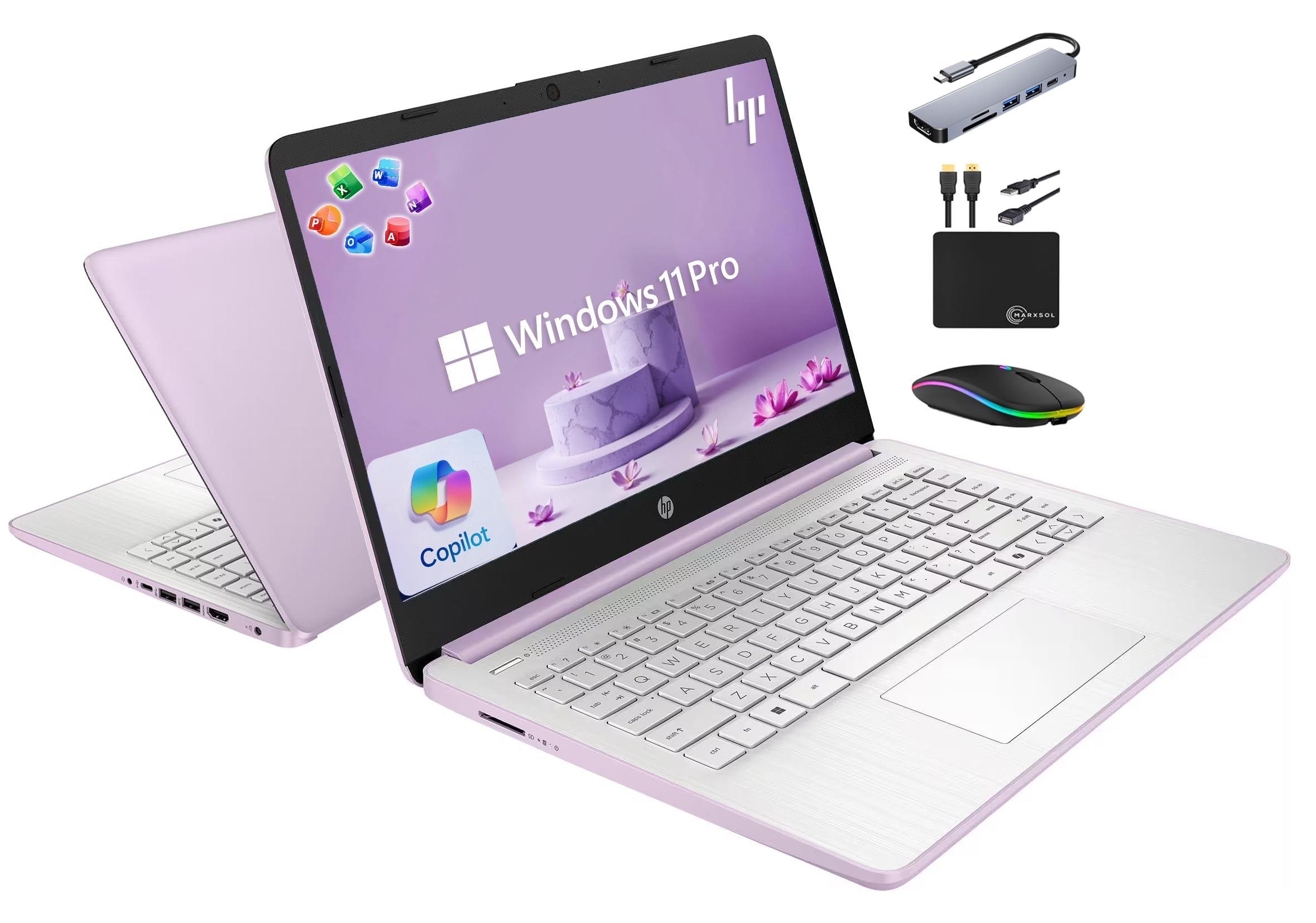
This HP 14-inch laptop comes in a beautiful Honey Lavender color and packs a punch with its included accessories. It is powered by a quad-core Intel Processor N150 and 16GB of DDR4 RAM. The internal 128GB UFS storage is supplemented by a 500GB external drive, giving you a total of 628GB. The standout feature is the inclusion of a Lifetime Microsoft Office 2024 license, saving you a recurring subscription fee.
The bundle includes a 6-in-1 USB-C docking station hub, a wireless mouse, an HDMI cable, and a mouse pad, meaning you have a complete workstation out of the box. It runs Windows 11 Pro, which offers more security and management features than the Home edition. The 14-inch display has a 720p HD camera with dual microphones, making it ready for remote learning and video calls.
Users find it fast enough for home use and appreciate the included extras and lifetime Office license. The screen resolution is 1366×768, which is lower than Full HD, so text and images are not as sharp as on 1920×1080 panels. For basic tasks and office work, this is an incredibly complete and cost-effective package.
Why it’s great
- Includes Lifetime Microsoft Office 2024 license
- Complete bundle with docking station, mouse, and cables
- 16GB of RAM for smooth multitasking
- Windows 11 Pro with Copilot AI integration
Good to know
- Screen resolution is HD (1366×768), not Full HD
- N150 processor is entry-level
9. HP Stream 14″ HD BrightView Laptop
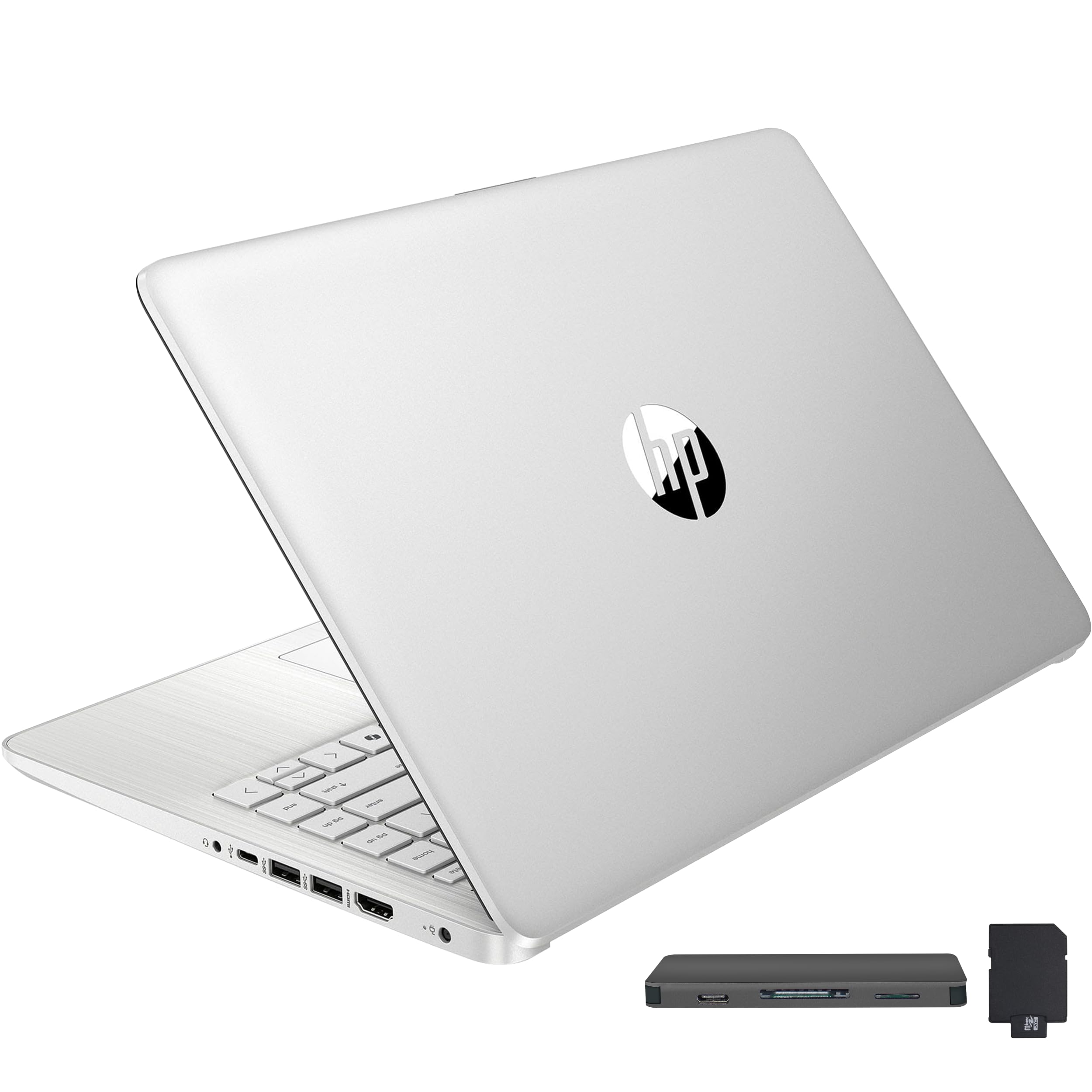
The HP Stream 14 is designed for extreme portability and value. It is one of the lightest options at just 3.24 lbs, making it a true travel companion. It is powered by an Intel Processor N150 with 16GB of DDR4 RAM. The total storage capacity is a generous 416GB, achieved through a combination of 128GB eMMC, a 256GB 7-in-1 docking station, and a 32GB MicroSD card.
The 14-inch HD BrightView display is adequate for basic tasks, though it sticks to the older 1366×768 resolution. It comes with 1 year of Office 365 and Windows 11 Home in S Mode. The included docking station adds essential ports and storage, making this a great pick for students who need to carry their setup between classes.
Customers love the perfect size and battery life for on-the-go use. The screen quality is not its strong suit, but the combination of weight, included accessories, and price make it a compelling choice for basic cloud-based work and note-taking. It is also TSA-friendly due to its size.
Why it’s great
- Ultra-lightweight at 3.24 lbs for easy travel
- Generous total storage with included external drives
- 16GB of RAM for a smooth experience
- Includes a 7-in-1 docking station and Office 365
Good to know
- Screen resolution is only 1366×768
- eMMC storage is slower than a full NVMe SSD
10. HP 17.3″ Touchscreen Laptop

This HP is for users who prioritize a large screen. The 17.3-inch touchscreen display with a 1600×900 resolution provides an expansive and interactive workspace. It is powered by an Intel Quad-Core N100 processor and 8GB of RAM, which is sufficient for basic productivity, web browsing, and streaming. The 128GB SSD handles the OS and a few key applications.
The full-size backlit keyboard with a numeric keypad and a fingerprint reader make it a comfortable productivity machine for your desk. It includes Microsoft 365 personal apps (subscription activation required) and has a dedicated Copilot key for AI assistance. HP Fast Charge gets you from 0 to 50% in 45 minutes. Despite its size, it weighs a reasonable 4.6 lbs.
Customers appreciate the large screen, speed, and performance for the price. The resolution is not Full HD, which means less screen real estate and slightly less sharp text than 1920×1080 panels. It is a fantastic option if you have a fixed desk space and want a big, touch-capable screen without spending a lot.
Why it’s great
- Massive 17.3-inch touchscreen display
- Full-size backlit keyboard with numeric keypad
- Fingerprint reader for secure login
- Fast Charge for quick top-ups
Good to know
- Screen resolution is 1600×900, not Full HD
- 8GB of RAM is the minimum for Windows 11
11. Acer Aspire 3 A315-24P-R7VH Slim Laptop

The Acer Aspire 3 is a solid entry-level machine that benefits from a modern AMD Ryzen 3 7320U processor. This chip offers excellent efficiency and decent performance for day-to-day tasks. It features 8GB of LPDDR5 RAM, which is faster than standard DDR4, and a 128GB NVMe SSD. The 15.6-inch Full HD IPS display is a highlight at this price, offering sharp details and good color reproduction.
Acer includes PurifiedVoice technology with AI noise reduction for clearer calls and a TNR (Temporal Noise Reduction) camera for better low-light video quality. The slim design makes it easy to carry, and the battery life is rated for up to 11 hours. The laptop feels well-constructed for its price point, with a soft-touch keyboard.
Users are amazed at the performance and build quality for the cost. The main drawback is that the 8GB RAM is soldered and not upgradable, and the 128GB SSD is on the smaller side. The keyboard lacks a backlight, and the fan can become audible under sustained load. It is an excellent choice for students and home users on a strict budget.
Why it’s great
- Great Full HD IPS display at a low price
- Efficient AMD Ryzen 3 processor
- Solid build quality for an entry-level laptop
- Good battery life for all-day use
Good to know
- 8GB RAM is soldered and cannot be upgraded
- 128GB storage fills up quickly
- No keyboard backlight
FAQ
Can a budget PC laptop handle light gaming?
Is 8GB of RAM enough for a budget laptop in 2024?
What is the difference between an Intel N100 and a Core i3 processor?
Should I avoid Windows 11 S Mode?
Final Thoughts: The Verdict
For most users, the best budget pc laptop winner is the Auusda Business Laptop because it delivers an unbeatable combination of 16GB RAM, a 1TB NVMe SSD, and a solid build at a price that undercuts the competition. If you want the most raw processor power for productivity or light gaming, grab the NIMO with the AMD Ryzen 5. And for the absolute highest specs and a massive touchscreen, nothing beats the Lenovo IdeaPad with 40GB of RAM.