
Managing four monitors on a single stand means battling sag, alignment issues, and a wobbly base that can ruin a day of trading or coding. The right mount transforms a chaotic desk into a stable, ergonomic command center where each screen stays precisely where you placed it.
I’m Min — the co-founder and writer behind Gadgets Feed. After analyzing hundreds of hours of real-world feedback, weight limits, VESA patterns, and the actual failure points across dozens of quad-mount models, I pinpointed the stands that genuinely hold up under the weight of four screens without drifting or tipping.
This guide breaks down the strongest, most reliable options available so you can buy with confidence and finally lock in a stable 4 monitor mount that matches your exact monitor sizes and desk setup.
How To Choose The Best 4 Monitor Mount
Selecting a four-monitor stand involves more than just counting arms. You need to match the mount’s weight limit to your specific screens, decide between spring-assisted and fixed arms, and verify your desk can handle the clamp or grommet base. These factors determine whether your setup stays locked in place or slowly drifts out of alignment over weeks.
Weight Capacity Per Arm
Each arm on a quad mount has an individual weight limit, typically between 17.6 and 25 pounds. If you run four 27-inch or larger monitors, especially ultrawide models, the per-arm capacity becomes the deciding factor. Mounts with a high per-arm limit use thicker steel or aluminum and stronger spring mechanisms that prevent drooping.
Arm Type: Gas Spring vs. Mechanical Spring
Gas spring arms offer smooth lift-and-lower motion but can lose tension over years of use. Mechanical spring arms rely on coiled metal tension that doesn’t degrade, making them ideal for heavy or large screens that need constant repositioning. Budget-friendly mounts typically use friction hinges, which require manual tightening to hold position.
Desk Compatibility and Mounting Options
Clamp mounts work best on solid wood or metal desks with a lip thickness between 0.2 and 3.94 inches. Grommet mounts need a pre-drilled hole but distribute weight more evenly and work on glass or thin tops. Always check the mount’s base dimensions — some quad stands extend over 24 inches behind the desk, eating into walk space.
Quick Comparison
On smaller screens, swipe sideways to see the full table.
| Model | Category | Best For | Key Spec | Amazon |
|---|---|---|---|---|
| ergounion E6666 | Premium | Heavy/ultrawide monitors up to 40″ | 25 lbs per arm / mechanical spring | Amazon |
| Stand Steady MM4CLBL | Premium | Seamless monitor alignment | 17.6 lbs per arm / powder-coated steel | Amazon |
| VIVO STAND-V104A | Mid-Range | 3+1 config for mixed setups | 22 lbs per arm / 3.94″ clamp depth | Amazon |
| WALI M004S | Mid-Range | Quick assembly and solid stability | 22 lbs per arm / 51.2″ max extension | Amazon |
| Mount-It! MI-2754 | Mid-Range | Friction-hinge reliability | 17.6 lbs per arm / 3.5″ clamp range | Amazon |
| VIVO STAND-V004FG | Value | Glass desk compatibility | 22 lbs per arm / 16.7″x10.2″ glass base | Amazon |
| Pholiten MD18864 | Value | Gas spring adjustability on a budget | 22 lbs per arm / 90° tilt range | Amazon |
In‑Depth Reviews
1. ergounion E6666

The ergounion E6666 stands alone in this list with its mechanical spring system — a coiled tension mechanism that doesn’t lose lifting power over time like gas springs do. Each arm holds up to 25 pounds, enough for four 40-inch ultrawide monitors or a top/bottom stack of 34-inch screens. The aluminum build in silver finish feels premium and weighs notably less than steel counterparts, which matters when clamping to a standing desk.
Assembly takes roughly 30 minutes with the included paper guide, but the brittle cable management cap is a known weak point that some users crack during installation. Tilt spans +90° to -25°, swivel reaches 180°, and rotation goes full 360° for portrait mode. The VESA plates lack a quick-release mechanism, so removing a monitor requires unscrewing four bolts — a minor hassle if you frequently swap displays.
Vertical stacking with two 34-inch monitors works only in side-by-side configurations; true top/bottom alignment with large panels requires careful arm positioning due to the center pole’s height limit. For professional users running heavy 40-inch screens who want zero long-term sag, this is the most future-proof quad mount available.
Why it’s great
- Mechanical spring never loses tension, unlike gas struts that fade
- 25 lbs per arm handles ultrawide and 40-inch monitors
- Aerospace-grade aluminum reduces overall weight while staying rigid
Good to know
- Cable management cap is fragile and can crack during install
- VESA plates don’t have a quick-release mechanism
- Vertical stacking with ultrawide monitors is tight
2. Stand Steady MM4CLBL

Stand Steady designed this mount around the pain point of getting four screens to line up perfectly. The detachable VESA plates snap on and off without tools, letting you pre-mount each monitor before attaching to the arms — a genuine time-saver when you’re working alone. Each arm supports 17.6 pounds, which covers most standard 27- to 32-inch displays, though the tilt needs to be tightened aggressively to prevent heavy screens from drooping.
The powder-coated steel construction feels dense and the clamp base holds firmly on desks up to 3.5 inches thick. A notable design quirk: small nubs on the side arms limit swing range, and several owners have cut them off with a hacksaw to achieve full articulation. The mount extends roughly 10 inches behind the desk, so it requires a 30-inch or deeper surface to avoid crowding your work area.
Cable management runs through the arms, and the built-in clips keep wires tidy. For setups running three large monitors plus one smaller screen, the crosspiece can be modified to add additional support. This is the best option for users who prioritize seamless screen alignment above raw weight capacity.
Why it’s great
- Quick-release VESA plates make solo installation much easier
- Strong powder-coated steel frame resists flex with heavy monitors
- Cable routing integrated into arms reduces visible wire clutter
Good to know
- Side arm nubs limit swing range; some users modify them
- Requires 30-inch+ desk depth due to 10-inch rear extension
- Tilt must be tightened very firmly to prevent drooping
3. VIVO STAND-V104A

VIVO’s STAND-V104A uses a distinctive 3-plus-1 layout — three arms on the pole and one offset arm for a fourth screen — which provides more flexibility than the standard four-arm radial design. Each arm supports 22 pounds and accommodates monitors from 13 to 32 inches with VESA 75×100 patterns. The center pole offers height adjustment, while each arm tilts 15° in either direction, swivels 180°, and rotates 360° for portrait orientation.
The C-clamp fits desks up to 3.94 inches thick, one of the widest ranges in this category, and the optional grommet mount works for desks that can accept a hole. Assembly requires mechanical comfort — the hardware uses nylock nuts and the arms have fixed lengths, so pushing the desk against a wall may prevent full articulation. Several owners report needing to mount the post on a 2-inch riser to achieve comfortable eye level.
Built-in cable clips along the pole and arms keep wires managed, but the tilt mechanism’s range is narrower than some competitors at only 15°. For mixed configurations — say two vertical 27-inch monitors flanked by two horizontal 22-inch screens — the 3+1 arm layout justifies the mid-range price.
Why it’s great
- 3+1 arm configuration offers more layout flexibility than radial designs
- Massive clamp range up to 3.94 inches fits thick desks
- Nylock nuts keep adjustments tight over months of use
Good to know
- Tilt range limited to only 15° up/down
- Fixing arms have fixed length — not ideal for desks against a wall
- Some users need a riser to reach comfortable eye level
4. WALI M004S
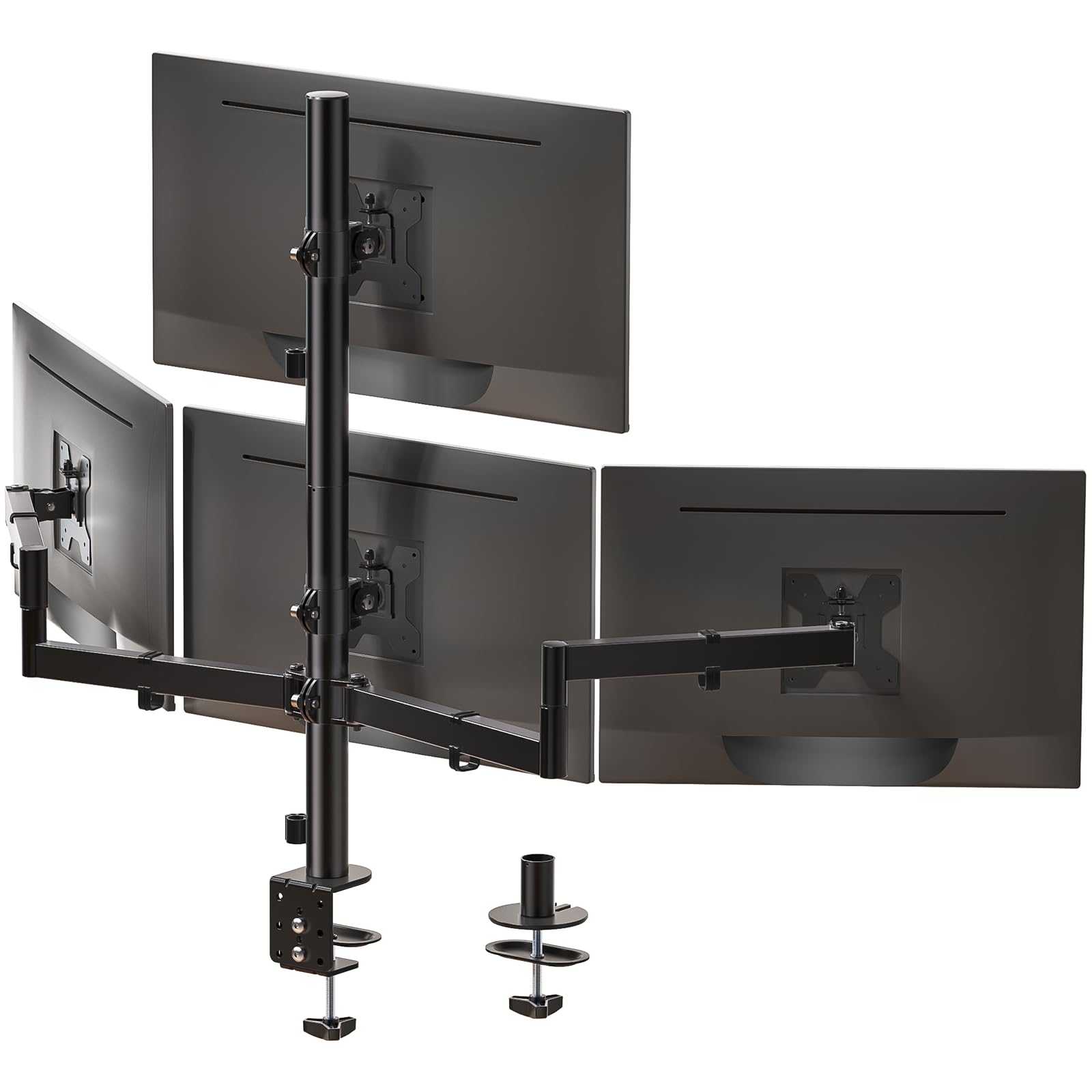
WALI’s M004S delivers the highest per-arm extension in this roundup at 51.2 inches, making it the go-to choice for extra-wide desk setups where you want the outer monitors to reach far beyond the clamp point. Each arm holds 22 pounds and supports screens from 13 to 27 inches. Tilt spans +35° to -35°, swivel reaches +90° to -90°, and rotation is full 360°.
The clamp fits desks between 0.2 and 3.62 inches thick, and the grommet base works with surfaces up to 2.56 inches. Assembly is straightforward — some bolts are unlabeled but the manual uses illustrations that compensate. The side arms initially swivel downward under monitor weight until you tighten a specific bolt, which is a common first-time adjustment. Integrated cable management clips keep wires along the arm channels.
The maximum height of 31.65 inches works well for most seated positions, though very tall users may want more vertical range. For the price, this mount offers the best combination of arm reach, weight tolerance, and tilt range among mid-tier options.
Why it’s great
- 51.2-inch max extension best for wide desks with far-screen setups
- High 22 lbs per arm capacity for 27-inch monitors
- Generous +35°/-35° tilt range good for stacked configurations
Good to know
- Side arms can sag until the correct bolt is tightened
- Maximum height of 31.65″ may be low for taller users
- Some VESA plates fit loose on certain monitor brands
5. Mount-It! MI-2754

Mount-It!’s MI-2754 uses a friction-hinge system rather than gas or mechanical springs, which means it relies on tight joints for positioning rather than counterbalance. Each arm supports 17.6 pounds and fits monitors from 19 to 32 inches with VESA 75×100 patterns. Tilt reaches up to 45°, swivel goes 90°, and rotation covers 180° — less than full 360°, so portrait orientation may require careful arm positioning.
The clamp fits desks up to 3.5 inches thick, and the grommet option works for thinner tops. Assembly requires significant torque on the elbow joint near the monitor to keep the arm from sagging, especially with 27-inch screens. The cable management system routes wires through the arms, but the channel covers can be finicky to snap back into place.
A known issue: the bottom mount bolt can arrive misaligned on some units, though Amazon’s return policy handles that quickly. The arms feel serviceable and the height-adjustable pole lets you raise or lower the entire four-monitor grouping. This is a dependable friction-hinge option for users who prefer manual tightness over spring mechanisms.
Why it’s great
- 45° tilt range is wider than many quad mounts in this class
- Height-adjustable pole lets you move all four monitors at once
- Clamp fits desks up to 3.5 inches thick
Good to know
- Friction hinge requires heavy tightening to prevent sag
- Bottom mount bolt can be misaligned on random units
- Only 180° rotation limits portrait orientation flexibility
6. VIVO STAND-V004FG

The VIVO STAND-V004FG stands out for its freestanding glass base — a 16.7-by-10.2-inch footprint that sits on the desk rather than clamping to the edge. This design is a lifesaver for glass desktops where drilling or clamping is impossible. Each arm holds 22 pounds and fits monitors from 13 to 27 inches with VESA 75×100 patterns. Full motion includes -90° to +90° tilt, 180° swivel, and 360° rotation.
Assembly takes around an hour because the parts arrive unlabeled, requiring some trial-and-error sorting. The base includes padded bottom strips to prevent scratching. Stability is solid when monitors are centered, but pulling the arms too far forward creates a tipping risk — you cannot lean back in your chair while the monitors are extended outward without the stand potentially tilting.
The alloy steel and aluminum construction keeps weight manageable, and the 3-year warranty reflects better confidence than most sub- quad mounts. For users stuck with glass desks or who simply don’t want to clamp anything to their furniture, this is the only viable freestanding option in the list.
Why it’s great
- Freestanding glass base works where clamps can’t — glass desks
- 3-year warranty is better than most budget quad mounts
- Full 360° rotation with 90° tilt range
Good to know
- Unlabeled parts make assembly take about an hour
- Arms extended forward can tip the stand — not bolt-down secure
- Base footprint takes up desk surface space
7. Pholiten MD18864

The Pholiten MD18864 brings gas spring adjustability to the budget tier, offering smooth lift-and-lower motion at a price point where most competitors use friction hinges. Each arm supports 22 pounds and fits monitors from 13 to 32 inches with VESA 75×100 patterns. Tilt covers ±80°, swivel reaches ±90°, and rotation is full 360° for portrait switching.
The clamp and grommet options fit most standard desks, though the instructions are confusing for first-time assemblers — you may need trial and error to figure out which hardware goes where. After installation, the gas springs hold position well and the joints feel stiff but functional. The VESA screws are short; some users needed spacers or longer screws when mounting thicker panels.
Side-by-side configuration works best, and the gas springs make adjusting the height of each monitor effortless compared to friction-arm mounts. Given the 22-pound per-arm capacity and ability to handle 32-inch screens, this is the strongest entry-level quad mount for users who want gas spring convenience without jumping to premium pricing.
Why it’s great
- Gas spring adjustability at a budget-friendly price point
- Supports up to 32-inch monitors at 22 pounds per arm
- Full 360° rotation and wide ±80° tilt for ergonomic flexibility
Good to know
- Assembly instructions are confusing for new users
- Included VESA screws may be too short for thicker monitors
- Joints feel stiff initially — needs break-in period
FAQ
Can a 4 monitor mount hold four 32-inch monitors?
Should I get a clamp or grommet base for my quad mount?
Will a quad mount work with four different monitor brands?
Final Thoughts: The Verdict
For most users, the 4 monitor mount winner is the ergounion E6666 because its mechanical spring system handles the heaviest screens without long-term tension loss. If you want seamless screen alignment with quick-release VESA plates, grab the Stand Steady MM4CLBL. And for glass desks where clamping is impossible, nothing beats the VIVO STAND-V004FG.