
The day a laptop’s internal Wi-Fi card dies—or a desktop PC ships without one—the search for a reliable USB stick begins. An AC1200 adapter hits the sweet spot: dual-band 2.4GHz and 5GHz connectivity, aggregate speeds up to 1200 Mbps, and enough range to stream 4K or survive a Zoom call without the spinning wheel of death. But not all sticks are created equal—some run hot, some drop connections hourly, and others are finicky with modern operating systems.
I’m Min — the co-founder and writer behind Gadgets Feed. I’ve spent hundreds of hours cross-referencing chipset driver support, real-world throughput tests on Windows 11 and Linux kernels, and the thermal behavior of nano vs. antenna-equipped adapters to separate the consistent performers from the daily headache.
Whether you’re reviving an old MacBook Pro or upgrading a gaming rig, these seven options represent the most thoroughly vetted ac1200 usb wifi adapter picks available right now.
How To Choose The Best AC1200 USB WiFi Adapter
An AC1200 adapter promises up to 300 Mbps on the 2.4GHz band and 867 Mbps on the 5GHz band. But the real-world speed you get depends on three critical factors: the USB interface, antenna configuration, and operating system driver support. Ignoring any one of these can turn a supposed upgrade into a frustrating paperweight.
USB 2.0 vs. USB 3.0 — The Bottleneck Factor
USB 2.0 tops out at a theoretical 480 Mbps, which caps the 5GHz potential of an AC1200 chip well below its 867 Mbps ceiling. A USB 3.0 interface removes that bottleneck entirely, allowing the adapter to breathe. If you have a USB 3.0 port available (blue port on most computers), prioritize an adapter with that interface. The performance gain in large file transfers and low-latency gaming is immediately measurable.
Antenna Design — Nano vs. High-Gain External
A nano-sized adapter (no protruding antennas) is ideal for travel or a laptop where you plug it in and forget it. However, these units have smaller internal antennas, which means weaker signal penetration through walls. Adapters with two external 5dBi antennas offer dramatically better range and stable throughput at distances beyond 30 feet, especially on the crowded 5GHz band. For a desktop PC in a basement or a room far from the router, the larger form factor is the right trade-off.
Chipset and Driver Philosophy
The Realtek RTL8812BU, RTL8822BU, and Mediatek MT7612U are the three common chipsets powering AC1200 USB adapters. Windows 10 and 11 have native drivers for many of these, but macOS and Linux are where chipset choice becomes critical. Some adapters (like the ALFA AWUS036ACH) use chipsets with native kernel support on Linux, enabling monitor mode and packet injection. Others rely on proprietary drivers that break after a macOS update. Always verify the chipset listed in the product’s technical details before buying for a non-Windows system.
Quick Comparison
On smaller screens, swipe sideways to see the full table.
| Model | Category | Best For | Key Spec | Amazon |
|---|---|---|---|---|
| ALFA AWUS036ACH | Premium External | Linux auditing & extreme range | USB-C, 2x 5dBi detachable antennas | Amazon |
| BrosTrend 1200Mbps | Long-Range Desktop | Desktop & extended range | USB 3.0 cradle, 2x 5dBi antennas | Amazon |
| Linksys WUSB6300 | Established Brand | Easy Windows setup | USB 3.0, CD wizard setup | Amazon |
| NETGEAR A6150 | Compact Nano | Ultra-portable travel | Nano size, Beamforming+ | Amazon |
| ASUS USB-AC53 Nano | Nano Performer | Discreet permanent install | World’s smallest, MU-MIMO | Amazon |
| TP-Link Archer T3U | Reliable Upgrade | Budget AC1300 upgrade | USB 3.0, MU-MIMO, Beamforming | Amazon |
| Edimax EW-7822ULC | Ultra-Small Value | Budget-friendly & Linux | Nano size, WPA3, Linux support | Amazon |
In‑Depth Reviews
1. ALFA AWUS036ACH

The ALFA AWUS036ACH is the gold standard for users who need maximum range and operating system versatility. Its Type-C interface and two detachable 5dBi high-gain antennas deliver the strongest signal in this roundup, easily punching through multiple walls to maintain a stable 5GHz connection where nano adapters fail entirely. On Linux, the chipset has native kernel support out of the box, enabling monitor mode and packet injection for pentesting without compiling a single driver.
Real-world throughput measures around 450-600 Mbps on a clear 5GHz channel, putting it well ahead of USB 2.0 locked adapters. The sturdy metal build feels durable enough for fieldwork, and the included USB-C cable allows flexible positioning. It’s not the smallest stick—you won’t want it protruding from a laptop on a plane—but for a desktop rig or a bag dedicated to network troubleshooting, it’s unmatched.
Some users reported a unit failing after a few months, but ALFA’s warranty and customer service quickly replaced the defective adapter. The lack of macOS driver support beyond version 10.15 is a firm limitation for Apple users running newer hardware.
Why it’s great
- Native Linux support with monitor mode/packet injection
- Exceptional range due to dual 5dBi detachable antennas
- USB-C interface with extension cable for optimal placement
Good to know
- No driver support for macOS beyond 10.15 or M1/M2 chips
- External antennas make it bulky for travel
2. BrosTrend 1200Mbps USB WiFi Adapter

BrosTrend’s 1200Mbps adapter combines the raw throughput of USB 3.0 with a clever extended cradle design. A 5-foot USB 3.0 cable lets you position the antenna-equipped dongle on your desk away from the RF noise of the PC case, often turning a 40-60 Mbps signal into a consistent 170 Mbps connection at 60 feet through a two-story home. The gold-plated USB connector ensures a corrosion-resistant link over time.
On the software side, BrosTrend supports WPA3 security out of the box, a meaningful privacy upgrade for users on modern routers. The driver installation on Windows is straightforward, though Linux support is notably absent. A few early units suffered from connection drops that required a driver rollback, but the latest drivers from the BrosTrend website have stabilized performance significantly. The blue LED on the cradle is bright enough to light up a dark room—consider a piece of tape if it bothers you at night.
One trade-off is the adapter’s physical size: it’s a larger unit that sits on a base, not a nano stick you leave plugged in. For a desktop PC that never moves, this is negligible; for a laptop user, it’s a clear compromise.
Why it’s great
- USB 3.0 cradle eliminates the bottleneck of USB 2.0 adapters
- WPA3 security support for encrypted connections
- 5-foot extension cable for optimal antenna placement
Good to know
- No Linux driver support; Windows-only
- Blue LED is very bright in dark environments
3. Linksys WUSB6300

Linksys brings its long-standing networking pedigree to the WUSB6300, a USB 3.0 AC1200 adapter that attaches directly to your desktop or laptop with a slim, non-antenna form factor. The theoretical speed of 867 Mbps on 5GHz is realistic in near-line-of-sight conditions, and the included CD wizard makes setup a breeze on Windows 7 through 10. Users report strong signal retention with no drops over months of use, even in mixed-router environments.
The WUSB6300 supports WPS push-button pairing, which simplifies connecting to a Linksys or other WPS-enabled router without navigating the Windows network menu. However, Linux users face a significant hurdle: the V1 adapter requires manual driver compilation, and V2 is unpredictable. For a dedicated Windows desktop that needs a reliable, no-fuss wireless upgrade, the Linksys delivers consistent throughput without the heat issues that plague some smaller adapters.
A handful of reviews mention that the initial setup requires an internet connection to install drivers, creating a chicken-and-egg problem for machines that have never had Wi-Fi. A quick pre-download of the driver on a separate device solves this. Overall, it’s a solid choice for users who prioritize brand reliability over cutting-edge features like WPA3 or Linux compatibility.
Why it’s great
- USB 3.0 interface for full AC1200 throughput potential
- Stable, reliable connection with no drops after months of use
- WPS button for fast, menu-free connection
Good to know
- Linux support is inconsistent between V1 and V2 hardware
- Requires driver download from another device if no existing internet
4. NETGEAR A6150
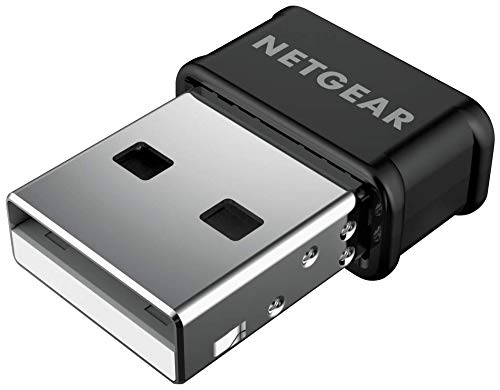
NETGEAR’s A6150 packs AC1200 performance into a nano-sized shell that barely protrudes from a USB port, making it the ideal candidate for a laptop that travels frequently. Despite the tiny footprint, it integrates Beamforming+ technology, which focuses the wireless signal toward your router for enhanced range. Speeds jumped from a paltry 30 Mbps with a laptop’s internal 1×1 card to a measured 197 Mbps in one reviewer’s test, with a DNS tweak pushing it to 390 Mbps.
The adapter is USB 2.0 only, which is the primary speed cap here—even with great signal, you’re limited to around 400 Mbps in real-world conditions. This is acceptable for streaming and gaming, but users with gigabit internet will want a USB 3.0 alternative. Setup on Windows requires a manual driver download from NETGEAR’s site; the included Genie software occasionally fails to auto-install. Once running, it’s stable and does not block adjacent USB ports.
macOS support extends up to Catalina (10.15.7), so users on Monterey or later should check compatibility before purchasing. For Windows laptop owners who need a discreet, reliable upgrade from a failing internal card or a single-band adapter, the A6150 is a tiny powerhouse.
Why it’s great
- Minimal nano form factor—barely sticks out from laptop
- Beamforming+ improves range beyond typical nano adapters
- Easy driver setup on supported Windows and Mac systems
Good to know
- USB 2.0 limits max throughput to ~400 Mbps
- No support for macOS beyond Catalina 10.15.7
5. ASUS USB-AC53 Nano

ASUS claims the USB-AC53 Nano is the world’s smallest AC1200 adapter, and at just 0.78 inches long, it lives up to the billing. This dongle is purpose-built for users who want to plug it into a laptop and forget it exists—no protruding antennas, no cable management, just a near-flush fit that won’t snap off in a bag. It supports MU-MIMO, which means it can handle data streams from multiple devices on a compatible router without congestion.
Speed tests show a jump from a feeble 2-3 Mbps on an old single-band card to 100-200 Mbps on a mid-range AC router with a 250 Mbps internet plan. The dual-band support lets you choose the less congested 5GHz channel, reducing interference from neighbors. Some users note that disabling the internal Wi-Fi adapter in Device Manager is necessary to avoid conflicts, a common step with USB adapters that’s easy to perform.
The main limitation is the lack of support for Linux and macOS beyond specific versions—this is a Windows-focused adapter. Signal range is mediocre compared to antenna-equipped units, often reading three out of four bars at moderate distances. For a straightforward way to resurrect a Windows laptop with a dead or slow internal card, the ASUS adapter offers reliable, pocket-size performance.
Why it’s great
- Extremely compact design—minimal protrusion from USB port
- MU-MIMO compatible for multi-device households
- Dual-band 2.4/5GHz for reduced interference
Good to know
- Limited OS support—Windows focus, spotty macOS/Linux
- Signal range is average compared to external antenna models
6. TP-Link Archer T3U

TP-Link’s Archer T3U is an AC1300 adapter that comfortably exceeds AC1200 baseline, offering a 1300 Mbps aggregate speed. The USB 3.0 interface ensures no data bottleneck, and the inclusion of both MU-MIMO and Beamforming makes it competitive with far pricier options. Real-world impact: one user’s aging HP laptop jumped from 12 Mbps to 160 Mbps after deactivating the onboard Realtek adapter in Device Manager.
The adapter is small and portable, weighing only 0.02 pounds, but it’s not as flat as a nano stick—it has a slight wedge shape. It works on Windows 11, 10, 8.1, 8, 7, and XP as well as macOS up to 10.14. Driver installation on Windows 11 requires a manual download from TP-Link’s site; the plug-and-play experience works only if the system already has the driver cached. A few users report needing to unplug and replug the adapter occasionally after extended use to re-establish a connection—a minor inconvenience given the price point.
For budget-conscious upgraders who want the speed benefit of USB 3.0 and the reliability of the world’s largest consumer Wi-Fi brand, the Archer T3U is a proven workhorse. It’s not the smallest or the fastest, but it’s the safest bet for a general-purpose Windows upgrade.
Why it’s great
- USB 3.0 eliminates throughput bottleneck
- MU-MIMO and Beamforming for stable, low-latency connections
- Trusted brand with broad Windows compatibility
Good to know
- May need occasional unplug/replug after extended runtime
- Driver not always pre-installed on Windows 11
7. Edimax EW-7822ULC

The Edimax EW-7822ULC claims the title of the world’s smallest AC1200 adapter, and its 0.25-inch thickness makes it virtually invisible once plugged into a USB port. Despite the tiny footprint, it supports MU-MIMO, Beamforming, and—uniquely at this price tier—WPA3 encryption.
Where this adapter truly shines is cross-platform compatibility. It works out of the box on Windows 10 and 11, and it has native driver support for Linux kernels (Fedora 3.11~5.11, Ubuntu 3.8~5.11) and macOS up to 10.15. One user on Ubuntu reported a seamless plug-and-play experience setting up a print server. On a 2008 MacBook Pro, it resurrected a machine whose internal Wi-Fi had failed, delivering over 200 Mbps without dropped connections.
Some users noted occasional stalls after wake from sleep, resolved by reselecting the network. The USB 2.0 ceiling means you’ll top out around 175-200 Mbps even on a perfect channel, which is still more than enough for 4K streaming and general browsing. For the price, the Edimax offers the best value proposition in the AC1200 category, especially if you need Linux support on a shoestring budget.
Why it’s great
- Smallest AC1200 adapter—practically invisible in a USB port
- Supports WPA3 encryption, rare at this budget tier
- Genuine Linux and macOS plug-and-play compatibility
Good to know
- USB 2.0 caps real-world speeds at ~175-200 Mbps
- Occasional connection stalls after wake from sleep
FAQ
Will an AC1200 USB adapter work with my Windows 11 laptop?
Do I need to disable my laptop’s internal Wi-Fi card when using a USB adapter?
Can I use an AC1200 adapter with Linux without compiling drivers?
Final Thoughts: The Verdict
For most users, the winning ac1200 usb wifi adapter is the ALFA AWUS036ACH because it delivers the best balance of range, Linux-native support, and sturdy build quality. If you need a discreet, travel-friendly solution, the NETGEAR A6150 offers solid nano performance with Beamforming. And for the budget-conscious Linux user, the Edimax EW-7822ULC provides surprising WPA3 support and genuine plug-and-play compatibility at an entry-level price.