
A quad-core processor still holds the sweet spot for a massive portion of PC builders, handling everyday multitasking, office productivity, and entry-to-mid-level gaming with surprising headroom. The key is picking the right architecture and platform match for your motherboard and RAM budget—not just grabbing the cheapest option.
I’m Min — the co-founder and writer behind Gadgets Feed. I’ve spent hundreds of hours analyzing benchmark data, customer reliability patterns, and platform longevity for every 4-core chip on the market to build this guide.
After deep research through thousands of verified reviews and spec sheets, these picks represent the most balanced options in the 4 core processor market for a wide range of build budgets.
How To Choose The Best 4 Core Processor
A quad-core CPU is the entry-level standard for modern computing, but not all quad-cores deliver the same real-world speed. The generation of the architecture, the boost clock ceiling, and the platform it sits on (AM4 vs LGA1700 vs AM5) define whether a chip feels snappy or sluggish. Here’s what to prioritize.
Clock Speed and Boost Behavior
A 4-core processor with a max boost of 4.7 GHz will feel significantly faster in single-threaded applications than one stuck at 3.6 GHz. Look for a base clock above 3.0 GHz and a turbo boost that pushes past 4.0 GHz. The Intel Core i3-14100F hits 4.7 GHz out of the box, making it a standout for responsiveness.
Cache Size and Platform Longevity
L3 cache size directly impacts how quickly the CPU can access frequently used data. A chip with 12 MB of L3 cache (like the i3-14100F) will handle game loads and application launches better than one with only 6 MB. Platform matters too—AM5 boards support DDR5 and future CPU upgrades, while AM4 offers the best value for DDR4 builds.
Integrated Graphics vs Discrete GPU Requirement
If you’re building a system without a dedicated graphics card, you need a CPU with integrated graphics (IGP). Intel’s “F” suffix chips lack an IGP, so choose the non-F variant if you need display output from the motherboard. AMD’s Ryzen 3 and Ryzen 5 desktop chips generally require a discrete GPU unless you pick a G-series APU.
Quick Comparison
On smaller screens, swipe sideways to see the full table.
| Model | Category | Best For | Key Spec | Amazon |
|---|---|---|---|---|
| Intel Core i3-14100F | Desktop CPU | Budget gaming & productivity | 4.7 GHz Boost / 12 MB Cache | Amazon |
| Intel Core i5-14400F | Desktop CPU | Hybrid multitasking (6P+4E) | 4.7 GHz Boost / 20 MB Cache | Amazon |
| AMD Ryzen 5 8400F | Desktop CPU | Zen 4 AM5 gaming starter | 4.7 GHz Boost / 22 MB Cache | Amazon |
| AMD Ryzen 5 5500 + MSI A520M-A PRO | CPU + MB Combo | Plug-and-play AM4 build | 4.2 GHz Boost / 19 MB Cache | Amazon |
| AMD Ryzen 3 4100 | Desktop CPU | Low-budget AM4 upgrade | 4.0 GHz Boost / 6 MB Cache | Amazon |
| Intel Core i3-12100 | Desktop CPU | Office & home with iGPU | 4.3 GHz Boost / 12 MB Cache | Amazon |
| Dell Optiplex 7050 (i7-7700) | Prebuilt SFF | Renewed office workstation | 3.60 GHz / 32 GB DDR4 | Amazon |
| GMKtec M2 Pro (i7-1185G7) | Mini PC | Compact productivity & 3 displays | 4.8 GHz Boost / Iris Xe | Amazon |
| HP 22″ All-in-One (N100) | All-in-One | Everyday family computing | 3.4 GHz / 8 GB DDR5 | Amazon |
In‑Depth Reviews
1. Intel Core i3-14100F Desktop Processor

The Intel Core i3-14100F delivers the highest clock speed in this quad-core class at 4.7 GHz, paired with a 12 MB L3 cache that keeps game load times and application launches snappy. This chip uses Intel’s 700-series chipset platform, giving you access to both DDR4 and DDR5 memory support—a rare flexibility at this tier. Benchmarks show it matching or beating older six-core chips in single-threaded tasks, which is where most everyday software spends its time.
Gamers pairing this CPU with a mid-range GPU like an RX 580 or Arc A580 report consistent 60+ FPS at 1080p Ultra in titles like Hogwarts Legacy and Baldur’s Gate 3. The unlocked multiplier means you can push the all-core frequency higher with a decent aftermarket cooler, though the included RM1 thermal solution handles stock operation fine. Windows 11 boot times from an M.2 drive clock in around 8 seconds, a testament to the Raptor Cove core architecture’s efficiency.
The main compromise is the lack of integrated graphics—the “F” suffix requires a discrete GPU for display output. For builders on a tight budget who already own a GPU, this is a non-issue, but anyone needing a fallback display should look at the non-F i3-14100 variant. Overall, this is the most balanced quad-core for pure price-to-performance in a modern gaming or productivity build.
Why it’s great
- Highest boost clock (4.7 GHz) in quad-core class
- Flexible DDR4/DDR5 memory support
- Compatible with affordable 600/700-series motherboards
Good to know
- No integrated graphics (needs discrete GPU)
- Stock cooler adequate but runs warm under sustained load
2. Intel Core i5-14400F Desktop Processor

The Intel Core i5-14400F stretches beyond pure quad-core territory with its hybrid architecture: 6 Performance-cores and 4 Efficient-cores, totaling 16 threads. This gives it a massive advantage in threaded workloads like video encoding, compiling code, or running a home server with multiple VMs. The 20 MB L3 cache is almost double what you get on a standard quad-core, reducing memory bottlenecks in data-heavy applications.
Real-world testing shows this chip hitting 4.7 GHz on the P-cores under single-threaded loads, while the E-cores handle background tasks without stealing resources from the main application. Users report 60°C gaming temperatures and 75°C under heavy video editing with a decent tower cooler—well within safe thermal limits. The hybrid scheduling in Windows 11 ensures that foreground games get priority on the P-cores while Discord, Chrome, and OBS run on the E-cores without causing stutter.
The trade-off is that the i5-14400F still lacks integrated graphics, so a discrete GPU is mandatory. Additionally, the LGA1700 socket is a dead-end platform upgrade-wise, so factor in a full motherboard replacement if you want a future CPU upgrade. For anyone building a mid-range rig right now that needs to handle both gaming and productivity, this hybrid architecture delivers more than any traditional quad-core can.
Why it’s great
- Hybrid 10-core design excels at multitasking
- Large 20 MB cache reduces memory latency
- Cool thermal behavior under heavy editing loads
Good to know
- LGA1700 socket has no further CPU upgrade path
- Requires discrete graphics card
3. AMD Ryzen 5 8400F

The AMD Ryzen 5 8400F is a Zen 4 chip on the AM5 platform, giving you DDR5 memory support and a multi-year upgrade path—AMD has committed to supporting AM5 through 2027 and beyond. With 6 cores and 12 threads running up to 4.7 GHz, it’s a step above a traditional quad-core in multi-threaded performance, yet it remains a strong entry point for gamers who want the latest platform features without spending flagship money.
Thermal performance is impressive: users report sub-45°C temperatures during heavy gaming sessions with a basic fan heatsink. The chip scored 24,800 on the PassMark CPU test, which puts it in comfortable territory for medium gaming and daily productivity. One caveat is that the 8400F has no onboard video, so you’ll need a discrete GPU from the start. However, the ability to drop in a Ryzen 9000-series CPU later without changing the motherboard makes this a smart long-term investment.
The biggest downside is that the 8400F is a relatively new SKU, so motherboard BIOS compatibility varies. Most B650 and A620 boards shipped after mid-2024 should work out of the box, but older stock may need a BIOS update. If you want the smoothest entry to the AM5 ecosystem and plan to upgrade your CPU in 2-3 years, this is the safest foundational bet.
Why it’s great
- Future-proof AM5 platform with DDR5 support
- Strong single-thread Zen 4 performance
- Runs cool under load with basic cooling
Good to know
- No integrated graphics
- May require BIOS update on older AM5 boards
4. INLAND AMD Ryzen 5 5500 + MSI A520M-A PRO

This bundle combines an AMD Ryzen 5 5500 (6 cores, 12 threads, 4.2 GHz boost) with an MSI A520M-A PRO Micro-ATX motherboard, delivering a complete foundation for a budget gaming or office PC. The Ryzen 5 5500 has 19 MB of total cache and supports DDR4-3200, offering slightly stronger multi-core performance than a pure quad-core while staying at a very accessible price point. The A520 chipset provides PCIe 3.0 connectivity, which is sufficient for most NVMe SSDs and mid-range GPUs.
Users consistently praise the plug-and-play nature of this combo: the motherboard comes with pre-applied thermal paste on the cooler, and the MSI BIOS is straightforward for first-time builders. Boot times from an M.2 NVMe drive under Windows 11 are snappy, and the board includes MSI’s Core Boost and DDR4 Boost technologies to stabilize overclocks. The inclusion of 4 SATA ports and 1 M.2 PCIe 3.0 slot covers storage needs for most home builds.
The main risk is consistency: a small number of buyers report DOA motherboards that fail to POST, and the return process can take weeks. Also, the A520 chipset lacks PCIe 4.0 support, so if you plan to use a PCIe 4.0 GPU or SSD in the future, you’ll be bandwidth-limited. For a simple, reliable build at the lowest total cost of entry, this combo is hard to beat.
Why it’s great
- Complete CPU + motherboard in one box
- Pre-applied thermal paste saves setup time
- Reliable MSI BIOS with useful overclocking tools
Good to know
- Quality control variance on motherboards (some DOA reports)
- A520 chipset lacks PCIe 4.0 support
5. AMD Ryzen 3 4100

The AMD Ryzen 3 4100 is the entry-level quad-core on the AM4 platform, featuring 4 cores and 8 threads with a 4.0 GHz max boost and a bundled Wraith Stealth cooler. This chip supports DDR4-3200 memory and works with inexpensive A320, B450, and A520 motherboards, making it the cheapest path to a modern Ryzen desktop. Users report smooth performance for everyday tasks like web browsing, office suites, and light virtual machine hosting with negligible lag.
Gaming performance is decent when paired with a budget GPU—expect around 100 FPS in popular esports titles at medium settings. The 6 MB L3 cache is smaller than newer chips, so loading times in open-world games may feel slightly slower compared to a Ryzen 5 5500 or i3-14100F. However, for a system that costs under for the CPU, the 4100 delivers reliable frame pacing without CPU bottlenecking in less demanding scenarios.
The main issue is that the Ryzen 3 4100 runs warmer than higher-end 65W Ryzen SKUs like the 5500 or 5600. The stock cooler is adequate for light loads, but sustained gaming or rendering pushes temperatures into the high 70s, so an aftermarket cooler is recommended. At its regular price, the Ryzen 5 3600 or 5500 often offers better value, so wait for a discount if possible.
Why it’s great
- Lowest-cost entry to modern AM4 platform
- Unlocked for overclocking with adequate cooling
- Bundled Wraith Stealth cooler works out of the box
Good to know
- Runs warmer than 65W Ryzen chips under load
- Small 6 MB cache limits high-end gaming performance
6. Intel Core i3-12100 Quad-core Processor

The Intel Core i3-12100 is a 4-core, 8-thread chip with Alder Lake architecture and integrated Intel UHD Graphics 730, making it a standout for office PCs and home servers that don’t need a discrete GPU. The CPU reaches 4.3 GHz boost and has 12 MB of L3 cache, which is identical to the newer i3-14100F in single-threaded performance. The integrated graphics can drive up to 4 monitors simultaneously at 4K resolution, ideal for multi-monitor productivity setups.
Users building TrueNAS or DIY storage servers report excellent efficiency, with the chip consuming only 60 watts under load while handling multiple data streams and user sessions. For standard office tasks—Word, Excel, browser tabs—the i3-12100 feels instantaneous, and the stock cooler runs silently. Light gaming is possible on the integrated GPU; titles like Roblox, Civ VI, and Minecraft run at playable frame rates without a separate card.
The main drawback is that gaming performance is limited by the UHD 730 GPU; you cannot play modern AAA titles without a discrete card. Also, the i3-12100 does not have Iris Xe graphics (that’s reserved for higher-end mobile chips), so don’t expect entry-level gaming magic. For a quiet, power-sipping, and reliable quad-core with built-in display output, this chip is the top choice.
Why it’s great
- Integrated UHD Graphics 730 supports 4 monitors
- Only 60W TDP, very energy efficient
- 12 MB cache matches newer i3 chips in speed
Good to know
- Not suitable for AAA gaming without discrete GPU
- UHD 730 graphics cannot match Iris Xe for light gaming
7. Dell Optiplex 7050 SFF (i7-7700)
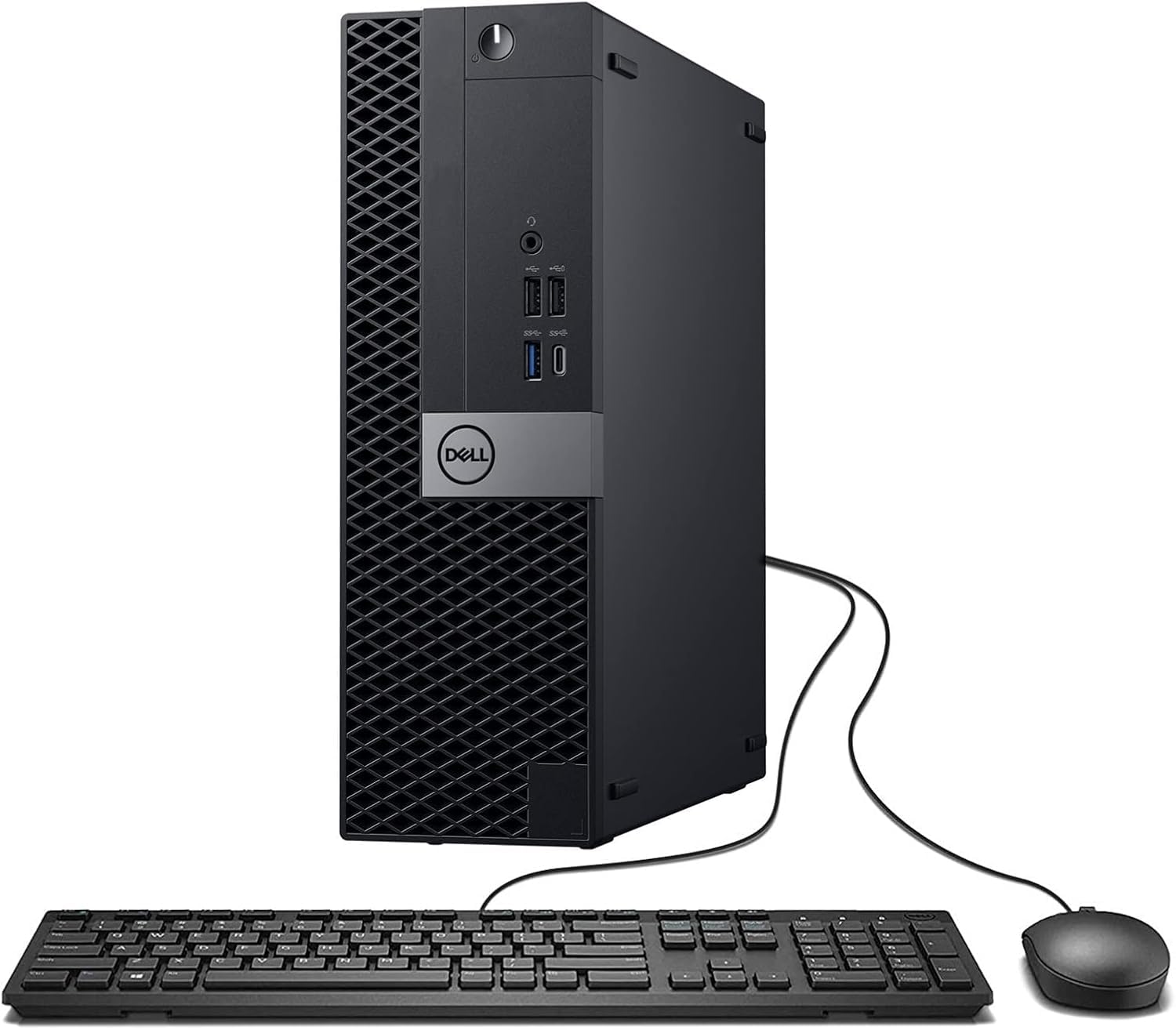
The Dell Optiplex 7050 Small Form Factor is a professionally renewed desktop powered by the Intel Core i7-7700, a 4-core/8-thread Kaby Lake CPU running at 3.60 GHz (3.90 GHz turbo). This pre-configured system comes with 32 GB of DDR4 RAM, a 1 TB SSD, Windows 11 Pro, and Intel UHD Graphics 630, making it ready for office productivity, streaming, and light creative work right out of the box. The SFF chassis includes 10 USB ports (2.0 and 3.0), HDMI, and DisplayPort outputs for multi-monitor support.
Users deploying this as a church streaming PC or small business workstation highlight its reliability and quiet operation. The 32 GB RAM handles OBS Studio, presentation software, and multiple browser tabs simultaneously without stutter. The Intel HD 630 graphics can drive 3-4 monitors at 1080p and stream at 30 fps, though it won’t handle modern gaming. The included wireless USB WiFi and keyboard/mouse bundle make this a true turnkey solution for non-technical users.
The biggest risk is the renewed condition: a minority of buyers receive DOA units or units missing components (like the DVD drive listed in specs but not physically present). Seller customer service quality varies, with some users waiting weeks for refunds. For a hassle-free experience, check the system immediately upon arrival and test all ports. If you get a good unit, the i7-7700 still holds up well for everyday computing.
Why it’s great
- Complete turnkey system with 32 GB RAM and 1 TB SSD
- Intel HD 630 drives 3-4 monitors for productivity
- Compact SFF case fits small desks or server racks
Good to know
- Renewed unit quality varies; some DOA reports
- Kaby Lake platform lacks modern security features
8. GMKtec M2 Pro Mini PC (i7-1185G7)

The GMKtec Nucbox M2 Pro packs an 11th-gen Intel Core i7-1185G7 (4 cores, 8 threads, up to 4.8 GHz) into a palm-sized chassis with 16 GB DDR4 and a 1 TB NVMe SSD. The integrated Iris Xe Graphics G7 96EU is the most powerful integrated GPU in this list, capable of light gaming and hardware-accelerated video editing without a discrete card. The mini PC supports triple 4K displays via two HDMI ports and one USB-C, making it a strong candidate for a home theater PC or a compact office workstation.
Users running engineering CAD tools report smooth performance for light modeling, and the 2.5Gbps Ethernet port combined with WiFi 6 ensures fast network transfers for large files. The idle power consumption is remarkably low at around 35W, which keeps electricity costs down for a 24/7 server or streaming box. The VESA mount included in the box allows you to attach the unit to the back of a monitor for a completely clutter-free desk.
The main limitation is that the Iris Xe graphics still cannot compete with even an entry-level discrete GPU like the GTX 1650 for modern gaming. Also, the 16 GB RAM is soldered or limited to two SODIMM slots, so upgrade capacity maxes out at 64 GB. For users who need a space-saving quad-core with strong integrated graphics and excellent connectivity, this mini PC is the premium choice.
Why it’s great
- Iris Xe 96EU is the best integrated GPU for light gaming
- Triple 4K display support via HDMI and USB-C
- Ultra-compact design with VESA mount included
Good to know
- Cannot match discrete GPU for demanding games
- RAM upgrade limited to 64 GB total
9. HP 2025 22″ FHD All-in-One (N100)

The HP 2025 All-in-One uses the 13th-gen Intel N100 processor, a 4-core, 4-thread Alder Lake-N chip running up to 3.4 GHz with 6 MB of cache. While this is the least powerful CPU in this roundup, it is specifically designed for everyday computing—web browsing, email, office documents, and streaming video—where its 6-watt TDP means silent, cool operation. The 21.5-inch Full HD IPS display with anti-glare coating makes this a comfortable choice for family rooms and home offices.
The system comes with 8 GB of DDR5 RAM and a 128 GB SSD, which boots Windows 11 Pro quickly and handles basic multitasking without lag. The built-in HD webcam with a privacy shutter and dual stereo speakers make it ready for Zoom calls and online classes straight out of the box. Connectivity includes WiFi 6, Bluetooth 5.3, HDMI-out, and a USB-C port, giving you room to expand with external storage or a second monitor.
The N100 is not suitable for gaming, video editing, or any CPU-intensive work. The 128 GB storage fills up fast with Windows updates and applications, so you may need external storage sooner than expected. For non-technical users or older family members who just need a simple, reliable computer without any setup complexity, this all-in-one is the most user-friendly option here.
Why it’s great
- Zero setup required—just plug in and use
- Ultra-low power consumption and silent operation
- Integrated 1080p webcam with privacy shutter
Good to know
- Not capable of gaming or heavy multitasking
- 128 GB storage may require external expansion
FAQ
Is a 4-core processor still enough for gaming in 2025?
Should I choose DDR4 or DDR5 for my quad-core build?
What is the difference between Intel F-series and non-F processors?
Final Thoughts: The Verdict
For most users, the 4 core processor winner is the Intel Core i3-14100F because it combines the highest boost clock in its class, flexible DDR4/DDR5 support, and proven compatibility with affordable motherboards for a snappy gaming and productivity experience. If you want integrated graphics for a no-GPU office build, grab the Intel Core i3-12100 with UHD 730. And for the best future-proof platform with a clear upgrade path, nothing beats the AMD Ryzen 5 8400F on AM5.