
That one-frame stutter in a firefight isn’t your connection — it’s your audio link. Standard Bluetooth earbuds introduce a delay between what happens on screen and what you hear, turning split-second reactions into frustrating misses. For competitive and casual gamers alike, the solution is a new class of true wireless earbuds built specifically to eliminate that gap.
I’m Min — the co-founder and writer behind Gadgets Feed. I’ve spent hundreds of hours dissecting latency specs, codec compatibility, and real-world battery performance to separate the products that actually deliver on their low-latency promises from those that don’t.
Whether you’re on PC, PlayStation, or Nintendo Switch, this guide breaks down the best models that combine wireless freedom with the responsiveness your gameplay demands. This is your definitive resource for finding the best bluetooth earbuds for gaming.
How To Choose The Best Bluetooth Earbuds For Gaming
Picking the right earbuds for gaming is fundamentally different from picking them for music. The primary job is not sound quality — it is synchronization. You need wireless audio that arrives at your ears at the same instant the action happens on screen. This guide walks you through the three specs that define that performance.
Latency: The 20ms vs. 100ms Reality
Human perception of audio lag starts around 40-50 milliseconds. Standard Bluetooth earbuds often sit between 100ms and 250ms, creating a noticeable echo between visual and audio cues. For competitive gaming, look specifically for models that advertise latency at or below 30ms — ideally 20ms — and confirm that this figure is achieved via a dedicated 2.4GHz wireless dongle or a specific codec like LC3. A product quoting “low latency” without a number is not a serious contender.
Connection Mode: Bluetooth vs. 2.4GHz
Most gaming earbuds in this guide use a dual-mode approach. Standard Bluetooth works everywhere but can suffer interference in crowded spaces. A 2.4GHz USB-C dongle creates a dedicated point-to-point link with vastly lower latency and higher stability. The catch: the dongle occupies a USB port on your console or PC. For PlayStation 5 users, this is straightforward; for Nintendo Switch users, check that the dongle works in docked and handheld modes. Some premium models also offer simultaneous audio — mixing 2.4GHz game audio with Bluetooth voice chat — which is a game-changer for Discord users on PC.
Battery Life With Active Usage
Gaming sessions burn through battery faster than music listening because the wireless chipset is operating in high-bandwidth, low-latency mode. A product that quotes “8 hours of music playback” may deliver only 4-5 hours when connected via 2.4GHz with RGB lighting and noise cancellation enabled. Pay attention to the real-world battery figures in user reports, not just the marketing numbers. A charging case that can top off the earbuds two or three times is essential for heavy use.
Quick Comparison
On smaller screens, swipe sideways to see the full table.
| Model | Category | Best For | Key Spec | Amazon |
|---|---|---|---|---|
| Sony INZONE Buds | Premium | PS5 Integration | 48H (12H+case) — 30ms latency | Amazon |
| ASUS ROG Cetra SpeedNova | Premium | Simultaneous Audio | 46H — Balanced Armature drivers | Amazon |
| SteelSeries Arctis GameBuds | Premium | Game Audio Presets | 40H (10H+case) — 2.4GHz + BT 5.3 | Amazon |
| Razer Hammerhead HyperSpeed | Mid-Range | Multi-Platform | 30H — ANC — BT 5.2 | Amazon |
| Cleer ARC II Gaming | Mid-Range | Open-Ear Comfort | 35H (8H+case) — Snapdragon Sound | Amazon |
| Middle Rabbit SW5 | Entry | Budget Dongle Gaming | 8H — 20ms latency — BT 5.4 | Amazon |
In‑Depth Reviews
1. Sony INZONE Buds Wireless Gaming Earbuds

Sony’s INZONE Buds deliver the tightest PS5 integration available in a true wireless form factor. On-screen status indicators for volume, battery, and microphone mute, combined with Tempest 3D Audio support, make them feel like a native extension of the console rather than a third-party accessory. The dual-mode connection allows you to run the 2.4GHz dongle for sub-30ms latency while keeping Bluetooth LE Audio active for a secondary device.
The 8.4mm dynamic drivers produce a balanced sound signature with clean separation across the frequency range, though the default “Chat” output profile is notably thin — switching to the “Game” output in the INZONE Hub fixes this immediately. Battery life hits 12 hours on a single charge via dongle, with an additional three full charges from the case, bringing the total to 48 hours. The AI-assisted microphone effectively filters background noise, making voice comms crisp even in moderately noisy rooms.
The primary limitation is the lack of simultaneous Bluetooth + dongle audio, meaning you cannot mix Discord chat on your phone with game audio from your PS5 at the same time. The Bluetooth connection also relies on LE Audio (LC3 codec), which is incompatible with iPhones and some older Android devices — a critical check before purchase. The earbuds are comfortable for six-hour sessions, and the ANC performance is on par with Sony’s flagship consumer buds, providing meaningful isolation during intense gameplay.
Why it’s great
- Native PS5 integration with on-screen status
- Excellent 12-hour battery on 2.4GHz mode
- Reliable sub-30ms low latency wirelessly
Good to know
- LE Audio only — not compatible with iPhones
- No simultaneous BT and dongle audio mixing
- Default Chat audio profile requires manual adjustment
2. ASUS ROG Cetra True Wireless SpeedNova

The ROG Cetra SpeedNova stands apart by using a balanced armature driver instead of the typical dynamic driver, delivering exceptionally detailed high-frequency response and cleaner instrument separation. This matters in gaming for hearing subtle environmental cues like distant reloads or footsteps over complex ambient audio. The dual-mode wireless system supports both 2.4GHz dongle and Bluetooth 5.3, and critically, it offers hybrid multipoint — connecting to a device via 2.4GHz for game audio while simultaneously maintaining a Bluetooth link for calls or Discord.
Bone-conduction AI microphones are a genuine innovation here. Instead of relying solely on external air pressure to pick up your voice, they also capture vibrations through your jawbone, dramatically improving voice clarity in loud environments. The adaptive ANC automatically adjusts based on your ear canal shape and ambient noise level, which is a step beyond the fixed ANC found in most competitors. Battery life reaches 46 hours in Bluetooth mode with RGB off, but real-world 2.4GHz usage with ANC active drops that closer to 6-7 hours per charge.
The software experience is the main friction point. The Windows companion app is bloated and slow to load, and the touch controls are not customizable — you are stuck with the factory layout (four taps for volume adjustment). The charging case also lacks a storage slot for the USB-C dongle, making it easy to misplace. When everything works, however, the combination of Dirac Opteo-enhanced 24-bit/96kHz audio and near-zero latency makes this the strongest option for users who need to bridge PC gaming and mobile voice chat in a single session.
Why it’s great
- Bone-conduction AI mic for crystal-clear comms
- Hybrid multipoint: 2.4GHz + BT simultaneously
- Balanced armature driver for detailed high frequencies
Good to know
- Touch controls are non-customizable
- No dongle storage in the charging case
- Windows software is clunky and slow
3. SteelSeries Arctis GameBuds

SteelSeries brings its console headset pedigree to a true wireless form factor with the Arctis GameBuds. The headline feature is the companion app’s library of over 100 game-specific audio presets, each tuned to boost critical sounds — footsteps, gunshots, ability cues — for specific titles. This is a genuine competitive advantage if you play a wide rotation of games and don’t want to manually tweak EQ every time you switch from Valorant to Call of Duty.
The hardware is solid: custom neodymium magnetic drivers provide clear directional audio, and the quick-switch dual wireless lets you toggle between 2.4GHz and Bluetooth 5.3 without interrupting your session. The 4-mic hybrid ANC is present, but reviews consistently note that it is the weakest element of this product — it does not eliminate fan noise or road rumble the way Sony or Bose ANC does. Transparency mode introduces a constant hiss that some users find distracting. Battery life hits 10 hours per charge with an additional three charges in the Qi-compatible case, totaling 40 hours.
The build quality raises concerns for long-term durability. The ear gaskets on the buds tend to flip inside out when removing them from the case, and the case lid feels plasticky with a weak hinge. Bluetooth connectivity also exhibits some quirkiness — the buds sometimes fail to switch between 2.4GHz and Bluetooth without manual intervention on the phone. For users who prioritize SteelSeries’ preset ecosystem and are willing to accept mid-tier ANC and build quality, these earbuds deliver a genuinely useful feature set that no other product in this category offers.
Why it’s great
- Massive library of 100+ game-specific audio presets
- Qi wireless charging case for convenience
- Quick-switch between 2.4GHz and Bluetooth 5.3
Good to know
- ANC performance is weak compared to competitors
- Plasticky build quality with fragile ear gaskets
- Bluetooth switching can be inconsistent
4. Razer Hammerhead HyperSpeed

Razer’s Hammerhead HyperSpeed brings the company’s signature Chroma RGB lighting to your ears, offering 16.8 million colors that sync with other Razer peripherals. The real draw, though, is the HyperSpeed 2.4GHz wireless via the USB-C dongle, which provides a reliable, low-latency connection to PS5, PS4, PC, Mac, Nintendo Switch, and mobile devices. The dongle is small enough to leave plugged into a controller or console port without feeling intrusive.
Active noise cancellation and dual environmental noise-canceling microphones work together to isolate both your game audio and your voice. The ANC is effective at removing consistent low-frequency sounds like air conditioning or fan noise, though it doesn’t match the performance of dedicated audiophile ANC earbuds. The ENC mics do a solid job of reducing background noise during voice chat, keeping your callouts clean during competitive matches. Bluetooth 5.2 ensures stable connections and automatic re-pairing to the last device.
Battery life is the area where this model divides opinion. Razer quotes 30 hours total, but real-world 2.4GHz usage with RGB and ANC enabled drops single-charge endurance to around 4-5 hours — enough for a gaming session but requiring daily case charging. Several user reports also describe audio degradation after 40 minutes on PS5, manifesting as robotic distortion that requires dongle reconnection. The build quality feels lightweight and plasticky, and the voice prompts sound cheap. For casual gamers who value RGB aesthetics and multi-platform compatibility, the Hammerhead HyperSpeed delivers, but heavy users will find its battery endurance and occasional connection hiccups frustrating.
Why it’s great
- Multi-platform compatibility across PS5, PC, Switch, and mobile
- Chroma RGB lighting syncs with Razer ecosystem
- Effective dual ENC mics for clear comms
Good to know
- Battery life drops to ~4-5 hours with features enabled
- Some units experience audio distortion on PS5 after extended use
- Plasticky build and cheap-sounding voice prompts
5. Cleer ARC II Gaming Earbuds

The Cleer ARC II Gaming takes a fundamentally different approach from every other product in this lineup: an open-ear design that rests on the ear using a secure hook rather than inserting a nozzle into your ear canal. This eliminates ear fatigue entirely and allows situational awareness — you can hear your surroundings while gaming, which is useful for VR or for staying connected to your physical environment. The hook design is exceptionally comfortable for users who wear glasses, as there is no clamping pressure on the temples.
Audio quality relies on Snapdragon Sound with aptX Lossless, delivering 16-bit/44.1kHz CD-quality audio over the wireless link. The frequency response is impressively broad for an open-ear bud, with tight bass and clear treble. The low-latency USB-C dongle keeps the wireless delay under 67ms, which is competitive though not the absolute lowest in this category — the Middle Rabbit SW5 and Sony INZONE Buds are both faster. Multipoint pairing across two devices is handled smoothly, and the Bluetooth 5.3 connection is stable.
The open-ear design has an acoustic trade-off: in quiet environments, some users report a constant background static when the earbuds are powered on. Volume output is also limited compared to in-ear designs; in noisy rooms, you may struggle to hear game audio clearly without pushing volume levels uncomfortably high. The microphone quality for calls is acceptable but not exceptional, with some reports of muffled voice capture. The IPX5 sweatproof rating makes these suitable for active use, and the 35-hour total battery (8 hours in the buds, 27 in the case) covers marathon sessions. If open-ear comfort is your priority, the ARC II Gaming is the only serious choice.
Why it’s great
- Open-ear design eliminates ear fatigue completely
- Snapdragon Sound with aptX Lossless delivers clean audio
- Comfortable with glasses for extended wear
Good to know
- Low latency at 67ms, not the fastest in class
- Background static reported in quiet environments
- Volume output is lower than in-ear designs
6. Middle Rabbit SW5 Wireless Gaming Earbuds
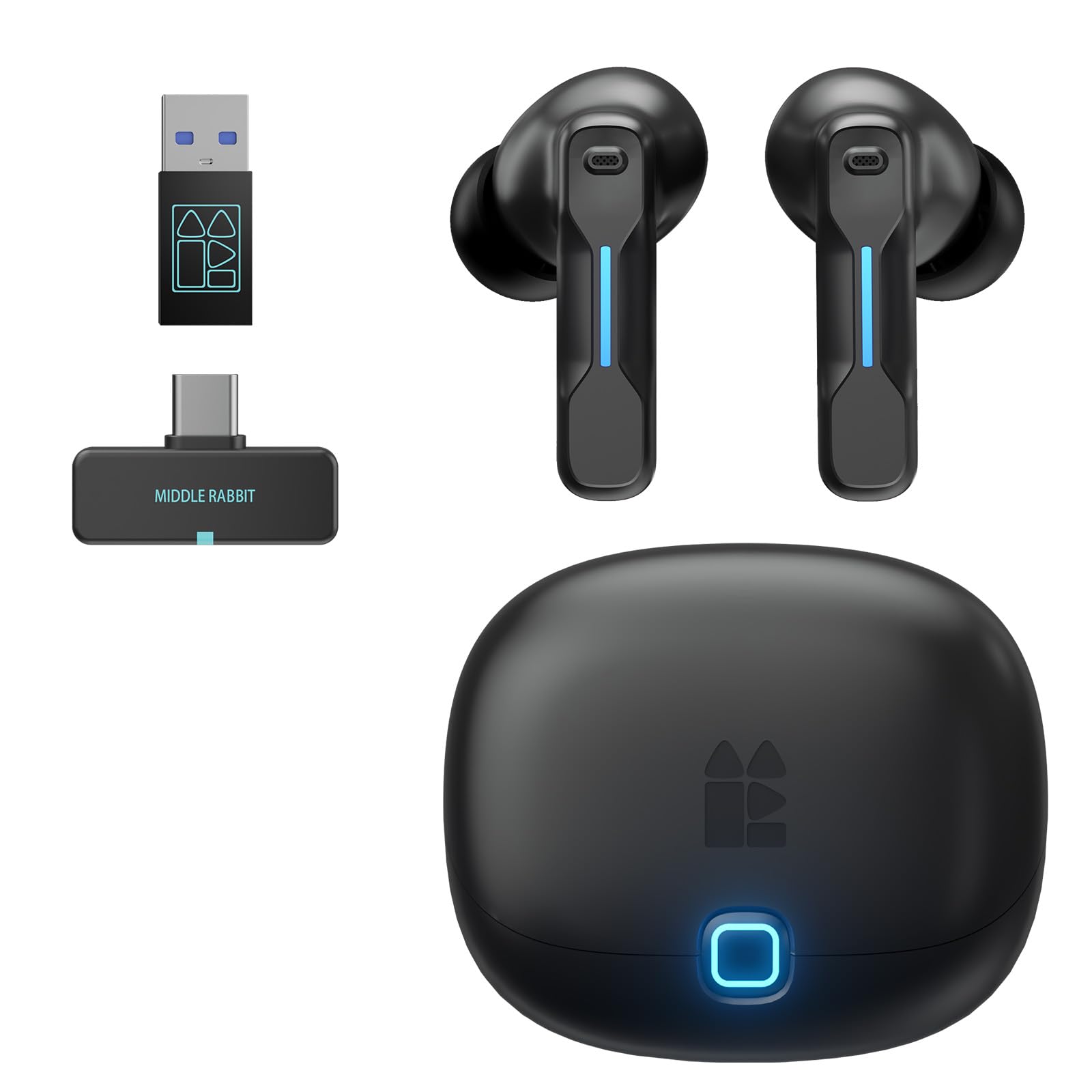
The Middle Rabbit SW5 proves that sub- entry-level earbuds can deliver competitive latency performance. The headline number is 20ms latency via the LC3 codec, and real-world testing confirms that this is not just marketing — the audio-visual synchronization is genuinely tight, matching or beating some premium models. The dual-mode connectivity supports both a 2.4GHz USB-C dongle and Bluetooth 5.4, with the ability to connect to two devices simultaneously, allowing you to game on one device while staying reachable on your phone.
Audio quality is surprisingly customizable. The Middle Rabbit companion app offers multiple EQ modes (Music, Game, Podcast) plus a custom EQ sliders, and the sound profile has a flat default response with a slight bass boost that works well for explosive game audio. The AI-enhanced HD microphone does a respectable job of isolating your voice, though it is not as sophisticated as the bone-conduction system in the ASUS ROG Cetra. The earbuds are comfortable for sessions of four to six hours, and the charging case includes a dedicated slot for the USB dongle — a small but significant convenience absent from many premium competitors.
The main shortfall is battery life: approximately 6-8 hours per charge, which is below the category average. The touch controls are also finicky in practice — accidental activation during adjustments is common, and the app integration requires creating an account for full functionality. A small but notable number of user reports mention the left earbud failing within days, either becoming extremely quiet or refusing to pair. If you get a good unit, the SW5 offers exceptional value with the lowest latency in this guide, but the quality control variance means you should verify the return policy before purchasing.
Why it’s great
- Ultra-low 20ms latency via LC3 codec
- Dual-device connectivity for seamless multitasking
- Charging case stores the 2.4GHz dongle
Good to know
- Battery life is below average at 6-8 hours
- Touch controls can be accidentally activated
- Quality control issues reported by some users
FAQ
Can I use gaming earbuds for voice chat on Discord while playing on PC?
Do gaming earbuds work with the Nintendo Switch?
What is the difference between 20ms and 40ms latency in gaming?
Final Thoughts: The Verdict
For most users, the best bluetooth earbuds for gaming winner is the Sony INZONE Buds because of their native PS5 integration, excellent battery life, and reliable sub-30ms latency. If you need simultaneous voice chat mixing, grab the ASUS ROG Cetra SpeedNova. And for unbeatable budget value, nothing beats the Middle Rabbit SW5.