
At 27 inches, 4K resolution delivers a pixel density of roughly 163 PPI (pixels per inch), which is the sweet spot for sharp text without needing scaling that can break legacy apps. You get a crisp, retina-like experience for spreadsheets, code, and creative work, while the 16:9 aspect ratio remains the standard for gaming and video consumption. The market has shifted dramatically: 60Hz panels are no longer the default, with 120Hz, 144Hz, and even 160Hz refresh rates becoming common at this size and resolution.
I’m Min — the co-founder and writer behind Gadgets Feed. I’ve spent countless hours analyzing pixel response times, color gamut coverage (DCI-P3 and sRGB), and the nuanced differences between IPS, VA, and Fast IPS panel types to find the monitors that actually deliver on their specs.
The real challenge today isn’t finding a 4K 27-inch monitor—it’s choosing one that balances raw sharpness with the high refresh rate your GPU can actually drive. This guide cuts through the noise to help you find the absolute best 4k 27 inch monitor for your specific workload and budget.
How To Choose The Best 4K 27 Inch Monitor
Finding the right 4K 27-inch monitor comes down to three core decisions: panel type, refresh rate, and connectivity. Your use case—whether it’s competitive gaming, professional color work, or general productivity—will dictate which of these specs you should prioritize. A monitor built for a graphic designer will feel sluggish for a esports player, and vice versa.
Panel Technology: IPS vs Fast IPS vs VA
In the 4K 27-inch category, IPS panels dominate because they offer the best balance of color accuracy, wide viewing angles (178°/178°), and reasonable pixel response times. Standard IPS panels typically deliver a 1000:1 native contrast ratio and 60Hz to 120Hz refresh rates. Fast IPS panels, with improved liquid crystal materials, can hit 160Hz or higher while maintaining < 1ms GtG response times. VA panels offer superior contrast ratios (2500:1 to 3000:1) for deeper blacks in HDR content, but often suffer from slower black-to-white pixel transitions and narrower viewing angles. For most users, a Fast IPS panel provides the best all-around experience at 27 inches 4K.
Refresh Rate and VRR Compatibility
At 4K, driving a high refresh rate is demanding. A 120Hz display requires your GPU to push 120 frames per second at 3840 x 2160, which is roughly 530 megapixels per second. Mid-range monitors now offer Dual Mode (DFR) switching that lets you toggle between 4K at 160Hz and FHD (1920 x 1080) at 320Hz for competitive titles. Look for monitors with Adaptive-Sync (AMD FreeSync Premium or NVIDIA G-Sync Compatible) to eliminate screen tearing within the VRR window. HDMI 2.1 ports are essential for running 4K at 120Hz or higher from a PS5, Xbox Series X, or a modern GPU without Display Stream Compression.
Color Accuracy and Gamut Coverage
For photo editing, video production, or any color-critical workflow, factory calibration and wide gamut coverage are non-negotiable. The sRGB standard (100% sRGB) is the baseline for web content. DCI-P3 coverage (90% or higher) is required for accurate HDR content and is the standard for modern digital cinema and Apple displays. Look for monitors that advertise Delta E < 2—this means the deviation from the reference color is imperceptible to the human eye. The ASUS ProArt series, for example, comes with a factory calibration report for individual units, which is a good indicator of quality control. Matte anti-glare coatings vary; a lighter coating preserves perceived sharpness while still reducing reflections.
Quick Comparison
On smaller screens, swipe sideways to see the full table.
| Model | Category | Best For | Key Spec | Amazon |
|---|---|---|---|---|
| GIGABYTE M27UP | Mid-Range | Productivity & Dual-Mode Gaming | 4K 160Hz / FHD 320Hz DFR | Amazon |
| LG 27G810A-B Ultragear | Premium | High-Speed Competitive Gaming | 4K 180Hz / FHD 360Hz DFR | Amazon |
| Acer Nitro VG270K | Mid-Range | Budget High-Refresh Rate Gaming | 4K 160Hz / FHD 320Hz DFR | Amazon |
| BenQ MA270U | Premium | MacBook Pro/Air Ecosystem | USB-C 90W PD, P3 Gamut | Amazon |
| ASUS ProArt PA279CRV | Premium | Color-Critical Professional Work | 99% DCI-P3, USB-C 96W PD | Amazon |
| ASUS ProArt PA279CV | Mid-Range | Entry-Level Color Accurate Work | 100% sRGB, USB-C 65W PD | Amazon |
| Samsung ViewFinity S8 S80D | Mid-Range | General Productivity & Office Work | HDR10, USB-A Hub | Amazon |
| Dell S2725QS 27 Plus | Mid-Range | All-Round Work & Casual Gaming | 4K 120Hz, 1500:1 Contrast | Amazon |
| KOORUI G2741L | Budget | Entry-Level Dual Mode Experience | 4K 160Hz / FHD 320Hz DFR | Amazon |
| LG 27UP650K-W | Budget | Budget 4K with Great Color | 95% DCI-P3, 60Hz | Amazon |
| Samsung Odyssey G7 G75F | Premium | Immersive Curved Gaming | 37″ 1000R Curve, HDR600 | Amazon |
In‑Depth Reviews
1. GIGABYTE M27UP
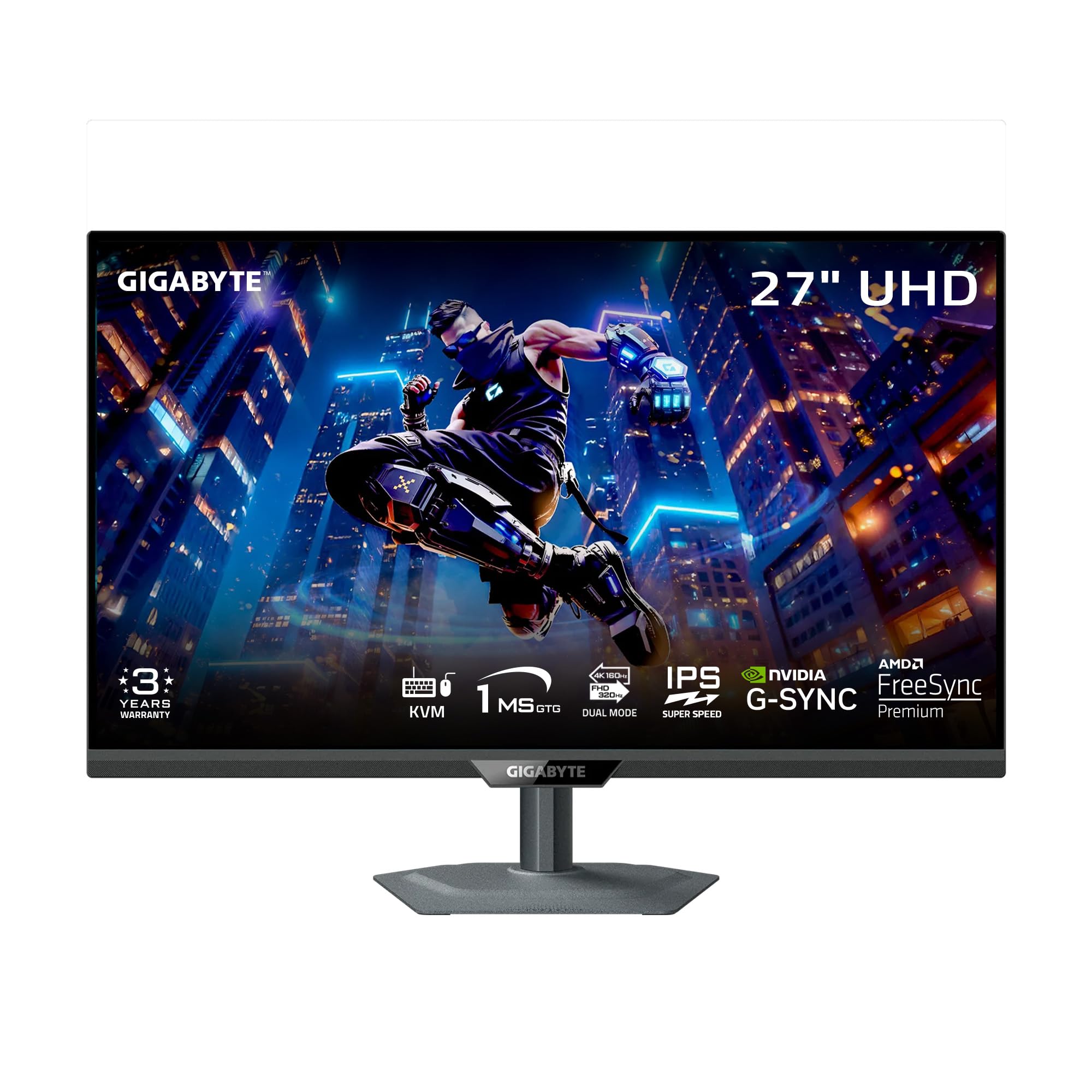
The GIGABYTE M27UP is the most well-rounded 4K 27-inch monitor on the market because it nails the fundamentals while adding high-value features rarely seen at this price. Its SuperSpeed IPS panel delivers a Dual Mode experience: 4K at 160Hz for immersive gaming or FHD at 320Hz for competitive esports. The 1ms GtG response time ensures minimal ghosting, and the 125% sRGB color gamut makes it usable for light creative tasks.
What separates the M27UP from the pack is its integrated KVM switch and wide connectivity suite, which includes DisplayPort 1.4, HDMI 2.1, and USB-C with DisplayPort Alt Mode. This means you can control two PCs with a single keyboard and mouse through the monitor—a genuine productivity multiplier. The included HDMI 2.1 cable and DP cable remove the need for a separate purchase to hit 4K 160Hz.
The ergonomic stand offers height (130mm), tilt, swivel, and pivot adjustments, which is rare for a monitor in this performance tier. The 3-year warranty provides peace of mind. The only compromise is a slight IPS glow in corners and average viewing angles compared to premium options.
Why it’s great
- Dual Mode 4K 160Hz / FHD 320Hz covers both single-player and competitive gaming scenarios.
- KVM switch with USB-C connectivity eliminates need for a separate KVM box.
- Includes all necessary cables (HDMI 2.1, DP, USB) and a full ergonomic stand.
Good to know
- IPS glow in corners is noticeable in dark room scenes but typical for the panel technology.
- Viewing angles are average; color shift occurs off-axis more than premium IPS.
2. LG 27G810A-B Ultragear

The LG 27G810A-B pushes the upper limit of what a non-OLED 4K 27-inch monitor can achieve right now. Its Dual Mode capability offers 4K at 180Hz (the highest native 4K refresh rate in this roundup) and FHD at 360Hz for competitive gaming. The 1ms GtG response time and VESA DisplayHDR 400 certification give it the velocity to play fast shooters while maintaining decent HDR highlights.
Covering 95% of the DCI-P3 color space, this monitor produces rich, saturated colors that pop more than standard sRGB panels. It is both AMD FreeSync Premium and NVIDIA G-Sync compatible, ensuring tear-free gameplay across any modern GPU. The Black Stabilizer and Dynamic Action Sync features are genuinely useful for spotting enemies in dark corners of games like Escape from Tarkov or Call of Duty.
The build quality is excellent with a narrow bezel and a stand that offers full height, tilt, swivel, and pivot adjustment. The 4-pole headphone jack with DTS HP:X delivers spatial audio through a single connection. Some users report a noticeable fan noise from the internal cooling, which could be distracting in a quiet room.
Why it’s great
- Highest 4K refresh rate in the list at 180Hz, plus a 360Hz FHD mode for esports.
- DTS HP:X spatial audio and 4-pole headphone jack for competitive audio.
- Full ergonomic stand with pivot, ideal for portrait mode coding or reading.
Good to know
- Internal fan produces an audible whir under heavy load, not ideal for silent work sessions.
- Stand is well-built but limited in maximum height; taller users may need a monitor arm.
3. Acer Nitro VG270K

The Acer Nitro VG270K is the most cost-effective way to get a 4K 27-inch monitor with Dual Mode functionality. It offers 4K at 160Hz and FHD at 320Hz (DFR), with a 0.5ms GtG response time and AMD FreeSync Premium. The inclusion of two HDMI 2.1 ports is a major plus, as it allows full 4K 160Hz bandwidth from a PS5 or Xbox Series X without compression artifacts.
With DCI-P3 90% color gamut and HDR10 support, the display delivers vibrant colors for its price bracket. The ZeroFrame design with slim bezels makes it suitable for multi-monitor setups where seamless alignment matters. The built-in speakers are functional but weak—expect tinny output that’s fine for system alerts but inadequate for gaming or movies.
Customer feedback is mixed on long-term reliability. Early failures of HDMI ports and vertical line issues have been reported, though the majority of users praise the value and performance for the price. The stand supports tilt but lacks height adjustment, which is a compromise at this price point.
Why it’s great
- Two HDMI 2.1 ports for full-bandwidth 4K 160Hz from modern consoles.
- Dual Mode switching (4K 160Hz / FHD 320Hz) is a premium feature at a budget price.
- Near bezel-less ZeroFrame design ideal for multi-monitor configurations.
Good to know
- Some units have reported HDMI port failure and vertical line defects after several months.
- Stand only supports tilt adjustment; height and pivot are not available.
4. BenQ MA270U

The BenQ MA270U is purpose-built for MacBook users who want a seamless external display experience without paying Apple Studio Display prices. It connects via a single USB-C cable that carries 4K video, data, and delivers 90W of power delivery to charge your MacBook Pro or MacBook Air. The dual USB-C ports also provide 15W of charging for an iPhone or iPad.
BenQ has tuned the panel to match the color profile of the MacBook display, achieving a P3 wide color gamut with BenQ’s exclusive AQCOLOR technology. The ability to control brightness and volume directly from the MacBook keyboard (using BenQ Display Pilot 2) is a small but significant quality-of-life improvement. The 2000:1 native contrast ratio is higher than most IPS monitors, giving deeper blacks for photography work.
The ergonomic stand offers height, tilt, swivel, and pivot adjustment, and the slim metal design matches the aesthetic of Apple hardware. The built-in speakers are notably poor and described as tinny—plan to use external speakers or headphones. There have been isolated reliability reports of vertical bar defects after a few weeks of use.
Why it’s great
- Single USB-C cable handles video, data, and 90W laptop charging for a clean desk setup.
- Color-tuned for MacBook displays with P3 gamut, reducing color mismatch headaches.
- Keyboard brightness/volume control integration works seamlessly with macOS.
Good to know
- Built-in speakers are very poor quality; plan for external audio.
- Early failure reports of vertical lines suggest some quality control variance.
5. ASUS ProArt PA279CRV

The ASUS ProArt PA279CRV is the reference monitor for creative professionals who need wide gamut coverage and factory-calibrated color without the premium of a reference OLED. It covers 99% DCI-P3 and 99% Adobe RGB, which is essential for print design, video color grading, and photography. It ships with a factory calibration report showing Delta E < 2, and is Calman Verified for accuracy.
Connectivity is a highlight: it includes DisplayPort over USB-C with 96-watt Power Delivery, along with HDMI, DisplayPort, and a USB hub. The monitor also supports daisy-chaining via DisplayPort out, which allows you to connect a second monitor through a single cable to your laptop. This is a major productivity boost for creative workflows that need multiple displays.
The stand provides full ergonomic adjustment (height, tilt, swivel, pivot). The 3,000:1 contrast ratio is significantly higher than typical IPS panels, giving deeper blacks that approach VA panels. It is capped at 60Hz, so this is strictly for color work—not for gaming. Some users report minor light bleed uniformity issues, though the factory calibration is generally very solid.
Why it’s great
- 99% DCI-P3 and Adobe RGB coverage with Delta E < 2 factory calibration.
- USB-C with 96W power delivery and DisplayPort daisy-chain support for multi-monitor setups.
- Higher 3,000:1 contrast ratio for better shadow detail compared to standard IPS.
Good to know
- Limited to 60Hz refresh rate—unsuitable for gaming or 120Hz video preview.
- Matte coating can make text appear slightly less sharp than glossy alternatives.
6. ASUS ProArt PA279CV

The ASUS ProArt PA279CV is the gateway monitor for professionals who need accurate color but don’t require DCI-P3 coverage. It covers 100% sRGB and 100% Rec. 709, which is sufficient for web and broadcast content creation. It comes factory-calibrated with a Delta E < 2 report and is Calman Verified, ensuring consistent color reproduction out of the box.
Connectivity includes DisplayPort over USB-C with 65W Power Delivery, which is enough to charge a MacBook Air or smaller ultrabook, plus a DisplayPort, HDMI, and a USB 3.1 hub with four downstream ports. The 3-month Adobe Creative Cloud subscription is a bonus for new subscribers. The monitor supports adaptive sync (FreeSync) but is limited to 60Hz, making it a poor choice for gaming.
The ergonomic stand provides height, tilt, swivel, and pivot adjustment. Some users report a slight green tint out of the box that requires manual adjustment in the OSD, and the text sharpness is good but not retina-level due to the standard matte coating. Overall, it’s a reliable tool for color-critical work at a competitive price point.
Why it’s great
- 100% sRGB and Rec. 709 with factory Delta E < 2 calibration for web and broadcast work.
- USB-C with 65W PD and a USB hub for connecting peripherals.
- Full ergonomic stand with pivot rotation for portrait-mode document editing.
Good to know
- 60Hz refresh rate only; not suitable for gaming or high-frame-rate video editing.
- Some units have a slight green tint out of box requiring manual OSD adjustment.
7. Samsung ViewFinity S8 S80D

The Samsung ViewFinity S8 S80D is a productivity-centric 4K 27-inch monitor that prioritizes sharp text, eye comfort, and connectivity over gaming features. It supports HDR10 for improved color and contrast in multimedia content, and comes with a versatile I/O panel including HDMI, DisplayPort, and multiple USB-A ports that function as a built-in USB hub for connecting peripherals.
The ergonomic stand offers height, tilt, swivel, and 90-degree pivot adjustment, making it easy to switch to portrait mode for coding or reading long documents. Samsung’s Eye Saver Mode and Flicker-Free technology are TÜV-certified and reduce eye strain during long work sessions. The matte anti-glare screen is effective in bright office environments with overhead lighting.
There are no built-in speakers, which is disappointing for a monitor in this price range. The OSD control is handled by a single joystick button on the rear, which can be confusing to navigate initially. The refresh rate is 60Hz, so this monitor is not designed for gaming. Text clarity is very good for a matte screen, with minimal graininess.
Why it’s great
- Built-in USB hub with multiple USB-A ports for peripherals, reducing desktop clutter.
- Full ergonomic stand with 90-degree pivot and TÜV eye care certification.
- Excellent matte anti-glare screen that handles bright office lighting well.
Good to know
- No built-in speakers; requires external speakers or headphones for audio.
- Refresh rate is 60Hz; unsuitable for fast-paced gaming or smooth motion.
8. Dell S2725QS 27 Plus

The Dell S2725QS is a balanced 4K 27-inch monitor that brings a 120Hz refresh rate to a product line traditionally limited to 60Hz. This makes it a compelling option for users who want smoother desktop motion and casual gaming without the premium of a 160Hz+ gaming monitor. The 1500:1 contrast ratio is higher than typical IPS panels, providing deeper blacks and better shadow detail for movies and creative work.
It covers 99% sRGB color gamut and has AMD FreeSync Premium for tear-free gaming when paired with a compatible GPU. The integrated speakers are significantly better than most built-in monitor speakers, with greater output power and frequency range than the previous generation. ComfortView Plus reduces blue light emissions to ≤35% without making the screen look yellow, so color accuracy is preserved for photo editing.
The ash white finish and ultra-thin bezels give it a modern, minimalist look. The stand supports height, tilt, swivel, and pivot adjustment. Some users report a slight vignette effect (darker corners) on a portion of units, and the 120Hz refresh rate at 4K means you need an HDMI 2.1 or DP 1.4 connection to achieve it without compression.
Why it’s great
- 4K 120Hz refresh rate with a 1500:1 contrast ratio for better depth and motion.
- ComfortView Plus reduces blue light without yellow tint, preserving color accuracy.
- Built-in speakers with improved output power over previous Dell models.
Good to know
- Some units show vignetting (darkening) at the screen edges.
- 120Hz requires HDMI 2.1 or DP 1.4; older cables default to 4K 60Hz.
9. KOORUI G2741L

The KOORUI G2741L is an entry-level Dual Mode monitor that offers 4K at 160Hz and FHD at 320Hz, with a Fast IPS panel and 1ms response time. On paper, it competes directly with the Acer Nitro VG270K on specs. It supports both AMD FreeSync Premium and NVIDIA G-Sync Compatibility, and includes HDMI 2.1 and DisplayPort 1.4 connections for high-bandwidth input.
The monitor covers 95% DCI-P3 color gamut and has VESA DisplayHDR 400 certification, which provides a noticeable brightness boost for HDR content compared to standard monitors. The ergonomic stand offers height, tilt, and pivot adjustment, which is rare for a monitor at this budget tier. The anti-glare coating is effective but has been described as grainy, which can dull perceived sharpness on text.
Customer reviews are sharply divided. While many users praise the image quality and price, a significant number report quality control issues including dead pixels, wobbly control buttons, and power button failures after several months. The standby LED cannot be turned off and some units show erratic behavior at higher refresh rates after warm-up. Support is reportedly inconsistent.
Why it’s great
- Dual Mode 4K 160Hz / FHD 320Hz with FreeSync Premium and G-Sync Compatible.
- VESA DisplayHDR 400 for improved brightness and HDR highlight detail.
- Full ergonomic stand (height, tilt, pivot) at a budget price point.
Good to know
- Quality control is inconsistent; dead pixels and button failures are reported.
- Standby LED is always on and cannot be disabled—distracting in dark rooms.
10. LG 27UP650K-W

The LG 27UP650K-W is a pure value play for users who prioritize color quality and resolution over high refresh rates. It offers a 4K 60Hz IPS display with an impressive 95% DCI-P3 color gamut coverage—something typically found on more expensive monitors. The VESA DisplayHDR 400 support allows it to hit 400 nits peak brightness, providing decent HDR highlight pop for a budget model.
The ergonomic stand is excellent, supporting height, tilt, and pivot adjustment, with a white/light finish that stands out from the sea of black monitors. The anti-glare coating is matte and effective, with good contrast and brightness that make it suitable for stock trading, spreadsheet work, and web browsing. The Black Stabilizer feature is useful for brightening dark scenes in games or video.
The monitor lacks USB ports, so you cannot use it as a USB hub. There are no built-in speakers. The refresh rate is capped at 60Hz, making it unsuitable for gaming. The color temperature is warm out of the box and needs adjustment via the joystick-controlled OSD. For non-gamers who want a budget-friendly 4K monitor with strong color, this is a solid pick.
Why it’s great
- 95% DCI-P3 color gamut coverage at a budget price, ideal for photo viewing.
- VESA DisplayHDR 400 with 400 nits peak brightness for decent HDR.
- Full ergonomic stand with height, tilt, and pivot in a unique white finish.
Good to know
- No USB ports, no built-in speakers, and a 60Hz refresh limit.
- Warm color temp out of box requires manual OSD adjustment.
11. Samsung Odyssey G7 G75F

The Samsung Odyssey G7 G75F breaks the 27-inch rule slightly with a 37-inch 4K UHD panel, but its 1000R curvature is the defining feature. This aggressive curvature wraps the display around your peripheral vision, creating a deeply immersive experience for single-player games and cinematic content. The VA panel delivers a 3000:1 native contrast ratio, which produces inky blacks and excellent shadow detail—far superior to standard IPS panels.
VESA DisplayHDR 600 certification ensures bright, punchy highlights with better sustained brightness than HDR400 displays. The 165Hz refresh rate with 1ms GtG response time provides smooth motion for racing and shooter games. AMD FreeSync Premium Pro handles variable refresh rates with low latency, and the panel covers 99% DCI-P3 for rich, saturated colors in HDR mode.
The ergonomic stand supports height, tilt, and swivel adjustment, though the massive curved panel takes up significant desk space. The extreme 1000R curve is not for everyone—some users find it distracting for productivity work, and it makes wall-mounting less practical. The pixel density is lower than a true 27-inch 4K panel, so text won’t be as sharp.
Why it’s great
- 1000R curved VA panel with 3000:1 contrast ratio for deep blacks and immersion.
- VESA DisplayHDR 600 delivers significantly better HDR highlights than HDR400 monitors.
- 165Hz refresh rate with FreeSync Premium Pro for smooth cinematic gameplay.
Good to know
- Extreme 1000R curve is polarizing; some users find it disorienting for productivity or desktop work.
- 37-inch size and curved form factor require a deep desk and careful spacing.
FAQ
Is 60Hz enough for a 4K 27-inch monitor?
Can I run a 4K 27-inch monitor at 144Hz with a standard HDMI cable?
What is the ideal viewing distance for a 27-inch 4K monitor?
Should I choose an IPS or VA panel for a 27-inch 4K monitor?
Final Thoughts: The Verdict
For most users, the best 4k 27 inch monitor winner is the GIGABYTE M27UP because it combines a Dual Mode 4K 160Hz / FHD 320Hz panel with a built-in KVM switch and USB-C connectivity, making it equally adept for productivity and gaming at a competitive price. If you need the highest possible refresh rate for competitive gaming, grab the LG 27G810A-B Ultragear with its 4K 180Hz and FHD 360Hz modes. And for color-critical professional work with wide DCI-P3 gamut and USB-C 96W charging, nothing beats the ASUS ProArt PA279CRV.