
That dreaded pinwheel or the hourglass that appears every time you switch between a dozen browser tabs is a clear signal your laptop is running out of memory. Adding an 8GB SODIMM stick is the single most cost-effective upgrade you can perform, instantly breathing new life into a sluggish machine without replacing the entire system.
I’m Min — the co-founder and writer behind Gadgets Feed. I’ve analyzed hundreds of hours of benchmark data and real-user feedback across every major DDR3 and DDR4 laptop memory module to pinpoint the sticks that deliver genuine speed improvements without compatibility headaches.
After sifting through thousands of verified reviews and specification sheets, I’ve identified the top DDR3 and DDR4 modules that offer the best blend of stability, speed, and value for your upgrade. Here is my carefully curated list of the best 8gb notebook ram currently on the market.
How To Choose The Best 8GB Notebook RAM
Picking the wrong stick will either leave you staring at a blank screen or force you to deal with constant system errors. Focus on three pillars: generation, speed, and compatibility with your motherboard and processor.
Match Your Laptop’s Memory Generation
DDR3 and DDR4 sticks are physically keyed differently and are not interchangeable. A DDR4 module will not fit into a DDR3 slot, and vice versa. Check your laptop’s manual or use an online system scanner to confirm whether your machine accepts 204-pin DDR3 or 260-pin DDR4 SODIMMs.
Speed and Latency Tiers
DDR3 typically runs at 1600MHz with CL11 latency, while DDR4 spans 2133MHz to 3200MHz with CL15 to CL22. Higher frequency improves data transfer rates, but your system will only run as fast as its slowest component. Buying a 3200MHz stick for a laptop limited to 2666MHz is a waste of money — the module will simply downclock itself.
Single vs. Dual Rank
Single-rank (1Rx8 or 1Rx16) modules use fewer chips and often run cooler, while dual-rank (2Rx8) can offer slightly better performance by interleaving data. Most modern laptops work fine with either, but checking reviews from owners of your specific model can prevent surprises.
Quick Comparison
On smaller screens, swipe sideways to see the full table.
| Model | Category | Best For | Key Spec | Amazon |
|---|---|---|---|---|
| Crucial 8GB DDR4 3200MHz | DDR4 | Best Overall Compatibility | 3200MHz, CL22, 1.2V | Amazon |
| TEAMGROUP Elite 8GB DDR4 3200MHz | DDR4 | Best Value High Speed | 3200MHz, CL22, Lifetime Warranty | Amazon |
| SK Hynix 8GB DDR4 3200MHz | DDR4 | OEM-Grade Reliability | 3200MHz, 1Rx16, 260-pin | Amazon |
| Timetec 8GB DDR4 2666MHz | DDR4 | Best Budget DDR4 Stick | 2666MHz, CL19, 1.2V | Amazon |
| A-Tech 8GB DDR4 2133MHz | DDR4 | Older DDR4 Laptops | 2133MHz, CL15, 1.2V | Amazon |
| Samsung 8GB DDR3 1600MHz | DDR3 | Best OEM DDR3 Memory | 1600MHz, CL11, 204-pin | Amazon |
| Adamanta 8GB DDR3L 1600MHz | DDR3L | Best Budget DDR3 for Macs | 1600MHz, CL11, 1.35V | Amazon |
In‑Depth Reviews
1. Crucial 8GB DDR4 RAM 3200MHz

Crucial is the consumer-facing arm of Micron, one of the world’s largest memory manufacturers. This 8GB DDR4-3200 SODIMM stick uses Micron’s own fab components, ensuring strict quality control and consistency. It runs at 1.2V with CL22 latency and is designed to downclock to 2933MHz or 2666MHz for older platforms, making it universally compatible with any system that accepts DDR4 laptop memory.
Real users report installing this stick in everything from HP ProBook 430 G6 units to older Dell Vostro 5410 models, with immediate recognition and zero blue screens. Several reviewers noticed a dramatic reduction in stutter when running Android Studio or juggling multiple office applications. The Crucial System Scanner tool takes the guesswork out of compatibility by analyzing your hardware before purchase.
What sets this module apart is the dual-rank (2Rx8) configuration frequently shipped, which offers slightly better memory interleaving than single-rank sticks. Combined with a strong warranty and Micron’s decades of fabrication expertise, this is the safest pick for most users seeking a reliable DDR4 upgrade.
Why it’s great
- Manufactured by Micron with excellent build quality
- Downclockable for broad compatibility with older DDR4 systems
- Lifetime warranty and free technical support
Good to know
- Slightly higher sticker price compared to lesser-known brands
- Rank configuration may vary (1Rx8 vs 2Rx8) between batches
2. TEAMGROUP Elite 8GB DDR4 3200MHz

TEAMGROUP’s Elite series delivers the same 3200MHz PC4-25600 speed as premium competitors but at a noticeably lower cost per gigabyte. This 8GB single-module stick uses a CL22 timing profile and operates at the JEDEC standard 1.2V, meaning it will work seamlessly in any DDR4-compatible laptop or mini PC without requiring XMP or manual BIOS tweaks.
Customer feedback highlights its plug-and-play nature in systems like the HP 15-fd0083wm and Intel NUC8i5BEH. One reviewer successfully ran a 24-hour memtest86 pass on a full 32GB configuration using two of these sticks, reporting zero errors. Another noted that upgrading from 4GB to 16GB transformed a budget laptop into a responsive daily driver capable of handling multiple applications simultaneously.
TEAMGROUP backs this module with a lifetime warranty, and the price often beats larger rivals by a noticeable margin. If raw affordability matters more than brand prestige, this stick delivers identical real-world performance to modules costing significantly more.
Why it’s great
- Excellent price-to-performance ratio for 3200MHz DDR4
- Stable at stock JEDEC timings with no configuration needed
- Lifetime warranty and free technical support
Good to know
- CL22 latency is standard but not as tight as enthusiast-grade kits
- Single-rank configuration in most batches
3. SK Hynix 8GB SODIMM DDR4 3200

SK Hynix is one of the top three DRAM manufacturers globally, and this 8GB DDR4-3200 SODIMM stick uses their own in-house chips. That means it undergoes the same rigorous testing as modules shipped inside Dell, HP, and Lenovo laptops from the factory. The 1Rx16 single-rank configuration runs cool and draws minimal power, which helps battery life in thin-and-light machines.
Users report seamless installation in ASUS Nitro 5 and Dell Inspiron 15 3520 laptops. Several buyers noted immediate recognition and dual-channel activation when paired with an existing stick of the same spec. A small number of customers received the module in loose packaging without an anti-static case, but the memory itself worked flawlessly after installation.
If you want an OEM-grade module that matches the exact quality standard used by major laptop manufacturers, this SK Hynix stick is a solid choice. The lack of a fancy heatsink or retail box is irrelevant inside a closed laptop chassis.
Why it’s great
- Hynix OEM chips ensure high reliability and compatibility
- Recognized immediately in most modern DDR4 laptops
- Compact 1Rx16 design runs cooler and uses less power
Good to know
- Occasional loose packaging without retail box
- Price can fluctuate based on DRAM market conditions
4. Timetec 8GB DDR4 2666MHz
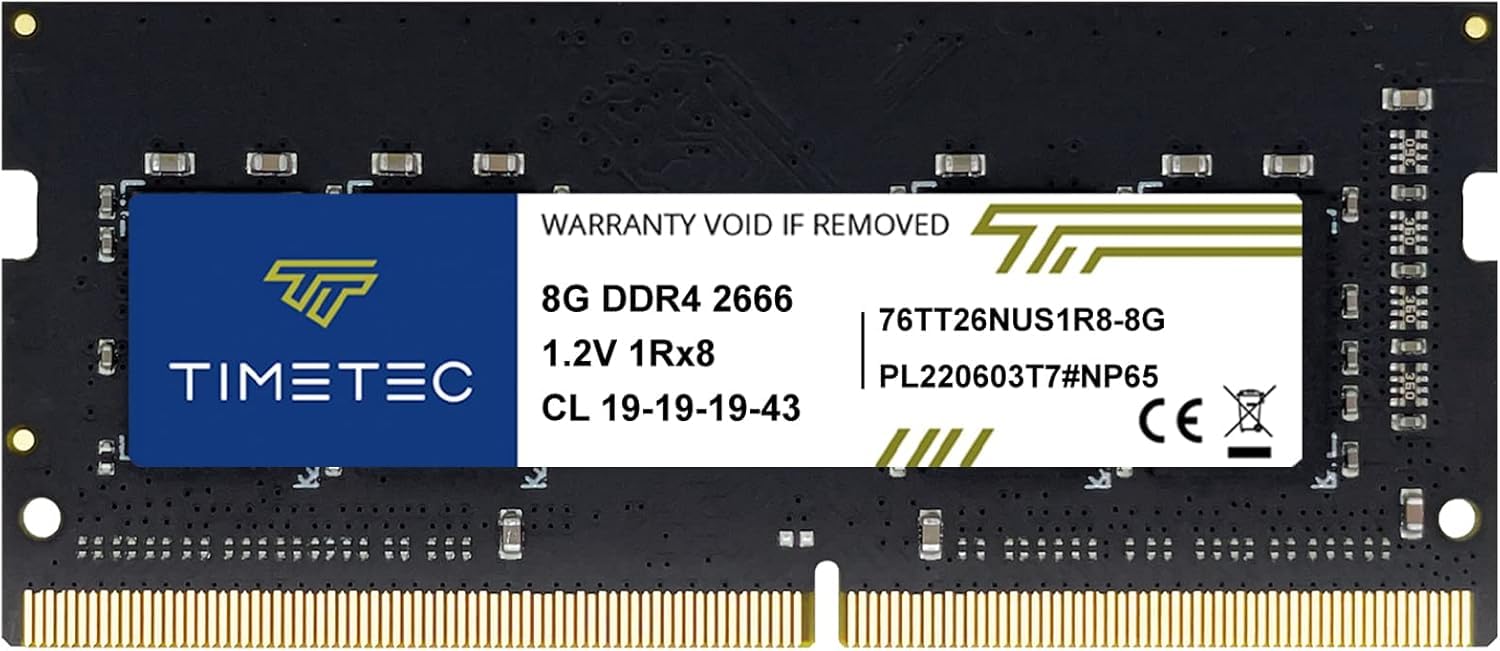
Not every laptop supports 3200MHz memory, and paying extra for speed your system cannot use makes no sense. Timetec’s 8GB DDR4-2666 stick targets that exact scenario with a CL19 timing profile at 1.2V, making it a perfect match for Intel 8th/9th-gen and AMD Ryzen 3000 mobile platforms capped at 2666MHz. The 260-pin SODIMM form factor fits all standard DDR4 laptop slots.
Verified buyers successfully installed this stick in HP Elitedesk 800 G4 Mini PCs and Lenovo ThinkPad laptops. One user paired it with a different brand stick of identical specs and reported no stability issues, BIOS errors, or blue screens. The module’s PCB color may vary between green and black depending on production batch, but the performance specification remains consistent.
Backed by a limited lifetime warranty from a US-based support team, this Timetec module offers a smart, budget-conscious path to doubling or tripling your system memory without overspending on speed you cannot exploit.
Why it’s great
- Optimized for laptops capped at 2666MHz system memory speed
- CL19 latency is tight for this frequency class
- Lifetime warranty with US-based technical support
Good to know
- PCB color and rank may vary by batch
- Not a high-speed overclocking module
5. A-Tech 8GB DDR4 2133MHz

Older laptops from 2015–2018 often max out at DDR4-2133, making high-speed sticks an unnecessary expense. A-Tech’s 8GB PC4-17000 module runs at 2133MHz with a tight CL15 latency, squeezing every drop of performance from that slower memory controller. It uses a 260-pin SODIMM form factor with JEDEC-standard 1.2V voltage.
Users report great results in Dell Latitude AiO 3275 units and various older notebook models. One reviewer noted that a single stick upgraded their system from 8GB to 16GB, eliminating slowdowns in audio/video playback and hard drive swapping. A power user who ran two 16GB sticks for five years of daily heavy use reported only one failure after that extended period.
A-Tech provides a lifetime warranty and friendly pre- and post-purchase support. If your laptop is DDR4-capable but cannot run speeds above 2133MHz, this module delivers the exact specification your system needs without any compatibility risk.
Why it’s great
- CL15 latency is exceptionally tight for 2133MHz DDR4
- Perfect match for older systems capped at 2133MHz
- Lifetime warranty and responsive customer support
Good to know
- Limited to 2133MHz — not future-proof for faster platforms
- Single-rank or dual-rank configuration varies by batch
6. Samsung 8GB DDR3 1600MHz

If you are reviving a laptop from the DDR3 era — think early 2010s machines — Samsung’s OEM 8GB DDR3L module is the gold standard. This 204-pin SODIMM runs at 1600MHz with CL11 latency and supports both 1.35V low-voltage and 1.5V standard operation, giving it wide compatibility with older Intel and AMD platforms.
Owners of mid-2012 MacBook Pros and various PC laptops report flawless installation and immediate recognition. One reviewer upgraded six identical MacBook Pros from 4GB to 16GB using two of these sticks, noting the complete elimination of the spinning beach ball during normal use. Pairing this memory with an SSD was frequently described as the ultimate budget rejuvenation for aging hardware.
Samsung’s own fabrication and rigorous testing ensure module-to-module consistency. This is the safest choice for anyone needing reliable OEM-grade DDR3 memory that will not introduce compatibility quirks.
Why it’s great
- Samsung OEM chips offer top-tier reliability and testing
- Dual-voltage support (1.35V / 1.5V) maximizes compatibility
- Proven in MacBook Pro and PC laptop upgrades
Good to know
- DDR3-only — not compatible with DDR4 systems
- Higher price per gigabyte than newer DDR4 sticks
7. Adamanta 8GB DDR3L 1600MHz

Adamanta offers a value-driven alternative for DDR3/L upgrades. This 8GB module runs at 1600MHz with CL11 latency and is compatible with both standard 1.5V and low-voltage 1.35V slots. Assembled and tested in the USA, each module undergoes individual manufacturer validation before shipping.
Reviews highlight successful upgrades in mid-2012 MacBook Pro units, older Dell laptops, and even a Porsche repair diagnostic workstation. One repair technician specifically praised the reliability of USA-assembled RAM over cheaper imports. A small number of users faced motherboard compatibility issues unrelated to the stick itself, but the return process was described as painless.
For extending the life of a DDR3-era machine on a tight budget, Adamanta provides a compelling mix of low cost, US-based assembly, and a limited lifetime warranty. Verify your system’s maximum supported capacity before purchasing.
Why it’s great
- Assembled and tested in the USA for quality assurance
- Compatible with both 1.35V and 1.5V DDR3 slots
- Limited lifetime warranty with free technical support
Good to know
- DDR3-only — no use in DDR4 systems
- Some older motherboards may not support 8GB single sticks
FAQ
Can I mix a new 8GB stick with my existing RAM of a different brand or speed?
How do I know if my laptop uses DDR3 or DDR4 memory?
What does PC4-25600 or PC3L-12800 mean on a RAM stick?
Final Thoughts: The Verdict
For most users, the best 8gb notebook ram winner is the Crucial 8GB DDR4 3200MHz because its Micron-sourced chips, broad compatibility with downclocking, and lifetime warranty offer the safest and most reliable upgrade path for the widest range of modern laptops. If you want the best high-speed value, grab the TEAMGROUP Elite 8GB DDR4 3200MHz. And for reviving a legacy DDR3 machine on a tight budget, nothing beats the Adamanta 8GB DDR3L 1600MHz.