
A 3.5-pound graphics card dangling from a motherboard slot by a thin PCB edge creates leverage that can crack the PCIe bracket, warp the board, and choke your air cooler’s clearance by millimeters. The droop is not cosmetic — it’s a mechanical load that stresses solder joints and can degrade the slot’s electrical contacts over time. The cure isn’t a thicker case or a different motherboard; it’s the right brace, the proper power extension, and a cable that doesn’t fight your airflow.
I’m Min — the co-founder and writer behind Gadgets Feed. I’ve spent hundreds of hours cross-referencing PCIe power specifications, ARGB controller protocols, and physical clearance dimensions to separate the accessories that genuinely solve GPU support and cable management from the ones that just look good on Instagram for a week.
From sag-correction brackets to 16AWG sleeved extension kits and 12VHPWR right-angle adapters, this guide ranks the most practical and visually coherent options to help you find the best graphic card accessory for your build’s specific layout and power requirements.
How To Choose The Best Graphic Card Accessory
Not every accessory solves the same problem. A brace addresses physical sag, an extension cable fixes routing and aesthetics, and a 12VHPWR adapter eliminates a dangerous sharp bend near the power connector. Before buying, measure the space between your GPU’s power port and the side panel, and note whether your motherboard has a 5V 3-pin ARGB header if you want lighting sync.
Physical Support vs. Power Delivery
A GPU brace with a segmented sliding mechanism and a silicone pad protects the card’s PCB from long-term flex, but it cannot fix a power cable that creates a voltage drop under transient spikes. Conversely, a 16AWG extension kit delivers cleaner current than an 18AWG stock cable, yet it adds nothing if the card already sags 4mm at the far corner. Decide which issue matters first — structural or electrical — and buy the accessory that targets your exact bottleneck.
ARGB Compatibility and Cable Routing Depth
If your case has a tinted glass panel and you want lighting, ensure the accessory uses a standard 5V 3-pin ARGB connector (not 12V RGB) so it can sync with your motherboard’s software. For cable extensions, measure the distance from your PSU shroud to the GPU’s power port; a 30cm cable is standard for mid-towers, but full-tower builds may need 35cm or a pre-bent design to avoid kinking against the drive cage.
Quick Comparison
On smaller screens, swipe sideways to see the full table.
| Model | Category | Best For | Key Spec | Amazon |
|---|---|---|---|---|
| AsiaHorse Hydrus-8PIN | Premium ARGB Extension | Clean integrated look with ARGB | 18AWG copper, 2500W whole set | Amazon |
| Sirlyr RGB 8 Pin PCIE | RGB Extension Cable | 360-degree RGB with mini controller | 27 LEDs, 5V3Pin ARGB | Amazon |
| Fasgear 16 Pin GPU Adapter | 12VHPWR Extension | 600W output for RTX 4090/5090 | 16AWG tinned copper, 30cm | Amazon |
| Bangfun 16Pin Right Angle | 90-Degree Adapter | Eliminating sharp bends near connector | 90-degree 16Pin, 400W peak | Amazon |
| Sirlyr PSU Extension Kit | Sleeved Cable Kit | Pre-bent curves and dual combs | 16AWG, 262-strand tinned copper | Amazon |
| SMEOZZ 16AWG Extension Kit | Sleeved Cable Kit | Budget cable management with combs | 16AWG, nylon braided, 30cm | Amazon |
| upHere GH03ARGB Brace | GPU Sag Bracket | Adjustable support with ARGB | 5V ARGB sync, aviation aluminum base | Amazon |
In‑Depth Reviews
1. AsiaHorse Hydrus-8PIN GPU PSU Extension Cable ARGB Light
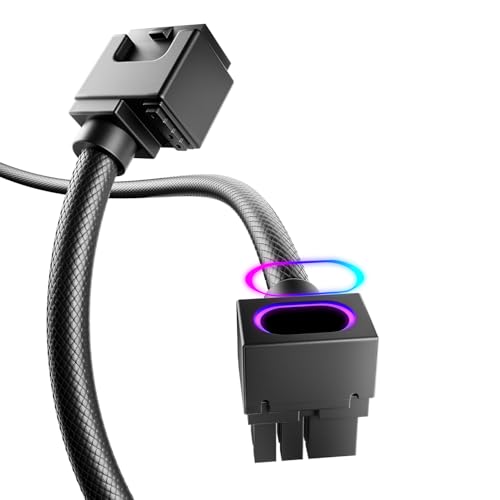
The AsiaHorse Hydrus-8PIN distinguishes itself with an integrated minimalist design that fuses the PSU extension cable and an ARGB light strip into one continuous 11.81-inch unit. Rated for up to 900W on a single wire and a staggering 2500W across the whole set, this cable uses 18AWG copper with brass tin-plated terminals that resist both high voltage and heat — a feature set that outpaces most stock PSU cables by a wide margin.
The 90-degree right-angle connector removes the need to force a bend near the GPU port, which is critical for cards mounted horizontally in cases with less than 40mm of side-panel clearance. The cable endured over 40,000 bend cycles in testing without combs, and the frosted diamond-pattern texture resists scratches. The ARGB lighting syncs via a motherboard 5V 3-pin header, and the brightness is even across the entire length without hot spots.
Compatibility spans from GTX 1070 and RX 5500 XT up to RTX 4060 Ti and RX 9070 XT, covering nearly every 8-pin GPU in the last six generations. The absence of a separate controller and the tight 90-degree turn means you need roughly 2.5 inches of vertical clearance between the GPU port and the chassis floor. For builds where cable management is a priority, this is the cleanest single-cable solution available at this tier.
Why it’s great
- 90-degree connector prevents cable kinking and terminal stress near the GPU.
- 2500W whole-set rating supports future high-wattage cards without voltage drop.
- Integrated ARGB eliminates the need for a separate lighting strip and cable combs.
Good to know
- Fixed 90-degree angle may not align with every GPU latch position — measure clearance first.
- No included ARGB controller; requires motherboard 5V 3-pin header or external hub.
2. Sirlyr RGB 8 Pin PCIE Cable

The Sirlyr RGB 8 Pin PCIE Cable packs 27 individually addressable LEDs into a single 30cm sleeved extension, distributing light on all four sides for a 360-degree effect that eliminates dark spots — a common complaint in single-sided RGB cables. The silicone outer jacket remains flexible at low temperatures, and the silver-plated wire cores maintain stable current transfer even during sustained gaming sessions that trigger GPU power spikes.
It connects to a 5V 3-pin ARGB header on the motherboard and syncs automatically with popular RGB software. For builds lacking an ARGB header, the included mini SATA-powered controller offers standalone mode switching. The cable targets cards with an 8-pin power port, including RTX 4060, RTX 4070, and AMD Radeon RX 6600 series, and the black connector and light strip design blends seamlessly with dark-themed cases.
Users on SignalRGB have successfully daisy-chained this cable with other 5V 3-pin accessories using a 16-port controller, enabling music visualizers and game-reactive lighting. The cable’s 30cm length is ideal for mid-tower builds with a bottom PSU shroud. The only trade-off is the cable’s slight stiffness near the connector, which requires gentle routing to avoid pulling the RGB strip out of alignment.
Why it’s great
- Full 360-degree ARGB lighting with no dark zones, visible from any angle through a glass panel.
- Includes a standalone controller for builds without motherboard 5V 3-pin ARGB headers.
- Silver-plated wire cores handle transient power spikes without measurable heat buildup.
Good to know
- Fixed 8-pin design — not compatible with 6-pin or 12-pin GPU power ports.
- The silicone jacket is flexible but the connector end is less pliable than standard nylon braided cables.
3. Fasgear 16 Pin GPU Cable Adapter

The Fasgear 16 Pin GPU Cable Adapter is a PCIe 5.0 12VHPWR extension (12+4 pin male to 2×8 pin female) with a 30cm length and a 600W output rating, making it one of the few accessories officially compatible with the RTX 4090’s 450W TDP and the 5090’s potential 600W peak. The 16AWG tinned copper wire uses 262 strands per conductor, which carries higher current with lower resistance than the standard 18AWG cables bundled with most power supplies.
Four transparent cable combs are included to fan the dual 8-pin connectors into a clean parallel run, and the sleeved fiber jacket protects against abrasion inside tight cable channels. The 12V-2×6 connector improves safety margin over the original 12VHPWR spec by increasing the contact pin recess depth, reducing the risk of partial insertion and thermal runaway — a well-documented failure point in early RTX 4090 builds.
Compatibility extends to RTX 5070 Ti, 5070, 4080, 4070 Ti, 4070 (16-pin models only), and 3090 Ti. The cable requires two free 8-pin PCIe ports on the PSU; using only one of the pigtails will result in insufficient power delivery for cards above 300W. Users with ATX 3.0 PSUs can bypass the 2×8-pin side and plug the 16-pin native cable instead, but this adapter is primarily designed for legacy PSUs without native 12VHPWR.
Why it’s great
- 600W power capacity covers the most demanding RTX 4090 and 5090 cards with headroom.
- 12V-2×6 spec improves connector safety with deeper recessed pins.
- 16AWG tinned copper reduces voltage drop over 30cm length compared to stock 18AWG.
Good to know
- Not compatible with 12-pin GPUs like the RTX 3090 (non-Ti) — double-check your card’s connector type.
- Two 8-pin PSU ports are mandatory; one pigtail only delivers half the required wattage.
4. Bangfun 16Pin GPU RTX 4070 Super Power Adapter Cable 90 Degree

The Bangfun 16Pin GPU Power Adapter Cable is purpose-built for one specific problem: the sharp 90-degree bend required when a standard straight 12VHPWR connector exits the GPU and immediately hits a glass side panel. The integrated 90-degree male connector eliminates the need to force a bend, which in stock cables often causes internal wire fracture or connector lift after repeated thermal cycling.
Built with 16AWG tinned copper wire and alloy copper terminals, the cable supports up to 400W peak output (300W-400W sustained), sufficient for RTX 4070 Ti Super and most 4070-series cards. The 13-inch length offers enough slack to route the cable behind the motherboard tray or through a grommet without tension. Four transparent acrylic cable combs are included to manage the dual 8-pin female end, and the nylon braided fiber jacket matches the texture of aftermarket sleeved cable kits.
Compatibility covers RTX 4070 Ti, 4070 Super, and 4070, plus the RTX 5070 and 5080 series. The 90-degree orientation places the connector’s latch on the outer arc, which aligns with most GPU latch positions when the card is mounted horizontally. Users with inverted chassis layouts should verify the bend direction before purchase. After one year of daily use, reviews report zero melting or discoloration around the connector pins.
Why it’s great
- 90-degree connector eliminates the forced bend that causes fatigue fractures in stock cables.
- 400W peak output handles transient spikes on 4070 Ti Super and comparable cards.
- 13-inch length provides flexible routing in both mid-tower and compact cases.
Good to know
- Not suitable for 12-pin RTX 3090 (non-Ti) — only works with 16-pin (12+4) GPU ports.
- The 90-degree connector’s latch orientation may not match all inverted chassis layouts.
5. Sirlyr PSU Cable Extension Kit – 4Pack 16AWG
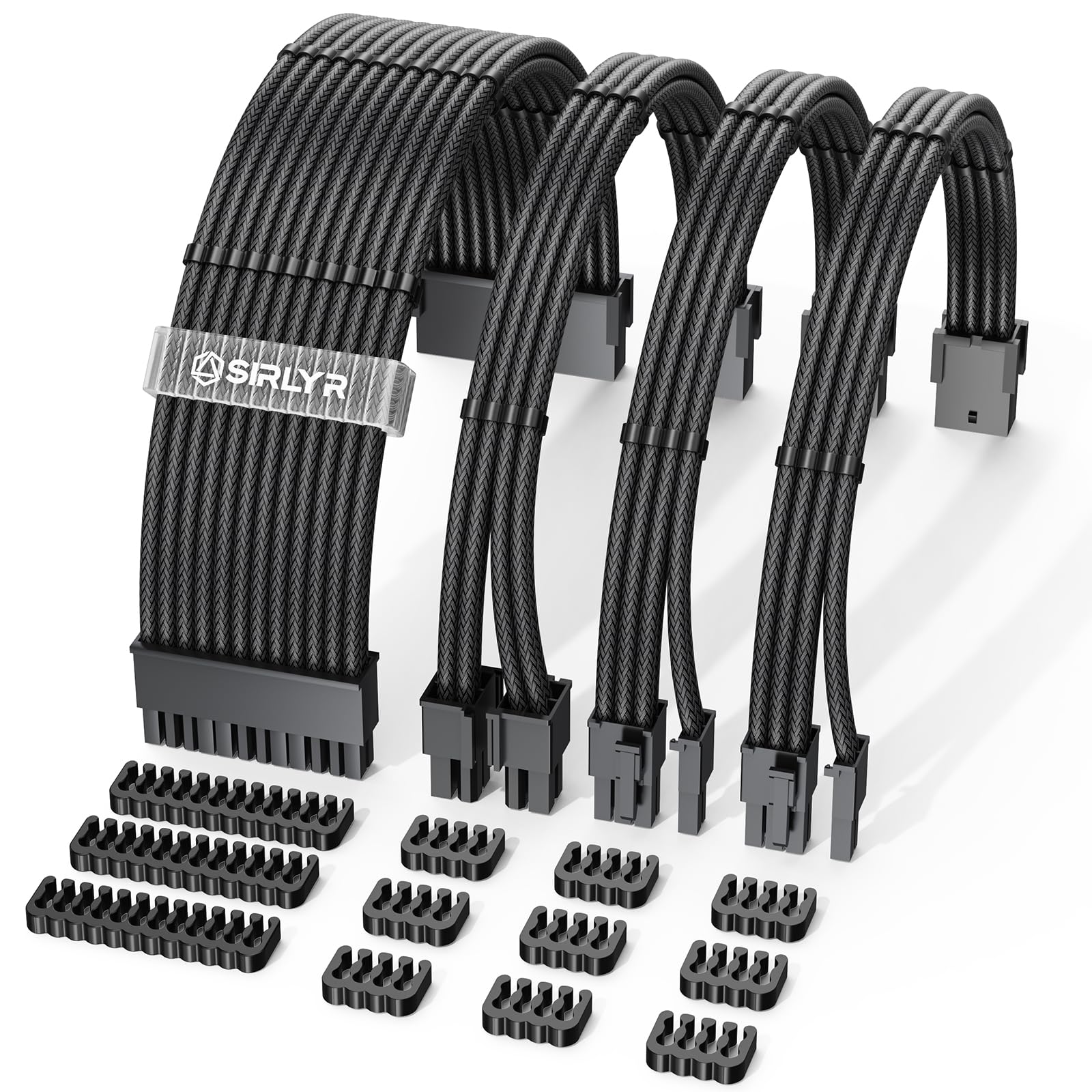
The Sirlyr PSU Cable Extension Kit includes a 24-pin ATX, an 8-pin (4+4) EPS, and two 8-pin (6+2) PCIe extensions, all built with 16AWG tinned copper wire containing 262 strands per conductor — a 60% increase in copper mass compared to the 163-strand 18AWG cables found in most stock PSU kits. This higher strand count reduces electrical resistance, which translates to lower operating temperatures under sustained 400W+ loads and fewer voltage sag events during transient GPU spikes.
The pre-bent design on the PCIe cables delivers a fixed curve that simplifies routing in cases with shallow cable channels. Each cable comes with dual cable combs pre-installed plus an additional set of combs for custom spacing. The black nylon braided sleeve resists oxidation and fading even when exposed to the exhaust heat of a rear-mounted GPU radiator. Gold-plated terminals on the 8-pin PCIe connectors improve conductivity and resist corrosion over time.
The 13-inch (34cm) length accommodates full-tower cases where the PSU is mounted in a bottom chamber far from the GPU. The pre-bent curve on the 8-pin PCIe cables creates an opposite bend direction (buckle on the outer arc) to match most GPU latch positions. For builds using a 6-pin GPU, the pigtail splits cleanly without leaving a dangling half-connector. The kit lacks RGB lighting, which keeps the price lower for users prioritizing function over aesthetics.
Why it’s great
- 262-strand 16AWG wire reduces resistance and runs cooler than stock 18AWG cables.
- Pre-bent PCIe cables simplify routing in cases with limited space behind the motherboard tray.
- Gold-plated 8-pin GPU terminals prevent oxidation and ensure stable contact.
Good to know
- Pre-bent curves limit flexibility for non-standard routing paths — requires pre-planning.
- No RGB option; designed for clean black builds that prioritize function over lighting.
6. SMEOZZ 16AWG PSU Cable Extension Kit
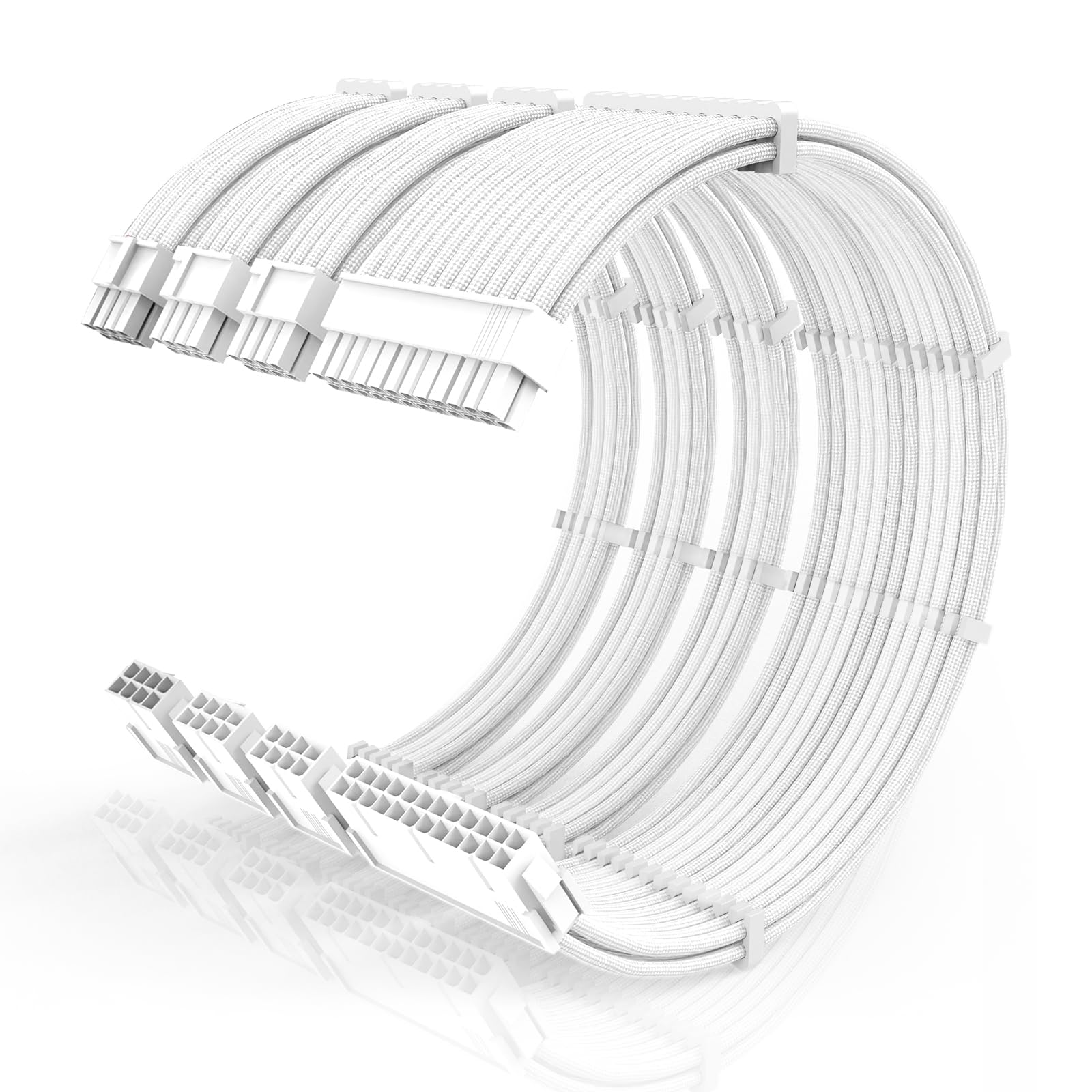
The SMEOZZ PSU Cable Extension Kit offers a 4-pack set (24-pin ATX, 4+4 EPS, and dual 6+2 PCIe) with genuine 16AWG copper wire at a price point that undercuts most competitors by roughly 15%. The nylon braided sleeving is soft and easy to bend, which helps when routing around tight corners in budget cases that lack generous cable management channels. The kit is available in both white and black connector housing variants, with white housing including 4 pure-white cable combs per line and black housing including 4 clear plus 4 black combs per line.
The 30cm length is standard for ATX cases, and the dual PCIe cables provide enough coverage for most single-GPU builds. The braided jacket resists fraying when trimmed with scissors, and the terminals maintain a firm click when inserted into both PSU and GPU ports. Users have reported successful use with SignalRGB via a separate controller for the ARGB variant (this kit lacks lighting), but the focus here is purely on clean power delivery and aesthetic matching for monochrome builds.
The primary limitation is the cable comb quality: the acrylic combs can crack if over-tightened, and the pre-installed combs are spaced for a standard fan-out that may not suit every layout. For budget-conscious builders who want a functional, low-resistance extension set without paying a premium for pre-bent curves or gold-plating, this kit delivers the core spec — 16AWG wire — at a price that leaves room for other accessories.
Why it’s great
- Genuine 16AWG copper wire at a price typically reserved for 18AWG kits.
- Soft nylon braiding reduces routing difficulty in cases without wide cable channels.
- Dual-color housing options (white or black) suit different build themes.
Good to know
- Cable combs are acrylic and can crack under pressure — handle gently when adjusting.
- No gold-plated terminals; standard tin-plated connectors are adequate but less corrosion-resistant.
7. upHere 5V Addressable RGB Graphics Card GPU Brace Support

The upHere GH03ARGB is a tool-free adjustable GPU brace that combines a segmented sliding mechanism with an anodized aviation aluminum base and a transparent acrylic support shaft built around a 5V ARGB LED strip. The brace’s sliding design allows height adjustment between roughly 30mm and 80mm, which covers the clearance range from a standard ATX motherboard to a full-tower vertical GPU mount. The bottom magnet secures the brace to a steel PSU shroud without adhesive, and the support pad at the top uses a silicone cushion to prevent scratching the GPU’s backplate.
The ARGB lighting syncs with the motherboard’s 5V 3-pin header and supports SignalRGB, ASUS Aura Sync, MSI Mystic Light, and Gigabyte Fusion. The transparent acrylic shell diffuses the LEDs evenly, creating a glow that complements rather than overpowers the case lighting. The segmented slider is locked in place with a threaded collar, and the support arm can be inverted for GPUs that sit closer to the motherboard tray.
Users have successfully supported EVGA RTX 3080 Ti FTW3 Ultra cards weighing over 1.6kg, but the acrylic shaft has been reported to develop hairline cracks under the sustained pressure of very heavy cards (above 1.8kg). The magnet is relatively weak and may slide around during transport or if bumped. For mid-weight cards (RTX 4060, RX 7700 XT), this is a visually clean and cost-effective sag solution, but owners of RTX 4090-class cards should consider a full-metal brace with a screw-clamp base.
Why it’s great
- Adjustable height range covers most ATX and full-tower chassis layouts.
- Anodized aluminum base provides a stable platform without tools.
- ARGB sync works with major motherboard lighting software for a unified look.
Good to know
- Acrylic support shaft may crack under sustained weight of ultra-heavy cards (1.8kg+).
- Base magnet is not strong enough for vertical transport — may shift if the case is moved.
FAQ
Will a 16AWG extension cable work with my existing modular PSU?
Does a GPU brace void the graphics card warranty?
Can I use a 12VHPWR adapter with an ATX 2.0 power supply?
Final Thoughts: The Verdict
For most users, the graphic card accessory that delivers the biggest functional and visual upgrade is the AsiaHorse Hydrus-8PIN because its integrated 90-degree ARGB design solves both cable clutter and lighting in a single, high-power-rated cable that works across nearly all modern 8-pin GPUs. If your priority is protecting a high-end card like the RTX 4090 from connector heat, grab the Fasgear 16 Pin GPU Adapter with its 12V-2×6 safety margin and 600W output. And for a simple, cost-effective sag fix, nothing beats the upHere GH03ARGB brace for its adjustable height and motherboard-synced lighting at a price that leaves room for other upgrades.