
Multicolor printing is no longer a fringe luxury—it’s the single most requested upgrade in desktop fabrication, and a proper 4-axis 3D printer (a machine that natively handles a fourth material channel or color) is how you get there without resorting to a messy, unreliable external add-on. Whether you’re prototyping a presentation-grade model or churning out Etsy inventory, the difference between a single-extruder slog and a seamless four-color workflow is measured in hours—and in the crisp, end-user-ready quality of the finished part.
I’m Min — the co-founder and writer behind Gadgets Feed. This guide is the result of weeks spent cross-referencing real print speeds, layer adhesion reports, purge waste ratios, and the 4-channel ecosystem maturity of every machine on this list, so you can match the right build volume and toolhead design to your actual production needs.
After combing through thousands of verified user experiences and technical spec sheets, I’ve assembled the most current and actionable ranking of the best 4 axis 3d printer options available right now, organized by use case and price tier to help you find your exact match.
How To Choose The Best 4 Axis 3D Printer
Every 4-axis or quad-color machine on the market today solves a slightly different version of the same problem: how to handle multiple filaments without constant jams, excessive purge waste, or manual swaps. The decision tree comes down to four core variables that separate a reliable multi-color workhorse from a weekend frustration.
Native 4-Channel vs. External Add-On
A genuine 4-axis 3D printer integrates the multi-filament path into the toolhead or print-head assembly, minimizing the tube length and retraction distance between the spool and the nozzle. External units like the Creality CFS upgrade kit can work, but they add complexity at the 4-in-1 connector and introduce more failure points for brittle or abrasive filaments. If you plan to print multi-color every day, a machine with a built-in quad-spool system—like the Anycubic Kobra X’s ACE Gen 2—will deliver fewer jams and a cleaner purge cycle than a retrofit.
Purge Volume and Filament Waste
Every color change requires purging the previous filament from the hotend. The volume of that purge—measured in cubic millimeters or grams—directly impacts your operating cost. Machines that use a single nozzle for all colors (common on budget to mid-range units) tend to waste more filament per switch than multi-toolhead designs. However, the purge waste on a single-nozzle quad-color machine can be reduced by intelligent sequencing and shorter travel paths. Look for printers that advertise a reduced travel path (like the Kobra X’s 81.25% reduction) or a dedicated filament cutter that minimizes the leftover tail.
Maximum Speed vs. Quality at 4-Colors
CoreXY machines routinely advertise 500-600 mm/s print speeds, but multi-color printing introduces toolhead acceleration penalties and vibration from the added filament path weight. A printer with a rigid frame, vibration compensation, and a direct-drive extruder rated for 300°C or higher will maintain layer quality across color transitions. The Bambu Lab P1S and ELEGOO Centauri Carbon both use CoreXY + auto-calibration to keep speed and precision balanced, even when switching between four spools mid-print.
Build Volume and Material Range
If your primary use is large functional prototypes or engineering-grade parts, prioritize a machine with a 256mm³ or larger build volume and a hotend that reaches 320°C or more (for carbon-fiber nylon or polycarbonate). For hobbyist tabletop figures or signage, a 220mm³ print area with a 300°C nozzle and PLA/PETG/TPU support is plenty. The QIDI Max4 Combo, with its 390×390×340mm volume and 65°C heated chamber, is the obvious choice for industrial users who need to print full-size parts in engineering materials without splitting models.
Quick Comparison
On smaller screens, swipe sideways to see the full table.
| Model | Category | Best For | Key Spec | Amazon |
|---|---|---|---|---|
| Anycubic Kobra X (ACE Gen 2) | Mid-Range | Best Overall 4-Color Value | 600 mm/s, 260mm³, 4-color native | Amazon |
| Anycubic Kobra X (Family Kit) | Mid-Range | Beginner & Family Multi-Color | 45dB, 49-point LeviQ 3.0 leveling | Amazon |
| FLASHFORGE AD5X | Mid-Range | Reliable CoreXY 4-Color | 600 mm/s, 300°C Direct Drive | Amazon |
| Creality K1 Series CFS Upgrade | Mid-Range | Add-on 16-Color for K1 Users | 16-color max via 4 CFS units | Amazon |
| ELEGOO Centauri Carbon | Mid-Range | Plug-and-Play CoreXY Workhorse | 500 mm/s, 320°C nozzle, 256mm³ | Amazon |
| Bambu Lab P1S | Mid-Range | Enclosed 16-Color Ecosystem | 500 mm/s, enclosed, auto-leveling | Amazon |
| Creality K2 Combo (A) | Premium | 16-Color Production with CFS | 600 mm/s, 260mm³, step-servo motors | Amazon |
| Creality Ender 5 Max | Premium | Large Volume Print Farm | 700 mm/s, 400mm³, dual-gear extruder | Amazon |
| QIDI Max4 Combo | Premium | Industrial Engineering Materials | 800 mm/s, 390mm³, 65°C chamber | Amazon |
| Prusa CORE One | Premium | Long-Term Reliability & Open Source | 55°C chamber, CoreXY, 250x220x270mm | Amazon |
| Prusa XL 5-Tool | Premium | Professional 5-Material Production | 360mm³, 5 independent toolheads | Amazon |
In‑Depth Reviews
1. Anycubic Kobra X Multicolor 3D Printer

The Anycubic Kobra X is the rare quad-color machine that delivers native 4-spool printing out of the box without requiring an expensive add-on module. Its ACE Gen 2 system handles color switching at the printhead with a claimed 81.25% reduction in travel path, which translates directly to less purge waste per transition compared to earlier single-nozzle multi-color designs.
At 600 mm/s max speed and a 260mm³ build volume, it competes with machines twice its price tier. The LeviQ 3.0 auto-leveling uses a 49-point calibration to ensure bed flatness, and the integrated AI camera detects spaghetti failures or foreign objects on the print bed. Reviewers consistently report flawless first layers and crisp multi-color results with PLA, PETG, and TPU across hundreds of print hours.
The main tradeoff is software polish—the Anycubic Slicer is functional but lacks the ecosystem depth of Bambu Studio or PrusaSlicer. That said, the open nature of the machine means you can adapt OrcaSlicer profiles without much hassle. For makers who want true quad-color printing at a mid-range price, this is the most complete package available.
Why it’s great
- Native 4-color ACE Gen 2 system with minimal purge waste
- 600mm/s CoreXY speed with vibration compensation
- 49-point auto bed leveling ensures reliable first layers
Good to know
- Proprietary slicer has fewer advanced features than Bambu Studio
- Spool holders feel slightly flimsy compared to competitors
2. ANYCUBIC Kobra X Fast 3D Printer (Family Kit)
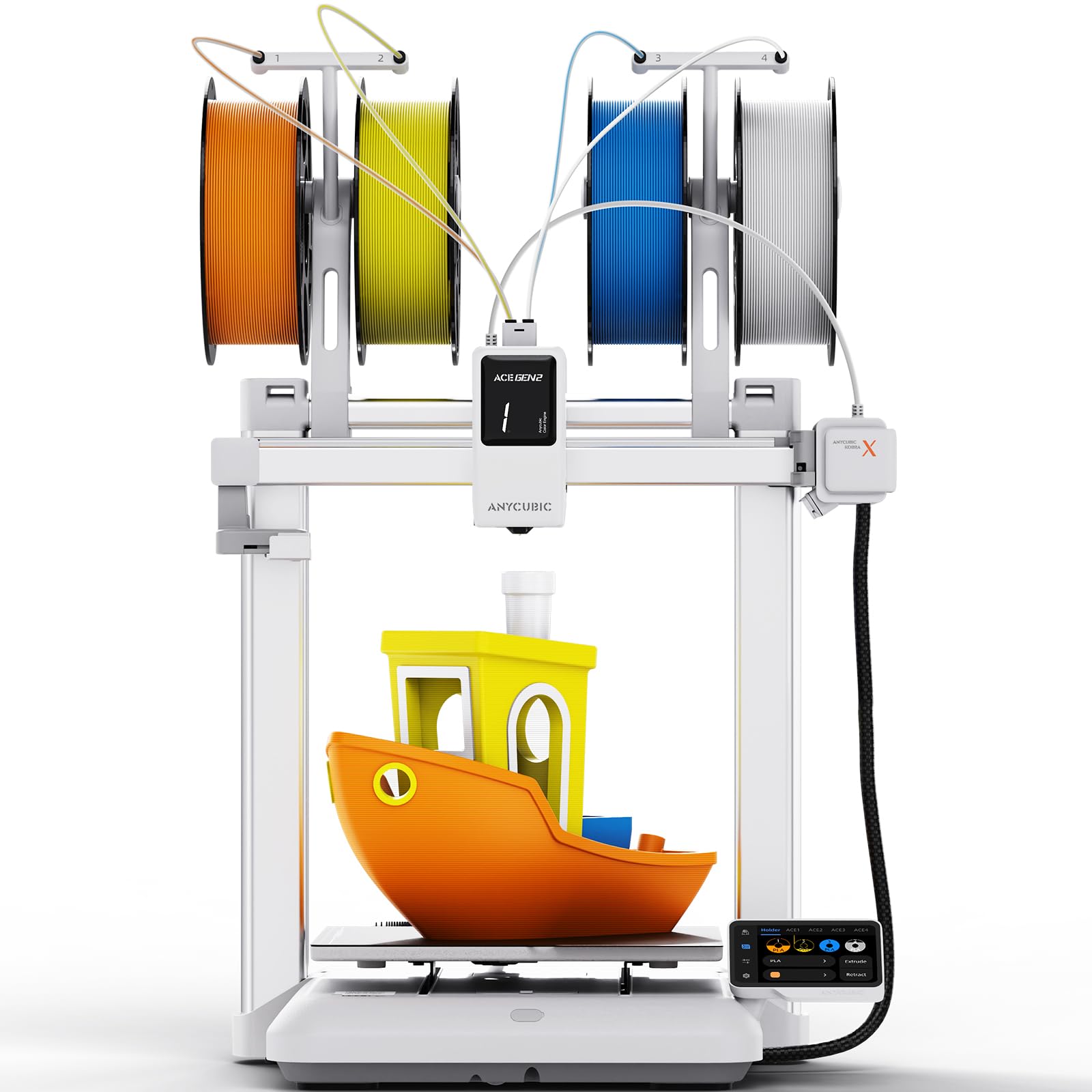
This version of the Kobra X is specifically tuned for family and educational use, bundling the same ACE Gen 2 quad-color system with a simplified 15-minute assembly and a 45dB noise profile that’s quieter than typical conversation. The 49-point LeviQ 3.0 leveling and 0.02mm accuracy ensure that even first-time users get a perfect first layer without manual knob-turning.
Print quality is identical to the standalone Kobra X, meaning you still get 600mm/s maximum speed, a 260mm³ build volume, and the same AI-powered spaghetti detection via the integrated 720P camera. The unique advantage here is the emphasis on safety—foreign object detection pauses the print immediately, which is a significant peace-of-mind feature for unsupervised classroom or home use.
The only notable difference is packaging: this kit includes additional family-oriented print model libraries and clearer multilingual instructions. The touchscreen and app experience are identical to the base model. If you need to put a quad-color printer into a shared space with kids or beginners, this build delivers the same multi-color reliability with a quieter, safer envelope.
Why it’s great
- 45dB ultra-quiet operation suitable for living spaces
- AI foreign object and spaghetti detection for safe unsupervised printing
- 15-minute unboxing-to-print setup is genuinely beginner-friendly
Good to know
- Single-nozzle design still produces significant purge waste on color changes
- Camera angle is fixed and may not show the full build plate
3. FLASHFORGE AD5X Multi-Color 3D Printer

The FLASHFORGE AD5X brings a proper CoreXY architecture to the sub- multi-color segment, achieving 600 mm/s with 20,000 mm/s² acceleration. Its 300°C direct-drive extruder handles PLA, PETG, and TPU without issues, and the 1-click auto leveling system has been praised for delivering consistent first layers even on warped beds.
Multi-color support is handled through a 4-in-1 filament system that feeds into a single nozzle. Users report that the color transitions are smooth and the purge waste is manageable—though the single-nozzle design means every color change requires a significant purge tower. The 220x220x220mm build volume is smaller than the Kobra X, which may limit larger multi-color projects.
The software ecosystem is the main weak point. Flash Maker’s slicer is a basic OrcaSlicer fork with a steeper learning curve, and the mobile app has low ratings. However, the hardware is robust: vibration compensation, dual-channel cooling fans, and support for nozzle swaps from 0.25mm to 0.8mm give it versatility that rivals more expensive machines. For users willing to invest time in tuning the slicer, the AD5X delivers print quality that punches above its price.
Why it’s great
- Genuine CoreXY delivers fast, stable high-speed printing
- Interchangeable nozzle sizes (0.25–0.8mm) for extreme detail or speed
- Excellent first-layer adhesion on PEI plate
Good to know
- Slicer and mobile software need improvement
- Single-nozzle color changes produce more waste than multi-toolhead designs
4. Creality K1 Series CFS Upgrade Kit

This is not a standalone printer—it’s the official Creality CFS (Creality Filament System) upgrade kit that converts your existing K1 Max, K1C, K1, or K1 SE into a quad-color machine, with support for up to 16 colors by chaining four CFS units. The kit includes the upgrade module with an integrated hardened steel cutter and filament run-out sensor.
Installation is straightforward: attach the CFS to the printer frame, connect the filament path, and update the firmware. Users report that the system handles automatic RFID filament recognition and smooth color switching, though the purge waste is higher than native multi-nozzle designs. The kit works with standard Creality RFID spools, but paper spools are not recommended due to feeding reliability issues.
The catch is compatibility: this kit is explicitly not compatible with the 2025 versions of the K1 Max, K1C, K1, and K1 SE. Buyers must verify their printer’s manufacturing date before purchasing. For existing K1 owners, this is the most cost-effective path to 4-axis printing without buying a new machine, but the added complexity at the 4-in-1 connector can cause clogs that are harder to clear than on native quad-color printers.
Why it’s great
- Affordable upgrade path for existing Creality K1 owners
- Scales to 16 colors with 4 CFS units for complex projects
- RFID filament recognition simplifies material management
Good to know
- Not compatible with 2025 K1 models—check your serial number
- More prone to clogs at the 4-in-1 connector than native designs
5. ELEGOO Centauri Carbon 3D Printer

The Centauri Carbon is ELEGOO’s answer to the growing demand for a fully assembled, pre-calibrated CoreXY machine that prints at 500 mm/s out of the box. Its rigid die-cast aluminum frame and automatic vibration compensation make it exceptionally stable at speed, and the 320°C brass-hardened steel nozzle allows printing of advanced materials like carbon-fiber reinforced filaments from day one.
Multi-color capability comes via a companion add-on (sold separately), but the base machine is optimized for single-spool high-speed production. The 256x256x256mm build volume is generous for its footprint, and the built-in chamber camera with dual LED lighting supports real-time monitoring and time-lapse capture. The dual-sided PEI plate has a specific PLA Surface that provides excellent adhesion at lower bed temperatures.
User feedback is overwhelmingly positive, with many praising the zero-assembly experience and the quality of first-layer adhesion. However, the Centauri Carbon is not a true 4-axis printer out of the box—it requires the separate multi-color module. The machine also shakes noticeably on lightweight surfaces, so a sturdy table is mandatory. For users who prioritize build quality and material versatility over native quad-color, this is a strong mid-range contender.
Why it’s great
- Fully assembled and pre-calibrated with zero setup required
- Die-cast aluminum frame and vibration compensation for stable high-speed prints
- 320°C nozzle enables carbon-fiber and other advanced filaments
Good to know
- Multi-color module sold separately—not a native 4-axis printer
- Shakes significantly on non-rigid surfaces; needs a heavy table
6. Bambu Lab P1S 3D Printer

The Bambu Lab P1S is the enclosed workhorse of the Bambu ecosystem, offering 500 mm/s CoreXY speed, auto bed leveling, and full compatibility with the Bambu AMS (Automatic Material System) for up to 16 colors. The enclosed chamber with active cooling makes it suitable for ABS and ASA printing—materials that require stable ambient temperatures to avoid warping.
Setup takes under 30 minutes, and the Bambu Studio slicer is widely regarded as the most polished software in the consumer 3D printing space. The P1S auto-levels before every print, and users report dimensional accuracy that rivals more expensive industrial machines. The 260x260x260mm build volume is a standard sweet spot that fits most project needs.
The AMS itself is an additional purchase, and it currently supports only PLA, PETG, TPU, PVA, PET, ABS, and ASA—carbon-fiber or glass-fiber filaments are not recommended. The P1S also requires a cloud connection for its most advanced features, which may be a concern for privacy-conscious users. That said, the combination of reliability, speed, and software polish makes it the default choice for users who want a no-fuss multi-color upgrade path.
Why it’s great
- Polished Bambu Studio slicer with excellent print profiles
- Fully enclosed for advanced materials like ABS and ASA
- Auto-leveling and filament detection ensure hands-off operation
Good to know
- AMS multi-color module sold separately—adds to total cost
- Cloud-dependent for advanced features; limited offline functionality
7. Creality K2 Combo (A) 3D Printer

The Creality K2 Combo ships with the CFS filament system already included, making it a true native quad-color machine out of the box, expandable to 16 colors with additional CFS units. Its step-servo motor system adjusts torque dynamically in under a millisecond, delivering smoother motion and quieter operation than traditional stepper motors.
Build quality is a step above Creality’s earlier offerings. The enclosed frame and 260x260x260mm build volume handle PLA, PETG, ABS, and carbon-fiber filaments. The AI camera monitors for spaghetti failures and idling, and the auto-leveling system probes only the print area—resulting in faster calibration cycles. Users report that the 4-color prints come out vibrant with minimal layer lines.
The downsides are primarily quality control related. Some units arrive with defective CFS slots or power cord issues, and the documentation for the K2 Combo workflow is sparse compared to Bambu’s guides. The CFS also requires RFID spools or printed adapters for standard spools, which adds friction for users with existing filament collections. At this premium price point, the inconsistency is disappointing, but the hardware potential is undeniable.
Why it’s great
- Native CFS included in the box for immediate 4-color printing
- Step-servo motors for ultra-quiet operation and precise extrusion
- Expandable to 16 colors for complex production projects
Good to know
- QC issues reported—CFS slots and power cords can be defective
- CFS requires RFID spools or 3D-printed adapters for standard spools
8. Creality Ender 5 Max 3D Printer

The Ender 5 Max is built for scale. With a 400x400x400mm build volume and a 700 mm/s CoreXY system, it’s designed to batch-produce large parts or multiple models in one go. The 1000W rapid-heating bed reaches working temperature in minutes, and the dual-gear extruder is engineered for 24/7 reliability in print-farm environments.
The 64-point auto leveling system with automatic Z-offset ensures consistent first-layer adhesion across the massive build plate. WLAN multi-printer control allows grouped management of multiple units, making it a viable option for small businesses scaling up production. The reinforced die-cast aluminum frame and precision X-axis linear rail minimize vibration even during tall or heavy prints.
Multi-color capability is not native to the Ender 5 Max—it requires the separate CFS upgrade kit. Also, the included camera is basic (Nebula USB) and the AI failure detection is unreliable compared to flagship models. The build volume is the real hero here: if you need to print helmet parts or signage without splitting models, nothing else at this price comes close. However, the reliability reports are polarizing—some units fail within hours of first use.
Why it’s great
- Massive 400mm³ build volume for oversized or batch production
- 700 mm/s speed with 1000W rapid-heating bed for fast turnaround
- WLAN multi-printer control for print-farm management
Good to know
- No native multi-color; requires CFS upgrade kit
- Mixed reliability reports—some units fail within the first 10 hours
9. QIDI Max4 Combo 3D Printer

The QIDI Max4 Combo is a heavy-duty machine aimed at industrial and engineering users. Its 390x390x340mm build volume is 55% larger than its predecessor, and the 65°C active heated chamber can handle high-temperature materials like ABS-CF, PC, and even PPS-CF. The 800 mm/s max speed and 30,000 mm/s² acceleration are made possible by closed-loop motors on the X/Y axes.
The QIDI BOX add-on (sold separately) enables up to 16-color multi-material printing with real-time filament level monitoring and automatic pause on filament runout. The machine also features an integrated AI camera that detects printing abnormalities and pauses to save material. Support for standard and abrasive filaments is excellent, with a 40mm³/s high-flow hotend and hardened steel nozzle.
At 120 pounds and over , this is not a casual purchase. The setup is plug-and-play, but the size and weight demand a dedicated workstation. Users love the print quality with engineering filaments and the open-source nature of the firmware. The main complaints involve a choppy touchscreen UI, long pre-print heat-up times, and high initial power draw. This is the machine to pick if you need production-grade parts in advanced materials.
Why it’s great
- 65°C heated chamber for industrial materials like PC and PPS-CF
- 800 mm/s speed with closed-loop motors for high precision
- Expandable to 16 colors with QIDI BOX for multi-material engineering
Good to know
- Heavy (120 lbs) and requires a permanent dedicated space
- Touchscreen UI is less responsive than Bambu or Prusa interfaces
10. Original Prusa CORE One

The CORE One is Prusa’s first CoreXY machine, built on the same “made to last” philosophy that made the MK4 a legend. The enclosed chamber reaches 55°C with active temperature control, supporting everything from PLA and PETG (with the door closed) to demanding materials like ASA, PC, and Nylon. The all-steel exoskeleton frame ensures maximum rigidity.
Print quality is exceptional out of the box, with PrusaSlicer providing the most mature and reliable print profiles in the industry. The 250x220x270mm build volume is smaller than many CoreXY competitors, but the dimensional accuracy and surface finish are consistently rated among the best. The machine is fully open-source, with no cloud lock-in, and Prusa offers lifetime technical support.
Multi-color support is not native to the CORE One—it requires the separate MMU3 upgrade, which adds significant cost and complexity. The assembly process (if you choose the kit version) takes around 25 hours, though the pre-assembled version is ready to print in minutes. The CORE One is the right choice for users who prioritize long-term reliability, repairability, and software freedom over raw speed or max color count.
Why it’s great
- Fully open-source with no cloud dependency—full control over your prints
- 55°C active chamber for advanced materials like PC and Nylon
- PrusaSlicer profiles provide the most reliable print quality in the industry
Good to know
- Multi-color requires the MMU3 add-on (expensive and complex)
- Build volume is smaller than many CoreXY competitors at this price
11. Original Prusa XL 5 Independent Toolhead

The Prusa XL 5-Tool is the ultimate expression of multi-material 3D printing in the consumer-pro space. With five independent toolheads, the XL can print up to five different materials or colors in a single job without the purge waste of single-nozzle systems—each toolhead has its own dedicated extruder and nozzle, so color changes are instant and waste-free. The 360x360x360mm build volume enables large-scale functional prototypes and full-color models.
The segmented heated bed system heats only the zones under active prints, improving energy efficiency and reducing warping on large models. The machine integrates seamlessly with Prusa Connect and Printables.com for remote management. Build quality is outstanding, with a heavy steel frame that absorbs vibration completely.
The price is the obvious barrier, placing it in a completely different league from the rest of this list. Assembly is not trivial—some sensitive components ship uninstalled, requiring up to half a day of setup. The XL is overkill for most hobbyists, but for professional designers, engineers, or studios that need production-grade multi-material prints with zero purge waste, it’s the only machine that truly delivers independent 5-axis material handling.
Why it’s great
- 5 independent toolheads eliminate purge waste entirely during color changes
- Segmented heated bed reduces energy use and warping on large prints
- Open-source, repairable design with lifetime Prusa support
Good to know
- Extremely expensive—more than 3x the cost of any other printer here
- Requires significant setup time and a solid understanding of 3D printing
FAQ
What makes a 3D printer a true 4-axis machine?
How much filament waste should I expect from a 4-color print?
Can I print a 4-color model on a printer with a 0.4mm nozzle without clogs?
Final Thoughts: The Verdict
For most users, the best 4 axis 3d printer winner is the Anycubic Kobra X Multicolor because it delivers native quad-color printing, a 600mm/s CoreXY speed, a 260mm³ build volume, and AI monitoring at a mid-range price with minimal setup friction. If you want a polished ecosystem with an enclosed chamber for engineering materials, grab the Bambu Lab P1S with its AMS upgrade for seamless 16-color expansion. And for professional multi-material production with zero purge waste and the largest build volume, nothing beats the Prusa XL 5-Tool.