
An aesthetic computer mouse is no longer just a peripheral — it’s a deliberate statement on your desk. The glossy clear shell, the pastel gradient, the compact silhouette that matches your laptop sleeve; these details signal that function and form can coexist. But the market is flooded with cheap plastic that looks good in photos and fails in daily use, forcing you to choose between a beautiful desk and reliable tracking.
I’m Min — the co-founder and writer behind Gadgets Feed. After analyzing the sensor specs, battery life figures, and real-world customer testing data for dozens of models, I’ve separated the visually pleasing from the genuinely functional to find the true winners for your workspace.
This guide focuses exclusively on models that blend thoughtful design with solid engineering, helping you find the best aesthetic computer mouse that actually performs as well as it looks on your desk.
How To Choose The Best Aesthetic Computer Mouse
Not every visually striking mouse is built to last. The glossy finish that looks stunning in product photos can become a fingerprint magnet within hours, and a cute shape might force your hand into an uncomfortable claw grip. You need to look beneath the paint job at the sensor, the battery, and the connectivity.
Sensor Performance and DPI Range
An optical sensor with at least 1200 DPI ensures smooth cursor movement on standard surfaces. Higher DPI counts like 4800 or 8000 allow you to use the mouse on glass desks or textured tabletops without jitter. Mice with adjustable DPI levels give you flexibility — low DPI for precise editing, high DPI for rapid navigation across multiple monitors.
Connectivity Options
Bluetooth is convenient for swapping between a MacBook and an iPad, but it can introduce latency or dropouts in crowded wireless environments. A 2.4GHz USB receiver offers near-zero lag and rock-solid stability, but it occupies a port. Triple-mode mice (Bluetooth + 2.4GHz + wired) provide the best of both worlds, letting you choose based on your current setup.
Battery Life and Charging
A rechargeable lithium-ion battery with USB-C charging is the gold standard — no disposable AAA batteries, no hunting for a micro-USB cable. Look for models that claim at least 150 hours of use per charge. The ability to use the mouse while it charges is a practical bonus that saves you from downtime.
Quick Comparison
On smaller screens, swipe sideways to see the full table.
| Model | Category | Best For | Key Spec | Amazon |
|---|---|---|---|---|
| Logitech MX Anywhere 3S for Mac | Premium | Mac users needing precise tracking | 8K DPI sensor, MagSpeed scroll | Amazon |
| elec Space USB C Cartoon Mouse | Premium-Mid | Portable use with cute design | Triple-mode, 2400 DPI | Amazon |
| Lekvey Ergonomic Vertical Mouse | Mid-Range | Reducing wrist strain stylishly | Rechargeable, 1600 DPI | Amazon |
| TECKNET Ergonomic Vertical Mouse | Mid-Range | Long battery life and multi-device | 4800 DPI, 12-month battery | Amazon |
| FOPATO Travel Mouse Pink | Mid-Range | Travel-friendly dual-mode use | Bluetooth + 2.4G, 1200 DPI | Amazon |
| elec Space Floating Animal Mouse | Budget | Fun desk accessory for kids | 2.4G, silent clicks | Amazon |
In‑Depth Reviews
1. Logitech MX Anywhere 3S for Mac

The Logitech MX Anywhere 3S for Mac sets the standard for what an aesthetic computer mouse should be: a compact, Pale Grey body that matches the Apple ecosystem while packing an 8K DPI sensor that tracks on glass surfaces without a mousepad. The MagSpeed electromagnetic scroll wheel auto-switches between ratchet and free-spin modes, letting you blaze through 1,000 lines per second or stop on a single pixel with zero over-scroll. Logi Options+ software unlocks app-specific customizations for the six buttons, making this a productivity powerhouse disguised as a minimalist accessory.
Bluetooth Low Energy pairs up to three devices simultaneously — MacBook Pro, iPad, iMac — and the connection is rock-solid without the need for a USB receiver. The quiet clicks reduce noise by 90 percent compared to standard mice, which matters in an open-plan office or a shared workspace. USB-C charging delivers weeks of battery life from a short top-up, and the Pale Grey finish resists fingerprints better than glossy alternatives.
The compact form factor is ideal for smaller hands or for users who prefer a fingertip grip, though users with larger palms may find it undersized for extended use. The sensor tracking is flawless across wood, marble, glass, and fabric, eliminating the need to carry a dedicated mousepad when working from coffee shops or co-working spaces.
Why it’s great
- 8K DPI tracks on any surface including glass
- MagSpeed scroll wheel is the fastest and most precise on the market
- Quiet clicks with satisfying tactile feedback
- USB-C charging with weeks of battery life
Good to know
- Compact size may not suit users with larger hands
- Side buttons not supported on macOS by default
2. elec Space USB C Cartoon Mouse
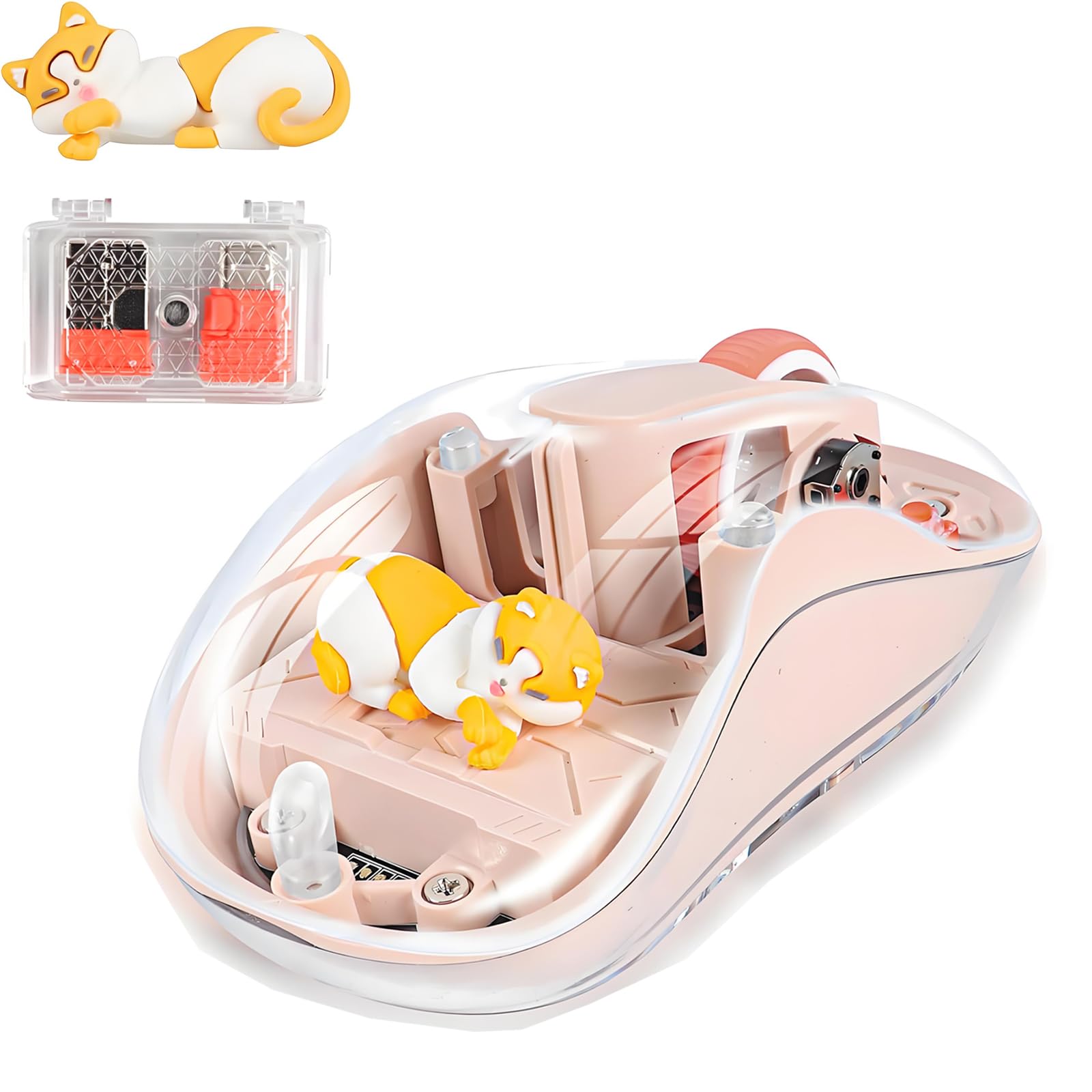
The elec Space USB C Cartoon Mouse in Milk Tea color proves that a playful design doesn’t have to sacrifice performance. This triple-mode mouse supports Bluetooth, 2.4GHz, and USB-C wired connections, giving you flexibility across a laptop, iPad, and Android tablet. The optical sensor offers four adjustable DPI levels (800, 1200, 1600, 2400), allowing you to dial in the cursor speed that matches your workflow, whether you’re editing photos or navigating spreadsheets.
The silent click mechanism is genuinely quiet — no audible click echoes in a library or late-night work session. The USB-C rechargeable battery lasts multiple days on a single charge, and the four-LED battery indicator on the top panel shows remaining capacity at a glance, preventing unexpected power loss. Weighing just 112 grams, it’s light enough to toss into a bag without adding noticeable bulk, and the glossy Milk Tea finish adds a calm, warm accent to any desk.
The 10-meter wireless range covers most rooms without dropouts, and the plug-and-play USB receiver requires no driver installation on Windows, macOS, or Chrome OS. The cartoon character design is subtle enough to blend into a professional workspace while still offering a touch of personality that stands out from the sea of black and gray peripherals.
Why it’s great
- Triple-mode connectivity covers every modern device
- Adjustable DPI from 800 to 2400 for different tasks
- USB-C rechargeable with visible battery indicator
- Lightweight and portable at 112 grams
Good to know
- Glossy finish shows smudges over time
- Only 3 buttons; no forward/back navigation
3. Lekvey Ergonomic Vertical Mouse
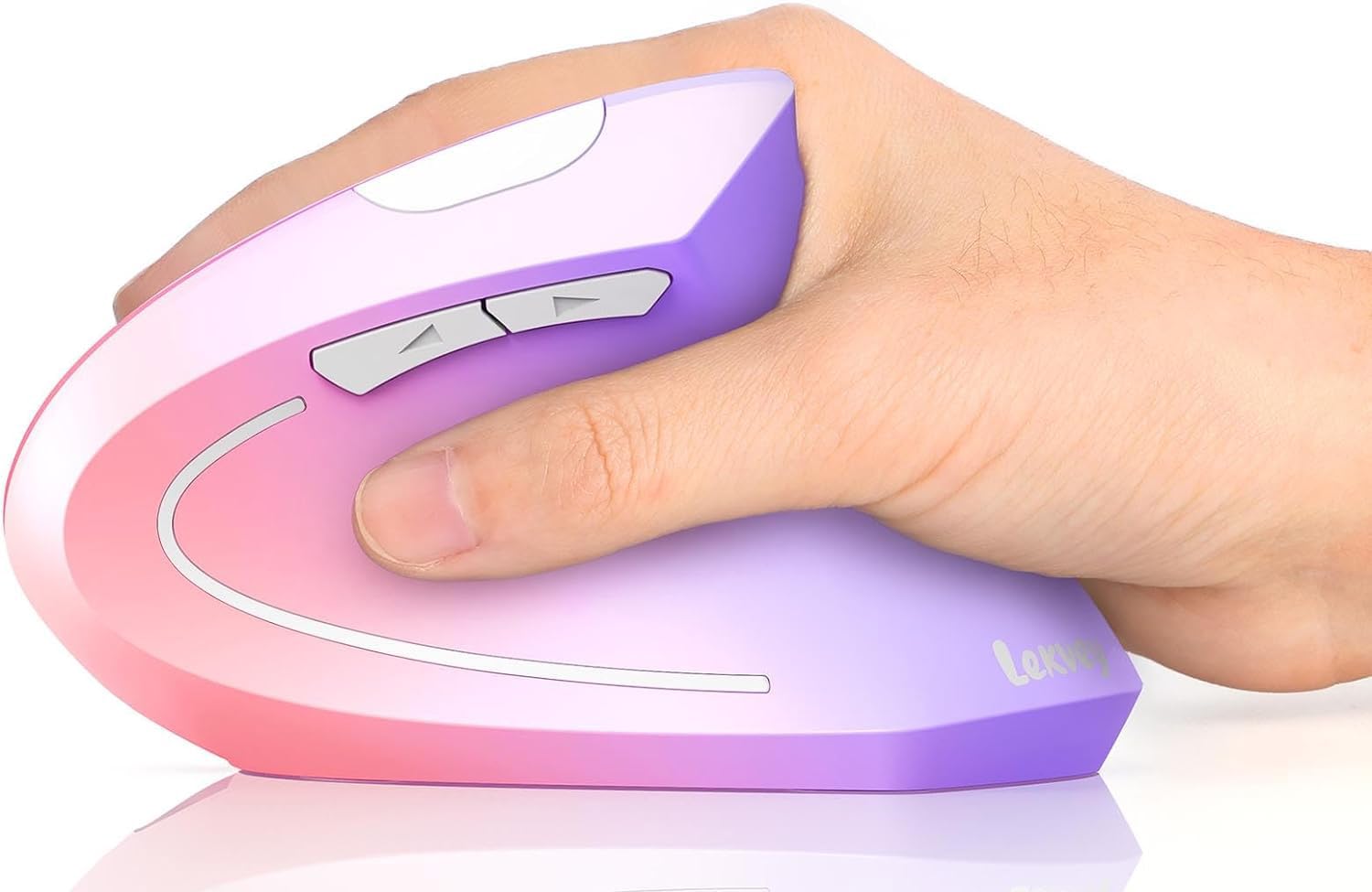
The Lekvey Ergonomic Vertical Mouse in Pink to Purple gradient is the rare aesthetic mouse that prioritizes wrist health without compromising on looks. Its handshake-angle design rotates the palm into a neutral position, reducing pressure on the carpal tunnel and forearm muscles during eight-hour workdays. The optical sensor supports three DPI levels (800, 1200, 1600), giving you enough range for both precision work and fast window navigation, while the metal scroll wheel feels premium and durable under repeated use.
The built-in rechargeable battery charges fully in about three hours and provides up to 150 hours of continuous use — a solid month of typical office work. The 2.4GHz USB receiver is tucked away in the bottom compartment, so you won’t lose it during travel. The gradient finish transitions smoothly from pink at the top to purple at the base, making it one of the more visually distinct options in the ergonomic category. Six buttons including forward and back navigation streamline browsing without reaching for the keyboard.
The left and right buttons operate with low-noise clicks that won’t disturb nearby colleagues, and the mouse automatically enters sleep mode after 20 minutes of inactivity to conserve power. Users with smaller hands should note that the vertical form factor is larger than traditional mice, but the ergonomic payoff is substantial for anyone dealing with wrist fatigue from a standard flat mouse.
Why it’s great
- Handshake-angle design reduces wrist strain significantly
- 150-hour rechargeable battery lasts weeks
- Gradient color scheme stands out on any desk
- Metal scroll wheel feels premium
Good to know
- Too large for users with small hands
- Some units report scroll wheel failure after extended use
4. TECKNET Ergonomic Vertical Mouse
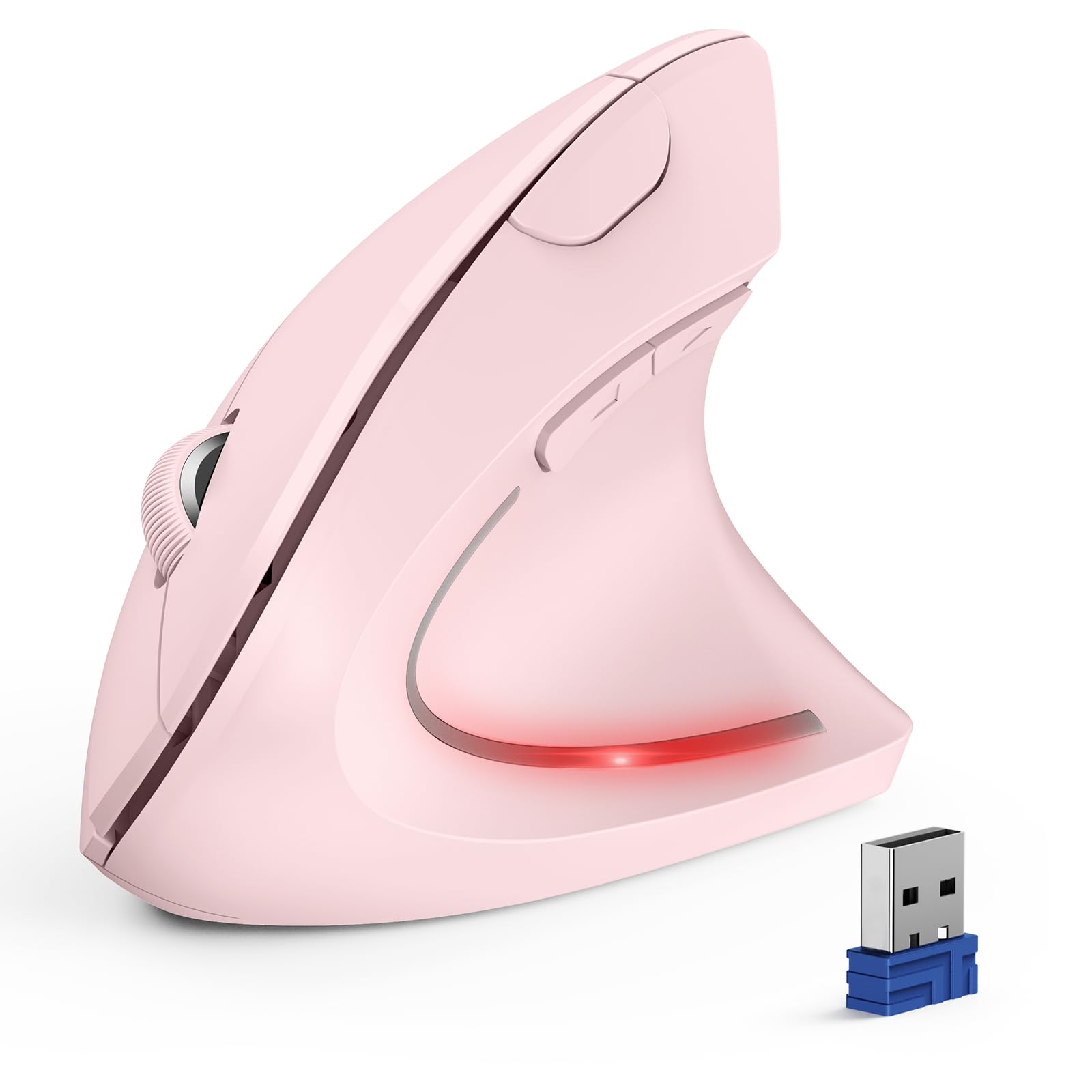
The TECKNET Ergonomic Vertical Mouse in Pink combines a near-vertical palm angle with six adjustable DPI levels ranging from 800 to a full 4800 — enough sensor resolution to handle 4K or even 5K monitors without cursor lag. This mouse uses two AAA batteries (not included), but its power management is so efficient that a single set can last up to 12 months under normal daily use, making it the lowest-maintenance option in this roundup. The Bluetooth 5.0 and 2.4GHz dual-mode connectivity lets you pair with up to three devices and switch between them with a bottom button.
The left and right buttons are genuinely silent, producing a muted thud rather than a sharp click, which makes a tangible difference in quiet office environments. Four additional buttons — forward, back, DPI switcher, and mode selector — give you full control without reaching for the keyboard. The DPI indicator light flashes in a sequence corresponding to the selected level, so you always know your current sensitivity. The ergonomic shape forces the hand into a handshake posture, which effectively reduces wrist pronation and the associated fatigue over long sessions.
The 2.4GHz receiver stores magnetically in the bottom compartment, preventing loss. The mouse enters deep sleep after 10–30 minutes of inactivity, and a quick click on any button wakes it instantly. The Pink color option adds a subtle pastel accent without being overly flashy, making it suitable for both home offices and professional workstations. Some users report the scroll wheel can develop issues after several months, but the 36-month warranty provides peace of mind.
Why it’s great
- Up to 12-month battery life on two AAA batteries
- 4800 DPI sensor handles high-resolution monitors smoothly
- Triple-device connectivity via Bluetooth and 2.4GHz
- Silent clicks for quiet workspace
Good to know
- AAA batteries not included
- Scroll wheel durability issues reported by some users
5. FOPATO Travel Mouse Pink
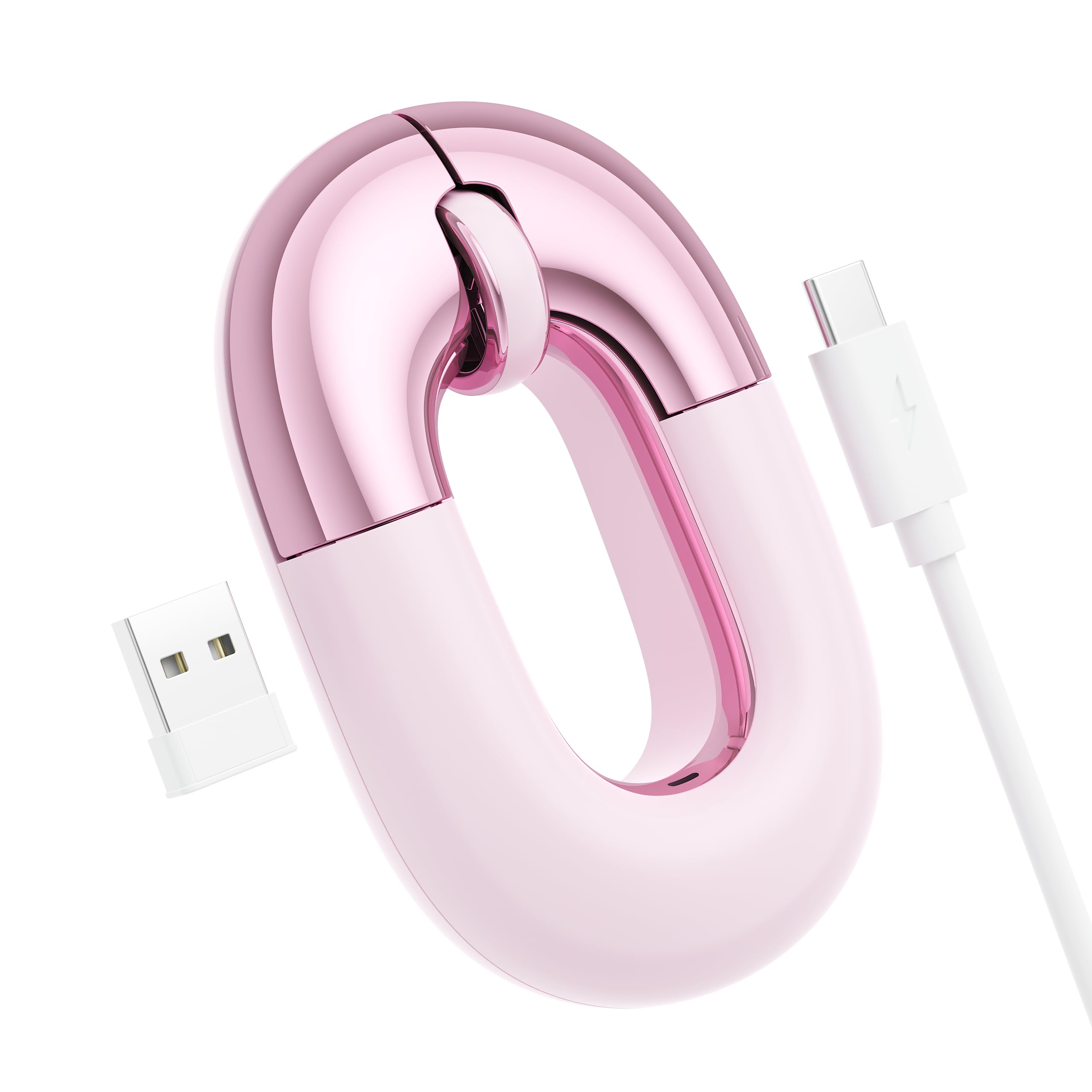
The FOPATO Travel Mouse Pink is a dual-mode wireless mouse designed specifically for portability, weighing just 56 grams — light enough that you might forget it’s in your bag. It supports both Bluetooth and 2.4GHz connections, allowing you to pair with a laptop, tablet, or smartphone and switch between them with a single button. The 1200 DPI optical sensor delivers smooth tracking on standard desk surfaces, though it struggles on fully transparent glass tables. The donut-inspired design in a dusty rose pink metallic finish gathers compliments from coworkers and cafe neighbors alike.
The rechargeable battery lasts up to 20 days on a single charge, and the USB-C charging cable attaches neatly with a built-in velcro strap for organized travel storage. The five buttons include forward and back navigation, making it easy to browse the web without stretching your thumb. The silent clicks produce minimal noise, which is essential when using the mouse in a quiet library or during a late-night flight. The flat profile fits easily into a laptop pocket or purse, and the metallic finish resists fingerprints better than glossy plastic alternatives.
The compact size is a double-edged sword — it’s perfect for small to medium hands and for users who prefer a fingertip grip, but extended use may cause wrist fatigue for users with larger palms. The tracking is reliable on wood, fabric, and plastic surfaces, and the Bluetooth connection pairs without fuss to both macOS and Windows devices. For the commuter, student, or remote worker who values desk aesthetics and daily carry convenience, this mouse hits a sweet spot between portability and charm.
Why it’s great
- Ultra-light at 56 grams for daily carry
- Dual-mode Bluetooth and 2.4GHz connectivity
- USB-C rechargeable with velcro cable strap
- Eye-catching dusty rose metallic finish
Good to know
- Does not track on glass tables
- Compact size may cause wrist fatigue for large hands
6. elec Space Floating Animal Mouse
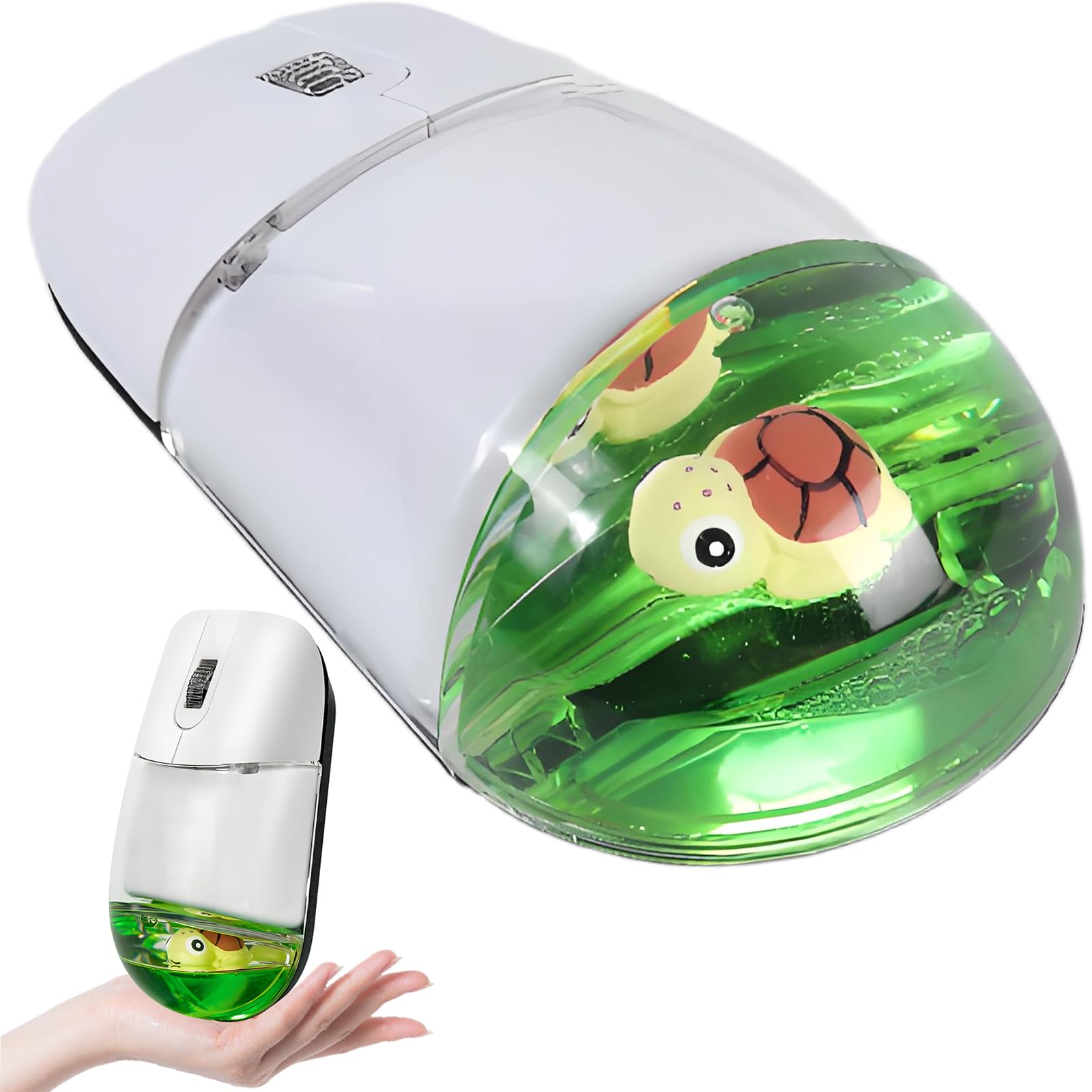
The elec Space Floating Animal Mouse in Turtle-Green is the most playful entry in this guide, featuring a translucent floating animal design that sits inside the clear shell. Despite its whimsical appearance, the 2.4GHz optical sensor delivers stable tracking up to 10 meters away with plug-and-play simplicity — just insert the USB receiver and go. The three-button layout is basic but functional, and the silent click mechanism makes it a considerate choice for shared workspaces or a child’s desk. The ABS plastic body with a fingerprint-resistant coating keeps the glossy surface looking clean longer than expected.
Customer feedback consistently highlights how much this mouse brightens a workspace by making people smile, which is an underrated benefit in a sterile office environment. The turtle green color and cartoon animal motif are clearly targeted at younger users or anyone who wants their tech to inject personality into an otherwise grey desk setup. The lightweight build makes it easy for small hands to maneuver, and the lack of software or driver requirements means it works immediately on any Windows, macOS, or Chrome OS device.
The biggest compromise is the red LED that shines through the translucent shell during use — some users find it distracting, especially in low-light conditions. The 3-button layout lacks forward/back navigation, which power users will miss. The build quality is adequate for the entry-level price point, but the plastic feels less substantial than mid-range or premium alternatives. For anyone looking to add a fun desk accessory without breaking the bank, this mouse delivers on the aesthetic promise while covering the basics of reliable cursor control.
Why it’s great
- Unique floating animal design adds personality to a desk
- Plug-and-play 2.4GHz connection with 10-meter range
- Silent clicks suitable for quiet environments
- Fingerprint-resistant coating keeps it clean
Good to know
- Red LED shines through the translucent shell
- Only 3 buttons with no forward/back navigation
- Build quality feels less durable than pricier options
FAQ
Can I use an aesthetic computer mouse on a glass desk?
Are silent click mice less responsive than standard mice?
How do I keep a glossy mouse clean from fingerprints?
Final Thoughts: The Verdict
For most users, the best aesthetic computer mouse winner is the Logitech MX Anywhere 3S for Mac because it combines an 8K DPI sensor that tracks on glass, a best-in-class MagSpeed scroll wheel, and a design that integrates seamlessly with an Apple setup without sacrificing performance. If you want an ergonomic vertical shape that reduces wrist strain while keeping a stylish gradient finish, grab the Lekvey Ergonomic Vertical Mouse. And for a compact, travel-friendly option that draws compliments and fits in any bag, nothing beats the FOPATO Travel Mouse Pink.