
The bottleneck in most desktop audio setups isn’t the speakers or the source—it’s the amplifier. A dedicated amp transforms the thin, noisy, and underpowered sound coming from a motherboard or a cheap powered monitor into a rich, dynamic, and noise-free listening experience. But with the rise of compact Class-D amplifiers, finding one that fits your desk, your speakers, and your power demands requires parsing real specs from marketing claims.
I’m Min — the co-founder and writer behind Gadgets Feed.
Whether you’re connecting bookshelf speakers to a PC for music production, gaming, or critical listening, the right amps for desktop computer must offer clean power, low noise floor, and flexible connectivity that a typical AV receiver simply cannot match.
How To Choose The Best Amps For Desktop Computer
Desktop amplifiers are a different breed from their home-theater cousins. The priority shifts from raw loudness to low-noise operation, compact footprint, and input flexibility that matches a computer-centric workflow. Before you buy, evaluate these three critical factors.
Power Output and Speaker Impedance Matching
A desktop setup rarely needs the 100 watts per channel that a living room system demands. What matters more is clean power at the impedance your speakers present—typically 4 ohms or 8 ohms for passive bookshelf units. A quality desktop amp should deliver at least 30-50 watts per channel into 8 ohms without distortion; anything beyond 100W per channel at 4 ohms is surplus unless you drive inefficient speakers or sit far from the desk. Look for RMS ratings rather than peak numbers, and pay attention to whether those wattage claims are measured at 1% THD or 10% THD.
Connectivity and Audio Interface
The simplest path is an amplifier with USB or optical digital input so you can bypass your PC’s internal DAC entirely. If your amp only accepts analog RCA inputs, you will need an external digital-to-analog converter (DAC) or rely on your motherboard’s headphone jack—which often introduces electrical noise. Balanced XLR inputs are a premium feature for long cable runs or professional desktop workflows, but for most nearfield desk setups, a good RCA connection from a dedicated DAC is more than adequate. Bluetooth 5.0 adds convenience for phone streaming without leaving the desk.
Physical Footprint and Thermal Management
Desktop real estate is finite. A compact chassis (under 6 inches wide) that fits beside or beneath a monitor is ideal. Class-D amplifiers run cooler than Class-AB designs, but sustained operation at moderate volume still generates heat. Models with full-body aluminum heat sinks or bottom-mounted chip integration dissipate heat more effectively than plastic enclosures with small vents. If the amp doubles as a headphone amplifier, check the output impedance and whether it can drive your headphones—many desktop amps optimize for speaker output only.
Quick Comparison
On smaller screens, swipe sideways to see the full table.
| Model | Category | Best For | Key Spec | Amazon |
|---|---|---|---|---|
| SMSL S1 | Stereo Amp | Budget desktop stereo | 100W x2 @ 2Ω | Amazon |
| Fosi Audio Q4 | DAC/Amp | PC audio upgrade | USB/Optical/Coax inputs | Amazon |
| AIYIMA A07 MAX | Mono/Stereo | High-power flexibility | 300W x2 @ 4Ω | Amazon |
| Fosi Audio V3 | Stereo Amp | Audiophile desktop | 300W x2 @ 4Ω | Amazon |
| Fosi Audio V3 Mono | Monoblock | Channel-separated systems | 240W @ 4Ω per unit | Amazon |
In‑Depth Reviews
1. Fosi Audio V3 Stereo Amplifier

The Fosi Audio V3 occupies a sweet spot in the desktop amplifier market by combining the proven TPA3255 chipset with premium Japanese and German capacitors (NCC, ELNA, WIMA) and Sumida inductors. With an SNR of 110dB and a noise floor measured at just 140uV, this compact unit delivers exceptionally clean amplification that eliminates the hiss and hum common to motherboard audio outputs. The 48V power supply provides enough headroom to drive 4-ohm bookshelf speakers to satisfying levels without audible strain.
What sets the V3 apart for desktop use is its swappable op-amp design. The stock NE5532 op-amps can be upgraded to Sparkos SS3602 or MUSES02 units to tailor the sound signature, giving you a clear upgrade path without replacing the entire amplifier. The pre-out is volume-controlled, meaning you can integrate a powered subwoofer directly into your desktop chain. User reports confirm it drives 86dB-sensitive ELAC B6 speakers without difficulty, and the innovative top-and-bottom vent design keeps the chassis at reasonable temperatures during extended listening sessions.
For most desktop users, the V3 presents the best balance of power, fidelity, and upgradeability under typical budget constraints. Its 600W peak rating is generous for a desktop setup, and the compact footprint fits easily beside a monitor. If you want studio-grade clarity from your computer speakers without stepping into monoblock territory, this is the benchmark.
Why it’s great
- Exceptional 110dB SNR and ultra-low noise floor ideal for nearfield listening
- Swappable op-amps allow sound signature customization without replacing the amp
- Volume-controlled pre-out simplifies subwoofer integration
- High-quality capacitor selection rivals far more expensive designs
Good to know
- Lacks integrated USB or optical DAC input, requiring an external source
- Some users report a loud pop through subwoofer on initial power-on
2. AIYIMA A07 MAX Stereo/Mono Amplifier

The AIYIMA A07 MAX brings a genuinely innovative dual-mode design to the desktop amp category. A simple switch on the bottom converts the unit from a 300W-per-channel stereo amplifier to a 600W mono-block, making it the most flexible option for users who may want to upgrade to a dual-amp configuration later. At its core sits the TPA3255 chip alongside an NE5532 op-amp, high-quality Nichicon and ELNA capacitors, and a German WIMA film capacitor for low distortion.
In stereo mode, this amplifier delivers measured output of approximately 107W per channel at 4 ohms with the included 36V 6A power supply, which is ample for nearfield desktop listening with efficient bookshelf speakers. The 3.5mm AUX line output is volume-controlled, allowing you to daisy-chain a second A07 MAX in mono mode for a true dual-mono configuration. The chassis stays warm during operation—around 100°F—which is normal for a Class-D design pushing 300W peaks, but the combination of side and bottom vents prevents dust accumulation and extends component life.
What makes the A07 MAX a strong contender for desktop computer setups is its exceptional build quality and upgrade path. The binding posts are staggered and robust, the volume knob doubles as a power switch, and the replaceable op-amp socket gives you room to refine the sound. It lacks Bluetooth and digital inputs, but for a pure analog amplifier that can grow with your system over time, the A07 MAX is unmatched in its segment.
Why it’s great
- Switchable stereo/mono mode provides unmatched future-proof flexibility
- Replaceable op-amps and high-quality Japanese capacitors enhance sound quality
- Volume-controlled 3.5mm line output allows daisy-chaining for dual-mono setups
- Massive heat sink and staggered binding posts indicate industrial-grade construction
Good to know
- Volume knob has poor low-level control; no audible output until 9 o’clock position
- No Bluetooth or digital inputs, requiring an external DAC for pure digital sources
3. Fosi Audio V3 Mono Power Amplifier

The Fosi Audio V3 Mono represents a significant engineering step forward for desktop audio enthusiasts who demand channel separation. Each monoblock houses its own TPA3255 chip with PFFB (Post-Filter Feedback) technology—a feature typically reserved for amplifiers costing three times as much. PFFB eliminates the load dependency common to Class-D designs, meaning the amp maintains consistent frequency response and distortion performance regardless of your speaker’s impedance curve. The result is a measured THD as low as 0.006% and a SINAD of 101dB.
Connectivity includes both XLR/TRS balanced inputs and RCA single-ended inputs with a gain selector switch, making the V3 Mono compatible with professional audio interfaces and consumer DACs alike. The auto power/signal-sensing mode turns the amp on when it detects input, which is convenient for desktop setups where you want the system to respond automatically to your computer’s audio output. At 5.71 inches wide per unit, a pair of V3 Monos will occupy roughly the same desk space as a single stereo amplifier, but with the benefit of true dual-mono architecture—no crosstalk, no shared power supply.
For the desktop user who values absolute clarity and imaging precision, the V3 Mono system is the most transparent option available at this tier. Real-world measurements show roughly 130-140W at 8 ohms and over 300W RMS at 2 ohms per channel, providing immense headroom even for low-sensitivity speakers. The amplifier does run hot under sustained high-volume use, so ensure adequate ventilation on your desk.
Why it’s great
- PFFB technology eliminates Class-D load dependency for consistent sound across speakers
- XLR/TRS balanced inputs suit professional desktop audio workflows
- Auto signal-sensing power mode integrates seamlessly with PC setups
- True monoblock architecture delivers zero crosstalk and separate power supplies
Good to know
- Requires two units for stereo, increasing total desk footprint and cost
- Runs very hot under high load; needs at least 2 inches of clearance around chassis
4. SMSL S1 Mini Class D Amplifier
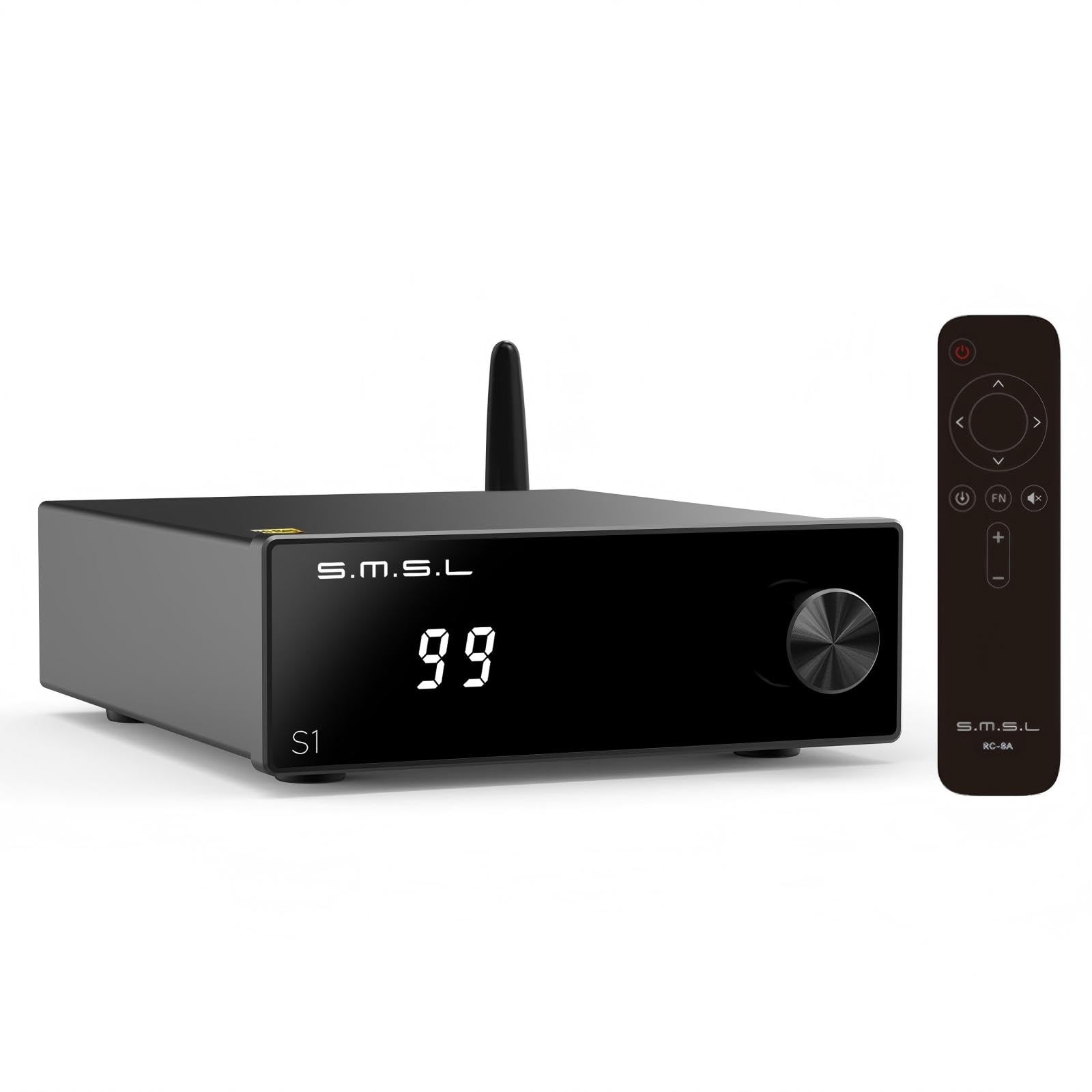
The SMSL S1 is the most space-efficient amplifier in this roundup, measuring just 5.51 by 1.38 by 3.82 inches and weighing only 10.56 ounces. It runs on dual Texas Instruments TPA3116 chips to deliver 100W per channel at 2 ohms, making it suitable for compact desktop speakers. The built-in Bluetooth 5.0 streams audio up to 15 meters from your phone or laptop, and the RCA input allows connection to a DAC, computer, or TV. This level of input flexibility in a chassis that small is rare in the desktop amplifier market.
The control interface is surprisingly sophisticated for an entry-level unit. A single knob manages all settings—click to navigate menus, rotate to adjust values—and the display shows current volume, bass and treble levels, EQ mode, and screen brightness. The seven built-in EQ presets (Direct, Tone, Bass, Super Bass, Rock, Soft, Clear) let you tailor the frequency response without additional software. Bass and treble can be adjusted independently across a range from -7 to +7, giving you fine control over the sound profile to match your room and taste.
For desktop users on a tight budget who need both Bluetooth streaming and analog input in one tiny box, the SMSL S1 delivers reliable performance. Customer reviews note that while the 100W rating is achieved at lower impedance values, the amplifier sounds reasonably powerful and clean with efficient bookshelf speakers. The remote control adds convenience for desk scenarios where the amp isn’t within arm’s reach.
Why it’s great
- Extremely compact footprint (less than 6 inches wide) fits any desk layout
- Integrated Bluetooth 5.0 and RCA inputs cover both wireless and wired sources
- Seven EQ presets plus adjustable bass/treble offer extensive tonal customization
- Single-knob interface with clear display simplifies menu navigation
- Power output of 100W is specified at 2 ohms, significantly less at standard 4 or 8 ohms
- Bluetooth name shown as “WITOLOGIE” suggests rebranding; verify product identity before purchase
- Cannot operate on 12V DC despite the rear panel showing a 12-24V range
5. Fosi Audio Q4 DAC Headphone Amp

The Fosi Audio Q4 solves a specific desktop problem: eliminating the electrical noise that plagues onboard PC audio. By integrating a 24-bit/192kHz DAC with USB, optical, and coaxial inputs, the Q4 bypasses your computer’s internal sound processing entirely. This is the most straightforward path to cleaner audio from a desktop computer, as it requires no driver installation and draws power directly from the USB port. The RCA outputs connect to powered speakers or an external amplifier, while the 3.5mm headphone jack handles headphones from 16Ω to 200Ω.
The bass and treble control knobs are a genuine functional asset for desktop listening, where room acoustics and speaker placement often introduce frequency imbalances. Users report that setting both knobs to roughly 75% significantly improves clarity and low-end punch, particularly with budget IEMs and headphones. The full metal chassis provides RF shielding, and the compact dimensions (3.9 by 2.9 inches) place it comfortably between your monitor and keyboard. After two years of continuous operation, several users confirm the Q4 remains stable without failures.
For the desktop user who wants the simplest possible upgrade from motherboard audio, the Q4 is the most effective solution in this guide. It does not amplify passive speakers directly—it functions as a DAC/preamp for powered speakers or as a headphone amplifier. The lack of a microphone input means gaming headsets with combined audio/mic plugs will need a separate adapter, but for pure audio improvement, the Q4 delivers noticeable noise reduction and frequency clarity at a minimal cost.
Why it’s great
- Integrated USB DAC bypasses noisy motherboard audio completely
- Optical and coaxial inputs add compatibility with TVs, consoles, and CD players
- Physical bass and treble knobs enable quick tonal adjustments for different content
- Plug-and-play operation with no driver installation required on Windows or Mac
Good to know
- No microphone input, limiting compatibility with combo gaming headsets
- Audible white noise floor with low-impedance headphones (under 32Ω); less noticeable with 150Ω+ cans
FAQ
Do I need a DAC with a desktop amplifier?
What wattage do I need for desktop speakers?
Can I use a monoblock amplifier for a desktop stereo system?
Final Thoughts: The Verdict
For most users, the amps for desktop computer winner is the AIYIMA A07 MAX because its switchable stereo/mono mode provides unmatched flexibility as your desktop system evolves, and the high-quality components deliver clean power ideal for nearfield listening. If you want the simplest noise-free upgrade from motherboard audio, grab the Fosi Audio Q4. And for the purest channel separation and engineering refinement in a desktop-friendly form factor, nothing beats the Fosi Audio V3 Mono.