
Every Bitcoin you hold on a hot exchange or mobile wallet is one phishing link, clipboard hijacker, or server breach away from vanishing. A dedicated hardware wallet isolates your private keys on a dedicated microcontroller, signing transactions without ever exposing the seed to your internet-connected phone or laptop. The difference between losing sleep over your stack and sleeping like a stone comes down to one decision: which silicon and firmware is trusted to guard your sats.
I’m Min — the co-founder and writer behind Gadgets Feed. After spending dozens of hours dissecting secure element certifications, open-source audit trails, air-gapped transaction methods, and real-world user recovery experiences across the major vendors, I’ve mapped exactly which devices deliver genuine self-custody and which cut corners.
Whether you are a long-term HODLer or a first-time buyer looking to move Bitcoin off the exchange, this guide breaks down the critical trade-offs so you can pick the right best bitcoin hardware wallet.
How To Choose The Best Bitcoin Hardware Wallet
The market packs everything from USB sticks to metal cards with color touchscreens. But the core decision points are not about aesthetics—they come down to how the device generates, stores, and signs with your private key. Here is what to check before you buy.
Secure Element vs. Standard MCU
In an EAL 6+ certified secure element, a dedicated chip physically isolates your private key from the main processor even if the device is compromised during active use. Wallets without this layer rely on the general-purpose microcontroller alone, which is a valid trade-off for budget buyers but leaves a larger theoretical attack surface. If you plan to hold significant value, the premium for a certified secure element is the best insurance you can buy.
USB Connection vs. Air-Gapped Workflow
A USB-connected wallet (like the Ledger Nano S Plus or Trezor Safe 3) must plug into a computer or phone to sign, which means the signing request travels over the wire. An air-gapped wallet (like the Blockstream Jade with its QR camera or the ELLIPAL Titan Mini with its magnetic adapter) never connects electronically—transactions are signed via QR codes or SD cards. Air-gapped models eliminate the risk of a compromised host computer infecting the wallet, but they add a step to every transaction.
Open Source Transparency
Open-source firmware means anyone can inspect the code, verify claims, and identify backdoors or bugs. The Bitcoin hardware security model rests on the assumption that the code is auditable. Wallets with fully open-source stacks build trust through public scrutiny. Proprietary firmware requires you to trust the manufacturer entirely. For serious Bitcoiners, open source is not a feature—it is a prerequisite.
Recovery Portability
A hardware wallet is a means to an end: the seed phrase you write down during setup is your actual ownership. If your device is lost or broken, that 12- or 24-word seed must be restorable on any compatible wallet—including one from a different vendor. BIP39 or SLIP39 standards matter here. Some wallets use proprietary recovery formats that lock you into their ecosystem. Always choose a wallet that generates a standard seed phrase.
Quick Comparison
On smaller screens, swipe sideways to see the full table.
| Model | Category | Best For | Key Spec | Amazon |
|---|---|---|---|---|
| Trezor Safe 5 | Premium | Best Overall | EAL 6+ Secure Element | Amazon |
| Trezor Safe 3 | Mid-Range | Value & Security | EAL 6+ Secure Element | Amazon |
| Ledger Nano S Plus | Mid-Range | Multi-Chain Management | CC EAL 6+ Secure Element | Amazon |
| Blockstream Jade | Mid-Range | Bitcoin-Only Air-Gap | QR Camera Air-Gapped | Amazon |
| ELLIPAL Titan Mini | Mid-Range | Heavy Metal Durability | Air-Gapped Metal Casing | Amazon |
| Arculus Cold Storage | Premium | NFC Tap-to-Transact | 3-Factor Authentication | Amazon |
| Ballet REAL 3-Pack | Budget | Zero-Setup Gifting | Stainless Steel Card | Amazon |
In‑Depth Reviews
1. Trezor Safe 5

The Trezor Safe 5 sits at the top because it nails every critical element without compromise. The NDA-free EAL 6+ secure element physically isolates your private keys from the main CPU, and the Gorilla Glass color touchscreen with haptic feedback makes on-device verification genuinely pleasant. It supports the full Trezor Suite desktop and mobile app for buying, selling, staking, and swapping across thousands of coins and tokens.
The device weighs just 0.8 ounces and uses a USB-C connection—no battery, no Bluetooth, no wireless attack vectors. The passphrase entry is handled directly on the touchscreen, which eliminates the risk of a keylogger reading your passphrase on the host computer. Setup from sealed box to a signed transaction takes under 15 minutes, and the recovery process uses SLIP39 multi-share backup to eliminate single points of failure.
The trade-off is price and the small touchscreen that can be finicky with wet or sweaty fingers. There is no internal battery, so you must plug it into a USB-C source every time you sign. For a long-term holder who values top-tier security and a polished user experience, this is the clear winner.
Why it’s great
- NDA-free EAL 6+ secure element for physical key isolation
- Responsive color touchscreen with haptic confirmation
- SLIP39 multi-share backup eliminates single seed failure
Good to know
- Requires USB-C connection—no internal battery
- Touchscreen accuracy drops with wet fingers
- Premium price point compared to entry-level alternatives
2. Trezor Safe 3

The Trezor Safe 3 brings the same NDA-free EAL 6+ secure element as its bigger sibling into a compact USB-C form factor that costs significantly less. The monochrome OLED screen is small but perfectly readable for verifying transaction details—address, amount, and fee—before you press confirm. It uses Trezor Suite for desktop and Android via USB-C, with full passphrase support for creating hidden wallets.
The aluminum body weighs only 0.5 ounces, making it the most portable secure-element wallet on this list. Multi-share backup support means you can split your recovery seed into multiple parts, so any single physical breach does not expose your entire wallet. The open-source firmware means the code is publicly auditable, which satisfies the transparency requirement that serious Bitcoiners demand.
The screen is small and the device has no Bluetooth or wireless connectivity, which is actually a security advantage. The USB-C cable included in the box has been reported as finicky by some users—using a quality third-party cable usually resolves the issue. For a no-frills, high-security cold wallet at a mid-range price, this is tough to beat.
Why it’s great
- EAL 6+ secure element at a mid-range price point
- Full passphrase support for hidden wallets
- Multi-share backup eliminates single point of failure
Good to know
- Small monochrome OLED screen may be hard to read in bright light
- No Bluetooth or wireless connectivity
- USB-C cable quality has mixed user reports
3. Ledger Nano S Plus

The Ledger Nano S Plus is one of the most popular hardware wallets in existence for good reason. It packs a CC EAL 6+ certified secure element into a USB-drive-sized body, supports over 15,000 coins and tokens via the Ledger Live app, and lets you buy, sell, swap, and stake directly from the software interface. The sapphire blue color option adds a bit of personality to your cold storage setup.
The device connects via USB-C to desktop (Windows, macOS, Linux) and Android. It does not work with iOS, so iPhone users need to look at Bluetooth-enabled Ledger models or Trezor. The OLED display is bright enough for outdoor use, and the two-button navigation is intuitive for confirming or rejecting transactions. The genuine check feature confirms your device is not a counterfeit during setup.
The firmware is partially open source—the operating system is closed but the apps and libraries are public. This has been a point of contention for the privacy-focused crowd, but the hardware itself has been tested by Ledger Donjon white-hat hackers. The 1.5 MB storage capacity limits how many blockchain apps you can install simultaneously, but for a Bitcoin-focused user this is rarely an issue.
Why it’s great
- CC EAL 6+ certified secure element for strong key isolation
- Wide asset support via Ledger Live app
- Compact USB-drive size very portable
Good to know
- Not compatible with iOS devices
- Partially closed firmware—not fully auditable
- Limited storage capacity for multi-chain app installation
4. Blockstream Jade

Blockstream Jade is built by the team behind the Bitcoin Liquid sidechain and the Blockstream Green wallet, so the Bitcoin-focused pedigree is absolutely genuine. The standout feature is the built-in camera that scans animated QR codes from the Green app, enabling fully air-gapped transaction signing without any USB or Bluetooth connection. The firmware is fully open source, and the device supports anti-exfil protection to prevent the host from extracting your private key during signing.
The 240 mAh battery powers the camera, the color screen, and Bluetooth connectivity for users who prefer a wireless connection (though air-gap is the more secure route). The device is compatible with Blockstream Green on iOS, Android, and desktop, and also works with Bitcoin Core via HWI (Hardware Wallet Interface). The rate-limited, server-enforced PIN adds a layer of protection against brute-force attacks on the physical device.
The build quality is serviceable but not premium—the body is plastic and the screen is bright but not Gorilla Glass. Some users report that the iPhone Green Wallet app can be glitchy and the PIN prompt is slow to appear. The virtual secure element architecture means it does not use a dedicated hardware secure element chip, which some security purists view as a limitation despite the compensating software protections.
Why it’s great
- Camera enables fully air-gapped QR transaction signing
- Complete open-source firmware for full auditability
- Compatible with Bitcoin Core via HWI
Good to know
- Plastic build feels less premium than metal alternatives
- Virtual secure element not a dedicated hardware chip
- Green app on iPhone has reported glitches
5. ELLIPAL Titan Mini

The ELLIPAL Titan Mini is built like a tank—literally. The reinforced metal casing and anti-tamper / anti-disassembly technology mean that if someone tries to physically crack it open, the internal chip self-destructs. The air-gapped design uses a magnetic security adapter for offline firmware updates and a 2.4-inch HD color touchscreen for navigating the transaction workflow. There is no USB port, Bluetooth, or Wi-Fi on the device itself.
Transaction signing happens by scanning QR codes between the ELLIPAL App and the Titan Mini screen. The device supports over 10,000 coins and tokens including Bitcoin, Ethereum, XRP, LTC, and DOT. The integrated SD card slot handles firmware updates offline, and the 12-word mnemonic recovery is BIP39 standard so you are not locked into the ELLIPAL ecosystem if the device fails.
The touchscreen is a double-edged sword: it is large enough to read easily, but the virtual keyboard is small enough that typing passphrases with a thumb is frustrating. Some users report that the touch sensitivity with thick fingers is poor, making a stylus almost necessary. The 1-year warranty is shorter than Trezor’s 2-year coverage, which feels stingy given the premium pricing.
Why it’s great
- Reinforced metal casing with anti-tamper self-destruct chip
- Fully air-gapped—no USB, Bluetooth, or Wi-Fi
- Large 2.4-inch color touchscreen for clear QR scanning
Good to know
- Touchscreen keyboard is small and thumb-typing is difficult
- Only 1-year manufacturer warranty
- Heavier than USB-connected wallets at 0.31 pounds
6. Arculus Cold Storage Wallet

The Arculus Cold Storage Wallet reimagines the hardware wallet as a sleek metal card you can carry in your actual wallet. It uses 3-factor authentication: a biometric lock on your phone, a 6-digit PIN, and the NFC tap of the card itself. The private key is stored on a CC EAL6+ secure element inside the card, and the only way to communicate with it is through a secure NFC tap to your phone—no cords, no cables, no wireless radios.
The setup is remarkably simple: download the Arculus app, tap the card, set your PIN and biometrics, and write down the recovery phrase. Sending crypto requires tapping the card again to authorize the transaction. The device supports Bitcoin, Ethereum, Cardano, XRP, and a wide range of other assets covering roughly 95% of the market cap. The metal card design means no battery to charge and no ports to fail—the card is essentially an NFC-powered key.
The NFC connection can be finicky, especially if you use a thick phone case. The card has no screen, so all transaction verification happens on your phone screen, which means you are trusting your phone’s integrity. The recovery phrase is standard BIP39, so you can restore your wallet on any compatible device if the card is lost or damaged.
Why it’s great
- 3-factor authentication with biometric, PIN, and hardware key
- Sleek metal card fits in a standard wallet slot
- No battery, no cables—always ready with an NFC tap
Good to know
- NFC reading can be inconsistent with thick phone cases
- No on-device screen—transaction verification depends on phone
- 1-year warranty is shorter than some competitors
7. Ballet REAL Bitcoin Cold Storage Wallet 3-Pack
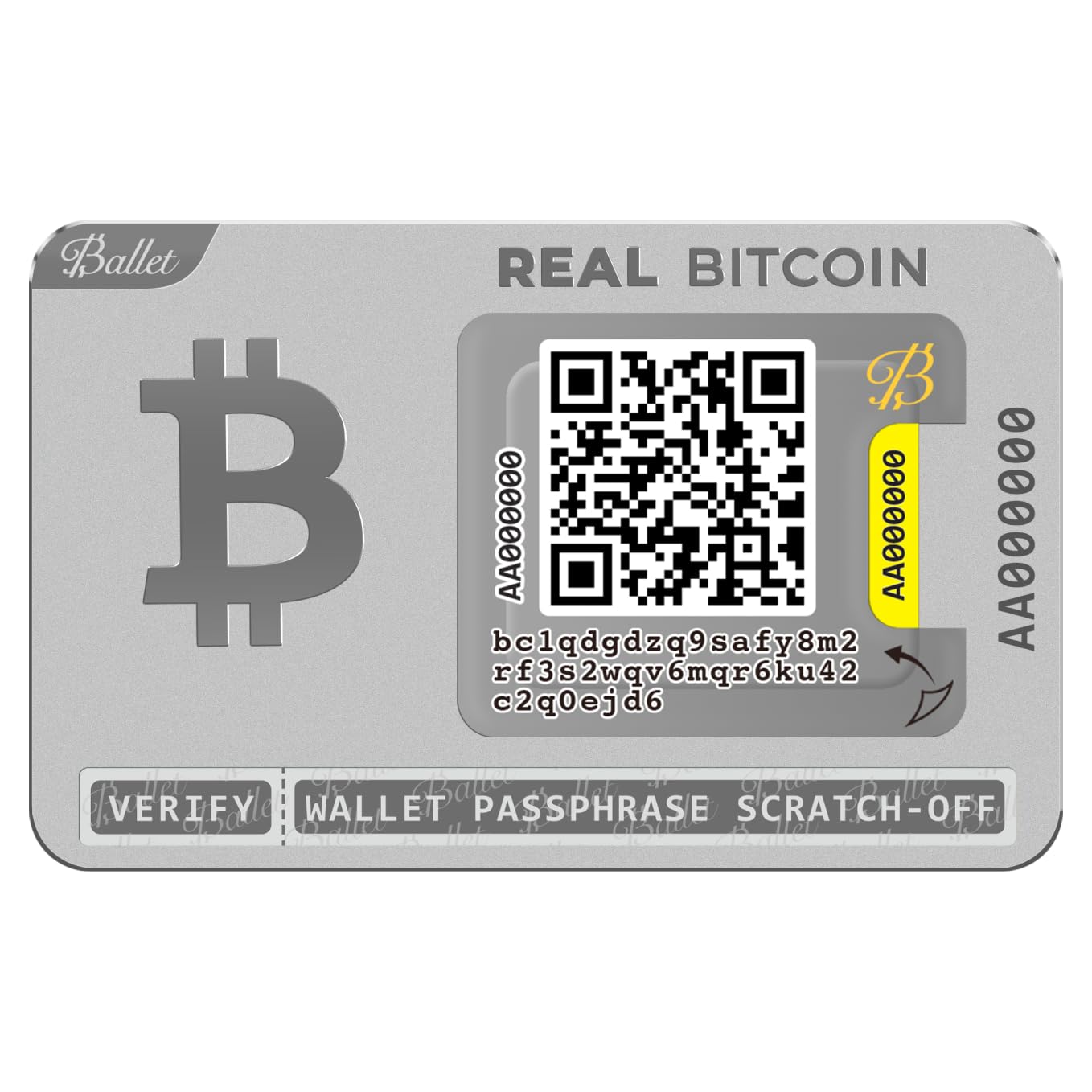
The Ballet REAL is not a traditional hardware wallet—it is a physical stainless steel card with a pre-printed private key underneath a tamper-evident sticker. There is no setup, no PIN, no firmware update, and no battery. You scan the public address QR code using the Ballet Crypto app, send Bitcoin to it, and the private key stays securely under the sticker on the card until you need to sweep the funds. The 3-pack gives you three independent wallets for portfolio separation or gifting.
The stainless steel body is far more durable than paper wallets or laminated QR codes, but the private key sticker is not fireproof—extreme heat can destroy the QR label. The zero-setup nature makes this the easiest cold wallet to understand for a complete beginner, and the ability to pre-load the card with Bitcoin before giving it as a gift is genuinely thoughtful. The app supports balance checking, sending, and receiving across most major coins.
The trade-offs are significant for power users. The static public address means reduced privacy—anyone who knows the address can monitor the balance forever. The Ballet app charges a premium on transfers compared to using a dedicated hardware wallet with your own node. The tamper-evident sticker offers physical protection but is not as secure as a trusted display showing you exactly what you are signing. This is a budget-friendly option for small amounts or gifting, not for deep self-custody of significant value.
Why it’s great
- Zero setup—ready to receive Bitcoin straight out of the box
- Durable stainless steel construction
- Ideal for gifting with pre-load capability without opening packaging
Good to know
- No on-device verification—trusts phone app entirely
- Static public address reduces privacy long-term
- Ballet app transfer fees are higher than using a dedicated hardware wallet
FAQ
Can I recover my Bitcoin on a different wallet brand if my hardware wallet breaks?
Does a hardware wallet protect against physical theft of the device itself?
Is an air-gapped wallet actually more secure than a USB-connected wallet?
Final Thoughts: The Verdict
For most users, the best bitcoin hardware wallet winner is the Trezor Safe 5 because it combines the highest-grade secure element with an intuitive color touchscreen and fully open-source firmware in a premium package. If you want maximum value with the same secure element core, grab the Trezor Safe 3. And for air-gapped Bitcoin-only users who insist on full transparency, nothing beats the Blockstream Jade with its QR camera and open-source stack.