
Struggling to read a tiny digital display or decipher the hands of an analog clock is a daily frustration for those with low vision, macular degeneration, or cognitive challenges. A talking alarm clock solves this instantly by announcing the time, day, and date in a clear voice with just a press of a button, removing the guesswork and restoring independence.
I’m Min — the co-founder and writer behind Gadgets Feed. I’ve spent countless hours analyzing the technical specifications, customer feedback, and real-world usability of these specialized voice-announcement devices to find the models that truly deliver on clarity, volume, and ease of use for seniors and the visually impaired.
This guide cuts through the noise to help you find the perfect best talking alarm clock that fits your specific needs, whether you prioritize extreme loudness for hearing loss or a large, high-contrast display for low vision.
How To Choose The Best Talking Alarm Clock
Selecting the right voice-announcement clock goes beyond just picking a device that talks. You need to evaluate the clarity of the voice, the ease of the single-button press, the maximum volume output, and whether the display helps or hinders someone with specific vision needs. Here are the critical factors to consider.
Voice Clarity, Accent, and Volume
The core function of these clocks is the voice. Listen for a clear, neutral male or female English voice that is free of robotic distortion. A volume control that can reach 85 dB or higher is essential for users with hearing aids or hearing loss. Models with an easily accessible volume wheel or buttons at the bottom are preferable to those that bury the setting in a menu.
Button Size and Activation Method
Look for a single, large, high-contrast button on the top of the device. This allows a user with tremors, arthritis, or no vision to easily locate and press the button without fumbling. The ideal design requires a gentle press to announce the time on the first push and then the day and date on the second push, providing sequential information without confusion.
Display Brightness and Contrast
For users with some remaining light perception or low vision, the display should have high contrast (like black text on a white background) and an adjustable or auto-dimming brightness setting. A screen that can be turned off completely is a premium feature for those who need to avoid light disturbances during sleep. The size of the digits is also crucial — a 7-inch display is a significant help for those with moderate vision loss.
Quick Comparison
On smaller screens, swipe sideways to see the full table.
| Model | Category | Best For | Key Spec | Amazon |
|---|---|---|---|---|
| Top Life Talking Clock | Premium | Maximum Loudness & Clarity | 85 dB Volume & Screen Off Mode | Amazon |
| GOLOZA 7″ Dementia Clock | Premium | Multi-Reminder & Color Display | 7″ Display, 10 Colors, 6 Themes | Amazon |
| Thoughtfully Designed Button Clock | Mid-Range | Compact & Stable Design | 70 mm Button, Flat Base | Amazon |
| Mitoart 7″ Digital Clock | Mid-Range | Large Display & Auto-Dimming | 7″ Display, 9 Language Voice | Amazon |
| Cirbic Large Talking Clock | Mid-Range | High Contrast & Simple Operation | Large Blue Button, ABS Frame | Amazon |
| BATVOX Talking Button Clock | Mid-Range | Battery Backup & Memory Function | Time Memory on Battery Change | Amazon |
| MAUJOY Large Button Clock | Budget | Value & Portability | 3.54″ Diameter, Sleep Mode | Amazon |
In‑Depth Reviews
1. Top Life Talking Clock

The Top Life Talking Clock sets the benchmark for this category with its extreme 85 dB volume output. This is not a polite whisper — it cuts through ambient noise and background chatter, making it the definitive choice for the significantly hard of hearing. The single, oversized button on the top announces the time on the first press and the full date (including the year) on the second, which eliminates any confusion about the day-night cycle for those with dementia.
Its design philosophy revolves around utility over aesthetics. The large, high-contrast display is bright and legible from across a room, but the standout feature is the “screen off” mode. By completely darkening the display, it ensures zero light pollution for users sensitive to light while sleeping, allowing them to check the time with a simple button press in the dark without squinting or disrupting sleep patterns. Powering it via AC cord with a battery backup (3 AA batteries) ensures the clock and its settings survive a power outage.
The only trade-offs are a slightly verbose voice announcement and a red case that may not match every decor. However, for raw functionality — extreme loudness, crystal-clear vocal delivery, and sleep-friendly darkness — this model is in a league of its own. If you need a device that *will* be heard and understood, this is the one.
Why it’s great
- Exceptional 85 dB volume for the hard of hearing
- Full screen-off mode for zero light disturbance
- Single large button: press for time, press again for full date
Good to know
- Voice announcements can feel slightly verbose
- Red case color may clash with home decor
2. GOLOZA 7” Digital Dementia Clock

The GOLOZA 7-inch digital clock is a sensory and organizational powerhouse. It moves beyond simple time-telling to become a full-fledged daily support system. With 10 display color modes and 6 different themes (including a flip-clock style), you can personalize the visual experience to suit the user’s preference, making the clock less of a medical device and more of a comfortable companion in the room.
Its most compelling feature set is the comprehensive reminder system. It allows you to set unlimited alarms for medication, appointments, and even birthday or holiday reminders, triggering a “Happy Birthday” tune on the day. The voice announcement feature reads the time aloud with a button press, and the remote control makes it easy for caregivers or users to adjust settings without reaching for the back of the clock. The auto-dimming feature is customizable, allowing you to set exact times for the display to transition from a bright 250 cd/㎡ to a sleep-friendly 50 cd/㎡.
The main drawback is the setting complexity for non-tech-savvy users. While the remote helps, the sheer number of options can be overwhelming for an elderly person to navigate alone. Setting the daylight saving time is not intuitive. However, for a caregiver who wants a feature-rich clock that provides visual stimulation, medication prompts, and time awareness, the GOLOZA is unmatched in its versatility.
Why it’s great
- Large 7-inch LCD with 10 color modes and 6 themes
- Smart reminder system for meds, birthdays, and holidays
- Remote control for easy caregiver adjustments
Good to know
- Setup and navigation can be complex for some users
- Requires AC power with battery backup for settings
3. Thoughtfully Designed Talking Button Clock
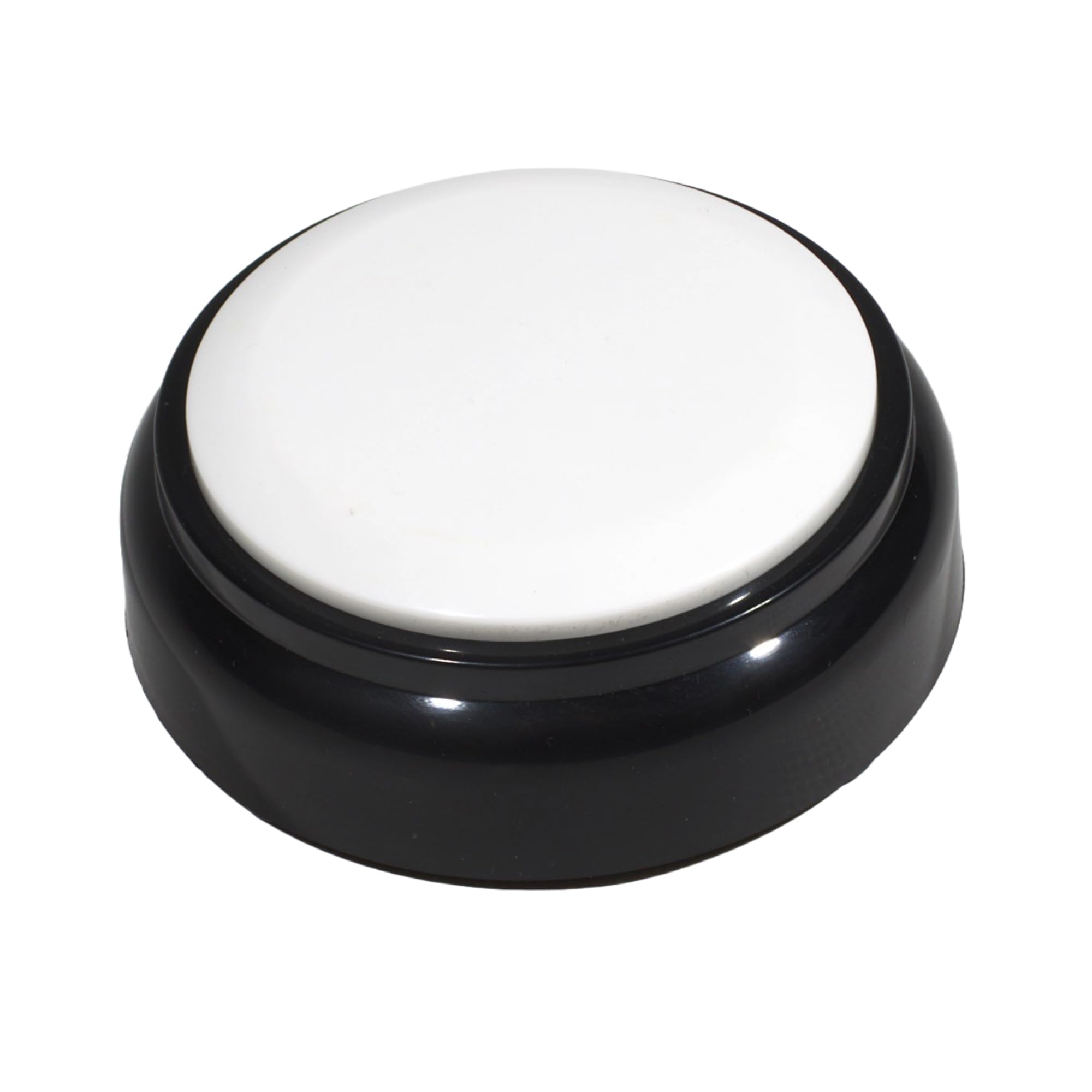
The Thoughtfully Designed button clock prioritizes stability and simplicity. Its design features a flat, weighted black base with a large, bright white 70 mm button on top. This configuration makes it difficult to accidentally knock over, which is a critical consideration for users with unsteady hands or those who keep the clock on a cluttered nightstand or table. The high contrast between the black base and white button also aids those with residual vision in locating it.
The voice is a clear male English voice that is loud but not overly aggressive. It tells the time on the first press and then the day and date on the second press. The alarm function announces itself, rather than just beeping, providing extra context for memory-impaired users. The device runs on 2 AAA batteries, making it truly portable and easy to place anywhere without worrying about a power cord.
The main challenge is the setup process. The buttons for setting the time and alarm are located on the bottom of the unit, which are small and can be difficult for arthritic fingers to manipulate. The instructions need to be followed closely. Once set, however, its operational simplicity and durable build quality make it a reliable daily companion that will not slide around or tip over.
Why it’s great
- Extremely stable, flat base design prevents tipping
- Large, high-contrast white button is easy to see and press
- Portable 2 AAA battery operation
Good to know
- Bottom-mounted setup buttons are small and tricky to use
- Setup process requires careful reading of instructions
4. Mitoart 7″ Digital Dementia Clock
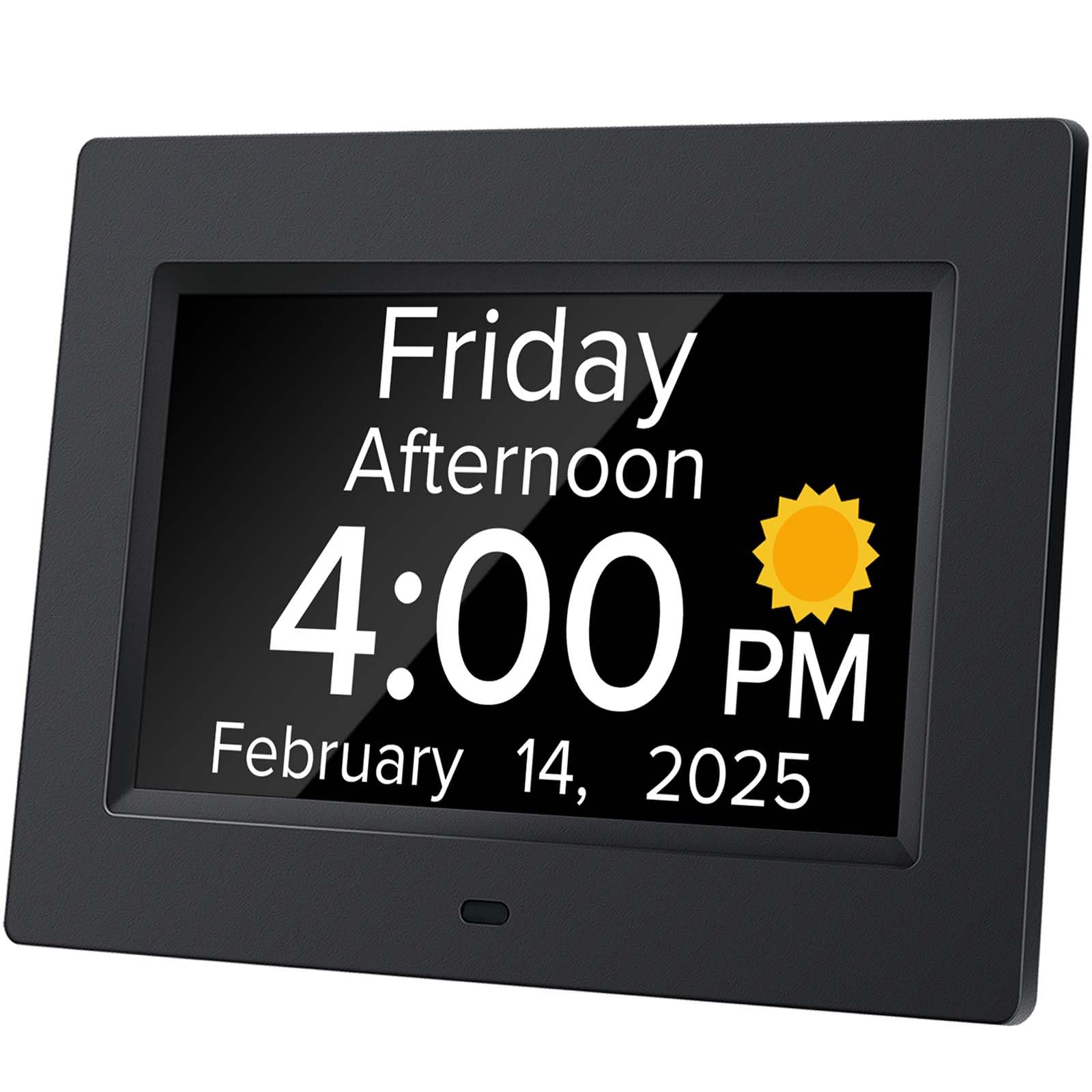
The Mitoart clock is built from the ground up for readability. The 7-inch display uses large, bold characters without abbreviations, clearly showing the day of the week, month, date, and AM/PM. This eliminates cognitive guesswork for users who might struggle with standard abbreviations. The auto-dimming feature is a standout, intelligently dropping to 50 cd/㎡ at 7:00 PM and brightening to 250 cd/㎡ at 7:00 AM, providing a seamless transition without a harsh light source at night.
The voice feature is activated by pressing the “OK” button on the back or the remote control. A unique advantage is its support for 9 languages, making it a versatile option for non-native English speakers or in multilingual households. The ability to set multiple alarms for medication and schedule reminders is built-in, and the interface is designed to be intuitive enough for an elderly user to handle the basics without caregiver assistance.
A potential limitation is the lack of a volume control on the remote or the front face — the volume is managed through a button on the back. While the voice is clear, users looking for extreme loudness might find it less powerful than dedicated button clocks. It is also a wired clock with a battery backup, so placement is tied to a power outlet. For users whose primary need is a massive, easy-to-read visual display with a helpful voice assistant, this is an excellent choice.
Why it’s great
- Massive 7-inch display with bold, un-abbreviated text
- Smart auto-dimming adjusts light based on time of day
- 9-language voice support for multi-lingual households
Good to know
- Volume control is located on the back of the unit
- Requires AC power to function
5. Cirbic Large Talking Clock

The Cirbic clock is a study in no-nonsense functionality, and its primary strength is visual contrast. The bright blue plastic color of the button and the body stands out sharply against most environments, making it easy for someone with low vision to locate by sight. The single, large button on top is easy to press and provides immediate audio feedback. It requires 3 AAA batteries (not included), which means no cords to tangle and complete placement freedom.
The voice is a clear North American male English accent, which is a relief for those who struggle with synthesized or heavily accented voices. Press the button once for the time, and a second time for the date. The clock also features a simple alarm with audio instructions for setting, catering to those who might find multi-step processes challenging. The ABS plastic construction is rugged and feels durable enough for daily use in a bedroom or living room.
The most common user feedback points to the clock running slightly fast over time, which may require periodic manual re-setting. More critically, the setting buttons on the bottom can be accidentally pressed when lifting the clock, leading to an inadvertent time change. It is a straightforward device, but it lacks features like a snooze function, a night mode for the display, or an explicit alarm tone that is distinct from the time announcement.
Why it’s great
- Excellent high-contrast blue color for easy spotting
- Clear North American male English voice
- Rugged ABS plastic build is very durable
Good to know
- Some units have been reported to run a bit fast
- Bottom setting buttons can be accidentally pressed when handling
6. BATVOX Large Talking Button Clock

The BATVOX clock solves a unique pain point common with button clocks: losing the time settings when the batteries die. Its “Special Time Memory Function” uses a built-in capacitor to retain the time and date even when you remove the old batteries and replace them with new ones. This “set it once, use it forever” feature is a massive convenience for users who might not have the dexterity or patience to reset the clock regularly.
It features a high-contrast silver and turquoise design, making the large button visually distinct. The volume is controlled via “+” and “-” keys on the bottom, and it comes with 3 AAA batteries in the box, which is a thoughtful touch. The voice is a clear male English voice that loudly announces the time on press one and the date on press two. The user instructions clearly warn to turn down the volume before the first use, as the default setting is quite high, confirming the speaker is powerful enough for hearing-impaired users.
The only notable downside is a potential for a slight vocal stutter or accent that some users found hard to understand on early units, though this has been improved in later production runs. The buttons on the bottom for volume and settings are functional but require lifting the clock. If the time-memory feature is a priority for a forgetful or elderly user, the BATVOX is a uniquely fitting choice that removes a common source of frustration.
Why it’s great
- Time memory function retains settings during battery changes
- Includes 3 AAA batteries, ready to use out of the box
- Very loud default volume, good for hearing aids
Good to know
- Voice clarity/accent has been a minor issue for some users
- Bottom controls require lifting the clock to adjust
7. MAUJOY Large Talking Button Clock

The MAUJOY button clock is the budget-friendly entry point into the category, but it does not compromise on the core functionality. At just 3.54 inches in diameter and 1.18 inches tall, it is the most compact and portable model in this lineup. This makes it ideal for travel, whether it is being packed for a hospital stay, a visit to a relative’s house, or simply moving from the bedside to the living room. Its simplicity is its greatest asset.
It performs the essential tasks flawlessly: a single press announces the time, and a second press announces the day and date in a clear, distinctive voice. The “sleep mode” function is a nice addition, allowing for battery preservation. Users consistently praise its ease of use for parents who are hard of hearing and seeing, noting that it removes the need to constantly ask a caregiver for the time. The high-quality hard plastic construction feels durable despite its small size.
The most significant limitations are its small size and the lack of a visible digital display. Users with significant hearing loss may find the volume adequate but not overwhelming. It also lacks an alarm function that is as robust as some of the premium models. For a user who wants a no-frills, portable, and affordable talking clock that does one thing very well — announce the time — the MAUJOY is the perfect, cost-effective choice.
Why it’s great
- Extremely compact and portable for travel
- Simple, reliable one-button operation
- Great value for the core essential feature
Good to know
- Smaller size means a smaller target to press
- Volume is good but not as powerful as premium models
FAQ
How loud should a talking alarm clock be for someone who is hard of hearing?
Will the clock lose its time setting when I change the batteries?
Can a talking clock help with dementia or memory loss?
What is the benefit of a talking clock with an auto-dimming display?
Do these clocks only speak in English?
Final Thoughts: The Verdict
For most users, the best talking alarm clock winner is the Top Life Talking Clock because it combines the loudest 85 dB voice output with a screen-off mode for pitch-black rooms and a single-button operation that is virtually foolproof. If you want a large color display packed with medication and holiday reminders, grab the GOLOZA 7″ Dementia Clock. And for a compact, travel-friendly, no-frills option at a great value, nothing beats the MAUJOY Large Button Clock.