
A flimsy plastic joystick with a sticky center detent and a loose base turns every crosswind landing into a fight against the hardware. The difference between a frustrating sim session and a genuinely immersive flight lies in the gimbal mechanism, the sensor resolution, and the mounting rigidity—details that separate a toy from a tool.
I’m Min — the co-founder and writer behind Gadgets Feed. Over the past weeks I’ve dug into material specs, Hall effect vs. potentiometer accuracy, clamp-load ratings, and axis resolution figures to sort the serious contenders from the shelf decorations.
Whether you fly an Airbus route or a taildragger pattern, choosing the right airplane simulator joystick determines whether your virtual stick-and-rudder skills transfer to muscle memory or get lost in a dead zone.
How To Choose The Best Airplane Simulator Joystick
Not every flight stick is built for the same mission. A yoke is ideal for GA and airliners, while a center-stick grip suits fighters and aerobatic aircraft. The decision goes deeper than appearance—sensor type, mounting system, and button layout all feed into the final feel.
Center Detent and Gimbal Design
The most common complaint from simmers moving up from a cheap stick is the “notch” or sticky center detent that makes small pitch adjustments impossible. Look for a gimbal mechanism with ball bearings or a dampened self-centering system that eliminates that dead zone entirely. A linear gimbal without detents allows you to hold a 0.1-degree pitch change without fighting a mechanical catch.
Sensor Resolution: Bits Matter
A 10-bit joystick provides 1024 steps per axis, which is adequate for basic flight. A 16-bit Hall effect sensor delivers 65536 steps per axis—enough resolution to feel the difference between a 2.5-degree and a 2.52-degree bank. Higher bit depth doesn’t just mean more precision; it means less jitter and smoother response in the critical small-deflection zone where most actual flying happens.
Mounting and Stability
A premium stick on a wobbly desk is worse than a mid-range stick bolted to a solid mount. Desktop suction pads, steel C-clamps, and dedicated chair mounts each solve the problem differently. If your sim sessions last more than an hour, the ergonomic cost of a joystick that slides or tilts under load will show up as fatigue and sloppy landings.
Quick Comparison
On smaller screens, swipe sideways to see the full table.
| Model | Category | Best For | Key Spec | Amazon |
|---|---|---|---|---|
| Honeycomb Alpha Flight Controls Yoke | Yoke System | GA and airliner realism | 180° yoke rotation, steel shaft, dampened self-centering | Amazon |
| Honeycomb Foxtrot Aviation Stick | Flight Stick | Precision aerobatics | 16-bit Hall effect sensors, linear gimbal, ambidextrous | Amazon |
| Thrustmaster T-Flight Hotas One Collector’s Edition | HOTAS | Console and PC entry-level | 10-bit axes, detachable throttle, dual rudder system | Amazon |
| Thrustmaster SimTask FarmStick | Specialty Joystick | Farming and heavy machinery sims | Hall effect magnetic sensors, 33 programmable inputs, ambidextrous | Amazon |
| Hikig 2 Pack Desk Mount | Mounting System | Desk stability for HOTAS | 386 kg clamp capacity, fits 0.2–5.3 inch desk tops | Amazon |
| HTLAKIKJ 2 Set Hotas Desk Mount | Mounting System | Thrustmaster HOTAS mounting | Heavy duty steel, vertical adjustment, silicone pad base | Amazon |
| EG STARTS 2 Set Chair Mount | Mounting System | Chair-side HOTAS positioning | 6-inch height adjustment, 45° outward tilt, M6 thumb screws | Amazon |
In‑Depth Reviews
1. Honeycomb Aeronautical Alpha Flight Controls Yoke & Switch Panel
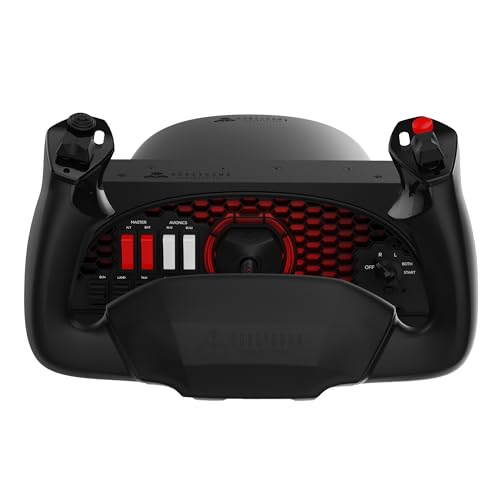
The Honeycomb Alpha is the gold standard for yoke-based flight simulation at the enthusiast level. Its full 180-degree yoke rotation with dual linear ball bearings and a dampened self-centering mechanism delivers a smooth, detent-free pull that mimics a Cessna 172 or Piper Seneca more faithfully than any competitor under twice its price. The integrated switch panel includes master, alternator, avionics, and light switches plus a realistic 5-position ignition—no reaching for a keyboard for basic cockpit flows.
Build quality is exceptional: the shaft is solid steel, the base weighs nearly 5 kg, and the included steel C-clamps lock the unit flush against the desk. For thicker desks, the large 3M Micro-Suction pad provides 40 lbs of tensile strength so you don’t need clamps at all. The left and right handles each carry an 8-way hat switch, two vertical and two horizontal 2-way rocker switches, three buttons, and a push-to-talk button—28 programmable inputs total.
The only caveat is that this is a yoke, not a center stick, so it’s best suited for general aviation and airliner flying rather than fighters or aerobatics. Pair it with the Honeycomb Bravo throttle quadrant for a complete cockpit, and you have a setup that a real-world flight student could use for instrument practice at home.
Why it’s great
- Smooth, dampened self-centering with zero center detent
- Steel shaft and heavy base eliminate any wobble
- Integrated switch panel reduces keyboard dependence
- Superior to CH/Saitek/Redbird alternatives at this price tier
Good to know
- Yoke format not ideal for combat or aerobatic sims
- Base adhesive can stick to desk without the included plastic protector
- Throttle quadrant sold separately
2. Honeycomb Foxtrot Aviation Stick
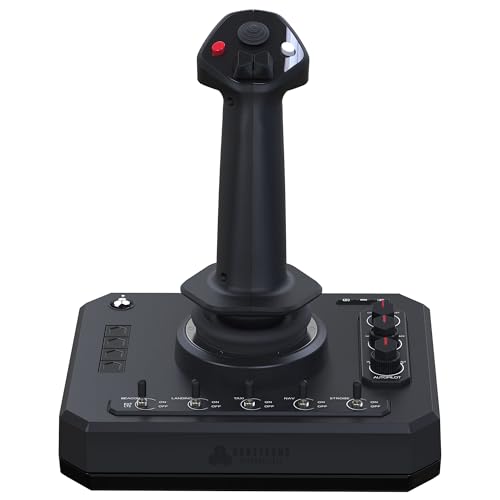
The Honeycomb Foxtrot delivers a linear gimbal experience that serious simmers have been waiting for. Its advanced gimbal mechanism eliminates the center detent entirely—no notch, no sticking point at neutral—so small corrections in pitch and roll are transmitted to the sim with no mechanical interruption. The 16-bit Hall effect sensors read 65,536 steps per axis, meaning you can hold a 2.5-degree bank angle as easily as a 25-degree one.
The stick is ambidextrous, with an ergonomic grip that accommodates both left- and right-handed pilots. It features a rudder twist axis, five two-way switches, four programmable buttons, dual hat switches, and a rotary panel—24 inputs total. The base is glass-fiber reinforced aluminum, weighing 1.6 kg, which gives it enough heft to stay planted during aggressive inputs. It is compatible with MSFS 2024, MSFS 2020, X-Plane 12, and other major sims on both PC and Mac.
One common note from users: the Foxtrot does not include a throttle, so you will need a separate throttle quadrant to control engine power. Some early units had trigger durability issues, though Honeycomb’s warranty support has been responsive. For pure stick precision—especially for taildragger flying, aerobatics, or glider sims—this is the best current option at its price.
Why it’s great
- Zero center detent for smooth small-deflection control
- 16-bit Hall effect sensors provide exceptional precision
- Ambi grip works for left- and right-handed simmers
- Compatible with Mac out of the box
Good to know
- Throttle not included
- Trigger button reported as fragile by some users
- Requires manual programming in X-Plane 12
3. Thrustmaster T-Flight Hotas One Collector’s Edition

The Thrustmaster T-Flight Hotas One Collector’s Edition is the officially licensed controller for Microsoft Flight Simulator 2024 on Xbox Series X|S and PC, offering a true plug-and-play experience. It features 10-bit precision across 5 axes—including a Z-axis rudder—with 14 action buttons, a rapid trigger, and a multidirectional hat switch. The modular design lets you separate the stick and throttle for a cockpit-style spread or keep them locked together for compact desktop use.
The collector’s edition white finish and MSFS branding aside, this is the same proven HOTAS platform that has served console simmers for years. The adjustable joystick resistance allows you to tune the spring tension heavier for airliner flying or lighter for helicopter work. The S.M.A.R.T. sliding rail system on the throttle provides smooth, notchy-free movement, and the integrated rudder lever on the throttle base gives you an alternative to twisting the stick.
Build quality is solid for the entry-level price bracket, though the plastic construction and lighter weight (2 kg) mean it can slide on a smooth desk during aggressive maneuvers. A desk mount like the Hikig or HTLAKIKJ set eliminates that issue entirely. Driver updates have caused some reported issues with throttle behavior, but most users find it works perfectly out of the box without installing any drivers at all.
Why it’s great
- Official MSFS 2024 license with plug-and-play on Xbox and PC
- Detachable throttle for flexible desk and lap use
- Adjustable joystick resistance and dual rudder options
- Expandable with TFRP rudder pedals
Good to know
- Plastic construction can slide on smooth desks
- Driver updates may introduce throttle issues
- No button diagram included for mapping
4. Thrustmaster SimTask FarmStick

While the FarmStick is marketed specifically for Farming Simulator 25, its Hall effect magnetic sensors and 33 programmable inputs make it a versatile controller for any simulation genre that benefits from a multi-axis joystick—including helicopter flying in MSFS, crane operation in construction sims, or precision farming equipment control. The H.E.A.R.T (Hall Effect AccuRate Technology) sensors eliminate drift and wear, ensuring consistent performance over thousands of hours.
The stick features a 3-axis design with a mini-stick, thumbwheel, triggers, and rocker switches. The ambidextrous design allows pairing with a racing wheel and a second joystick for complex multi-controller setups. On PC, the software mapping is straightforward, and on PS5/PS4 it auto-detects as a Farming Simulator 25 controller with pre-mapped functions.
The base is notably wide—wider than a standard HOTAS—so it may not fit on a typical shifter bracket. Many users pair it with a desk mount or a dedicated stand. For simmers who split their time between flight sim and farming/construction sims, this single stick covers both worlds with hardware that competes with sticks costing twice as much.
Why it’s great
- Hall effect sensors eliminate drift and wear
- 33 programmable inputs cover nearly any function
- Ambi design works with wheel + dual-stick setups
- Plug-and-play on PS5/PS4 and PC for Farming Simulator 25
Good to know
- Wide base may not fit standard shifter brackets
- No Xbox compatibility
- Primarily designed for farming sims, not flight sims
5. Hikig 2 Pack Desk Mount

The Hikig 2 Pack Desk Mount is the mounting solution that solves the stability problem for nearly every major HOTAS on the market. Its push-pull quick clamp generates a holding force rated at 386 kg—enough to anchor a Honeycomb Alpha or a Logitech X56 through the most aggressive combat maneuvers without a millimeter of shift. The clamp accommodates desk thicknesses from 0.2 to 5.3 inches, covering everything from thin writing desks to heavy custom tables.
Compatibility is impressively broad: the mount works with Logitech X52/X52 Pro/X56, Thrustmaster T.16000M, Warthog, TCA Officer Pack Airbus, VKB Gunfighter, VKB Gladiator, VPC Mongoos T-50, Winwing, and many other devices. The bracket itself offers three mounting positions and vertical height adjustment, and it includes non-slip feet to protect the desk surface. Assembly is straightforward with the included hex tool.
Some users note that the clamp can loosen slightly after repeated removal and reattachment, and a locking nut would be a welcome addition. However, for the price, the Hikig set delivers the same rigidity as premium mounts at a fraction of the cost. If you are pairing a high-end stick like the Foxtrot or a heavy HOTAS like the X56, this mount is a must-buy to unlock the full precision those sticks are capable of.
Why it’s great
- 386 kg clamp force eliminates any desk movement
- Fits almost all HOTAS brands and models
- Three mounting positions plus vertical height adjustment
- Includes tool and non-slip pads
Good to know
- Clamp may loosen slightly after frequent removal
- Heavy unit—5.27 kg—requires a sturdy desk
- Hole layout on some sticks may cause 1–4 degree tilt
6. HTLAKIKJ 2 Set Hotas Desk Mount
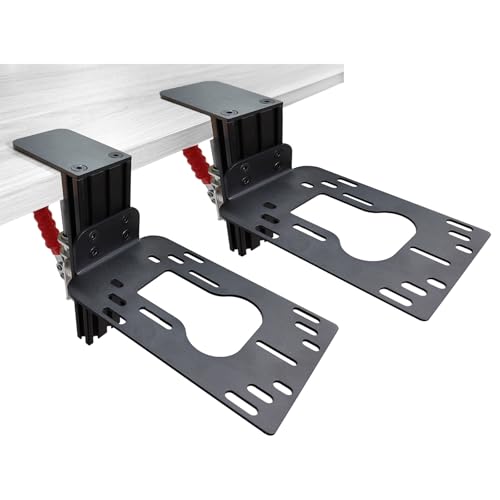
The HTLAKIKJ desk mount is a budget-friendly steel holder designed specifically for Thrustmaster HOTAS systems—including the T-Flight Hotas 4, Hotas X, Hotas One, Stick X, and T-16000M. The heavy duty steel plate with strong nuts and bolts provides a stable platform that lifts your controls off the desktop and positions them at a comfortable height. The clamp fits desks up to 2.8 inches thick and includes a silicone pad to protect the surface while preventing slip.
Vertical adjustment allows you to set the height that matches your seated eye level, and the strong adjustable clamp ensures stability during flight. The set includes two mounts—one for the stick and one for the throttle—so your controls stay symmetrical rather than fighting them separately on a flat desk.
Be aware that this mount is not compatible with Thrustmaster Sol-R2 sticks because the flat plate design covers the stick’s base and leaves no clearance for the USB plug. Some users report needing a 90-degree USB-C adapter to work with certain newer sticks. The instructions are brief and the box may contain metal filings from manufacturing, so open it over a hard floor. For the price, the steel quality is good, but verify your stick’s footprint before ordering.
Why it’s great
- Steel plate and strong nuts provide desk-level stability
- Vertically adjustable for comfortable seating height
- Silicone pad protects desk surface and prevents slip
- Affordable pair of mounts for stick and throttle
Good to know
- Flat plate design incompatible with Thrustmaster Sol-R2
- May require 90-degree USB adapter for newer sticks
- Box may contain metal filings
7. EG STARTS 2 Set Chair Mount

The EG STARTS 2 Set Chair Mount takes a different approach to flight sim control positioning—it bolts directly to the bottom of your gaming chair, freeing your desk surface entirely. It supports a wide range of flight controls including Logitech X56, X52, X52 Pro, Thrustmaster T-Flight Hotas, TCA, T.16000M, VKB Gunfighter, VKB Gladiator, and VPC Mongoos T-50. The mount offers up to 6 inches of vertical adjustment and 45 degrees of outward tilt, so you can position the stick exactly where your real forearm would rest in a cockpit.
The M6 x 15 thumb screws enable quick tool-less removal, making it easy to swap between flight controls and racing wheels. The base is heavy (4.2 kg) and the steel construction feels substantial when mounted. Users with Razer Enki chairs report successful fits with minor modifications, though some chairs with non-standard bolt patterns may require drilling.
The main drawback is that installation can be finicky—the included Allen key stripped on some units, and the bolts for side risers were too short for certain chair frames. The slot nuts can strip if overtightened. Plan for a potential hour of adjustment and possible trip to the hardware store for longer bolts. For simmers who want their desk free for mouse and keyboard while keeping the controls in a natural ergonomic position, the effort is worth it.
Why it’s great
- Frees up desk space entirely
- 6-inch height and 45° tilt for ergonomic positioning
- Quick disconnect thumb screws for easy swapping
- Wide HOTAS and stick compatibility
Good to know
- Installation can require drilling or hardware modification
- Included Allen key may strip
- Bolt length may be insufficient for some chair frames
- Mount adds width to the chair
FAQ
Should I get a yoke or a joystick for airplane simulator flying?
What is the real difference between a 10-bit and a 16-bit joystick?
Can I use a Thrustmaster T-Flight Hotas One on PC as well as Xbox?
Why would I need a desk mount for my joystick?
What does center detent mean and why should I avoid it?
Final Thoughts: The Verdict
For most users, the airplane simulator joystick winner is the Honeycomb Foxtrot because its 16-bit Hall effect sensors and linear gimbal deliver the precise, detent-free control that makes a real difference in landing accuracy and pitch stability. If you fly general aviation and airliners, grab the Honeycomb Alpha Yoke. And for a budget-friendly console entry that still offers good control fidelity, nothing beats the Thrustmaster T-Flight Hotas One.