
When your media library, project archives, or surveillance footage starts pushing past 10TB, a 14TB external hard drive isn’t a luxury—it’s the only sane choice. The jump from 5TB or 8TB to 14TB changes how you manage data: fewer drives to juggle, lower cost per terabyte, and a single point of organization rather than a messy stack of smaller enclosures.
I’m Min — the co-founder and writer behind Gadgets Feed. I’ve spent hundreds of hours analyzing the specifications, user reliability reports, and real-world transfer benchmarks of the largest-capacity external drives on the market to separate genuinely dependable 14TB models from ones that ship with noisy fans or unreliable internals.
The right drive for you depends on how you work. This guide breaks down the nine most compelling options to help you find the best 14tb external hard drive for your workflow, budget, and tolerance for fan noise.
How To Choose The Best 14TB External Hard Drive
Choosing a 14TB drive means accepting that this is a desktop peripheral, not something you slip into a pocket. The core considerations are reliability, transfer speed (determined by rotational speed, interface, and cache size), and the quality of the enclosure’s cooling and acoustics.
Rotational Speed: 5400RPM vs 7200RPM
At this capacity, 7200RPM drives offer significantly faster sustained read and write speeds—often 180-250 MB/s versus 120-150 MB/s for 5400RPM units. The trade-off is noise and heat. A 7200RPM 14TB drive can run noticeably warmer and produce a constant low hum. If your drive sits on a desk next to you during quiet work, a 5400RPM or variable-speed drive may be preferable.
Interface and Throughput
USB 3.0 (5Gbps) is more than enough to saturate any single 14TB HDD’s mechanical limits, so don’t pay extra for Thunderbolt 3 or USB-C (10Gbps) expecting faster transfer speeds from the drive itself—unless you plan to daisy-chain multiple drives or need the cable compatibility for a modern laptop with only USB-C ports. Thunderbolt 3 shines for daisy-chaining up to five more devices to a single port.
Warranty and Data Recovery
With 14TB of data, a drive failure is catastrophic. Look for a 2-year or longer warranty. Some manufacturers (Seagate) include Rescue Data Recovery Services for a period after purchase, which can save thousands in professional recovery fees if the drive fails mechanically. Western Digital’s higher-end lines offer similar peace of mind.
Quick Comparison
On smaller screens, swipe sideways to see the full table.
| Model | Category | Best For | Key Spec | Amazon |
|---|---|---|---|---|
| WD Elements Desktop 14TB | Desktop HDD | Reliable bulk storage | USB 3.0, 5Gbps, 5400RPM | Amazon |
| G-Technology G-DRIVE 14TB | Pro Desktop | Mac creatives needing Thunderbolt 3 | Thunderbolt 3 + USB-C, 7200RPM | Amazon |
| SanDisk Professional G-Drive 12TB | Enterprise External | Ultra-fast backup via USB-C 10Gbps | USB-C 10Gbps, 7200RPM Ultrastar | Amazon |
| Seagate Expansion Desktop 16TB | Desktop HDD | High capacity with data recovery service | USB 3.0, 5400RPM, Rescue Services | Amazon |
| WD Easystore 14TB | Desktop HDD | Budget 14TB with WD reliability | USB 3.0, external power, 3.5-inch | Amazon |
| MDD MAXDIGITALDATA 14TB Enterprise | Internal Enterprise | DIY server/NAS builds (internal) | SATA 6Gb/s, 7200RPM, 256MB cache | Amazon |
| WD My Passport 6TB | Portable HDD | High-capacity portable backup | USB 3.0, 2.5-inch, hardware encryption | Amazon |
| Seagate Portable 5TB | Portable HDD | Lightweight portable for on-the-go | USB 3.0, 2.5-inch, 1-Year Rescue | Amazon |
| WD Elements Portable 5TB | Portable HDD | Budget portable external storage | USB 3.2 Gen 1, 2.5-inch, 5Gbps | Amazon |
In‑Depth Reviews
1. WD Elements Desktop 14TB External Hard Drive

The WD Elements Desktop 14TB is the quintessential no-nonsense bulk storage drive. It uses a 5400RPM drive inside a well-ventilated aluminum enclosure that stays cool during extended use. Users report actual usable capacity around 12.7TB after formatting (NTFS), with sustained transfer speeds of 150-180 MB/s over USB 3.0. The plug-and-play setup on Windows requires zero configuration—just connect the included power brick and USB cable.
Reliability is the strongest argument for this drive. Western Digital’s Elements line has a well-documented track record for low failure rates in the 14TB segment. Multiple long-term users report zero issues after years of continuous operation. The drive is also one of the quieter desktop units at this capacity, with only a brief spin-up hum and near-silent idle operation. The compact vertical footprint saves desk space compared to wider desktop enclosures.
The main compromise is speed. At 5400RPM, large file transfers top out well below what a 7200RPM enterprise drive delivers. If you regularly move multi-gigabyte video projects, you’ll notice the difference. Also, the bundled USB-A cable is short (about 3 feet), which may force the drive closer to your PC than ideal. For archival storage, scheduled backups, and media libraries, however, this is the safest bet in the 14TB class.
Why it’s great
- Proven WD reliability with low failure rates in long-term use
- Quiet operation—no constant fan or seek noise
- Compact vertical aluminum design saves desk space
- True plug-and-play on Windows, no software needed
Good to know
- 5400RPM drive limits sustained write speeds to ~180 MB/s
- Requires external AC power brick
- Short included USB cable may limit placement options
- Must be reformatted for Time Machine on macOS
2. G-Technology 14TB G-DRIVE with Thunderbolt 3

The G-Technology G-DRIVE is the gold standard for Mac creative professionals who need Thunderbolt 3 connectivity. It packs a 7200RPM enterprise-grade drive inside a milled aluminum case that matches the aesthetic of a Mac Pro or Studio. The dual Thunderbolt 3 ports allow daisy-chaining up to five additional devices, while the USB-C port (USB 3.1 Gen 1) provides backward compatibility. Real-world transfer speeds reach 250 MB/s for sequential reads and writes—significantly faster than USB 3.0-only alternatives.
Setup on macOS is effortless: plug it in and it appears as a standard HFS+ volume ready for Time Machine. The drive includes a power brick and a Thunderbolt 3 cable, though some users upgrade to a longer 0.5m or 1m cable for better desk routing. The all-aluminum body acts as a heatsink, keeping the 7200RPM drive cool even under sustained load. The adjustable LED brightness is a thoughtful touch for studio environments where light bleed is a concern.
The premium price is the primary barrier. The G-DRIVE costs significantly more per terabyte than the WD Elements or Seagate Expansion. Some users report audible seek noise during idle operation—a “clickety-clackety” sound typical of high-RPM enterprise drives. Transfer speeds also max out the mechanical drive well before saturating Thunderbolt 3’s 40Gbps bandwidth, so the interface is future-proofing for daisy-chaining rather than raw speed gain. For professionals who need rock-solid Thunderbolt 3 connectivity and a drive that won’t be a bottleneck in a multi-device workflow, it’s worth the premium.
Why it’s great
- Thunderbolt 3 ports for daisy-chaining multiple drives
- 7200RPM enterprise drive delivers ~250 MB/s speeds
- Premium aluminum build matches Mac aesthetic
- Adjustable LED brightness and quiet idle operation
Good to know
- Very expensive per terabyte compared to USB-only drives
- Audible seek noise typical of 7200RPM enterprise drives
- Speed is still limited by mechanical HDD, not TB3 bandwidth
- Requires reformatting for Windows use
3. SanDisk Professional 12TB G-Drive
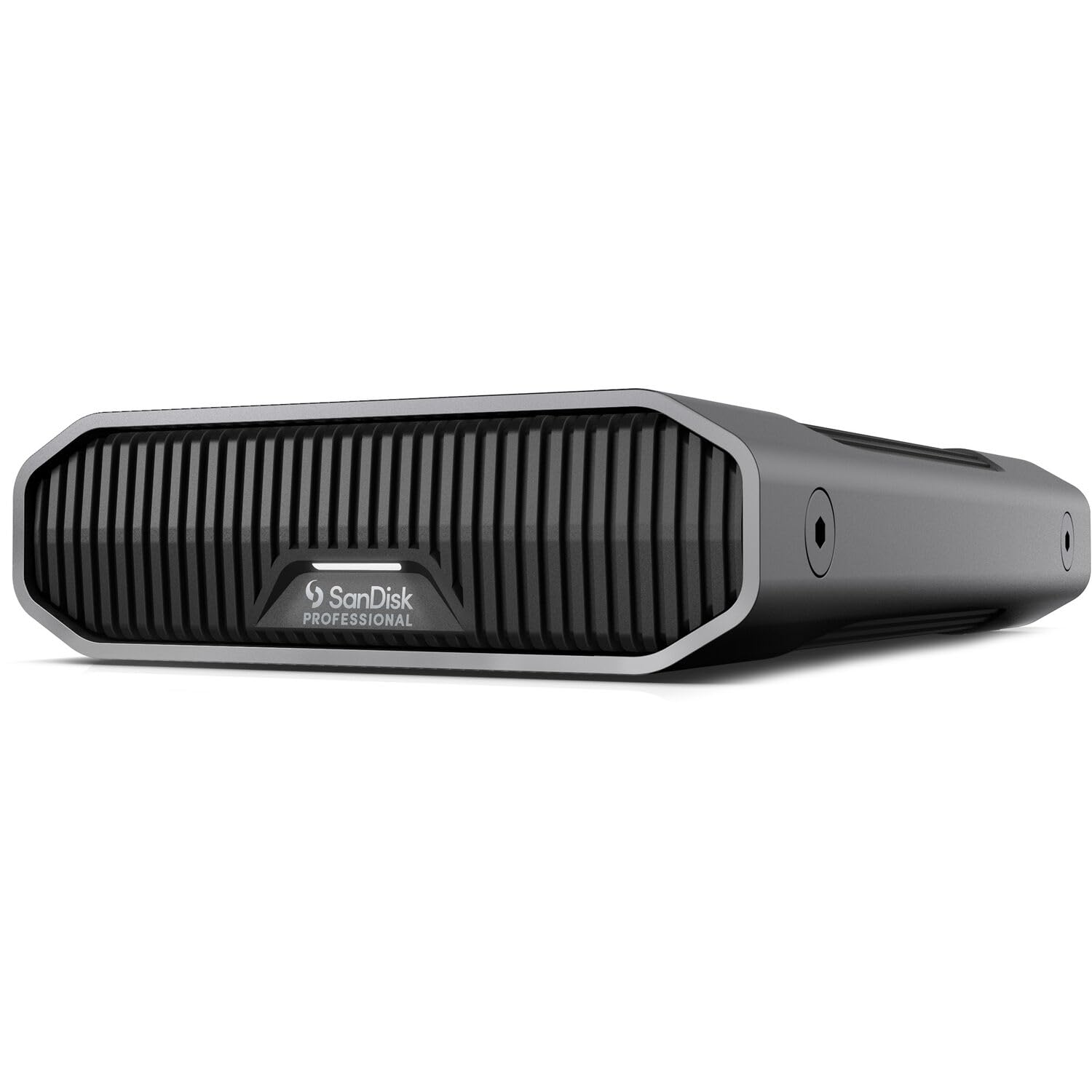
The SanDisk Professional G-Drive (12TB) is built around Western Digital’s enterprise-class Ultrastar hard drive spinning at 7200RPM. This is the same drive found in data centers, rated for 24/7 operation with a 2.0 million-hour MTBF. The USB-C interface runs at 10Gbps (USB 3.2 Gen 2), which is double the bandwidth of standard USB 3.0, though the mechanical drive tops out around 250 MB/s read and write—matching the interface comfortably. The anodized aluminum enclosure is stackable and feels indestructible.
Mac users will appreciate the out-of-box readiness for macOS and Time Machine compatibility. The drive ships formatted as HFS+ and includes a USB-C cable and power brick. The three-mode LED brightness adjustment is handy for reducing light pollution in a home office or studio. The drive is noticeably heavier than consumer-grade externals due to the thick aluminum shell and the enterprise-grade mechanics inside.
The failure rate reports are a concern. Several Amazon reviews describe units dying within weeks or months—one customer reported failure after just 2 months. Heat sensitivity may be a factor; the drive can become finicky if airflow is restricted. Also, the usable capacity of 12TB is 10.9TB after formatting, which is a noticeable chunk lost to file system overhead. For enterprise users who need the Ultrastar’s reliability and can tolerate the bulk, this is a strong option—but the inconsistent QA is worth noting.
Why it’s great
- Enterprise Ultrastar 7200RPM drive with high MTBF rating
- USB-C 10Gbps interface for fast connectivity
- Stackable, durable aluminum enclosure
- Mac ready with Time Machine support
Good to know
- Mixed reliability reports; some units fail within months
- Heavy and bulky compared to standard desktop drives
- 10.9TB usable after formatting out of 12TB
- Heat-sensitive; needs good airflow to avoid issues
4. Seagate Expansion Desktop 16TB External Hard Drive

The Seagate Expansion Desktop 16TB is a brute-force capacity play for users who need maximum storage without stepping up to a multi-bay NAS. It provides approximately 14.5TB of usable space after formatting (the remaining 1.5TB is lost to file system overhead and binary-to-decimal conversion). The drive connects via USB 3.0 and offers drag-and-drop simplicity on both Windows and macOS. The plastic enclosure is less premium than aluminum alternatives but keeps the weight down for occasional relocation.
The standout feature is the included 1-year Rescue Data Recovery Services. If the drive fails mechanically within the first year, Seagate will attempt to recover your data in a certified clean room—this alone can justify the purchase for users storing irreplaceable family photos or critical business archives. The drive is also compatible with PlayStation and Xbox consoles for game storage expansion.
Noise is the most common complaint. The drive is audibly louder than the WD Elements, with a constant hum during operation and more pronounced seek sounds. Some users report that the drive is slower than expected for large file transfers, suggesting a 5400RPM mechanism may be inside. There are also scattered reports of units failing or crashing during transfers, though these are not as prevalent as with some other high-capacity models. If data recovery peace of mind is a priority, this is a compelling choice despite the noise.
Why it’s great
- Massive 16TB raw capacity for archival storage
- 1-Year Rescue Data Recovery Services included
- Plug-and-play with Windows, macOS, and gaming consoles
- Competitive price per terabyte at this capacity tier
Good to know
- Noticeably noisy during operation and seeks
- Plastic enclosure feels less durable than aluminum
- Slower transfer speeds than 7200RPM alternatives
- Some reports of drive failures and transfer crashes
5. WD Easystore 14TB External Hard Drive

The WD Easystore 14TB is essentially a rebadged WD Elements with a different enclosure design and a frequently lower price point. It uses the same proven 5400RPM drive technology, delivers the same ~180 MB/s transfer speeds over USB 3.0, and offers the same plug-and-play simplicity. The black plastic and aluminum hybrid enclosure is compact and stackable. It requires an external power adapter, as all 3.5-inch desktop drives at this capacity do.
Users who shuck drives (remove them from the enclosure for use in a NAS or PC) often target the Easystore because it frequently contains a WD Red or White Label drive that works in RAID arrays. The drive is also known for being relatively quiet compared to Seagate’s offerings at the same capacity. For pure storage of media files, game libraries, and documents, it performs identically to the pricier Elements model.
The drawbacks are the same as the Elements: 5400RPM speed ceiling, short cable, and no included backup software of real value. Some users report the drive is loud enough to hear during quiet periods, though this is subjective. The bundled software is often deleted immediately by experienced users. If you can find the Easystore at a discount vs. the Elements, it’s the better value—just know you’re getting essentially the same hardware underneath.
Why it’s great
- Often priced lower than the WD Elements for identical internals
- Frequently shuckable for NAS/DIY use
- Reliable WD drive mechanism with low failure rates
- Compact desktop footprint
Good to know
- 5400RPM limits write speeds to ~180 MB/s
- Bundled software is unnecessary and often deleted
- External power brick required
- Some users find the drive audibly noticeable
6. MDD MAXDIGITALDATA 14TB Enterprise Hard Drive (Renewed)

The MDD MAXDIGITALDATA 14TB is an enterprise-grade SATA hard drive designed for hyperscale data center environments—not consumers. It spins at 7200RPM, packs a 256MB cache, and connects via SATA 6Gb/s, making it suitable for desktop PCs, RAID systems, NAS enclosures, and surveillance systems. This is a bare drive with no enclosure, cables, or accessories. It requires a 3.5-inch drive bay and SATA power/data cables to function.
The value proposition is extraordinary: enterprise-level reliability and speed at a fraction of the cost of retail external drives. The drive is rated for 24×7 operation with a 2.0 million-hour MTBF and a 0.44% annualized failure rate. Users report that drives often arrive with zero power-on hours. The 5-year warranty (through MDD) provides additional peace of mind, though the renewal process involves working with the seller for replacements.
The primary risk is the inconsistency of renewed enterprise drives. Some customers report receiving units with dead sectors, poor performance, or DOA units that refuse to spin up. While the seller appears to replace defective units promptly, the hassle of returns and the potential data loss risk make this a better fit for tech-savvy users who have robust backup strategies. This drive is not recommended for beginners or for use as a single point of storage for critical data.
Why it’s great
- Enterprise 7200RPM performance with 256MB cache
- Extremely low price per terabyte for 14TB
- 5-year warranty for renewed enterprise hardware
- Suitable for NAS, RAID, and 24/7 operation
Good to know
- Renewed drive quality is inconsistent; some arrive defective
- Bare drive only—requires enclosure and cables (not included)
- Must initialize and format before use (GPT required)
- Not suitable for non-technical users or primary storage without backup
7. WD My Passport 6TB Portable External Hard Drive

The WD My Passport 6TB is a game-changer for portable storage: it’s the world’s first 6TB 2.5-inch portable hard drive, removing the need for an external power brick. This drive draws power directly from the USB port, making it a true companion for laptops. It includes WD’s backup software with ransomware defense and supports hardware encryption with password protection. The slim design slips easily into a laptop bag pocket.
The drive is surprisingly resilient given its thin form factor. One user reported carrying it daily in a laptop bag through rough industrial environments while two other portable drives failed around it. USB 3.2 Gen 1 (5Gbps) speeds are adequate for backup and media transfer, though expect ~120 MB/s maximum sustained writes—slower than desktop 3.5-inch drives. The red color option provides some visual distinction on a desk or in a bag.
Reliability is a mixed bag. While many users report long-term success, there are multiple reports of mechanical failures (loud clicking, unrecognized by Windows 11) across different units. The inherent fragility of 2.5-inch HDDs means this is not a drive to toss loosely into a bag—a padded case is recommended. The capacity is also half of what a 3.5-inch 14TB desktop drive offers, so this is best as a travel companion to a primary desktop archive, not a replacement for it.
Why it’s great
- World’s first 6TB 2.5-inch portable drive—no power brick needed
- Includes hardware encryption and ransomware defense software
- USB bus-powered for true laptop portability
- Compact, slim design fits in a laptop bag
Good to know
- Slower speeds than desktop 3.5-inch drives (~120 MB/s)
- Mixed reliability reports; some units fail with clicking sounds
- Fragile 2.5-inch HDD needs padded protection in transit
- Capacity (6TB) is less than half of 14TB desktop alternatives
8. Seagate Portable 5TB External Hard Drive

The Seagate Portable 5TB is a lightweight bus-powered external HDD ideal for students, photographers, and anyone who needs to carry a large media library between locations. It connects via USB 3.0 and is compatible with PC, Mac, PlayStation, and Xbox. The drive is sleek, compact, and virtually silent during operation—one reviewer called it “college kid friendly” for its ease of use and daily carry convenience. The 1-year Rescue Data Recovery Service is included for added peace of mind.
Music producers and sample library users report that the drive is fast enough for loading plugins and samples in real-time, though it’s not intended for active video editing workflows. Transfer speeds for large file dumps (like offloading iPhone photos) range from 30-45 minutes per substantial batch. The drive requires reformatting for Mac use (APFS or ExFAT) but works seamlessly once configured.
A significant concern is power draw. Some users report that the drive is power-hungry and may not initialize reliably on all USB ports, particularly on older PCs or when connected through a hub. The Seagate Portable also lacks SMART support, making it harder to monitor drive health proactively. One reviewer noted that the Western Digital Elements Portable was superior in power efficiency, SMART support, and consistent speed. For -10 more, the WD alternative is often the safer bet at this capacity tier.
Why it’s great
- Lightweight and truly portable—no external power needed
- Compatible with PC, Mac, PS4, and Xbox One
- Includes 1-Year Rescue Data Recovery Service
- Quiet operation and sleek design
Good to know
- Power hungry; may not work on all USB ports without a powered hub
- Lacks SMART support for health monitoring
- WD Elements Portable is often a better value with better power efficiency
- Requires reformatting for Mac use
9. WD Elements Portable 5TB External Hard Drive

The WD Elements Portable 5TB is the go-to entry-level portable HDD for budget-conscious users who need mass storage without the bulk of a desktop drive. It connects via USB 3.2 Gen 1 (5Gbps) and runs entirely off bus power, making it a no-fuss solution for backups, media storage, and game library expansion for PS4 and Xbox. The 2.5-inch form factor is small enough to slip into a laptop sleeve, and the matte black finish resists fingerprints and scratches.
This is a “plug and play” drive for Windows, but Mac users need to reformat it—Time Machine on Monterey automatically reformats to APFS, which locks the drive for backup use only. The workaround is to create a separate volume for general storage before enabling Time Machine. Transfer speeds hover around 120 MB/s, which is sufficient for most personal use cases, though noticeably slower than a portable SSD. The drive runs whisper quiet and stays cool to the touch.
The cable is the weakest link. Multiple users report that the included USB cable is prone to failure over time and recommend keeping a spare. This is a common complaint across the WD Elements portable line. The drive itself, however, is reliable—the same WD reputation for low failure rates applies here. If you need 5TB of portable storage for less than some mid-range SSDs offer for 1TB, this is the most cost-effective option. Just budget for a replacement cable.
Why it’s great
- Excellent price per terabyte for a portable drive
- Fully USB bus-powered—no external power adapter needed
- Compact 2.5-inch form factor fits in any bag
- Reliable WD drive mechanism with low failure rates
Good to know
- Included USB cable is prone to failure; budget for a spare
- Slow write speeds compared to SSDs or 7200RPM desktop drives
- Requires reformatting for Time Machine on Mac
- Not truly portable if you need shock protection for daily rough use
FAQ
What is the actual usable capacity of a 14TB external hard drive?
Can I shuck a 14TB external drive for use in a NAS?
Why is my 14TB drive clicking or making noise during idle?
Final Thoughts: The Verdict
For most users, the best 14tb external hard drive winner is the WD Elements Desktop 14TB because it delivers proven reliability, quiet operation, and a straightforward plug-and-play experience at a reasonable cost per terabyte. If you need Thunderbolt 3 connectivity and premium build quality for a Mac-centric workflow, grab the G-Technology 14TB G-DRIVE. And for those on a tight budget who don’t mind refurbished enterprise hardware, the MDD MAXDIGITALDATA 14TB Enterprise Drive offers incredible value—just have a backup plan.