
The worst part of starting 3D printing isn’t the learning curve — it’s the four hours you spend manually leveling a bed, tightening belts, and troubleshooting failed first layers before you ever see a completed print. The market has finally listened, and today’s beginner-friendly models arrive fully assembled, auto-level in seconds, and include guided apps that put the focus on design and creation rather than mechanical wrestling.
I’m Min — the co-founder and writer behind Gadgets Feed. I’ve spent over 80 hours in the last three months studying print speed tests, failure rates, auto-leveling accuracy, and real user reports across the most popular entry-level FDM and resin machines to separate the genuinely beginner-ready from the frustratingly incomplete.
Whether you’re buying for a curious child, a classroom, or your own first foray into additive manufacturing, the right model saves days of frustration. This guide cuts through the marketing to find the best 3d printer for starters that actually works right out of the box without demanding hours of calibration before every job.
How To Choose The Best 3D Printer For Starters
Three things separate a great starting printer from a frustrating one: how much assembly it requires, how automatically it handles first-layer calibration, and how accessible the companion software is. Beginners should prioritize machines that let them experience a successful print within the first thirty minutes of opening the box.
Auto Bed Leveling Is The Deciding Feature
Manual leveling was once the rite of passage for 3D printing, but it is also the number one reason beginners give up. A printer with 16-point or 49-point auto-leveling eliminates the most common failure — the first layer not sticking — and lets you focus on design rather than tweaking thumbscrews. Every machine on this list includes some form of automatic leveling, but the sophistication and speed of that system vary significantly.
Build Volume Versus Footprint
Starter printers typically offer a build volume between 100mm and 256mm per side. A compact model like the Geeetech M1 has a 100mm cubic space that handles small toys and educational projects but struggles with larger functional prints. A 256mm cube, found on the Bambu Lab A1 or the ELEGOO Centauri Carbon, gives room for helmets, brackets, and larger creative builds. Match the build volume to what you actually plan to make — a child’s desk doesn’t need industrial capacity, but a hobbyist prototyping functional parts will outgrow a tiny bed in weeks.
Print Speed And Noise In A Shared Space
Entry-level printers now push speeds from 250 mm/s to 600 mm/s, but raw speed matters less than consistency. A printer that can sustain 250 mm/s without introducing layer-shift or ringing is far more valuable than one that spikes to 600 mm/s but fails prints. Noise level is also critical for home use — enclosed printers with vibration compensation can run as low as 35-45 dB, allowing overnight printing without disrupting a household.
Quick Comparison
On smaller screens, swipe sideways to see the full table.
| Model | Category | Best For | Key Spec | Amazon |
|---|---|---|---|---|
| Bambu Lab A1 | FDM | Multi-color ease of use | 256mm³ build, 10,000 mm/s² accel | Amazon |
| ELEGOO Centauri Carbon | CoreXY FDM | High-speed enclosed printing | 500 mm/s, 256mm³, CoreXY | Amazon |
| Anycubic Kobra X | FDM Multicolor | Native 4-color printing | 600 mm/s, 260mm³, ACE Pro ready | Amazon |
| AOSEED X-Maker Joy AI+ | AI FDM | Kid-safe AI-driven creation | 400 mm/s, AI Doodle, 8 PLA rolls | Amazon |
| ELEGOO Saturn 4 Ultra 16K | Resin MSLA | Ultra-fine detail printing | 16K LCD, 30°C tank heating | Amazon |
| FLASHFORGE Adventurer 5M | FDM | Proven workhorse reliability | 600 mm/s, 280°C nozzle, 220mm³ | Amazon |
| Entina Tina2 Plus | Mini FDM | Ultra-compact classroom use | 250 mm/s, WiFi, 40s hotend | Amazon |
| Geeetech M1 | Mini FDM | Low-risk tinker trial | 250 mm/s, 100mm³, 4.45 lbs | Amazon |
| Geeetech M1S | Mini FDM | Budget-friendly app control | 250 mm/s, 16-point auto-level | Amazon |
In‑Depth Reviews
1. Bambu Lab A1

The Bambu Lab A1 sets a new standard for what a starter machine should be. Its full-auto calibration handles Z-offset and bed leveling without any manual intervention, and the active flow rate compensation algorithm dynamically adjusts extrusion to eliminate under- or over-extrusion mid-print. The 256mm build cube gives beginners room to grow beyond trinkets into functional prints like phone stands and cable organizers.
The optional AMS lite system introduces multi-color printing at a price point that was unimaginable two years ago. Single-spool mono prints are excellent, but the ability to load four filaments and let the machine handle swaps turns the A1 into a creative powerhouse for kids and adults alike. The active motor noise canceling keeps the printer at or below 48 dB, making it comfortable to run in a shared living space overnight.
Bambu’s slicer software is arguably the most intuitive in the consumer market, with pre-configured profiles that produce near-flawless first prints. The touchscreen interface is responsive, and the app integrates seamlessly for remote monitoring. For a beginner who wants to print immediately without any mechanical prep, the A1 is the safest recommendation on the market today.
Why it’s great
- Fully automatic calibration — no manual leveling ever
- Multi-color capability with the AMS lite add-on
- Exceptionally quiet operation for bedroom or office use
Good to know
- AMS lite sold separately if not buying the Combo bundle
- Filament clogging can occur with certain budget PLA brands
2. ELEGOO Centauri Carbon

The Centauri Carbon arrives fully assembled and pre-calibrated, requiring nothing more than plugging it in and loading filament. Its CoreXY architecture delivers 500 mm/s print speeds with 20,000 mm/s² acceleration, completing a Benchy in roughly 18 minutes without sacrificing surface quality. The rigid die-cast aluminum frame absorbs vibration better than sheet-metal alternatives, ensuring clean layers even at peak velocities.
The enclosed chamber is a significant advantage for a starter printer. It supports advanced filaments like carbon fiber reinforced PLA and ABS by maintaining a stable thermal environment, and the 320°C hardened brass-steel nozzle can handle these materials without degradation. The dual-sided PEI plate includes a PLA-specific surface that delivers excellent adhesion at lower bed temperatures, reducing warping for new users who might not dial in perfect settings right away.
A built-in camera provides real-time monitoring and time-lapse capture through the ElegooSlicer software. The auto bed leveling system is one-click and genuinely works out of box, eliminating the need for paper-leveling rituals. At 38.5 pounds, it is heavy and solid, but that mass contributes directly to its print stability. Some early units had hotend communication issues, but ELEGOO has addressed those with revisions and responsive support.
Why it’s great
- CoreXY speed with enclosed chamber for advanced materials
- No assembly required — truly ready out of box
- Built-in camera for remote monitoring and time-lapses
Good to know
- Heavy machine at 38.5 pounds, not easily portable
- ElegooSlicer may struggle with complex STL files on older computers
3. Anycubic Kobra X

The Kobra X distinguishes itself from the pack by integrating native 4-color printing through its built-in ACE system without requiring an external add-on box. With up to four ACE 2 Pro units, the palette expands to 19 colors, making it the most affordable multicolor entry point for a beginner who wants to print articulated rainbow dragons and gradient vase mode objects from day one.
The LeviQ 3.0 auto-leveling system uses a 49-point calibration algorithm that maps the bed surface more thoroughly than the typical 16-point approach. First-layer adhesion is nearly guaranteed across the entire 260mm build plate. The hardened steel nozzle and vibration compensation allow the printer to sustain 600 mm/s without producing visible ghosting, and the dual-band Wi-Fi with 2.4G/5G support ensures reliable remote connectivity.
The built-in AI camera monitors for spaghetti failures and foreign objects, sending alerts to the Anycubic app so you don’t waste hours printing a failed layer. The top-mount spool holder frees up desk space, and the 300°C nozzle temperature range supports PLA, PETG, TPU, PVA, and ASA. For a beginner who wants multicolor without a complicated multi-unit setup, the Kobra X delivers impressive capability at a reasonable entry price.
Why it’s great
- Native 4-color printing — no external AMS required
- 49-point auto leveling for exceptional first-layer adhesion
- AI spaghetti detection prevents wasted filament during failed prints
Good to know
- Gen 2 ACE system is not compatible with older ACE Pro units
- Phone app interface could benefit from additional polish
4. AOSEED X-Maker Joy AI+

The X-Maker Joy AI+ redefines what a kid-focused printer can be by integrating AI Doodle, a feature that turns voice, text, or image prompts into printable 3D models. A child can draw a rough sketch on paper, photograph it with the app, and have the AI convert it into a ready-to-print file within seconds. The AI MiniMe mode transforms photos into cartoon-style 3D figures, keeping young creators engaged without needing CAD skills.
Safety is clearly prioritized here. The enclosed frame prevents access to moving parts and hot components, and the TÜV Rheinland ISO 16000-tested PLA filament is certified low-emission for indoor use. The print bed is leveling-free — no adjustment needed ever — and the magnetic build plate pops off with a simple flex. Eight PLA filament rolls are included in the box, so a family can start printing in color immediately without separate purchases.
Print speeds peak at 400 mm/s, with sustained operation around 220-250 mm/s, and small toys complete in about 20 minutes. The built-in camera records time-lapses automatically and lets parents monitor progress from their phone. Some user reports note that preloaded models occasionally fail due to adhesion issues on complex geometries, but for simple toys, fidgets, and educational projects, the X-Maker is the most accessible and confidence-inspiring option for children.
Why it’s great
- AI Doodle converts sketches to 3D prints instantly
- Leveling-free platform — truly zero calibration
- Enclosed, pinch-resistant design with certified safe materials
Good to know
- Some preloaded designs have inconsistent adhesion success
- AI features require a smartphone or tablet connection
5. ELEGOO Saturn 4 Ultra 16K

The Saturn 4 Ultra is a resin printer, which means it operates fundamentally differently from the FDM machines on this list. Instead of melting filament, it cures liquid resin layer by layer using a 16K monochrome LCD screen, producing prints with detail that filament printers cannot match — think hair textures on figurines, smooth jewelry molds, or intricate tabletop miniatures with sharp fabric folds.
ELEGOO solved the two biggest pain points for a resin beginner: leveling and temperature. The auto-leveling system requires zero manual adjustment, and the smart tank heating keeps the resin at a consistent 30°C, ensuring proper fluidity and layer adhesion even in cooler rooms. The tilt release mechanism peels each cured layer from the FEP film faster than traditional lift methods, achieving print speeds up to 150 mm/h without compromising detail.
The AI camera monitors for warp failures and empty build plates, sending alerts to your phone. Built-in chamber lighting and automatic time-lapse capture make it easy to document projects. The 8.66-inch build height accommodates large models like cosplay armor pieces. Resin printing does require ventilation and post-processing — washing and curing — but for a beginner whose priority is hyper-detailed models rather than functional parts, the Saturn 4 Ultra removes nearly every setup barrier.
Why it’s great
- 16K resolution delivers unmatched surface detail for miniatures
- Auto-leveling and heated resin tank simplify setup dramatically
- AI detection and time-lapse features are genuinely useful
Good to know
- Requires post-processing equipment (washing and curing station not included)
- Resin fumes require a ventilated workspace away from living areas
6. FLASHFORGE Adventurer 5M

The Adventurer 5M has been on the market long enough to accumulate a substantial track record of user reliability, and the consensus is clear: this is a workhorse that keeps printing day after day. The Core XY mechanism delivers 600 mm/s top speeds with 20,000 mm/s² acceleration, and the vibration compensation algorithm effectively eliminates ghosting even at those velocities.
One-click auto-leveling ensures a perfect first layer every time, and the 280°C quick-detachable nozzle can be swapped in seconds without tools. The filament run-out sensor pauses prints automatically when a spool empties, and the power-loss recovery resumes from the last saved layer after an outage. These features, often missing from budget machines, give a beginner peace of mind that mistakes won’t ruin entire multi-hour prints.
The open-frame design means it needs a well-ventilated space, but the all-metal chassis and flexible PEI steel plate create a reliable printing surface for PLA, PETG, and TPU. Some users report early firmware freezes, though FLASHFORGE has been responsive with updates and replacement parts. For a starter who wants a proven, no-nonsense machine with strong community support, the Adventurer 5M is a safe bet.
Why it’s great
- Proven reliability with hundreds of successful user prints
- Tool-less quick-detachable nozzle simplifies maintenance
- Power-loss recovery and filament run-out detection included
Good to know
- Open frame requires a ventilated workspace
- Smaller 220mm build volume compared to similarly priced competitors
7. Entina Tina2 Plus

The Tina2 Plus is the smallest fully assembled printer on this list, and its compact footprint is a deliberate design choice for classrooms or children’s desks where space is tight. Despite its size, it prints at 250 mm/s and uses a ceramic hotend that reaches printing temperature in 40 seconds, minimizing the wait between power-on and first extrusion.
Wi-Fi connectivity through the Poloprint Cloud app gives access to 1,500+ preloaded models, effectively removing the need to find or slice your own files. For a young beginner, the ability to scroll through a library, tap a model, and watch it print is the most frictionless introduction to 3D printing available. The auto-leveling system and dual Z-axis structure improve print reliability beyond what most mini printers deliver.
The PEI spring steel build plate provides excellent adhesion for PLA, and the magnetic surface makes part removal satisfyingly simple. Some users found the app limiting after the first few prints, and the build volume of roughly 100mm will constrain ambitious projects. The included spool is very small — budget for extra filament immediately. For a first printer intended to spark interest rather than produce large functional parts, the Tina2 Plus delivers an excellent out-of-box experience.
Why it’s great
- Fully assembled and printing within minutes of unboxing
- 1,500+ preloaded models through the cloud app
- Ceramic hotend heats in 40 seconds for fast startup
Good to know
- Very small build volume limits project possibilities
- Cloud app functionality can be unreliable after initial use
8. Geeetech M1
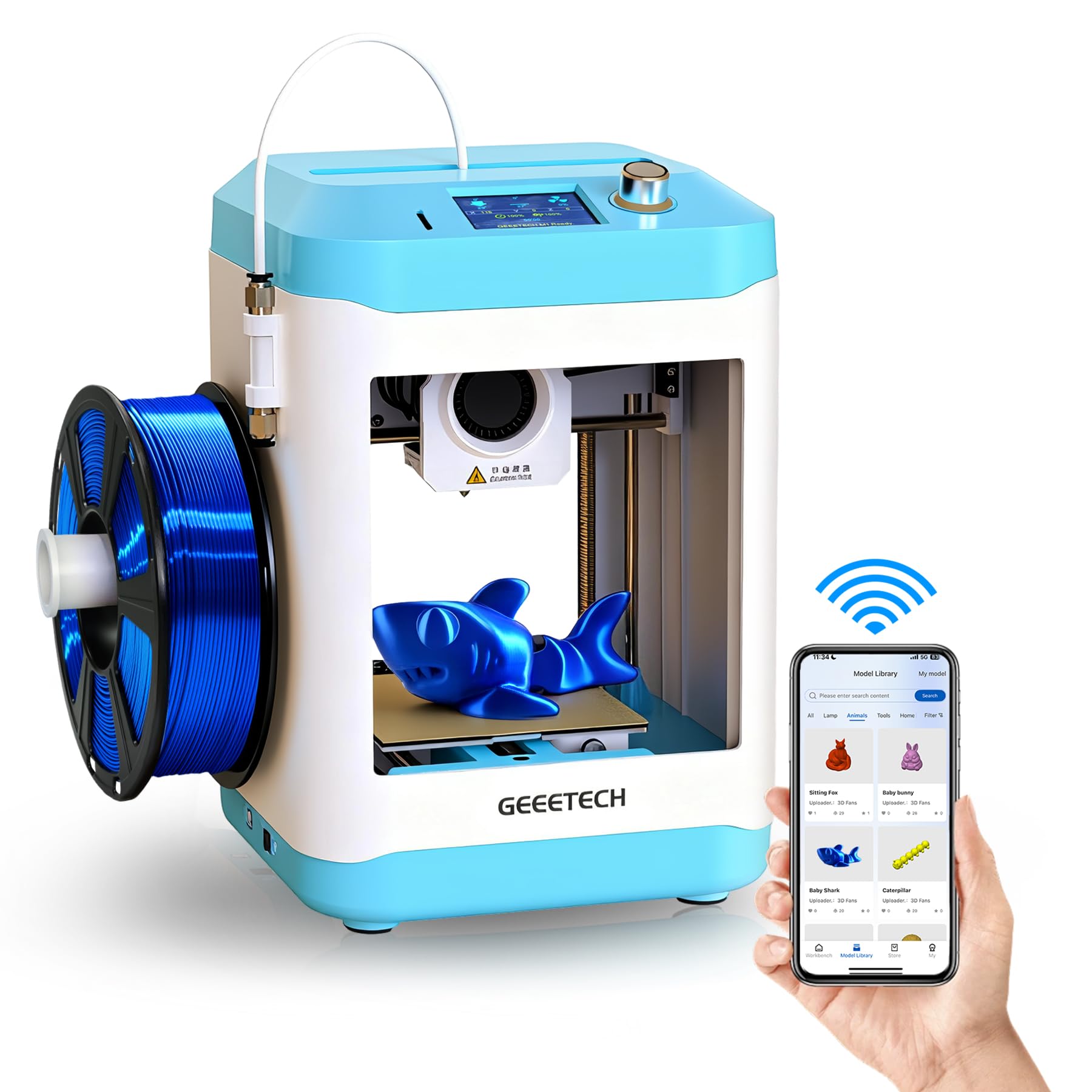
The Geeetech M1 is intentionally small — a 3.94-inch cube build volume — and that limitation is actually its best feature for a total novice. A small print area means shorter print times, less filament waste when things go wrong, and a lower barrier to iteration. Beginners can try a design, fail fast, learn the lesson, and try again without the sunk cost of a six-hour failed print on a larger machine.
The direct-drive extruder with a 1:5 gear ratio generates sufficient torque to push both PLA and TPU reliably. The 16-point auto-leveling system is straightforward and effective, and the magnetic flexible build plate lets you pop parts off without scraping. The 2.4-inch LCD color screen and knob-based interface are refreshingly simple compared to touchscreens that can confuse younger users.
Geeetech provides lifetime technical support, and the M1 is backed by a 12-month free repair guarantee. Some users reported initial units with auto-leveling failures, but the support team expedited replacements. For a parent buying for a child under 10 who wants to explore without commitment or high cost, the M1 is the lowest-risk trial on the market.
Why it’s great
- Compact size reduces filament waste and print time for learning
- Knob-based interface is intuitive for children
- Direct-drive extruder handles TPU filament well
Good to know
- 100mm build cube restricts project size significantly
- Initial unit quality control can be inconsistent
9. Geeetech M1S

The M1S is the app-connected sibling of the M1, adding WiFi and smartphone control through the Geeetech app while keeping the same compact 100mm build volume and direct-drive 1:5 gear ratio extruder. For a beginner who prefers managing prints from their phone rather than an SD card, this incremental upgrade is worth the small premium.
The 16-point auto-leveling and heated PEI build plate perform reliably across dozens of prints. The printer supports both 500g and 1kg filament spools — though the included sample roll is small, and users may need to print a spool holder if they want to use standard 1kg rolls. One-button filament loading and unloading simplifies material changes for children and first-time users.
Customer support from Geeetech has been a consistent positive in user reports, with quick replacements for units that arrived with auto-leveling issues or WiFi connectivity problems. The app itself is not the most polished on the market, but it allows remote management and access to a model library. For the budget-conscious buyer who wants modern connectivity features without stepping up to a larger format printer, the M1S delivers everything required to learn the basics.
Why it’s great
- WiFi and app control at a budget-friendly price point
- Heated PEI build plate provides reliable adhesion
- One-button filament loading simplifies material changes
Good to know
- Included filament spool is only 500g — additional filament needed
- App connectivity can be finicky and may require re-pairing
FAQ
Should I start with an FDM or a resin printer as a total beginner?
How much assembly should a beginner expect from a “starter” 3D printer?
What is the ideal build volume for a first 3D printer?
Can I print in multiple colors with a single-spool starter printer?
Do I need ventilation for a 3D printer in my home?
Final Thoughts: The Verdict
For most users, the best 3d printer for starters winner is the Bambu Lab A1 because its fully automatic calibration, quiet operation, and multi-color expansion path remove every friction point that typically kills a beginner’s enthusiasm. If you want a fully enclosed printer that can handle advanced materials and maintain high speeds, grab the ELEGOO Centauri Carbon. And for a family with young children who want an AI-powered creative tool that requires zero setup and no separate software, nothing beats the AOSEED X-Maker Joy AI+.