
The leap from a laptop or console to a dedicated gaming desktop is the single biggest frame-rate upgrade you can make, but the component alphabet soup—CPU cores, VRAM, ray tracing—can paralyze a first-time buyer. You need a machine that plays modern titles at 1080p without stutter, boots in seconds, and leaves a clear upgrade path for when you outgrow it.
I’m Min — the co-founder and writer behind Gadgets Feed. I spend my days dissecting prebuilt PC specs across dozens of SKUs, comparing CPU generations, GPU memory bandwidth, and power supply headroom to separate real gaming value from marketing fluff.
This guide turns months of spec-sheet analysis into a clear, actionable pick for your first rig, helping you find the best beginner gaming pc that balances performance, upgrade potential, and long-term reliability right out of the box.
How To Choose The Best Beginner Gaming PC
Your first gaming PC needs to solve three things: run current games at comfortable frame rates, survive regular use without crashing, and let you swap components when you’re ready for more. A prebuilt machine that nails all three is worth far more than one with a single high-end part and budget everything else.
The GPU is Your Engine
The graphics card dictates whether you play at 30 FPS or 90 FPS. For entry-level 1080p gaming, an AMD Radeon RX 580 8GB or an NVIDIA RTX 3050 6GB is the baseline. Cards with only 4GB of VRAM (like the RX 6500 XT) choke on modern textures. If you see “integrated graphics” on the spec sheet, that PC needs a discrete GPU for any serious gaming.
RAM and Storage Aren’t Optional
8GB of RAM is the absolute floor; several modern titles demand 16GB to avoid stutter. A 512GB NVMe SSD boots Windows in seconds, but 1TB prevents the agony of uninstalling games constantly. Always check if the motherboard has spare RAM slots and a secondary drive bay for future upgrades.
CPU Generations Matter Differently
A 12th-gen Core i5 or a Ryzen 5 5600 handles 1080p gaming without bottlenecking any GPU in this price range. Older server-grade Xeon processors (E3-12xx series) work but lack features like PCIe 4.0 support and modern security patches. Don’t overspend on a CPU at the expense of the GPU budget.
Power Supply and Case Quality
A 550W 80+ Bronze power supply is the minimum for a build with a dedicated GPU. Generic no-name PSUs can fail and damage other parts. Tempered-glass side panels and RGB fans improve airflow and aesthetics, but ensure the case has enough ventilation to keep the GPU from thermal throttling during long sessions.
Quick Comparison
On smaller screens, swipe sideways to see the full table.
| Model | Category | Best For | Key Spec | Amazon |
|---|---|---|---|---|
| Skytech Gaming Crystal | Premium | Ultra settings 1080p gaming | RTX 5060 8GB, Ryzen 7 5700 | Amazon |
| KOTIN Prebuilt Gaming PC | Premium | 1440p-ready with DDR5 | RTX 5060 Ti 8GB, Ryzen 5 9600X | Amazon |
| SKYESEV Gaming Desktop | Mid-Range | Ray tracing on a budget | RTX 3050 6GB, Ryzen 5 5600 | Amazon |
| HP Pavilion Gaming Desktop | Mid-Range | Compact prebuilt from a major OEM | RX 5500 4GB, Ryzen 3 5300G | Amazon |
| CyberPowerPC Gamer Master | Mid-Range | Entry-level team red build | RX 6500 XT 4GB, Ryzen 5 5500 | Amazon |
| suevery Desktop Computer | Mid-Range | White theme with RTX 3050 | RTX 3050 6GB, Core i5-12400F | Amazon |
| YAWYORE Gaming PC | Value | Upgrade-ready integrated platform | Radeon Vega 7, Ryzen 5 5600GT | Amazon |
| ALCPOK Gaming Desktop | Value | Starter PC for esports titles | Radeon Vega 8, Ryzen 7 5700G | Amazon |
| Blackout Computers Gaming PC | Budget | Classic RX 580 build with i7 | RX 580 8GB, Core i7 4790 | Amazon |
| STGAubron Gaming PC | Budget | RX 580 with Wi-Fi 6 and peripherals | RX 580 8GB, Core i7 4th Gen | Amazon |
| NOVATECH Phantom 2.0 | Budget | Workstation-class Xeon build | RX 580 8GB, Intel Xeon E3 v6 | Amazon |
In‑Depth Reviews
1. Skytech Gaming Crystal Gaming PC

The Skytech Crystal represents the ceiling of what a beginner should consider. With an NVIDIA RTX 5060 8GB GPU and a Ryzen 7 5700 eight-core processor, it delivers 60+ FPS on ultra settings at 1080P in titles like Black Myth Wukong and Baldur’s Gate 3 without breaking a sweat. The 32GB of DDR4-3200 RAM ensures you can run Discord, a browser, and the latest game simultaneously without any stutter.
Skytech assembled this in the USA and backs it with a one-year warranty on parts and labor. The triple tempered-glass Crystal case shows off the ARGB fans and internal layout, and the 650W Gold-rated PSU gives you headroom for future GPU upgrades. The included gaming keyboard and mouse get you started immediately, though most users will swap them out within a few months.
For someone who wants to avoid any upgrade anxiety for two or three years, this machine is the sweet spot. The RTX 5060’s ray tracing cores and DLSS support mean you can explore modern visual features, and the beefy 650W power supply means you can slot in a higher-tier card later without swapping the PSU.
Why it’s great
- RTX 5060 handles 1080p ultra settings effortlessly
- 32GB RAM eliminates multitasking bottlenecks
- 650W Gold PSU with upgrade headroom
- No bloatware pre-installed
Good to know
- Included keyboard and mouse are basic
- Wi-Fi is 802.11ac, no Wi-Fi 6
- Case has no USB-C front port
2. KOTIN Prebuilt Gaming PC Desktop

The KOTIN build pushes the beginner envelope further by pairing the latest Zen 5 architecture (Ryzen 5 9600X) with DDR5-6000 memory and an RTX 5060 Ti 8GB GPU. The combination of DDR5 bandwidth and the 9600X’s 5.4GHz boost clock means this system handles both 1080p esports titles at 200+ FPS and 1440p AAA gaming at solid frame rates.
A standout feature is the digital CPU temperature display built into the air cooler, giving you real-time thermal feedback without third-party software. The 650W 80+ Gold PSU and PCIe 4.0 NVMe SSD with 6,000MB/s read speeds ensure everything loads nearly instantly. Wi-Fi 7 and Bluetooth 5.3 make this the most future-proofed wireless setup in this comparison.
KOTIN includes a one-year limited warranty and Amazon-based support. The 16GB of DDR5 is dual-channel and upgradeable to 64GB, though beginners will find 16GB sufficient for current games. The 1TB SSD leaves room for a dozen or more titles before you need to manage storage.
Why it’s great
- RTX 5060 Ti with 8GB GDDR7 for ray tracing at 1440p
- DDR5-6000 memory for faster frame times
- CPU temp display on the cooler
- Wi-Fi 7 and Bluetooth 5.3
Good to know
- Only 16GB RAM at this price point
- Component brands may vary
- Runs warm under sustained load
3. SKYESEV Gaming Desktop Computer PC

The SKYESEV desktop delivers a mature combination for the entry-level gamer: a Ryzen 5 5600 six-core processor paired with an RTX 3050 6GB GPU. This is the first build on this list that supports NVIDIA’s DLSS upscaling, which can boost frame rates by 30-40% in supported titles without a visible quality hit. The 32GB of DDR4-3200 dual-channel RAM is overkill for gaming alone, but it future-proofs you for streaming or video editing.
Storage is handled by a 1TB M.2 NVMe PCIe SSD, and the 550W 80+ Bronze PSU provides stable power for the 3050. The case features five ARGB 120mm fans with a remote control, allowing you to adjust fan speed and lighting without opening the case. The MSI A520M-A PRO motherboard leaves room for RAM and storage upgrades down the line.
Users report that this machine runs Call of Duty, Overwatch, and Arc Raiders above 60 FPS at medium-to-high settings. The only caveat is that the case comes packed with shock-absorbing foam that must be removed before powering on—skip that step and thermal shutdowns will follow.
Why it’s great
- RTX 3050 6GB supports DLSS for better performance
- 32GB DDR4 RAM is excessive but welcome
- 1TB NVMe SSD for large game libraries
- Remote-controlled ARGB fans
Good to know
- Shock foam must be removed first
- GPU brand may vary
- Single report of system power-off after days of use
4. HP Pavilion Gaming Desktop

The HP Pavilion TG01-2022 is the most compact prebuilt on this list, measuring just under 14 inches tall. It runs on a Ryzen 3 5300G processor with an AMD Radeon RX 5500 4GB discrete GPU. The RX 5500 delivers playable frame rates in esports titles like Valorant and Overwatch at 1080p medium settings, and it can handle older AAA releases like Death Stranding at acceptable quality.
HP subjected this chassis to 230 quality tests for durability, and the 9 total USB ports offer excellent connectivity for peripherals. The 8GB of DDR4 RAM is the biggest limitation—users who upgrade to 16GB report that the system transforms, eliminating stutter in titles like Rust and Age of Empires IV. The 512GB PCIe NVMe SSD boots Windows 11 quickly but fills up fast.
The included wired keyboard and mouse let you start gaming immediately, and the customizable LED lighting adds some personality to an otherwise understated case. This is a solid choice for someone who wants a name-brand machine with a small footprint and is comfortable adding a RAM stick.
Why it’s great
- Compact, durable chassis from a major OEM
- Front USB-C port for modern accessories
- Easy RAM upgrade slot
- Very quiet under load
Good to know
- 8GB RAM is too low for modern gaming
- RX 5500 4GB struggles with AAA titles at high settings
- Wi-Fi 5, no Wi-Fi 6 support
5. CyberPowerPC Gamer Master

CyberPowerPC is a well-known system integrator, and the Gamer Master GMA3100A3 is their entry-level offering. It pairs a Ryzen 5 5500 six-core processor with an AMD Radeon RX 6500 XT 4GB GPU. The RX 6500 XT runs esports games like Fortnite and CS2 comfortably at medium settings, but its 4GB VRAM buffer becomes a wall for modern AAA titles—God of War or Cyberpunk 2077 will require significant settings reductions.
The B550 chipset motherboard supports PCIe 4.0, and the 500GB NVMe SSD loads levels and operating system quickly. The 8GB of DDR4 is the same bottleneck seen in the HP Pavilion; upgrading to 16GB is recommended before playing any recent open-world game. The tempered glass side panel and custom RGB lighting give the case a clean gamer aesthetic.
CyberPowerPC includes a wired keyboard and mouse, a one-year parts and labor warranty, and free lifetime tech support. For a beginner focused on competitive shooters and older titles, this machine works out of the box, but the 4GB GPU and 8GB RAM mean you will want to plan a small upgrade sooner than with other options.
Why it’s great
- Reliable system integrator with good support
- B550 motherboard allows CPU upgrades
- PCIe 4.0 SSD for fast loading
- Compact case with tempered glass
Good to know
- RX 6500 XT 4GB VRAM limits modern AAA gaming
- 8GB RAM needs immediate upgrade
- Some reports of poor power supply and GPU quality
6. suevery Desktop Computer

This suevery build is a visual standout with its all-white theme and five RGB fans. Under the hood, it runs a 12th-gen Core i5-12400F processor—six performance cores, 12 threads, no efficiency core complexity. Paired with an RTX 3050 6GB, it delivers smooth 1080p gaming in titles like Apex Legends (150+ FPS) and Red Dead Redemption 2 on high settings.
The 16GB of DDR4-3200 RAM is the sweet spot for a beginner, and the 512GB NVMe SSD offers quick boot times. The power supply is a standard 550W unit, adequate for the RTX 3050 but with limited headroom for a major GPU upgrade. The case’s pure white aesthetic includes a tempered glass side panel and clean cable management out of the box.
Some users reported missing audio drivers after a clean Windows format, but downloading the drivers from the Galax 510 motherboard page resolved it. For a beginner who wants a unique look without sacrificing performance, this white build offers a balanced spec sheet at a fair mid-range price.
Why it’s great
- Stunning all-white design with RGB fans
- Core i5-12400F is a strong gaming CPU
- RTX 3050 6GB handles 1080p high settings well
- 16GB DDR4 is the right baseline
Good to know
- 512GB SSD fills up fast with modern games
- No USB-C on the front panel
- Driver availability requires the specific motherboard page
7. YAWYORE Gaming PC Desktop

This YAWYORE system takes the integrated graphics route with a Ryzen 5 5600GT processor and its built-in Radeon Vega 7 graphics. Without a dedicated GPU, it runs lighter esports games like Fortnite at around 30 FPS on low settings. However, the 550W 80+ Bronze PSU includes PCIe power cables, and the motherboard has a full-length PCIe slot, so adding a used RX 580 or GTX 1070 Ti transforms this machine into a competent 1080p gaming rig.
The 16GB of DDR4-3200 RAM and 1TB M.2 NVMe SSD are excellent baseline specs. The MSI A520M-A PRO motherboard offers solid stability, and the five ARGB 120mm fans with a remote control keep the system cool. The built-in Wi-Fi and Bluetooth antennas remove the need for a separate USB dongle.
For a beginner who is willing to buy a used GPU for around and slot it in, this system offers the lowest total cost for a capable gaming PC. The integrated Vega 7 also handles video playback and productivity without any fan noise, making this a dual-purpose machine until you add a graphics card.
Why it’s great
- 550W PSU with PCIe connectors ready for GPU
- 16GB DDR4 and 1TB SSD are generous
- Quiet operation when not gaming
- Excellent platform for a budget GPU upgrade
Good to know
- Integrated Vega 7 is weak for AAA gaming out of box
- GPU power cable is tucked inside the case
- Must manually install a discrete GPU
8. ALCPOK Gaming Desktop

The ALCPOK system is built around the Ryzen 7 5700G APU, which includes Radeon Vega 8 integrated graphics. This is the most powerful integrated GPU on this list—it can run League of Legends, Dota 2, and CS2 at smooth 1080p frame rates on medium settings without a dedicated card. For a child or someone just exploring PC gaming on a tight budget, this works out of the box.
Like the YAWYORE, this machine has a 550W 80+ Bronze PSU with PCIe connectors, so you can install a dedicated GPU whenever you outgrow the Vega 8 graphics. The 16GB of DDR4-3200 RAM and a 1TB NVMe SSD provide ample headroom for multitasking and storage. The motherboard includes extra RAM slots and M.2 slots for future expansion.
Users who added an RTX 3060 reported the system transformed into a powerful 1080p gaming desktop. The ARGB fans run quietly, and the case is compact enough to fit on a standard desk. The single stick of RAM (not dual-channel) slightly reduces Vega 8 performance, but the motherboard supports a second stick for a dual-channel upgrade.
Why it’s great
- Ryzen 7 5700G is the strongest APU for gaming
- 550W PSU with PCIe cables ready for GPU
- 1TB SSD and 16GB DDR4 included
- Quiet, cool operation
Good to know
- RAM is single-stick, reducing GPU performance
- No USB-C port
- Must add a GPU for AAA gaming
9. Blackout Computers Gaming PC
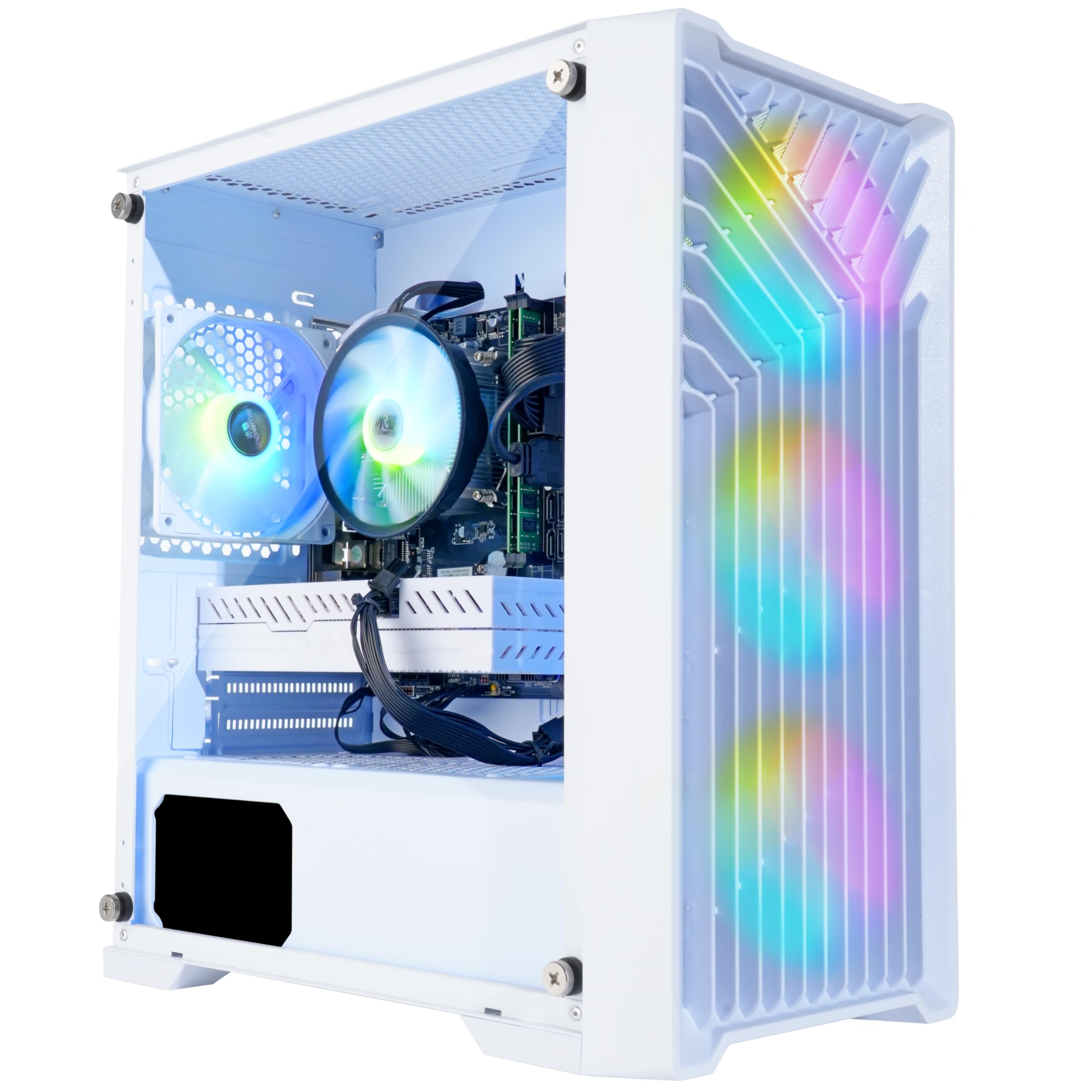
Blackout Computers offers a classic budget build centered around a Core i7 4790 (Haswell, 4th gen) and an AMD Radeon RX 580 8GB GPU. The RX 580 remains a formidable 1080p card, delivering 60+ FPS on medium settings in titles like Call of Duty Warzone, GTA V, and Elden Ring. Its 8GB VRAM gives it an edge over newer 4GB cards in texture-heavy scenes.
The system includes 16GB of DDR3 RAM (the i7 4790 uses DDR3, not DDR4) and a 1TB NVMe SSD. The case features four RGB fans and a front mesh panel for airflow. Blackout Computers includes a one-year warranty on parts and labor with lifetime free technical support, and multiple users report excellent customer service responsiveness.
The i7 4790 is a decade-old architecture without PCIe 4.0 or M.2 NVMe native support, though the included NVMe SSD runs via a third-party controller. This system is ideal for the absolute budget buyer who wants a working gaming machine today, but the aging CPU platform limits future CPU upgrades without swapping the motherboard.
Why it’s great
- RX 580 8GB still a strong 1080p GPU
- 16GB RAM and 1TB SSD included
- Assembled in the USA with good support
- VR ready with 4 RGB fans
Good to know
- 4th-gen Core i7 uses old DDR3 platform
- No PCIe 4.0 support
- Some reports of GPU failure after weeks
10. STGAubron Gaming PC
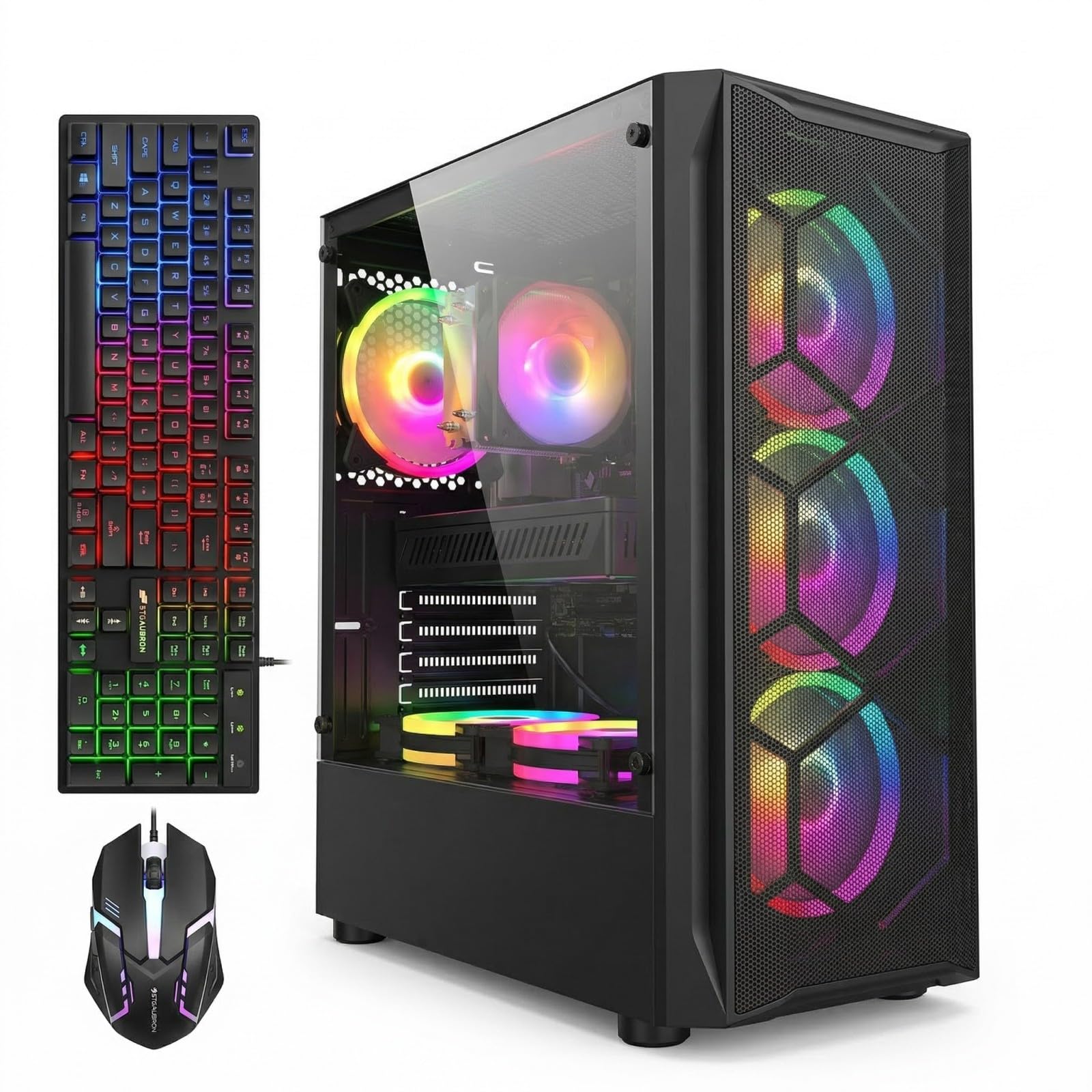
The STGAubron build mirrors the Blackout Computers configuration—a 4th-gen Core i7 paired with an RX 580 8GB—but adds Wi-Fi 6, Bluetooth 5.0, and an RGB keyboard and mouse bundle. The 16GB of DDR3 RAM and 1TB SSD provide the same baseline, and the six RGB fans offer excellent airflow out of the box.
The RX 580 handles the same 1080p gaming load as the Blackout unit, offering 60+ FPS in Fortnite, Minecraft, Roblox, and Call of Duty at medium settings. The Wi-Fi 6 adapter is a genuine upgrade over older 802.11ac, reducing latency in online games when wired Ethernet isn’t an option. The included keyboard and mouse are basic but functional for starting out.
STGAubron provides a one-year parts and labor warranty with lifetime tech support. Some users had language settings default to French and needed to adjust the Windows regional settings, but once configured, the system runs reliably. This is a good pick for someone who wants every accessory included and doesn’t plan to upgrade the CPU platform.
Why it’s great
- RX 580 8GB for solid 1080p gaming
- Wi-Fi 6 reduces online gaming latency
- Includes RGB keyboard and mouse
- Six RGB fans for airflow
Good to know
- 4th-gen Core i7 uses DDR3 platform
- Language settings may default incorrectly
- Some reports of system failure after two days
11. NOVATECH Phantom 2.0

The NOVATECH Phantom 2.0 uses a server-grade Intel Xeon E3-1230 v6 processor, which is essentially a Core i7-7700 without the integrated graphics. This is paired with an AMD RX 580 8GB GPU, 16GB of DDR4 RAM, and a 512GB M.2 SSD. The Xeon handles 1080p gaming with strong single-threaded performance, pushing 70-200 FPS in titles like God of War at 76 FPS.
The case is a premium tower with good cable management and secure packaging. NOVATECH includes a Wi-Fi and Bluetooth dongle for connectivity. The 1-year warranty covers parts and labor, and customer service has a reputation for responsiveness—one user reported a dead-on-arrival unit and received a next-day replacement at half cost.
The 512GB SSD is half the size of competing budget builds, and the system has no manual included. Users also note the GPU can arrive defective due to shipping shocks. For a buyer who needs a workstation-grade CPU for productivity alongside gaming, this Xeon build offers the most processing power per dollar at the budget end.
Why it’s great
- Xeon E3-1230 v6 equals i7-7700 performance
- RX 580 8GB for 1080p gaming
- Excellent customer service reported
- Sturdy case and good packaging
Good to know
- Only 512GB SSD storage
- No manual included
- GPU defective on arrival in some cases
FAQ
Is an RX 580 8GB still good enough for gaming in 2025?
How much RAM does a beginner gaming PC actually need?
Should I get a prebuilt or build my own beginner gaming PC?
Can I upgrade a prebuilt beginner gaming PC later?
Is integrated graphics good enough for a beginner gaming PC?
Final Thoughts: The Verdict
For most users, the best beginner gaming pc winner is the Skytech Gaming Crystal because its RTX 5060, 32GB RAM, and 650W Gold PSU deliver ultra-settings 1080p gaming today and a clear upgrade path for tomorrow. If you want maximum future-proofing with DDR5 and Wi-Fi 7, grab the KOTIN Prebuilt. And for the strictest budget, nothing beats the value of the Blackout Computers RX 580 build or the bundle-friendly STGAubron.