
Finding a graphics card that delivers silky-smooth 1440p framerates without sounding like a jet engine is the real challenge in today’s mid-range GPU market. You need 16GB of VRAM for modern textures and AI-powered features, but you also need a cooling solution that keeps things quiet under load — a balance that many cards fail to strike.
I’m Min — the co-founder and writer behind Gadgets Feed. I’ve spent countless hours analyzing benchmark data, thermal performance metrics, and customer feedback across the RX 9060 XT lineup to identify which models actually deliver on their promises for real-world gaming and creative workloads.
After poring over spec sheets and verified user experiences, I’ve narrowed the field to the seven best options available right now — this is the definitive guide to finding your ideal 9060 xt model for a balanced, high-performance build.
How To Choose The Best 9060 XT Model
The RX 9060 XT occupies a sweet spot in the GPU market — it’s powerful enough for high-refresh 1440p gaming but doesn’t demand a nuclear power plant or a full-ATX case. Choosing the right model comes down to understanding three key variables: thermal design, physical dimensions, and memory bandwidth. Here’s what matters most.
Cooling Architecture & Noise Profile
Every 9060 XT model uses the same RDNA 4 chip, so the defining difference is how each manufacturer handles heat dissipation. Dual-fan cards like the ASRock Challenger and PowerColor Reaper are compact and quiet at idle, but their thermal limits under sustained load differ significantly from triple-fan designs like the GIGABYTE Gaming OC. Look for cards with 0dB fan-stop technology if you prioritize silence during light workloads.
Physical Dimensions & Case Compatibility
The 9060 XT lineup spans from compact 200mm cards perfect for small form-factor builds to 280mm+ triple-fan behemoths. Measure your case clearance carefully — the PowerColor Reaper at 200mm fits almost any chassis, while the GIGABYTE Gaming OC requires a roomier mid-tower. Thickness also varies from 2-slot to 2.5-slot designs, which can block adjacent PCIe slots.
VRAM & Memory Bus Considerations
All models in this class ship with 16GB of GDDR6 memory on a 128-bit bus, which is ample for 1440p ultra textures and most 4K scenarios at medium settings. The memory clock speed is consistent across brands at 20 Gbps, so performance differences come down to boost clock optimization and thermal throttling behavior. Choose a card with a higher factory boost clock for a small but meaningful out-of-box performance edge.
Quick Comparison
On smaller screens, swipe sideways to see the full table.
| Model | Category | Best For | Key Spec | Amazon |
|---|---|---|---|---|
| ASUS Dual RX 9060 XT | Premium | Compact 1440p Builds | 3250 MHz Boost / Dual BIOS | Amazon |
| GIGABYTE Gaming OC ICE | Premium | Silent Performance | 2780 MHz / Dual BIOS / Hawk Fan | Amazon |
| GIGABYTE Gaming OC | Premium | High-FPS 1440p Gaming | 2700 MHz / WINDFORCE Cooling | Amazon |
| XFX Swift OC | Mid-Range | Ultra-High Boost Clock | 3320 MHz Boost / SWFT Fan | Amazon |
| PowerColor Reaper | Mid-Range | Small Form-Factor Builds | 200mm Length / 500W PSU | Amazon |
| ASRock Challenger | Mid-Range | Budget AI & Gaming | 3290 MHz / 0dB Silent Mode | Amazon |
| Sapphire Pulse | Budget | Best Entry-Level Value | 3290 MHz / Compact / Quiet | Amazon |
In‑Depth Reviews
1. ASUS Dual Radeon RX 9060 XT 16GB GDDR6 Graphics Card

The ASUS Dual RX 9060 XT strikes an impressive balance between raw clock speed and physical compactness. With a boost clock reaching 3250 MHz, it outpaces many competitors in out-of-box performance while maintaining an 8-inch length that fits comfortably in smaller mid-tower cases. The 2.5-slot design and axial-tech fans with a reduced hub size increase downward air pressure, keeping GPU temperatures around 60-75°C even in ITX enclosures.
What sets this card apart is the Dual BIOS switch, letting you toggle between a performance-optimized profile and a quieter mode that reduces fan noise during less demanding sessions. Verified buyers report that the 0dB technology keeps fans completely stopped during light gaming, making it an excellent choice for living room or workstation builds where noise matters. The dual ball fan bearings also add long-term reliability compared to sleeve-bearing alternatives.
For creative professionals and AI enthusiasts, the 16GB VRAM buffer handles 1440p video editing timelines and local LLM inference without stuttering. The three DisplayPort 2.1a outputs support multi-monitor setups at up to 8K resolution, and the card’s power efficiency means a 550W PSU is sufficient for most configurations. It’s a well-rounded package that doesn’t compromise on performance for size.
Why it’s great
- Highest stock boost clock at 3250 MHz among competitors
- Dual BIOS with 0dB fan-stop for silent operation
- Compact 8-inch length fits most cases easily
Good to know
- Plastic backplate sacrifices some structural rigidity
- Premier pricing tier may stretch tighter budgets
2. GIGABYTE Radeon RX 9060 XT Gaming OC ICE 16G
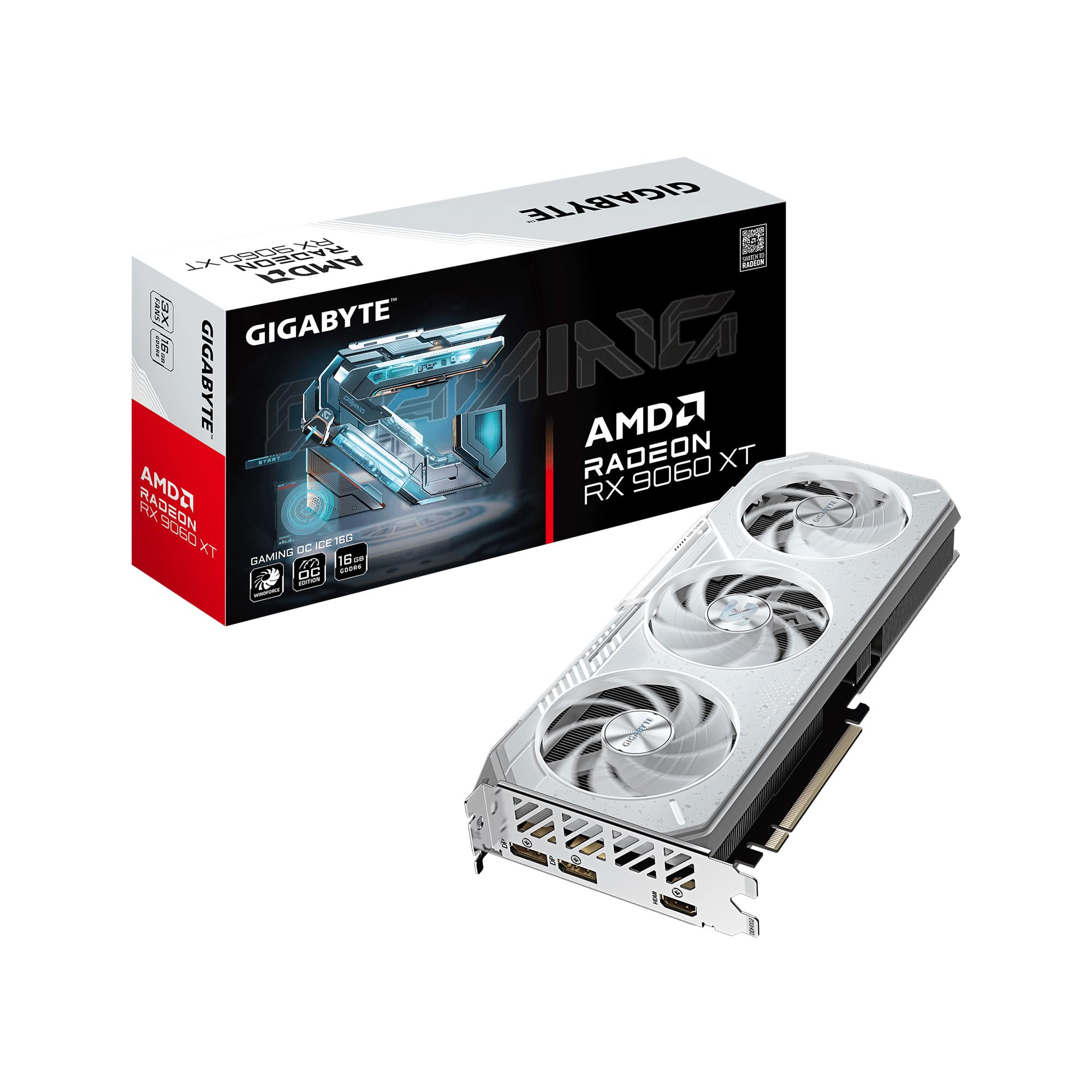
The GIGABYTE Gaming OC ICE edition takes thermal management seriously with its signature WINDFORCE cooling system, featuring Hawk fans with alternate spinning technology and server-grade thermal conductive gel. This combination keeps edge temperatures in the mid-50s°C during gaming sessions while maintaining near-silent operation. The reinforced metal backplate with a bent edge adds structural rigidity that prevents PCB sag over time.
A standout feature is the Dual BIOS switch, with Performance mode as the factory default and Silent mode available for users who prioritize noise reduction. The card’s 2780 MHz game clock and 16GB GDDR6 memory deliver smooth 1440p ultra settings in demanding titles like Cyberpunk 2077 and Hogwarts Legacy, according to verified buyers. FSR 4 upscaling further extends its longevity for future titles.
The ICE variant’s white aesthetic is a deliberate design choice for builders creating themed PC builds, and the 16.7M-color RGB lighting syncs via GIGABYTE CONTROL CENTER. At 11.06 inches long, it requires a mid-tower or larger case, but the thermal headroom it provides justifies the footprint. AV1 encoding support also makes it a strong contender for streamers and content creators.
Why it’s great
- Superior WINDFORCE cooling with server-grade thermal gel
- Dual BIOS with Silent mode for near-inaudible operation
- Excellent 1440p ultra performance with FSR 4 support
Good to know
- Long 11.06-inch card may not fit smaller cases
- White color scheme limits build theme flexibility
3. GIGABYTE Radeon RX 9060 XT Gaming OC 16G

The standard GIGABYTE Gaming OC shares the same WINDFORCE cooling DNA as its ICE sibling but at a more accessible price point. The Hawk fan design and composite copper heat pipes work together to keep the card cool under sustained loads, with verified users reporting stable temperatures even during extended Battlefield 6 sessions at max settings. The solid backplate adds structural support without the aesthetic constraints of the white ICE version.
With a 2700 MHz game clock and 16GB GDDR6 memory, this card handles 1440p high to ultra settings across virtually all modern AAA titles. Verified buyers consistently praise its ability to deliver 240fps in competitive titles like Fortnite and high framerates in simulation games like DCS. The zero-RPM fan mode keeps the card silent during desktop use, and the fans only spin up when GPU temperature exceeds the threshold.
Customizable RGB lighting through GIGABYTE CONTROL CENTER allows synchronization with other components, though some buyers note the card’s large 11.06-inch length requires careful case measurement. AV1 encoding hardware is included for streaming and recording. This is the sweet spot for buyers who want GIGABYTE’s excellent cooling without paying extra for the white colorway.
Why it’s great
- Excellent thermal performance with quiet zero-RPM fans
- AV1 encoding support for streamers and editors
- Consistent 1080p/1440p performance with stable frame pacing
Good to know
- Ray tracing performance is decent but not class-leading
- Large physical footprint requires case clearance check
4. XFX Swift AMD Radeon RX 9060 XT OC Gaming Edition

The XFX Swift OC Gaming Edition leads the pack with the highest factory boost clock in this lineup at 3320 MHz, translating to a Time Spy score of approximately 17,000 in verified benchmarks. The SWFT dual-fan cooling solution keeps temperatures around 60°C under load, enabling sustained performance without thermal throttling. It’s a straightforward, no-frills card that focuses on delivering raw gaming performance.
Verified buyers running 1080p max settings report that this card handles 95% of modern AAA titles without breaking a sweat, while 1440p gaming remains smooth and responsive. The card’s power efficiency is noteworthy — it draws less power than competitor equivalents while maintaining comparable or better frame rates. The XFX Swift design language is clean and understated, featuring a matte black shroud without excessive RGB lighting.
At 10.63 inches long, it’s moderately sized but still requires case clearance. The inclusion of two DisplayPort and one HDMI output covers standard monitor setups, though users needing four displays will need to use motherboard outputs for the additional monitor. For buyers prioritizing raw clock speed and proven thermal performance, this is a compelling mid-range choice.
Why it’s great
- Highest boost clock in class at 3320 MHz
- Excellent price-to-performance ratio for 1440p gaming
- Runs cool at ~60°C under sustained gaming loads
Good to know
- Only three display outputs may limit multi-monitor setups
- No RGB lighting for gamers wanting customizable aesthetics
5. PowerColor Reaper AMD Radeon RX 9060 XT 16GB GDDR6

The PowerColor Reaper is the smallest RX 9060 XT model on this list at just 200mm in length, making it the ideal choice for small form-factor (SFF) builds and compact ITX cases. Despite its diminutive size, it packs the full 16GB GDDR6 memory and supports up to 7680×4320 resolution through one HDMI 2.1b and two DisplayPort 2.1a outputs. The single 8-pin power connector keeps cable management simple.
Verified buyers upgrading from older cards like the RX 580 and GTX 1080 report dramatic performance improvements, with the Reaper handling 1440p gaming effortlessly and even delivering playable 4K framerates in less demanding titles at around 53fps native. The card operates quietly under load, with temperatures reaching 72-76°C during extended gaming sessions — acceptable for such a compact design. Some users noted that driver-level stuttering in CPU-bound scenarios was resolved by adjusting e-core settings.
The Reaper’s clean, all-black aesthetic and lack of RGB lighting make it a stealthy addition to any build. Its 658-gram weight means it doesn’t require a support bracket, reducing installation complexity. For AI workloads, the 16GB VRAM handles local LLMs and image generation models effectively. This card proves that smaller footprint doesn’t mean smaller performance.
Why it’s great
- Ultra-compact 200mm length fits almost any case
- Single 8-pin power connector simplifies cable management
- Capable of 4K 60fps gaming in less demanding titles
Good to know
- Runs warmer than larger dual-fan alternatives
- Some CPU-bound stuttering reported with certain processor configurations
6. ASRock Radeon RX 9060 XT Challenger 16GB OC

The ASRock Challenger 16GB OC delivers impressive performance at a budget-friendly price point, with a 3290 MHz boost clock that competes closely with more expensive models. The striped axial dual fans and 0dB Silent Technology stop the fans completely under low load, making this card virtually silent during everyday productivity tasks. The 249mm length and 2-slot design fit comfortably in most mid-tower cases without clearance issues.
Verified buyers report that this card serves as an excellent upgrade from older gen GPUs like the RTX 3060, delivering 165fps on high settings in modern titles while running quietly. The 16GB VRAM also makes it a capable option for AI inference tasks, with users successfully running Qwen and Gemma models. The PCIe 5.0 x16 interface provides future-proofing for upcoming motherboard platforms.
A particularly thoughtful inclusion is the hardware LED indicator with a dedicated on/off switch, letting users disable all lighting without software. The Super Alloy construction and metal backplate add structural integrity. For buyers who want a no-nonsense 9060 XT model that focuses on performance and value without expensive extras, the Challenger is a strong contender.
Why it’s great
- Excellent value with strong 1440p gaming performance
- 0dB Silent Technology for zero fan noise at idle
- PCIe 5.0 support for future-proofing
Good to know
- Dual-fan heatsink struggles in cases with poor airflow
- No RGB lighting for gamers wanting customizable aesthetics
7. Sapphire 11350-03-20G Pulse AMD Radeon RX 9060 XT Gaming OC

The Sapphire Pulse RX 9060 XT Gaming OC represents the entry-level price point in the 9060 XT lineup while still delivering solid 1440p performance and 16GB of GDDR6 memory. The 3290 MHz boost clock makes it competitive with more expensive models in raw compute terms. Full PCIe 5.0 x16 support ensures maximum bandwidth for modern and future motherboards.
Verified buyers upgrading from older cards like the RX 570 report transformative performance gains, with the Pulse running all modern games at max settings and maintaining low power draw via a single 6+2 pin connector. The compact design and small footprint make installation straightforward, and GPU temperatures stay around 61°C with memory at 70°C under load — impressive for a more affordable model.
Where this card particularly shines is Linux compatibility. Multiple verified users report plug-and-play functionality with distributions like Devuan, excellent Blender performance, and seamless operation with ComfyUI and local LLM workloads. The dual HDMI outputs (2 x HDMI, 1 x DisplayPort) suit users with legacy monitor setups. For buyers prioritizing value and Linux support over aesthetics or RGB, this is a standout choice.
Why it’s great
- Best entry-level pricing for the 9060 XT platform
- Excellent Linux compatibility with plug-and-play drivers
- Runs cool at 61°C with low power draw
Good to know
- Thick back bracket may cause tight fit in some cases
- 2 x HDMI output configuration limits DisplayPort monitor setups
FAQ
Does the RX 9060 XT support ray tracing effectively at 1440p?
Which 9060 XT model is best for small form-factor PC builds?
Can the RX 9060 XT run local AI models like Llama or Stable Diffusion?
What power supply wattage do I need for a 9060 XT model?
Final Thoughts: The Verdict
For most users, the 9060 xt model winner is the ASUS Dual Radeon RX 9060 XT because it combines the highest stock boost clock with a compact form factor, Dual BIOS flexibility, and proven thermal performance. If you want superior cooling and silent operation, grab the GIGABYTE Gaming OC ICE. And for small form-factor builds, nothing beats the PowerColor Reaper.