
Geometry demands precise calculations — angle-side relationships, circle arcs, polygon dimensions, and unit conversions that frustrate even dedicated students and tradespeople. A general scientific calculator often buries these functions under menus, forcing you to lose focus. The right device hands you dedicated keys for π, sin/cos/tan, square roots, and fraction manipulation, turning problem-solving into a fluid process rather than a constant hunt through mode screens.
I’m Min — the co-founder and writer behind Gadgets Feed. After spending dozens of hours comparing function lists, display readability, battery systems, and real-world user reports across seven geometry-focused calculators, I’ve isolated exactly what separates a useful tool from a drawer-dweller.
Choosing the right device can shave minutes off every homework session or job-site layout. This guide cuts through the marketing noise to deliver the definitive calculator for geometry recommendations based on actual specs, student exam requirements, and trade-specific needs.
How To Choose The Best Calculator For Geometry
Geometry problems often require simultaneous handling of angles in degrees or radians, fractional side lengths, and coordinate geometry. Not every calculator handles these equally well. Understanding three key decision points will keep you from overpaying for features you do not need or under-buying for the complexity of your coursework or profession.
Dedicated Trig and Geometry Functions
A calculator that forces you to dig through menus for sine, cosine, tangent, inverse trig, or π is a distraction. Look for devices with hard keys for these operations, plus dedicated paths for circle area, arc length, polygon dimensions, and angle conversions. Trade-specific calculators like the Calculated Industries 4400 even include keys for hexagonal and polygonal dimensions — a huge time saver for metal fabricators and welders.
Display Type and Natural Textbook Output
Seeing a fraction as a stacked numerator over denominator, or a trig answer expressed in terms of π, eliminates transcription errors. Natural Textbook Display technology (found on Casio models) shows expressions exactly as they appear in textbooks. Graphing calculators with high-resolution color screens, like the TI-84 Plus CE, also render graphs and geometric figures in richer detail, helping you visualize circle arcs, points of intersection, and transformations.
Exam Approval and Classroom Compatibility
If you are a student, the calculator must be allowed on standardized tests. The College Board and ACT maintain strict lists of approved devices. The TI-84 Plus CE, Casio fx-9750GIII, and NumWorks are all widely approved. Many mid-range scientific calculators are also test-compliant, but models with Computer Algebra Systems (CAS), like the TI-Nspire CX II CAS, are banned on some exams (ACT, SAT). Always verify a model’s approval status before purchasing.
Quick Comparison
On smaller screens, swipe sideways to see the full table.
| Model | Category | Best For | Key Spec | Amazon |
|---|---|---|---|---|
| Texas Instruments TI-84 Plus CE | Graphing | Color graphing & exam compliance | 140 DPI, 16-bit color display | Amazon |
| Casio fx-9750GIII | Graphing | Natural Textbook Display & Python | Natural Textbook Display | Amazon |
| Texas Instruments TI-Nspire CX II CAS | Graphing with CAS | College math & symbolic algebra | 8 built-in apps, Python programming | Amazon |
| NumWorks Graphing Calculator | Graphing | Modern interface & open-source coding | 320×240 pixel color screen | Amazon |
| iPepul Scientific 991EX | Scientific | Rechargeable all-in-one with notepad | 552 calculation functions | Amazon |
| Calculated Industries 4400 TradesmanCalc | Trade Specific | Welding, fabrication, job-site layout | Dedicated circle/arc/hex keys | Amazon |
| Nadex Scientific with Graph Functions | Scientific | Budget-friendly high school geometry | 360+ functions, solar + battery | Amazon |
In-Depth Reviews
1. Texas Instruments TI-84 Plus CE Color Graphing Calculator

The TI-84 Plus CE is the de facto standard for high school and early college geometry for a reason. Its 140 DPI, 16-bit color backlit display renders graphs, coordinate grids, and geometric figures with crisp clarity — you can plot a circle, overlay a tangent line, and inspect intersection points without squinting. The rechargeable lithium-ion battery eliminates the cost and waste of disposable cells, and the metallic coral casing is surprisingly durable, with user reports confirming no scratches after multiple drops.
Geometry-specific workflows benefit from this calculator’s robust graphing engine. You can enter parametric and polar equations directly, animate function paths, and analyze arcs and sectors visually. The preloaded Cabri Jr. geometry app lets you construct dynamic figures — triangles, circles, polygons — and manipulate them in real time to test conjectures. This visual feedback is invaluable for students struggling to connect abstract formulas to actual shapes.
Approved for AP, SAT, ACT, PSAT, and IB exams, this calculator travels seamlessly between classroom and test center. The 3.2-inch color screen with zoom and trace functions means you never lose your place on a dense graph. The trade-off is a premium investment, but the combination of build quality, display clarity, and exam compliance makes it the most versatile geometry tool on this list.
Why it’s great
- High-resolution color display for precise graph interpretation
- Rechargeable battery with long real-world life
- Durable metal enclosure withstands daily drops
Good to know
- Battery may arrive not charged — plan to charge before first use
- Premium tier; less expensive options exist for basic geometry
2. Casio fx-9750GIII Graphing Calculator

The Casio fx-9750GIII delivers graphing capabilities at a price point well below the TI-84 class, making it a compelling pick for students who need charting and geometry functions without the premium markup. The Natural Textbook Display shows fractions, square roots, derivatives, and integrals exactly as they appear in your geometry textbook — a feature that dramatically reduces errors when transcribing complex angle formulas or rational side lengths.
Geometry students benefit from its support for parametric graphs, polar coordinates, and vector calculations. The ability to run MicroPython directly on the calculator introduces a programming dimension that schools increasingly value in STEM curricula. Users consistently praise the responsive interface and exceptional battery life — a set of four AAA batteries can last through months of daily use without replacement, based on real reports.
Exam approval for AP, SAT, ACT, and IB tests ensures classroom compatibility. The 6.6 by 3.25-inch footprint is compact enough for a crowded desk. The graphing speed is slower than higher-end models, and it lacks a color display, but the trade-off is substantial savings for a device that handles geometry and pre-calculus workloads with ease.
Why it’s great
- Textbook-style display eliminates transcription errors on fractions
- Excellent battery life — months on one set of AAA cells
- Approved for all major standardized exams
Good to know
- Graph rendering is slower than premium TI models
- Limited vector capabilities for physics-heavy geometry courses
3. Texas Instruments TI-Nspire CX II CAS Graphing Calculator

The TI-Nspire CX II CAS is the heaviest hitter on this list, purpose-built for students whose geometry coursework extends into calculus, linear algebra, and advanced STEM applications. Its built-in Computer Algebra System (CAS) performs symbolic manipulation — it can simplify trigonometric identities, solve for an unknown side length in terms of variables, and factor polynomial expressions that arise from coordinate geometry problems. The 320 by 240 pixel color screen displays graphs in six different styles with remarkable detail.
This model ships with eight built-in apps, including a dedicated Geometry app for constructing and manipulating shapes through drag-and-drop interaction. You can create a triangle, measure its angles, and watch them update dynamically as you resize sides — an immediate, visual reinforcement of the angle-side relationships central to geometry. Python and TI-Basic coding add a layer of custom function creation for advanced projects. The slim design at 0.57 pounds is easy to carry between classes.
The critical caveat: CAS calculators are not allowed on the ACT, SAT, or many AP exams. This is strictly a classroom and homework weapon for students who need symbolic algebra. The startup time can be slow, especially with many installed files, and the premium price reflects the CAS capability. For college-level coursework involving proofs and symbolic manipulation, nothing here matches its raw analytical horsepower.
Why it’s great
- CAS engine solves symbolic equations for advanced geometry proofs
- Interactive Geometry app for dynamic shape manipulation
- Lightweight at just over half a pound
Good to know
- Not permitted on ACT, SAT, or most AP exams
- Slow startup time reported with heavy file storage
4. NumWorks Graphing Calculator

NumWorks has disrupted the graphing calculator market with an open-source operating system that receives frequent, user-driven updates — a stark contrast to the static firmware of legacy brands. The high-resolution color screen (320×240 pixels) renders geometric constructions and trigonometric graphs with clarity, and the USB-C charging port aligns with modern laptop and tablet cables, reducing cable clutter in a student’s bag. At 220 grams, it is among the lightest graphing calculators available.
For geometry, the NumWorks offers an excellent equation solver and fast graph rendering that gives real-time feedback as you adjust parameters. The intuitive interface means less time fumbling with menus and more time exploring angle relationships and coordinate transformations. Users praise the clean design and the built-in Python shell for writing custom geometry solvers. The calculator is approved for AP, SAT, and ACT exams.
The downsides include slightly mushy button feedback compared to the crisp tactile response of TI calculators, and the white plastic casing is prone to visible scratches over time. Python editing on the device itself is slow, and scripts can be lost if the battery fully drains. For high school geometry through pre-calculus, however, this is a forward-thinking choice that prioritizes usability and modern connectivity over legacy complexity.
Why it’s great
- Open-source OS with frequent feature updates
- USB-C charging — no proprietary cables needed
- Fast graph rendering for real-time geometry exploration
Good to know
- Button feel is mushy compared to TI alternatives
- White plastic scratches easily; no dark mode
5. iPepul Scientific 991EX with Notepad

The iPepul 991EX packs 522 calculation functions into a form factor that includes a write-on notepad, letting you scribble intermediate steps while viewing results on the LCD. For geometry students solving multi-step problems involving right triangles, coordinate distances, and circle properties, this eliminates the need to juggle a separate scratch pad. The notepad includes a locking key to prevent accidental erasure — a thoughtful touch that protects an entire problem-solving chain.
This calculator covers trigonometry, complex numbers, matrix operations, and vector calculations essential for geometry and pre-calculus coursework. The dual power system — solar panel supplemented by Type-C rechargeable battery — means you never hunt for disposable coin cells. Users report the default fraction output (as proper fractions rather than decimals) is a major advantage when working with exact side ratios in geometry. The device is lightweight and suitable for middle school through college.
The main concern is the lack of graphing capability, so you will not plot parabolas or hyperbolas directly. The screen also struggles in low-light conditions, relying on the solar panel for adequate brightness. For students whose geometry curriculum focuses on analytic computation rather than graph visualization, this is a budget-respecting powerhouse that also reduces desk clutter with its integrated notepad.
Why it’s great
- Integrated notepad with locking key prevents accidental erasure
- Solar and Type-C dual power — no button batteries needed
- Fraction output by default suits exact geometry calculations
Good to know
- No graph plotting capability
- Screen is dim in low-light environments
6. Calculated Industries 4400 TradesmanCalc
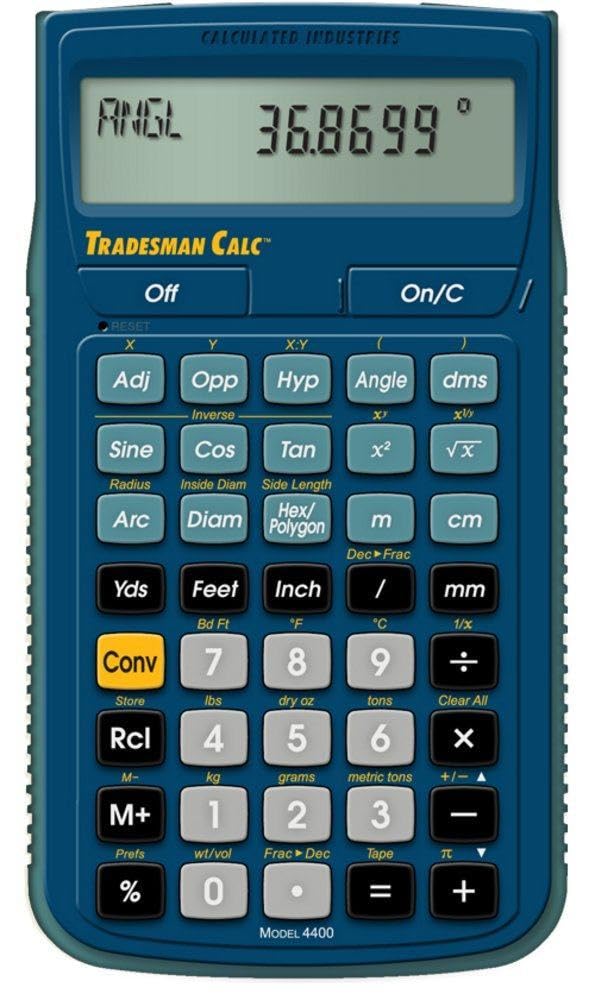
The Calculated Industries 4400 is not a general graphing calculator — it is a purpose-built tool for welders, metal fabricators, engineers, and draftsmen who live in applied geometry. Dedicated keys for circle circumference, arc length, radius, hexagonal and polygonal dimensions, and angle-side relationships mean you can solve a complex layout problem in seconds without navigating through submenus. The calculator handles fractions in multiple formats (proper, improper, decimal) and converts between Imperial and metric units on the fly.
Applied geometry in the field demands speed and accuracy. The TradesmanCalc solves proportions, ratios, and trig functions with dedicated hard keys, reducing the risk of costly material waste. Users in welding and fabrication describe it as invaluable for calculating bevel angles, determining true lengths of angled cuts, and converting plan measurements to workable stock dimensions. The protective slide cover and pocket reference guide make it rugged enough for a job-site tool belt.
The calculator is not suitable for a classroom environment where graphing, symbolic manipulation, or test-center compliance is required. Its 5.5 by 3-inch footprint and metal enclosure give it a dense, solid feel. For anyone whose work involves measuring, cutting, and fabricating material based on geometric principles, this is the most efficient geometry calculator available — it is not a student tool, it is a professional instrument.
Why it’s great
- Dedicated keys for circle, arc, polygon, and trig calculations
- Built-in fraction and unit conversion for real-world measurements
- Rugged metal construction with protective slide cover
Good to know
- Not graphing capable or exam-approved for students
- Specialized for trades — overkill for general geometry homework
7. Nadex Scientific Calculator with Graph Functions
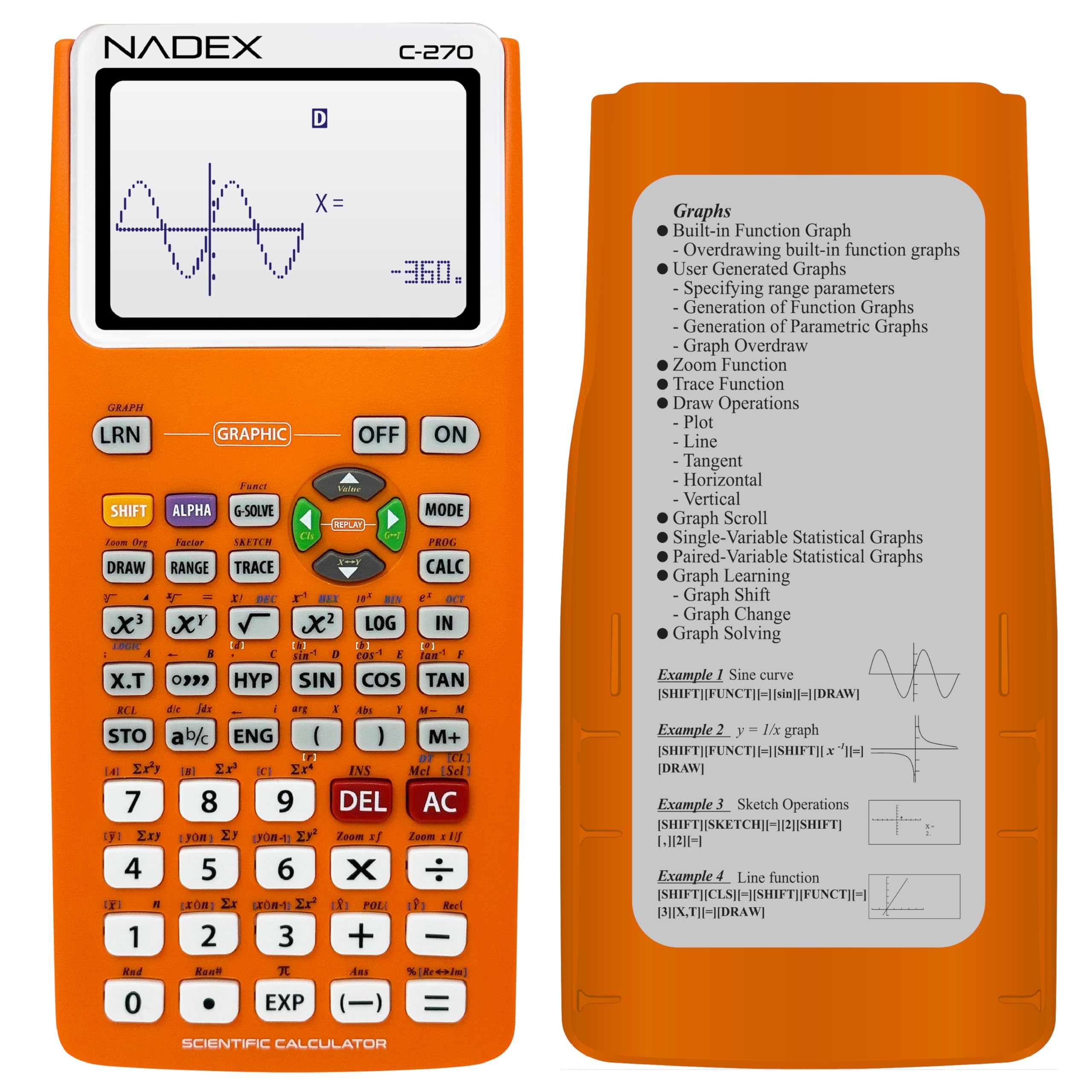
The Nadex Scientific Calculator brings over 360 functions — covering trigonometry, linear regression, complex numbers, fractions, and variable solving — at a price point that makes it accessible for middle and high school students easing into geometry. The “graph functions” describe formula visualization and table generation, not full graphing calculator plotting, but for visualizing a parabola’s shape or a sine wave’s pattern from a table of values, it provides enough graphical context to reinforce classroom concepts.
This calculator supports three operating modes — calculation, angular measurement (radians/degrees), and display preferences — so geometry students can switch between degree-based angle work and radian-based circular functions without confusion. It is approved for PSAT/NMSQT, SAT, ACT, and AP exams, meaning it travels seamlessly into test rooms. The dual power source (solar cell plus included AA backup battery) ensures it never dies mid-exam. Users report it as extremely close in feel and interface to the TI-84, making it a low-cost alternative for practice.
The plastic enclosure feels lighter and less durable than metal-bodied alternatives, and the 2.5-inch screen is smaller than graphing calculator displays. It also lacks programming capability, color graphing, and dynamic geometry apps. For a student on a tight budget who needs a reliable, test-approved scientific calculator for geometry through algebra II, this device delivers proven value without straining the wallet.
Why it’s great
- Exam-approved for SAT, ACT, AP, and PSAT at a low cost
- Solar + AA dual power prevents mid-test shutdowns
- User interface and layout closely mimic TI-84
Good to know
- Not a true graphing calculator — limited visualization
- Plastic casing feels less durable than premium models
FAQ
What is the difference between a scientific and a graphing calculator for geometry?
Can I use a CAS calculator on the SAT or ACT?
Why do some geometry calculators show answers as fractions instead of decimals?
Is a solar-powered calculator reliable for geometry exams?
Final Thoughts: The Verdict
For most users, the calculator for geometry winner is the Texas Instruments TI-84 Plus CE because it combines a high-resolution color display, rechargeable battery, full exam approval, and the most robust geometry app ecosystem available at a mid-premium price point. If you want exceptional value and a textbook-style display for less money, grab the Casio fx-9750GIII. And for professional tradespeople solving applied geometry on the job site, nothing beats the Calculated Industries 4400 TradesmanCalc.