
That box of dusty 8mm tapes in your closet isn’t just clutter—it’s a vault of irreplaceable family history, first steps, and blurry but beloved holiday mornings. But the camcorder that recorded them is likely dead, and the only way to watch them is with a working playback deck. Modern digital tools have evolved specifically to solve this problem, turning analog signals into clean digital files without the bulk of a full VCR setup.
I’m Min — the co-founder and writer behind Gadgets Feed. I spend my time researching niche AV gear, comparing frame rates, bitrates, and connector compatibility to find the most reliable path from old tape to new hard drive.
This guide cuts through the noise to help you pick the best 8mm camcorder that will play your tapes and transfer them to your computer with minimal frustration and maximum clarity.
How To Choose The Best 8mm Camcorder
The market for 8mm camcorders today is almost entirely used or refurbished hardware, so your buying criteria differ from a modern camcorder. You aren’t looking for the best new recording specs; you are looking for the most reliable playback, the most straightforward transfer path, and the fewest headaches.
Format Compatibility: 8mm, Hi8, or Digital8
These three formats use the same physical tape shell, but they are not all the same. Standard 8mm is early analog with around 250 lines of resolution. Hi8 boosted that to roughly 400 lines by using a higher-frequency luminance signal. Digital8 is a digital variant that records MPEG-2 onto the same tape. Most camcorders sold for transfer purposes are backward-compatible: a Digital8 camcorder will play Hi8 and standard 8mm tapes, but a standard 8mm camcorder will not play Digital8. If you have a mix of tape types, look for a Digital8 or Hi8 model that explicitly states backward compatibility.
Transfer Method: USB Capture vs. Tapeless DVR vs. FireWire
There are three primary ways to get footage off a tape. The simplest and most modern approach is a tapeless DVR box like the RunCam PowerPlay, which intercepts the analog AV signal from any camcorder and records it directly to a microSD card as an MP4 file—no computer required during capture. The second method uses a USB capture dongle connected to a PC or Mac, which records the analog video signal through software. The third method, specific to Digital8 camcorders, uses a FireWire (i.LINK) port to transfer the digital stream losslessly; this requires an older computer with a FireWire port or an adapter. For most users, the tapeless DVR route is the most reliable and least dependent on finicky software.
Condition and Tape Transport Mechanics
With used camcorders, the condition of the tape mechanism is everything. Rubber belts dry out and crack, causing the tape to not load or the capstan to slip. Video heads can become clogged or worn, producing a snowy or banded picture. A camcorder that looks pristine may still fail to play a tape smoothly. Look for sellers who guarantee the unit works for playback, or who offer a return policy. A refurbished or inspected unit is often worth the premium over an untested “as-is” unit. Also confirm that the battery holds a charge or that an AC adapter is included—dead batteries are common and sometimes discontinued.
Quick Comparison
On smaller screens, swipe sideways to see the full table.
| Model | Category | Best For | Key Spec | Amazon |
|---|---|---|---|---|
| Sony Camcorder for 8mm Digital8 Hi8 Transfer | Bundle | Playback all 8mm, Hi8, Digital8 tapes | Compatible with all three formats | Amazon |
| Tech Collector 8mm Digital8 Hi8 Transfer Bundle | Bundle | Start archiving with S-Video output | S-Video output for higher quality | Amazon |
| Panasonic miniDV Camcorder Bundle | Bundle | MiniDV playback and transfer | FireWire and USB connectivity | Amazon |
| Hi8 8mm VCR (Tech Collector) | Camcorder | Simple play-and-digitize 8mm/Hi8 | Includes USB adapter | Amazon |
| Sony DCR-SX85 Handycam | Modern | Modern tapeless recording with zoom | 70x Extended Zoom, 1280×720 | Amazon |
| Canon VIXIA HF R800 (Renewed) | Modern | Modern tapeless recording with zoom | 57x Advanced Zoom, Full HD CMOS | Amazon |
| KODAK REELS 8mm & Super 8 Digitizer | Scanner | Digitizing 8mm film reels (not tapes) | 5″ screen, frame-by-frame scan | Amazon |
| RunCam PowerPlay DVR | Tapeless DVR | Recording analog AV to microSD | 60fps recording, 2.4in LCD | Amazon |
| Upgraded PowerPlay DVR Recorder | Tapeless DVR | Recording analog AV to microSD | 720×576 PAL, 720×480 NTSC | Amazon |
In‑Depth Reviews
1. Sony Camcorder for 8mm Digital8 Hi8 Tape Transfer to Computer USB and DVD

This bundle from a specialized reseller is the most complete solution for archival work. The camcorder is a used Sony Digital8 model that plays Video8, Hi8, and Digital8 tapes without any format confusion. It ships with a USB capture device, AV and S-Video cables, a power supply, and a blank tape so you can start transferring immediately.
The S-Video output is a genuine advantage over a basic composite-only camcorder because it separates luminance and chrominance, reducing dot crawl and delivering a sharper image when captured through a good USB dongle. The included capture software works on both Windows and Mac, and several reviewers confirm success using VLC as an alternative recording tool.
Customer support from this seller is notably responsive—one reviewer received a free cleaning cassette shipped internationally after a settings change caused interference. The main limitation is that this is a used camcorder; the tape transport and battery may show age-related wear, but the seller guarantees 100% functionality and offers returns.
Why it’s great
- Plays all three 8mm tape formats in one device
- Includes S-Video output for higher capture quality
- Complete bundle with USB adapter and cables out of the box
Good to know
- Used unit with potential tape mechanism wear
- FireWire transfer requires older computer hardware
- Battery life may be short due to age
2. Tech Collector 8mm, Digital8, and Hi8 Transfer Bundle for Digitizing 8mm Tapes and Converting 8mm to DVD

Tech Collector offers a similar kit to the Sony bundle but focuses on the Hi8 and 8mm crowd. The included camcorder has an S-Video output, which is the best analog connection you can use for capturing to a computer. The bundle also comes with a blank 8mm tape, USB adapter, and all the necessary AV and FireWire cables.
Several reviewers successfully digitized decades-old home movies using this kit, noting that the S-Video capture produced noticeably better quality than composite cables. The seller includes a complete instruction manual and has a reputation for responding to issues. One point of confusion is that if you receive a Sony DCR-TRV240 as the camcorder, you get an excellent unit with long recording history, but the specific model may vary depending on stock.
The audio echo issue reported by one user is worth noting—a slight delay or reverberation on the captured audio, possibly due to a settings mismatch or a faulty capture device. It’s not universal, but it means you should test a short clip before committing to a full batch of transfers.
Why it’s great
- S-Video output delivers cleaner video capture
- Complete cable and adapter kit included
- Works with standard 8mm, Hi8, and Digital8 tapes
Good to know
- Some users report audio echo during capture
- Exact camcorder model may vary
- Condition depends on seller’s sourcing
3. Panasonic Corp Panasonic miniDV Camcorder Bundle w/USB Adapter for Tape Transfer to Digital

If your tape collection is exclusively MiniDV, this Panasonic bundle is a focused solution. It includes a refurbed camcorder, a USB capture device, AV cables, a battery, and a blank MiniDV tape. The camcorder supports FireWire (i.LINK) output, which is the gold standard for MiniDV transfer because the digital stream goes directly from the tape to the computer without any analog conversion.
Reviewers report that the kit works flawlessly for playing and transferring MiniDV tapes. The included instructions are clear, and the USB adapter handles the analog capture if your computer lacks a FireWire port. One caveat is that the specific Panasonic model can vary, and one user reported that theirs did not work with their particular cassettes, suggesting that tape transport tolerances can be an issue with used gear.
The horizontal banding issue described in one review is typical of dirty or worn video heads. A cleaning cassette is recommended as a first troubleshooting step before returning the unit. For anyone with a shelf of MiniDV tapes, this bundle offers a complete and well-reviewed path to digital.
Why it’s great
- FireWire output for lossless MiniDV transfer
- Complete bundle with blank tape and cables
- Easy setup with included instructions
Good to know
- Some units may have dirty video heads
- Not compatible with 8mm or Hi8 tapes
- Specific camcorder model may vary
4. Hi8 8mm VCR Video Cassette Recorder, Play and Digitize Your Old 8mm and Hi8 Tapes

Tech Collector’s Hi8 8mm VCR is a straightforward solution for people who just want to play and digitize their old 8mm and Hi8 tapes. The camcorder is a used unit that functions primarily as a playback deck. It includes a USB adapter so you can connect it directly to a PC and start capturing.
User feedback is consistently positive, with multiple reviewers reporting that their old tapes played back without issues. The unit comes with a 1-year warranty, which is excellent for a used camcorder. One review mentions initial confusion with the play button layout, but once resolved, the device functioned as expected. A Mac user noted that the seller provided instructions for USB transfer on macOS, which is helpful because many older capture tools are Windows-only.
The main drawback is that this is a basic unit without S-Video output, so you are limited to composite video quality. For standard 8mm tapes, the difference is minor, but Hi8 tapes benefit substantially from S-Video separation. If your collection is mostly Hi8 and you want the best quality, consider a bundle with S-Video support.
Why it’s great
- Guaranteed working with 1-year warranty
- Includes USB adapter for PC capture
- Simple setup for 8mm and Hi8 playback
Good to know
- Composite video only, no S-Video output
- Used unit with potential age-related issues
- Not for Digital8 tapes
5. Sony DCR-SX85 Handycam Camcorder (Silver)

The Sony DCR-SX85 is a modern flash-memory camcorder, not a tape-based unit. It records directly to its internal 16GB of storage or an SD card, outputting standard-definition 720p video. This is not for playing old 8mm tapes, but it is the closest modern equivalent to the compact camcorders of the 8mm era, and it is often used by archivists as a reference camera for recording off a monitor or as a cheap backup.
The Carl Zeiss Vario-Tessar lens with 70x extended zoom is surprisingly capable for terrestrial and even basic astrophotography—one reviewer used it to capture the aurora and moon with good results. The touchscreen is responsive, and the internal memory means you can record for up to 12 hours in LP mode without buying a memory card.
The video quality is SD only, so don’t expect HD sharpness. The SteadyShot stabilization is decent but not perfect, especially at full zoom. For a camcorder that is small enough to fit in a coat pocket and runs on a standard NP-FV30 battery, it is a solid choice if you want to shoot new footage in the spirit of the 8mm format.
Why it’s great
- 16GB internal memory for long recording times
- 70x extended zoom for distant subjects
- Compact size with Carl Zeiss lens
Good to know
- SD video quality only, not HD
- Not compatible with 8mm tapes
- Stabilization struggles at full zoom
6. Canon VIXIA HF R800 Camcorder (Black) (Renewed)
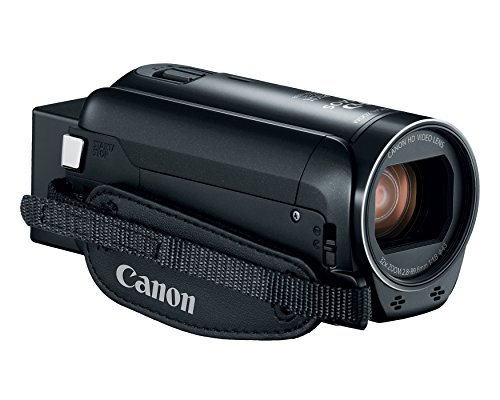
The Canon VIXIA HF R800 is a refurbished modern camcorder that records Full HD 1080p video to an SD card. It features a 3.28-megapixel CMOS sensor, a DIGIC DV 4 processor, and 57x advanced zoom. Like the Sony DCR-SX85, it is not for playing 8mm tapes, but it is an excellent tool for re-creating that camcorder aesthetic or for use as a B-cam.
The SuperRange Optical Image Stabilization (OIS) is noticeably better than the digital-only stabilization on most budget camcorders, and it handles handheld walking shots well. The minimum focusing distance of 10mm at the wide end allows for impressive close-up work. The MP4 file format is directly editable without conversion, which is convenient.
As a renewed unit, the condition can vary. Some reviewers note that it feels slightly overpriced for a refurb—expect to pay around the mid-tier pricing bracket. It is also not lefty-friendly, with the zoom rocker and record button optimized for right-handed use. But for tapeless HD recording in a compact body, this is a strong performer.
Why it’s great
- Full HD 1080p recording with CMOS sensor
- SuperRange OIS for smooth handheld video
- 57x advanced zoom range
Good to know
- Refurbished unit, condition varies
- Not compatible with 8mm tapes
- Not designed for left-handed users
7. KODAK REELS 8mm & Super 8 Films Digitizer Converter with Big 5” Screen

The KODAK REELS digitizer serves a different purpose: it converts physical 8mm and Super 8 film reels into digital MP4 files, not video tapes. If your family archive is on film spools rather than cassette tapes, this device is purpose-built for that job. It features a 5-inch LCD screen and a frame-by-frame scanning process using an 8.08-megapixel sensor.
The process is slow—a 3-minute reel takes roughly 30 minutes to scan—but it is fully automated once you load the film. The resulting 1080p video is limited by the original film quality, but experienced users have found that adjusting the settings (lowering sharpness, increasing bitrate via a firmware modification) can significantly improve output. The device supports reels from 3 to 9 inches in diameter.
The main limitation is that the scanner captures at approximately 20fps, while the original film was likely 16-18fps, resulting in slightly sped-up motion. External software is needed to correct the speed. Additionally, old film is brittle and prone to breaking, so the process requires supervision. For a large film library, this is a cost-effective alternative to professional scanning services, but it demands patience.
Why it’s great
- Digitizes 8mm and Super 8 film reels at home
- Large 5-inch LCD for preview and navigation
- No computer required for the scanning process
Good to know
- Very slow scan speed (10x real time)
- Requires post-processing for frame rate correction
- Fragile film may break during scanning
8. RunCam 2025 Latest Immersion RC PowerPlay Vintage Camera Monitor with DVR LCD Screen

The RunCam PowerPlay is not a camcorder at all—it is a tapeless DVR that sits between your existing camcorder and your display. You connect your 8mm, Hi8, or MiniDV camcorder to the PowerPlay via AV cable, and it records the analog signal directly to a microSD card as an MP4 file. This eliminates the need for a computer during capture.
The 60fps recording capability is a standout feature. Standard analog video from an NTSC camcorder is 60 fields per second, and recording at 60fps preserves the full temporal resolution without deinterlacing artifacts. The built-in 2.4-inch LCD screen lets you monitor what is being recorded in real time, and the compact design includes a cold shoe mount for attaching to your camcorder.
Quality control is a concern. Several users reported units that refused to power on or overheated internally. The recorded resolution may be 960×480 rather than the advertised 720×480, requiring post-processing to correct the aspect ratio. The battery meter uses vague bars, and the unit requires specific 18500 Li-ion cells with a longer positive post. When it works, it is an elegant solution; the failure rate, however, is higher than average.
Why it’s great
- Records analog video directly to microSD at 60fps
- Built-in LCD for real-time monitoring
- Eliminates need for a computer during capture
Good to know
- Some units have power and overheating issues
- Recorded resolution may be 960×480, not 720×480
- Requires specific 18500 batteries not included
9. Upgraded PowerPlay DVR Video Recorder, 60fps Video Capture for Camcorder, VHS, 8mm
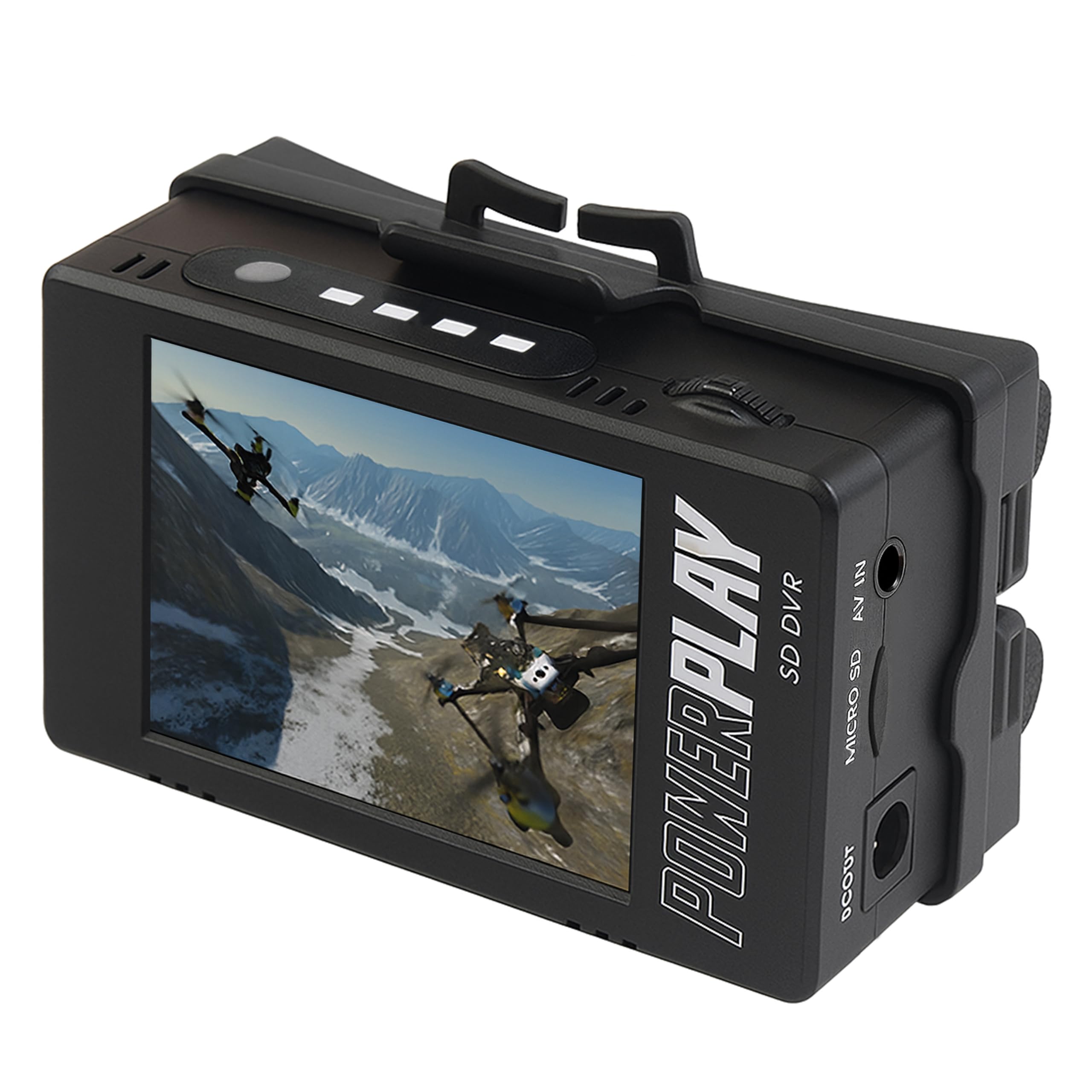
This unit is a clone or successor to the ImmersionRC PowerPlay design, and it functions identically—it is a tapeless DVR that records analog AV to a microSD card. It records at 720×576 PAL or 720×480 NTSC at 50/60fps respectively, and it supports microSD cards up to 512GB (Class 10 required).
The compact design with a clip mount makes it easy to attach to a camcorder strap or belt. Users report a battery life of around 3 hours using two 18500 Li-ion cells, which is sufficient for several tape transfers. The DVR quality is rated as better than the built-in DVRs in older FatShark FPV goggles, and the MP4 output is directly usable without conversion.
The primary issue is that some units suffer from SD card compatibility problems—one reviewer could not get the device to read any card. The AV cable included may have the wrong pinout for some camcorders, requiring you to buy a separate cable. The build quality feels somewhat cheap, and the “upgraded” claim is misleading; this is a different manufacturer’s take on the same concept, and not necessarily an improvement. For the price, it is worth trying if you are on a tight budget, but have a return plan ready.
Why it’s great
- Records PAL and NTSC at 50/60fps
- Supports large microSD cards up to 512GB
- Compact clip mount for portable use
Good to know
- SD card compatibility issues reported
- AV cable pinout may not match your camcorder
- Build quality feels plasticky
FAQ
Can I play an 8mm tape in a modern HD camcorder?
What is the difference between 8mm, Hi8, and Digital8?
Do I need S-Video cables for the best quality?
How do I clean video heads on a used camcorder?
Why does my digitized 8mm footage look sped up?
Final Thoughts: The Verdict
For most users, the best 8mm camcorder winner is the Sony Camcorder for 8mm Digital8 Hi8 Tape Transfer because it covers every tape format with a complete bundle and S-Video output for optimized capture. If you want the simplest tapeless workflow and already own a working camcorder, grab the RunCam PowerPlay DVR. And for digitizing actual 8mm film reels, nothing beats the KODAK REELS Digitizer for a DIY home solution.