
The used PC parts market is the smartest path to a powerful machine if you know where to look. A few generations old processor can deliver 80% of modern performance for 20% of the new price, but only if you can spot the difference between a reliable upgrade and a problematic paperweight.
I’m Min — the co-founder and writer behind Gadgets Feed. My buying guides are built on hundreds of hours spent cross-referencing spec sheets, decoding seller terminology, and analyzing verified customer feedback for the most popular restored computer components.
The difference between a smart purchase and a frustrating waste often comes down to checking compatibility and seller reputation. This guide breaks down the current landscape of reliable 2nd hand pc parts that actually work when they arrive.
How To Choose The Best 2nd Hand PC Parts
Buying used processors and computers requires a completely different checklist than buying new. You are banking on the seller’s honesty about the chip’s condition, the motherboard’s compatibility, and the operating system’s activation status. The three most critical filters are socket type, thermal design power (TDP) versus your cooling, and whether the unit has been tested or just pulled from a decommissioned office.
Socket Compatibility Is Non-Negotiable
A Core i7-3770K will physically drop into any LGA 1155 motherboard, but the motherboard’s BIOS revision must support Ivy Bridge processors. Similarly, a Xeon E5-2697 v3 requires an LGA 2011-3 board with a C612 chipset. Always look up your motherboard’s CPU support list before clicking buy, or you end up with a dead chip and a return process that might take weeks.
Core Count vs. Clock Speed for Your Workload
A fourteen-core Xeon at 2.6 GHz demolishes video rendering and virtual machine tasks but underperforms in older games that rely on single-core speed. An overclockable i7-3770K at 3.5 GHz pushes higher frame rates in titles from 2014 and earlier. Match the silicon to the task, not to the hype of the highest number.
The Hidden Cost of Windows Licenses
Many renewed desktop PCs ship with Windows 10 or 11 Professional pre-installed and activated, which adds significant value versus a bare processor or system that requires you to buy a separate license. However, some older CPUs like the i5-6500 are not officially supported by Windows 11, forcing you to use a workaround or stick with Windows 10 until its end-of-life date in 2025.
Quick Comparison
On smaller screens, swipe sideways to see the full table.
| Model | Category | Best For | Key Spec | Amazon |
|---|---|---|---|---|
| Dell Optiplex 7040 SFF i5-6500 | Renewed Desktop | Office productivity, media center | 16GB DDR4 / 256GB SSD | Amazon |
| HP EliteDesk 800 G2 i5-6500T | Renewed Mini PC | Homelab, Linux server, compact desk | 16GB DDR4 / 240GB SSD | Amazon |
| Dell Optiplex 7010 i5 Package | Full Desktop Bundle | Budget all-in-one setup with monitor | 8GB RAM / 500GB HDD | Amazon |
| Intel Core i7-3770K | Used CPU | LGA 1155 gaming upgrade | 4 Cores / 8 Threads @ 3.5GHz | Amazon |
| Intel Xeon E5-2697 v3 | Renewed CPU | Multi-threaded rendering, VMs | 14 Cores / 28 Threads @ 2.6GHz | Amazon |
| Dell Optiplex 3020 Micro i3-4150T | Renewed Mini PC | Arcade emulation, basic office | 8GB DDR3 / 120GB SSD | Amazon |
| Intel i5-3470 | Used CPU | Ultra-budget LGA 1155 build | 4 Cores @ 3.2GHz / 6MB Cache | Amazon |
In‑Depth Reviews
1. Dell Optiplex 7040 SFF Intel Core i5-6500, 16GB Ram, 256GB SSD
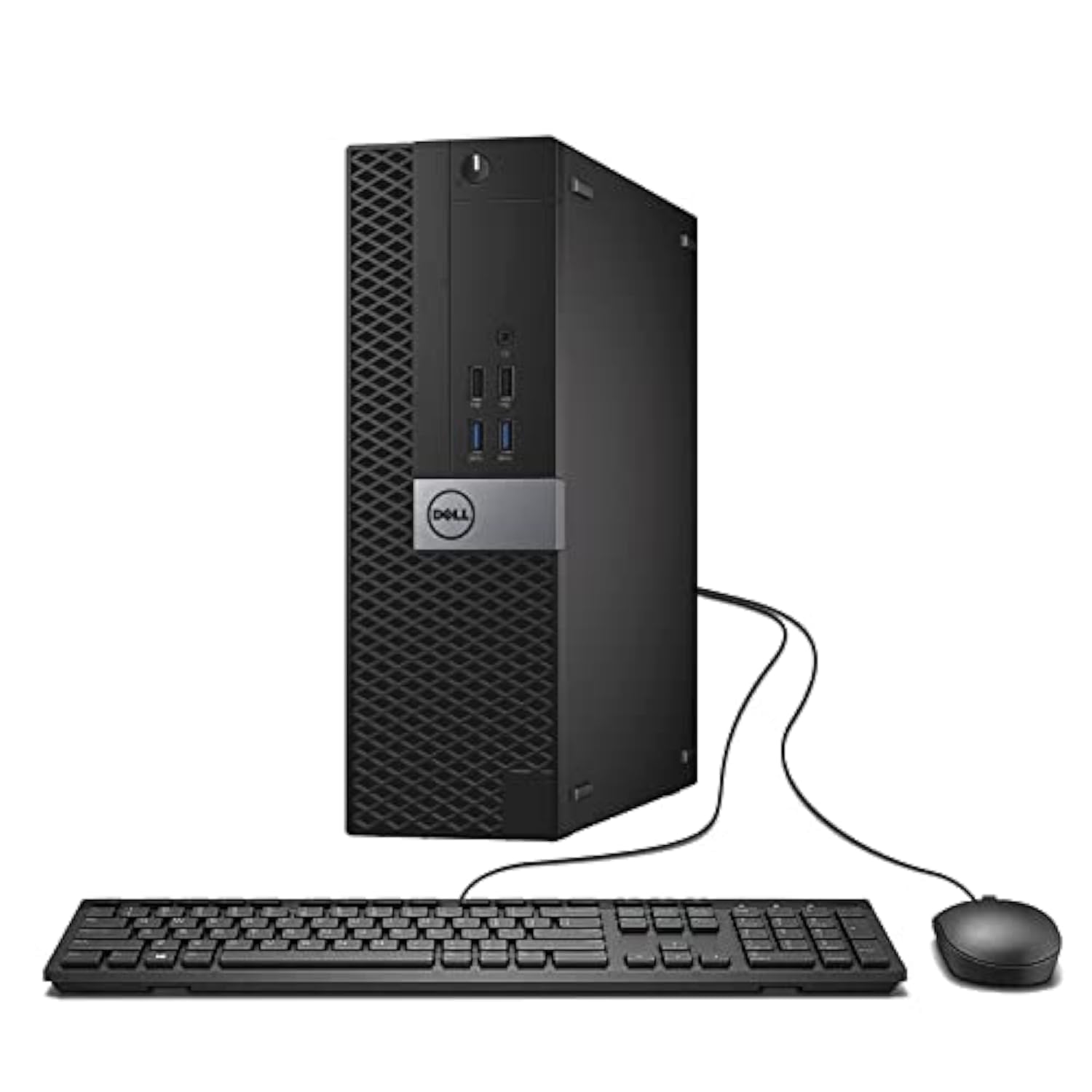
This renewed Dell Optiplex 7040 balances the most important factors for a used PC purchase: recent-enough architecture to feel snappy, enough RAM to avoid immediate upgrades, and an SSD large enough for Windows and several applications. The i5-6500 runs at a base of 3.2 GHz and boosts to 3.6 GHz, which handles web browsing, office suites, and media playback without any perceptible lag. The 16GB of DDR4 RAM gives headroom for multiple browser tabs and light photo editing that 8GB systems choke on.
The small form factor chassis is surprisingly upgrade-friendly. Inside you have an M.2 slot occupied by the 256GB NVMe drive, plus an open SATA port for adding a 2.5-inch SSD or HDD for bulk storage. Buyers reported that the unit arrives in clean condition with a fresh Windows 10 Pro installation that activates automatically. The included keyboard and mouse are basic but functional, and the USB WiFi adapter eliminates the need to run ethernet cable immediately.
The one major caveat is that the i5-6500 is not on Microsoft’s official Windows 11 supported list, so upgrading to the newest OS requires the TPM 2.0 registry bypass workaround. If you need official Windows 11 support out of the box, you may want to look at newer units. For office productivity, school work, or as a lightweight media station, this Optiplex is the most complete value proposition in the current renewed market.
Why it’s great
- 16GB RAM and 256GB NVMe provide real-world responsiveness
- M.2 slot plus open SATA port for easy storage expansion
- Comes with Windows 10 Pro licensed and activated
Good to know
- CPU is not officially supported for Windows 11 upgrade
- Small form factor limits full-size GPU installation
2. HP EliteDesk 800 G2 Desktop Mini, Intel i5-6500T, 16GB DDR4, 240GB SSD

The HP EliteDesk 800 G2 Mini is the answer for anyone who needs a tiny, quiet PC that disappears behind a monitor. Despite its 1-liter volume, this machine packs 16GB of DDR4 memory and a 240GB SSD, making it significantly faster for daily tasks than similarly priced mini PCs that ship with only 4GB or 8GB. The i5-6500T is a 35W TDP chip that runs stone-cold quiet — several buyers noted hearing zero fan noise even under sustained load.
Port selection is unusually generous for a mini PC this size. The front panel includes a USB Type-C port alongside two USB 3.0 ports and separate headphone and microphone jacks. The rear delivers four more USB 3.0 ports, a VGA port, a DisplayPort, and a wired RJ-45 gigabit ethernet jack. This makes it a fantastic candidate for a Linux-based homelab, a Bitcoin node running Umbrel, or a dedicated Batocera emulation machine when paired with a low-latency display.
Multiple verified buyers reported that they successfully upgraded the storage to 2TB via the internal M.2 slot after removing the included SATA SSD. The caveat is that the i5-6500T, like the i5-6500 in the Dell Optiplex 7040, is not on the official Windows 11 support list. A registry-based workaround is available and was confirmed working by several users. For anyone building a compact, energy-efficient, and silent workstation, this HP EliteDesk is the top-tier choice.
Why it’s great
- Virtually silent 35W TDP processor stays cool without fans ramping up
- Front USB Type-C and dual display outputs for modern peripherals
- Excellent candidate for Linux installs and homelab projects
Good to know
- Windows 11 requires TPM bypass workaround for CPU compatibility
- Some units arrive with stripped WiFi antenna shielding
3. Dell Optiplex 7010 Desktop Package, i5 3.2GHz, 8GB, 500GB HDD, 19-inch LCD

This bundle delivers the most complete out-of-box experience of any product in the list. For a single purchase price, you get a renewed Dell Optiplex 7010 tower, a 19-inch LCD monitor, a wired keyboard and mouse, and a WiFi adapter. For a parent setting up a child’s first computer or someone needing a dedicated machine for simple web browsing and online shopping, this package eliminates the headache of sourcing a monitor separately.
The tower runs an Intel Core i5 processor at 3.2 GHz with 8GB of RAM and a 500GB mechanical hard drive. The HDD is the obvious bottleneck here — boot times and application loading will feel noticeably slower than the SSD-equipped systems on this list. However, the system ships with Windows 11 Professional pre-installed and licensed, which is a strong point given that some newer parts in this price range lack official Windows 11 support. The integrated Intel HD Graphics 2500 can drive the included LCD and a second monitor simultaneously.
Buyer feedback highlights that the monitor’s DVI cable may need to be replaced if the included one is faulty, which is a common headache with bundled renewed electronics. The tower itself is solid for its price tier, but the mechanical hard drive will hold back its perceived speed. If you can live with longer boot times or are willing to swap in a cheap SATA SSD, this bundle becomes a genuinely useful secondary machine.
Why it’s great
- Complete package includes monitor, keyboard, mouse, and WiFi adapter
- Windows 11 Professional pre-installed and activated
- Dual monitor capable via integrated graphics
Good to know
- 500GB mechanical HDD is a major speed bottleneck
- Monitor cable quality is inconsistent between units
4. Intel Core i7-3770K Quad-Core Processor 3.5 GHz LGA 1155

The Core i7-3770K is the ultimate upgrade for anyone still running an LGA 1155 motherboard. With four physical cores and eight threads running at a base clock of 3.5 GHz and a turbo of 3.9 GHz, this chip breathes new life into aging Dell Optiplex 3010/7010 towers or custom-built Sandy Bridge-era systems. The unlocked multiplier lets you push the clock speed higher with an aftermarket cooler, and buyers have reported stable overclocks while keeping temperatures around 55°C.
The memory controller officially supports up to 32GB of DDR3-1333 or DDR3-1600 RAM, which is crucial for memory-hungry applications like browser-based development tools or older video editing software. The 8MB L3 cache helps with responsiveness in CPU-bound tasks. Multiple verified purchasers noted that the chip arrived in aftermarket packaging with minor contact marks on the pads, but every single boot test was successful — a reassuring sign for a used processor listing.
The biggest drawback is that this is a twelve-year-old architecture (Ivy Bridge). Modern AAA games will be bottlenecked by the CPU regardless of the GPU you pair it with, and the lack of official Windows 11 support means you are stuck on Windows 10 or a Linux distribution. For a dedicated retro-gaming rig, a home server, or a secondary workstation running legacy software, the i7-3770K remains an absolute bargain at its price tier.
Why it’s great
- Unlocked multiplier enables overclocking for extra performance headroom
- 8 threads and 8MB cache handle multitasking well for its age
- Drop-in upgrade for any LGA 1155 motherboard
Good to know
- Ivy Bridge architecture shows its age in modern multi-core workloads
- No official Windows 11 support; limited to Windows 10 or Linux
5. Intel Xeon E5-2697 v3 Fourteen-Core 2.6GHz LGA 2011-3

The Xeon E5-2697 v3 is the brain that belongs in a workstation, not a gaming PC. Its fourteen physical cores and twenty-eight threads at 2.6 GHz base clock demolish any task that scales across multiple cores, such as video transcoding, 3D rendering, compiling code, or running multiple virtual machines on a hypervisor. The 35MB of L3 cache is enormous by any standard and significantly reduces memory latency in cache-sensitive workloads.
This renewed unit is sold as a standalone CPU and requires a motherboard with an LGA 2011-3 socket and a C612 chipset. That means you are committing to a platform with DDR4 ECC memory if you want to build a workstation, or you can pair it with a compatible ASUS or Gigabyte X99 board for a high-core-count desktop. Several buyers reported using this chip for home lab servers running Plex media servers and multiple VMs simultaneously, with the chip performing flawlessly straight out of the box.
The trade-offs are real and must be considered before purchase. The 145W TDP demands a robust CPU cooler and a power supply that can handle the sustained draw. Single-core performance is lower than a modern Core i3, so the Xeon feels slower in everyday tasks like web browsing and light office work. This part is specifically for users who need massive parallel processing power and can tolerate the platform age for the core-count-per-dollar ratio that simply cannot be matched.
Why it’s great
- 28 threads for a fraction of the cost of a modern threadripper
- 35MB L3 cache reduces memory bottlenecks in compute-heavy tasks
- Certified refurbished with 90-day warranty and functionality testing
Good to know
- 145W TDP requires a strong aftermarket cooler and quality PSU
- Single-core clock speed is slow for day-to-day desktop use
6. Dell Optiplex 3020 Micro, Intel i3-4150T, 8GB DDR3, 120GB SSD

The Dell Optiplex 3020 Micro is a purpose-built tool for users who need a tiny, ultra-budget PC for a very specific job. With its Intel i3-4150T dual-core processor at 3.0 GHz, 8GB of DDR3 RAM, and a 120GB SSD, this machine will not impress anyone with raw speed, but it draws very little power and fits in the palm of your hand. Several buyers specifically chose this unit for running Batocera Linux as a retro arcade emulation station, where the integrated Intel HD Graphics 4400 is just capable enough for PlayStation 1 and earlier console emulation.
The 120GB SSD is actually a positive surprise at this price tier, as many similarly priced micro PCs still ship with slow mechanical hard drives or eMMC storage. Windows 10 Professional 64-bit boots reasonably fast, and the system handles basic office tasks, web browsing, and video playback at up to 4K resolution via the DisplayPort output. The VESA mount lets you attach the unit directly to the back of a monitor, completely eliminating the tower footprint from your desk.
The biggest limitation is the lack of upgrade headroom. The i3-4150T is socketed LGA 1150, so upgrading to an i5 or i7 is possible if you can find one, but the 8GB RAM maximum and the difficulty of fitting a 2.5-inch HDD (the VESA mount bracket only accommodates an SSD) constrain what this box can do. Some users reported receiving units with defective video ports, highlighting the importance of testing immediately upon arrival. For its intended niche, this is a capable little machine, but broader use cases are better served by the higher-tier options.
Why it’s great
- Includes an SSD for fast boot times, not a mechanical hard drive
- VESA mountable for an invisible desk setup
- Very low power draw and silent operation
Good to know
- Limited to 8GB RAM with no upgrade path beyond that
- Some units may arrive with faulty video output ports
7. Intel i5-3470 3.2GHz Quad-Core Processor LGA 1155

The Intel i5-3470 occupies a very specific and important slot in the second-hand market: the absolute cheapest viable upgrade for a decade-old Dell Optiplex or HP Compaq that still has an LGA 1155 motherboard and a Pentium or Core 2 Duo inside. At its price point, this is not a processor you buy to build a new PC around — it is a processor you buy because the existing motherboard is already paid for and you need to squeeze another year or two of usability out of a free machine.
Buyers reported using this CPU to upgrade aging all-in-one PCs for elderly relatives and to turn old office towers into basic gaming machines. One verified purchaser paired the i5-3470 with a GTX 1080 Ti and reported that the combination could run modern games on medium settings, which is an impressive outcome for a CPU at this price level. The 3.2 GHz clock speed with a turbo of 3.6 GHz across four cores is enough to prevent stuttering in most productivity applications and mid-range gaming.
The obvious limitation is that the i5-3470 is an Ivy Bridge chip from 2012. It lacks support for DDR4 memory, PCIe 3.0 (it runs PCIe 3.0 but at a slightly reduced effective bandwidth compared to Haswell), and has no official Windows 11 compatibility. The 6MB L3 cache is half that of the i7-3770K, which shows up in cache-sensitive workloads. For anyone with a truly tight budget and an existing compatible motherboard, this processor provides the highest real-world performance per dollar in the entire list.
Why it’s great
- Highest performance-per-dollar for LGA 1155 systems
- Surprisingly capable for medium-setting gaming when paired with a strong GPU
- Excellent drop-in upgrade for pre-built office desktops
Good to know
- Ivy Bridge architecture lacks modern instruction set support
- No upgrade path beyond LGA 1155 and DDR3 ecosystem
FAQ
Can I use a Xeon processor for gaming on an LGA 2011-3 motherboard?
How do I verify that a used CPU works before installing it into my motherboard?
Is the Core i5-3470 still usable in 2025 for everyday tasks?
What does “Certified Refurbished” mean for processors and desktops on Amazon?
Final Thoughts: The Verdict
For most users, the 2nd hand pc parts winner is the Dell Optiplex 7040 SFF i5-6500 because its 16GB DDR4 RAM and 256GB NVMe SSD eliminate the two biggest speed bottlenecks in this price range while offering a clean, quiet chassis ready for immediate use. If you need the absolute smallest footprint, grab the HP EliteDesk 800 G2 Mini. And for massive multi-threaded rendering power, nothing beats the Intel Xeon E5-2697 v3.