
The quiet hum (or the annoying drone) of a PC fan is the defining sound of a working computer. But a 120mm fan isn’t just about pushing air; it’s about balancing that airflow against static pressure, noise levels, and bearing longevity. Choosing the wrong fan means your radiator chokes or your case sounds like a small server room.
I’m Min — the co-founder and writer behind Gadgets Feed. I have spent countless hours researching PC cooling solutions, analyzing airflow curves, static pressure ratings, and decibel measurements to separate marketing hype from genuine engineering.
This guide cuts through the specs to help you find the best cooling solution for your build. Whether you need whisper-quiet operation for a home office or high-pressure airflow for a custom loop, we have identified the top candidates for the best 120mm fan on the market today.
How To Choose The Best 120mm Fan
Selecting a 120mm fan is a game of trade-offs. You need to decide if your priority is raw cooling (high RPM and CFM) or silence (low decibels). The intended use—case intake, exhaust, or radiator mounting—dictates which spec you should prioritize.
Static Pressure vs. Airflow (CFM)
For case fans with open mesh or large grilles, high airflow (measured in CFM) is king. For fans mounted on radiators or dense heatsinks, static pressure (mmH2O) is critical. A high static pressure fan can push air through restrictive fins, whereas a high airflow fan will stall against the resistance.
Bearing Technology and Lifespan
Bearing type directly impacts noise and longevity. Fluid Dynamic Bearings (FDB) and Magnetic Levitation (MagLev) bearings offer quieter operation and longer lifespans than sleeve bearings. Look for bearings rated for 150,000 hours or more if you plan on using the fan for years.
PWM Control and Noise Profile
A 4-pin PWM fan allows the motherboard to dynamically adjust speed based on temperature. This is essential for a quiet and efficient system. Also consider the noise profile—a fan rated at 25 dBA can sound very different depending on whether the tone is a low hum or a high-pitched whine.
Quick Comparison
On smaller screens, swipe sideways to see the full table.
| Model | Category | Best For | Key Spec | Amazon |
|---|---|---|---|---|
| Noctua NF-A12x25 G2 PWM | Premium | Ultimate silence & performance | 22.5 dBA | 1800 RPM | Amazon |
| Corsair iCUE Link LX120 RGB | Premium | Dual-loop RGB & cable management | 69.9 CFM | 5.22 mmH2O | Amazon |
| Cooler Master MF120 Halo² | Premium | Bright ARGB & strong airflow | 2050 RPM | 27 dBA | Amazon |
| ASUS ROG Strix XF120 | Mid-Range | Whisper-quiet with MagLev bearing | 400k-hour lifespan | 22.5 dBA | Amazon |
| be quiet! Light Wings LX | Mid-Range | RGB hub lighting & high pressure | 2.51 mmH2O | 20.6 dBA | Amazon |
| Thermalright TL-C12C-S (5-Pack) | Budget | Best value ARGB 5-pack | 66.17 CFM | 25.6 dBA | Amazon |
| ARCTIC P12 Pro A-RGB | Budget | High static pressure at low cost | 3000 RPM | 77 CFM | Amazon |
In‑Depth Reviews
1. Noctua NF-A12x25 G2 PWM

The Noctua NF-A12x25 G2 PWM is the benchmark that all other 120mm fans are measured against. It uses a Sterrox LCP construction and a Progressive Bend impeller to achieve an exceptional balance of high airflow and high static pressure. The included Low-Noise Adaptor allows you to cap the speed at a near-silent level, making it perfect for both demanding radiators and open-air cases.
At 22.5 dBA, it is whisper-quiet even at 1800 RPM. The premium-grade SSO2 bearing is rated for over 150,000 hours of continuous operation. The bundle is equally generous, including anti-vibration mounts, a gasket for radiators, a Y-splitter, and extension cables.
This fan commands a premium price, but for users who prioritize absolute silence and top-tier cooling, it is an investment that pays for itself over years of flawless, quiet operation.
Why it’s great
- Unmatched quiet performance across all RPM ranges
- High static pressure for radiator use
- Extensive accessory kit (y-splitter, extensions, mounts)
Good to know
- Highest price in this roundup
- No RGB lighting option
- Brown color scheme doesn’t fit all builds
2. Corsair iCUE Link LX120 RGB

The Corsair iCUE Link LX120 RGB is designed for those who want spectacular lighting without sacrificing performance. Its dual light loops, featuring 18 LEDs per fan, deliver vibrant and customizable RGB effects that sync across your entire system via iCUE software. The fan pushes 69.9 CFM of air with a static pressure of 5.22 mmH2O, making it a top contender for high-performance AIO coolers.
CORSAIR’s Magnetic Dome bearing minimizes friction and noise, keeping the fan quiet under normal loads. The iCUE LINK system simplifies cable management with bridge connectors that daisy-chain multiple fans using a single cable, drastically reducing clutter. The highest speed of 2400 RPM is powerful but slightly louder at 36 dBA.
It requires the iCUE Link System Hub (sold separately) to unlock its full potential, which adds to the upfront cost. However, for a fully integrated RGB ecosystem with great cooling, it is a top-tier choice.
Why it’s great
- Stunning dual-loop RGB with 18 LEDs
- Excellent static pressure for radiators
- iCUE LINK reduces cable clutter
Good to know
- Requires iCUE Link System Hub
- Higher noise at max RPM
- Premium price point
3. Cooler Master MF120 Halo²
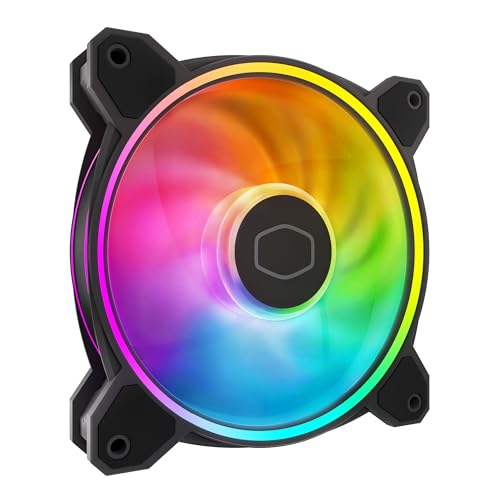
The Cooler Master MF120 Halo² features dual-loop ARGB rings that are 50% brighter than the previous generation, creating a vibrant, diffused lighting effect thanks to the frosted blade design. It uses a hybrid frame and Air Balance blades that are 10% larger, boosting cooling performance without compromising stability.
Dynamic PWM control allows the fan to spin from 0 to 2050 RPM, letting you balance noise and cooling on the fly. At maximum speed, it operates at 27 dBA, which is a reasonable noise level for its performance. It is compatible with cases, liquid coolers, and air coolers, offering great flexibility.
Some users note that the proprietary hub can have loose connectors, but daisy-chaining the fans directly to the motherboard works flawlessly. For a sharp-looking RGB fan with excellent cooling, this is a strong mid-premium option.
Why it’s great
- Very bright dual-loop ARGB with frosted blades
- Good airflow at 2050 RPM
- Quiet operation across the RPM range
Good to know
- Proprietary hub connectors can be loose
- Lighting not as crisp as some competitors
- Hub cable length may be short
4. ASUS ROG Strix XF120

The ASUS ROG Strix XF120 uses a Magnetic Levitation (MagLev) bearing, which stabilizes the rotor to reduce friction and extend the lifespan to an impressive 400,000 hours. It is designed to deliver an optimal blend of airflow and static pressure, making it suitable for use as a case fan, radiator fan, or CPU cooler fan.
It operates at a maximum of 1800 RPM and produces only 22.5 dBA, with a smooth and stable sound frequency that avoids annoying high-pitched whines. The aerodynamic blade and frame design minimizes turbulence. Anti-vibration pads are included to prevent rattling.
It lacks RGB, making it a stealthy choice for users who prioritize silence and longevity over flashy aesthetics. The 5-year warranty provides peace of mind.
Why it’s great
- 400,000-hour MagLev bearing lifespan
- Very quiet at all speeds
- Good static pressure and airflow balance
Good to know
- No RGB illumination
- Not the highest CFM for open case use
- Price is mid-range, not budget
5. be quiet! Light Wings LX 120mm PWM

The be quiet! Light Wings LX 120mm PWM high-speed fan is engineered by the German brand known for silent computing. It uses a closed-loop motor that maintains target RPM even when working against air resistance, ensuring consistent performance on radiators and restrictive grilles. The 16 LEDs inside the hub shine outward onto frosted blades for a clean, focused lighting look.
It delivers a static pressure of 2.51 mmH2O, making it a strong choice for demanding cooling configurations. The noise level is rated at just 20.6 dBA, which is impressively low for a high-speed fan. The ARGB connection allows daisy-chaining for easier cable management.
The fan is built with a rifle bearing, which is a step down in longevity compared to premium FDB or MagLev bearings, but it still offers solid reliability for the price. It’s an excellent choice for a quiet, good-looking build.
Why it’s great
- Very quiet at 20.6 dBA
- Closed-loop motor maintains RPM under resistance
- Attractive hub ARGB lighting
Good to know
- Rifle bearing not as durable as FDB
- Only 16 LEDs in the hub
- Can be slightly louder at high RPM under load
6. Thermalright TL-C12C-S (5-Pack)

The Thermalright TL-C12C-S 5-Pack is the undisputed king of value in the 120mm fan market. For the cost of a single premium fan, you get five PWM ARGB fans with S-FDB bearings. Each fan pushes 66.17 CFM of air at a maximum of 1550 RPM while keeping noise at or below 25.6 dBA.
The included daisy-chain cables for both PWM and ARGB allow you to connect multiple fans without a hub, reducing cable clutter. The ARGB lighting is soft and diffused thanks to the LED atomizing blade design, offering up to 17 lighting modes that sync with your motherboard.
Build quality is solid for the price, though the plastic frame feels slightly less premium than high-end options. The 5-pack is ideal for budget-conscious builders who want to fill a case with good cooling and RGB without breaking the bank.
Why it’s great
- Incredible value with 5 fans per pack
- Daisy-chainable PWM and ARGB cables
- Good balance of airflow and noise
Good to know
- Lower static pressure than premium fans
- Slightly louder than premium fans at max RPM
- Plastic frame feels less robust
7. ARCTIC P12 Pro A-RGB

The ARCTIC P12 Pro A-RGB is a powerful fan that punches well above its price point. It spins up to a blistering 3000 RPM, pushing 77 CFM of air with high static pressure, making it an exceptional choice for dense radiators and restrictive mesh panels. The Fluid Dynamic Bearing (FDB) ensures smooth, quiet operation and a long service life.
PWM control allows the fan to stop completely below 5% PWM, enabling semi-passive cooling when the system is idle. The redesigned rotor blades offer an excellent balance of performance and low noise, especially at lower speeds. The ARGB lighting is vibrant and easy to sync via the 5V 3-pin header.
At maximum speed, the fan is noticeably louder than premium options, but at mid-range speeds, it remains impressively quiet. For users on a tight budget who need high static pressure for a radiator, this is a top contender.
Why it’s great
- Very high static pressure for radiator use
- 0 RPM mode for silent idle
- Excellent price-to-performance ratio
Good to know
- Loud at maximum 3000 RPM
- Plastic build feels basic
- ARGB lighting not as bright as premium options
FAQ
Should I get a high airflow or high static pressure fan for my case?
Does a 4-pin PWM fan make a big difference over a 3-pin?
Why are Noctua fans considered the best?
Final Thoughts: The Verdict
For most users, the best 120mm fan winner is the Noctua NF-A12x25 G2 PWM because it sets the standard for quiet, high-performance cooling in any application. If you want stunning dual-loop RGB and a clean cable system, grab the Corsair iCUE Link LX120 RGB. And for budget-conscious builders who need serious static pressure, nothing beats the value of the Thermalright TL-C12C-S 5-Pack.