
If your laptop or tablet has a USB-C port you’d rather save for a drive or a charger, then a Bluetooth mouse without a USB receiver is the only setup that makes sense. No dongle to lose, no port to occupy, and no pairing headaches that linger past the first connection.
I’m Min — the co-founder and writer behind Gadgets Feed. I spend my weeks digging through spec sheets, studying battery performance metrics, and analyzing real user feedback to separate the mice that deliver on their Bluetooth promise from those that frustrate with lag or poor tracking.
Whether you’re juggling multiple machines or just want a cleaner desk, this guide cuts through the noise to deliver the best bluetooth mouse without usb receiver options that actually perform in real-world conditions.
How To Choose The Best Bluetooth Mouse Without USB Receiver
When you remove the USB receiver from the equation, the mouse relies entirely on its radio chip and antenna design. That means Bluetooth version, sensor quality, and battery management become the deciding factors — not whether a tiny dongle fits in your pocket.
Bluetooth Version and Connection Stability
Bluetooth 5.0 or newer is the baseline for a receiver-free mouse. Older versions like 4.2 introduce latency and occasional re-pairing delays. A mouse with Bluetooth 5.1 or 5.2 offers a more stable link with lower power draw, which directly extends battery life between charges.
Battery Life and Charging Method
Without a receiver siphoning power, the mouse’s internal battery or AA/AAA cell is the only energy source. Look for rechargeable models with at least 70 days of rated life. Micro-USB is acceptable, but USB-C charging is faster and more convenient. Avoid mice that force you to replace batteries monthly — a rechargeable internal pack with quick-charge capability is ideal.
Multi-Device Pairing and Switching
One of the biggest advantages of a Bluetooth-only mouse is the ability to pair with three devices simultaneously and switch with a button press. This is essential if you move between a laptop, tablet, and desktop. Check that the mouse remembers pairings after power cycles — some budget models forget and require re-pairing.
Quick Comparison
On smaller screens, swipe sideways to see the full table.
| Model | Category | Best For | Key Spec | Amazon |
|---|---|---|---|---|
| Logitech MX Master 3S Bluetooth | Premium Bluetooth | High-precision work on any surface | 8,000 DPI sensor, 70-day battery | Amazon |
| Logitech MX Master 4 | Top-tier Bluetooth | Haptic feedback & fastest scroll | MagSpeed, Haptic Sense, USB-C | Amazon |
| Apple Magic Mouse | macOS Native | Seamless Apple ecosystem gesture control | Multi-Touch surface, rechargeable | Amazon |
| Logitech MX Anywhere 2S | Compact Bluetooth | Travel-friendly, glass tracking | Darkfield sensor, 70-day battery | Amazon |
| Microsoft Surface Mobile Mouse | Slim Travel | Long battery, lightweight portable use | BlueTrack, 12-month AA battery | Amazon |
| Ghajz Foldable Combo | Bluetooth KBM Set | Full keyboard + mouse travel setup | Folding design, 3 DPI settings | Amazon |
| Logitech MX Master 3S Standard | Hybrid Connection | Users wanting both Bluetooth & dongle | Logi Bolt included, 8K DPI | Amazon |
In‑Depth Reviews
1. Logitech MX Master 3S Bluetooth Edition

The MX Master 3S Bluetooth Edition is the gold standard for a dongle-free workflow. Its 8,000 DPI Darkfield sensor tracks on glass surfaces without a hitch, and the MagSpeed scroll wheel — which free-spins at 90% faster than standard wheels — makes long spreadsheet navigation feel instant. The 70-day rechargeable battery with a quick charge that delivers a full day from three minutes is a concrete advantage over mice that force you to swap AAAs.
Logitech Flow is the standout multitasking feature here: you can pair with up to three devices over Bluetooth and move your cursor between them, copying files across machines without any USB receiver. The quiet clicks reduce click noise by 90%, which matters in shared offices. The ergonomic silhouette with a thumb rest keeps your wrist in a natural posture during eight-hour work sessions.
Some users report occasional app-specific button mapping glitches in Logi Options+, but the programmable buttons remain highly customizable per application. The Bluetooth-only edition ships without a charging cable, so you need your own USB-C cable. For anyone who wants premium performance without occupying a port, this is the clear winner.
Why it’s great
- 8,000 DPI tracks on any surface including glass
- MagSpeed free-spin scroll wheel is remarkably fast
- Flow cross-computer control works flawlessly between Windows and macOS
- Quiet clicks reduce noise in shared spaces
Good to know
- No USB-C charging cable included in the box
- Software customization can glitch with certain apps
2. Logitech MX Master 4
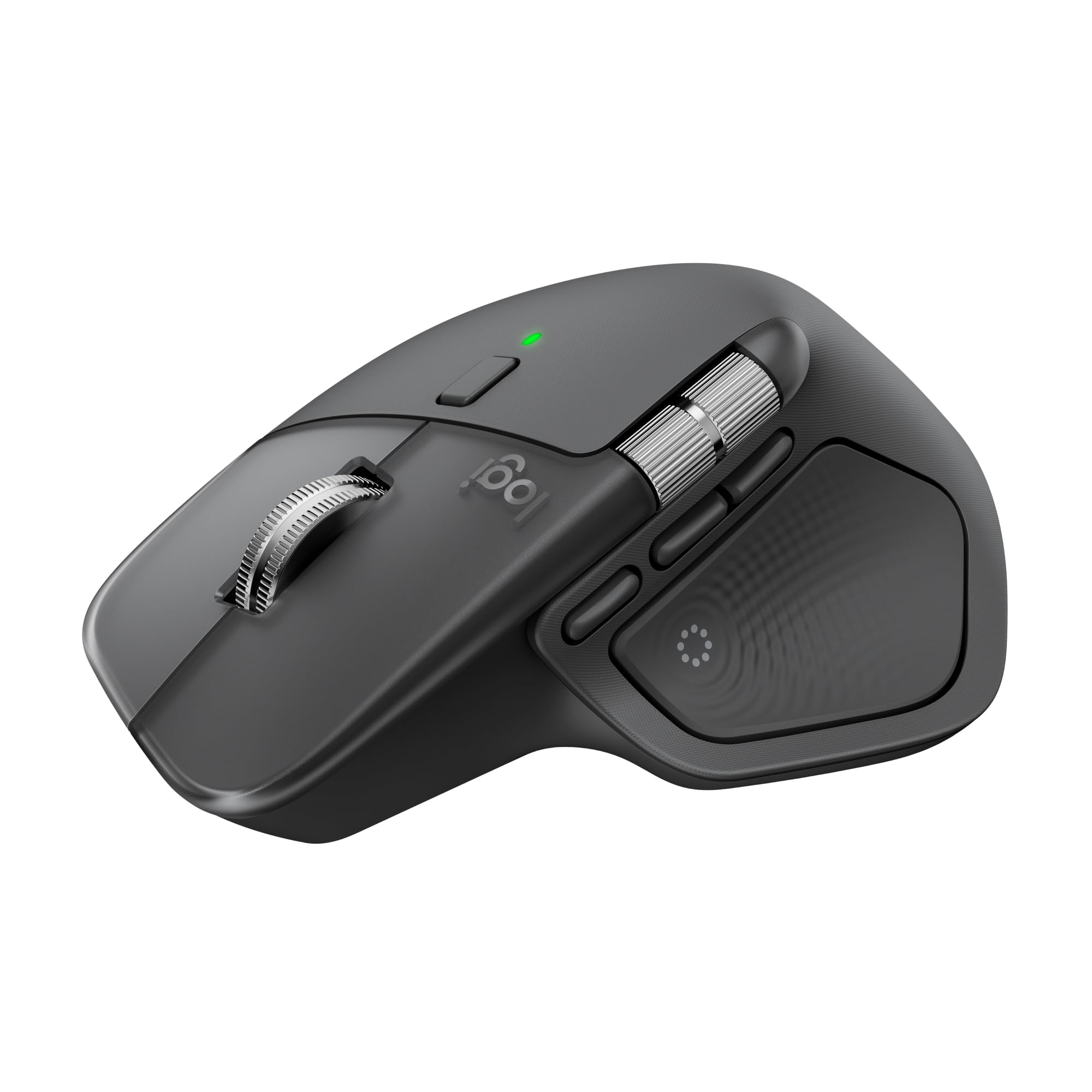
The MX Master 4 introduces the Haptic Sense Panel, which delivers customizable vibration feedback for actions like switching desktops or triggering shortcuts — a tangible upgrade over the 3S. The MagSpeed scroll wheel now claims 1,000 lines per second while stopping on a pixel, making it the fastest scroll wheel Logitech has shipped. The 8,000 DPI sensor still tracks on glass, and the USB-C charging is now standard.
The Actions Ring overlay is a productivity multiplier: it places app-specific shortcuts at your cursor so you can adjust filters, tools, or brushes without moving your hand to the keyboard. The ergonomic tilt and thumb wheel remain identical to the previous generation, which is excellent for extended use. Bluetooth 5.2 ensures minimal latency even when paired to three devices simultaneously.
At a premium price point, the MX Master 4 is a worthy upgrade if you rely heavily on customization and haptic feedback. Existing users of the 3S may not find enough new features to justify the jump, but for first-time buyers, this is the definitive Bluetooth mouse without a receiver. The 54% recycled plastic in the Graphite version is a solid sustainability bonus.
Why it’s great
- Haptic feedback adds tactile confirmation for shortcuts
- MagSpeed scroll is incredibly fast and precise
- USB-C charging with 70-day battery life
- Actions Ring boosts workflow efficiency in creative apps
Good to know
- Incremental upgrade from MX Master 3S — not groundbreaking for returning users
- Heavier build may not suit ultra-light travel preferences
3. Apple Magic Mouse

The Apple Magic Mouse is the only mouse that pairs automatically with a Mac straight out of the box, and its Multi-Touch surface replaces the scroll wheel entirely. Swiping between web pages, scrolling through documents, and switching spaces rely on finger gestures that feel native on macOS. The rechargeable battery lasts about a month, and the woven USB-C cable enables both charging and pairing via a single port.
The low-profile design is polarizing: it looks elegant on a desk but can cause hand fatigue during long sessions because your palm stays flat. The lack of physical buttons means all input is gesture-based, which takes time to adapt to. The charging port is located on the bottom, meaning you cannot use the mouse while it charges — a design flaw that remains unchanged.
For users fully invested in the Apple ecosystem, the Magic Mouse is the clear choice. It has zero connection issues with Mac Studio, MacBook, or iPad, and the tracking is precise enough for everyday productivity. The price is high for what is essentially a gesture-pad on wheels, but the integration with macOS is unmatched by any third-party Bluetooth mouse.
Why it’s great
- Seamless auto-pairing with Mac devices
- Multi-Touch surface enables intuitive gestures
- Rechargeable battery with USB-C reduces cable clutter
- Sleek, minimalist design complements Apple setups
Good to know
- Charging port on bottom blocks use during charging
- Flat ergonomics cause hand fatigue after extended use
4. Logitech MX Anywhere 2S

The MX Anywhere 2S proves that a Bluetooth mouse without a receiver can be both compact and capable. Its Darkfield High Precision tracking works on glass and glossy surfaces — a rare trick at this size — with up to 4,000 DPI. The 70-day battery is recharged via micro-USB, and a three-minute charge yields a full day of use, which is critical when you forget to plug it in before a trip.
Logitech Flow enables control across three computers with a single mouse, and the hyper-fast scrolling wheel makes quick work of long PDFs or web pages. The quiet clicks and lightweight build (under 100 grams) make it a natural travel companion. It pairs seamlessly with Mac and Windows machines, and the compact shape fits easily into a laptop pocket without bulging.
The micro-USB port is the biggest drawback in 2025 — a USB-C version would be welcome. The right-handed sculpted shape also limits ambidextrous use. But for its size and on-glass performance, the MX Anywhere 2S remains the best portable Bluetooth mouse without a dongle for travelers and minimalists.
Why it’s great
- Darkfield sensor tracks on glass surfaces
- Ultra-compact design fits any laptop bag pocket
- 3-minute charge provides a full day of power
- Flow cross-computer control works across up to 3 devices
Good to know
- Micro-USB charging instead of USB-C
- Right-handed only — not suitable for left-handed users
5. Microsoft Surface Mobile Mouse

The Microsoft Surface Mobile Mouse is a no-fuss Bluetooth option that prioritizes battery life above all else. It runs on two AAA batteries that last up to 12 months, which means you never have to think about charging. The BlueTrack technology tracks on virtually any surface including carpets and rough tabletops, making it a reliable companion for fieldwork or coffee shops with non-ideal surfaces.
The sculpted design is ambidextrous and lightly textured, resisting smudges and fingerprints. The metal scroll wheel doubles as a 4-way button, and the magnetic battery cover stays secure during transport. Bluetooth pairing is quick — it syncs with Surface Pro and Windows laptops without any additional software. The 3-button layout keeps things simple without extra programmable controls.
The flat shape causes hand cramp for users with larger palms, and the lack of a back button limits navigation convenience. There is no rechargeable battery — you will need to keep spare AAAs around. But for anyone who values battery longevity over advanced features, this is the most hassle-free Bluetooth mouse without a receiver on the list.
Why it’s great
- 12-month battery life from two AAAs
- BlueTrack sensor works on carpets and rough surfaces
- Lightweight and portable at just 3.5 ounces
- Quick Bluetooth sync with Windows devices
Good to know
- Flat ergonomics may cause hand cramp for larger hands
- No rechargeable battery — uses disposable AAAs
6. Ghajz Foldable Keyboard and Mouse Combo
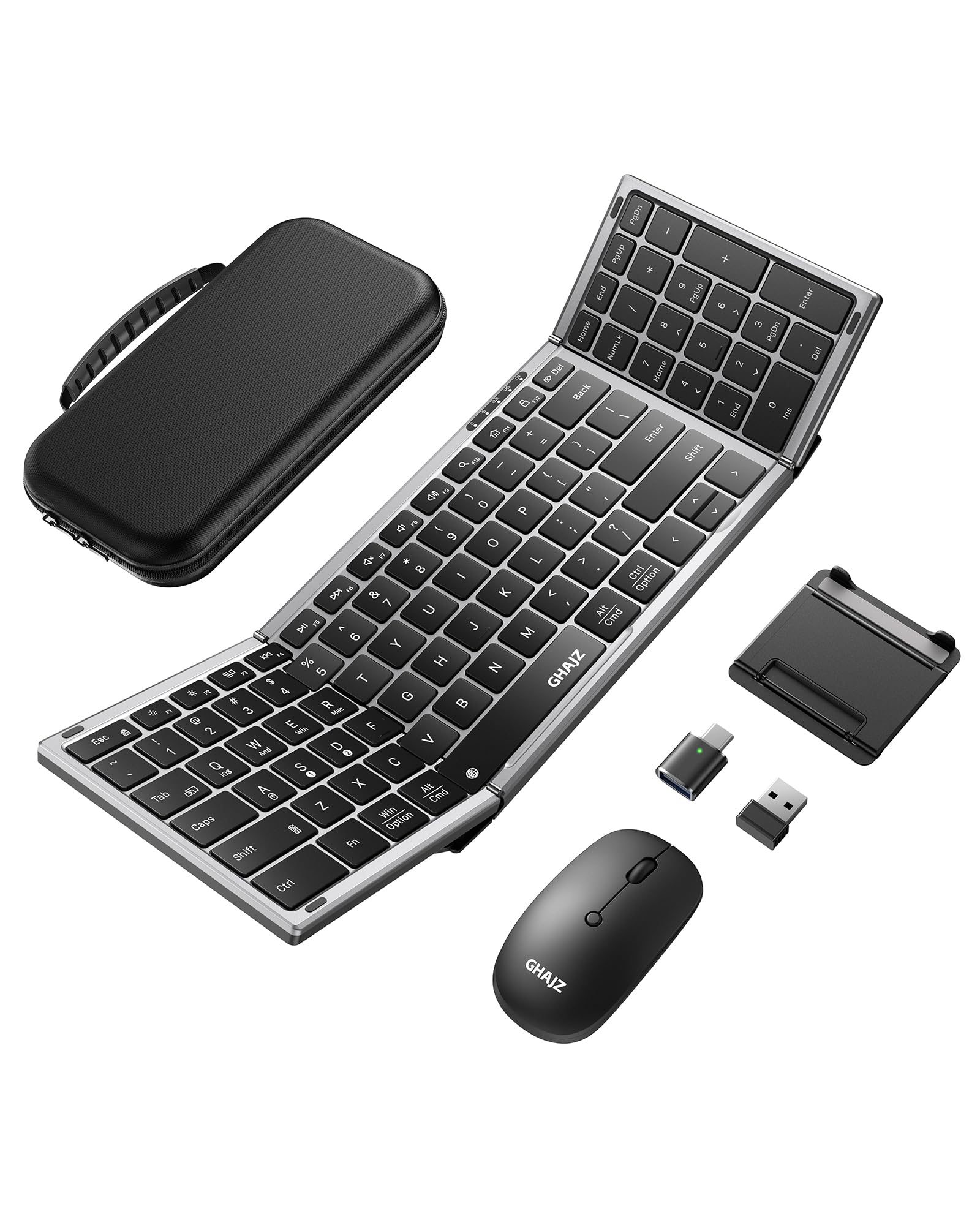
The Ghajz combo is not a standalone mouse — it bundles a full-size foldable keyboard with a compact Bluetooth mouse in a single case. The mouse connects via Bluetooth without a USB receiver and offers three DPI settings (800/1200/1600) suitable for everyday navigation. The keyboard folds to 0.8 inches thick and features a unique hinge lock that stabilizes the keyboard on your lap — useful in airports or cafes without a table.
Both devices charge via USB-C, with a claimed 150-200 days of standby time. The mouse is quiet and lag-free, and the keyboard membrane is soft with minimal click noise. The combo supports up to three paired devices, switching between them with a dedicated button. The case holds everything including a folding stand for a phone or iPad, which makes this a complete travel workstation.
The mouse itself is basic — 1,600 max DPI is not enough for high-resolution displays or design work. The build quality of the mouse casing feels less dense than premium standalone mice. However, as an all-in-one solution for travelers who need both typing and pointing without carrying separate devices, this combo is uniquely practical.
Why it’s great
- Complete keyboard and mouse combo in one case
- Foldable keyboard with lap-stable hinge lock
- USB-C charging on both devices
- Connects to 3 devices via Bluetooth
Good to know
- Mouse maxes at 1,600 DPI — not for high-res monitors
- Keyboard hinge lock must be handled carefully to avoid damage
7. Logitech MX Master 3S Standard Edition

The MX Master 3S Standard Edition is identical in ergonomics and sensor to the Bluetooth-only version, but it includes a Logi Bolt USB receiver and a USB-C charging cable. While this appears to contradict the “without receiver” requirement, the mouse works perfectly in Bluetooth-only mode — you simply ignore the dongle. The 8,000 DPI Darkfield sensor and quiet clicks are the same high-quality hardware.
The main advantage of the Standard Edition is the included USB-C cable and the option to use the Logi Bolt receiver (1 ms latency) if a Bluetooth connection ever feels sluggish. For workstation setups where the mouse stays on one desk, the USB-C charging cable alone justifies the purchase — no hunting for a spare cable. The 70-day battery life matches the Bluetooth Edition.
This is a solid entry point for users who want the MX Master 3S experience but are not fully committed to a dongle-free lifestyle. The receiver can always be stored away, making this a flexible bridge between wired and wireless. If you value having a backup cable and receiver, the Standard Edition offers more value for the same price as the Bluetooth-only variant.
Why it’s great
- Includes USB-C charging cable — no extra purchase needed
- 8,000 DPI sensor tracks on glass
- Quiet clicks and MagSpeed scroll wheel
- Works as Bluetooth-only without using the receiver
Good to know
- Comes with a receiver you may not need
- Non-replaceable internal battery
FAQ
Can I use a Bluetooth mouse without a USB receiver on any laptop?
Does a Bluetooth mouse without a receiver have worse latency than one with a receiver?
How do I connect a Bluetooth mouse without a receiver to multiple computers?
Final Thoughts: The Verdict
For most users, the bluetooth mouse without usb receiver winner is the Logitech MX Master 3S Bluetooth Edition because it combines an 8,000 DPI sensor, 70-day battery, and Flow cross-computer control in a package that works on glass. If you want the fastest scroll wheel on the market with haptic feedback, grab the Logitech MX Master 4. And for travel where space is everything, nothing beats the Logitech MX Anywhere 2S.