
Choosing the wrong 3 or 4 pin fan can turn a silent PC into a roaring turbine, or leave your CPU throttling under heat. The difference comes down to a few key specs—RPM range, bearing type, and noise level—that most buyers overlook until it’s too late.
I’m Min — the co-founder and writer behind Gadgets Feed. I’ve spent countless hours analyzing fan specifications, reading real user feedback, and cross-referencing performance metrics to separate genuine cooling upgrades from overpriced noise-makers.
After poring over the specs and community feedback, the thermalright 5 pack TL-C12C-S emerges as the best all-rounder for balancing cost and performance, but dedicated noise-sensitive builders will find their match elsewhere. This guide covers the top contenders for the best 3 or 4 pin fan investments you can make right now.
How To Choose The Best 3 Or 4 Pin Fan
Jumping into the 3 or 4 pin fan market without understanding your build’s airflow resistance and your own noise tolerance is a guaranteed path to disappointment. The key specs aren’t just numbers; they directly map to how hot your PC runs and how loud it gets under load. Here’s what actually matters.
PWM vs. DC Voltage Control
The pin count defines your speed control method. A 4-pin PWM fan allows the motherboard to adjust speed by modulating power pulses, giving finer, smoother control from idle to max RPM. A 3-pin DC fan varies voltage across a wider range, often leading to a higher minimum speed and less precise ramping. For silent curves, PWM is the standard.
Static Pressure vs. Airflow
Buyers often grab the highest CFM (cubic feet per minute) fan they can find, only to discover it struggles to push air through a dense radiator or mesh panel. Static pressure, measured in mmH₂O, determines a fan’s ability to overcome resistance. High static pressure fans are mandatory for radiators and heatsinks, while high airflow models work better as unrestricted case intake or exhaust.
Bearing Longevity and Noise Profile
Cheap sleeve bearings dry out and rattle after months. Premium designs like Fluid Dynamic Bearings (FDB), Magnetic Levitation (MagLev), or Rifle Bearings offer 80,000 to 400,000 hours of quiet operation. A fan’s dB(A) rating only tells part of the story; the *tone* of the noise (a smooth whoosh vs. a high-pitched whine) determines how intrusive it feels in a room.
Quick Comparison
On smaller screens, swipe sideways to see the full table.
| Model | Category | Best For | Key Spec | Amazon |
|---|---|---|---|---|
| Thermalright TL-C12C-S (5 Pack) | Mid-Range | Best Overall Value with ARGB | 66.17 CFM / 1.53 mmH₂O | Amazon |
| ASUS ROG Strix XF120 | Mid-Range | Whisper-Quiet Long Life | 400,000 hr MagLev Bearing | Amazon |
| Noctua NF-P12 | Premium | Time-Tested Quiet Radiator Fan | 19.8 dB(A) / 1300 RPM | Amazon |
| be quiet! Pure Wings 3 120mm | Mid-Range | German Engineering for Silence | 80,000 hr Rifle Bearing | Amazon |
| ARCTIC P12 Pro PST (5 Pack) | Premium | High-Speed Radiator Push | 3000 RPM / FDB Bearing | Amazon |
| AsiaHorse AMICI-5GT | Premium | RGB Infinity Mirror Showpiece | 61.5 CFM / 2.0 mmH₂O | Amazon |
| ARCTIC P14 Pro PST (5 Pack) | Premium | Large 140mm Case Airflow | 110 CC/min / 2500 RPM | Amazon |
In‑Depth Reviews
1. Thermalright TL-C12C-S (5 Pack)

The Thermalright 5 Pack TL-C12C-S dominates the value segment by delivering 66.17 CFM of airflow and 1.53 mmH₂O static pressure at a max of 1550 RPM, all while staying under 25.6 dB(A). The S-FDB bearing provides the longevity and smoothness usually reserved for fans in a higher price bracket, and the included ARGB lighting adds aesthetic versatility without a premium upcharge.
Real-world testing shows these fans moving substantial air through both mesh cases and thin radiators, with users reporting drops in gaming temps on CPUs like the 7800X3D. The daisy-chain PWM and ARGB cables simplify installation even in cramped cases, and the ability to sync with SignalRGB makes lighting control flexible across different motherboard ecosystems.
Some units have arrived with minor defects, but the sheer volume of positive feedback—and the low per-fan cost—makes this pack a no-brainer for a full-case refresh. If you need both performance and customizable lighting without paying for a brand name, this is the 3 or 4 pin fan bundle to grab.
Why it’s great
- Exceptional airflow-to-noise ratio at this price point
- Smooth ARGB lighting with easy daisy-chain wiring
- S-FDB bearing ensures reliable long-term operation
Good to know
- Occasional defective units reported out of the box
- Not the strongest static pressure for very dense radiators
2. ASUS ROG Strix XF120

ASUS brings genuine acoustic engineering with the ROG Strix XF120, featuring a Magnetic Levitation bearing that stabilizes the rotor for reduced friction and a rated lifespan stretching to 400,000 hours. With a maximum rotational speed of 1800 RPM and a noise output of just 22.5 dB(A), it delivers 62.5 CFM of airflow without the annoying whine or rattle common in cheaper fans.
Users report dropping gaming temperatures by roughly 10°C when replacing stock case fans, all while maintaining a whisper-quiet profile that blends into background noise. The included anti-vibration pads and mounts further reduce the chance of resonance through thin metal panels, and the aerodynamic blade design minimizes turbulence to keep the sound frequency smooth and non-intrusive.
The 250-1800 RPM operating range gives extensive headroom for creating a custom fan curve that stays near-silent at idle and only ramps under heavy loads. For anyone prioritizing a long lifespan and low noise over RGB bling, this 4-pin PWM fan stands as a serious contender against much more expensive options.
Why it’s great
- MagLev bearing provides exceptional durability and quiet operation
- Very low noise floor at 22.5 dB(A) even at high RPM
- Wide PWM range allows for flexible, quiet fan curves
Good to know
- No RGB lighting for aesthetic-focused builders
- Premium price for a single fan compared to multi-packs
3. Noctua NF-P12

The Noctua NF-P12 is a pressure-optimized legend that has quietly cooled countless builds for nearly a decade. Its nine-blade design with Vortex-Control Notches produces a focused stream of air ideal for CPU heatsinks and water cooling radiators, while the SSO2 bearing boasts over 150,000 hours of mean time to failure. The 3-pin variant offers low-noise adapters (LNA) to cap speeds at 1100 or 900 RPM for near-silent operation.
Users consistently praise its build quality and longevity, with many reporting eight years of continuous service before retiring it for an upgrade. The included accessories—LNA, Ultra-Low-Noise Adaptor, extension cable, and a 3:4-pin adapter for direct PSU power—make it incredibly flexible for custom scenarios. At 19.8 dB(A), it’s one of the quietest fans at its speed range.
The aesthetic, however, remains divisive: the iconic brown and beige color scheme clashes with most modern black or white builds. If you care only about raw cooling performance and silence on a radiator, the NF-P12 is a textbook choice. Just be prepared to hide it behind a mesh panel or commit to the Noctua color scheme.
Why it’s great
- Excellent static pressure for radiators and heatsinks
- Extremely low noise floor at 19.8 dB(A)
- Comes with multiple adapters for flexible installation
Good to know
- Brown/beige color is polarizing for modern builds
- 3-pin DC control limits fine PWM curve adjustments
4. be quiet! Pure Wings 3 120mm

be quiet! lives up to its name with the Pure Wings 3 maxing out at 2100 RPM while producing only 30.9 dB(A) of noise. The rifle bearing is rated for 80,000 hours of operation, and the frame outlet has been optimized to deliver peak performance even when mounted on a radiator. At 59.6 CFM, it’s not the highest airflow in this list, but its pressure-optimized blade design ensures it pushes that air where it’s needed most.
User reports highlight its excellent build quality and near-silent operation, with many replacing stock AIO cooler fans for a noticeable 2-3°C drop in CPU temps under load. The long cable makes routing through large cases straightforward, and the included mounting hardware is sturdy. The 4-pin PWM header provides full speed control for custom fan curves.
For silent PC enthusiasts who value German engineering and a very low minimum RPM for idle silence, the Pure Wings 3 is a strong performer. It doesn’t produce the raw CFM of some competitors, but its focus on low noise and high static pressure makes it a specialist for noise-sensitive builds.
Why it’s great
- Very quiet operation even at 2100 RPM maximum speed
- Frame designed for optimal performance on radiators
- Durable rifle bearing with 80,000-hour lifespan
Good to know
- Lower raw CFM compared to some budget competitors
- No RGB options for lighting-focused builders
5. ARCTIC P12 Pro PST (5 Pack)

The ARCTIC P12 Pro PST pushes the envelope with a staggering 3000 RPM maximum speed and 77 CFM of airflow, making it one of the most aggressive 120mm fans available. The Fluid Dynamic Bearing ensures smooth, quiet operation at lower speeds, and the PWM control with 0 RPM capability below 5% PWM allows for complete fan stop during idle for total silence.
Users confirm its high static pressure is a match for dense radiators, with one builder using 10 of these fans across a large case for exceptional thermal results. The daisy-chain PST (Passive Sharing Technology) simplifies cabling, though some users find the integrated Y-splitters complicate neat wire management in tighter builds. At full tilt, it is noticeably loud—around 30-35 dB(A)—so noise-conscious users will want to cap the curve.
For performance enthusiasts who need maximum cooling headroom for overclocking or compact cases with poor ventilation, this 5-pack is hard to beat. The value per fan is outstanding, but you must accept that high speed equals higher noise.
Why it’s great
- Extremely high 3000 RPM speed for maximum cooling
- Excellent static pressure for restrictive radiators and mesh
- FDB bearing provides smooth and durable operation
Good to know
- Very loud at 100% RPM, requires careful fan curve tuning
- Integrated Y-splitters can complicate cable management
6. AsiaHorse AMICI-5GT
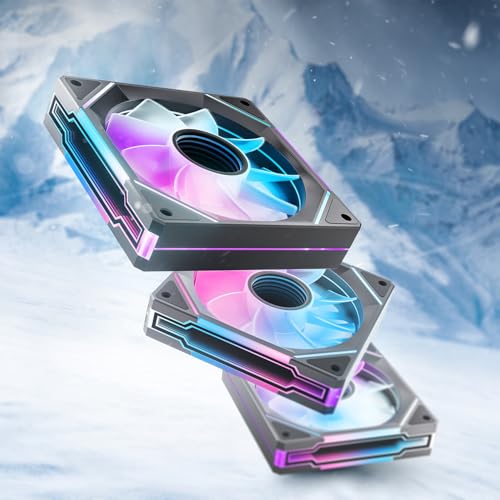
The AsiaHorse AMICI-5GT is first and foremost a visual showpiece, featuring an Infinity Mirror design with 24 LED beads per fan capable of 16.8 million colors. Beyond the flash, it delivers 61.5 CFM and 2.0 mmH₂O static pressure at 1800 RPM, with an HDB bearing rated for 50,000 hours of use. The 30 dB(A) noise rating keeps it reasonably quiet for a fan with this much lighting.
Users are impressed by the brightness and accuracy of the RGB colors, with the infinity mirror creating a deep, layered effect that stands out in any build. The rubber anti-vibration pads help dampen noise, and the daisy-chain cable system (with a recommended limit of three fans per chain) keeps installation simple. Many report it as a silent performer even with 10 fans running in a system.
The primary compromise is the lack of a true wireless daisy-chain connection—each fan must be connected via cables, which can still create cable mess in a fully loaded case. If your build revolves around RGB aesthetics and you need solid cooling to match, the AMICI-5GT offers a premium look without the premium brand tax.
Why it’s great
- Stunning Infinity Mirror ARGB effect with 24 LEDs per fan
- Good balance of airflow and static pressure for most builds
- Quiet operation with effective anti-vibration padding
Good to know
- Cable system is not wireless, requires daisy-chain wiring
- White variant has a visible black plastic center ring
7. ARCTIC P14 Pro PST (5 Pack)
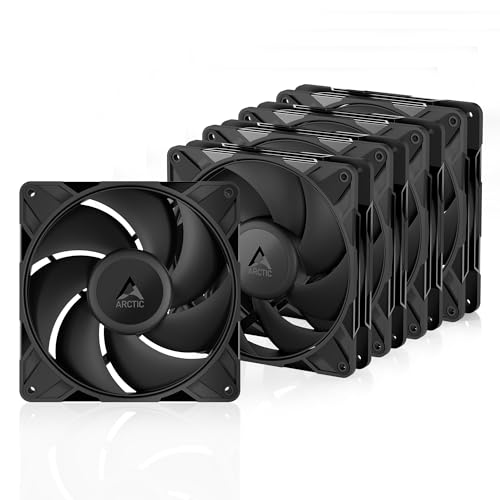
The ARCTIC P14 Pro PST is the 140mm powerhouse in this roundup, spinning up to 2500 RPM and pushing an enormous volume of air—rated at 110 CC/min—through even the most restrictive radiator or mesh panel. The Fluid Dynamic Bearing and precise manufacturing keep vibrations to a minimum, though the fan is decidedly loud when pushed past 60% PWM duty cycle.
Users building high-performance systems report combining six P14s with three P12s to achieve over 1,000 CFM of total airflow, dramatically dropping load temperatures on high-TDP CPUs and GPUs. The PST daisy-chain simplifies connecting multiple fans to a single header, though the included screws have been noted as slightly soft and the mounting holes are unthreaded, requiring attention during installation.
This 5-pack is an incredible value for anyone needing massive case airflow or high-pressure radiator cooling in a larger chassis. It trades silence at high speeds for raw thermal performance—something that perfectly suits overclockers and compact case enthusiasts but not silent PC purists.
Why it’s great
- Massive 2500 RPM speed for powerful 140mm cooling
- Excellent static pressure for radiators and dense mesh
- Exceptional price-per-fan value in a 5-pack
Good to know
- Loud at speeds above 60%, needs careful curve tuning
- Included screws can be soft; mounting holes are tight
FAQ
Can I use a 4-pin PWM fan on a 3-pin motherboard header?
What is the ideal RPM range for a quiet gaming PC fan?
Is a 3-pin fan worse than a 4-pin fan for cooling?
Final Thoughts: The Verdict
For most users, the best 3 or 4 pin fan winner is the Thermalright 5 Pack TL-C12C-S because it delivers the best balance of strong airflow, quiet operation, and ARGB lighting at a per-fan cost that undercuts the competition. If you want whisper-quiet performance with a 400,000-hour lifespan, grab the ASUS ROG Strix XF120. And for maximum radiator cooling power that can handle extreme overclocks, nothing beats the ARCTIC P12 Pro PST 5 Pack.