
That stock cooler whining under load is your CPU begging for relief. Swapping it for a serious aftermarket tower doesn’t just drop temperatures by 20 degrees—it silences your system and unlocks the boost clock headroom your processor was designed to use. The right cooler turns a jet-engine gaming session into a barely audible hum.
I’m Min — the co-founder and writer behind Gadgets Feed. I’ve spent hundreds of hours dissecting thermal test data, comparing heat pipe layouts, and mapping fan curves to match real-world TDP loads so you don’t have to guess which fin stack actually delivers.
Whether you’re taming a hot-running Ryzen 9 or a Core i9, pairing your build with the right best aftermarket cpu fan is a one-time upgrade that pays back in frame rates and silence every single day.
How To Choose The Best Aftermarket CPU Fan
Dropping a new cooler on your CPU is the single most cost-effective performance upgrade you can make, but only if you pick the right one for your chassis and processor. Three parameters separate a great match from a frustrating paperweight.
Heat Pipe Count And Layout
Heat pipes are the veins of an air cooler. A 6mm pipe transfers about 35-45W of thermal energy effectively, so a 200W processor needs at least six pipes to stay under 85°C under sustained load. Look for direct-contact copper pipes or nickel-plated bases that cover the entire IHS—especially on modern AM5 and LGA1700 CPUs with oblong die layouts. Coolers like the Noctua NH-D15 G2 now pack eight 6mm pipes for a reason: more pipes mean lower thermal resistance and quieter fan operation at the same temperature target.
Clearance: Case Height And RAM Slots
Before you click buy, measure the distance from your motherboard CPU area to your side panel. Dual-tower air coolers typically sit between 154mm and 168mm tall. A case like the Fractal North or NZXT H5 Flow fits 155mm coolers snugly, while full-tower cases can swallow 168mm monsters. Equally critical is RAM clearance. Coolers with a front fan can block the first DIMM slot; designs with a recessed bottom fin or a secondary fan clip that can be shifted upward give you the 40-45mm needed for tall RGB memory sticks.
Noise Normalized Performance
Raw cooling at 2,000 RPM fan speed is easy. Quiet cooling at 1,200 RPM is the real engineering challenge. Check the noise rating in dBA and the maximum airflow (CFM) at those levels. A cooler rated at 66 CFM and 25.6 dBA, like the Thermalright Phantom Spirit 120SE, delivers more cooling per decibel than a cheaper unit that pushes 58 CFM at 30 dBA. PWM control is non-negotiable; you want the motherboard to dynamically adjust RPM so the cooler is near-silent at idle and ramps only when your CPU actually needs it.
Quick Comparison
On smaller screens, swipe sideways to see the full table.
| Model | Category | Best For | Key Spec | Amazon |
|---|---|---|---|---|
| Noctua NH-D15 G2 | Air / Premium | Max-performance silent builds | 8 heat pipes, 24.8 dBA | Amazon |
| Thermalright Phantom Spirit 120SE | Air / Mid-Range | High value, 200W+ CPUs | 7 heat pipes, 66.17 CFM | Amazon |
| be quiet! Dark Rock 5 | Air / Premium Compact | Silent operation, RAM clearance | Single tower, 6 pipes, 29.8 dBA | Amazon |
| Corsair Nautilus 360 RS LCD | Liquid / Premium | Big SST builds, display customization | 360mm rad, 20 dBA pump | Amazon |
| NZXT Kraken Plus 360 | Liquid / Premium | Hybrid performance and LCD screen | 360mm rad, 1.54″ LCD | Amazon |
| Osprey 240mm AIO | Liquid / Entry | Budget AIO with ARGB control | 240mm rad, 2600 RPM pump | Amazon |
| ID-COOLING FROZN A620 PRO SE | Air / Budget | Ultra-low cost dual-tower | 6 pipes, 157mm height | Amazon |
In‑Depth Reviews
1. Noctua NH-D15 G2

The second-generation NH-D15 is a statement of intent. Eight nickel-plated copper heat pipes feed a massive 150mm-wide fin stack that’s 20% larger than the original, and the dual NF-A14x25r G2 140mm fans spin at just 1,500 RPM max while pushing 155.6 m³/h of air. That means a Core Ultra 9 285K stays under 72°C under sustained load with the fans barely audible—performance that rivals 280mm AIOs with zero pump noise and zero leak risk.
The offset design is a lifesaver for top-slot PCIe 5.0 SSDs and tall VRM heatsinks on modern AM5 boards. Noctua includes its excellent NT-H2 thermal paste and the Torx-based SecuFirm2+ mounting system, plus a quality screwdriver right in the box. RAM clearance is 59mm with only the rear fan installed, though dropping in a second fan cuts that to 32mm—switch to low-profile modules or shift the fan upward with the included wire clips for standard-height DIMMs.
At 1,525 grams, it is a heavy beast and requires a full-size case (168mm clearance minimum). Some owners report minor DRAM interference when running both fans at stock position, but the mounting system is so well documented that even first-time builders get it right in under 30 minutes.
Why it’s great
- Best-in-class air cooling: beats many 280mm AIOs on both temperature and noise.
- Industry-leading build quality with eight heat pipes and premium S-FDB fans.
- Comes with NT-H2 paste, screwdriver, and easy SecuFirm2+ mounting for all modern sockets.
Good to know
- Requires wide case clearance; will not fit slim or mid-tower chassis under 168mm.
- RAM height limited to 32mm with both fans attached in the default position.
2. Thermalright Phantom Spirit 120SE

Thermalright’s Phantom Spirit 120SE has become the benchmark for price-to-performance air cooling. Seven 6mm heat pipes with AGHP 4.0 gravity-agnostic technology feed a dense dual-tower aluminum fin array that handles up to 260W TDP. The pair of TL-C12B V2 120mm PWM fans push 66.17 CFM each at a maximum noise level of just 25.6 dBA—that’s more airflow per decibel than many coolers costing twice as much.
Real-world tests show it competes directly with 280mm liquid AIOs. A Ryzen 7 7800X3D idles in the low 40s and peaks in the mid-60s during gaming sessions, while a 9950X3D running Prime95 stays under 94°C at 260W. The 154mm height fits most modern mid-tower cases, though the SE version lacks the top fin covers of the regular PS120, making the exposed heat pipe tips visible through a mesh side panel.
The mounting system covers LGA1851, LGA1700, LGA1200, AM4, and AM5 out of the box. A few users noted that the stock fans can emit a bearing hum after six months, but swapping them for Arctic P12s or the standard Noctua NF-A12x25 is a common and affordable fix. For the asking price, this cooler punches far above its weight class.
Why it’s great
- Extreme value: dual-tower 260W cooling at a mid-range price point.
- Very quiet at stock fan speeds (25.6 dBA) with excellent acoustic profile.
- Low 154mm height works in the majority of mid-tower and full-tower cases.
Good to know
- Stock fans may develop bearing noise over extended use; easily replaced.
- SE model lacks aesthetic top fin covers and may not suit all RGB builds.
3. be quiet! Dark Rock 5

The Dark Rock 5 is be quiet!’s refined answer to compact single-tower cooling with premium acoustics. Six high-performance copper heat pipes with ceramic-particle black coating connect to a dense aluminum fin stack that’s designed for maximum surface area without choking airflow. The included Silent Wings 4 120mm PWM fan spins up to 2,100 RPM but maintains remarkably low noise thanks to a fluid-dynamic bearing and a rubberized frame that decouples vibration from the heatsink.
The asymmetrical tower design leaves plenty of clearance for RAM: you can fit unlimited-height DIMMs without moving the fan, and the cut-out fins improve VRM cooler compatibility on crowded AM5 boards. A long-neck screwdriver comes in the box, and the pre-installed mounting bridge makes installation genuinely tool-light. Owners of Ryzen 9700X and 7800X3D chips report idle temps around 35°C and gaming peaks under 70°C with the fan barely audible.
At , it sits in a premium price bracket for a single-tower cooler, and its 55 CFM airflow is lower than some dual-tower rivals at the same noise level. While it’s not the best choice for an overclocked 250W+ CPU, it is arguably the most acoustically refined air cooler under 140mm height for mainstream high-end processors.
Why it’s great
- Exceptional acoustic tuning: Silent Wings 4 fan with rubber decoupling is near-inaudible at low RPM.
- Unrestricted RAM and VRM clearance thanks to asymmetrical tower shape.
- Includes premium mounting hardware and a long-neck screwdriver for easy installation.
Good to know
- Max airflow of 55 CFM is lower than many dual-tower designs at the same noise target.
- Premium price for a single-tower cooler; budget buyers may find better raw performance per dollar.
4. Corsair Nautilus 360 RS LCD
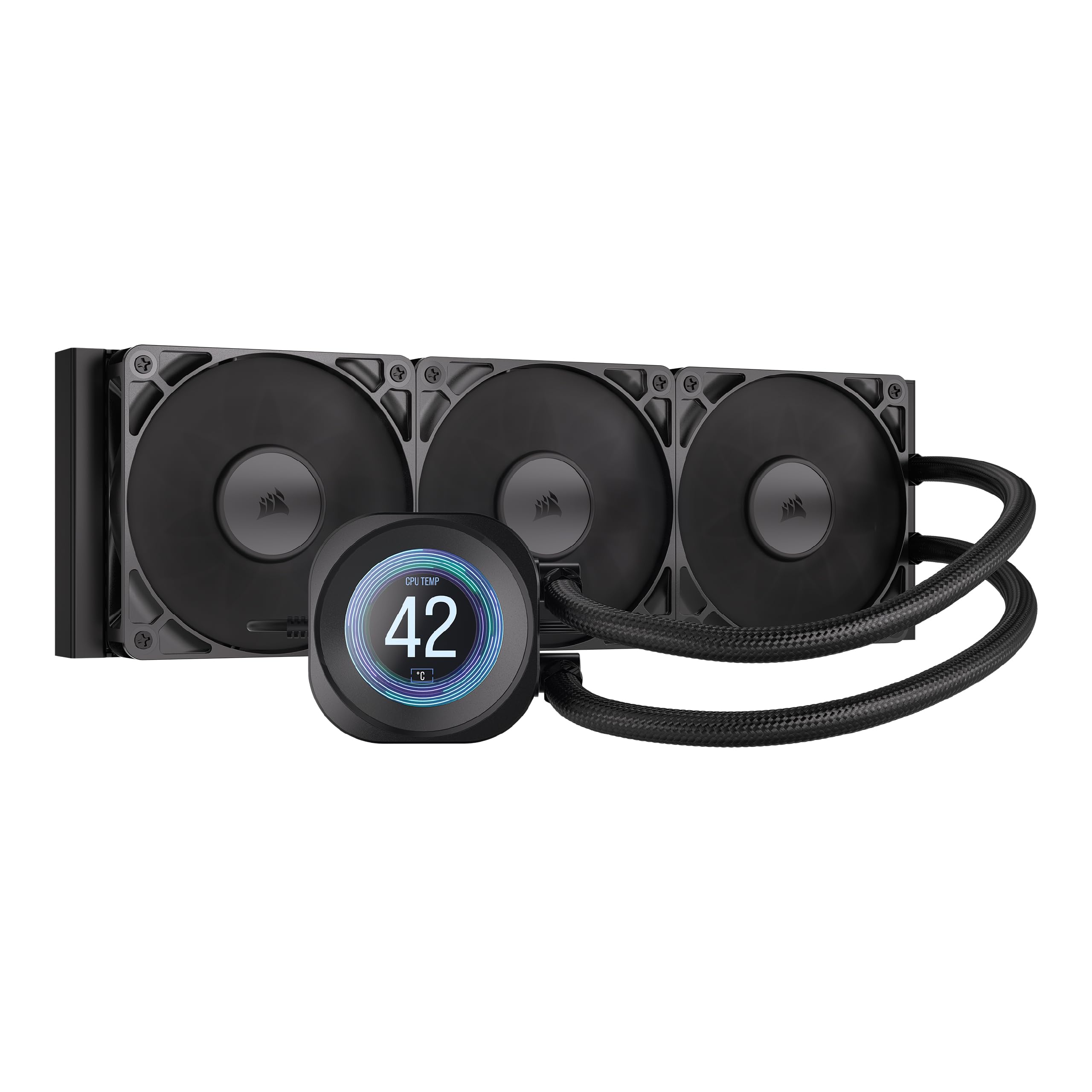
Corsair’s Nautilus 360 RS LCD pairs a 360mm aluminum radiator with a 2.1-inch IPS LCD display on the pump block, delivering both thermal performance and visual flair. The pump operates at just 20 dBA, making its coolant circulation almost impossible to hear inside a closed case. The RS120 fans use AirGuide technology and Magnetic Dome bearings to push high static pressure through the dense radiator fins while staying quiet even at 2,100 RPM.
The display is fully customizable via Corsair’s iCUE software, capable of playing short GIFs, YouTube clips up to 30 seconds, or showing real-time CPU temperature and usage stats. The cold plate features a slightly convex design with pre-applied thermal paste for optimal contact on AM5 and LGA1700 integrated heat spreaders. A 9800X3D under competitive gaming load stays below 50°C, and peaking at around 70°C during heavy all-core stress testing.
Installation involves routing a breakout cable from the pump cap, which speeds up wiring but leaves a few cables that need careful zip-tie management to keep the build clean. The twist memory on the coolant tubes can be stubborn, requiring additional cable combs. While the price point sits near the top of the category, the combination of a vibrant IPS screen and whisper-quiet 360mm cooling is unmatched for showpiece builds.
Why it’s great
- Very quiet pump (20 dBA) and high-static pressure RS120 fans for low-noise 360mm cooling.
- Bright 2.1-inch IPS LCD with iCEE customization for GIFs, YouTube clips, and system monitoring.
- Convex cold plate design ensures maximum contact and good thermal paste spread.
Good to know
- Cable routing from the pump breakout can be fiddly; some users note tube twist memory.
- Software can occasionally glitch; iCEE may need a restart to apply screen settings.
5. NZXT Kraken Plus 360
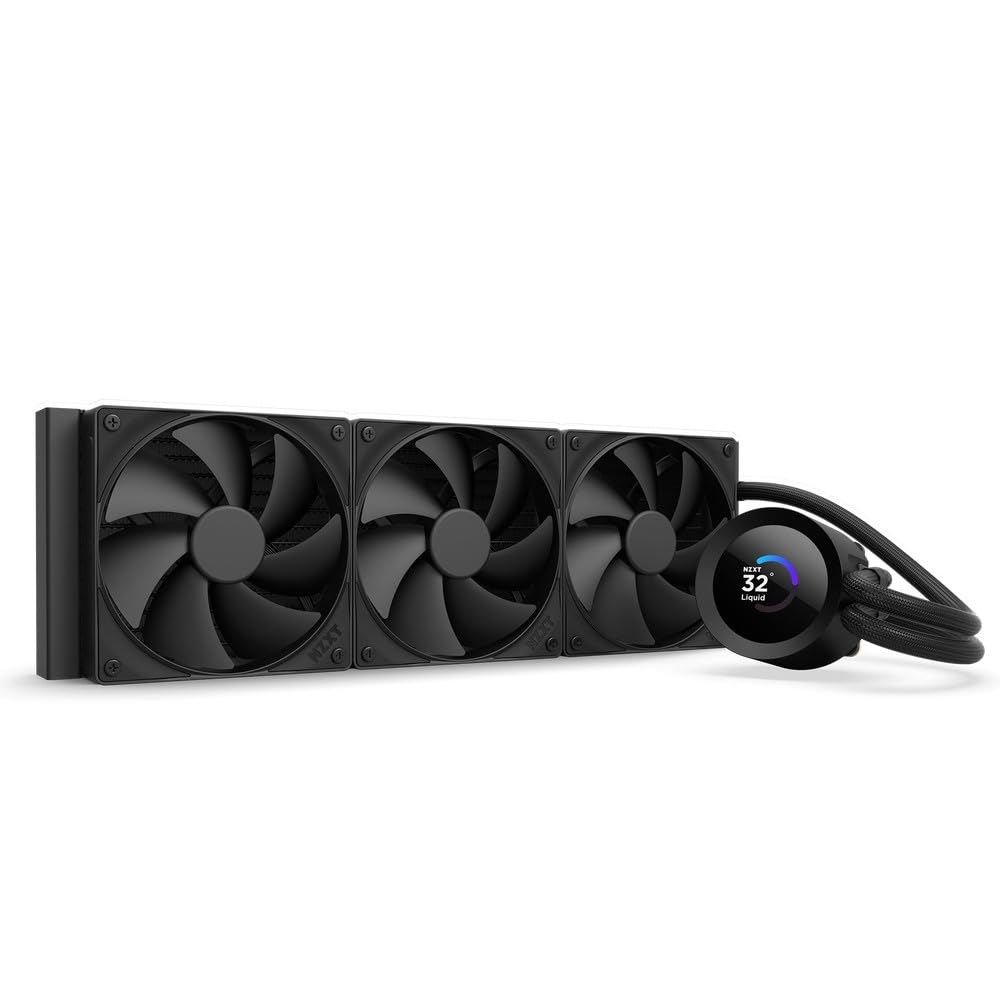
The NZXT Kraken Plus 360 is the latest evolution of their flagship liquid cooler, combining a high-flow Turbine pump with a bright 1.54-inch square LCD. The pump uses a 3-pin or 4-pin connector and maintains efficient coolant circulation while staying quiet under normal loads. Three F120P static-pressure fans push air through the 360mm radiator, and the Zero RPM Mode stops the fans entirely at low CPU temperatures for dead-silent operation during desktop tasks.
The LCD screen integrates with NZXT CAM software for displaying system temperatures, animated GIFs, or web-based widgets like Spotify and YouTube. The tool-free mounting brackets support LGA1851, LGA1700, LGA1200, and AM5 sockets, and the pre-applied thermal paste makes initial setup fast. Owners of Ryzen 9 processors report excellent thermal headroom, with the cooler handling sustained all-core loads without audible pump whine.
Installation is straightforward, especially when paired with an NZXT H6 Flow case that has cutouts optimized for the breakout cable. Some users note that the pump can produce faint noise at higher speeds, typical of any 360mm AIO under maximum load. The black version is priced slightly below competing 360mm LCD coolers, making it a strong contender for builders who want both performance and a customizable display without paying the absolute premium.
Why it’s great
- High-flow Turbine pump delivers efficient cooling with low pump noise at medium load.
- Customizable 1.54-inch square LCD with NZXT CAM support for system monitoring and GIFs.
- Tool-free mounting for all modern sockets and pre-applied thermal paste for quick setup.
Good to know
- Pump noise can become audible under maximum load; not the quietest AIO.
- LCD screen is smaller than some competitors (Corsair Nautilus 2.1-inch).
6. Osprey 240mm AIO
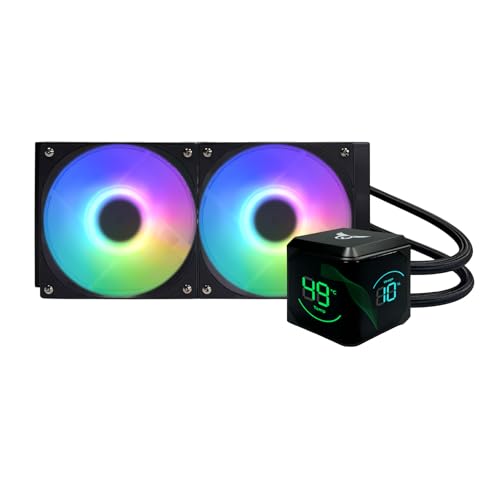
The Osprey 240mm AIO delivers entry-level liquid cooling with an aggressive price point and a comprehensive feature set. The pump spins up to 2,600 RPM for rapid liquid circulation, and the dual 120mm PWM fans push up to 65 CFM each with hydraulic bearings rated for 40,000 hours. The 276x120x27mm aluminum radiator is paired with a copper cold plate rated for up to 250W TDP, covering mid-to-high-range CPUs from Ryzen 7 to Core i7 without breaking a sweat.
A standout for the price is the included ARGB hub and remote control, supporting up to nine ports for synchronized lighting across fans and pump. The kit supports LGA115X, LGA1200, LGA1700, LGA1851, LGA2011, LGA2066, AM4, and AM5 sockets right out of the box, with a spring-loaded mounting bracket that prevents uneven pressure. An 8-core processor running at 4.7 GHz stays under 100°F during gaming, a solid result for a 240mm design.
Installation instructions are sparse, and some users note the manual is lacking detailed diagrams. The pump noise is moderate and typical for this price bracket, hitting a maximum of 30 dBA. For builders on a tight budget who want the aesthetics and thermal characteristics of an AIO rather than a bulky air cooler, the Osprey 240mm is a capable stopgap—though it lacks the long-term refinement of premium units.
Why it’s great
- Excellent value for a 240mm AIO with ARGB hub and remote lighting control.
- Wide socket compatibility covers modern and legacy Intel/AMD platforms.
- Decent thermal performance: keeps 8-core CPUs under 100°F under moderate loads.
Good to know
- Installation instructions are minimal and may frustrate first-time AIO builders.
- Pump noise is average for the price; not as quiet as premium 240mm units.
7. ID-COOLING FROZN A620 PRO SE

At its price point, the ID-COOLING FROZN A620 PRO SE is a remarkable dual-tower air cooler that punches well above its weight. Six 6mm copper heat pipes bridge to a dense aluminum fin array, cooled by two 120mm PWM fans spinning up to 2,000 RPM. Despite the low entry fee, it handles up to 270W TDP: a Ryzen 7 9700X runs with significant headroom, and an Intel Core Ultra 7 270K stays under 65°C during gaming loads with idle temps around 30-35°C.
The blackout aesthetic fits seamlessly into dark interior builds, and the 157mm total height squeezes into most mid-tower cases that accept 160mm clearance. RAM clearance is 40mm with the front fan in the default position, and you can shift the fan upward for up to 63mm height on the cut-out side—enough for virtually any memory kit. The mounting hardware supports LGA1700, LGA1851, LGA1200, AM4, and AM5, and the included paste, while functional, is a standard white compound that users often replace with their preferred high-performance paste.
Some units arrived with older thermal paste, and the included fans, while quiet at 27.2 dBA max, lack the premium bearings of more expensive coolers. But for the lowest price in this guide, the A620 PRO SE delivers cooling that rivals coolers at twice the cost, making it the clear budget champion for builders who need maximum thermal performance per dollar spent.
Why it’s great
- Exceptional budget value: dual-tower, 6 heat pipe at entry-level pricing.
- Good RAM clearance with adjustable front fan and cut-out fin design.
- Low noise level (27.2 dBA) at maximum fan speed.
Good to know
- Included thermal paste may be old; recommend replacing with a premium compound.
- Fans lack the bearing quality of premium options; functional but unrefined.
FAQ
Does an air cooler need a separate backplate for installation?
Can I install a dual-tower cooler in a case with 155mm clearance?
Is an AIO liquid cooler always quieter than an air cooler?
What TDP rating should I look for for a Ryzen 9 or Core i9?
Final Thoughts: The Verdict
For most users, the best aftermarket cpu fan winner is the Noctua NH-D15 G2 because it delivers class-leading air cooling performance that rivals liquid AIOs while staying near-silent under load, and its eight-heat-pipe design handles both high-end Intel and AMD processors with zero pump noise or leak risk. If you want the absolute best value per dollar, grab the Thermalright Phantom Spirit 120SE for dual-tower cooling that outperforms its price bracket by a massive margin. And for a compact single-tower build with premium acoustics and unrestricted RAM clearance, nothing beats the be quiet! Dark Rock 5.