
Pushing a 4K monitor means your graphics card is doing the heavy lifting in almost every scene — but the wrong processor can still introduce stutter, frame-time spikes, and noticeable drag in CPU-bound titles like simulation games, massive open worlds, and real-time strategy epics. Selecting the right chip for a 4K build is less about raw clock speed and more about smart cache architecture, efficient power delivery, and enough core muscle to keep feeding the GPU without generating unnecessary heat or noise.
I’m Min — the co-founder and writer behind Gadgets Feed. After carefully analyzing benchmark data and real-world 4K gaming performance across dozens of CPU and GPU pairings, this guide breaks down which processors truly hold up under the demanding rasterization and ray-tracing loads of 2160p gaming.
Whether you are prioritizing raw frame rates or smooth 1% lows, this deep dive into the best 4k gaming cpu options will help you match the right silicon to your GPU and your budget.
How To Choose The Best 4K Gaming CPU
Selecting a 4K gaming processor involves more than finding the highest boost clock on the spec sheet. The resolution shifts the bottleneck almost entirely to the GPU in most titles, but certain CPU traits — cache size, memory controller quality, and single-core IPC — still determine whether your frame times stay flat and your 1% lows remain playable.
Focus on Cache Architecture, Not Just Core Count
At 4K, the processor spends much of its time waiting for the GPU to finish rendering each frame. Large L3 caches, particularly AMD’s 3D V-Cache, reduce the number of trips to system memory, smoothing out frame-time variance even when the CPU is not fully loaded. A 96MB or 104MB L3 pool can make a measurable difference in open-world and simulation titles at 4K, where draw calls and asset streaming are constant.
Evaluate Platform Longevity
A 4K gaming CPU is often a multi-year investment. Socket support matters: AMD’s AM5 platform is confirmed for several more generations, while Intel’s new LGA1851 socket for the Core Ultra 200 series offers a fresh starting point with PCIe 5.0 and DDR5 support built in. Choosing a processor on a platform with an upgrade path protects your motherboard investment if you want to swap the CPU in a few years without rebuilding the entire system.
Consider Power and Thermal Headroom
Sustained 4K gaming sessions can push a CPU into its thermal limits, especially in smaller cases or with air coolers. Processors with lower TDPs (65W to 125W) and efficient architectures tend to maintain boost clocks longer without throttling. A chip that runs cooler also gives your GPU more room in the case airflow budget, which matters when the RTX 4090 or 5090 is dumping 450W of heat into the same chassis.
Quick Comparison
On smaller screens, swipe sideways to see the full table.
| Model | Category | Best For | Key Spec | Amazon |
|---|---|---|---|---|
| AMD Ryzen 7 9800X3D | Processor | Ultimate 4K Gaming | 104MB L3 Cache | Amazon |
| AMD Ryzen 7 7800X3D | Processor | Value 4K Gaming | 96MB 3D V‑Cache | Amazon |
| Intel Core Ultra 7 270K | Processor | Productivity + Gaming | 24 Cores (8P + 16E) | Amazon |
| Intel Core Ultra 9 285K | Processor | Multi‑Threaded Workloads | 5.7 GHz Boost | Amazon |
| Skytech Azure 3 (9800X3D + RTX 5080) | Prebuilt Desktop | Plug‑and‑Play 4K | 360mm AIO Cooler | Amazon |
| CyberPowerPC Gamer Xtreme (Ryzen 9 9900X) | Prebuilt Desktop | 12‑Core 4K Gaming | Liquid CPU Cooled | Amazon |
| Alienware Aurora (Core Ultra 7 265F) | Prebuilt Desktop | Streamlined 4K Gaming | 1000W Platinum PSU | Amazon |
| MSI Codex Z2 (R7-8700F + RTX 5070) | Prebuilt Desktop | Balanced 4K Build | 2TB NVMe SSD | Amazon |
| KOTIN G60B (Ryzen 7 9700X) | Prebuilt Desktop | 4K With Smart Display | 32GB DDR5 6000MT/s | Amazon |
| WIWB Gaming PC (Core i9-14900HX) | Prebuilt Desktop | Entry‑Level 4K Ready | GeForce RTX 5060 Ti | Amazon |
| KAMRUI Hyper H2 (Core i9-14900HX) | Mini PC | Compact 4K Gaming | Triple 4K Display | Amazon |
In‑Depth Reviews
1. AMD Ryzen 7 9800X3D

The 9800X3D sits at the absolute top of the 4K gaming hierarchy thanks to AMD’s second-generation 3D V-Cache stack, which pushes L3 capacity to 104MB. In CPU-bound 4K scenarios like Cyberpunk 2077 with crowd density maxed or Flight Simulator 2024, this cache depth dramatically reduces memory latency and keeps frame-time variance under 2ms — exactly what you need to avoid perceived stutter on a high-refresh 4K panel. The Zen 5 architecture also delivers a 16% IPC uplift over the 7800X3D, so even in non-gaming tasks like compiling shader caches, the chip feels snappy.
Thermals are surprisingly manageable for a flagship. The 9800X3D sips around 120W under sustained gaming loads, which means a good dual-tower air cooler or a 240mm AIO is sufficient — you do not need a massive 360mm radiator to keep it under 80°C. The drop-in compatibility with existing AM5 boards (BIOS update required) also makes it a convenient upgrade for anyone on a B650 or X670 platform.
Where the 9800X3D truly pulls ahead is in 1% low frame rates. Benchmarks show it delivering 15-20% higher minimum FPS than the next-fastest non-X3D chip at 4K, which translates to a noticeably smoother experience even when average FPS numbers look similar. For a builder targeting a 4090 or 5090, this is the processor that ensures every frame reaches the display without a hitch.
Why it’s great
- 104MB L3 cache crushes frame-time variance at 4K
- Drop-in compatible with AM5 boards
- Runs cool enough for air cooling at 120W gaming load
Good to know
- No bundled cooler — factor in – for a quality unit
- Premium pricing reflects flagship positioning
2. AMD Ryzen 7 7800X3D

The 7800X3D remains the price-to-performance king for 4K gaming because its 96MB 3D V-Cache delivers 90% of the 9800X3D’s gaming uplift at a substantially lower cost. In 4K gaming, where GPU load dominates, the 7800X3D often ties the 9800X3D in average frame rates within the margin of error — it only falls behind in the most CPU-heavy scenes where the extra 8MB of cache and higher clock speeds on the newer chip become meaningful.
Power efficiency is another standout trait. The 7800X3D maxes out around 75W under gaming loads, which is less than many 65W office CPUs. That low draw means it runs cool with even a budget air cooler (stock temps hover in the 65–70°C range under load) and places almost zero thermal burden on the rest of the case. For compact builds or users who prioritize silence, this chip is hard to beat.
Real-world reports from VR sim racers and high-refresh 4K gamers show the 7800X3D feeding an RTX 4090 with CPU/GPU timings under 9ms at 3560×3560 resolution — effectively eliminating CPU bottlenecking. If you are building a 4K system on a tighter motherboard/CPU budget and plan to upgrade the GPU down the line, the 7800X3D leaves plenty of room without compromising today’s frame rates.
Why it’s great
- 96MB 3D V-Cache provides near-flagship 4K gaming performance
- Draws only 75W under gaming loads, runs cool and quiet
- Compatible with budget AM5 boards and coolers
Good to know
- Multicore productivity lags behind higher-core-count chips
- Not the best option for heavy rendering or encoding workloads
3. Skytech Gaming Azure 3 Desktop (9800X3D + RTX 5080)

The Skytech Azure 3 pairs the 9800X3D — the best 4K gaming CPU on the market — with an RTX 5080 16GB, 32GB of DDR5 6000MHz memory, and a 2TB NVMe SSD, creating a prebuilt that is essentially lag-proof at 4K. The 360mm AIO liquid cooler keeps the 9800X3D well under 70°C even during extended sessions, and the 850W Gold ATX 3.0 PSU provides stable power delivery for peak GPU transients.
Cable management inside the tempered-glass Azure chassis is clean out of the box, and Skytech includes a free keyboard and mouse — not high-end peripherals, but functional for immediate use. The system ships with Windows 11 Home pre-installed and no bloatware, which saves the hour of debloating that most prebuilts require.
For VR gaming with a Quest 3 or Pimax headset, the Azure 3 excels thanks to the 9800X3D’s low-latency cache architecture and the 5080’s dual encoders. Users report smooth 90 FPS at per-eye resolutions exceeding 3500×3500 with zero frame drops. If you want a turnkey 4K gaming rig that needs zero assembly, this is the full package.
Why it’s great
- 9800X3D + RTX 5080 is the ultimate 4K gaming combo
- 360mm AIO keeps thermals in check with minimal noise
- No bloatware, clean cable management out of the box
Good to know
- Included keyboard and mouse are basic
- Premium price reflects top-tier component selection
4. Intel Core Ultra 9 285K

Intel’s flagship Core Ultra 9 285K brings a hybrid architecture with 8 performance cores and 16 efficiency cores, hitting a 5.7 GHz boost clock. At 4K, this chip leverages its 40MB cache and strong single-core IPC to deliver competitive frame rates, especially in games that favor Intel’s scheduling logic — titles like CS2, Rainbow Six Siege, and Valorant show particularly tight 1% lows.
Where the 285K really shines is in mixed workloads. If you are streaming your 4K gameplay via OBS while running Discord, browser tabs, and a capture card in the background, the 16 E-cores handle those background threads without stealing cycles from the P-cores. The integrated Intel graphics also serve as a handy backup if your discrete GPU ever needs troubleshooting.
The move to the LGA1851 socket means you will need a new Z890 motherboard, which adds platform cost, and the 250W turbo power draw demands robust cooling — a 360mm AIO is strongly recommended. Memory stability with four DIMMs can be tricky; users report best results with two sticks of high-speed DDR5 CUDIMMs.
Why it’s great
- 24 cores excel at gaming + streaming + background tasks
- 5.7 GHz boost delivers top-tier single-core performance
- Clean architecture with no voltage issues from earlier Intel gens
Good to know
- Requires new LGA1851 motherboard
- 250W turbo draw needs a 360mm AIO
- Not as cache-rich as X3D chips for frame-time smoothing
5. Intel Core Ultra 7 270K

The Core Ultra 7 270K is the hidden gem in Intel’s Arrow Lake lineup for 4K gaming. It uses the same 24-core count (8 P-cores + 16 E-cores) as the 285K but at a lower price point, and in many gaming benchmarks it matches or slightly exceeds the 285K due to better binning and slightly lower thermal density. Real-world reports show it running 5.5 GHz under load while staying 5–8°C cooler than the flagship.
For 4K gaming, the 270K feeds an RTX 4090 or 5090 with virtually zero bottleneck in titles that are not extremely cache-sensitive. The 40MB L3 cache is smaller than AMD’s X3D offerings, so simulation-heavy games like Factorio or Kerbal Space Program 2 will see higher frame-time variance — but for the vast majority of AAA releases, the difference is within 3–5%.
The unlocked multiplier on the 270K allows easy overclocking when paired with a Z890 board. Many users report stable all-core overclocks around 5.6–5.7 GHz with a 360mm AIO, which pushes single-core performance past even the stock 285K. For builders who enjoy tuning, this chip offers the best headroom on Intel’s new platform without paying the flagship tax.
Why it’s great
- Same core count as the 285K at a lower cost
- Runs cooler than the 285K under gaming loads
- Unlocked for easy overclocking on Z890 boards
Good to know
- Cache-limited vs X3D chips in simulation genres
- Requires LGA1851 motherboard — no backward compatibility
6. CyberPowerPC Gamer Xtreme (Ryzen 9 9900X + RTX 5070)

The Gamer Xtreme pairs a 12-core Ryzen 9 9900X with an RTX 5070 12GB and 32GB of DDR5, making it a compelling prebuilt for gamers who also edit video or stream in 4K. The 9900X’s 12 cores and 24 threads handle encoding, rendering, and multitasking with ease — OBS and Discord running alongside a 4K game show zero perceptible impact on frame rates.
The included liquid cooler keeps the 9900X comfortably under 85°C during extended Cinebench runs, and the tempered-glass side panel with RGB lighting gives the build a polished look. CyberPowerPC includes a matching keyboard and mouse that are serviceable for immediate use, though most enthusiasts will upgrade them down the line.
Connectivity is generous: dual USB-C 3.2 ports, four USB-A 3.2 ports, WiFi 6, and Bluetooth 5.3 cover all peripheral needs. The 1TB PCIe 4.0 NVMe SSD loads games quickly, and the B850 chipset allows future CPU upgrades to the upcoming Ryzen 9000X3D series if the 9900X ever feels insufficient for 4K gaming.
Why it’s great
- 12 cores handle gaming + streaming without lag
- Liquid cooling and RGB make it look premium
- Free lifetime tech support included
Good to know
- 1TB SSD fills up fast with modern 4K game installs
- Prebuilt warranty is 1 year — check coverage details
7. Alienware Aurora ACT1250 (Core Ultra 7 265F + RTX 5070)

The Alienware Aurora brings Dell’s build quality and support ecosystem to a 4K gaming desktop powered by Intel’s Core Ultra 7 265F and an RTX 5070. The 265F, while not the flagship, provides 14 cores (6P + 8E) with a 5.3 GHz boost — enough to keep the 5070 fed at 4K in the vast majority of titles, especially with DLSS 4 frame generation smoothing out the performance curve.
The chassis design is distinctive, with a matte basalt black finish and stadium-style AlienFX lighting that can be fully customized through the Alienware Command Center. The 1000W Platinum-rated PSU provides massive headroom for future GPU upgrades, and Dell’s 1-year onsite service means a technician will come to your home for hardware issues — a solid safety net for a premium purchase.
Some users report occasional startup delays (around 2 minutes from cold boot) and minor software quirks with the lighting control app, but once running, the system is quiet under load and handles 4K gaming smoothly. The Alienware Command Center also allows per-game performance profiles, making it easy to switch between quiet and performance modes depending on the title.
Why it’s great
- 1-year onsite service from Dell
- 1000W Platinum PSU future-proofs GPU upgrades
- Quiet operation even under gaming loads
Good to know
- Bluetooth and WiFi can be finicky out of the box
- Some users report slow cold boot times
8. MSI Codex Z2 (Ryzen 7 8700F + RTX 5070)

The MSI Codex Z2 strikes a smart balance with its Ryzen 7 8700F and RTX 5070 combo — the 8700F’s 8 Zen 4 cores boost up to 5.0 GHz, providing more than enough single-core grunt for 4K gaming while leaving budget for the generous 2TB NVMe SSD. That storage capacity is a real advantage for 4K gamers who install multiple 100GB+ titles simultaneously.
Cooling is handled by an ARGB fan air cooler backed by four case fans (three front intake, one rear exhaust). The airflow design keeps the 8700F well under 80°C during gaming, and the system stays quieter than many liquid-cooled prebuilts at the same performance level. The MSI Center software allows easy RGB customization and performance monitoring from a single dashboard.
Connectivity is strong with USB Type-C, multiple USB-A ports, and Ethernet. A few users noted that the stock Bluetooth module can be unreliable — an easy fix is swapping in a TP-Link BE9300 PCIe card for about . Once that’s sorted, the Codex Z2 is a reliable, fast, and quiet 4K gaming machine that leaves room for a GPU upgrade a few years down the line.
Why it’s great
- 2TB NVMe SSD handles large 4K game libraries
- Quiet air cooling with good thermal performance
- Clean MSI Center software for monitoring and RGB control
Good to know
- Stock Bluetooth module may need upgrading
- Not as fast as X3D chips in cache-sensitive titles
9. KOTIN G60B (Ryzen 7 9700X + RTX 5070)

The KOTIN G60B is one of the most visually distinctive prebuilts on the market, featuring an 11.3-inch smart display on the front of the case that shows real-time system stats — CPU temperature, GPU load, clock speed, and even the weather. The Ryzen 7 9700X within is AMD’s latest Zen 5 8-core chip, hitting 5.5 GHz and providing excellent 4K gaming performance when paired with the RTX 5070 12GB.
KOTIN backs the system with a 360mm liquid cooler with its own digital temperature display, keeping the 9700X below 70°C even during sustained gaming. The 32GB of DDR5 6000MHz RAM and 1TB PCIe 4.0 SSD ensure snappy load times, and the 850W 80 Plus Gold PSU provides stable power. The system is fully assembled in California, with the GPU pre-installed — just remove the internal foam, plug in peripherals, and start gaming.
Customer experiences are mixed: some units arrive with the smart display functioning perfectly, while others report intermittent boot issues or a non-functional side screen. KOTIN’s 1-year parts and labor warranty covers these issues, and customer service is generally responsive. If you get a well-built unit, the G60B offers unique aesthetics and solid 4K gaming performance for the price.
Why it’s great
- 11.3-inch smart display shows real-time system stats
- 360mm AIO keeps the 9700X cool
- Fully assembled in the USA, plug-and-play ready
Good to know
- Quality control can be inconsistent on the smart display
- Mix of positive and negative reviews on reliability
10. WIWB Gaming PC (Core i9-14900HX + RTX 5060 Ti)

The WIWB Gaming PC targets the entry point for 4K gaming with a mobile-derived Core i9-14900HX (24 cores, 32 threads, up to 5.8 GHz) and a desktop RTX 5060 Ti 8GB with GDDR7 memory. While the 5060 Ti is not a native 4K powerhouse, it handles 4K gaming effectively with DLSS 4 upscaling and medium-to-high settings in most AAA titles — think 45–60 FPS in Hogwarts Legacy and Cyberpunk 2077 with DLSS Quality mode.
The 14900HX is a mobile chip, so its sustained performance depends heavily on the cooling solution. The WIWB uses an air cooler with multiple case fans, and while it stays quiet under gaming loads, extended rendering sessions can push temperatures into the high 80s. The 16GB of DDR5 RAM is enough for gaming but feels tight for multitasking — an easy upgrade to 32GB is recommended.
Port selection is practical: HDMI, DisplayPort, multiple USB 3.2 ports, and WiFi 6 for wireless connectivity. The system comes with a bloatware-free Windows 11 install, and the black tower design with customizable RGB lighting looks clean on any desk. For budget-conscious gamers who want to enter 4K gaming without spending flagship money, this is a viable starting point.
Why it’s great
- Entry-level 4K gaming with DLSS 4 support
- 24-core 14900HX handles multitasking well
- Clean, bloatware-free Windows 11 pre-install
Good to know
- Only 16GB RAM — upgrade soon for smoother multitasking
- Air cooler can struggle under sustained all-core loads
11. KAMRUI Hyper H2 Mini PC (Core i9-14900HX)
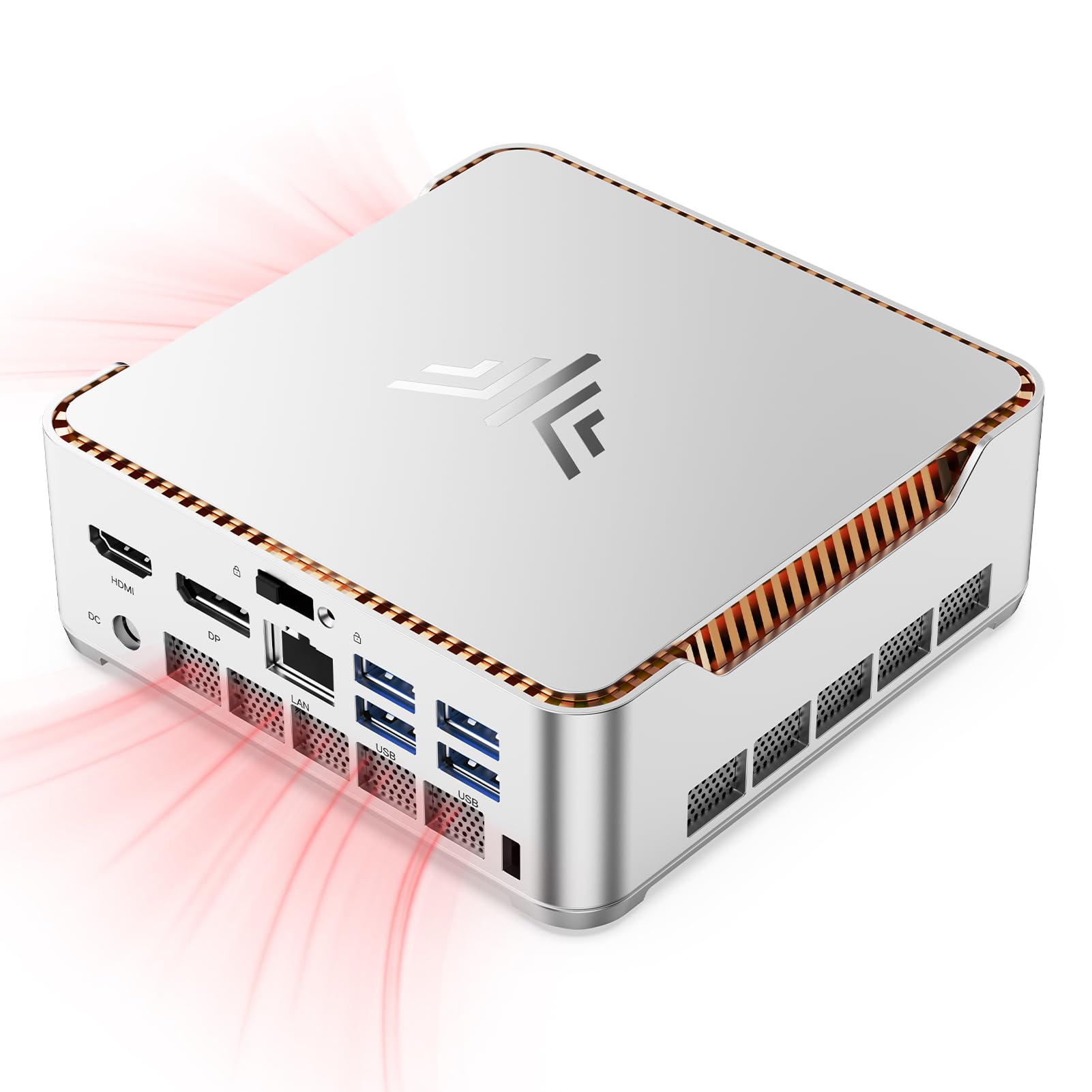
The KAMRUI Hyper H2 is a SFF (small form factor) PC that packs the Intel Core i9-14900HX into a chassis just 5 x 5 x 1.6 inches. While the integrated UHD graphics cannot drive 4K gaming on their own, the Hyper H2 is designed as a CPU-centric mini PC for users who will add an external GPU via the USB-C port (though bandwidth is limited) or use it as a powerful home theater and productivity hub that can handle light 4K gaming via cloud streaming or older titles.
The 14900HX inside is the same 24-core monster found in the WIWB, but here it is constrained to a 55W TDP to fit the compact cooling system. The upgraded silent centrifugal fan with dual copper heat pipes and dual-fin module keeps the chip stable under load, but sustained performance is lower than in a full-size desktop chassis with better airflow.
Connectivity is impressive for the size: HDMI 2.0, DP 1.4, USB-C, four USB-A 3.2 ports, RJ45 Ethernet, WiFi 6E, and Bluetooth 5.2. The included VESA mount lets you attach the unit behind a monitor for a near-invisible setup. For a dedicated 4K gaming CPU-focused build, this is a niche option — better suited for those who value extreme space savings over raw gaming performance.
Why it’s great
- Ultra-compact 5-inch chassis saves desk space
- Triple 4K display support via HDMI + DP + USB-C
- WiFi 6E and Bluetooth 5.2 for wireless peripherals
Good to know
- Integrated GPU limits 4K gaming to light or streamed titles
- 55W TDP cap reduces peak performance vs full-size PCs
FAQ
Does the CPU still bottleneck a GPU at 4K?
Is more cache always better for 4K gaming?
Should I get more cores or higher clock speed for 4K?
Do I need DDR5 RAM for a 4K gaming CPU?
Can I run a 4K gaming CPU on a B-series motherboard?
Final Thoughts: The Verdict
For most users, the best 4k gaming cpu winner is the AMD Ryzen 7 9800X3D because its massive 104MB L3 cache delivers the smoothest frame times at 4K while running cool enough for any good air or liquid cooler. If you want to save significant money without sacrificing much gaming performance, grab the AMD Ryzen 7 7800X3D — it still offers 96MB of 3D V-Cache and runs at just 75W under gaming loads. And for a plug-and-play 4K gaming beast that needs zero assembly, nothing beats the Skytech Gaming Azure 3 with its 9800X3D and RTX 5080 combo.