
Building a gaming PC on a tight budget forces you to make tough choices, and the graphics card is where the trade-offs sting most. The wrong pick means stuttering in modern titles, low texture quality, or a card that dies within weeks. Finding genuine 1080p performance without getting burned requires knowing exactly which silicon, which VRAM configuration, and which cooling solution actually delivers stable frame rates day after day.
I’m Min — the co-founder and writer behind Gadgets Feed. I’ve spent countless hours sifting through customer reports, factory spec sheets, and real-world benchmarks to identify which entry-level GPUs hold up under sustained gaming loads and which are destined to fail.
Whether you’re upgrading a prebuilt office PC or building from scratch with a lean wallet, this guide cuts through the noise to land on the single best cheap graphics card that balances raw performance with long-term reliability.
How To Choose The Best Cheap Graphics Card
Picking a budget GPU is a minefield of rebadged chips and misleading specs. Focus on three hard metrics: VRAM capacity, memory bus width, and the generation of the architecture. An 8GB card with a 256-bit bus from the Polaris era will outclass a 4GB card with a 128-bit bus in every texture-heavy scenario, even if the clock speed numbers look similar on paper. Driver maturity also matters — older AMD architectures are rock-solid, while newer Intel Arc cards require Resizable BAR support to function correctly.
VRAM and Memory Bus: The Real Bottleneck
8GB of GDDR5 on a 256-bit interface is the baseline for playable 1080p gaming in modern titles. Cards with 4GB or 6GB VRAM on narrower 96-bit or 128-bit buses will hit texture-swapping stutters in open-world games like Red Dead Redemption 2 or Cyberpunk 2077. The memory bandwidth number (calculated by memory clock × bus width / 8) tells you how quickly the GPU can feed the processor — anything under 200 GB/s will show visible frame drops in busy scenes.
Power Delivery and Form Factor
Many budget buyers are upgrading OEM prebuilts from Dell, HP, or Lenovo that lack standard PSU connectors. Some modern low-power cards (like the RTX 3050 6GB or RX 6400) draw all their power from the PCIe slot itself — no 6-pin or 8-pin cable needed. Measure your case clearance too: dual-fan cards are typically 240-270mm long, but single-slot low-profile cards fit in SFF cases. A card that requires a 6-pin or 8-pin power cable will not work in a system without that connector unless you also replace the power supply.
Quick Comparison
On smaller screens, swipe sideways to see the full table.
| Model | Category | Best For | Key Spec | Amazon |
|---|---|---|---|---|
| ASRock Arc A580 Challenger | Premium | 1440p capable gaming | 8GB GDDR6, 256-bit, 2000MHz core | Amazon |
| MSI RTX 3050 Ventus 2X 6G | Premium | Low power / no-PSU-upgrade builds | 6GB GDDR6, 96-bit, 70W slot power | Amazon |
| GIGABYTE RTX 3050 Windforce OC V2 | Premium | Ray tracing capable 1080p | 6GB GDDR6, 96-bit, dual fans | Amazon |
| MSI RTX 3050 Ventus 2X 6G OC (v2) | Premium | Small form factor desktops | 6GB GDDR6, 1.49 GHz boost | Amazon |
| XFX Speedster SWFT105 RX 6400 | Mid-Range | Low-profile office PC upgrades | 4GB GDDR6, RDNA 2, 2321MHz boost | Amazon |
| MOUGOL RX 580 8GB | Mid-Range | 1080p entry-level gaming | 8GB GDDR5, 256-bit, 1206MHz core | Amazon |
| Kelinx AISURIX RX 580 8GB | Mid-Range | Linux / KVM testing rigs | 8GB GDDR5, 1750MHz memory clock | Amazon |
| Maxsun RX 580 8GB (White) | Mid-Range | White-themed PC build | 8GB GDDR5, 256-bit, 3 outputs | Amazon |
| Sparkle Intel Arc A310 ECO | Budget | Media server / 4K transcoding | 4GB GDDR6, 50W TBP, low profile | Amazon |
In‑Depth Reviews
1. ASRock Intel Arc A580 Challenger 8GB OC
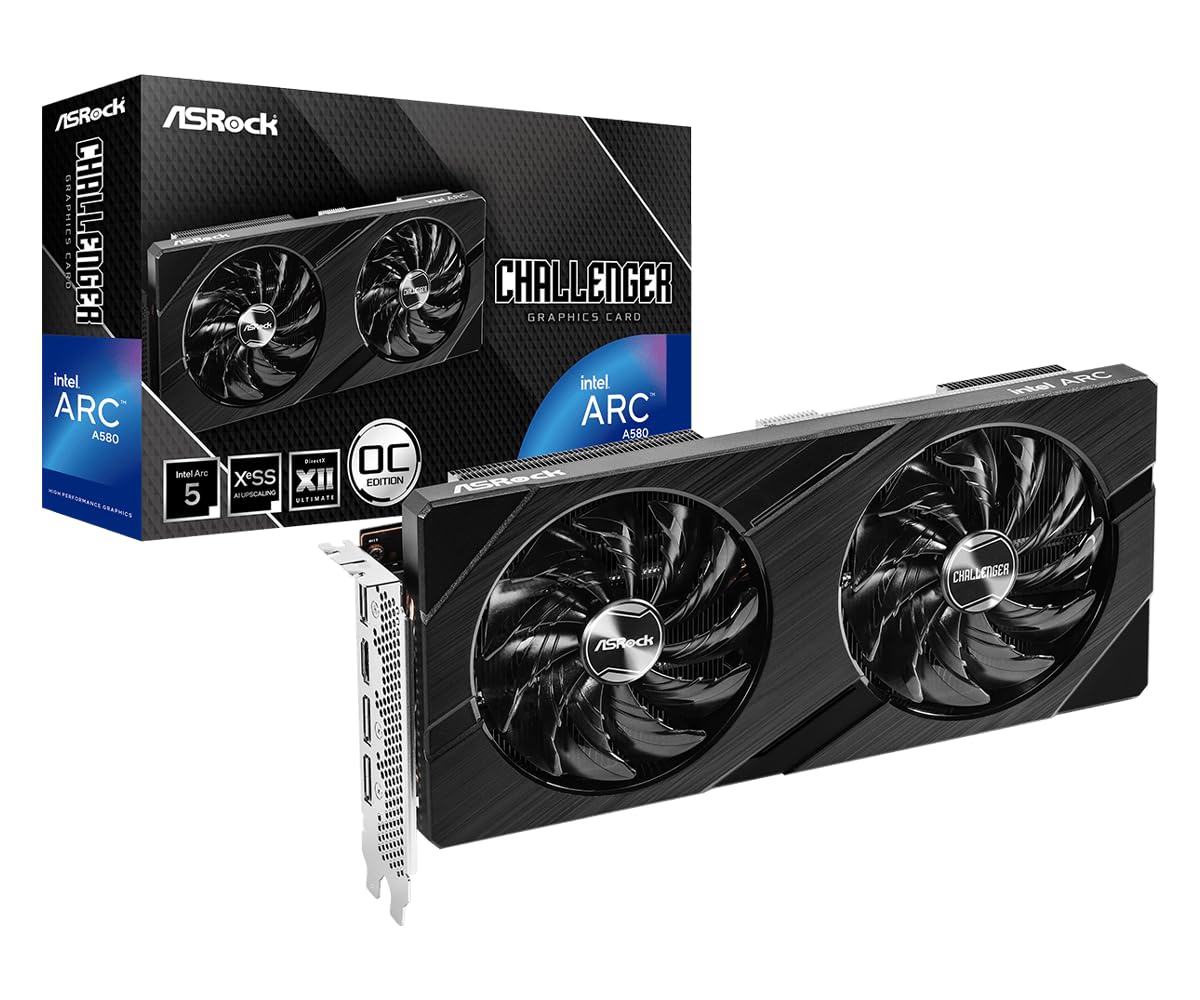
The ASRock Arc A580 Challenger is the strongest all-rounder in this list, featuring a factory overclock of 2000 MHz on the core and a full 8GB of GDDR6 memory across a 256-bit interface. That memory bandwidth — 512 GB/s — is double what most entry-level cards offer, enabling smooth 1440p gameplay in titles like Fortnite and Overwatch. The 384 XMX engines also accelerate Intel XeSS upscaling, giving you a free performance boost in supported games.
Its dual-fan design with 0dB Silent Cooling means the fans stop completely under low load, making it effectively silent during desktop work and light browsing. The metal backplate adds structural rigidity, and the DisplayPort 2.0 outputs support modern high-refresh-rate monitors. Just be aware this card requires Resizable BAR support in your motherboard BIOS — without it, you lose up to 40% performance. It also needs a 650W power supply with two 8-pin connectors.
Customer reviews consistently praise its 1080p performance at max settings, calling it a “great value” that plays everything on medium to high without stuttering. The main caveat is a known glitch where scrambled video shows after waking from sleep on DisplayPort — using HDMI avoids the issue entirely. For the combination of raw specs and modern feature set, this is the top pick.
Why it’s great
- Full 8GB GDDR6 on a 256-bit bus offers real 1440p potential
- Factory overclocked to 2000 MHz out of the box
- Fans stop completely at idle for silent operation
Good to know
- Requires Resizable BAR support in BIOS for full performance
- Needs a 650W PSU with two 8-pin power connectors
- DisplayPort sleep bug may require using HDMI instead
2. MSI Gaming RTX 3050 Ventus 2X 6G OC

The MSI RTX 3050 Ventus 2X stands out because it draws all its power — just 70W — from the PCIe slot itself. No external 6-pin or 8-pin power connector is required, making it a perfect drop-in upgrade for proprietary OEM systems from Dell, HP, or Lenovo that lack standard PSU cables. The 6GB GDDR6 memory on a 96-bit interface limits memory bandwidth to 168 GB/s, which is noticeably narrower than the A580, but the Ampere architecture brings hardware ray tracing cores and DLSS support.
In real-world gaming, this card delivers 50-60 FPS in Cyberpunk 2077 at high settings (1080p) without ray tracing, and around 100 FPS on medium. The dual-fan cooling keeps temperatures under 62°C under full load with fans running very quietly. Card dimensions are compact at 7.4 inches long, fitting most mid-tower cases easily. The boost clock of 1492 MHz is conservative, but the power efficiency is outstanding — idle power draw sits at just 10-15W.
Buyers upgrading from GTX 1650 or RX 6400 report a noticeable jump in stability and driver polish. The main criticism is that the 96-bit bus creates VRAM bottlenecks in texture-heavy games — Red Dead Redemption 2 will need lowered texture settings to avoid stuttering. For budget builds where PSU upgrade is impossible, this card is the safest choice available.
Why it’s great
- Slot-powered only — no external PCIe cables needed
- Excellent power efficiency at 70W full load
- Ray tracing cores and DLSS support at entry level
Good to know
- 96-bit memory bus limits VRAM bandwidth to 168 GB/s
- 6GB VRAM causes texture stuttering in the most demanding open-world titles
- Ray tracing performance is underwhelming — best kept disabled
3. GIGABYTE GeForce RTX 3050 WINDFORCE OC V2 6G

The GIGABYTE Windforce OC V2 brings the same NVIDIA Ampere architecture and 6GB GDDR6 as the MSI Ventus but with GIGABYTE’s proprietary dual-fan cooling solution. The Windforce fans spin at lower RPMs to achieve comparable thermal performance, and the card idles with fans stopped completely. The boost clock is listed at 1477 MHz — slightly lower than MSI’s offering — but in practice the difference is negligible at this performance tier.
This card also draws all power from the PCIe slot, requiring no external power connectors, which makes it equally suited for prebuilt upgrades. The dimensions are nearly identical to the MSI at 7.5 inches long, and the metal backplate adds durability. Display support goes up to 7680×4320 via a single HDMI 2.1a and DisplayPort 1.4a, so 4K desktop use is fully supported even if gaming at that resolution is not realistic.
Buyers report it works flawlessly for basic 1080p gaming with ray tracing in titles like Minecraft, and it serves as a solid upgrade for media center PCs. The only common complaint is that installation can cause a “freak out” on first boot if the system doesn’t immediately recognize the card — a simple driver install resolves it. For the same core specs as the MSI with slightly better cooling acoustics, it earns a top-tier spot.
Why it’s great
- Windforce fans deliver efficient cooling with low noise
- Slot-powered design fits OEM systems without PSU upgrades
- Includes HDMI 2.1a for high-bandwidth display connections
Good to know
- 6GB VRAM and 96-bit bus limit texture-heavy AAA gaming
- Ray tracing performance is marginal at best
- First-time installation may require driver reinstall if not recognized
4. MSI GeForce RTX 3050 Ventus 2X 6G OC (Low Profile)
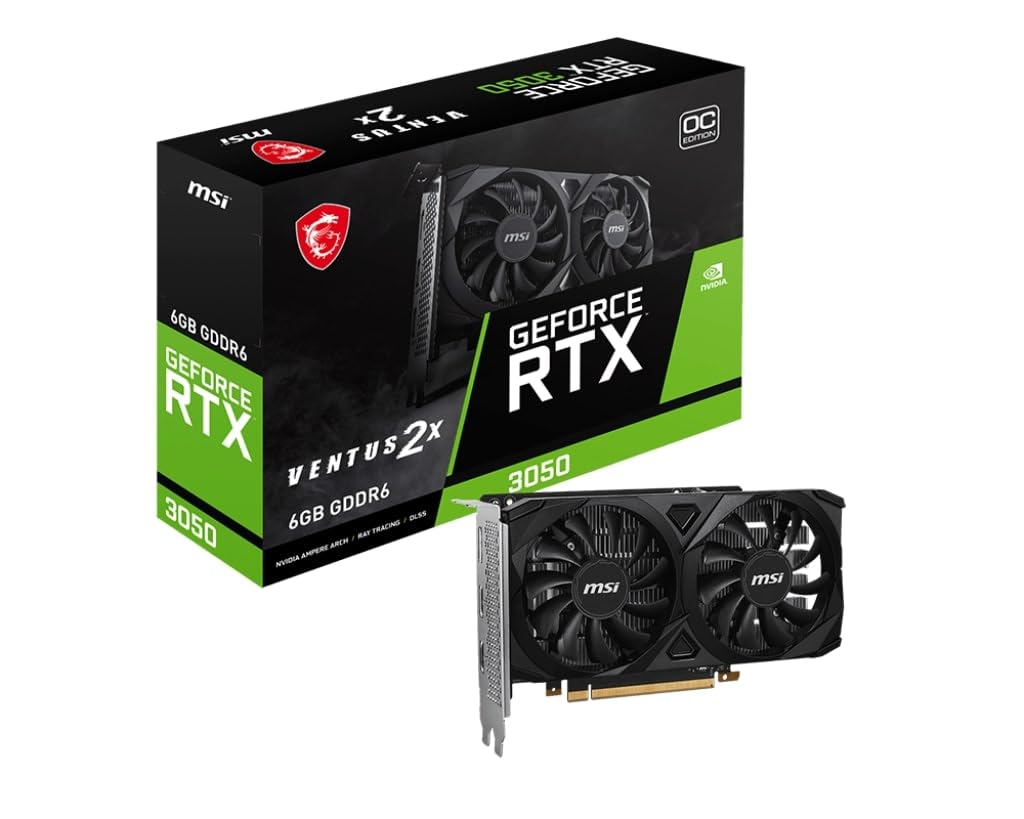
This second MSI RTX 3050 entry is essentially the same Ventus 2X silicon but marketed explicitly as a low-profile card, which means it physically fits into slim Small Form Factor (SFF) cases and compact OEM towers like the HP Pavilion TP01-25xx and Dell Optiplex SFF. The card uses the same 6GB GDDR6 memory at 1.49 GHz boost clock and requires no external power — it runs purely off the PCIe slot at approximately 70W TDP.
The low-profile bracket is pre-installed, and the card measures a mere 381 grams, making it exceptionally easy to handle in tight spaces. Gaming performance mirrors the full-height Ventus: 50-60 FPS in Cyberpunk 2077 at high settings, solid 1080p frame rates in Fortnite and Valorant, and enough power for light machine learning tasks like running smaller models in VS Code. The single fan is surprisingly quiet under load.
Buyers upgrading ancient Dell Optiplex or HP units report the card transforms the machine into a capable gaming PC for a tenth of the cost of a new build. The VRAM is sufficient for basic ML inference and video transcoding in tools like Immich. The only trade-off is the same 96-bit bus limitation — don’t expect to max out VRAM-sensitive titles at ultra textures. For the smallest possible footprint with RTX features, this is the card to beat.
Why it’s great
- Low-profile bracket fits SFF and slim OEM cases
- Slot-powered at ~70W — no PSU upgrade needed
- Light enough (381g) for easy handling in tight chassis
Good to know
- 6GB on 96-bit bus limits AAA texture settings
- Single fan may run warmer in poorly ventilated cases
- Not suitable for 1440p gaming beyond low settings
5. XFX Speedster SWFT105 Radeon RX 6400 4GB

The XFX RX 6400 uses AMD’s modern RDNA 2 architecture — the same foundation as the RX 6000 series — but with only 4GB of GDDR6 on a 64-bit bus. Memory bandwidth sits at just 128 GB/s, which is the card’s most significant bottleneck. However, the boost clock of 2321 MHz is the highest in this entire list, and the card draws all power from the PCIe slot (no external connector). This makes it the absolute cheapest way to get RDNA 2 features like hardware ray tracing and FSR upscaling into an old Optiplex or HP Pavilion.
The low-profile bracket is included and switching to it requires disassembling the shroud (10 screws), which customers describe as tedious but doable. In gaming, the card handles Mortal Kombat 11 and Tekken 7 at solid frame rates on medium settings, and Fortnite runs at 60 FPS with FSR enabled. The 4GB VRAM is the hard limit — Red Dead Redemption 2 and Hogwarts Legacy will stutter on high textures. The card is best for esports titles and older single-player games.
Customer reviews highlight its exceptional fit for the HP M01-F3214 and similar small office PCs where PSU upgrades are not an option. The driver stability is strong on both Windows and Linux. The main warning is to avoid unnecessary driver updates — some users report system lockups after installing newer versions. For ultra-budget builds that just need to play modern esports at decent settings, this delivers unbeatable value.
Why it’s great
- RDNA 2 architecture with the highest boost clock in this list
- Slot-powered — zero external cables, fits any desktop
- Low-profile bracket included for SFF builds
Good to know
- 4GB VRAM on a 64-bit bus causes VRAM bottlenecks in AAA games
- Switching to low-profile bracket requires disassembling the shroud
- Avoiding driver updates is recommended for stability
6. MOUGOL AMD Radeon RX 580 8GB
The MOUGOL RX 580 is a refreshed take on the legendary Polaris architecture, packing 8GB of Samsung GDDR5 memory on a full 256-bit bus. This gives it a memory bandwidth of 256 GB/s — enough to handle texture-heavy games at 1080p without VRAM swapping issues. The core clock is conservative at 1206 MHz with 2048 Stream Processors, and it supports DirectX 12, Vulkan, and OpenGL 4.6 for broad compatibility with both gaming and creative workloads like Blender rendering and Premiere Pro acceleration.
The dual-fan cooling system and aluminum heatsink keep the card under 65°C during extended gaming sessions, and the intelligent fan control stops the fans entirely at idle. Dimensions are 240x135x45mm, fitting standard ATX and M-ATX cases. It requires a single 6-pin power connector, so older PSUs without that cable will need an adapter. The I/O panel includes HDMI, DisplayPort, and DVI for triple-monitor setups at up to 4K resolution.
Customer feedback is highly positive, with multiple verified buyers calling it “awesome” for its price. The card runs Fortnite, GTA V, Apex Legends, and Valorant at smooth frame rates. A few users note the outer housing feels slightly cheap, resembling 3D-printed plastic, but this does not affect performance. For reliable 1080p gaming on a strict budget with no driver-layer headaches, this is the safest Polaris-era buy.
Why it’s great
- 8GB on 256-bit bus delivers excellent texture handling for the era
- Dual-fan cooling with intelligent idle fan stop
- Triple monitor output (HDMI+DP+DVI) for multi-display setups
Good to know
- Requires a 6-pin power connector from the PSU
- Outer housing feels cheap and plasticky
- Polaris architecture lacks ray tracing and modern upscaling
7. Kelinx AISURIX RX 580 8GB 2048SP

The Kelinx AISURIX RX 580 uses the same Polaris 20 XTX core as the MOUGOL but runs its memory at a faster 1750 MHz, effectively delivering slightly higher memory bandwidth. It also features semi-automatic intelligent fans that stop spinning when the GPU temperature is low, providing a zero-noise experience during light desktop work. The card supports up to 4K display output via 2x DisplayPort and 1x HDMI.
Power draw is rated at 185W maximum, and it requires a single 8-pin power connector — one more pin than the MOUGOL variant, so check your PSU cabling. The card is a dual-slot design that fits standard towers. In Linux environments, this card works out of the box with the open-source AMD drivers, making it a strong choice for KVM virtualization, media streaming, and lightweight gaming on Ubuntu or Fedora.
Customer reviews are mixed. Positive buyers say it works great for 1080p gaming and movie watching, with crisp colors and easy installation. However, several reports describe cards that failed after one or two weeks, with graphical glitches, purple screens, and driver install errors. The manufacturer’s support link reportedly returns a database error. For Linux test rigs or secondary PCs where total loss is not a disaster, the value is decent — but this card carries reliability risk.
Why it’s great
- Faster memory clock at 1750 MHz for slightly higher bandwidth
- Intelligent fan stop for silent desktop use
- Excellent native Linux driver support
Good to know
- Significant reliability concerns reported with early failures
- Requires 8-pin power — one more than similar RX 580 cards
- Manufacturer support is reportedly unresponsive
8. Maxsun AMD Radeon RX 580 8GB 2048SP (White)

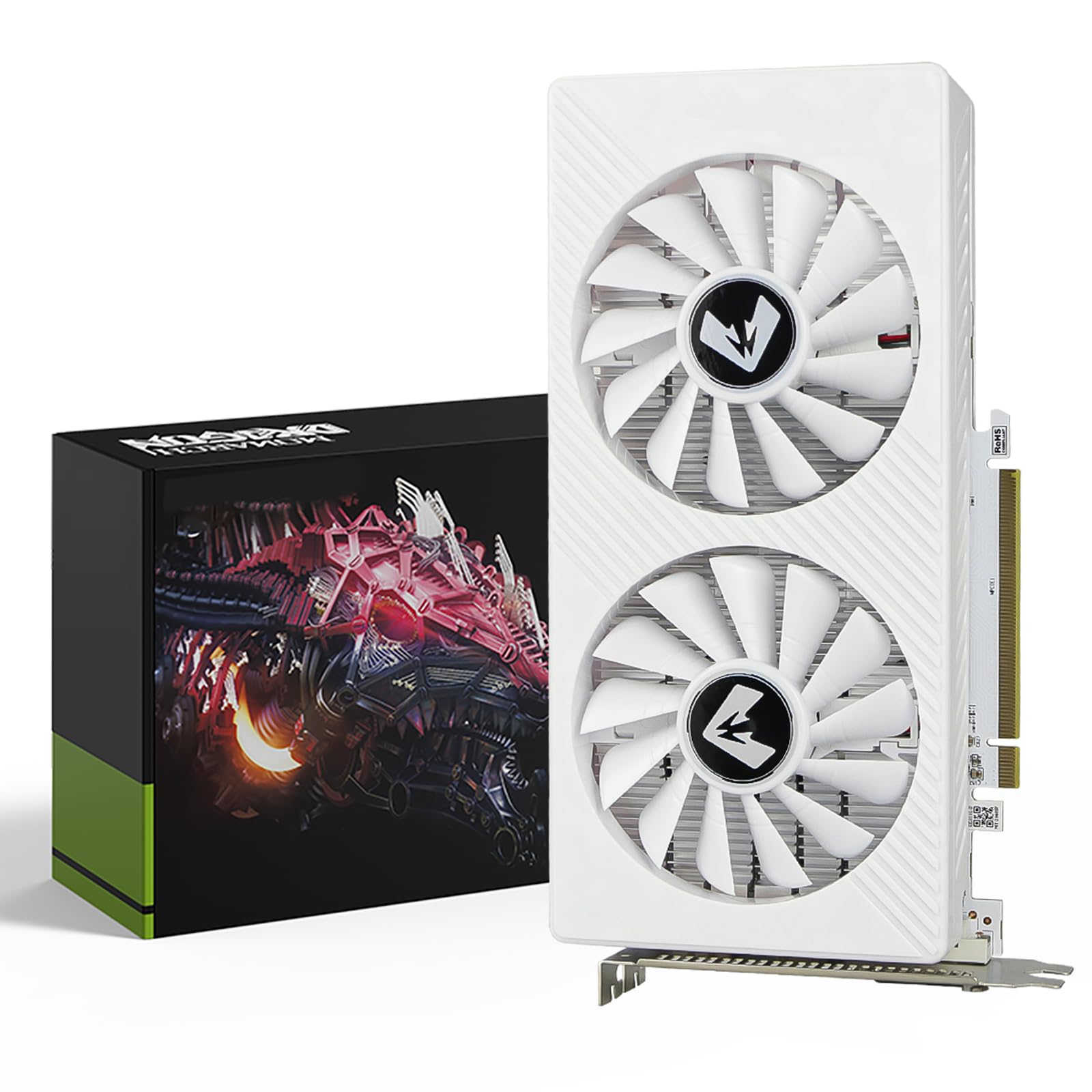
The Maxsun RX 580 is identical in core specs to the other Polaris 20 entries — 8GB GDDR5, 256-bit bus, 2048 Stream Processors — but with one distinctive feature: a white PCB and white dual-fan shroud. This makes it the only option on this list specifically designed for white-themed PC builds, where black components would clash with the aesthetic. It supports up to 7680×4320 resolution and includes HDMI, DisplayPort, and DVI outputs for multi-monitor setups.
The cooling solution uses dual fans with a heatsink that keeps the GPU under 65°C at max load, though the plastic shroud feels cheap according to buyers. Dimensions are 7.48 inches long, fitting most ATX and M-ATX cases. The card supports DirectX 12, Vulkan, and OpenGL 4.6. It requires a 6-pin power connector. A critical note: buyer reports state that a 750W power supply is necessary — at least one user experienced a system that would not turn on with a 620W PSU until they upgraded to 750W.
Gaming performance mirrors other RX 580 2048SP cards: 144 FPS in Fortnite and Valorant, 60 FPS in AAA titles at lowered settings. One buyer warned that the power port only has 6 pins instead of the advertised 8-overclocking slots, which they considered false advertising. For builders prioritizing aesthetics over absolute reliability, the white finish is unique. But the PSU requirement and potential spec discrepancy make this a niche choice rather than a universal recommendation.
Why it’s great
- White PCB and shroud for white-themed PC builds
- 8GB VRAM on 256-bit bus for solid 1080p gaming
- Triple output ports for multi-monitor work
Good to know
- Reportedly requires a 750W PSU — higher than typical Polaris cards
- One report of power port having fewer pins than advertised
- Plastic shroud feels cheap compared to branded alternatives
9. Sparkle Intel Arc A310 ECO 4GB Low Profile

The Sparkle Intel Arc A310 is not a gaming-first card — it is built for media transcoding and low-power workstation tasks. Its 4GB of GDDR6 memory on a 64-bit bus and 50W TBP make it the lowest-power card in this roundup. The Xe HPG architecture supports hardware-accelerated AV1 encoding, H.264, and H.265, making it the absolute best choice for a Plex, Jellyfin, or Emby media server that needs to transcode multiple 4K streams simultaneously.
The card is single-slot, single-fan, and low-profile out of the box, with a short bracket included for SFF cases. It measures just 6.14 inches long and weighs 202 grams. The I/O features 1x HDMI 2.0 and 2x mini DisplayPort. It supports DirectX 12 Ultimate, Vulkan 1.3, and Intel XeSS upscaling. It also supports real-time ray tracing in theory, but gaming performance is limited to very low settings in modern titles — it’s best described as “playable for older games and esports.”
Customer reviews are glowing for its intended use case: “top tier transcoding for NAS/Jellyfin.” Users report fast 4K transcoding with very low power draw. The main reported issue is a fan droning noise due to aggressive ramp-up/down behavior, which firmware updates and powertop help to mitigate but not fully eliminate. For gaming use, this card is not recommended unless you specifically need the low profile and can tolerate low settings. It is a specialist tool, not a general gaming GPU.
Why it’s great
- Exceptional 4K hardware transcoding with AV1 support
- Ultra-low 50W TBP with single-slot low-profile design
- Excellent Linux driver support with i915 and Xe drivers
Good to know
- 4GB VRAM and 64-bit bus severely limit gaming performance
- Fan has a droning sound that ramps up/down under load
- Requires Resizable BAR for acceptable performance in any scenario
FAQ
Can a cheap graphics card handle modern AAA games at 1080p?
Does a cheap graphics card require a new power supply?
Which is better for gaming: an older flagship or a newer budget card?
Final Thoughts: The Verdict
For most users, the best cheap graphics card is the ASRock Intel Arc A580 Challenger because it delivers a full 8GB of GDDR6 on a 256-bit bus with modern XeSS upscaling and a factory overclock. If you need a slot-powered card for a proprietary OEM build, go with the MSI RTX 3050 Ventus 2X 6G. And for the absolute lowest power draw with best-in-class media transcoding, nothing beats the Sparkle Intel Arc A310 ECO.