
A barcode printer that prints labels you can actually scan sounds simple, but the difference between a printer that saves you hours and one that costs you return fees comes down to resolution, connectivity, and media handling. The wrong choice means blurry barcodes that won’t scan, constant paper jams during a rush, or being stuck with a wired-only device when your workflow has moved to a tablet. This guide breaks down the real specs that separate a smart investment from a desk ornament.
I’m Min — the co-founder and writer behind Gadgets Feed. I’ve spent hundreds of hours analyzing thermal printer specifications, cross-referencing print head density with real-world scan success rates, and mapping connectivity protocols to actual shipping and retail workflows.
Whether you run a home-based Etsy shop, manage warehouse inventory, or need retail-compliant labels, the right thermal printer eliminates wasted time and wasted labels. This guide walks through the top contenders to help you find the absolute best barcode printer for your specific setup and volume.
How To Choose The Best Barcode Printer
The barcode printer market splits sharply between direct thermal models that require no ink and thermal transfer models that use ribbon. For the vast majority of shipping, retail, and warehouse label applications, direct thermal is the cleaner, lower-cost choice. Your real decisions come down to print resolution, connectivity type, media width support, and print speed.
Print Resolution: 203 DPI vs 300 DPI
203 dots per inch is the industry standard for 4×6 shipping labels and most warehouse barcodes. It produces clear, scannable results at high speeds. Stepping up to 300 DPI buys you visibly sharper text and smaller, denser barcodes that scan reliably even when printed at a reduced size. If you label small medical vials, tiny retail price tags, or high-density asset tags, 300 DPI is worth the premium. For standard package shipping, 203 DPI handles the job flawlessly.
Connectivity: Wired, Bluetooth, or Wi-Fi
USB-only printers are the cheapest but tether you to a dedicated computer. Bluetooth 5.0 models add the flexibility to print directly from an iPhone or Android phone, which is a massive time-saver for small business owners who process orders on a tablet. True Wi-Fi printers with AirPrint support allow any device on the same network to send labels wirelessly without installing drivers, an advantage for multi-user offices. Ethernet ports are valuable in warehouse environments where a stable wired connection beats Wi-Fi congestion.
Label Size and Media Handling
Most shipping label printers accept rolls or fan-fold labels from 1.5 inches wide up to 4.6 inches wide. The best models use a straight paper path with adjustable side guides to prevent skewing and jams. Check the minimum label length and width the printer supports if you need small price tags or barcode stickers. Some printers also handle continuous-length roll tape for custom-length labels up to three feet, useful for shelf signage or long asset tags.
Quick Comparison
On smaller screens, swipe sideways to see the full table.
| Model | Category | Best For | Key Spec | Amazon |
|---|---|---|---|---|
| Brother QL-820NWB | Premium | Multi-connectivity & red/black labels | 300 DPI, 110 labels/min | Amazon |
| Brother QL-1100c | Premium | Precise 300 DPI shipping & QR codes | 300 DPI, 69 labels/min | Amazon |
| Rollo USB | Premium | Durable high-speed wired operation | 203 DPI, 150mm/s, 1 label/sec | Amazon |
| MUNBYN Wireless Wi-Fi | Premium | Wi-Fi AirPrint & multi-device use | 203 DPI, 150mm/s, dual-band Wi-Fi | Amazon |
| Zebra GX420D (Renewed) | Mid-Range | Commercial-grade high-volume printing | 203 DPI, 170 ppm, USB | Amazon |
| Westinghouse Thermal | Mid-Range | Reliable ZPL support & Ethernet | 203 DPI, 6 ips, Ethernet + USB | Amazon |
| MUNBYN 941BP Bluetooth | Mid-Range | Sharp 300 DPI Bluetooth printing | 300 DPI, 180mm/s, Bluetooth 5.0 | Amazon |
| HP Shipping Label Printer | Mid-Range | Brand-name reliability at 7 ips | 203 DPI, 7 ips, USB 2.0 | Amazon |
| Phomemo PM64D Touch | Budget | Compact touchscreen & Bluetooth | 203 DPI, 150mm/s, touchscreen | Amazon |
In‑Depth Reviews
1. Brother QL-820NWB Professional, Ultra Flexible Monochrome Label Printer

The Brother QL-820NWB stands apart because it offers every meaningful connectivity option — USB, Ethernet, wireless 802.11b/g/n, and Bluetooth — all in one compact chassis. At 300 DPI, it prints up to 110 address labels per minute with crisp text and dense barcodes. The built-in monochrome LCD screen lets you operate it as a standalone unit without a computer, a rare feature that speeds up ad-hoc label runs. It also supports red/black dual-color DK-2251 tape, useful for color-coded organization.
Paper loading takes a bit of practice, and the P-Touch software feels dated compared to mobile-first apps. Bluetooth connectivity can be finicky when switching between multiple paired devices, and the dim LCD screen is hard to read in low light. But the sheer versatility of connections — including a USB host port for a barcode scanner — makes this the most future-proof label printer in its class for small-to-medium businesses that need network integration.
The 820NWB handles continuous-length tape up to three feet, so you can print long shelf labels or hanging signs in addition to standard shipping labels. It works with Brother’s DK roll system, which uses genuine pre-sized easy-peel rolls that cut down on waste. For any operation that needs one printer to do shipping, inventory, signage, and asset tagging, this is the most flexible pick in the guide.
Why it’s great
- Four connectivity methods in one device: Wi-Fi, Bluetooth, Ethernet, USB.
- 300 DPI delivers razor-sharp barcodes and small text.
- Standalone operation via monochrome LCD without a computer.
Good to know
- Paper loading mechanism is finicky and takes practice.
- Bluetooth only connects to one device at a time.
2. Brother QL-1100c Wide Format Label Printer

If your shipping labels carry dense 2D barcodes and QR codes that cheaper 203 DPI printers render fuzzy, the Brother QL-1100c is the antidote. Its 300 DPI print head produces scannable results even on complex, data-rich codes that bottom-barrel models routinely fail. It prints up to 69 standard address labels per minute on labels up to four inches wide, covering 4×6 shipping labels, product barcodes, and smaller retail tags.
The automatic crop function (Windows only) lets online sellers print barcode labels directly from A4/Letter-size sheet templates, saving the manual cutting step. The “Plug & Label” feature works without installing software on Windows PCs, printing directly from Word, Excel, and Outlook. This simplicity cuts setup time drastically for users who don’t want to learn label design software.
The trade-off is that the QL-1100c uses Brother’s proprietary DK roll system, meaning you are locked into Brother media for guaranteed performance. It lacks Bluetooth or Wi-Fi, so operation requires a USB cable to a computer. For users who prioritize output quality over wireless flexibility, this printer earns its spot through reliability — multiple reviewers report trouble-free operation for three years straight.
Why it’s great
- 300 DPI produces crisp, scannable dense QR and 2D barcodes.
- Plug & Label feature works directly from Microsoft Office without extra software.
- Automatic crop from sheet templates saves manual trimming.
Good to know
- USB-only connectivity; no Bluetooth or Wi-Fi.
- Locks you into Brother DK roll media for best performance.
3. Rollo USB Shipping Label Printer

The Rollo USB is the most recommended wired thermal printer among small business owners who process bulk shipments daily. It prints one 4×6 label per second at 150mm/s, and its durable aluminum-alloy frame holds up to high-volume use without flexing or jamming. The 203 DPI print head is standard, but Rollo’s driver optimization produces consistently dark, scannable barcodes even at maximum speed.
Setup takes under 30 minutes — download the Rollo driver, connect via USB, and adjust the side guides to your label width. The printer accepts label widths from 1.57 inches to 4.1 inches, covering shipping labels, product barcodes, and thank-you stickers. Rollo Ship Manager provides exclusive shipping rates, and the printer works with every major platform: Amazon, Shopify, Etsy, eBay, FedEx, UPS, and USPS.
The Rollo USB has no Bluetooth or Wi-Fi, so it’s tied to a single computer. Users who need wireless printing should look elsewhere. However, for a dedicated shipping station where the printer stays plugged into the same laptop all day, the Rollo’s reliability record is exceptional — owners report printing thousands of labels without a single jam or misalignment. The adjustable density and speed settings give fine control over print darkness based on your label stock.
Why it’s great
- Fastest print speed in its class at 1 label per second.
- Hardy aluminum build withstands heavy daily use without issues.
- Adjustable density and speed settings for precise print darkness.
Good to know
- USB-only connection means no wireless printing.
- Expect to waste 10-15 labels during initial setup calibration.
4. MUNBYN Wireless Wi-Fi Thermal Shipping Label Printer

The MUNBYN Wireless Wi-Fi printer is the strongest play for Apple users who want a true AirPrint workflow. After an initial setup via the Munbyn Print app, any iPhone, iPad, or Mac on the same Wi-Fi network can send labels directly without drivers. Dual-band 2.4GHz and 5GHz Wi-Fi keeps the connection stable even in congested office environments, and the printer supports up to 10 connected devices simultaneously.
The upgraded Japanese thermal print head delivers 150mm/s print speed at 203 DPI, and the compact 3-pound body fits easily into tight home office desks. It supports label widths from 1.57 inches to 4.3 inches and works with major platforms including Amazon, Shopify, eBay, Etsy, UPS, and FedEx. The Munbyn app gives you access to specialty label series like holographic and rainbow stock, expanding use cases beyond plain shipping labels.
Some users report that the 203 DPI resolution produces faint or choppy text at the maximum speed setting, requiring a density adjustment in the app. The included starter label roll is small, so budget for buying bulk labels immediately. Customer support is responsive — they remotely helped one user fix a firmware upgrade and another user received a replacement unit when print quality degraded after a week. The AirPrint convenience wins out for Mac-centric small businesses.
Why it’s great
- Apple AirPrint works natively from iPhone, iPad, and Mac without drivers.
- Dual-band Wi-Fi connects up to 10 devices simultaneously.
- Japanese thermal print head for reliable output.
Good to know
- 203 DPI can produce faint text at highest speed setting.
- Some units require a firmware update for full iOS compatibility.
5. Zebra GX420D Thermal Label Barcode Printer (Renewed)
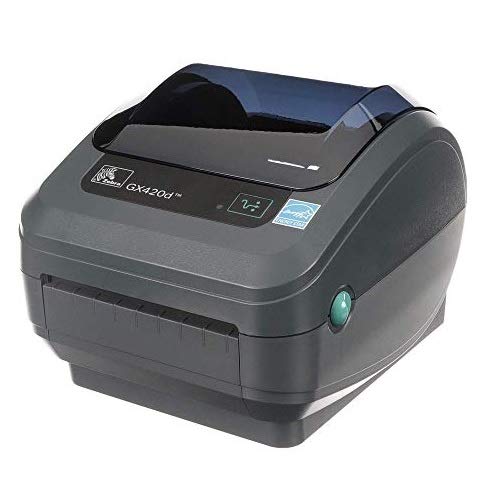
The Zebra GX420D is a commercial-grade direct thermal printer built for warehouse, healthcare, and logistics environments where downtime is not an option. Zebra’s industrial design philosophy means metal internals, a straight label path that virtually eliminates jams, and a print speed of 170 ppm. It handles 4-inch shipping labels, inventory tags, product labels, and asset tracking stickers with reliable consistency.
This is a renewed unit, so condition varies by seller. Some buyers received units with defective label sensors that were quickly replaced by responsive sellers like Techzone Direct. Others reported that their unit had custom firmware for Walmart or Sam’s Club that required ignoring proprietary login screens and installing the standard Zebra driver package directly. Once the correct drivers are loaded, the printer works flawlessly on Windows 10 and 11.
The GX420D uses a standard USB interface and is compatible with most labeling software. It does not include Bluetooth or Wi-Fi, so it’s best suited for a fixed workstation. The value proposition here is the Zebra brand’s reputation for longevity — these units are designed for thousands of labels per day. If you need a printer that can run a full shift without a hiccup and you are comfortable with the refurbished market, the GX420D delivers industrial reliability at a mid-range cost.
Why it’s great
- Industrial build quality designed for high-volume daily printing.
- Straight label path minimizes paper jams.
- Zebra driver package enables wide software compatibility.
Good to know
- Renewed unit may have custom firmware issues or sensor defects.
- USB-only; no wireless connectivity.
6. Westinghouse Thermal Shipping Label Printer

The Westinghouse Thermal printer is built for users who need ZPL compatibility and Ethernet connectivity — a rare combination in this price tier. ZPL (Zebra Programming Language) is the industry standard for barcode label formatting, making this printer easy to integrate into existing warehouse management systems and legacy shipping software. The 203 DPI print head runs at 6 inches per second, delivering sharp 4×6 labels.
Setup is straightforward: insert the included USB flash drive to install drivers, connect via USB or Ethernet, and start printing within 28 minutes according to real user reports. The straight label path feeds fan-fold and roll labels without jamming, a major win over printers with curved paper paths. It supports media widths from 0.78 inches to 4.6 inches with a maximum print width of 4.25 inches.
The Westinghouse is not Bluetooth-capable, so wireless printing is not an option. The Ethernet port on this printer runs best with router speeds under 1GHz per the manual, which older network hardware handles fine. For a small business running a dedicated shipping station connected to a networked PC, this printer offers ZPL support and Ethernet at a significantly lower cost than comparable industrial Zebra models.
Why it’s great
- ZPL support enables integration with warehouse and legacy systems.
- Ethernet port provides stable wired network printing.
- Straight label path minimizes paper jams.
Good to know
- No Bluetooth capability; wired or Ethernet only.
- USB-C cable and adapter required for modern laptops, sold separately.
7. MUNBYN Bluetooth Thermal Label Printer 941BP
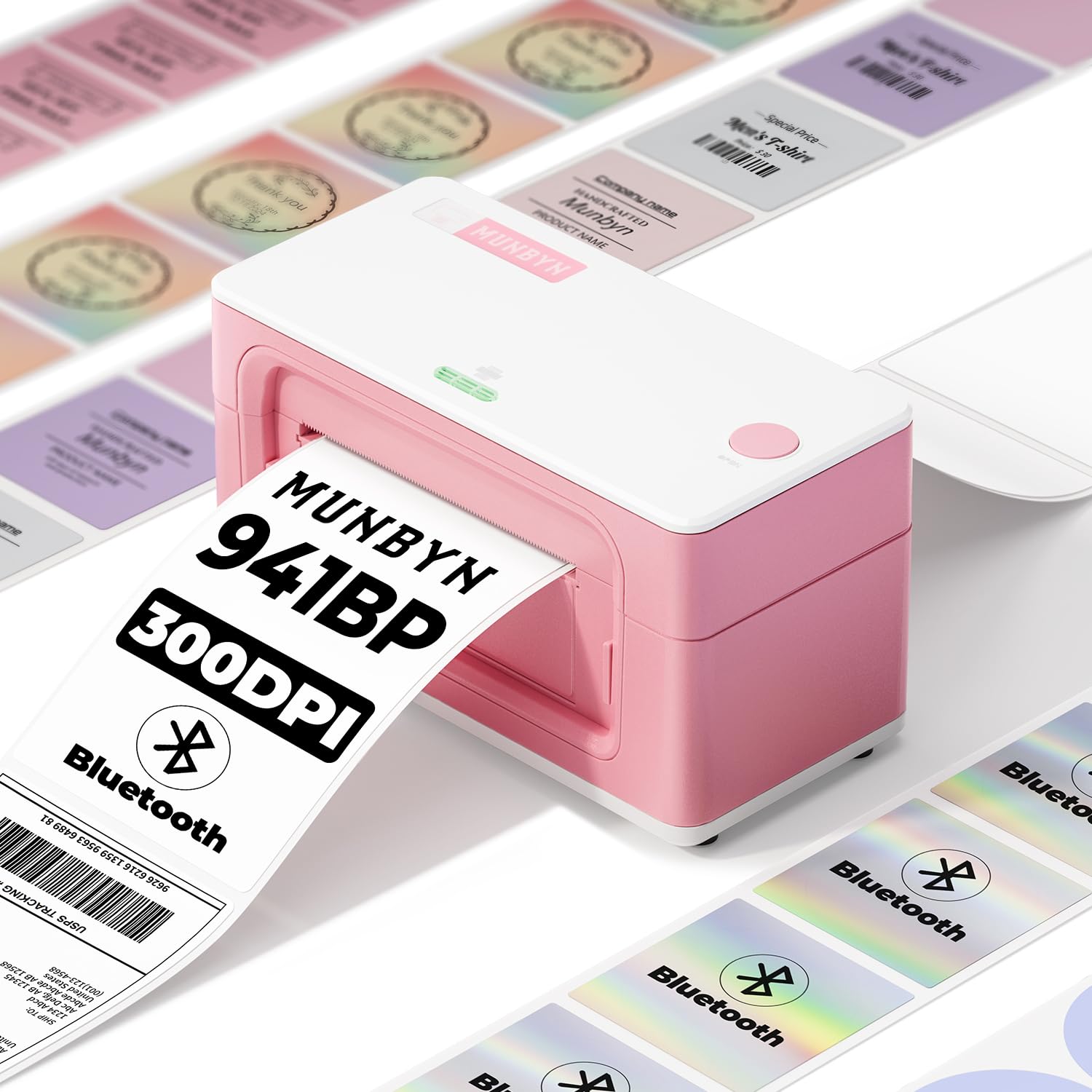
The MUNBYN 941BP hits a sweet spot by combining 300 DPI print resolution with Bluetooth 5.0 wireless connectivity at a mid-range price. Most budget-to-mid-range thermal printers max out at 203 DPI, but the 941BP’s higher resolution produces noticeably sharper text and denser barcodes that scan more reliably at smaller sizes. It prints at 180mm/s, handling up to 5,000 labels per day without jams.
Bluetooth pairing with iOS and Android works through the “Munbyn Print” app, and the printer also connects via USB Type-C to Windows and macOS computers. The 941BP is compatible with MUNBYN’s extensive label lineup, including shipping (4×6), circle, rectangle, and specialty series like holographic, aurora, and glitter stock. This makes it versatile for both functional shipping labels and decorative product stickers.
The companion app has a somewhat confusing interface — one reviewer noted that the app labels actions like “Operate” for delete and “Property” for output — but the printing quality itself is excellent. The printer also includes Ubuntu drivers verified to work on Pop!_OS 24.04, a rare perk for Linux users. For small businesses that want the sharpest possible output without jumping to premium pricing, the 941BP delivers high density at a comfortable mid-range cost.
Why it’s great
- 300 DPI resolution produces crisp, dense barcodes and text.
- Bluetooth 5.0 pairs easily with iOS and Android devices.
- Extensive label media compatibility including specialty styles.
Good to know
- Munbyn Print app has confusing button labels.
- Best results require specific label sizes from MUNBYN lineup.
8. HP Shipping Label Printer, 4×6 Commercial Grade

HP brings brand-name assurance to the thermal label printer market with this 4×6 direct thermal model. It prints at 7 inches per second at 203 DPI, producing clear barcodes and text without ink or toner. The adjustable media holders accept labels up to 4 inches wide, and the printer is compatible with HP labels and other major thermal label brands. It connects via USB 2.0 and supports Amazon, UPS, Shopify, ShipStation, and Etsy.
User reviews highlight the printer’s quiet operation and fast output. The driver installation process can be tripped up by Windows automatically installing generic drivers that block HP’s software — the fix is to check if the printer works with the generic driver first, and if print quality looks off, turn off dithering in the driver settings. One user reported about 1,000 labels printed without any issues inside the first month.
The HP printer lacks Bluetooth or Wi-Fi, so it is strictly a wired USB device. A few users reported units that printed blurry or blank labels after some months of use, which is a risk with any consumer-grade thermal printer. For users who trust the HP ecosystem and want a simple USB-only printer from a large brand with available support channels, this is a straightforward choice that gets the job done for light-to-moderate shipping volume.
Why it’s great
- Brand-name HP build with accessible customer support.
- Fast 7 ips print speed handles bulk label runs efficiently.
- Quiet operation suitable for home office environments.
Good to know
- USB-only; no Bluetooth or Wi-Fi connectivity.
- Windows driver conflicts may require manual dithering adjustment.
9. Phomemo Thermal Label Printer Upgraded with Touch Screen
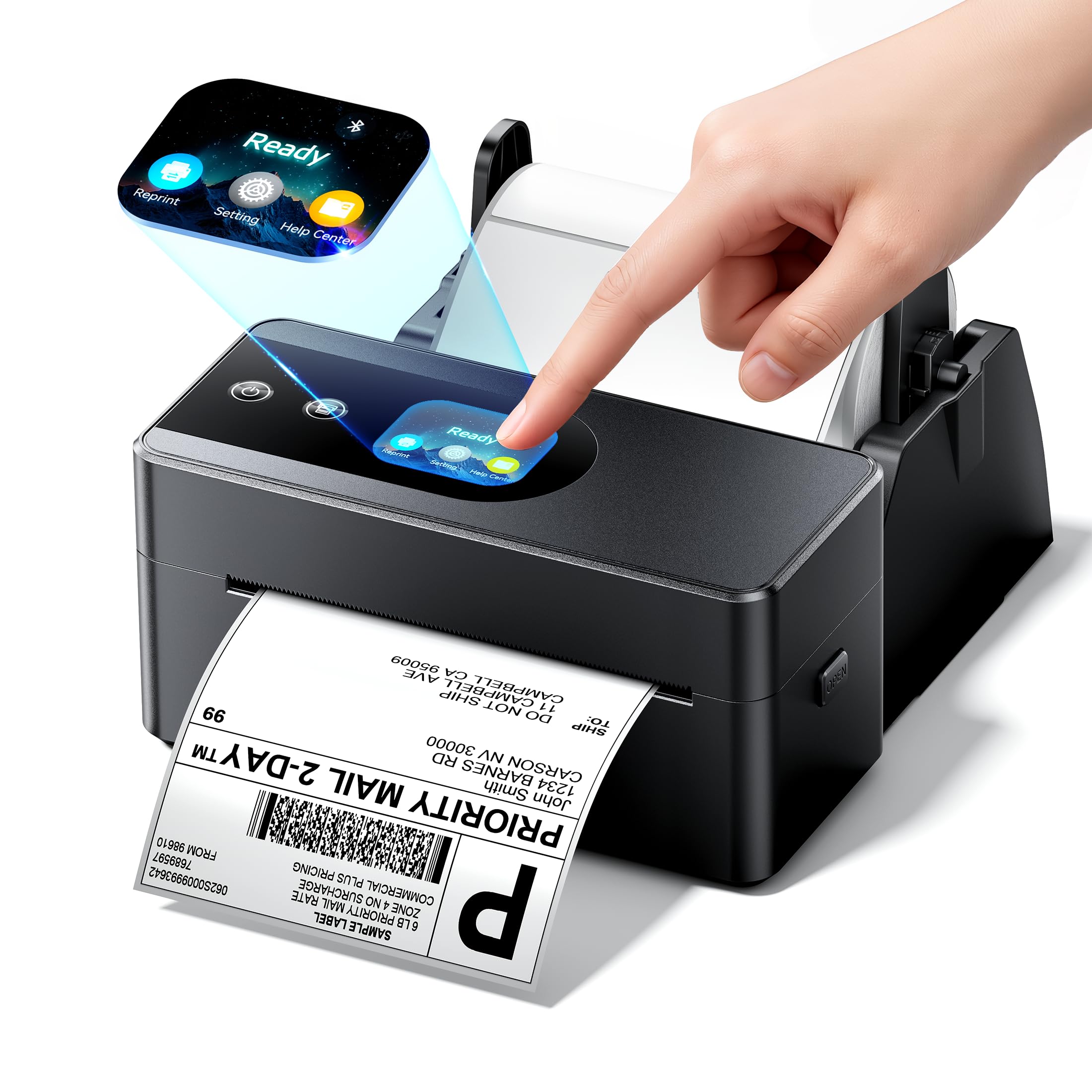
The Phomemo PM64D is the most innovative compact barcode printer in this guide thanks to its integrated touchscreen display. The 2.94-inch tall chassis saves 30% more desk space than typical 4×6 thermal printers, and the touchscreen lets you monitor print status, adjust settings, and trigger factory resets without a computer. It connects via Bluetooth 5.0 to iOS/Android devices and also works with Windows/macOS via USB Type-C.
The 203 DPI print head runs at 150mm/s with intelligent auto-alignment to prevent label misprints. It handles media widths from 0.79 inches to 4.53 inches, covering everything from tiny price tags to standard 4×6 shipping labels. Compatibility includes USPS, UPS, FedEx, Amazon, Shopify, Etsy, eBay, and PayPal. The PM64D is one of the few printers to ship with a sample pack of 20 4×6 labels included in the box.
The Labellife app has received criticism for a per year subscription that feels excessive for basic label design features, and some users report that image sizing within the app is trial-and-error. There have also been isolated reports of DOA units, suggesting that quality control can be inconsistent. However, for users who want the absolute smallest footprint and the convenience of a touchscreen interface, the Phomemo PM64D offers features no other budget-priced printer provides.
Why it’s great
- Built-in touchscreen for direct printer control without a PC.
- Ultra-compact design saves significant desk space.
- Bluetooth 5.0 connects to iOS and Android devices easily.
Good to know
- Labellife app requires a /year subscription for full utility.
- Quality control can be inconsistent with reported DOA units.
FAQ
Can a 203 DPI barcode printer produce scannable QR codes reliably?
What is the difference between direct thermal and thermal transfer printing?
Why does my barcode printer print blank labels after working fine for months?
Final Thoughts: The Verdict
For most users, the best barcode printer winner is the Brother QL-820NWB because it delivers 300 DPI quality with USB, Ethernet, Wi-Fi, and Bluetooth all in one unit, covering any workflow you might have now or in the future. If you want the sharpest possible output for dense barcodes and QR codes, grab the Brother QL-1100c for its 300 DPI precision. And for budget-conscious high-volume shippers who want a tank-like wired printer, nothing beats the Rollo USB.