
Left-handed gamers and right-handed office workers alike face an infuriating reality: nearly every high-performance mouse on the market is sculpted for a right-handed palm. Finding a pointer that feels natural in either hand — with symmetrical button placement, no ergonomic bias, and no compromise on sensor quality — can feel like hunting for a unicorn with a USB dongle.
I’m Min — the co-founder and writer behind Gadgets Feed. I’ve spent dozens of hours poring over sensor datasheets, polling-rate benchmarks, and switch-actuation mechanisms from PAW 3395 optics to HERO 2 trackers to separate genuinely ambidextrous designs from clones that just slap buttons on both sides.
From budget-friendly office companions to sub-70g esports contenders, this guide breaks down the top models by real-world metrics. Here is your definitive resource for finding the perfect best ambidextrous computer mouse that fits your hand, your grip, and your workflow without forcing you to adapt.
How To Choose The Best Ambidextrous Computer Mouse
Finding a truly symmetrical mouse is just step one. The real deciding factors are modularity, sensor accuracy, wireless technology, and switch durability. Here’s what separates a passable ambidextrous model from one you’ll reach for every single day.
Side-Button Configuration and Modularity
A mouse with buttons on both sides is only ambidextrous if you can remap or remove the opposite-side buttons to prevent accidental clicks. Look for designs that allow you to physically swap, cover, or disable the secondary set — the Logitech G PRO 2 and Corsair M75 both use magnetic modular panels for this exact reason. Fixed side buttons on both edges force your pinky or ring finger against unused switches, which ruins the feel over extended use.
Sensor and Polling Rate Performance
For gaming, a native DPI above 20,000 and a polling rate of at least 1,000 Hz (1 ms response) is the baseline. Premium contenders like the 8Bitdo R8 and Razer Viper 8KHz push up to 8,000 Hz polling, which delivers sub-0.125 ms latency on compatible systems. Office-focused models can get away with 2,400 DPI and 125 Hz polling, but if you game even casually, never settle below 1,000 Hz — the cursor jitter at lower rates is immediately noticeable during fast flicks.
Weight, Grip Coating, and Battery Life
Weight directly affects fatigue in long sessions. Ultra-light gaming mice hover around 71-89 g, while office models often land between 90-110 g. The coating matters more than you think — rougher textures (like the Razer Viper’s matte finish) resist sweat and fingerprints, while glossy or smooth plastic models become slippery with dry hands. Wireless battery life varies wildly: the HP 400 claims 24 months on a single AA, while the Corsair M75 offers roughly 105 hours per charge. Prioritize USB-C charging for convenience.
Quick Comparison
On smaller screens, swipe sideways to see the full table.
| Model | Category | Best For | Key Spec | Amazon |
|---|---|---|---|---|
| Logitech G PRO 2 Lightspeed | Premium | Competitive esports / left-handed gamers | 44,000 DPI HERO 2 sensor | Amazon |
| Razer Viper 8KHz ESL | Premium | Ultra-low latency / high-refresh-rate gaming | 8,000 Hz HyperPolling wired | Amazon |
| Corsair M75 Wireless | Mid-Range | FPS gaming / finger-grip users | 89 g / 26,000 DPI MARKSMAN | Amazon |
| 8Bitdo Retro R8 | Mid-Range | Retro-aesthetic desk / hybrid work-gaming | PAW 3395 / 8,000 Hz wired | Amazon |
| Razer Viper Ultralight Wired | Mid-Range | Budget-conscious FPS / low weight preference | 71 g / optical switches | Amazon |
| Lenovo Go Essential Wireless | Budget | Travel / remote work / silent clicking | 3-month rechargeable battery | Amazon |
| HP 400 Quiet Wireless | Budget | Silent office / dual-Bluetooth convenience | 24-month AA battery life | Amazon |
In‑Depth Reviews
1. Logitech G PRO 2 Lightspeed Wireless

The Logitech G PRO 2 Lightspeed is the gold standard for true ambidexterity. Its modular magnetic side buttons let you install two buttons on either side — or none at all — which is the only proper way to serve both right- and left-handed users. The HERO 2 sensor pushes up to 44,000 DPI with sub-micron tracking, and LIGHTFORCE hybrid switches combine optical speed with mechanical tactility.
At 80 g, it’s not the lightest in this roundup, but the weight distribution feels balanced during flick-heavy shooters. Battery life stretches to 95 hours on a single charge, and USB-C charging means you can top up quickly between sessions. The 8 kHz polling rate requires the separate PRO LIGHTSPEED receiver, but even at 1 kHz via the included dongle, latency is imperceptible.
My only gripe is the smooth side coating — players with dry hands may find it slippery during long matches. However, the swappable button covers eliminate accidental presses, a problem that plagues fixed-side-button ambidextrous mice. For left-handed gamers who have been stuck with right-handed ergonomics, this is the closest thing to a purpose-built pro tool.
Why it’s great
- True modular side buttons — use left, right, both, or none
- 44,000 DPI HERO 2 sensor with 88 G acceleration tracking
- 95-hour battery life with USB-C fast charging
Good to know
- Smooth plastic sides can feel slippery without textured grips
- 8 kHz polling requires a separate receiver purchase
- Premium price reflects esports-grade engineering
2. Razer Viper 8KHz ESL Edition

The Razer Viper 8KHz takes a straightforward approach: deliver the lowest possible wired latency through true 8,000 Hz HyperPolling. On a 240 Hz monitor, the difference from a standard 1,000 Hz mouse is tangible — cursor movements feel glued to your input with zero perceptible delay. The Focus+ 20K optical sensor and second-gen optical switches complete a package built for competitive integrity.
Weighing only 71 g, the Viper 8KHz is one of the lightest ambidextrous mice available. The Speedflex cable generates minimal drag, and the symmetrical shape accommodates both claw and fingertip grips. Eight programmable buttons sit on both sides, though the left-side buttons are active by default — you must disable the right pair in Razer Synapse to avoid misfires when using the mouse right-handed.
Long-term durability is the main concern here. Multiple user reports place the scroll wheel failure point around 12-15 months of daily use. The plastic chassis also shows wear from aggressive gripping. For pure, uncompromised polling-rate performance in a wired shell, it’s unmatched — but you are trading some build confidence for that speed edge.
Why it’s great
- True 8,000 Hz HyperPolling for near-zero input latency
- 71 g ultralight chassis with Speedflex low-drag cable
- Optical switches eliminate double-click failures
Good to know
- Scroll wheel prone to failure after heavy use
- Right-side buttons can cause accidental presses for left-handed users
- Wired only — no wireless option in this model
3. Corsair M75 Wireless RGB

The Corsair M75 strikes a rare balance between wireless freedom and true ambidextrous design. Its magnetic swappable side buttons allow you to equip up to four buttons on either side or remove them entirely, preventing accidental presses. The CORSAIR MARKSMAN optical sensor hits 26,000 DPI with 650 IPS tracking, making it competitive with far more expensive mice in fast-paced shooters.
At 89 g, the M75 is lightweight but not featherweight — it feels planted during wide sweeps. The QUICKSTRIKE button mechanism eliminates pre-travel delay, so left and right clicks register instantly. Battery life clocks around 105 hours, and the USB-C charging port is conveniently placed at the front. iCUE software provides per-button remapping, though the interface is denser than competing apps.
The white colorway in this variant looks clean on any desk, but the glossy plastic attracts fingerprints. Side buttons have a slight wobble — not enough to affect gameplay, but noticeable when resting your thumb. For mid-range pricing, you get modularity, wireless, and a sensor that punches above its weight class.
Why it’s great
- Magnetic swappable side buttons for true left/right ambidexterity
- 26,000 DPI MARKSMAN sensor with 650 IPS tracking
- 105-hour battery life with USB-C charging
Good to know
- Side buttons can feel slightly wobbly
- Glossy white finish shows fingerprints easily
- iCUE software has a learning curve for customization
4. 8Bitdo Retro R8 with Charging Dock
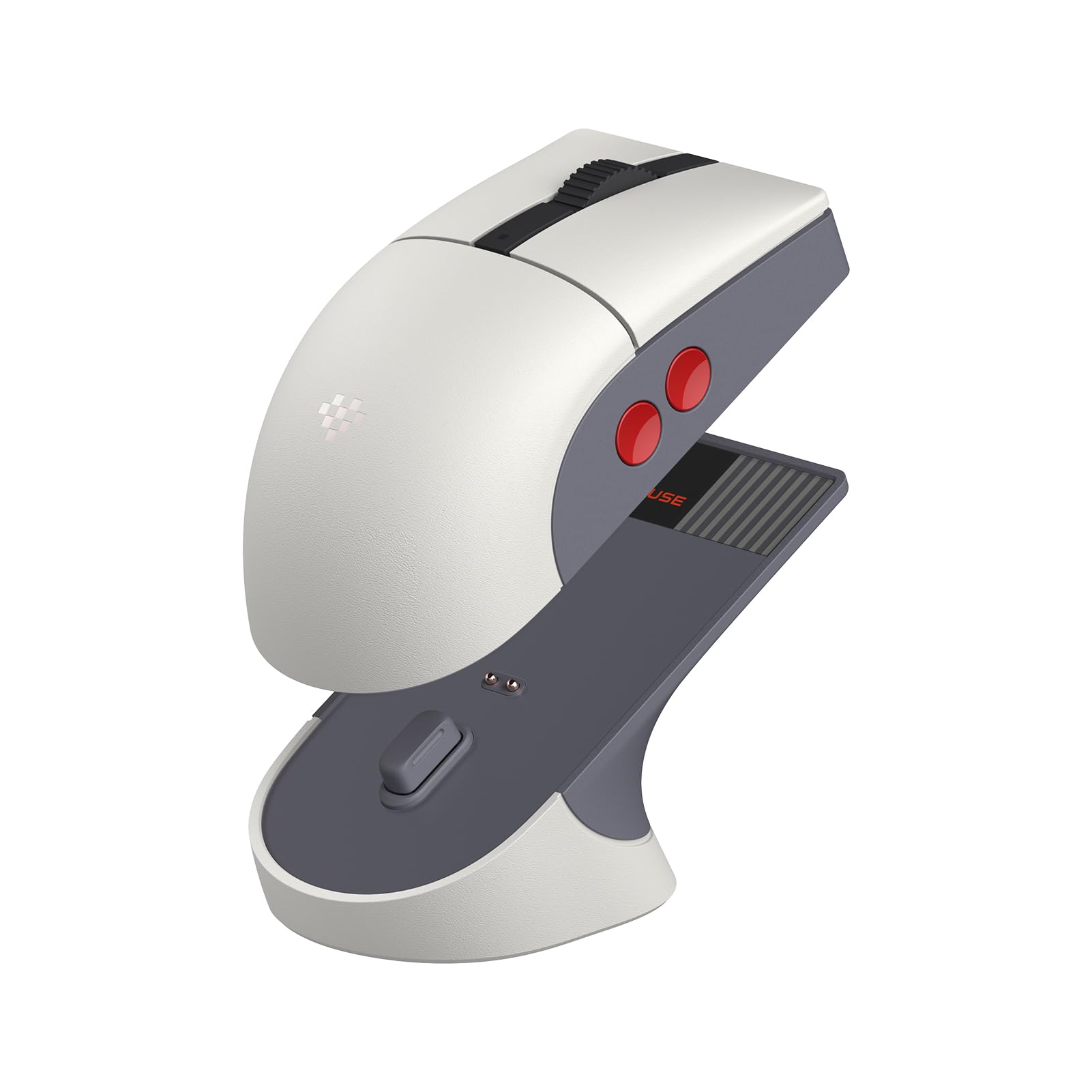
The 8Bitdo Retro R8 proves that a mouse can look like a vintage NES controller without sacrificing modern sensor performance. The PAW 3395 optical sensor supports up to 26,000 DPI with 8,000 Hz polling in wired mode and 4,000 Hz over 2.4 GHz wireless — a spec sheet that rivals much pricier esports mice. The magnetic charging dock doubles as a receiver storage bay and signal extender.
Four programmable side buttons (two per side) provide ample customization, though the left-right button arrangement isn’t modular — you manage extra buttons via the 8BitDo Ultimate Software V2. Kailh Sword GM X micro switches deliver crisp, tactile feedback with minimal dead travel. The build quality feels dense despite the lightweight design, and the grey/red retro colorway sparks genuine nostalgia on any desk.
The ambidextrous shape is slightly small for large hands, and the right-side buttons can interfere with a relaxed palm grip if left unmapped. Software macros currently have flaws with modifier-key timing. Still, for the combination of retro aesthetics, flagship sensor, and a dock that keeps everything tidy, the R8 offers exceptional value.
Why it’s great
- PAW 3395 sensor — 26,000 DPI with 8,000 Hz polling
- Magnetic charging dock with receiver storage and signal extension
- Kailh Sword GM X switches for sharp, durable clicks
Good to know
- Slightly small for large hands in palm grip
- Side buttons are fixed — not swappable or removable
- Software macro functionality has some bugs
5. Razer Viper Ultralight Wired (Mercury White)

The original Razer Viper remains a benchmark for lightweight ambidextrous design even in its wired form. At just 71 g, the Mercury White edition features a rougher matte finish that resists shine and provides solid grip during intense sessions. The 5G optical sensor delivers 20,000 DPI tracking with reliable motion sync that prevents spinout on fast swipes.
Second-gen Razer optical switches use infrared light actuation, eliminating the debounce delay that plagues mechanical switches and guaranteeing no double-click failures. The symmetrical shape accommodates both claw and fingertip grips equally well for left- and right-handed users. The DPI button sits on the underside, keeping the top surface clean but requiring you to lift the mouse to adjust sensitivity mid-game.
One notable omission: the Mercury White Viper lacks the swappable side-button design of the G PRO 2 or M75, so right-side buttons may cause accidental clicks for left-handed users who prefer a full palm grip. The braided Speedflex cable is lighter than traditional rubber cords but not as flexible as a true paracord. For the price, however, you get a proven competitive shape and zero-lag optical switching.
Why it’s great
- 71 g ultralight build with matte, fingerprint-resistant coating
- Optical switches eliminate double-click and debounce delay
- 20,000 DPI 5G sensor with motion sync anti-spinout
Good to know
- Right-side buttons can cause accidental presses in palm grip
- DPI adjustment requires lifting the mouse — no top button
- Cable is lighter than standard rubber but not true paracord
6. Lenovo Go USB-C Essential Wireless

The Lenovo Go is designed for the remote worker who needs a quiet, portable mouse that syncs via a tiny USB-C dongle — no full-size USB-A dongle sticking out of your laptop. The blue optical sensor tracks on almost any surface, including glass, and adjustable DPI (800/1600/2400) covers productivity needs. Silent buttons keep conference calls clutter-free.
Its rechargeable battery delivers up to three months on a single charge, and a 15-minute quick charge provides a full week of use. The Villi-painted grip texture adds tactile control without adding bulk. The symmetrical shape is genuinely ambidextrous, though the side buttons are only accessible from the left, effectively making it right-handed-only in practice.
Build quality is typical Lenovo solid, but some units develop scroll wheel or connection issues within the first year. The magnetic dongle storage under the battery cover is a thoughtful touch. For a budget-friendly travel mouse that charges via USB-C and works silently, this is a strong choice — just be aware it’s not fully left-hand capable despite the symmetrical shell.
Why it’s great
- USB-C receiver works natively with modern laptops and MacBooks
- Silent buttons and blue optical sensor for near-any-surface tracking
- 15-minute quick charge delivers one week of use
Good to know
- Side buttons are left-only — not truly ambidextrous
- Some units experience scroll wheel or connection failure within a year
- Small size may not suit large hands for extended use
7. HP 400 Quiet Wireless Mouse
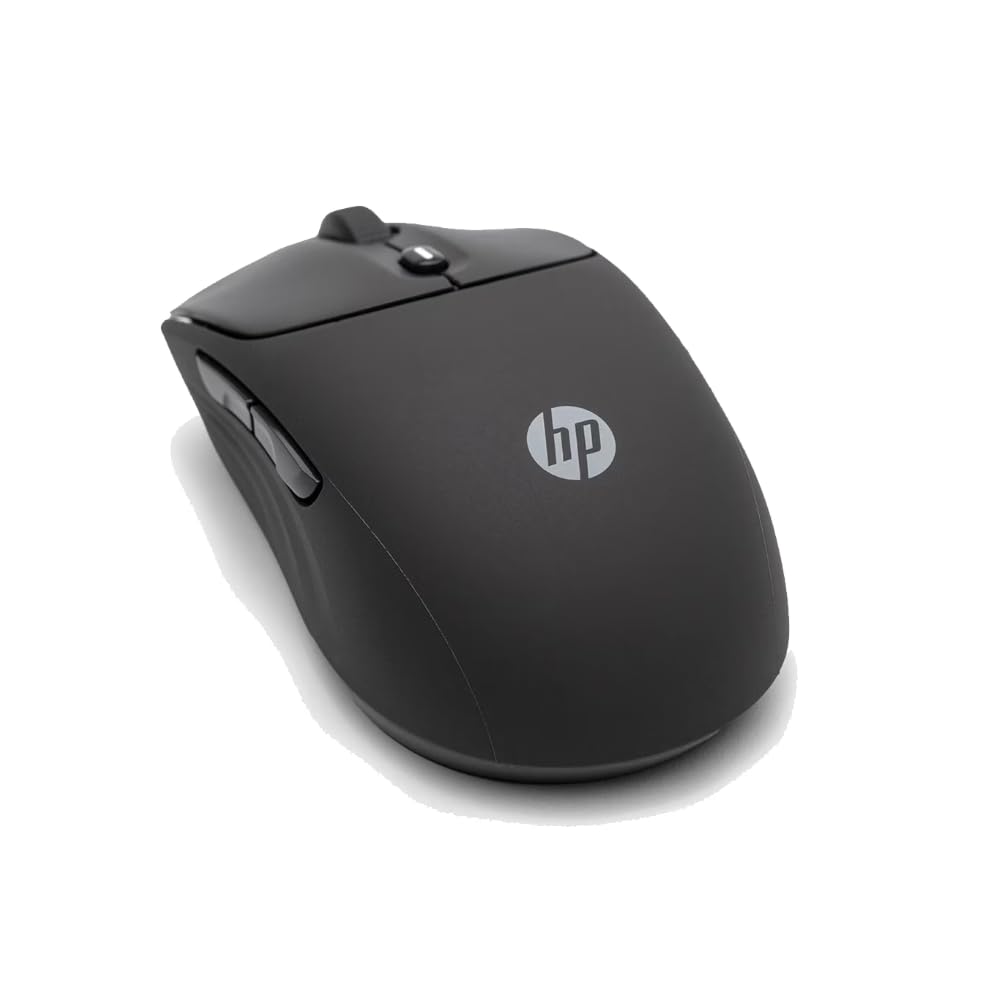
The HP 400 Quiet Wireless Mouse prioritizes two things: silence and longevity. The soft silicone rubber enclosure deadens click noise to near-inaudible levels, making it ideal for shared office environments or late-night work. Dual Bluetooth and 2.4 GHz connectivity give you flexibility without occupying a USB port permanently, and the Microsoft Wheel setting provides vertical and horizontal scrolling shortcuts.
At 6,000 adjustable DPI, the optical sensor handles most surfaces without stutter. The 24-month battery life on a single AA alkaline battery means you can forget about charging cables entirely. The build incorporates at least 40% post-consumer recycled materials, and the packaging is FSC-certified — a rare eco-conscious design choice in this category.
This mouse is ambidextrous by shape but lacks any side buttons, so left-handed users won’t miss out on features they can’t reach. The silicone texture does attract dust and lint over time. It’s not a gaming mouse — polling rate maxes at 125 Hz over Bluetooth — but for quiet, hassle-free productivity that works with any OS out of the box, the HP 400 delivers exceptional runtime.
Why it’s great
- 24-month AA battery life — no charging needed
- Silent silicone clicks for library-quiet operation
- Dual Bluetooth and 2.4 GHz with multi-OS compatibility
Good to know
- No side buttons limits customization
- Silicone surface attracts dust and lint
- 125 Hz Bluetooth polling insufficient for gaming
FAQ
Can I use a right-handed gaming mouse with my left hand if I just remap the buttons?
How do I prevent accidental side-button presses on an ambidextrous mouse?
Is a wired or wireless ambidextrous mouse better for competitive gaming?
What DPI setting should I use for an ambidextrous mouse in FPS games?
Final Thoughts: The Verdict
For most users, the best ambidextrous computer mouse winner is the Logitech G PRO 2 Lightspeed because its modular magnetic side buttons deliver true ambidexterity without compromising HERO 2 sensor accuracy or 95-hour battery life. If you want the absolute lowest input latency for high-refresh-rate gaming, grab the Razer Viper 8KHz ESL Edition and its 8,000 Hz HyperPolling. And for a budget-friendly office companion with silent clicks and dual-Bluetooth convenience, nothing beats the HP 400 Quiet Wireless Mouse.