
Buying a 3D printer for a tween isn’t like buying one for yourself. The wrong machine turns a promising hobby into a frustrating pile of spaghetti plastic, while the right one unlocks hours of independent design, problem-solving, and real tangible creation. Printers aimed at this age group need to strip away the calibration headaches and open-source tinkering that adults tolerate, replacing them with enclosed build areas, intuitive apps, and safety-first nozzle designs.
I’m Min — the co-founder and writer behind Gadgets Feed. I’ve spent countless hours comparing build volumes, nozzle temperatures, auto-leveling accuracy, and app ecosystems to find the handful of machines that actually deliver a frustration-free experience for tweens.
After weeks of cross-referencing specs, reading hundreds of parent and educator reviews, and analyzing everything from noise levels to filament compatibility, I’ve narrowed the field down to the models that earn their place as a true 3d printer for tweens.
How To Choose The Best 3D Printer For Tweens
Not every machine marketed as “beginner-friendly” actually is. A tween needs a device that minimizes the friction between wanting to print something and watching that object form layer by layer. That means prioritizing printers that handle calibration automatically, offer a clear mobile app for model selection, and include safety features like enclosed frames or low-temperature hotends.
Auto Leveling and First-Layer Reliability
Manual bed leveling is the single biggest source of failed prints. A tween who levels the bed incorrectly on Monday and gets a print failure will lose confidence by Tuesday. Machines with automatic bed leveling measure the build plate at multiple points and compensate in software, ensuring the first layer sticks every time without parent intervention.
Quick Comparison
On smaller screens, swipe sideways to see the full table.
| Model | Category | Best For | Key Spec | Amazon |
|---|---|---|---|---|
| AOSEED X-Maker Joy AI+ | Premium | Independent tween creation | 8,000+ model library + AI Doodle | Amazon |
| Bambu Lab P1S | Premium | Advanced projects & speed | 256x256x256 mm build volume | Amazon |
| ELEGOO Centauri Carbon | Premium | Reliable high-speed printing | 500 mm/s CoreXY speed | Amazon |
| FLASHFORGE AD5M | Mid-Range | Growing into the hobby | 3-second quick-swap nozzle | Amazon |
| Entina Tina2C | Mid-Range | 8-minute first print | 3.9-inch cube build volume | Amazon |
| HEPHI3D TINA2S | Mid-Range | Quiet home operation | 40-50 dB noise level | Amazon |
| Entina Tina2 Basic | Value | Entry-level offline printing | 100x105x100 mm build volume | Amazon |
| Wiiboox TINA2S Starter Kit | Value | Complete starter bundle | WiFi + app compatible | Amazon |
| HEPHI3D TINA2 Basic | Value | Budget-conscious families | Dual Z-axis rails | Amazon |
In‑Depth Reviews
1. AOSEED X-Maker Joy AI+

The AOSEED X-Maker Joy AI+ is the only printer on this list that genuinely feels designed by people who understand how a tween’s brain works. It comes with 8,000+ pre-loaded models and 17 themed design modules, meaning the child doesn’t need to learn CAD software or hunt for STL files across the web. The AI Doodle feature lets them draw a picture, describe an object, or upload a photo, and the printer converts it into a 3D model automatically — no slicer experience required.
At 220–250 mm/s with peaks up to 400 mm/s, the X-Maker is fast enough that small toys finish in about 20 minutes, which is ideal for short attention spans. The fully enclosed chassis keeps curious fingers away from the 0.05 mm precision hotend, and the TÜV Rheinland-tested PLA filament — 8 rolls included in the box — adds an extra layer of safety assurance. The built-in camera streams time-lapses directly to a parent’s phone, making it easy to monitor progress remotely.
This printer is heavier on educational value than any competitor. The STEM modules and AI MiniMe feature transform a simple toy factory into a design-thinking experience, where a tween can iterate on an avatar or a fidget design without firing up a computer. For families who want zero friction and maximum creative output, the X-Maker sets a new benchmark for the category.
Why it’s great
- AI model generation eliminates the steepest learning curve in 3D printing
- Fully enclosed design and included PLA rolls prioritize safety and convenience
- 8,000+ model library means instant gratification from the first power-up
Good to know
- Some users report adhesion issues with complex designs on the included build plate
- App-based control requires 2.4 GHz WiFi and a smartphone or tablet
2. Bambu Lab P1S

The Bambu Lab P1S is the closest thing to a professional-grade machine that a tween can safely operate. Its fully enclosed CoreXY chassis supports up to 16 colors via the optional AMS unit, and the 500 mm/s print speed with 20,000 mm/s² acceleration turns out detailed models faster than any open-frame competitor. The auto-bed leveling system checks the bed before every single print, eliminating the first-layer failures that plague cheaper units.
Setup takes around 15-30 minutes out of the box, and the Bambu Studio slicer software offers pre-configured profiles for PLA, PETG, TPU, and ABS. The build volume measures 256x256x256 mm, giving tweens room to create full-sized helmet accessories, articulated dragons, or school dioramas without scaling everything down. The enclosed body also keeps PLA odors contained and prevents accidental contact with the 320°C hotend during operation.
The P1S is a premium investment, but it grows with the user. A tween who masters it can later add multi-color printing and experiment with advanced filaments. The MakerWorld community integration makes it easy to find vetted model files. This is not a toy — it’s a tool that delivers consistent, high-quality output, which is exactly what a motivated tween needs to stay engaged long-term.
Why it’s great
- 500 mm/s speed with auto-leveling before every print ensures reliability
- Large 256mm build volume handles ambitious school projects and props
- Multi-color capability via AMS unlocks advanced creative projects
Good to know
- Significantly heavier and bulkier than other machines on this list
- TPU printing can require manual tuning for best results
3. ELEGOO Centauri Carbon

The ELEGOO Centauri Carbon punches far above its price tier by offering a fully enclosed CoreXY frame, 500 mm/s top speed, and a 320°C brass-hardened steel nozzle — all pre-calibrated out of the box. That means no tinkering, no leveling worries, and no warped prints from inconsistent cooling. The 256x256x256 mm build volume is identical to the Bambu Lab P1S, making it a serious contender for tweens who want to print large, functional parts.
The die-cast aluminum frame keeps vibrations to a minimum, which is critical when printing at high speed. An integrated chamber camera with dual LED lighting lets parents or kids monitor prints from a phone, and the auto bed leveling with vibration compensation ensures every first layer sticks. The dual-sided build plate has a specific PLA surface that delivers excellent adhesion at lower heatbed temperatures — a smart safety feature for younger users.
Customer feedback is overwhelmingly positive on print quality and ease of use, though some units have required warranty replacement due to hotend communication errors. The weight — nearly 39 pounds — makes it a permanent desktop fixture rather than a portable device. For a tween ready to move past toy-sized prints and into real engineering-grade projects, the Centauri Carbon offers an unbeatable power-to-price ratio.
Why it’s great
- 500 mm/s CoreXY performance at a mid-range price point
- Enclosed, rigid frame produces consistent high-speed results
- Built-in camera and WiFi enable remote monitoring and time-lapses
Good to know
- Heavy unit at nearly 39 pounds makes relocation difficult
- Some users have reported early hotend failures requiring warranty support
4. FLASHFORGE AD5M

The FLASHFORGE AD5M introduces tweens to the world of CoreXY printing without the complexity typically associated with the platform. Its fully automatic one-click leveling system measures the nozzle-to-bed distance at multiple points and sets offsets automatically, so the very first layer is always correct. The all-metal motion structure delivers stable printing at up to 600 mm/s, which is fast enough to keep a tween’s attention between design and finished object.
What really sets the AD5M apart for this age group is the patent quick-release nozzle. With swappable 0.25 mm (high-detail) and 0.8 mm (fast-fill) nozzles, a tween can switch between a detailed miniature and a functional part in about three seconds without tools. The 220x220x220 mm build volume is generous without dominating a desk, and the flexible double-sided PEI steel plate makes model removal as simple as peeling a sticker.
The Flash Maker app provides real-time print monitoring and parameter adjustment from anywhere, and the Orca-Flashforge slicer handles batch file transmission for multi-printer setups — useful for classrooms. With consistent reviews praising reliability and a user-friendly experience, the AD5M is a smart stepping stone for a tween who may eventually outgrow simpler machines.
Why it’s great
- Tool-free nozzle swap in 3 seconds encourages filament experimentation
- Fully automatic leveling removes the biggest beginner frustration
- Durable CoreXY frame supports high-speed printing without quality loss
Good to know
- Small included filament sample requires immediate re-ordering
- Slicer software requires a Windows or Mac computer, not a tablet
5. Entina Tina2C

The Entina Tina2C is designed from the ground up for the shortest path between unboxing and a finished print. The guided setup through the Poloprint Cloud app walks a tween through every step, and the first print can start in as little as eight minutes. The app also provides AI-powered search, a photo-to-print feature, and 20+ creative modules that turn a drawing on paper into a 3D model without any slicing knowledge.
With a 3.9-inch cube build volume, the Tina2C is purposefully small — it’s designed for keychains, figurines, fidget toys, and small STEM projects. That limitation is actually a feature for tweens: projects complete faster, failure risk per print is lower, and the printer fits on a standard desk without stealing all the space. The self-cleaning nozzle and quick-swap printhead make maintenance simple, and the low-noise operation keeps it from disrupting homework or bedtime.
The Tina2C supports both 2.4G WiFi printing and TF card offline mode, giving tweens a way to print even without a parent’s phone nearby. Customer reviews consistently mention that children as young as eight can operate it independently after the first tutorial. For families who want a zero-friction introduction to the hobby, this is the most forgiving entry point available.
Why it’s great
- Guided app setup delivers the first print in under 10 minutes
- Small build volume means faster prints and less wasted filament
- Self-cleaning nozzle reduces maintenance for young users
Good to know
- 3.9-inch build limit prevents printing larger projects or helmets
- Some parents report the app can be tricky for downloading custom STL files
6. HEPHI3D TINA2S
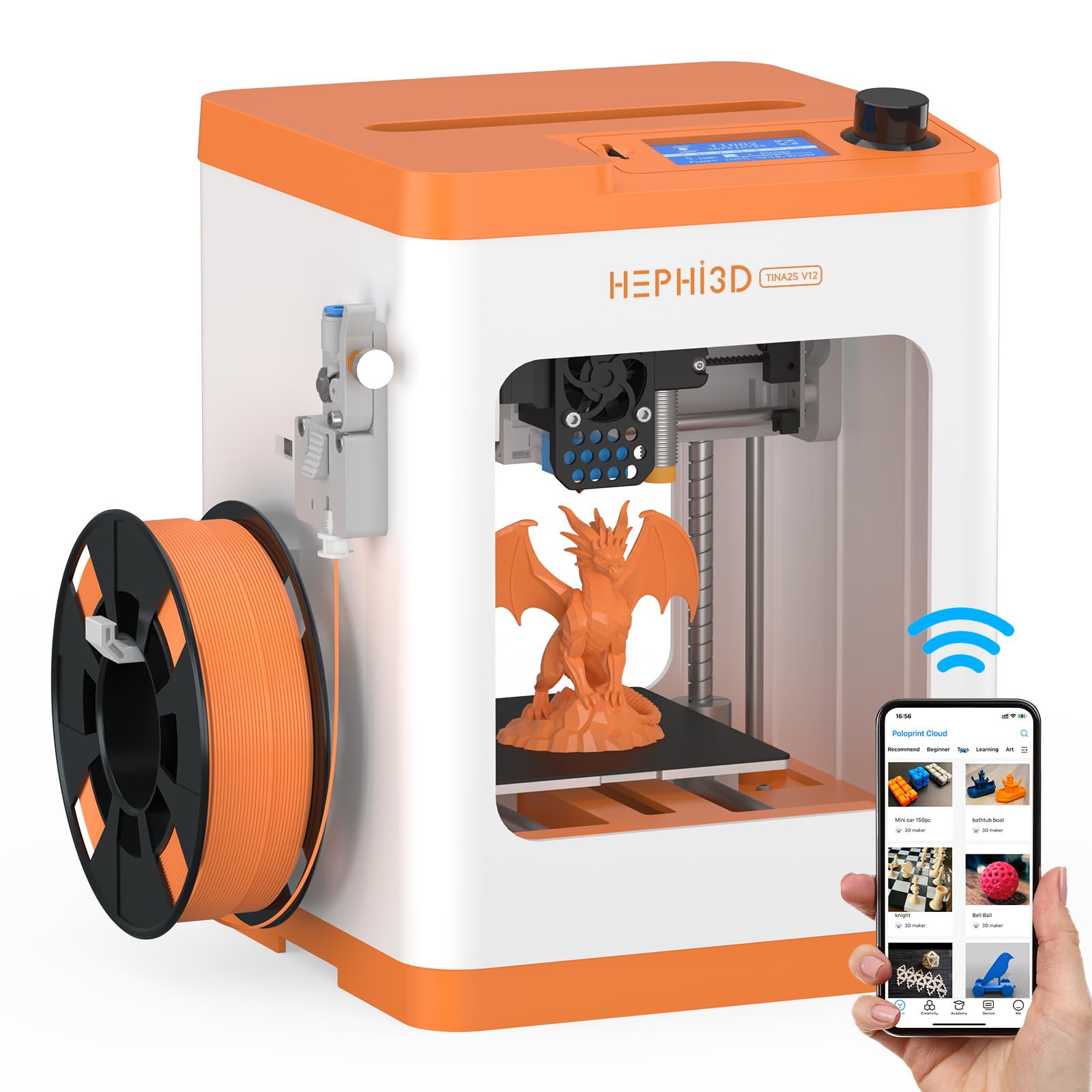
The HEPHI3D TINA2S brings all the core features of the Tina2 platform — fully assembled build, auto bed leveling, open-source compatibility — and adds a major improvement for home use: ultra-quiet operation. At 40 to 50 dB, this printer is quieter than a typical conversation, meaning it can run in a bedroom or study without being disruptive. The semi-enclosed design reduces noise further while also shielding curious fingers from the moving gantry.
The Poloprint Cloud App integration provides access to over 3,000 online models with weekly updates and themed monthly collections. A tween can browse, select, and start a print entirely from a smartphone or tablet, skipping the computer entirely. The 200 mm/s maximum print speed with an 8x CPU improvement over earlier Tina2 models means prints finish noticeably faster without sacrificing the 0.1 mm layer resolution that keeps figurines looking crisp.
Compatibility with PLA, PLA Pro, and TPU filaments gives tweens some material flexibility as they grow. The power-loss recovery and filament sensor reduce the chance of a ruined print after an interruption. Some reviews note that the setup process, while simpler than most full-size printers, still requires a parent to guide the initial WiFi connection and model selection for younger users.
Why it’s great
- 40-50 dB noise level is barely audible in a quiet room
- 3,000+ model library with weekly updates keeps content fresh
- WiFi and app printing eliminates the need for a computer
Good to know
- Some parents report the slicing and project-saving workflow confuses tweens under 12
- Small build volume (100x120x100 mm) limits project scope
7. Entina Tina2 Basic

The Entina Tina2 Basic is the stripped-back, offline-focused sibling of the Tina2 family, and it serves an important niche: tweens who don’t have access to a smartphone or tablet for app-based control. It relies solely on a 2.4-inch LCD screen and a MicroSD card for operation, which means no WiFi setup, no app downloads, and no reliance on a parent’s device. A TF card pre-loaded with test models and slicing software is included, so a tween can pop it in and start printing within five minutes of unboxing.
The dual Z-axis rail design is unusual at this price level. It provides extra stability during the print process, which translates to noticeably cleaner overhangs and sharper corners on small objects like keychains and action figure accessories. The 100x105x100 mm build volume is the smallest on the list, but it’s perfectly matched to the kinds of trinkets, phone stands, and toy parts that tweens actually print. The magnetic build plate makes removal satisfyingly simple.
Customer reviews consistently praise the print quality relative to the machine’s price, with parents noting that their children were able to operate it independently after a single supervised session. The downside is the lack of WiFi — no time-lapse videos, no remote monitoring, no model library browsing. For families who want a reliable, distraction-free printer that forces a tween to learn the basics of file management and slicing, the Tina2 Basic delivers exceptional value.
Why it’s great
- Completely offline operation is ideal for screen-conscious families
- Dual Z-axis rails provide unusually stable printing for a mini printer
- Under 6 pounds — easy to move between a desk and a shelf
Good to know
- No WiFi or app support means no remote monitoring or model browsing
- Very small build volume limits prints to miniature objects only
8. Wiiboox TINA2S Starter Kit

The Wiiboox TINA2S Starter Kit is essentially the same hardware as the HEPHI3D TINA2S but sold as a complete bundle that includes 10 meters of PLA filament, a pre-loaded MicroSD card, and several small accessories. This “everything in one box” approach removes the common post-purchase panic when a family realizes they forgot to order filament. The printer itself is fully assembled with auto leveling, a 2.4-inch LCD, and a flexible magnetic build plate that makes model removal easy.
The WiFi capability connects to the Poloprint Cloud app, giving tweens access to a library of models they can browse and print from a phone or tablet. The one-touch filament loading and retraction feature is especially beginner-friendly — a tween simply presses a button and the printer handles the feeding. The open-source compatibility means a motivated tween can later experiment with Cura, Simplify3D, or PrusaSlicer when they’re ready to design their own models.
The main drawback is the filament size: the TINA2S is designed for smaller 250g spools, not the standard 1kg spools that are more economical. Some parents also report mixed experiences with first-layer adhesion, recommending a glue stick for stubborn prints. Despite these quirks, the out-of-box experience is the most complete among the budget-tier options, making it a strong choice for families who want minimal friction during the first week of ownership.
Why it’s great
- Includes everything needed to start printing immediately — filament and SD card included
- One-touch filament loading simplifies the most fiddly beginner task
- WiFi and app support provide an easy path from browsing to printing
Good to know
- Uses non-standard 250g filament spools rather than common 1kg spools
- Some users report that the auto-leveling doesn’t always guarantee perfect first-layer adhesion
9. HEPHI3D TINA2 Basic

The HEPHI3D TINA2 Basic is the most stripped-down member of the Tina2 extended family, and that simplicity is exactly what some families need. It operates via TF card or USB cable rather than WiFi or an app, which means zero screen time is required to manage prints. The 2.4-inch LCD display and knob-based interface are intuitive enough that a tween can scroll through pre-loaded models, select one, and hit print without parental assistance.
The build quality surprises at this price point: dual Z-axis and dual Y-axis rails work together to stabilize the print head, producing sharp edges and minimal ghosting on small parts. The auto-leveling system is responsive and reliable — no manual knob-twisting at all. The open-source compatibility with Cura, Simplify3D, PrusaSlicer, and Wiibuilder means a tween who outgrows the pre-loaded models can start creating custom designs on a computer and transfer them via USB.
Customer feedback is divided: parents of older tweens (13+) report that their children master the machine quickly, while parents of 9-year-olds describe the file preparation process as too complex. The filament sensor and power-loss recovery reduce waste, but the 5.68-pound weight and tiny 100x105x100 mm build volume mean this is strictly a mini-object machine. For families who value screen-free operation and build resilience over app-based convenience, this is the most honest printer on the list.
Why it’s great
- Completely screen-free operation promotes independent learning without distraction
- Dual X/Y axis rails deliver impressive print stability for the price
- USB and SD card options provide flexibility for custom model transfers
Good to know
- No WiFi or app access — every print requires an SD card or USB cable
- Not suitable for children under 12 due to the manual file preparation workflow
FAQ
Is an enclosed 3D printer safer for a tween than an open-frame model?
What build volume should I look for in a 3D printer for a tween?
Does a tween need an app-controlled printer or is SD card printing enough?
Final Thoughts: The Verdict
For most families, the 3d printer for tweens that best balances safety, ease of use, and creative potential is the AOSEED X-Maker Joy AI+ because its AI-powered model generation and 8,000+ built-in designs let a child create independently from the very first day. If you want pro-grade speed and a large build volume for ambitious projects, grab the Bambu Lab P1S. And for a screen-free, budget-friendly introduction that still delivers excellent print quality, nothing beats the Entina Tina2 Basic.