
An 8-bit display isn’t just a screen—it’s the difference between a stalled prototype and a working, readable interface. Whether you’re building a weather station, a 3D printer controller, or a retro gadget, the wrong display dims your project before it even starts. Flicker, poor viewing angles, and incompatible drivers turn a simple build into a debugging nightmare, and you need a module that matches your microcontroller’s logic without extra headaches.
I’m Min — the co-founder and writer behind Gadgets Feed. I’ve spent hundreds of hours cross-referencing datasheets, scanning customer builds across Arduino and ESP32 ecosystems, and filtering out module failures to bring you the most reliable options in this guide.
After analyzing dozens of options for contrast, driver support, and real-world compatibility, I’ve narrowed down the top picks to help you find the absolute best 8 bit display for your next electronics project.
How To Choose The Best 8 Bit Display
Picking an 8-bit display means looking beyond resolution—you need to match the driver IC, interface protocol, and physical size to your project’s core requirements. A mismatch here means wasted time soldering and debugging.
Driver IC Compatibility
SSD1306 is the industry standard for small OLEDs, supported by Adafruit_SSD1306 and u8g2 libraries. MAX7219 drives 8×8 LED matrices and 7-segment displays, controllable with LedControl or MD_Parola. The ESP32-2432S028R uses an ILI9341 TFT driver. Always check library support before wiring.
Interface Protocol: I2C vs SPI vs GPIO
I2C only needs two pins (SDA/SCL) but is slower, fine for static text. SPI uses more pins (MOSI, MISO, CLK, CS) but offers faster refresh—critical for animations or live data. Direct GPIO on MAX7219 modules uses 3 pins but supports cascading for multi-digit displays.
Physical Size and Power Consumption
0.96-inch OLEDs consume as little as 0.04W and fit into compact enclosures. Larger 2.42-inch versions offer better readability but draw more current. The Eyoyo 8-inch LCD monitor is a different beast, powered via USB or 12V, designed for stationary setups like CCTV or PC cases.
Quick Comparison
On smaller screens, swipe sideways to see the full table.
| Model | Category | Best For | Key Spec | Amazon |
|---|---|---|---|---|
| AITRIP 0.96″ OLED | OLED Module | Arduino/RPi projects | 128×64, SSD1306, I2C | Amazon |
| MAX7219 Dot Matrix | LED Matrix | Large numeric/icon displays | 8×8 LED, 3-wire serial | Amazon |
| Hosyond 0.96″ OLED | OLED Module | High contrast monochrome | 128×64, SSD1306, I2C | Amazon |
| HiLetgo 2.42″ OLED | Large OLED | Readable text at distance | 128×64, SSD1309, I2C/SPI | Amazon |
| DIYmall ESP32-2432S028R | TFT Module | IoT with touch screen | 240×320, ILI9341, WiFi+BT | Amazon |
| DEVMO 8-Digit 7-Segment | 7-Segment | Numeric readouts | 0.36in digits, MAX7219 | Amazon |
| Eyoyo 8″ LCD Monitor | LCD Monitor | Desktop/server monitoring | 1024×768, HDMI/VGA | Amazon |
In‑Depth Reviews
1. AITRIP 5PCS 0.96 Inch OLED I2C IIC Display Module
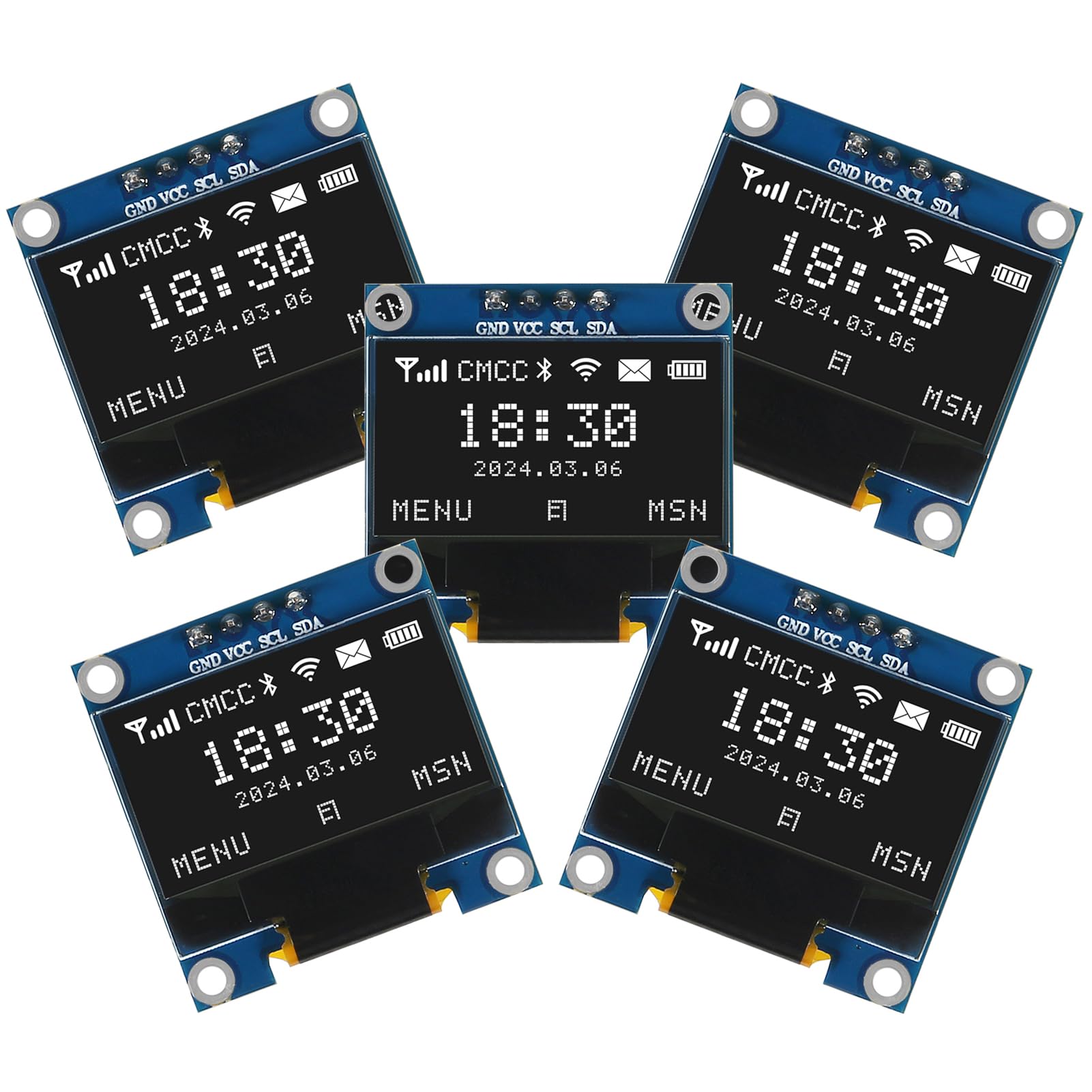
The AITRIP 0.96-inch OLED uses the SSD1306 driver and communicates over I2C, requiring only two data pins on your Arduino or ESP32. At 128×64 pixels, the resolution is crisp enough for small fonts and simple graphics, and the self-luminous pixels draw only 0.04W. Real-world builds confirm it works with ESPHome on Home Assistant, displaying sensor data like temperature from a DS18B20 without flicker when you assign a separate I2C bus.
Each pixel emits light independently, meaning contrast is excellent—you get true black backgrounds and bright white text even under indoor lighting. The five-pack provides excellent value for prototyping multiple nodes or having spares on hand. Customers report successful integration with Raspberry Pi 4/5 using the luma.oled library, though Dupont cables are not included.
Some users noted that running the display on 5V can introduce flicker, easily resolved by switching to 3.3V logic. The 30-second refresh needed for some ESPHome setups is a minor configuration tweak. Overall, this is the most versatile entry-level OLED for mixed-platform IoT work.
Why it’s great
- Ultra-low power consumption (0.04W) for battery-powered projects
- Five-pack value reduces per-unit cost for multi-sensor builds
- True self-luminous pixels deliver exceptional contrast without backlight bleed
Good to know
- No Dupont header cables included in the package
- May flicker at 5V; 3.3V operation is more stable
2. MAX7219 Dot Matrix Display – 10pcs SCM Control Drive LED Display

The MAX7219 driver is the backbone of this red LED matrix module, allowing you to control an 8×8 grid with just three GPIO pins—CLK, DIN, and CS. The BCD encoder and on-chip RAM handle multiplexing automatically, so your microcontroller isn’t bogged down refreshing pixels. Cascading multiple modules works out of the box, making this ideal for scrolling text displays or larger icon arrays.
Users report excellent brightness with the Arduino MD_Parola library, easily displaying animations and text without flicker. The modules come without pre-soldered header pins, which is actually a benefit—you can solder wires directly to the input holes for a more secure connection, avoiding the via-pulling issue common with 4×8 matrix boards.
The main downside is quality consistency; a few units have failed after initial testing, powering all LEDs at once due to potential chip damage. This is a risk with budget LED matrix modules, and the 10-pack means you have extras to compensate. For projects requiring large, bright numeric or character displays, this remains the most practical solution.
Why it’s great
- Bright red LEDs visible in daylight with software-adjustable brightness
- Only 3 GPIO pins needed per module, with seamless cascading support
- No header pins pre-installed—allows direct soldering for robust connections
Good to know
- Some units may arrive with defective chips that lock all LEDs on
- Removing pre-installed header pins can damage thin PCB traces
3. Hosyond 5 Pcs 0.96 Inch OLED I2C IIC Display Module

Hosyond’s OLED uses the same SSD1306 driver and I2C interface as the AITRIP, but it distinguishes itself with particularly crisp text at small font sizes. The 128×64 resolution supports custom fonts generated via software, giving you full control over character appearance. Blue and white variants are available, and the 160° viewing angle ensures readability from any direction.
This module works as a drop-in replacement for OpenSprinkler controllers and other devices using small OLEDs for status displays. Customers successfully used it with ESP32 and the u8g2 library (Adafruit libraries may fail). The I2C address defaults to 0x3C, with a jumper to shift to 0x3D if you want to run two displays on one bus.
The modules require 4.7kΩ pull-up resistors on the I2C lines, and they need a stable 7-12V supply—dropping below 7V causes dropout. The boards are also somewhat fragile; careful handling during soldering is necessary. For projects needing the sharpest possible monochrome text, this is the better pick between the two similar OLED options.
Why it’s great
- Incredibly clear and sharp text even at 6-8 pixel font sizes
- Drop-in replacement for OpenSprinkler and similar embedded displays
- Blue option provides high contrast against dark backgrounds
Good to know
- Requires external 4.7kΩ pull-ups on I2C lines for stable operation
- Board is fragile—easy to damage during soldering or handling
4. HiLetgo 2.42″ SSD1309 128×64 OLED Display Module
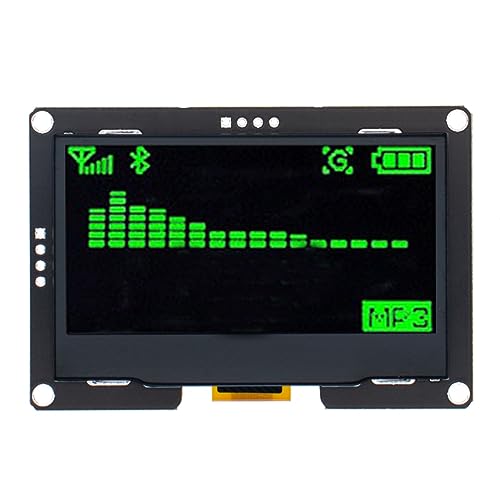
The HiLetgo 2.42-inch OLED steps up from the standard 0.96-inch form factor, using the SSD1309 driver which is a drop-in replacement for SSD1306 libraries. The 128×64 resolution on a larger physical screen means text is comfortably readable from across a room, and the brightness is notably higher—some users dim it via software for nighttime use. The module comes with an I2C 4-pin header, but SPI 7-pin mode is also available.
Real-world tests show this works as a plug-and-play replacement for 0.96-inch IIC displays—the same pinout and same libraries. It integrates with Arduino R3 and the U8g2 library, and brightness appears consistent across 3.3V and 5V supplies. The larger footprint makes it unsuitable for compact enclosures, but perfect for desktop instruments and control panels.
One drawback is that the display introduces noticeable noise on the power rail, requiring additional bypass capacitors in sensitive circuits. The Arduino R3 may also lack enough RAM for complex projects with this screen. For makers wanting a bigger OLED without changing their code, this is the straightforward upgrade.
Why it’s great
- Large 2.42-inch active area for easy reading without squinting
- Drop-in replacement for 0.96-inch I2C OLEDs with identical pinout
- Very bright display with voltage-sensing auto-adjustment
Good to know
- Adds significant noise to power supply rail
- Too large for compact enclosures and project boxes
5. 2.8″ ESP32 Module ESP32-2432S028R LCD TFT

The DIYmall ESP32-2432S028R packs a 2.8-inch TFT LCD with ILI9341 driver directly onto an ESP32-DOWDQ6 board, giving you a 240×320 color touchscreen, dual-core 240MHz processor, WiFi, and Bluetooth in one package. This is not a bare display—it’s a complete development board running FreeRTOS, and it’s proven popular as a drop-in control panel for Bambu Lab 3D printers.
The resistive touch screen supports custom UI development for IoT applications like remote monitoring and wireless data logging. It integrates OV2640 camera support, built-in flash, and TF card slot. The USB-C port is a modern convenience over micro-USB, and the dual-core processor easily handles network stacks simultaneously.
The touch screen is responsive, but the 240×320 resolution is relatively low for a 2.8-inch color display—text and icons appear less sharp compared to a typical smartphone. The board also lacks documentation for advanced features like camera integration. For makers needing a ready-to-use IoT controller with a built-in screen, this is the most integrated solution available.
Why it’s great
- Integrated ESP32 with WiFi+BT eliminates separate microcontroller wiring
- Color TFT touch screen with ILI9341 driver for custom GUI applications
- USB-C port and 240MHz dual-core processor for demanding IoT tasks
Good to know
- 240×320 resolution is low for a 2.8-inch screen—details are visibly pixelated
- Lacks comprehensive documentation for advanced features like camera
6. DEVMO 4pcs 8-Digit 7 Segment Module MAX7219

The DEVMO 4-pack provides eight-digit 7-segment displays driven by the MAX7219 chip, using only three I/O ports for each module. Each digit is 0.36 inches tall with a common-cathode configuration, and the modules support daisy-chaining for more digits. The PCB includes fixing studs to prevent short circuits against mounting surfaces.
The modules work with 5V or 3.3V microcontrollers and pair easily with the LedControl library for counting, timers, or weather station readouts. Real-world setups show success with Arduino weather stations using eight units, though each VCC line must be wired individually—daisy-chaining power causes instability. The 5V wiring is straightforward: VCC to 5V, GND to GND, DIN to P00, CLK to P02, and CS to P01.
Reliability is hit-or-miss—some users report units becoming intermittent after little use, with estimates of over 50% defect rate. This is not unusual for ultra-budget 7-segment modules. For the price of a four-pack, the working units are very cost-effective for numeric-only displays, but you may need to order extras to guarantee a fully functional set.
Why it’s great
- Cost-effective solution for numeric readouts with only 3 GPIO pins
- Cascading support allows daisy-chaining for more than 8 digits
- Works with both 5V and 3.3V logic for flexible microcontroller integration
Good to know
- High failure rate—reports of more than 50% defective units
- Power must be wired individually per module; daisy-chaining causes issues
7. Eyoyo 8 inch Small Mini Monitor 1024×768

The Eyoyo 8-inch LCD monitor is a different category of 8-bit display altogether—it’s a full TFT LCD with 1024×768 resolution, HDMI, VGA, and AV inputs, designed for CCTV, PC monitoring, and sim racing dashboards. The metal housing and 400 cd/m² brightness make it durable and visible in various lighting conditions, and the built-in speaker adds utility for HDMI audio.
It powers via USB (5V/2A) from a power bank or DC 12V/1A adapter, making it portable for field use. The 140° viewing angle is wide enough for side-by-side desktop setups. Customers have successfully used it as a TrueNAS server console, mounting it with M3 standoffs after disassembling the case, and as a sim racing dashboard displaying telemetry from racing rigs.
The 4:3 aspect ratio is not ideal for modern widescreen content, but it matches older CCTV systems and legacy computer outputs perfectly. Some units shipped without the advertised USB-C port, though Eyoyo customer support handles replacements promptly. For a compact, multi-input monitor in a rugged metal frame, this is the most versatile choice.
Why it’s great
- Metal housing provides robust physical protection for embedded installations
- Multiple inputs (HDMI, VGA, AV) support varied legacy and modern sources
- Can be powered via USB power bank for portable field use
Good to know
- 4:3 aspect ratio may not suit widescreen content
- USB-C port was missing on some units despite being advertised
FAQ
Can I use a 0.96-inch OLED with a 5V Arduino Uno without a level shifter?
How do I fix flickering on a MAX7219 LED matrix display?
What library should I use for a 2.42-inch SSD1309 OLED?
Can I run the Eyoyo 8-inch monitor from a standard USB port on a laptop?
Final Thoughts: The Verdict
For most users, the 8 bit display winner is the AITRIP 0.96-inch OLED because of its proven SSD1306 driver, I2C simplicity, five-pack value, and verified compatibility across Arduino, ESP32, and Raspberry Pi ecosystems. If you need a large readable screen for a desktop instrument, grab the HiLetgo 2.42-inch OLED. And for a complete IoT controller with a built-in color touch screen, nothing beats the DIYmall ESP32-2432S028R.