
The promise of a healthier back at work meets the reality of a triple-monitor battlestation. A standard standing desk converter might cradle one or two screens, but the moment your workflow demands three panels—one for code, one for research, one for comms—the search for a platform that holds them all without wobbling, sagging, or stealing half your desk becomes a tense engineering hunt. You need a precise lift mechanism, a wide enough footprint, and a weight rating that laughs at 27-inchers plus a laptop.
I’m Min — the co-founder and writer behind Gadgets Feed. I’ve spent countless hours cross-referencing load capacities, studying customer feedback on gas-spring vs. electric lift systems, and isolating the real-world stability data that separates a rock-solid standing converter from a shaky frustration magnet.
After combing through hundreds of verified experiences, I’ve narrowed the field to the eight models that actually deliver. This guide to the best 3 monitor standing desk converter focuses on what matters most: payload limits, platform depth, lift smoothness, and build integrity under heavy multi-screen loads.
How To Choose The Best 3 Monitor Standing Desk Converter
Three monitors create a unique physics problem: the combined weight, the offset center of gravity, and the need for simultaneous VESA alignment. A converter built for dual screens often tilts or sags under triple load. You must check the raw capacity, the lift type, and the keyboard tray depth before committing.
Weight Capacity and Distribution
Look for a rated capacity of at least 40 lbs if you use three 24-inch screens. For 27-inch monitors or heavier gaming panels, 50 lbs or more becomes mandatory. Also consider how the weight sits—does the converter’s base extend wide enough to prevent the whole unit from teetering when you lean on the keyboard tray?
Electric vs. Manual Lift
Gas-spring mechanisms are quieter and require no power outlet, but they demand consistent manual effort and can struggle if your load approaches the rated maximum. Electric lifts offer push-button precision and often include height memory, but introduce motor noise and a power cable to manage. For triple monitors, electric is generally preferred for the smooth, even lift that reduces screen shake.
Platform Dimensions and Keyboard Tray Ergonomics
A 47-inch wide upper platform gives you enough real estate for three monitors side-by-side without overlapping bezels crowding the center. The keyboard tray must be at least 11 inches deep to accommodate a full keyboard and mouse pad together, with enough clearance underneath for your knees at the lowest sitting height.
Quick Comparison
On smaller screens, swipe sideways to see the full table.
| Model | Category | Best For | Key Spec | Amazon |
|---|---|---|---|---|
| VIVO DESK-VE48B | Electric | Spacious electric lift | 50 lbs capacity, 47.3″ wide | Amazon |
| VIVO DESK-KIT-48KB3C | Manual | Integrated triple VESA mounts | 47.6″ wide, VESA 75/100mm | Amazon |
| Rocelco R CADRB-46 | Manual | Corner desk compatibility | 45.5″ wide, 40 lbs capacity | Amazon |
| VERSADESK PowerPro 40 | Electric | Heavy-duty triple setup | 80 lbs capacity, 40″ wide | Amazon |
| Vari VariDesk Pro Plus 36 | Manual | Premium build, zero assembly | 36″ wide, spring-assisted lift | Amazon |
| Vari Cube Corner 36 | Manual | Corner workstation, dual monitors | 36″ wide, 11 height settings | Amazon |
| Victor DC475 | Electric | Electric triple monitor mount | 28″ wide, 3 adjustable brackets | Amazon |
| Stand Steady Techtonic | Electric | Quiet motor, triple VESA | 55 lbs capacity, 3 VESA arms | Amazon |
In‑Depth Reviews
1. VERSADESK PowerPro 40 Inch Electric Standing Desk Converter
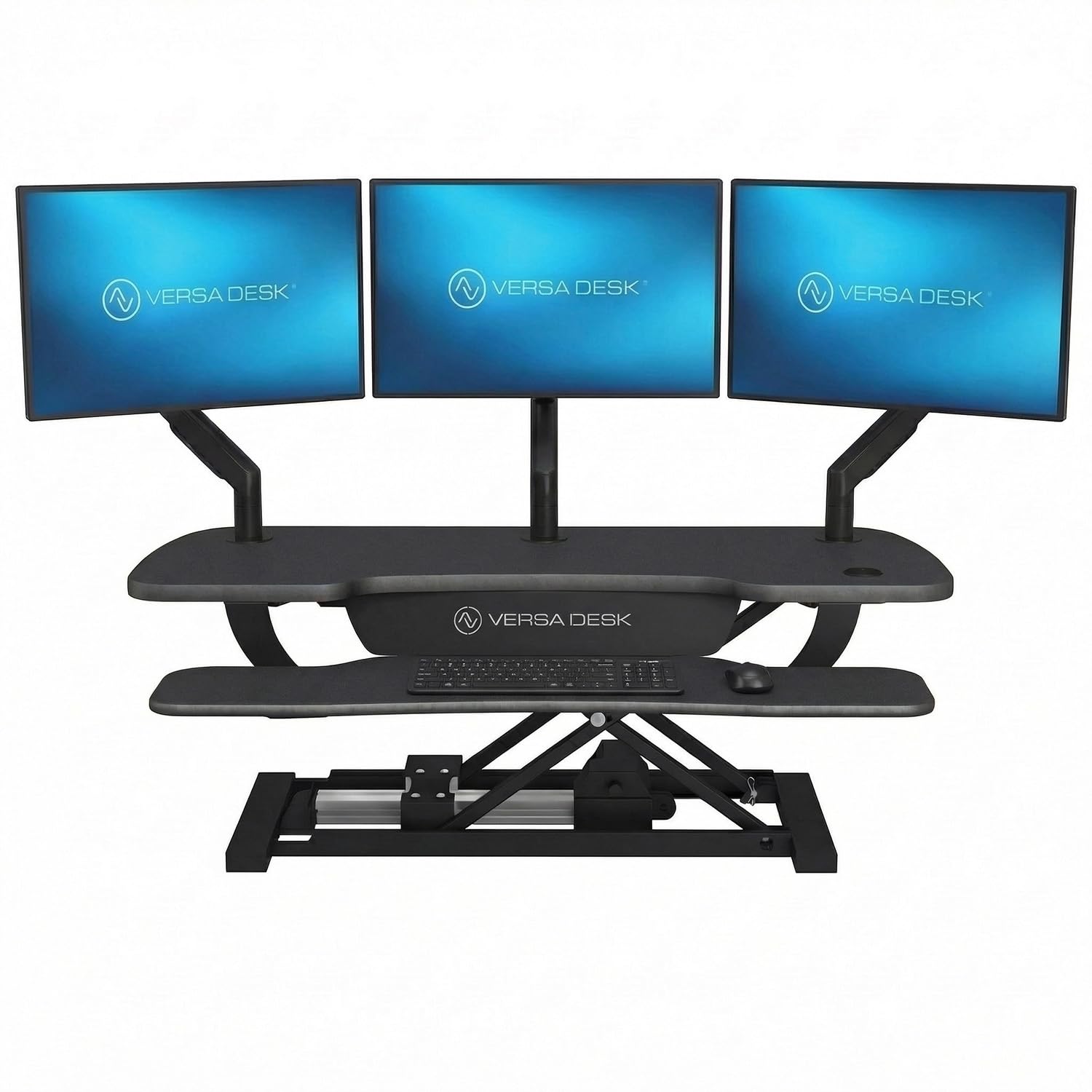
The PowerPro 40 is the heavy-lifting champion of this category. Its carbon steel frame and 80-pound weight capacity comfortably support three 27-inch monitors plus a laptop—no other converter in this roundup comes close to that overhead. The push-button electric lift transitions smoothly between sitting and standing, and the built-in child safety lock adds peace of mind in shared spaces. A USB charging port and three grommet holes for cable routing round out a thoroughly engineered workstation.
Multiple verified owners report that the unit ships nearly fully assembled, requiring only four thumb screws to lock the keyboard tray in place. The motorized lift, while slower than a manual gas spring, eliminates any struggle to raise a heavy triple monitor payload. Users over six feet tall note the height range is more than adequate, and the heavy-duty laminate surface resists scratches from constant use.
The split-level two-tier layout gives you a dedicated lower keyboard tray and a spacious 40-inch upper platform. Some users mention that the fixed keyboard tray is shallow—if you prefer a split keyboard setup, the overhang may bother you. The motor also emits a brief popping sound on initial activation, though this subsides immediately. Still, the combination of extreme weight capacity, pre-assembled convenience, and a lifetime warranty makes this the most capable option for demanding triple-screen professionals.
Why it’s great
- 80 lbs capacity handles three 27-inch monitors with ease
- Fully assembled out of the box—no tools needed
- Built-in USB port reduces cable clutter
Good to know
- Keyboard tray is shallow and non-adjustable
- Motor is slower than gas-spring alternatives
- Some units arrive with minor cosmetic damage
2. VIVO 47 inch Electric Motor Desk Converter, DESK-VE48B
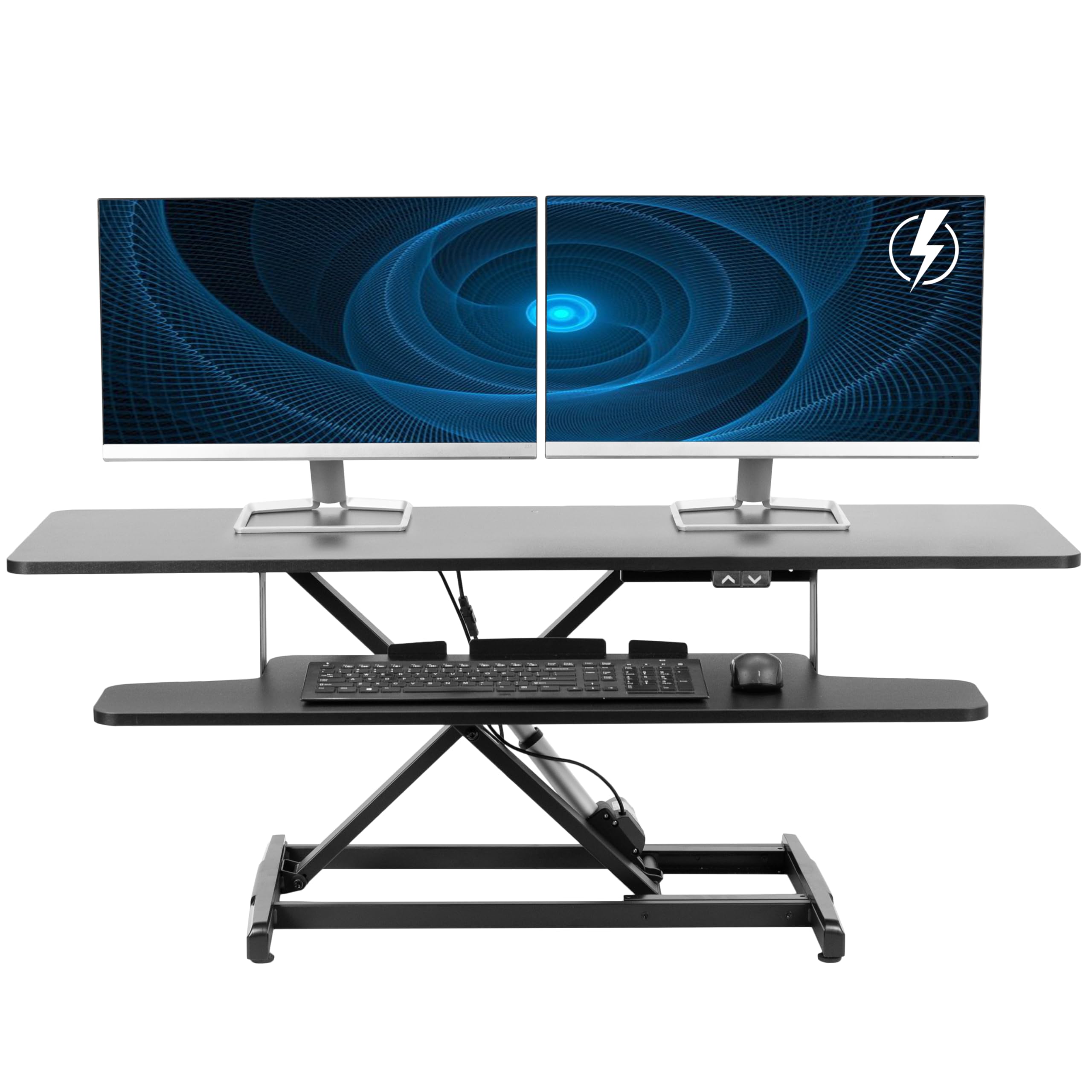
The VIVO DESK-VE48B delivers a full 47.3-inch wide platform and a 50-pound electric lift at a price point that undercuts most competitors. That width gives you room for three monitors side-by-side without crowding, and the 12-inch deep keyboard tray rises in sync with the desktop so your typing angle stays consistent through every height. The laminated finish blends into a modern office, and the alloy steel frame provides a solid foundation.
Assembly is minimal—users report attaching the keyboard tray and placing the unit on the desk within minutes. The motor is notably quiet, producing only a low hum during upward and downward travel. The height range spans from 5.7 to 19.5 inches, which accommodates most users from about 5’4” to 6’2”. Multiple verified buyers confirm that the unit supports two monitors and a laptop stand without wobble.
A handful of users note that the keyboard tray brackets were mislabeled left/right out of the box, requiring a simple swap to align correctly. More critically, at the lowest setting the keyboard tray sits approximately three inches above the desk surface, which some users with shorter arms found uncomfortable. If you need the closest possible sitting position, consider adding a wrist rest. For the price, however, the combination of electric actuation and wide platform is hard to beat.
Why it’s great
- 47-inch wide platform holds three monitors with room to spare
- Quiet electric motor with smooth height transitions
- Minimal assembly required—ready in minutes
Good to know
- Keyboard tray sits 3 inches high at the lowest setting
- Bracket labeling may be reversed out of the box
- 50 lb capacity is adequate, not generous
3. Stand Steady Techtonic Electric Standing Desk Converter

The Techtonic is purpose-built for triple monitors, shipping with three VESA-compatible arms that support 360-degree rotation, 240-degree swivel, and 15-degree tilt. This means you can position each panel independently without adjusting the converter’s base. The nearly silent motor makes it ideal for shared office environments or gaming rooms where noise discipline matters. The unit’s 55-pound capacity comfortably handles three 24-inch Dell monitors or two 27-inch panels plus a laptop.
Users consistently praise the build quality, describing the frame as sturdy and the powder-coated finish as durable. The three-level ergonomic design—keyboard shelf, main desktop, and elevated monitor mounts—keeps your screens at eye level while freeing desk space below. The compact footprint, measuring 34 x 18 inches, fits on standard office desks without overhang. Assembly takes about an hour, and the instructions, while dense, are adequate.
Some buyers report that the central VESA mount can be misaligned by roughly half an inch, requiring creative shimming or zip-tie solutions for perfect symmetry. The lower shelf sits slightly above the desk surface, which may cause a subtle rocking motion if not weighted properly. The unit is also heavy—70 pounds—so moving it after assembly is a two-person job. For users willing to invest in premium construction and integrated monitor arms, the Techtonic delivers a clean, consolidated triple-screen experience.
Why it’s great
- Includes three fully articulating VESA monitor arms
- Nearly silent motor operation
- Compact footprint fits standard and corner desks
Good to know
- Center VESA mount may require alignment tweaks
- Lower shelf not fully flush with desk surface
- Heavy at 70 lbs—difficult to reposition alone
4. VIVO Height Adjustable 48 inch Standing Desk Converter, DESK-KIT-48KB3C
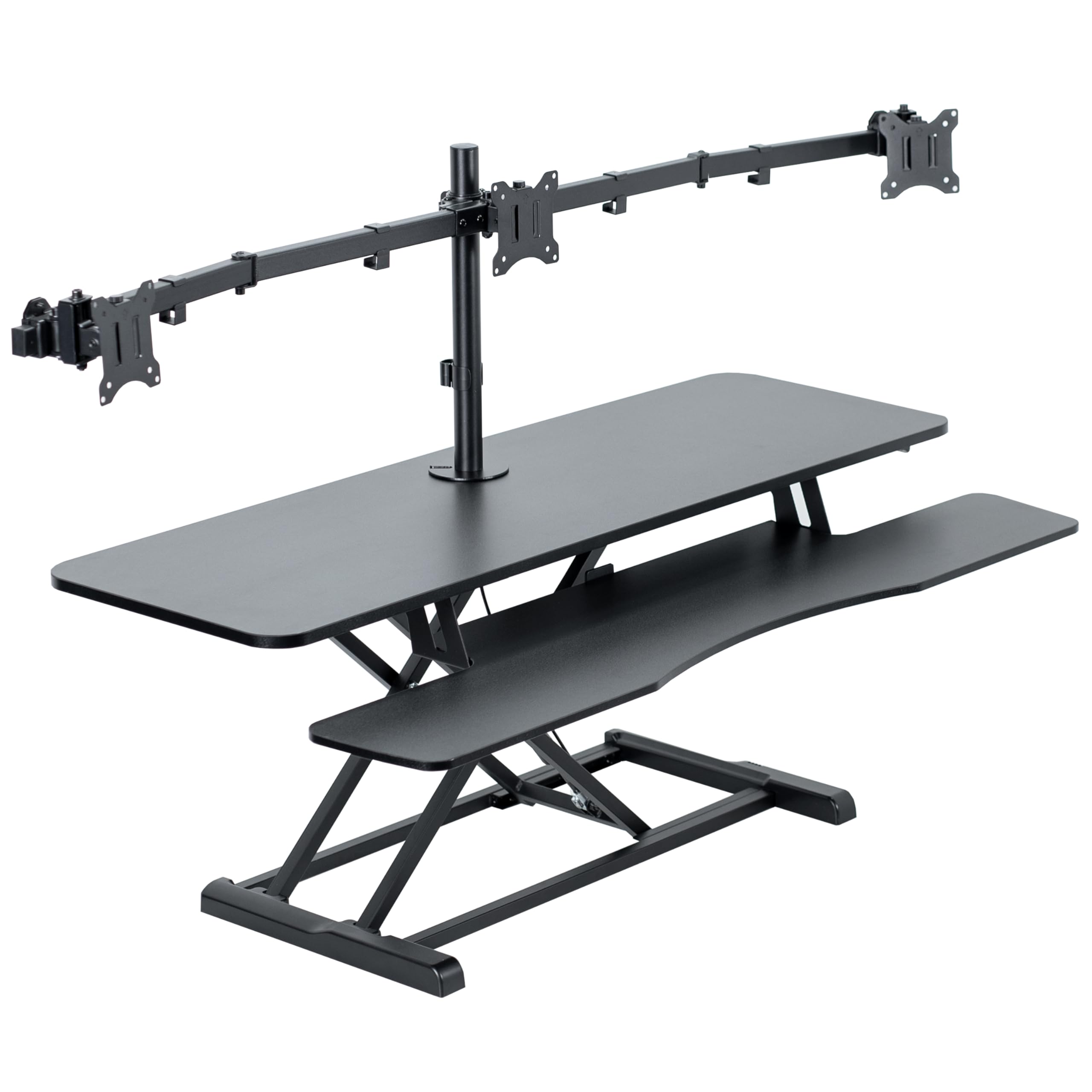
The DESK-KIT-48KB3C bundles a 47.6-inch wide riser with a dedicated triple monitor mount right in the box. Each arm handles screens between 21.5 and 27 inches, with VESA plates that slide for easy alignment. The manual height locking mechanism uses a gas-spring assist—you pull a handle and lift, and the platform stays where you release it. This avoids the need for a power outlet, making it a clean fit for cubicles or desks far from wall sockets.
The two-tier design provides an upper platform for screens and a lower platform measuring 11.8 inches deep for the keyboard and mouse. The laminated particle board surface resists scratches, and the alloy steel frame keeps the assembly stable during use. Setup involves attaching the keyboard tray, mounting the monitor arms to the riser, and installing the VESA plates—a process that users complete in under 30 minutes.
Some users note that the gas spring requires a bit more effort after extended periods of inactivity, and the overall stability with three 22-inch monitors raised concerns for long-term durability. The unit also struggles in corner cubicles due to its rectangular shape. If you want a complete triple-monitor solution without buying separate mounts and don’t mind a manual lift, this VIVO package offers strong value. For heavier loads, however, consider an electric option.
Why it’s great
- Includes triple monitor mount with sliding VESA plates
- 47.6-inch wide surface fits three large screens
- Manual gas-spring lift—no power cable needed
Good to know
- Stability under full load raises long-term questions
- Not suitable for corner cubicle layouts
- Gas spring may stiffen after disuse
5. Victor DC475 High Rise Electric Triple Monitor Standing Desk Converter

The Victor DC475 stands out for its independent monitor brackets that adjust separately from the main worksurface. Each bracket supports a screen up to 27 inches, and you can fine-tune the tilt, swivel, and rotation without moving the entire converter. The Easy Tap Technology lets you raise or lower the platform with a single button press, and the built-in safety sensor automatically stops the motor if it detects an obstruction underneath.
Users consistently report a straightforward assembly taking 20 to 30 minutes, with clear instructions and no requirement to attach the converter to the existing desk. The 28-inch wide work surface is narrower than some competitors, but the monitor brackets extend outward, effectively using vertical space rather than horizontal. The aluminum frame keeps the unit lighter than all-steel alternatives, and the motor operates quietly enough for open-plan offices.
The main drawbacks center on the safety sensor, which some users found overly sensitive to cable loops and loose papers under the desk. The lack of integrated cable management means you’ll need to zip-tie wires yourself to maintain a clean look. A few users also note a slight bounciness in the platform when fully raised, especially with larger monitors mounted. For a compact electric solution with independent screen adjustment, the DC475 is a solid mid-range contender.
Why it’s great
- Three independent monitor brackets for individual positioning
- Safety sensor prevents crushing cables or objects
- Quiet electric motor with one-touch control
Good to know
- Safety sensor may trigger on loose cables
- Platform can feel bouncy at full height
- No built-in cable management channels
6. Vari VariDesk Pro Plus 36 Standing Desk Converter
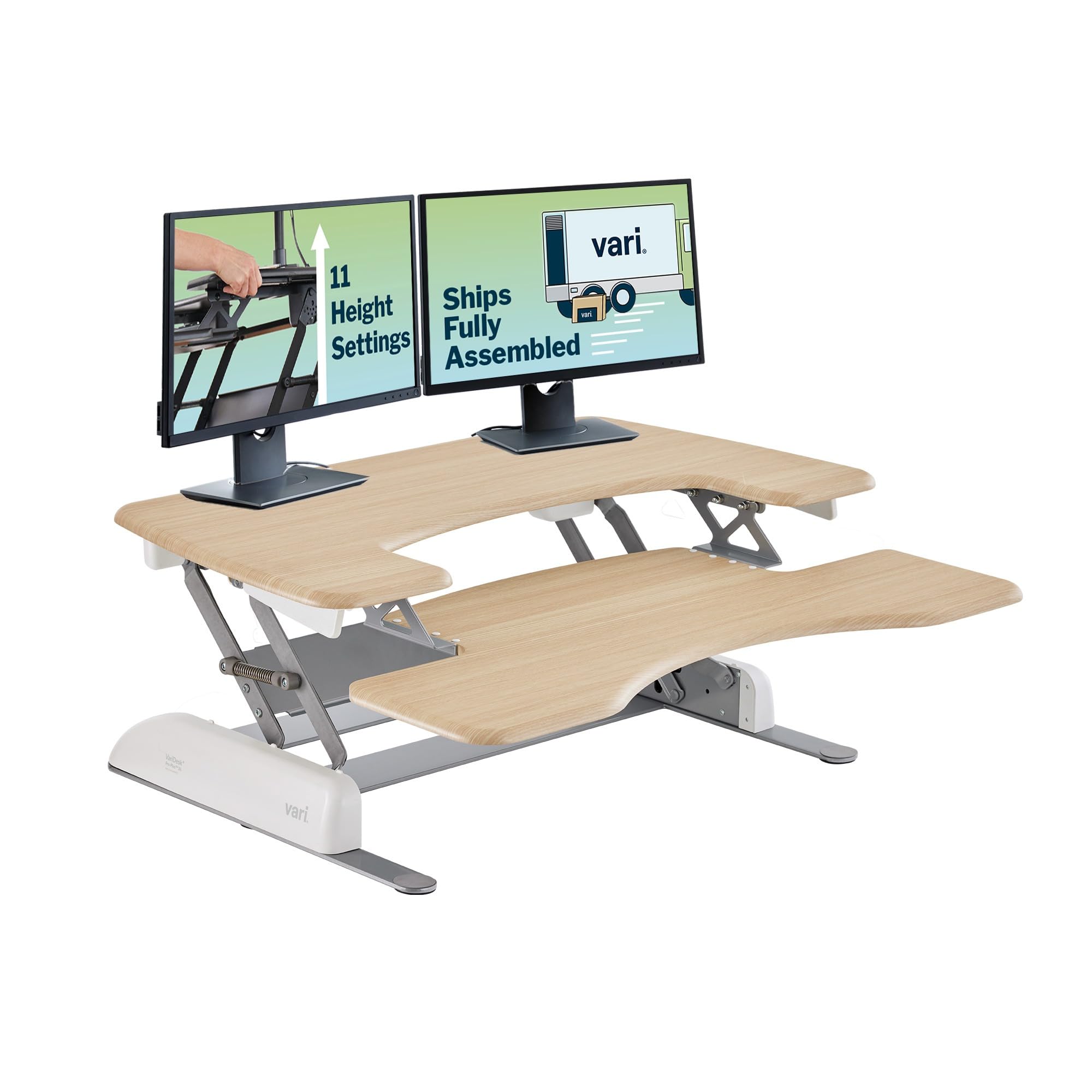
The VariDesk Pro Plus 36 is the benchmark for manual lift quality. It arrives fully assembled—you literally unbox it, place it on your desk, and start working. The spring-assisted rowing mechanism offers 11 height settings ranging from sitting to 17.5 inches of lift, and the dual-handle design with foam-wrapped steel prevents pinch points. The 36-inch top tier fits two monitors comfortably, though three smaller screens (21 to 24 inches) can squeeze in with careful arrangement.
Build quality is exceptional: thick steel frame, durable 3D laminate finish, and dual stability bars ensure the platform feels solid even at maximum extension. Users report negligible wobble, and the smooth lift action doesn’t spill coffee. The unit ships in a single box weighing about 50 pounds, and the white-glove assembly experience is a genuine time-saver. The light wood color option blends well with home office decor.
The primary limitation is width—at 36 inches, you’re constrained compared to the 47-inch VIVO models. Fitting three 27-inch monitors side-by-side is physically impossible without overhang. The keyboard tray is also fixed, and you’ll need an anti-fatigue mat for comfortable long-term standing. For a premium manual converter that prioritizes build quality and out-of-box readiness, the Pro Plus 36 is excellent. For triple 27-inch screens, step up to the VersaDesk or a wider model.
Why it’s great
- Fully assembled—zero tools or setup required
- Exceptional stability with dual stability bars
- Spring-assisted lift offers 11 precise height stops
Good to know
- 36-inch width limits triple monitor compatibility
- Keyboard tray depth is fixed and non-adjustable
- Heavy unit—50 lbs to move onto desk
7. Rocelco 46″ Height Adjustable Corner Standing Desk Converter
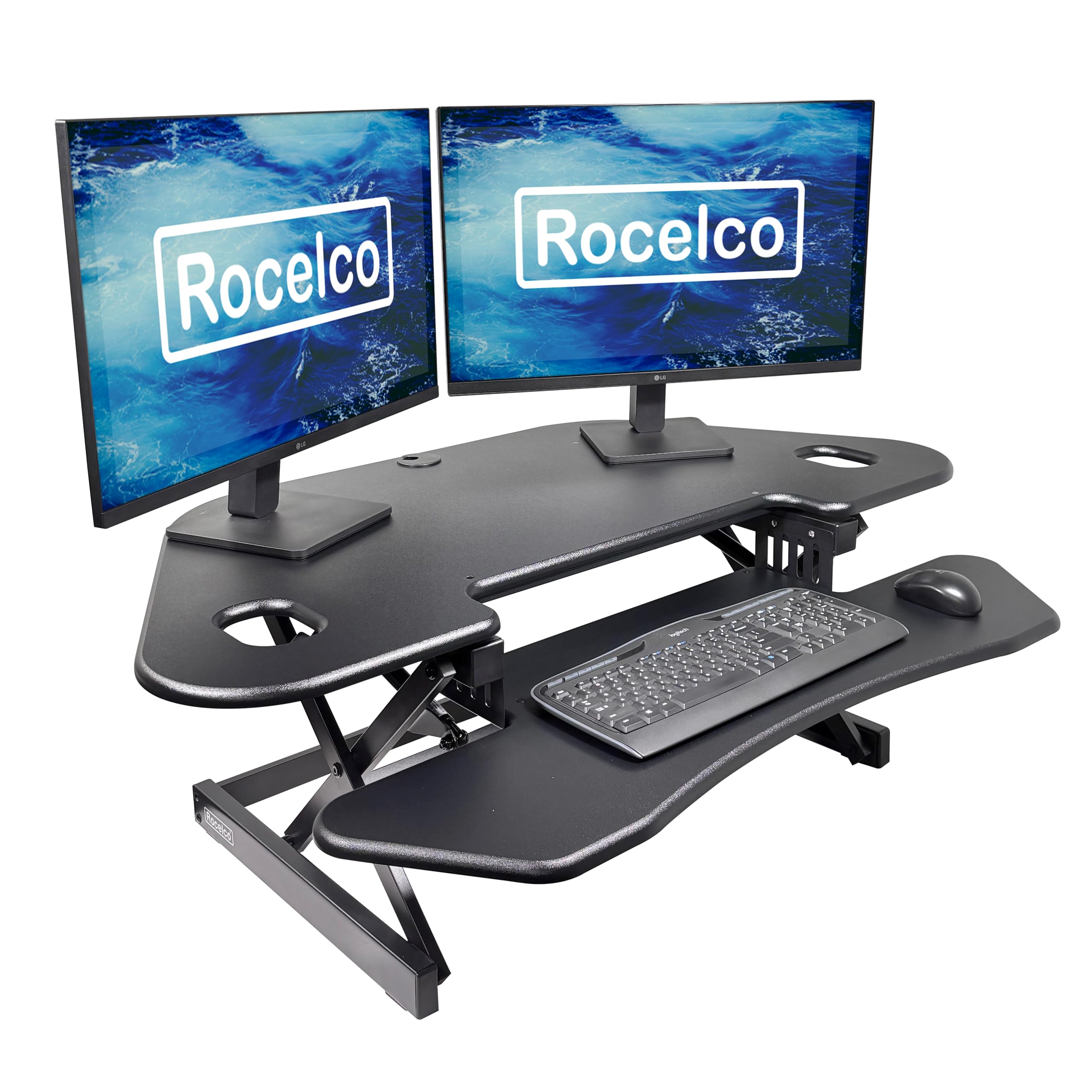
The Rocelco R CADRB-46 is one of the few converters designed specifically for corner desks. Its 45.5-inch wide by 23.25-inch deep desktop creates a wedge-shaped work surface that fits neatly into a corner, and the extra depth accommodates monitors as large as 32 inches. The gas piston assist with a side grip handle lets you raise or lower up to 40 pounds continuously, from 5 to 18 inches above the desk. The straight up-and-down motion minimizes the footprint required behind the monitors.
The 40-inch wide by 13-inch deep keyboard tray is generous—curved to follow the corner shape, it fits a full keyboard plus a 10-key numpad and leaves room for a large mouse pad. Users report that the unit feels solid and well-constructed, with smooth height adjustment that locks in place without sagging. Assembly is minimal: attach the keyboard tray with four screws and you’re ready. The grommet hole provides a clean path for cable management or a third-party monitor mount.
The main limitation is the 40-pound weight capacity, which is lower than electric alternatives. With three 27-inch monitors plus mounts, you may bump against the limit. Some users found the dual-monitor mount instructions confusing and the clamp too large for the grommet hole. Mouse space on the keyboard tray is also tight if you use a wrist rest. For a corner-specific layout with a single 32-inch screen or two smaller monitors, the Rocelco is a smart fit. For triple 27-inch screens, look at wider, higher-capacity electric models.
Why it’s great
- Designed specifically for corner desk layouts
- 45.5-inch wide surface holds up to 32-inch monitors
- Gas piston assist for smooth, continuous height adjustment
Good to know
- 40 lb capacity limits triple-heavy-monitor setups
- Dual-monitor mount instructions are unclear
- Limited mouse space if using a wrist rest
8. Vari VariDesk Cube Corner 36

The Cube Corner 36 is another corner-desk specialist from Vari, built with a weighted base that keeps the unit firmly planted even at maximum height. The 36-inch wide upper tier and curved front offer a workspace that mirrors the shape of a standard cubicle corner. The spring-assisted rowing lift with dual handles provides 11 height settings up to 17.5 inches, and the unit ships fully assembled—just lift it onto your desk and go. The engineered wood surface with laminated finish resists daily wear.
Users praise the stability of the weighted base, which prevents tipping even when leaning on the keyboard tray. The two-tier design accommodates two monitors plus a laptop on the upper level, while the lower tier holds the keyboard and mouse. The build quality aligns with Vari’s reputation for durability—thick steel components and a 5-year warranty offer long-term confidence. The 35-pound weight capacity is conservative, but sufficient for two 27-inch monitors.
The obvious limitation is the 35-pound payload, which makes it unsuitable for three large monitors. The curved keyboard tray also reduces usable depth compared to rectangular trays, and the laptop cutout is too small for many 15-inch and larger laptops. Some users in deep corner setups found the unit required pulling the desk away from the wall to access the lift handles when raised. For a dedicated dual-monitor cubicle setup, the Cube Corner 36 is a premium choice. For triple monitors, its capacity falls short.
Why it’s great
- Weighted base provides outstanding stability
- Fully assembled out of the box
- 5-year warranty and premium build quality
Good to know
- 35 lb capacity is insufficient for three large monitors
- Curved keyboard tray reduces usable mouse space
- Laptop cutout too small for most 15-inch models
FAQ
Will a 35-pound converter hold three 27-inch monitors?
Can I use a manual gas-spring converter with three monitors?
What size keyboard tray depth do I need for typing comfort?
Final Thoughts: The Verdict
For most users, the best 3 monitor standing desk converter winner is the VERSADESK PowerPro 40 because its 80-pound capacity and pre-assembled design handle triple 27-inch monitors without breaking a sweat. If you want a budget-friendly electric option with a massive 47-inch platform, grab the VIVO DESK-VE48B. And for a premium integrated mount system with a whisper-quiet motor, nothing beats the Stand Steady Techtonic.