
Our readers keep the lights on and my morning glass full of iced black tea. As an Amazon Associate, I earn from qualifying purchases.
When you’re shopping for a flagship graphics card, the number on the spec sheet that matters most isn’t the clock speed or the CUDA core count — it’s the video memory. 24GB of GDDR6 or GDDR6X VRAM is the threshold that separates a capable gaming GPU from a true powerhouse that can also handle 4K textures, complex AI workloads, and future-proofed triple-A titles without breaking a sweat. This isn’t just about raw frame rates; it’s about having the headroom to load massive assets, run demanding ray-traced scenes, and keep performance consistent for years to come.
I’m Min — the co-founder and writer behind Gadgets Feed. I’ve spent countless hours analyzing specifications, price-to-performance ratios, thermal designs, and real-world benchmarks to separate the worthwhile investments from the overpriced options in the high-end GPU market.
Whether you’re pushing pixels in 4K, training local LLMs, or building a VR rig that doesn’t choke, this guide breaks down every serious contender for the best 24gb gaming gpu that balances raw power with practical endurance.
How To Choose The Best 24GB Gaming GPU
Choosing a 24GB GPU means you are already in the premium or high-end enthusiast tier. But not all 24GB cards are equal — the architecture, memory type, cooling solution, and power delivery all determine whether the card will serve you for years or become a heat-soaked bottleneck. Focus on what matters for your specific use case.
Memory Type: GDDR6 vs GDDR6X Bandwidth
The memory speed and bus width directly affect how textures, shaders, and frame buffers are fed to the GPU core. GDDR6X offers higher bandwidth (up to 1 TB/s on some cards) compared to standard GDDR6, which matters for 4K texture streaming and ray-traced environments. However, GDDR6X runs hotter, so the card’s cooling solution becomes critical. If you’re gaming at 1440p or doing AI inference, the extra bandwidth is a clear advantage. For pure rasterization at lower resolutions, the difference is less pronounced.
Thermal Performance and Physical Dimensions
A 24GB card is a large, power-hungry component. Many of these cards exceed 12 inches in length and require three or even four 8-pin power connectors. The thermal compound quality, fan design, and heatsink materials determine not just noise levels but also long-term reliability. Cards with vapor chambers, copper baseplates, and dual-ball bearing fans tend to outlast others. Always check your case clearance — some mid-towers simply cannot fit a 340mm card with its support bracket.
Ray Tracing, DLSS, and FSR Support
NVIDIA’s DLSS 3 (and DLSS 4 on newer Ada Lovelace cards) provides a significant performance uplift in supported titles, allowing you to push higher resolutions and frame rates. AMD’s FSR 3 is catching up but still lags in image quality at lower resolutions. If ray tracing performance is a priority, the RTX 4090-class cards dominate the competition. AMD’s RX 7900 XTX offers strong raster performance but falls behind in ray-traced scenarios — a trade-off worth considering.
Quick Comparison
On smaller screens, swipe sideways to see the full table.
| Model | Category | Best For | Key Spec | Amazon |
|---|---|---|---|---|
| XFX Speedster MERC310 RX 7900 XTX | Mid-Range | High-refresh 1440p / AI workloads | 24GB GDDR6, 384-bit bus | Amazon |
| Sapphire Pulse RX 7900 XTX | Mid-Range | Value-oriented 4K | 24GB GDDR6, 2.7-slot design | Amazon |
| EVGA RTX 3090 FTW3 Ultra | Premium | Creative workstations / 4K | 24GB GDDR6X, 384-bit bus | Amazon |
| ASUS TUF Gaming RTX 4090 OC | High-End | Maxed 4K / DLSS 3 | 24GB GDDR6X, 2595 MHz OC | Amazon |
| PNY RTX 4090 Verto Triple Fan | High-End | Quiet performance / VR | 24GB GDDR6X, 2520 MHz boost | Amazon |
| GIGABYTE RTX 4090 Gaming OC | High-End | Packed features / RGB | 24GB GDDR6X, 2535 MHz core | Amazon |
| MSI RTX 4090 Gaming X Trio | High-End | Excellent thermal design | 24GB GDDR6X, 2595 MHz boost | Amazon |
| Vipera RTX 4090 Founders Edition | High-End | Pure reference performance | 24GB GDDR6X, 2520 MHz boost | Amazon |
In‑Depth Reviews
1. XFX Speedster MERC310 AMD Radeon RX 7900 XTX Black Gaming Graphics Card with 24GB GDDR6

The XFX Speedster MERC310 RX 7900 XTX delivers a compelling combination of raw raster performance and 24GB of GDDR6 memory on a 384-bit bus. With a boost clock reaching up to 2615 MHz, this card handles 1440p max settings with ease and pushes respectable 4K frame rates without breaking the bank compared to the NVIDIA competition. The triple-fan MERC cooling solution keeps temperatures manageable even under sustained load, and the metal backplate adds structural rigidity.
Real-world reviews highlight its ability to handle VRchat with 80+ players at 27-35 FPS, a massive improvement over 8GB cards. The 390W power draw requires a beefy PSU, but the card runs at around 60°C under load. Some users report hotspot temperatures reaching 105°C due to factory thermal paste pump-out, which is a known issue that can be mitigated by repasting with PTM7950. The AMD Software suite is praised for being straightforward and requiring no account login.
Ray tracing performance is improved over previous AMD generations but still lags behind NVIDIA’s RTX 4090 in titles that rely heavily on path tracing. For pure rasterization at 4K, the 7900 XTX competes closely with the RTX 4080 Super. The 24GB VRAM also makes it a strong choice for local AI inference and LLM workloads, though driver stability for compute tasks is slightly behind NVIDIA’s CUDA ecosystem. Overall, this is the best value 24GB card for gamers who prioritize frame rates over ray tracing.
Why it’s great
- Excellent 4K raster performance at a competitive price point
- 24GB VRAM on a 384-bit bus provides massive memory bandwidth
- Triple-fan cooling runs quiet and cool under most gaming loads
Good to know
- Ray tracing performance still trails NVIDIA equivalents
- Known thermal paste pump-out issue with hotspot temps
- Large physical size requires careful case compatibility check
2. Sapphire 11322-02-20G Pulse AMD Radeon RX 7900 XTX Gaming Graphics Card with 24GB GDDR6

Sapphire’s Pulse series has long been a favorite for enthusiasts who want factory-overclocked performance without the premium price tag of the Nitro+ lineup. The Pulse RX 7900 XTX features a boost clock of up to 2525 MHz and 24GB of GDDR6 memory across a 384-bit interface. The 2.7-slot design is relatively compact for a 24GB card, measuring 313mm in length, making it compatible with more mid-tower cases than many competitors.
User feedback consistently praises its thermal performance — the card stays under 62°C under load and operates quietly thanks to a well-designed heatsink and dual-ball bearing fans. The 24GB VRAM is a boon for 3440×1440 ultrawide gaming and 3D rendering workloads. Power spikes up to 400W are reported, so a 1000W PSU is strongly recommended. Some users noted high idle power draw when multiple monitors are connected, which is a known AMD architectural quirk.
While the Pulse card cannot match the overclocking headroom of the Nitro+ or the raw ray tracing performance of the RTX 4090, it offers the best price-to-performance ratio for a 24GB GPU. The card includes two HDMI 2.1 ports and two DisplayPort 2.1 outputs, supporting the latest high-refresh-rate displays. For gamers who want 24GB of VRAM without paying a premium for NVIDIA branding, the Pulse 7900 XTX is a standout.
Why it’s great
- Compact 2.7-slot design fits more cases than bulky alternatives
- Excellent thermal performance with low noise under load
- 24GB VRAM at a price well below NVIDIA equivalents
Good to know
- Power spikes can exceed 400W requiring a robust PSU
- Ray tracing performance behind RTX 4090-class cards
- Not suitable for eGPU enclosures due to bandwidth loss
3. EVGA GeForce RTX 3090 FTW3 Ultra Gaming, 24GB GDDR6X

The EVGA RTX 3090 FTW3 Ultra remains a formidable contender in the 24GB GPU space, especially for creative professionals who rely on CUDA acceleration in Blender, DaVinci Resolve, and 3D rendering applications. Its 24GB of GDDR6X memory on a 384-bit bus delivers 936 GB/s of bandwidth, which handles massive texture arrays and video timelines with ease. The FTW3 Ultra features EVGA’s iCX3 cooling with nine thermal sensors and three HDB fans that, while effective, can push memory junction temperatures to 105°C under sustained load without proper fan curve adjustments.
Real-world performance in 4K gaming is excellent — it can max out most titles at 60+ FPS, though ray tracing in Cyberpunk 2077 still demands DLSS to maintain smooth frame rates. The card’s 350W TDP and potential for higher memory temperatures mean that aggressive fan curves or even water cooling (with an active backplate) may be necessary for long rendering sessions. Users report significant heat output, describing it as a “space heater” that benefits from proper case airflow and a 1200W PSU for headroom.
The EVGA ecosystem is a major selling point: the brand has a strong warranty reputation and the FTW3 Ultra includes dual BIOS support for fail-safe operation. However, the card’s age means it lacks DLSS 3 frame generation and newer NVIDIA features. It remains an excellent option for workstation builds where CUDA is critical, but gamers should compare it against newer 40-series options that offer better ray tracing efficiency.
Why it’s great
- Excellent CUDA performance for creative and workstation tasks
- Dual BIOS and strong build quality from EVGA
- 24GB GDDR6X provides massive bandwidth for 4K/8K assets
Good to know
- Memory junction temps can hit 105°C without fan curve tuning
- Lacks DLSS 3 frame generation and newer architecture features
- High power draw and heat output demand robust cooling
4. ASUS TUF Gaming NVIDIA GeForce RTX 4090 OC Edition, 24GB GDDR6X

The ASUS TUF Gaming RTX 4090 OC Edition represents the pinnacle of consumer GPU engineering. Built on the Ada Lovelace architecture, it packs 24GB of GDDR6X memory on a 384-bit bus with a boost clock of 2595 MHz in OC mode. The TUF series is renowned for its military-grade durability, featuring dual-ball bearing Axial-tech fans that deliver up to 23% higher airflow than baseline designs. The card also includes a fully covered metal backplate and a die-cast frame that minimizes PCB flex and sag.
In real-world usage, the 4090 obliterates 4K gaming benchmarks. Cyberpunk 2077 with full path tracing and DLSS 3 frame generation runs well above 100 FPS. The card also excels in VR, content creation, and AI workloads. Users upgrading from an RTX 3080 Ti noted the need for a new PSU with four PCIe power connectors — the card draws up to 450W under load. Thermal performance is outstanding, with core temperatures staying in the mid-60s under gaming loads and the dual-ball bearing fans remaining nearly silent.
The primary barrier is the substantial investment — this is a premium product aimed at users who demand the absolute best performance available today. The TUF model’s robust thermal solution makes it a top choice for sustained workloads like rendering or training. While the placeholder 5090 series looms, the 4090 remains the definitive 24GB gaming GPU for those who want no compromises.
Why it’s great
- Unmatched 4K ray tracing performance with DLSS 3 frame gen
- Excellent build quality with military-grade components
- Quiet and cool operation under heavy load
Good to know
- Very high price point places it in a premium tier
- Requires a high-wattage PSU with four PCIe power connectors
- Large physical size may not fit in compact cases
5. PNY GeForce RTX 4090, 24GB GDDR6X, Verto Triple Fan

The PNY RTX 4090 Verto Triple Fan stands out for its understated aesthetic — an all-black cooler with no RGB bling, making it ideal for builds where clean and professional is preferred. It features 24GB of GDDR6X memory with a boost clock of 2520 MHz and a 384-bit bus. The cooler is massive but surprisingly quiet, thanks to a thick heatsink and triple fan design that maintains low noise even under sustained load. PNY includes a support bracket in the box, recognizing the card’s heft.
Real-world benchmarks show Time Spy scores of 29,950 when paired with a 7800X3D and 32GB of 6000MHz RAM. The card excels in VR and handles the most demanding titles at 4K. Users on Linux report excellent performance for Stable Diffusion and other CUDA-dependent workloads. The included 16-pin power cable can be problematic for side panels — an aftermarket 90° adapter is recommended to avoid bending the connector. The single PNY LED on the side is not software-controllable, which may disappoint RGB enthusiasts.
One standout feature is its size — the Verto is actually shorter than many other 4090s at 337mm, allowing it to fit in more cases while still using the next x16 slot. The build quality is solid, with no reported coil whine. For users who want RTX 4090 performance without the gamer aesthetic, the PNY Verto is a top contender. Its quiet operation and clean design make it a favorite among workstation users who also game.
Why it’s great
- Subdued, professional aesthetic without RGB distractions
- Exceptionally quiet operation under heavy gaming loads
- Compact design relative to other 4090s, fits more cases
Good to know
- Included power cable may not fit some case side panels
- Single LED not software-controllable
- High price reflects the RTX 4090 premium tier
6. GIGABYTE GeForce RTX 4090 Gaming OC 24GB, GV-N4090GAMING OC-24GD
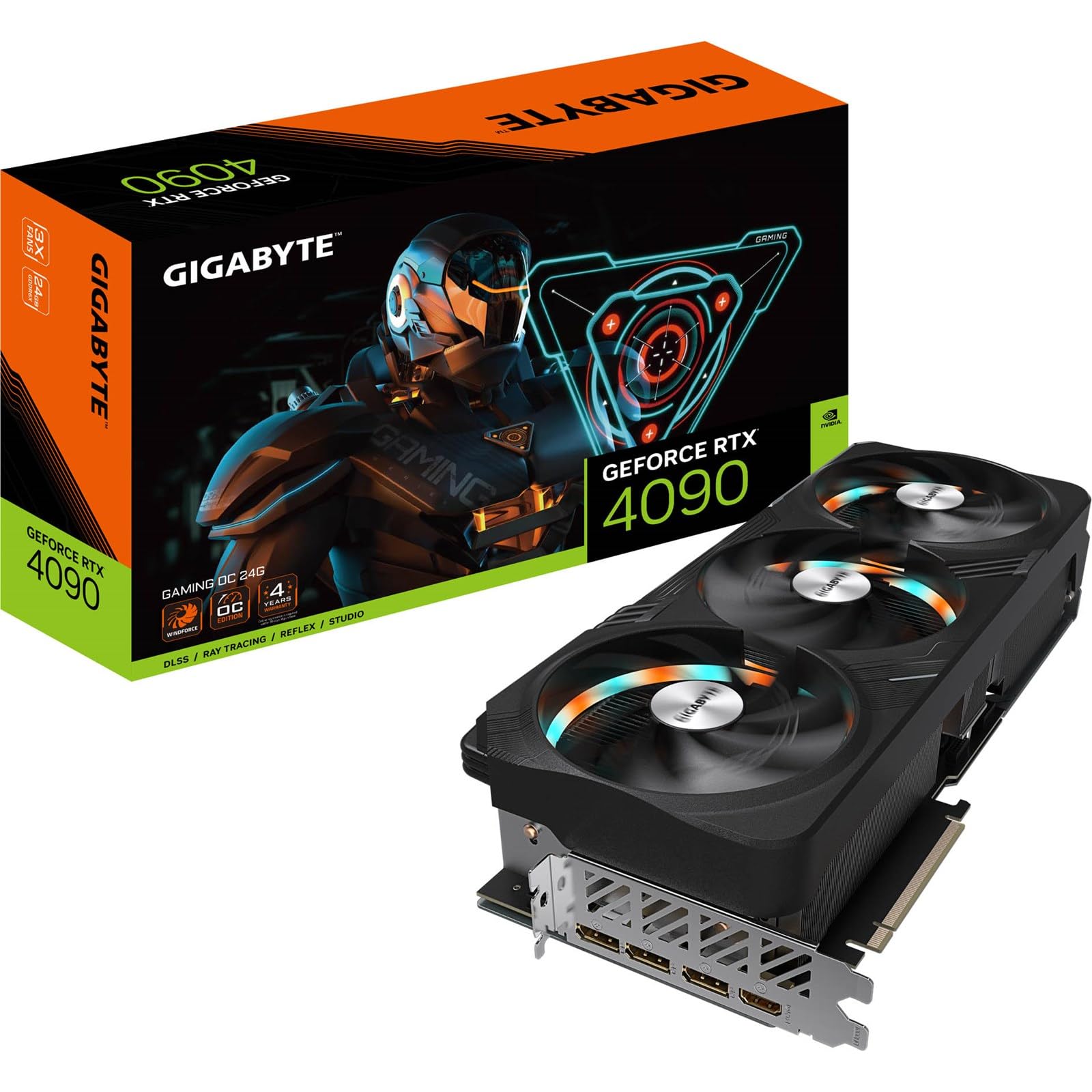
GIGABYTE’s RTX 4090 Gaming OC offers a feature-packed package with 24GB of GDDR6X memory, a core clock of 2535 MHz, and extensive RGB customization through the RGB Fusion software. The card uses a massive heatsink with a metal backplate and an anti-sag bracket included in the box. The 340mm length requires careful case selection — a review noted that even with the bracket, an extra 30-35mm of clearance is needed, and the card’s underside curve prevents standard GPU support sticks from working.
User experiences are mixed but generally positive: the card delivers the expected 4090 performance, running demanding titles at maxed settings smoothly. The RGB implementation drew criticism for a constant strobe effect on the fans while spinning, which can only be fully disabled by turning off all lights or dimming them. Some users found the card cheaper elsewhere and advised against paying above MSRP. For AI applications, one user happily reported running Qwen 3.6 with VRAM optimizations.
The GIGABYTE Gaming OC is a solid choice for builders who want a fully equipped 4090 with good thermal performance and the aesthetic flexibility of addressable RGB. However, the strobe issue and size constraints mean it requires careful research before purchase. The anti-sag bracket is a welcome inclusion, but the card’s length may still be problematic for mid-tower cases. Overall, it’s a reliable performer for those who can accommodate its dimensions and don’t mind the RGB behavior.
Why it’s great
- Full 4090 performance with DLSS 3 and ray tracing expertise
- Includes anti-sag bracket and heavy-duty cooler
- RGB Fusion software for customizable lighting
Good to know
- 340mm length plus bracket extra clearance requires large cases
- RGB fans may strobe when spinning, difficult to disable
- Value perception suffers at inflated prices above MSRP
7. MSI GeForce RTX 4090 Gaming X Trio 24G, 2595 MHz

MSI’s RTX 4090 Gaming X Trio is renowned for its TRI FROZR 3 thermal design, which combines TORX Fan 5.0 with a copper baseplate and precision-machined core pipes to efficiently dissipate heat from the 24GB GDDR6X memory and GPU core. The boost clock of 2595 MHz places it among the fastest factory-overclocked 4090s. The card measures 321mm in length, slightly shorter than the GIGABYTE and ASUS TUF models, improving case compatibility.
User reviews highlight its near-complete absence of coil whine, a common annoyance with other 4090s. The card runs all games at High/Ultra with NVIDIA features enabled, delivering blazing performance. Some users reported occasional fan revving to high gear, which can be bothersome in quiet environments. One buyer received a used card with two defective DisplayPorts but received excellent support from the seller. The card’s massive size and 4+ pound weight require proper mounting and support.
The MSI Gaming X Trio is a top-tier pick for users who prioritize excellent thermal performance and noise characteristics out of the box. The TRI FROZR 3 system keeps the card cool even under sustained gaming or rendering loads. Its slightly more compact dimensions compared to other premium 4090s make it a better fit for mid-tower builds, though a 1000W PSU is still mandatory. For the price, it delivers one of the best all-around experiences in the 4090 lineup.
Why it’s great
- Excellent TRI FROZR 3 thermal solution remains cool and quiet
- Negligible coil whine compared to many 4090 competitors
- Slightly shorter PCB improves case compatibility
Good to know
- Occasional fan revving can be audible in quiet rooms
- High price point typical of RTX 4090 tier
- Heavy card requires proper mounting and support
8. Vipera NVIDIA GeForce RTX 4090 Founders Edition, 24GB GDDR6X

The Vipera NVIDIA GeForce RTX 4090 Founders Edition represents the reference design straight from NVIDIA’s engineers. It features 24GB of GDDR6X memory with a boost clock of 2520 MHz and the classic dual-axial flow-through cooler that exhausts heat out the back of the case. The card measures 304mm in length, making it one of the most compact 4090 options and ideal for high-end builds where space is at a premium. The build quality is excellent, with an anodized aluminum shroud and a solid metal backplate.
Real-world performance matches the high bar set by all 4090s: excellent 4K gaming, effortless ray tracing, and strong performance in Blender and Unreal Engine 5 workflows. Users praise its quiet operation and competitive pricing for the tier. The Founders Edition runs LLMs well and powers three monitors without breaking a sweat. One reviewer described it as delivering approximately 1 FPS per dollar, which underlines its raw throughput for 4K ultra settings.
The primary advantage of the Founders Edition is its compact size and reference-level cooling, which makes it compatible with more cases than the bulky third-party designs. However, it lacks the factory overclock headroom and sometimes the lower noise of aftermarket coolers like the MSI Trio or ASUS TUF. It remains the gold standard for those who want a pure, unadulterated 4090 experience without gamer RGB or oversized shrouds. Availability can be spotty, making the Vipera listing a convenient option for those who prefer the reference design.
Why it’s great
- Compact 304mm design fits more cases than aftermarket models
- Reference cooling effectively exhausts heat outside the case
- Excellent build quality with anodized aluminum shroud
Good to know
- No factory overclock compared to aftermarket partners
- Reference cooler may not match custom models in noise
- Availability can be inconsistent
9. ASUS Dual NVIDIA GeForce RTX 5060 Ti 16GB GDDR7 OC Edition

The ASUS Dual RTX 5060 Ti 16GB OC Edition is not a 24GB GPU, but it warrants a mention for those exploring the high-VRAM mid-range segment. It features 16GB of GDDR7 memory on a 128-bit bus with fast 448 GB/s bandwidth, powered by the NVIDIA Blackwell architecture and DLSS 4 support. The AI performance rating of 767 AI TOPS is impressive for its class, making it a strong candidate for local AI labs and modest LLM workloads. The card’s compact 9-inch length and standard 8-pin connector make it an accessible upgrade for budget and small form factor builds.
Real-world reviews confirm it is a big upgrade from older cards like the RTX 2060 Super, delivering excellent 1440p gaming at High/Ultra settings with temperatures in the low 60s. However, the pricing has disappointed — the MSRP of has inflated to over due to AI demand, which pushes it into less compelling value territory. The 128-bit bus is mitigated by the fast GDDR7, but it still imposes a bottleneck in memory-intensive scenarios compared to wider-bus cards.
This card is best suited for gamers who prioritize 1080p or 1440p performance with some headroom for ray tracing, or for AI hobbyists who need 16GB VRAM on a budget. It is not a true 24GB workstation solution, but it offers a viable entry point into modern VRAM capacities without the investment required for high-end 24GB cards. The compact size and low power draw make it an excellent choice for upgrading pre-built systems or small form factor PCs.
Why it’s great
- Compact 9-inch design fits most cases, including SFF
- GDDR7 memory and DLSS 4 support for modern gaming
- Excellent thermal performance with low noise
Good to know
- Only 16GB VRAM, not a 24GB card
- 128-bit bus limits memory bandwidth
- Price inflation above MSRP reduces value proposition
10. GIGABYTE Radeon RX 7800 XT Gaming OC 16GB

The GIGABYTE RX 7800 XT Gaming OC is another 16GB card included for context. It features 16GB of GDDR6 memory on a 256-bit bus with a boost clock of 2565 MHz, powered by AMD RDNA 3 architecture. The Windforce cooling system uses three 90mm blade fans, seven composite copper heat pipes, and a large copper plate that directly contacts the GPU, resulting in excellent thermal performance. The card supports DisplayPort 2.1 and HDMI 2.1 for the latest displays.
Real-world reviews highlight excellent 1440p performance with smooth frame rates and quiet operation. The card is also praised for its compatibility with Ollama for LLM workloads, offering up to 70% faster performance than an Intel Arc A770. Users appreciate the solid value proposition for mid to heavy gaming at 1440p. However, FSR 3 is noted as good but not quite matching NVIDIA’s DLSS in image quality.
This card is best suited for gamers on a budget who want 16GB VRAM for high-resolution textures but don’t need the full 24GB headroom of premium cards. It is not a 24GB GPU, but its 256-bit bus provides competitive bandwidth for the price. The 700W recommended PSU is reasonable for its class. For pure 1440p gaming with some AI capability, this is a strong mid-range choice, but serious 4K ray tracing demands higher-tier hardware.
Why it’s great
- Excellent 1440p gaming performance with quiet cooling
- Good AI workload compatibility with ROCm support
- Reasonable price point for 16GB VRAM
Good to know
- Only 16GB VRAM, not suitable for heavy 4K workloads
- FSR 3 image quality behind DLSS in some titles
- Ray tracing performance still trails NVIDIA
11. PNY NVIDIA GeForce RTX 5070 Ti Epic-X ARGB Triple Fan, 16GB GDDR7
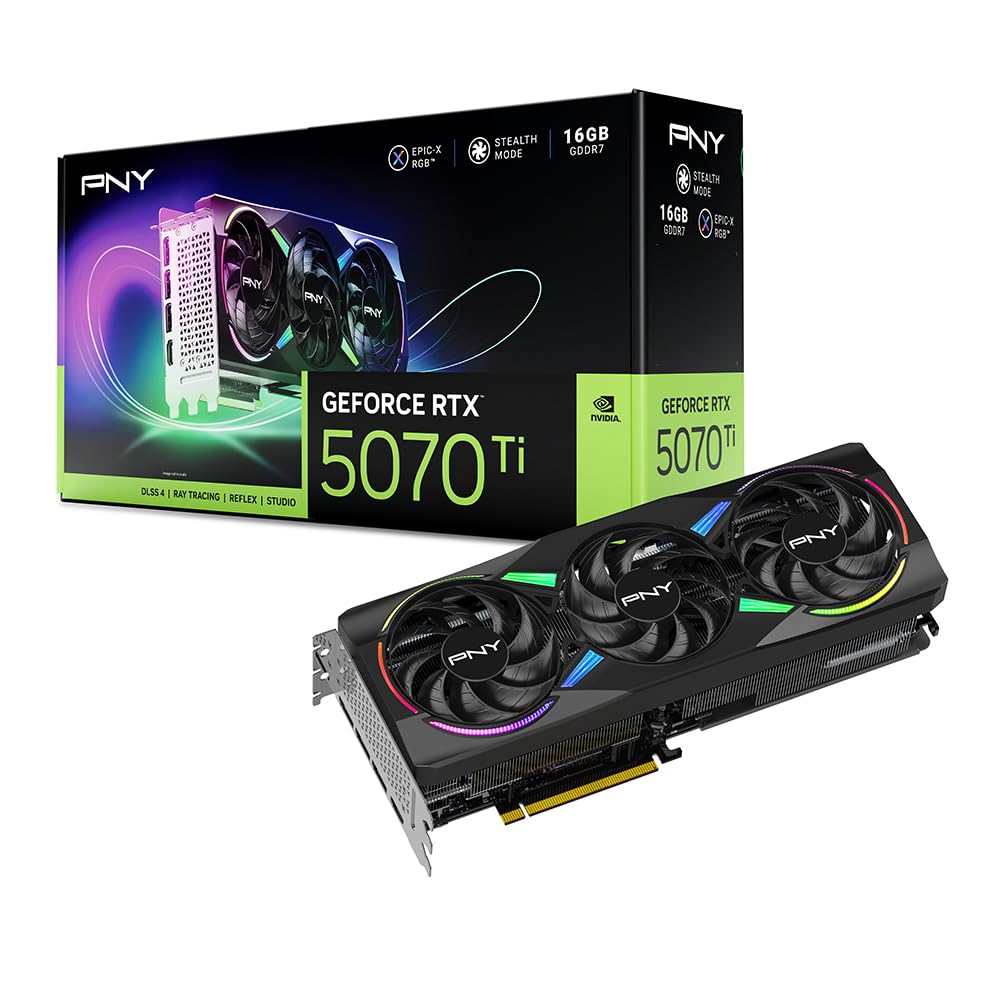
The PNY RTX 5070 Ti Epic-X is a 16GB card based on the NVIDIA Blackwell architecture with GDDR7 memory on a 256-bit bus. It features a boost speed of 2452 MHz, PCIe 5.0 support, and DLSS 4. The triple fan Epic-X design is large (12 inches long) with a chunky heatsink and bright RGB that cannot be turned off easily. The card draws up to 300W and requires three 8-pin PSU cables.
Real-world reviews commend its build quality and performance: it represents excellent value for NVIDIA at the MSRP of , offering strong 1440p and decent 3440×1440 gaming performance. The card runs cool and quiet under 100% load with no coil whine. Users report significant raster uplift over previous generation cards like the 6950 XT. However, the 16GB VRAM is a limitation for 4K texture-heavy workloads, and the bright RGB may be distracting for those who prefer a clean aesthetic.
This card is a strong mid-range option for gamers who want DLSS 4 and modern NVIDIA features without stepping up to the 80-class pricing. It is not a 24GB card, but offers a solid balance of performance and features for its price. The large physical size and power draw mean it is best suited for larger cases with robust cooling. For users who can live without the 24GB VRAM headroom, the 5070 Ti is a capable performer at 1440p and entry-level 4K.
Why it’s great
- Excellent performance per dollar at MSRP
- Efficient power draw with quiet operation
- DLSS 4 and modern NVIDIA feature set
Good to know
- 16GB VRAM not sufficient for heavy 4K textures
- Bright RGB cannot be disabled via software
- Large physical size may not fit all cases
FAQ
Is 24GB VRAM necessary for 4K gaming in 2025?
Should I buy an AMD RX 7900 XTX or an NVIDIA RTX 4090 for 24GB VRAM?
Does the memory bus width matter for a 24GB GPU?
Can a 24GB GPU be used for AI and machine learning workloads?
What size power supply do I need for a 24GB GPU?
Final Thoughts: The Verdict
For most users, the best 24gb gaming gpu winner is the XFX Speedster MERC310 RX 7900 XTX because it provides the best price-to-performance ratio for 4K gaming with full 24GB VRAM on a 384-bit bus. If you want uncompromised ray tracing performance and DLSS 3/4, grab the ASUS TUF Gaming RTX 4090 OC. And for a compact, quiet 24GB option ideal for workstation builds, nothing beats the PNY RTX 4090 Verto Triple Fan.