
A gaming CPU should deliver high frame rates without demanding a second mortgage. Every generation brings faster single-core speeds and more efficient architectures, but the price jump from a mid-range chip to a flagship often delivers diminishing returns in actual game performance. The smart build focuses clock speed, cache, and core architecture over raw core count.
I’m Min — the co-founder and writer behind Gadgets Feed. I spend my time dissecting silicon designs, comparing boost clocks, and mapping benchmark data to real-world gaming scenarios across the latest AMD and Intel lineups.
This guide cuts through the marketing jargon to identify the best affordable gaming cpu options that balance price and gaming performance for every type of builder.
How To Choose The Best Affordable Gaming CPU
Selecting a gaming CPU on a budget requires weighing single-threaded performance, core architecture, and platform ecosystem. Not all budget chips are created equal — some excel in eSports titles while others handle modern AAA open-world games with equal grace.
Single-Core Speed vs. Core Count
Most current games rely heavily on one to four threads. A chip with a high boost clock, like 5.3 GHz on the Intel Core i5-14600KF, will often outperform a 16-core processor with a lower frequency in pure gaming scenarios. Pouring money into 8+ cores only pays off if you also stream, render, or compile code alongside gaming.
Cache Architecture and Latency
L3 cache size and latency directly impact how quickly the CPU can feed data to the cores. AMD’s Zen 4 architecture uses a unified 32 MB L3 cache per CCD, which reduces access times compared to Intel’s split L2/L3 design. For fast-paced shooters, this can mean the difference between smooth 144 FPS and micro-stutters.
Platform and Upgrade Path
The motherboard chipset dictates your future upgrade options. AM5 supports AMD’s next few generations, while LGA 1700 is a dead end after 14th-gen. LGA 1851 introduces new features like Thunderbolt 4 and PCIe 5.0 but requires DDR5. Choose a platform that allows you to drop in a faster CPU later without replacing the entire board.
Quick Comparison
On smaller screens, swipe sideways to see the full table.
| Model | Category | Best For | Key Spec | Amazon |
|---|---|---|---|---|
| AMD Ryzen 5 5600X | Mid-Range | 1080p/1440p Gaming | 35 MB Cache, 4.6 GHz Boost | Amazon |
| INLAND Ryzen 5 5500 Combo | Budget Combo | First Build | 19 MB Cache, 4.2 GHz Boost | Amazon |
| Intel Core i5-14600KF | Mid-Range | High FPS Gaming | 24 MB Smart Cache, 5.3 GHz | Amazon |
| Intel Core Ultra 7 265KF | Premium | Efficiency & Encoding | 36 MB Cache, 5.5 GHz | Amazon |
| AMD Ryzen 9 5900XT | High-End | Streaming & Workstation | 72 MB Cache, 4.8 GHz Boost | Amazon |
| Intel Core i7-14700KF | Premium | Heavy Multitasking | 33 MB Cache, 5.6 GHz Boost | Amazon |
| STGAubron Prebuilt (i5/RX 550) | Entry Level | eSports Starter PC | 6 MB Cache, i5 up to 3.6 GHz | Amazon |
| Micro Center i5-14600K Combo | Mid-Range Combo | DDR4 Upgrade Path | 20 MB L2 Cache, 5.3 GHz | Amazon |
| Micro Center Ultra 7 265K Combo | High-End Combo | Future-Proof DDR5 Build | 36 MB Cache, 5.5 GHz | Amazon |
In‑Depth Reviews
1. AMD Ryzen 5 5600X

The AMD Ryzen 5 5600X remains a benchmark for affordable gaming performance thanks to its Zen 3 architecture and 35 MB of total cache. With a 4.6 GHz max boost, this 65 W TDP chip delivers consistent 100+ FPS in modern titles like Cyberpunk 2077 and Tomb Raider at 1080p without breaking a sweat. Cinebench R23 single-core scores hover around 1600, matching chips that cost significantly more.
Its unlocked multiplier allows easy overclocking, and users report stable all-core boosts of 4.65 GHz with adequate cooling. The bundled Wraith Stealth cooler keeps temperatures reasonable at stock settings, though an aftermarket tower cooler unlocks the full thermal headroom for sustained loads. The 6-core, 12-thread configuration handles light streaming and background tasks without choking game performance.
Platform compatibility means it drops right into existing AM4 boards with a simple BIOS update. The lack of integrated graphics requires a discrete GPU, but any gaming build already accounts for that. Real-world testing shows it beats Intel 10th-gen i5 and i7 chips while competing favorably against the i5-12600K at lower power draw.
Why it’s great
- Low 65 W TDP allows budget cooling solutions
- 35 MB cache reduces memory latency in games
- AM4 platform offers cheap motherboard options
Good to know
- No integrated graphics for troubleshooting
- Stock cooler limits overclocking potential
- Zen 4 successors are faster for a premium
2. INLAND AMD Ryzen 5 5500 Combo

The INLAND bundle pairs the Ryzen 5 5500 with an MSI A520M-A PRO motherboard, creating a turnkey platform for first-time builders. The 5500 chip uses Zen 3 architecture with 19 MB of cache and a 4.2 GHz max boost, delivering fast 100+ FPS in popular titles like Fortnite and Valorant. The included Wraith Stealth cooler and pre-applied thermal paste mean you can assemble and boot within minutes.
The MSI A520M-A PRO supports DDR4-4600 OC, PCIe 3.0 M.2 slots, and AMD Turbo USB 3.2 Gen 1. Micro-ATX form factor fits compact cases without sacrificing expansion. Users note that the 4-pin CPU power connector is required for stability, and ensuring RAM clearance with the stock cooler fan prevents interference. Most buyers report it works straight out of the box without BIOS changes.
Performance sits about 2-5% behind a premium combo, making it an excellent entry point. The motherboard’s Core Boost and DDR4 Boost technologies optimize power delivery for stable gaming sessions. For anyone transitioning from an older platform, this bundle avoids compatibility headaches and hits the ground running.
Why it’s great
- CPU and motherboard in one box simplifies building
- DDR4 support keeps memory costs low
- Micro-ATX board fits budget cases nicely
Good to know
- Some units require BIOS update to POST
- No PCIe 4.0 support on A520 chipset
- RAM clearance needs checking with cooler
3. Intel Core i5-14600KF

The Intel Core i5-14600KF brings Raptor Lake Refresh performance to the mid-range with a hybrid architecture featuring 6 performance cores and 8 efficiency cores. The 5.3 GHz max turbo frequency delivers exceptional single-threaded performance for gaming, while the 20 threads handle streaming and productivity multitasking without frame drops. Cinebench multi-core scores are around 22000, rivaling last-gen i7 chips.
Compatibility spans Intel 600-series and 700-series motherboards, with DDR4 and DDR5 support options. A BIOS update is recommended for stability, especially with the latest microcode revisions. Users pairing it with RTX 3080-class GPUs report smooth 1440p gameplay with no CPU bottleneck. The unlocked multiplier allows manual overclocking, and a quality 240mm AIO keeps temperatures stable under full load.
The chip lacks integrated graphics, so a dedicated GPU is mandatory. The 24 MB Intel Smart Cache and 20 MB L2 cache reduce memory access latency in open-world games. For builders wanting top-tier frame rates without stepping up to i7 or i9 pricing, the 14600KF hits a sweet spot.
Why it’s great
- 5.3 GHz turbo crushes single-threaded workloads
- DDR4 and DDR5 flexibility for budget builds
- Hybrid cores handle multitasking efficiently
Good to know
- Requires BIOS update on 600-series boards
- No cooler included in box
- LGA 1700 platform is end-of-life
4. Intel Core Ultra 7 265KF

The Intel Core Ultra 7 265KF represents Intel’s latest architecture with 8 P-cores and 12 E-cores reaching 5.5 GHz. This 20-thread processor delivers strong encoding performance and light gaming capabilities, particularly for titles like Call of Duty Black Ops 6 and Battlefield 4. The 36 MB L3 cache improves data throughput for content creation tasks.
It requires an Intel 800-series chipset motherboard, ensuring access to the latest I/O features like Thunderbolt 4 and PCIe 5.0. Early adopters report 35-40% faster boot times compared to previous 12-14th gen i5/i7 CPUs. Stability issues on certain MSI boards were resolved with BIOS updates, so checking compatibility before purchase is crucial. The 125 W base power allows reasonable cooling with a good air tower or 240mm AIO.
While it underperforms relative to direct AMD competitors in extreme gaming scenarios, it excels in mixed workloads. Users upgrading from Ryzen 7 3700X report noticeable gains in daily responsiveness and multitasking. The platform’s longevity with LGA 1851 socket makes it a solid investment for future upgrades.
Why it’s great
- 5.5 GHz boost clock for responsive gaming
- LGA 1851 platform supports future CPUs
- Thunderbolt 4 and PCIe 5.0 connectivity
Good to know
- Requires high-end cooler; not included
- Motherboard compatibility can be tricky
- Lower gaming performance than AMD at this price
5. AMD Ryzen 9 5900XT

The AMD Ryzen 9 5900XT packs 16 cores and 32 threads based on Zen 3 architecture, making it a productivity monster that still games well. The 72 MB total cache reduces data fetch latency, and the 4.8 GHz boost clock keeps frame rates high. Cinebench multi-core scores are excellent for rendering and compilation tasks.
This chip runs cooler than the 5950X due to less thermal throttling, though it still requires a 360mm AIO for sustained workloads. Users report all-core boosts around 4.1 GHz under SSE loads, dropping to 3.3-3.6 GHz under AVX2. For gaming-only builds, the split CCD design can cause latency penalties. However, disabling the second CCD through BIOS improves game performance.
It’s an exceptional choice for streamers running OBS plus games simultaneously. The AM4 platform keeps motherboard costs low, and PCIe 4.0 support ensures compatibility with fast SSDs and GPUs. For those needing high core counts without the X3D premium, the 5900XT delivers strong value.
Why it’s great
- 16 cores handle heavy multitasking with ease
- 72 MB cache reduces memory bottleneck
- AM4 compatibility keeps platform costs down
Good to know
- No cooler included; needs 360mm AIO
- Split CCDs can hurt gaming latency
- Zen 4 X3D chips faster for pure gaming
6. Intel Core i7-14700KF

The Intel Core i7-14700KF delivers 20 cores with 8 performance and 12 efficiency cores, boosting up to 5.6 GHz. This processor is a productivity powerhouse running databases, rendering tasks, and AI generation workloads while maintaining high gaming frame rates. The 33 MB L3 cache helps feed data quickly to the cores.
Compatibility spans 600 and 700-series motherboards, but BIOS with the 0x12F microcode is required for Vmin Shift stability fixes. Users pair it with RTX 4080 Super and 360mm AIO coolers to achieve zero stutter in CPU-intensive games like Battlefield 6. Under AI workloads, the 28 threads chew through iterations faster than 14th-gen i5 chips.
The 470-gram weight indicates a robust IHS and package design for thermal transfer. While it runs cool enough with proper cooling, the system cost for a full build can be prohibitive. For those wanting a single chip that excels at both gaming and heavy productivity, the 14700KF is a top contender.
Why it’s great
- 5.6 GHz boost maximizes single-core performance
- 28 threads handle professional workloads easily
- DDR4 and DDR5 support for budget flexibility
Good to know
- Requires latest BIOS microcode update
- Needs high-end tower cooler or 360mm AIO
- LGA 1700 platform is end-of-life
7. STGAubron Prebuilt Gaming PC

The STGAubron desktop bundles an Intel Core i5 processor with 16 GB RAM, 512 GB SSD, and a Radeon RX 550 4 GB GPU. This prebuilt targets entry-level gamers wanting to play Fortnite, Valorant, and CS:GO at 60+ FPS without assembling components. The included RGB gaming keyboard and mouse reduce the barrier to entry for first-time PC gamers.
Connectivity includes Wi-Fi 6, Bluetooth 5.0, and a serial port for legacy peripherals. The two RGB fans provide basic airflow, though thermal performance is modest under extended loads. Windows 11 Home comes pre-installed, so the machine boots directly to the desktop. Some users report LED failures and component faults after a few months, indicating variable quality control.
The RX 550 is a budget GPU that won’t handle modern AAA titles at high settings. Consider this a starter PC that offers a path to learn PC gaming before upgrading. The included 1-year warranty and lifetime tech support help mitigate initial setup issues, but long-term reliability depends on component quality.
Why it’s great
- Complete system ready out of the box
- Wi-Fi 6 and Bluetooth 5.0 included
- RGB mouse and keyboard added value
Good to know
- RX 550 is outdated for modern games
- Quality control issues reported by some users
- Proprietary parts limit upgrade potential
8. Micro Center i5-14600K Combo
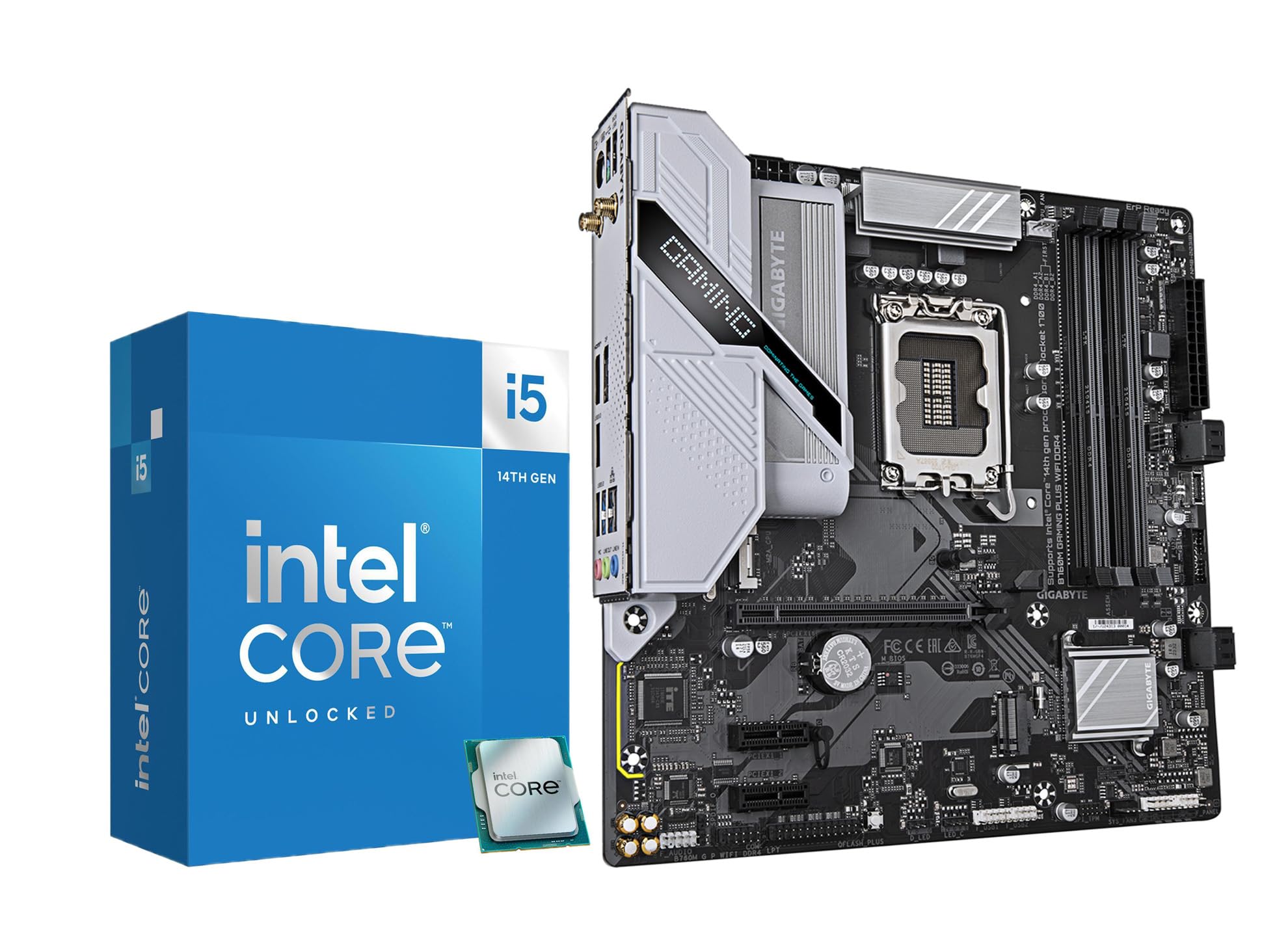
This Micro Center combo matches the Intel Core i5-14600K with a GIGABYTE B760M Gaming Plus WiFi DDR4 motherboard. The 14600K features 14 cores with integrated UHD Graphics 770, useful for troubleshooting or light desktop use without a GPU. The 5.3 GHz boost clock ensures top-tier gaming performance across AAA titles.
The B760M board includes Hybrid 4+1+1 phase VRM, Q-Flash Plus for BIOS updates without a CPU, and two PCIe 4.0 M.2 slots. DDR4 memory support lets users reuse existing RAM, significantly lowering upgrade costs. Users report stable Cinebench R23 multi-core scores around 22150 after undervolting, with temperatures staying at 62°C under liquid cooling.
This combo is ideal for those upgrading from older platforms like i7-7700K while keeping their DDR4 kits. The board’s USB-C front panel header and Wi-Fi 6 provide modern connectivity. BIOS version matters for GPU compatibility, so updating to the latest revision before installing a discrete GPU is recommended.
Why it’s great
- DDR4 support saves memory upgrade cost
- Integrated graphics for troubleshooting
- Q-Flash Plus enables CPU-less BIOS update
Good to know
- BIOS update needed for GPU compatibility
- VRM limited for heavy overclocking
- LGA 1700 platform is end-of-life
9. Micro Center Ultra 7 265K Combo
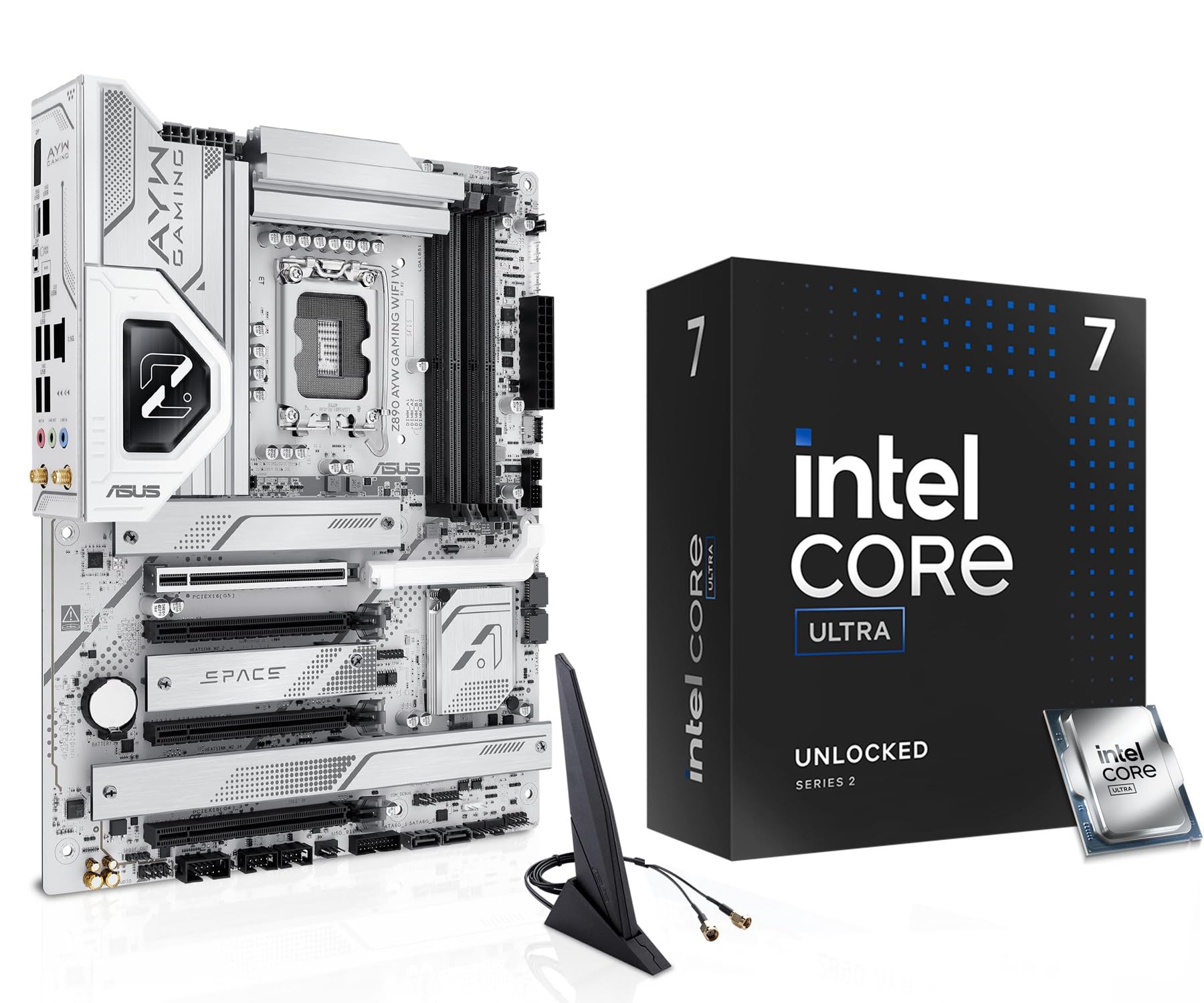
The Micro Center Ultra 7 265K combo bundles the next-gen Intel Core Ultra 7 with an Asus Z890 AYW Gaming WiFi W motherboard. The 20-core processor (8 P-cores + 12 E-cores) boosts to 5.5 GHz and features the LGA 1851 socket. This platform introduces Thunderbolt 4 support, PCIe 5.0 on all major slots, and DDR5 memory exclusively.
The Asus Z890 board includes 12+1+2+1 80A DrMOS power stages, PCIe 5.0 M.2 slot with cooling solution, and front USB 20 Gbps Type-C with 30 W PD/PPS fast charging. The DIY-friendly features like PCIe Slot Q-Release and BIOS FlashBack simplify building. Users report excellent stability after BIOS updates, with the chip handling both gaming and encoding tasks effortlessly.
No cooler is included, so a high-end air tower or 360mm AIO is mandatory. The board requires two 8-pin CPU power plugs, which some power supplies may not include. This combo is for builders who want the latest platform with maximum connectivity and are willing to invest in new DDR5 memory and a robust PSU.
Why it’s great
- LGA 1851 socket supports future Intel CPUs
- Thunderbolt 4 and PCIe 5.0 connectivity
- Robust VRM for stable overclocking
Good to know
- No cooler included; needs high-end solution
- Requires two 8-pin CPU power connections
- DDR5 only increases total build cost
FAQ
Do I need an unlocked K-series Intel CPU for overclocking?
Is integrated graphics important on a gaming CPU?
Should I buy a CPU with DDR4 or DDR5 support?
How many cores do I really need for gaming in 2025?
Final Thoughts: The Verdict
For most users, the affordable gaming cpu winner is the AMD Ryzen 5 5600X because it balances low price, strong gaming performance, and platform compatibility on AM4. If you want the highest frame rates possible, grab the Intel Core i5-14600KF for its 5.3 GHz boost and hybrid core design. And for heavy multitasking and streaming, nothing beats the AMD Ryzen 9 5900XT with its 16 cores and 72 MB cache.