
Building a digital archive means you are no longer hunting for space—you are hunting for reliability. The moment you fill your last internal bay, the choice shifts from convenience to cold, hard data integrity: every byte you archive today must surface intact years from now. That is what separates a temporary parking spot from a true archive drive.
I’m Min — the co-founder and writer behind Gadgets Feed. I’ve spent hundreds of hours digging through datasheets, shucking enclosures, and comparing spindle speeds, cache buffers, and interface bottlenecks to map out which drives actually hold up under long-term cold and warm storage duty.
This guide breaks down nine external and internal models that earned their place in a serious backup chain, and it all starts with finding the right best archive hard drive for your specific capacity and workflow demands.
How To Choose The Best Archive Hard Drive
Archive drives live a different life than your OS drive. They sit mostly idle, spin up once or twice a week for a backup job, then sleep. That changes the specs you should optimize for.
Spindle Speed and the 5400 RPM Advantage
For archival workloads, 5400 RPM drives generate less heat, draw less power, and produce lower vibration during the brief periods they spin. Lower operating temperature directly correlates with longer head and platter survival. A 7200 RPM drive offers faster read/write during large restores, but 5400 RPM models often outlast them in long-term cold storage.
Recording Technology: CMR over SMR
Conventional Magnetic Recording (CMR) writes data without overlapping tracks, ensuring consistent write speeds and simpler data recovery. Shingled Magnetic Recording (SMR) overlaps tracks to pack more terabytes per platter, but rewrite performance tank when the drive needs to re-write adjacent sectors. For an archive drive that rarely rewrites, SMR can work—but CMR is the safer bet for long-term data integrity.
Interface and Bus Power
External archive drives typically use USB 3.0 or USB 3.2 Gen 1 at 5 Gbps — plenty for mechanical hard drive speeds. USB-C with USB 3.2 Gen 2 (10 Gbps) future-proofs the enclosure, but the platter itself cannot saturate that bandwidth. Desktop drives require an AC adapter; portable 2.5-inch models draw power from the USB bus, which matters if your host port delivers marginal voltage.
Quick Comparison
On smaller screens, swipe sideways to see the full table.
| Model | Category | Best For | Key Spec | Amazon |
|---|---|---|---|---|
| Glyph BlackBox Pro 20TB | Premium | Professional media archives | 7200 RPM, 260 MB/s transfer | Amazon |
| WD 20TB Elements Desktop | Premium | Mass cold storage at scale | 20TB capacity, USB 3.0 | Amazon |
| SanDisk Professional G-Drive 6TB | Premium | Enterprise-class nearline archive | 7200 RPM Ultrastar inside | Amazon |
| LaCie Rugged RAID Shuttle 8TB | Mid-Range | Field archive with RAID protection | RAID 0/1, IP54 rated | Amazon |
| Seagate Expansion Desktop 10TB | Mid-Range | Reliable desktop backup pool | 10TB, drag-and-drop setup | Amazon |
| Seagate BarraCuda 8TB (Internal) | Mid-Range | Internal cold archive bay | 5400 RPM, 256MB cache | Amazon |
| WD 8TB Elements Desktop | Mid-Range | High-capacity plug-and-play archive | 8TB, 16 Gbps transfer rate | Amazon |
| WD 5TB Elements Portable | Budget | Portable archive on the go | 5TB, USB 3.2 Gen 1 | Amazon |
| Toshiba Canvio Basics 4TB | Budget | Entry-level backup drive | 4TB, USB 3.0 5 Gbps | Amazon |
In‑Depth Reviews
1. Glyph BlackBox Pro 20TB

The Glyph BlackBox Pro packs a 7200 RPM enterprise-grade drive inside a rugged aluminum shell with active fan cooling, making it the only drive on this list designed for 24/7 professional archiving. Delivering sustained transfers around 260 MB/s over USB-C 3.2 Gen 2, it handily beats the 250 MB/s advertised rating — real-world write performance that matters when you are backing up 4K/8K footage from a SanDisk Extreme Pro SSD.
With 20TB of formatted capacity showing up as 21.8TB after an NTFS reformat, this drive is built for studios that treat their archive as a living library. The included 3-2-1 warranty — three years hardware, two years Level-1 data recovery, one year advanced replacement — is the strongest protection plan in this roundup. It also ships with both USB-C and USB-A cables, eliminating adapter hunting.
Active fan cooling ensures the internal temperature stays regulated even during multi-hour write sessions, a critical factor for 7200 RPM drives that generate more heat than their 5400 RPM counterparts. The enclosure is heavy for frequent travel, but for a stationary archive workstation, the trade-off between mass and reliability is well worth it.
Why it’s great
- Enterprise-class 7200 RPM drive inside delivers verified 260 MB/s writes
- Best warranty package: hardware, data recovery, and advanced replacement
- Active fan cooling prevents thermal throttling during large archive jobs
Good to know
- Heavy chassis limits true portability
- Fan noise is audible in quiet studio environments
2. WD 20TB Elements Desktop

The WD 20TB Elements Desktop delivers the highest raw capacity in a plug-and-play enclosure in this lineup. Its 3.5-inch internal drive spins up to deliver sustained reads around 180 MB/s on PC and slightly higher on Mac, which is respectable for a 5400 RPM-class mechanism running over USB 3.0. Actual usable space lands at 18.19 TB — standard overhead for a 20TB drive.
WD’s reliability reputation carries this unit. The enclosure is compact for a 20TB desktop drive, with a small power brick and a 5-foot USB cable. It runs quiet during idle periods but produces an audible hum during active transfers. The drive ships NTFS-formatted, so Mac users should reformat to ExFat for dual-OS write access without third-party drivers.
For a cold archive that you plug in once a week for a full backup, the WD Elements 20TB hits the sweet spot between cost per terabyte and trusted brand track record. It does not include data recovery services like the Seagate Expansion or the Glyph, so factor in a separate backup plan for truly irreplaceable archives.
Why it’s great
- Highest single-drive capacity in the roundup at 20TB
- Quiet idle operation suitable for home office archive stations
- Compact footprint with a stable vertical orientation
Good to know
- No bundled data recovery service
- Active transfers produce noticeable spinning hum
3. SanDisk Professional G-Drive 6TB
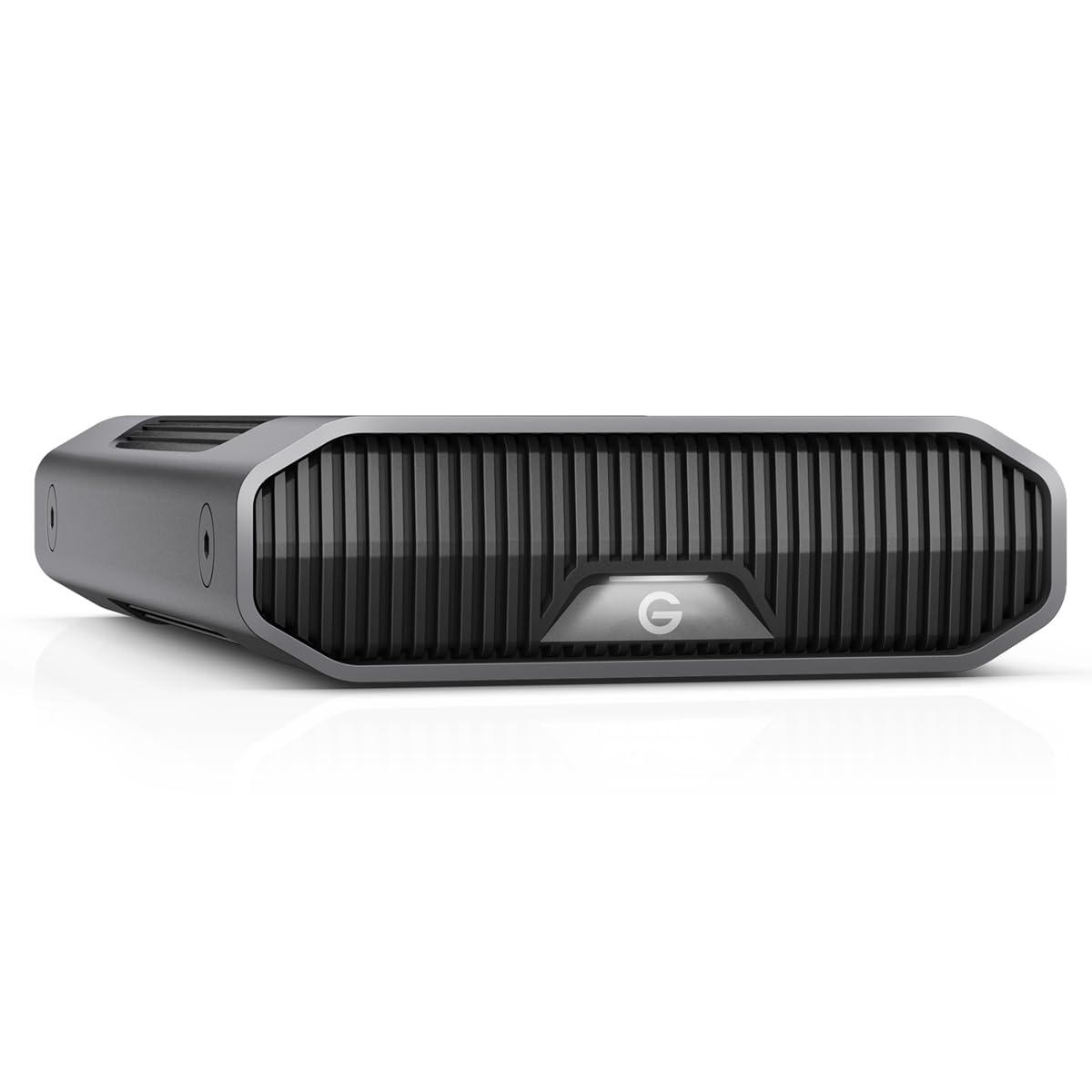
The SanDisk Professional G-Drive 6TB houses an enterprise-class Ultrastar 7200 RPM drive inside a stackable anodized aluminum enclosure. With USB-C supporting up to 10 Gbps (USB 3.2 Gen 2), it reaches up to 250 MB/s reads and writes — enough to saturate a 10GbE connection for nearline archive access. The aluminum body acts as a passive heatsink, keeping the 7200 RPM spindle from overheating during extended transfers.
It is Mac-ready out of the box and Time Machine compatible, but easily reformattable for Windows. The three-mode LED brightness adjustment lets you dim the activity light in a dark studio. Some users report corruption issues on Mac when routing through third-party hubs, so a direct USB-C connection is recommended for reliability.
The 6TB capacity is modest next to the 20TB monsters, but the enterprise-grade drive inside makes it a strong candidate for a high-durability archive that will be accessed frequently — a warm archive rather than a deep cold one. The Ultrastar’s higher power-on hours rating means it can handle daily use without premature wear.
Why it’s great
- Enterprise Ultrastar 7200 RPM drive inside for higher duty cycle
- Anodized aluminum enclosure acts as effective passive heatsink
- USB-C 10 Gbps matches nearline archive access speeds
Good to know
- 6TB capacity is low compared to rival desktop archive drives
- Some Mac users experienced corruption via third-party USB hubs
4. LaCie Rugged RAID Shuttle 8TB

The LaCie Rugged RAID Shuttle 8TB is the only drive in this list that offers hardware RAID 0/1 configuration inside a drop-shock, dust, and water-resistant chassis. This makes it uniquely suited for field archiving — photographers and videographers working on location who need both capacity and redundancy. In RAID 1 mode, the two internal 4TB drives mirror each other, so a single drive failure does not lose your archive.
The flat, envelope-like form factor is designed to slide into a crowded gear bag or shipping envelope. USB-C connectivity with up to 250 Mbps transfer speed is adequate for offloading card media in the field. The drive includes a one-month Adobe Creative Cloud subscription, which is a minor bonus for creative professionals setting up their workflow.
Self-encrypting password protection adds a security layer for sensitive client archives. However, some Mac users report the drive disappearing from the desktop and requiring a reboot to remount. For a premium-priced portable archive drive, that quirk is frustrating. If RAID redundancy is not a requirement, a single-drive portable may offer better reliability at a lower cost.
Why it’s great
- Hardware RAID 0/1 for speed or redundancy on the go
- IP54 dust and water resistance for location shoots
- Self-encrypting password protection for client data security
Good to know
- Some Mac users experience spontaneous dismount issues
- Premium price does not always include responsive tech support
5. Seagate Expansion Desktop 10TB

The Seagate Expansion Desktop 10TB is the most straightforward plug-and-play archive drive in the mid-range tier. Connect the power adapter and USB cable, and the drive is recognized immediately on both Windows and Mac. The drag-and-drop file saving works right out of the box without software installation, making it the easiest option for anyone who wants a simple, large backup target.
It includes Rescue Data Recovery Services, which is a meaningful addition for an archive drive — if the drive fails, Seagate attempts to recover your data as part of the warranty. That is a safety net that WD’s Elements line does not match at this price tier. Real-world transfer speeds depend heavily on the USB controller and cable quality; a full USB 3.2 compliant chain yields the best performance.
The enclosure is a standard desktop form factor with a built-in power supply brick. At 10TB, it hits a capacity sweet spot for home media archives or small business file servers without the cost jump to 14TB or 20TB. For users who want data recovery peace of mind without jumping to the enterprise tier, this is the most balanced mid-range pick.
Why it’s great
- Rescue Data Recovery Services included for archive safety net
- True plug-and-play with no software required on Windows or Mac
- 10TB capacity hits a strong cost-per-terabyte point in the mid-range
Good to know
- USB Type-A cable may require adapter for modern laptops
- Full speed requires USB 3.2 compliance across the entire chain
6. Seagate BarraCuda 8TB (Internal)

The Seagate BarraCuda 8TB is an internal 3.5-inch SATA III drive running at 5400 RPM with a 256MB cache — a classic cold storage configuration for a desktop archive bay. Its 190 MB/s sustained transfer rate is adequate for nightly backups and media file transfers, but not designed for speed-critical workloads. The 5400 RPM spindle keeps heat and noise low, which is ideal for a drive that will spin mostly at idle.
It arrives in frustration-free packaging — just the drive in an anti-static bag, no cables or mounting screws. The 8TB capacity is solid for a cold archive that stores completed projects, photo libraries, or retro game ROM collections. The AcuTrac technology helps maintain accurate head positioning during thermal swings, which is relevant for a drive that may sit in a case with varying airflow.
Users report that write speeds range from 20 MB/s to 250 MB/s depending on the zone being written to, which is normal for SMR-based BarraCuda drives at this capacity. If you plan to rewrite data frequently, consider the CMR-based IronWolf or WD Red Plus instead. For a write-once, read-rarely cold archive, this is a price-effective internal option.
Why it’s great
- 5400 RPM spindle runs cool and quiet for internal cold storage
- 256MB cache buffers sequential writes for decent bulk transfer
- Proven BarraCuda platform with 20 years of Seagate development
Good to know
- No cables, screws, or manual included in packaging
- SMR recording limits rewrite performance for active archives
7. WD 8TB Elements Desktop

The WD 8TB Elements Desktop is a reliable, no-frills external archive drive that prioritizes stability over flash. The desktop enclosure sits vertically on a small footprint and does not tip over easily, making it a clean addition to a workstation desk. USB 3.0 delivers fast enough transfers for full-disk backups without saturating the bus.
WD’s reputation for consumer drive reliability is reflected in the customer feedback — users consistently describe it as quiet, cool-running, and stable during multi-hour backup sessions. The drive does not include a data recovery plan like the Seagate Expansion, but WD’s standard warranty process is straightforward for hardware failures. The 8TB capacity is well-suited for archiving a decade of photos, documents, and media files.
Transfer speeds are smooth and consistent, and the drive does not run excessively hot compared to some competing desktop externals. For users who simply need a large, trustworthy external archive without RAID or encryption complexity, the WD 8TB Elements is a proven, uncomplicated choice.
Why it’s great
- Stable vertical design with a small desk footprint
- Runs cool and quiet during extended backup sessions
- Consistent transfer speeds without thermal throttling
Good to know
- No bundled data recovery service
- Requires AC adapter, not bus-powered
8. WD 5TB Elements Portable

The WD 5TB Elements Portable packs 5TB into a slim 2.5-inch form factor that draws power entirely from the USB bus — no AC adapter needed. This is a strong option for a portable cold archive that lives in a laptop bag and gets plugged in weekly for backup. USB 3.2 Gen 1 offers up to 5 Gbps bandwidth, though the mechanical drive tops out far below that threshold.
Plug-and-play expandability means it works immediately with Windows PCs, and it is compatible with Mac after reformatting away from NTFS. The drive runs quiet and only slightly warm during use. Some users note that the included USB cable can be a weak point over time, so a spare cable is worth keeping in the bag. At 5TB, it holds a substantial archive of documents, music, and raw photo files.
For users who need a travel-friendly archive that does not require a power brick, this is the most portable option in the mid-range tier. It is not designed for heavy daily read-write cycles, but as a weekly sync target for a laptop archive, it performs reliably.
Why it’s great
- Bus-powered 2.5-inch design requires no AC outlet
- 5TB capacity in a truly portable form factor
- Quiet operation and minimal heat generation
Good to know
- Included USB cable may wear out faster than the drive itself
- NTFS pre-format requires reformatting for Mac Time Machine
9. Toshiba Canvio Basics 4TB

The Toshiba Canvio Basics 4TB is the most budget-conscious entry in this archive drive roundup, offering a compact 2.5-inch portable drive with a matte, smudge-resistant finish. Plug-and-play with no software to install, it works immediately on Windows PCs and supports USB 3.0 with backward compatibility to USB 2.0. The 4TB capacity is a sensible starting point for a first-time archive buyer organizing photos and documents.
The LED indicator blinks slowly during operation, giving a clear visual cue that the drive is active. Pre-formatted NTFS for Windows means Mac users will need to reformat for native write support. The drive runs cool even after three hours of continuous downloads, thanks to its low-power 2.5-inch mechanism that draws power from the USB bus without an external adapter.
For the price, the Canvio Basics delivers fast enough transfers for nightly backups and easy portability for travel. It is the least expensive option in this guide, making it a viable archive drive for students or anyone establishing their first backup routine. The trade-off is lower capacity and no data recovery service — pair it with cloud backup for complete protection.
Why it’s great
- Lowest entry cost for getting started with a dedicated archive drive
- Sleek matte finish resists fingerprints and smudges
- Runs cool during extended use with no external power needed
Good to know
- 4TB capacity fills quickly for media-heavy archives
- No data recovery or backup software included
FAQ
Should I choose 5400 RPM or 7200 RPM for my archive drive?
Is SMR safe for long-term cold archival storage?
Final Thoughts: The Verdict
For most users, the best archive hard drive winner is the Glyph BlackBox Pro 20TB because it combines an enterprise-class 7200 RPM drive, active cooling, and the strongest warranty package in this roundup for professional-grade data security. If you want maximum raw capacity at a lower cost per terabyte, grab the WD 20TB Elements Desktop. And for a portable archive that can survive field work, nothing beats the LaCie Rugged RAID Shuttle 8TB with its hardware RAID 1 mirroring and IP54-rated chassis.