
Migrating from a standard flat panel to a curved 4K gaming monitor isn’t just about resolution; it’s about redefining your peripheral vision in the heat of battle. The 16:9 panel wrapped around your field of view reduces eye movement, pulling you deeper into the world where every pixel of 3840×2160 resolution matters for spotting distant threats. This shift demands a specific set of hardware considerations that go far beyond basic “4K” labels.
I’m Min — the co-founder and writer behind Gadgets Feed. My deep-dive research into this space focuses on parsing the nuanced interplay between panel technology, native refresh rates, and adaptive sync implementation to identify which monitors truly deliver a competitive edge without compromising image fidelity.
This guide analyzes the market’s top contenders, from blistering 240Hz QD-OLEDs to expansive 32:9 super-ultrawides, to help you identify the perfect best 4k curved gaming monitor for your setup and budget.
How To Choose The Best 4K Curved Gaming Monitor
Selecting the right 4K curved gaming monitor requires balancing resolution demands with raw speed. You need a display that leverages its curvature to enhance immersion without introducing distracting artifacts. Here are the three core pillars to evaluate before clicking “buy.”
Panel Technology: VA vs. OLED vs. Fast IPS
The panel determines contrast, color, and response. VA panels offer excellent static contrast (3000:1+) and deep blacks without blooming, making them a strong mid-range choice for dark room gaming. OLED (and QD-OLED) delivers infinite contrast with true blacks and near-instantaneous pixel response (0.03ms), but requires careful burn-in management. Fast IPS panels boast the widest viewing angles and fastest gray-to-gray transitions, but their native contrast ratio (~1000:1) falls behind VA and OLED for HDR content.
Refresh Rate and Response Time
At 4K, pushing frame rates beyond 120Hz requires a high-end GPU. A 240Hz monitor is future-proofing, but its benefit is realized only with hardware capable of exceeding 120 fps. Response time, measured in ms (GtG), directly impacts motion blur. You want a 1ms (or lower) response time for competitive FPS titles. OLED panels’ sub-0.1ms response times completely eliminate ghosting, providing a motion clarity advantage that LCDs cannot match at any spec.
Connectivity: HDMI 2.1 and DisplayPort 1.4
To run a 4K curved monitor at 144Hz or higher with 10-bit color depth, you need a DisplayPort 1.4 (with DSC) or HDMI 2.1 connection. HDMI 2.1 is essential for PlayStation 5 or Xbox Series X users, as it unlocks 4K 120Hz HDR without compression artifacts. Ensure your monitor supports the specific bandwidth of your GPU and console generation before purchasing.
Quick Comparison
On smaller screens, swipe sideways to see the full table.
| Model | Category | Best For | Key Spec | Amazon |
|---|---|---|---|---|
| CRUA 32″ 4K | Mid-Range | Best Value 4K 240Hz | 240Hz VA, 1500R | Amazon |
| ASUS ROG Strix XG32UCG | Mid-Range | Dual Mode (FHD 320Hz) | 0.3ms Fast IPS | Amazon |
| Alienware AW3423DWF | Premium | Best Ultrawide QD-OLED | 165Hz, 21:9, 1800R | Amazon |
| LG 37G800A-B | Mid-Range | Large 37″ 4K Display | 165Hz VA, 4000:1 CR | Amazon |
| Acer Predator X32 | Premium | Premium 4K OLED 240Hz | 0.03ms QD-OLED | Amazon |
| LG 34GS95QE | Premium | Aggressive 800R Curve | 240Hz, 21:9, 0.03ms | Amazon |
| Samsung Odyssey Neo G8 | Premium | High Brightness HDR2000 | 240Hz, VA Mini-LED | Amazon |
| Alienware AW3425DW | Premium | Ultrawide QD-OLED 240Hz | 240Hz, 21:9, 1800R | Amazon |
| Samsung Odyssey G9 G91F | Premium | Super-Ultrawide 32:9 | 144Hz, 1000R, 5120×1440 | Amazon |
| MSI MPG 321URX | Premium | Top-Tier 4K QD-OLED | 240Hz, 0.03ms, 32″ | Amazon |
| Dell Alienware AW3225QF | Premium | Compact 4K QD-OLED | 240Hz, 0.03ms, 32″ | Amazon |
In‑Depth Reviews
1. MSI MPG 321URX QD-OLED

The MSI MPG 321URX represents the sweet spot for 4K curved gaming, delivering a 31.5-inch QD-OLED panel that hits 240Hz with a 0.03ms GtG response time. This translates to flawless motion clarity where fast-moving objects remain sharp with zero perceptible ghosting, a significant upgrade from even the fastest IPS panels. The VESA DisplayHDR True Black 400 certification ensures that inky blacks coexist with vibrant highlights, creating a stunning HDR experience in compatible titles.
Its color performance is equally impressive, covering 99% DCI-P3 with factory Delta E ≤2 accuracy out of the box, which makes it viable for color-critical content creation alongside gaming. The inclusion of a KVM switch and PiP/PbP functionality adds a layer of productivity that is rare at this price point, allowing you to control two systems from a single keyboard and mouse setup. The stand, while sturdy, is somewhat wide; a monitor arm is a recommended upgrade for desk space optimization.
Connectivity is future-proof with two HDMI 2.1 ports and a DisplayPort 1.4a, supporting full 4K 240Hz with 10-bit color via DSC. The OLED Care 2.0 suite provides robust burn-in mitigation, including pixel shift and static screen dimming, giving you peace of mind for mixed-use scenarios that include productivity tasks with static UI elements.
Why it’s great
- Stunning QD-OLED contrast and color volume with true blacks.
- Blazing 240Hz refresh rate with instant 0.03ms pixel response.
- Built-in KVM switch and robust OLED Care features.
Good to know
- Stand has a wide footprint that consumes desk space.
- Brightness in large SDR windows is limited to around 250 nits.
2. Samsung Odyssey Neo G8 (G85NB)

As the world’s first 4K monitor to hit a 240Hz refresh rate, the Odyssey Neo G8 remains a powerhouse thanks to its Quantum Mini-LED backlighting. This technology delivers exceptional brightness peaking at 2000 nits (HDR2000) with a 1,000,000:1 dynamic contrast ratio, creating a high-impact HDR experience that rivals OLED in highlights while maintaining deep blacks without burn-in risk. The aggressive 1000R curvature matches the human eye’s natural field of view, providing an intense sense of immersion that is particularly effective in sim racing and open-world RPGs.
The matte display coating is a standout feature for brightly lit rooms, effectively eliminating distracting reflections that plague glossy panels. Its 1ms GtG response time, while not as instant as OLED, is more than sufficient for competitive play, and the AMD FreeSync Premium Pro certification ensures a tear-free experience across a wide frame rate range. However, the native color gamut coverage leans towards oversaturation in its default modes, requiring calibration to the sRGB preset for accurate color work.
Potential buyers should be aware of a well-documented scan line issue that can occur at 240Hz in certain scenarios, though many users find this mitigated by running the monitor at 120Hz or through power cycling the display. The build quality is solid with a matte white and black aesthetic, but the included stand is somewhat wobbly and the rear-mounted joystick is finicky. It demands a top-tier GPU to push 4K 240Hz, but for HDR enthusiasts who dislike OLED’s potential durability concerns, this is the premier choice.
Why it’s great
- Phenomenal peak brightness of 2000 nits for stunning HDR highlights.
- Excellent near-OLED contrast from Mini-LED local dimming.
- Aggressive 1000R curve provides maximum immersion.
Good to know
- Potential scan line issues at 240Hz on certain units.
- Stand feels wobbly and OSD buttons are difficult to use by feel.
3. Alienware AW3423DWF

The Alienware AW3423DWF is a legendary 34-inch QD-OLED ultrawide that offers an incredible balance of price and performance in the premium curved market. With a 3440×1440 resolution, 175Hz refresh rate, and a 1800R curve, it provides a wide, immersive canvas for both gaming and productivity. The Quantum Dot technology delivers a remarkable 99.3% DCI-P3 color gamut and a peak brightness of 1000 nits, making HDR content in games like Cyberpunk 2077 look truly breathtaking with specular highlights popping against pure blacks.
Its 0.1ms GtG response time is practically instantaneous, eliminating all motion blur and providing a clarity in fast-paced shooters that even the best 4K 240Hz LCDs cannot match. The included Creator Mode allows for switching between DCI-P3 and sRGB color spaces with adjustable gamma, making it a viable option for content creators who value color accuracy. The build quality is excellent with a clean, white aesthetic, and the 3-year warranty includes coverage for OLED burn-in, which is a significant confidence booster for longevity.
One common critique is that the screen surface is somewhat fragile and prone to micro-scratches from cleaning, so a microfiber cloth is essential. The resolution is WQHD (3440×1440), which is excellent for pixel density at 34 inches, but it is not true 4K (3840×2160). For users coming from a standard 16:9 4K display, they will notice a slight decrease in sharpness, but the trade-off for the ultrawide field of view is generally considered well worth it for gaming immersion.
Why it’s great
- Excellent value for a high-performance QD-OLED ultrawide.
- Infinite contrast ratio with vibrant, punchy HDR colors.
- 3-year warranty with burn-in coverage provides peace of mind.
Good to know
- Screen is fragile and can be scratched easily during cleaning.
- Resolution is WQHD, not true 4K UHD.
4. Acer Predator X32

The Acer Predator X32 brings a 31.5-inch 4K QD-OLED panel with a true 10-bit color depth and a 240Hz refresh rate, targeting the enthusiast gamer who demands the absolute best image quality. The 1700R curvature is gentle but effective, adding a layer of depth without distorting the 16:9 aspect ratio. The DCI-P3 99% color gamut and VESA DisplayHDR True Black 400 certification ensure that colors are exceptionally rich and blacks are truly infinite, providing a visual feast for both single-player epics and competitive titles.
The near-instant 0.03ms response time makes this one of the fastest 4K panels available, eliminating motion blur entirely for an extremely clean image even at high frame rates. The built-in speakers are a welcome addition for those who want to avoid desktop clutter, and the ergonomic stand offers full tilt, swivel, and height adjustment for comfortable long sessions. However, the OSD is controlled by a single joystick on the back, which can be cumbersome to navigate for frequent adjustments.
A notable quirk reported by some users involves periodic prompts for panel refresh, which can be intrusive during gameplay if not scheduled properly. The peak brightness, while excellent for HDR, can feel dim in very bright rooms due to the nature of OLED’s APL (Average Picture Level) limiting. For the price, this monitor offers a complete package, but the aggressive OLED care features can be a minor friction point for users who prefer a completely hands-off experience.
Why it’s great
- Top-tier QD-OLED image quality with infinite contrast and vibrant color.
- Blazing 240Hz refresh rate with near-instant 0.03ms response time.
- Full ergonomic stand with tilt, swivel, and height adjustment.
Good to know
- OSD can be confusing and menu navigation is clunky.
- Auto panel refresh prompts can interrupt gameplay.
5. Dell Alienware AW3225QF

The Dell Alienware AW3225QF is a 32-inch 4K QD-OLED monitor that delivers a sublime gaming experience with a 240Hz refresh rate and 0.03ms response time. It is one of the few 4K OLED monitors that is G-Sync Compatible, ensuring a rock-solid variable refresh rate experience with NVIDIA GPUs, eliminating screen tearing and stutter entirely. The color calibration out of the box is superb, with multiple sRGB and DCI-P3 presets that look accurate and vibrant without requiring manual tweaking.
The 1000R curvature on this 32-inch panel is more subtle than on larger ultrawides, but it effectively reduces eye strain by maintaining a consistent focal distance across the screen. The build quality exudes premium with a sturdy stand that offers height, tilt, and swivel adjustments. It also includes an active cooling fan, which is generally inaudible but can be heard in a completely silent room. The HDMI 2.1 port allows full 4K 120Hz from consoles, making it a fantastic dual-purpose monitor for PC and PS5 gamers.
One trade-off is the peak brightness, which is limited to around 1000 nits for small highlights and around 250 nits for full white screens, which is typical for QD-OLED. Additionally, the Dolby Vision implementation has been noted by some users to cause a raised black level in dark rooms, making the standard HDR mode a better choice for a pure black experience. It is a premium purchase that delivers a near-flawless image, but the active cooling fan and specific HDR mode quirks are points to consider.
Why it’s great
- Excellent out-of-box color accuracy with great SDR presets.
- G-Sync Compatible for tear-free gaming with NVIDIA GPUs.
- Supports full 4K 120Hz HDR from PS5 and Xbox Series X.
Good to know
- Active cooling fan can be audible in a quiet room.
- Dolby Vision mode can raise black levels in dark environments.
6. ASUS ROG Strix XG32UCG

The ASUS ROG Strix XG32UCG is a 32-inch 4K Fast IPS monitor that offers a unique dual-mode feature, allowing it to run at 4K 160Hz or switch to FHD 320Hz. This dual-mode capability is a killer feature for gamers who want high-resolution immersion for single-player titles and blistering frame rates for competitive esports, all on one monitor. The 0.3ms response time is among the fastest for IPS panels, ensuring minimal ghosting even at the 320Hz setting.
The ASUS Extreme Low Motion Blur Sync (ELMB SYNC) technology can be combined with variable refresh rate, effectively eliminating both ghosting and screen tearing simultaneously, which is rare and highly beneficial for fast-paced gameplay. Color coverage is solid at 95% DCI-P3, and the 32-inch 4K resolution provides excellent pixel density for sharp text and detailed game worlds. The stand is premium, offering height, tilt, swivel, and even a tripod socket for mounting a webcam or streaming microphone.
The matte screen coating effectively manages reflections, making it suitable for well-lit gaming rooms. While it lacks the infinite contrast of an OLED, the brightness is very high, and the colors are punchy. The KVM functionality via the USB-C port with DP Alt mode is a welcome addition for managing a desktop and laptop setup. The main downside is that achieving the full 320Hz refresh rate requires dropping to 1920×1080 resolution, which is noticeably less sharp on a 32-inch screen.
Why it’s great
- Dual-mode allows 4K 160Hz for immersion and FHD 320Hz for competition.
- ELMB SYNC works with VRR for tear-free, blur-free motion.
- Excellent build quality with a very functional ergonomic stand.
Good to know
- FHD resolution is less sharp on a 32-inch screen.
- Contrast ratio is typical for IPS, not as deep as VA or OLED.
7. LG 34GS95QE

The LG 34GS95QE is a 34-inch OLED ultrawide that sets itself apart with the most aggressive 800R curvature on the market. This steep curve is designed to completely envelop your peripheral vision, creating a deeply immersive cockpit-like experience for sim racing and first-person shooters. The OLED panel delivers perfect blacks and an infinite contrast ratio, with a 1.5M:1 contrast that makes dark scenes look incredibly detailed. The 240Hz refresh rate and 0.03ms response time provide elite-level motion clarity that is ideal for competitive gaming.
It is certified for both AMD FreeSync Premium Pro and NVIDIA G-Sync Compatible, ensuring a tear-free experience regardless of your GPU brand. The HDMI 2.1 port supports full 4K 120Hz from consoles, though the monitor’s native resolution is 3440×1440. The anti-glare with low reflection (AGLR) coating is excellent, maintaining the OLED’s deep blacks without turning into a mirror. The out-of-box color performance is superb, with vibrant and accurate colors that require minimal adjustment.
The main drawback is that the 800R curve is very polarizing; some gamers find it too aggressive for productivity work, as straight lines can appear slightly bent. Text clarity is also a known issue with OLED ultrawides due to the subpixel layout, making it less ideal than a high-PPI IPS monitor for heavy spreadsheet use. The included stand is heavy and takes up significant desk space, so a VESA monitor arm is a commonly recommended upgrade for this model.
Why it’s great
- Most immersive 800R curve that truly fills your peripheral vision.
- Perfect OLED blacks with excellent anti-glare coating.
- 240Hz refresh rate and G-Sync Compatible.
Good to know
- 800R curve may be too aggressive for productivity work.
- Text clarity is not ideal due to OLED subpixel layout.
8. Alienware AW3425DW

The Alienware AW3425DW is the successor to the AW3423DWF, offering an upgraded refresh rate to 240Hz on its 34.2-inch WQHD QD-OLED panel. This monitor retains the stunning 1800R curve that provides wide, immersive visuals without the distortion of steeper curves. The WQHD resolution (3440×1440) offers a great balance of pixel density and frame rate performance, allowing even mid-range GPUs to drive it effectively. The DCI-P3 99.3% color coverage and Delta E<2 accuracy are factory-calibrated, delivering a breathtakingly accurate and vibrant image out of the box.
It is certified for AMD FreeSync Premium Pro and VESA AdaptiveSync, ensuring smooth, tear-free gameplay with a wide VRR range. The build quality is typically Alienware high, with a sleek new Legend 2.0 design language, customizable RGB lighting, and a robust stand offering full ergonomic adjustments. The screen surface is a matte finish that handles reflections better than some QD-OLED panels, making it more versatile for bright room conditions.
The potential downside is the same across all QD-OLED ultrawides: text clarity is not as sharp as a standard LCD panel with high PPI, which is a consideration for heavy productivity users. Burn-in, while covered by a 3-year warranty, remains a risk that requires conscious management through pixel refresh and hiding taskbars. If you prioritize an immersive, fast gaming experience and are willing to manage OLED care, this monitor delivers elite performance.
Why it’s great
- Smooth 240Hz refresh rate on a stunning QD-OLED panel.
- Factory calibrated with Delta E<2 for exceptional color accuracy.
- Matte screen surface reduces reflections.
Good to know
- Text clarity is not as sharp as high-PPI LCDs.
- Requires active OLED burn-in management.
9. LG 37G800A-B
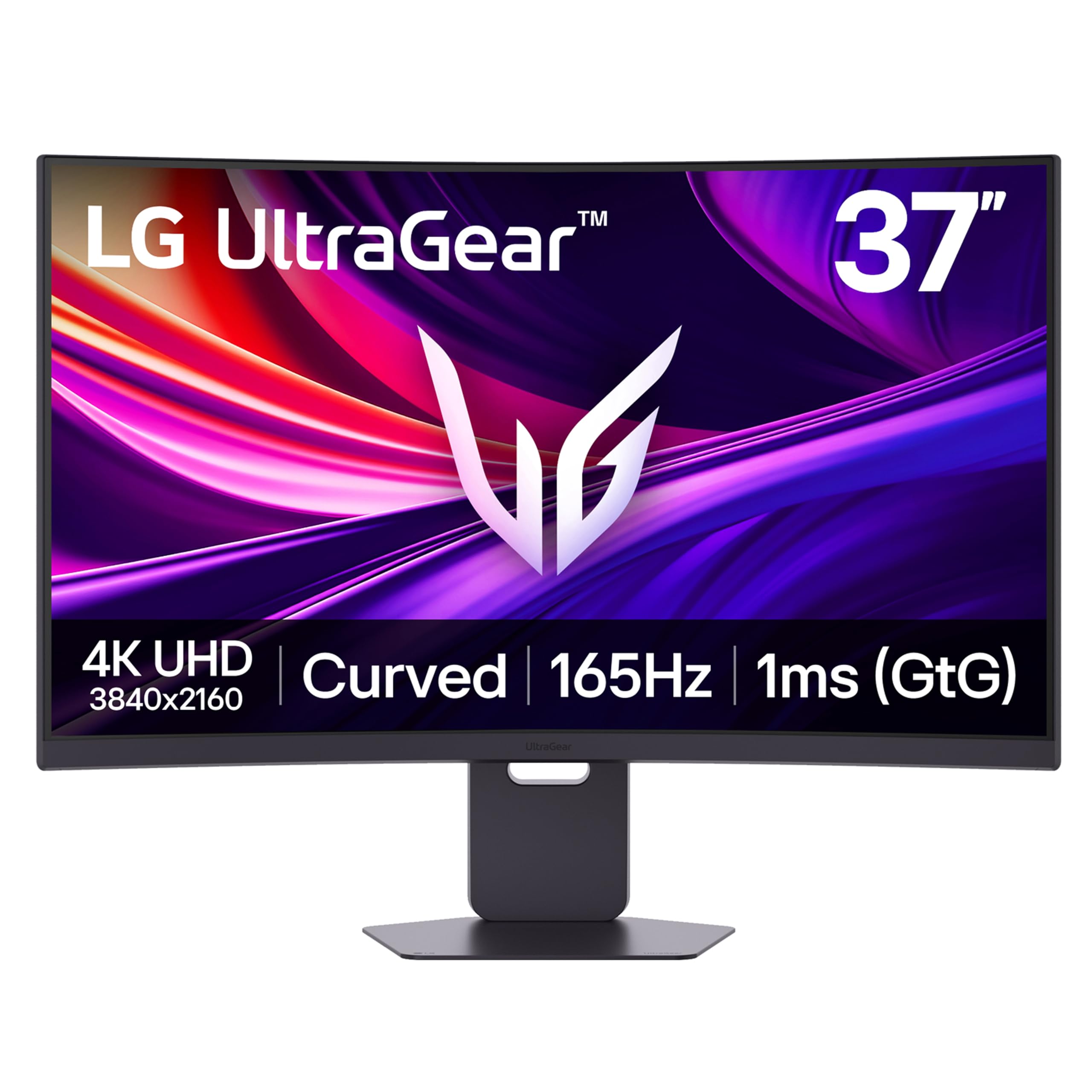
The LG 37G800A-B is a unique offering that provides a massive 37-inch 4K VA curved display with a 165Hz refresh rate and a 1ms GtG response time. The large 37-inch size is a key differentiator, offering more screen real estate than the standard 32-inch 4K monitors without stepping up to a super-ultrawide. The VA panel delivers a high 4000:1 contrast ratio and VESA DisplayHDR 600 certification, providing deep blacks and good highlights for a rich HDR experience that outshines IPS panels in dark scenes.
It includes a USB-C port with 65W power delivery, making it an excellent hub for a gaming laptop, and dual HDMI 2.1 ports for next-gen consoles. The stand is fully ergonomic, offering height, tilt, and swivel adjustments, which is essential for a screen of this size to fit comfortably on your desk. The built-in speakers, while not powerful enough to replace a dedicated set, are serviceable for casual use and alerts. The AMD FreeSync Premium Pro certification ensures smooth tear-free gameplay.
The main consideration is the VA panel’s native slower pixel response, which can exhibit some dark-level smearing in fast-paced transitions, though LG’s implementation here is better than many VA monitors. The OSD joystick is located on the back and can be awkward to reach, especially with the monitor’s size. For the price, this is a fantastic value proposition for a large 4K high-refresh display that works brilliantly for both gaming and immersive productivity.
Why it’s great
- Massive 37-inch screen size offers incredible immersion and real estate.
- Good 4000:1 contrast ratio with DisplayHDR 600 certification.
- USB-C with 65W PD and dual HDMI 2.1 for versatile connectivity.
Good to know
- VA panel can exhibit some dark-level smearing.
- OSD joystick is located awkwardly on the back.
10. CRUA 32″ 4K 240Hz

The CRUA 32-inch curved gaming monitor is a standout entry-level option that delivers a combination of 4K resolution and a 240Hz refresh rate on a VA panel at an exceptionally competitive price point. This combination is typically found on more expensive models, making it a compelling choice for budget-conscious gamers who prioritize smooth motion and sharp resolution. The 1500R curve is gentle and helps with immersion, and the VA panel’s 3000:1 contrast ratio provides decent blacks for a more cinematic experience in dark rooms.
It comes equipped with two HDMI 2.1 ports, which are fully compatible with PlayStation 5 and Xbox Series X, allowing for 4K 120Hz VRR gaming. The built-in speakers are a convenient addition for desk setups with limited space. The monitor also includes PIP/PBP functionality, which allows for displaying signal from two sources simultaneously, a handy feature for productivity. The white chassis offers a unique aesthetic that is not commonly found in gaming monitors.
The compromises are predictable for an entry-level model: the 300 cd/m² brightness is adequate but not HDR-capable, and the color gamut covers 120% sRGB but lacks the wider DCI-P3 coverage for true HDR. The stand only offers tilt adjustment, lacking height and swivel, and some users report the OSD menu can be confusing without a remote. For a pure performance spec list at its price point, the CRUA offers immense value for 4K 240Hz gaming.
Why it’s great
- Exceptional value for a 4K 240Hz gaming monitor.
- HDMI 2.1 support for full console compatibility.
- Built-in speakers and PIP/PBP for versatility.
Good to know
- Brightness and color gamut are limited, lacking true HDR.
- Stand only offers tilt adjustment; no height or swivel.
11. Samsung Odyssey G9 G91F

The Samsung Odyssey G9 G91F is a massive 49-inch super-ultrawide monitor with a 32:9 aspect ratio, effectively equivalent to two 27-inch 1440p monitors side-by-side without a bezel. Its DQHD resolution (5120×1440) provides immense horizontal screen real estate, making it a productivity powerhouse for multitasking with multiple windows and an incredibly immersive gaming monitor for supported titles. The 1000R curve is perfectly matched to the width of the screen, ensuring the entire display is equidistant from the eyes, which reduces neck and eye strain over long sessions.
The 144Hz refresh rate and 1ms MPRT response time provide a smooth gaming experience, though it is not as fast as the 240Hz panels on this list. The DisplayHDR 600 certification and VA panel’s high contrast ratio deliver vibrant colors and improved black levels compared to standard IPS panels. The monitor is AMD FreeSync Premium Pro certified, providing a tear-free experience in compatible games. Its sleek aluminum silver finish and sturdy ergonomic stand with tilt and height adjustment give it a premium desk presence.
The primary limitation is that the native resolution is not true 4K (3840×2160), but rather dual QHD (5120×1440). This means it will not display a perfect 4K image without scaling. Additionally, it lacks built-in speakers, so you will need a dedicated audio set. The 144Hz refresh rate is also lower than the competition’s high-end offerings. This is a specialized tool for users who want the most immersive ultrawide experience and maximum productivity, not just straight pixel count.
Why it’s great
- Massive 49-inch 32:9 super-ultrawide screen with high immersion.
- 1000R curve is perfectly optimized for a 49-inch width.
- Excellent for productivity with space for multiple full-size windows.
Good to know
- Resolution is Dual QHD (5120×1440), not standard 4K UHD.
- No built-in speakers and lower 144Hz refresh rate.
FAQ
Is a 240Hz refresh rate necessary for a 4K curved gaming monitor?
What is the ideal curvature for a 4K curved gaming monitor?
Can I use a 4K curved monitor for productivity and work?
Final Thoughts: The Verdict
For most users, the best 4k curved gaming monitor winner is the MSI MPG 321URX because it offers a nearly flawless QD-OLED experience with a 240Hz refresh rate, excellent color accuracy, and a robust feature set at a price that defines the premium mid-range. If you want the absolute best HDR brightness without OLED burn-in concerns, grab the Samsung Odyssey Neo G8. And for the ultimate immersive super-ultrawide experience for both gaming and productivity, nothing beats the Samsung Odyssey G9 G91F.