
The shift to a 14-inch tablet is less about portability and more about reclaiming screen real estate for real work, art, and cinema. You are no longer squinting at a phone or compromising on a cramped laptop display; instead, you are looking at a mobile command center that fits in a bag. The decision now is about which flagship-grade processor, stylus latency, and display technology justifies the footprint on your desk or in your lap.
I’m Min — the co-founder and writer behind Gadgets Feed. I have spent hundreds of hours mapping the specifications of large-format slates, analyzing processor benchmarks, display resolutions, and battery capacities to separate genuine performance upgrades from marketing fluff.
This guide dissects every viable contender in the large-screen space to help you pinpoint the absolute best 14 inch tablet that matches your workflow, creative ambitions, or entertainment habits without wasted investment.
How To Choose The Best 14 Inch Tablet
A 14-inch tablet sits in a unique intersection between a portable computer and a media slab. The right choice depends on how you prioritize raw performance, display fidelity, and accessory ecosystem. Ignore the screen size alone—focus on the chipset and the stylus support that powers your primary use case.
Processor and RAM: The Real Engine
A large display demands more graphics processing to drive high resolutions. Look for octa-core chipsets like the MediaTek Dimensity 8300 or the Snapdragon 8s Gen 3 if you are multitasking or using creative apps. RAM is equally critical—12GB is the new baseline for smooth split-screen operation, while virtual RAM extensions are a bonus but not a substitute for physical memory.
Display Technology and Stylus Latency
Not all 14-inch panels are equal. OLED delivers true blacks and is essential for photo editing and HDR content, while LCD panels with high nits ratings work better in bright rooms. For artists, stylus support with 4096+ pressure levels and low latency (under 20ms) is non-negotiable—look for Wacom EMR or Apple Pencil compatibility rather than generic capacitive pens.
Battery Capacity and Charging Speed
A larger screen consumes more power, so look for batteries in the 10,000mAh to 11,600mAh range. Fast charging above 30W makes a meaningful difference when you need to top up between meetings. Some premium models also support reverse charging to power your phone, which adds practical value on the road.
Quick Comparison
On smaller screens, swipe sideways to see the full table.
| Model | Category | Best For | Key Spec | Amazon |
|---|---|---|---|---|
| Lenovo Idea Tab Pro | Mid-Range | Student Productivity & Gaming | 12.7″ 3K LCD / Dimensity 8300 | Amazon |
| Samsung Galaxy Tab S8 Ultra | Premium | Professional Productivity & Display | 14.6″ AMOLED / 11200mAh | Amazon |
| Apple iPad Air 13-inch | Premium | Ecosystem-First Users & Creatives | 13″ Liquid Retina / M4 Chip | Amazon |
| Wacom MovinkPad Pro 14 | Premium | Digital Artists & Illustrators | 14″ OLED 3K / 8192 Pressure Levels | Amazon |
| Microsoft Surface Pro 12″ | Premium | Windows Workflow & Desktop Replacement | 12″ PixelSense / Snapdragon X Plus | Amazon |
| Samsung Galaxy Tab S11 Ultra | Premium | Ultimate Android Media & Multitasking | 14.6″ AMOLED 120Hz / 12GB RAM | Amazon |
| TCL NXTPAPER 14 | Mid-Range | Reading & Sheet Music | 14.3″ Paper-Like Display / 10000mAh | Amazon |
| TABWEE 13.4″ Android 16 | Mid-Range | All-in-One Bundle Value | 13.4″ IPS 120Hz / 10000mAh | Amazon |
| Lenovo Idea Tab Plus | Mid-Range | Balanced Android Media & Pen | 12.1″ 2.5K 90Hz / Dimensity 6400 | Amazon |
| TECLAST Artpadpro | Value | Large Screen on a Budget | 12.7″ 2K Display / 10000mAh | Amazon |
| ROSYVIBE 14″ Android 15 | Budget | Entry-Level Large Display | 14″ FHD / 11580mAh Battery | Amazon |
In‑Depth Reviews
1. Lenovo Idea Tab Pro

The Lenovo Idea Tab Pro strikes the most balanced combination of performance, display quality, and price in the large-screen Android segment. Its 12.7-inch 3K LCD panel with a 90Hz refresh rate delivers sharp text and smooth scrolling, while the MediaTek Dimensity 8300 processor handles split-screen multitasking and gaming without stutter. The 10200mAh battery and 45W fast charging mean you are rarely tethered to a wall outlet.
What sets this apart is its Google Gemini AI integration and the included Tab Pen Plus—features usually reserved for more expensive Samsung models. The 360Hz touch sampling rate makes it responsive enough for note-taking and light sketching. It also ships with a folio case, saving you an immediate accessory purchase. PUBG certification confirms its gaming chops at 90fps.
The quad JBL speakers with Dolby Atmos produce clear audio that fills a room, and the low blue light certification helps during long reading sessions. The only real compromise is the LCD panel itself—it cannot match the deep blacks of an OLED, but for this price tier, the trade-off is reasonable.
Why it’s great
- Snapdragon-level multitasking with Dimensity 8300
- Included pen and folio case add immediate value
- Fast 45W charging recharges the 10200mAh battery quickly
Good to know
- Requires specific Lenovo 45W PD charger for full speed
- No OLED panel—LCD blacks are typical for the class
2. Samsung Galaxy Tab S8 Ultra

The Galaxy Tab S8 Ultra remains a benchmark for large-screen Android tablets even years after its launch. Its 14.6-inch Dynamic AMOLED 2X display with 120Hz refresh rate produces colors that pop and blacks that are genuinely deep, making it the best choice for HDR movie streaming and photo editing. The Snapdragon 8 Gen 1 octa-core processor still handles demanding apps and multitasking with ease.
The included S Pen charges wirelessly and magnetically attaches to the back, offering 4096 pressure levels with near-zero latency. This makes it a serious tool for artists and note-takers. The 11200mAh battery provides about 15 hours of video playback, and the 45W fast charging brings it back to life quickly.
Being a renewed model, the price is significantly lower than the original MSRP, making premium AMOLED accessible. The build quality is all metal and glass, and the 12GB RAM version handles split-screen and DeX desktop mode without breaking a sweat. The front-facing dual cameras also support 4K video calls with auto-framing.
Why it’s great
- 14.6-inch AMOLED 120Hz is still top-tier for media
- S Pen is the best included stylus on Android
- Snapdragon 8 Gen 1 handles DeX mode smoothly
Good to know
- Renewed unit may have minor cosmetic wear
- No warranty outside the original purchase region
3. Apple iPad Air 13-inch (M4)
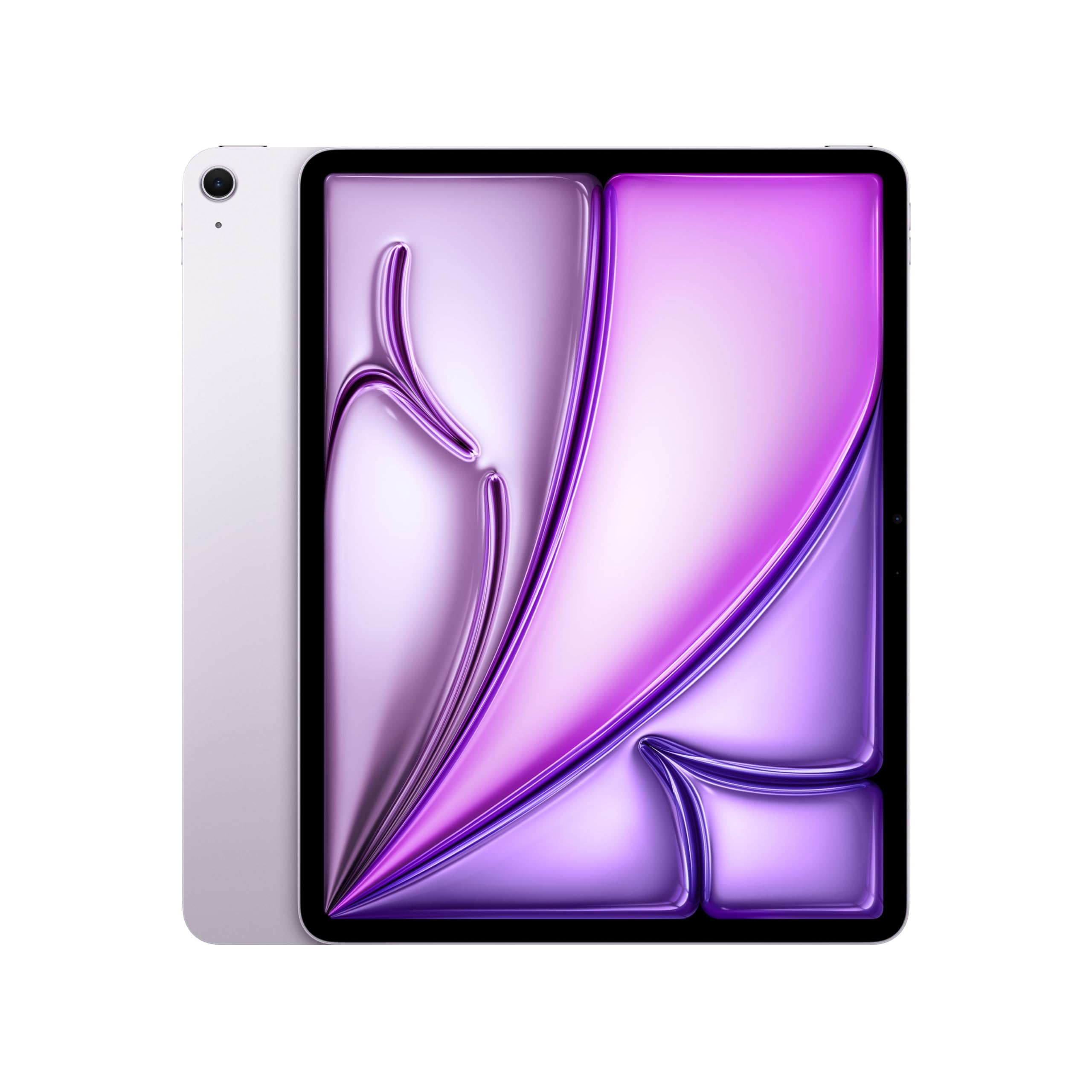
The iPad Air 13-inch with the M4 chip is an absolute powerhouse in a remarkably thin and light chassis at just 1.36 pounds. The Liquid Retina display with P3 wide color and True Tone makes everything from photo editing to video streaming look vibrant and accurate. The M4 chip delivers desktop-class performance, handling 4K video rendering and complex AI tasks without fan noise.
Battery life is rated for all-day use, and real-world testing shows about eight hours of continuous video playback. The 12MP Center Stage front camera ensures you stay perfectly framed during video calls, while the 12MP rear camera captures sharp 4K video. Touch ID is conveniently integrated into the top button, and Wi-Fi 7 support future-proofs your wireless connection.
The iPadOS ecosystem with Apple Intelligence brings advanced writing tools and image generation capabilities. It pairs seamlessly with Apple Pencil Pro and Magic Keyboard, though these are sold separately. This is the tablet for users who want the broadest app ecosystem and longest software support cycle.
Why it’s great
- M4 chip offers unmatched performance for creative apps
- Ultra-thin and lightweight design at 1.36 lbs
- Wi-Fi 7 and Apple Intelligence support
Good to know
- Apple Pencil Pro and Magic Keyboard sold separately
- No microSD expansion—storage is fixed at purchase
4. Wacom MovinkPad Pro 14

The MovinkPad Pro 14 is a dedicated mobile drawing studio that leaves no compromise for digital artists. Its 14-inch OLED display with 2880×1800 resolution covers 100% sRGB and DCI-P3 for incredibly accurate colors, while the Premium Texture etched glass mimics the friction of real paper. The Wacom Pro Pen 3 delivers 8192 pressure levels and never needs charging, a critical feature for uninterrupted creative flow.
Under the hood, the Snapdragon 8s Gen 3 processor and 12GB of RAM ensure that large canvas files in Clip Studio Paint or Krita remain responsive. The 256GB storage is expandable via microSD, giving you room for massive project files. It runs Android 15, so you have full access to the Google Play Store for apps and the included creative suite.
The battery life is excellent for a device of this power, and the OLED panel provides true blacks for contrast in your artwork. It can also function as a pen display for Windows and Mac via USB-C, adding versatility. The only downsides are the lack of a headphone jack and the need for a case, which is sold separately.
Why it’s great
- Professional-grade 8192-pressure-level battery-free pen
- OLED 3K display with anti-glare etched glass
- Snapdragon 8s Gen 3 handles large canvas files
Good to know
- No headphone jack—USB-C audio required
- Case not included in the box
5. Microsoft Surface Pro 12″ (2025)

The Surface Pro 12 is not just a tablet—it is a full Windows 11 Copilot+ PC designed for productivity. The Snapdragon X Plus processor with 16GB of RAM runs every desktop application you need, from Excel and Word to Lightroom, without the compromises of an Arm emulation layer. The 12-inch PixelSense touchscreen is sharp and responsive, though not OLED.
The built-in kickstand allows you to prop it up at any angle, and the Surface Pro Keyboard (sold separately) transforms it into a laptop. Battery life reaches up to 16 hours on a single charge, which is exceptional for a Windows device. The facial recognition via Windows Hello makes logging in instant and secure.
The Snapdragon X Plus includes a neural processing unit that powers AI features like real-time captions and Windows Studio Effects. It is fanless, so it runs silently during general tasks. However, heavy creative workloads like Raw photo denoising can slow it down, and the lack of a microSD slot limits expandability.
Why it’s great
- Full Windows 11 desktop experience in a tablet form
- 16-hour battery life for all-day work
- Snapdragon X Plus handles most professional apps
Good to know
- Keyboard and Slim Pen sold separately
- Not ideal for heavy GPU-accelerated creative work
6. Samsung Galaxy Tab S11 Ultra
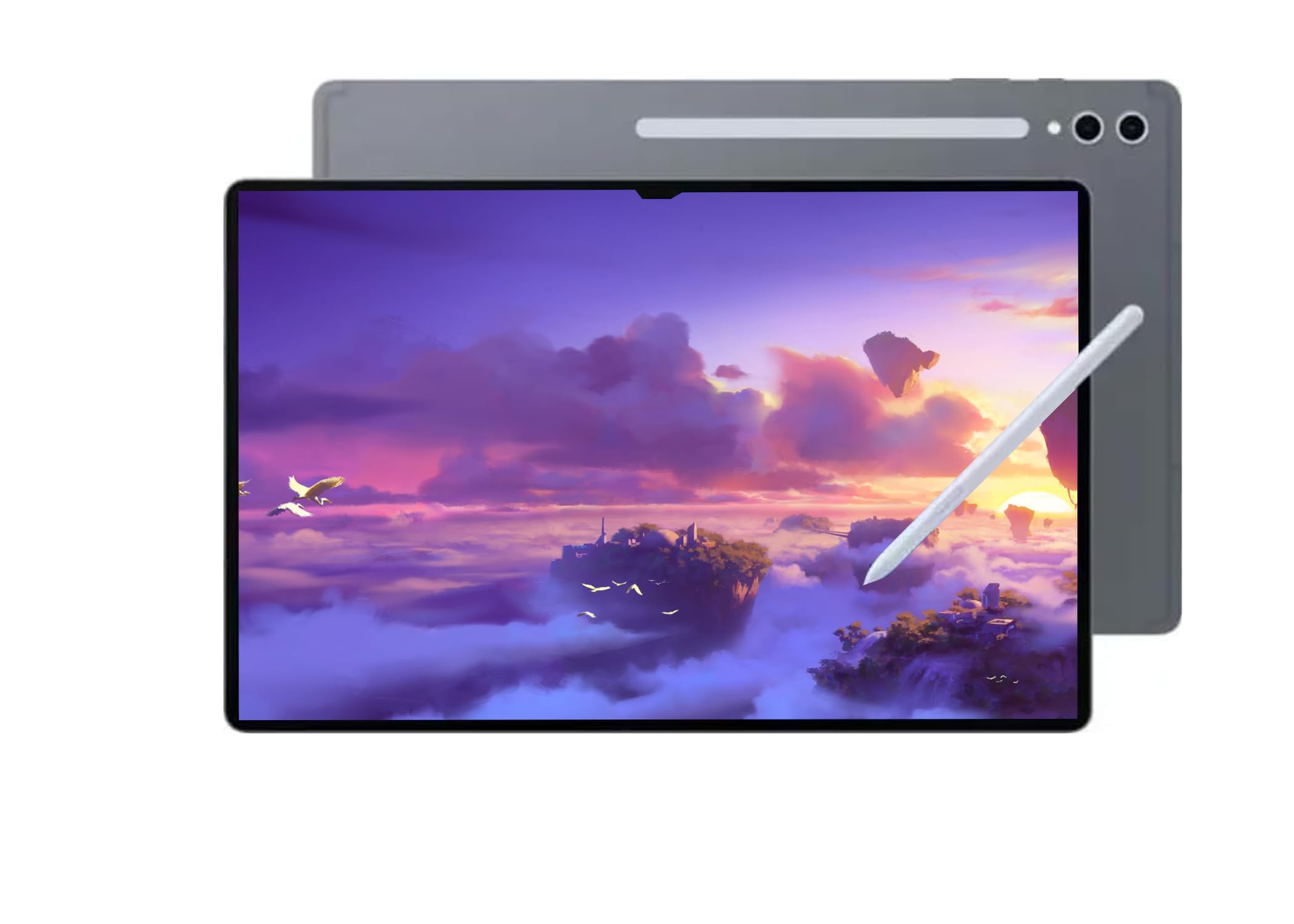
The Galaxy Tab S11 Ultra is the pinnacle of Android tablet hardware. Its 14.6-inch Dynamic AMOLED 2X panel with a 120Hz refresh rate and anti-reflective coating delivers an unparalleled viewing experience for movies, games, and reading. The MediaTek Dimensity 9400+ processor is blisteringly fast, and the 12GB of RAM ensures you can run multiple apps in split-screen without reloading.
The S Pen is included and attaches magnetically for charging and storage. The quad speakers with Dolby Atmos produce a wide soundstage that rivals many laptops. The 11600mAh battery provides up to 16 hours of video playback, and fast charging refills it quickly. The dual rear cameras (13MP + 8MP ultrawide) and 12MP front ultrawide camera are the best in any Android tablet.
It supports Wi-Fi 7 and Bluetooth 5.3 for the fastest wireless connectivity. However, this particular model is intended for international markets and carries no US warranty, so you are relying on the seller for support. It is also a Wi-Fi-only model with no cellular option.
Why it’s great
- Best-in-class 14.6-inch AMOLED 120Hz display
- Dimensity 9400+ with 12GB RAM handles everything
- Excellent camera system and S Pen included
Good to know
- No US warranty—international model only
- Wi-Fi only, no cellular connectivity option
7. TCL NXTPAPER 14

The TCL NXTPAPER 14 is designed for readers and musicians who spend hours staring at a screen. Its 14.3-inch 2.4K display uses NXTPAPER 3.0 technology to produce a paper-like finish with anti-glare coating, blue light reduction, and DC dimming. The dedicated NXTPAPER Key lets you switch between Regular, Ink Paper, and Color Paper modes instantly, reducing eye strain during long sessions.
The included T-Pen stylus offers 4096 pressure levels, making it suitable for note-taking and light sketching. The MediaTek Helio G99 processor with 8GB RAM plus 8GB virtual expansion handles multitasking for sheet music apps like MobileSheets and general productivity. The 10000mAh battery lasts about 10 hours and supports both 33W fast charging and reverse charging for your phone.
The quad stereo speakers with Smart PA deliver room-filling sound, and the dual front cameras (13MP + 5MP) are great for video calls. The durable metal build at just 0.27 inches thin and 1.67 pounds makes it highly portable. However, there is no microSD slot, so you are limited to the 256GB internal storage.
Why it’s great
- Paper-like display drastically reduces eye fatigue
- Three display modes for reading and media
- 10,000mAh battery with reverse charging
Good to know
- No microSD card slot for storage expansion
- Charger not included in the box
8. TABWEE 13.4″ Android 16 Tablet

The TABWEE tablet bundle provides everything you need to turn a large screen into a productivity station. It includes a keyboard, mouse, stylus, case, charger, tempered glass screen protector, and a stand—all in the box. The 13.4-inch IPS display runs at 1920×1200 resolution with a 120Hz refresh rate and 180Hz touch sampling rate, making it smooth for scrolling and gaming.
The 24GB RAM (8GB physical + 16GB virtual) and 2.2GHz octa-core processor handle multitasking well for general use like browsing, streaming, and document editing. The 10000mAh battery with 18W fast charging provides all-day use, and the 256GB storage can be expanded via microSD up to 1TB. It runs Android 16 with Gemini AI integration for document summarization and email drafting.
The four-year warranty (2 years standard + 2 years extended) provides excellent peace of mind for a budget-friendly device. The included accessories mean you don’t need to buy anything extra. The main compromise is the display resolution, which is lower than the 2K+ panels of premium competitors.
Why it’s great
- Complete bundle with keyboard, mouse, and pen included
- 120Hz IPS display for smooth scrolling
- Four-year warranty for long-term coverage
Good to know
- Display resolution is 1920×1200, not 2K
- May lag with fast-paced stock trading apps
9. Lenovo Idea Tab Plus

The Lenovo Idea Tab Plus offers an incredible balance of features for the price. Its 12.1-inch 2.5K IPS display with a 90Hz refresh rate and 800 nits peak brightness is bright and sharp, even outdoors. The MediaTek Dimensity 6400 processor with 8GB of RAM handles daily multitasking, streaming, and light gaming without issues.
The quad Dolby Atmos-tuned speakers produce clear and loud audio, making it a great media consumption device. The included Lenovo Tab Pen and Folio Case add significant value, as you don’t need to buy accessories separately. The 13-hour battery life on YouTube streaming is impressive, and the 2.0 USB-C charging is fast enough for overnight top-ups.
The Circle to Search feature powered by Google lets you search anything on screen by drawing a circle with the pen or your finger. The included learning apps (Lenovo Notepad, Squid, Nebo, MyScript Calculator) make it a compelling option for students. The thin and light build at just over a pound makes it easy to carry around campus.
Why it’s great
- Included pen and folio case add significant value
- Bright 2.5K display with 800 nits peak brightness
- 13-hour battery life for all-day use
Good to know
- MediaTek Dimensity 6400 is not a gaming powerhouse
- No high-refresh-rate gaming above 90Hz
10. TECLAST Artpadpro

The TECLAST Artpadpro delivers a large 12.7-inch 2K display at a price that undercuts most competitors. The 2176×1600 IPS panel with TDDI technology produces bright and detailed images, and the 16:10 aspect ratio gives you 20% more viewing area than a standard 16:9 tablet. It runs Android 15 with Gemini AI support for document and chart analysis.
The 8GB physical RAM plus 12GB virtual expansion provides 20GB of effective memory, which is enough for multitasking with multiple apps. The 256GB storage can be expanded to 1TB via microSD. The 10000mAh battery with 30W fast charging ensures you stay powered throughout the day, and the 4G LTE support means you can use cellular data on the go.
The included T-Pen stylus offers 4096 pressure levels and supports USI 2.0 compatibility. The Symphony Sound Chamber System with four speakers delivers immersive audio. However, the stylus accuracy is not on par with Wacom or S Pen, and the camera quality is mediocre. The lack of guaranteed software updates is a concern for long-term use.
Why it’s great
- 2K display at a very competitive price point
- 4G LTE connectivity for on-the-go use
- 10000mAh battery with 30W fast charging
Good to know
- Stylus accuracy is inconsistent for detailed art
- No guaranteed software update support
11. ROSYVIBE 14″ Android 15 Tablet

The ROSYVIBE 14-inch tablet is the most affordable entry point into the large-screen category. Its 2000×1200 FHD display with 300 nits brightness and 178-degree viewing angles is adequate for streaming and basic productivity. The MT6769 octa-core processor with 12GB physical RAM and 24GB virtual expansion handles light multitasking and app switching.
The standout feature is the massive 11580mAh battery, which can last up to 72 hours on a single charge with light use. The included accessories—case, stylus, fast charger, Type-C cable, wired headset, screen protector, and OTG cable—make it a complete package. It runs Android 15 with voice reading, real-time subtitles, and Google homework correction features.
The 13MP rear camera and 8MP front camera are acceptable for video calls, and the four speakers provide decent audio. The metal body and straight bezel give it a premium look. However, the software includes ad injections and app restrictions that can be frustrating, and the processor is slow for gaming or heavy apps.
Why it’s great
- Massive 11580mAh battery for extended use
- Complete accessories package included
- Large 14-inch display for the lowest price
Good to know
- Software may inject ads and restrict app installations
- Processor is underpowered for demanding games
FAQ
Is a 14-inch tablet too heavy to hold for reading?
Can a 14-inch tablet replace my laptop for work?
What is the best stylus for a 14-inch Android tablet?
Final Thoughts: The Verdict
For most users, the best 14 inch tablet winner is the Lenovo Idea Tab Pro because it delivers a premium 3K display, a powerful Dimensity 8300 processor, and an included pen and case at a mid-range price point that undercuts rivals. If you want the ultimate OLED display for media and art, grab the Samsung Galaxy Tab S8 Ultra. And for the best Windows productivity in a tablet form factor, nothing beats the Microsoft Surface Pro 12.