
The whine of a stock CPU cooler under load isn’t just annoying—it’s a sign you’re leaving thermal headroom on the table. That single 120mm fan is the mechanical heart of your entire cooling loop, responsible for pulling heat off the heatsink or radiator and pushing it out of your case. The wrong choice means higher temperatures, louder operation, or both.
I’m Min — the co-founder and writer behind Gadgets Feed. I’ve spent hundreds of hours analyzing the acoustic profiles, bearing technologies, and static pressure curves of the most popular PC cooling fans to separate marketing noise from real performance data.
This guide was built to help you cut through the spec-sheet clutter and find the best 120mm cpu fan that matches your specific balance of noise tolerance, airflow needs, and budget.
How To Choose The Best 120mm CPU Fan
Selecting a 120mm CPU fan isn’t just about picking the highest CFM number. The fan’s role—whether it’s mounted on a tower cooler, a liquid radiator, or acting as a case exhaust—dictates which specs matter most. Here are the critical factors to weigh before you buy.
Static Pressure vs. Airflow: The Core Trade-off
A fan’s static pressure (measured in mmH₂O) determines how well it can force air through restrictive environments like a dense heatsink fin array or radiator core. High airflow fans (measured in CFM) excel in open spaces with minimal resistance. For a CPU cooler or radiator, prioritize static pressure; for a general case fan, airflow is a more relevant metric.
Bearing Type: The Longevity Decider
The bearing inside the fan hub dictates its lifespan and acoustic behavior. Sleeve bearings are the entry-level option with shorter lifetimes. Rifle bearings offer an improvement with better lubrication. Fluid Dynamic Bearings (FDB) and Magnetic Levitation (MagLev) bearings significantly extend lifespan (over 100,000 hours) and reduce wear noise over time. Noctua’s SSO2 bearing is a premium self-stabilizing design that blends oil-pressure and magnetic support for exceptional durability.
PWM Range and Minimum RPM
Pulse Width Modulation (PWM) control allows the motherboard to dynamically adjust fan speed based on CPU temperature. A wide RPM range—from a low idle (around 300-400 RPM) to a high maximum (1800+ RPM)—offers greater flexibility and quieter low-load operation. Fans that support a 0 RPM mode can stop completely at low loads for a truly silent semi-passive system.
Quick Comparison
On smaller screens, swipe sideways to see the full table.
| Model | Category | Best For | Key Spec | Amazon |
|---|---|---|---|---|
| Noctua NF-A12x25 G2 | Premium | Ultimate quiet & performance | 22.5 dBA at 1800 RPM | Amazon |
| ARCTIC P12 Pro PST 5-Pack | Premium Multi-Pack | High static pressure | 3000 RPM max speed | Amazon |
| ASUS ROG Strix XF120 | Mid-Range | Balanced radiator/case fan | MagLev bearing, 400k hours | Amazon |
| Thermalright TL-C12C X5 | Value Pack | Budget-friendly multi-packs | 66.17 CFM, 25.6 dBA | Amazon |
| be quiet! Light Wings LX | Mid-Range | Quiet ARGB showcase builds | 20.6 dBA noise level | Amazon |
| Cooler Master Hyper 212 Spectrum V3 | CPU Cooler Bundle | Complete CPU cooler upgrade | 1750 RPM PWM fan | Amazon |
| Clyxgs Water Cooling Radiator | Specialty | Custom water loop radiator | 5000 RPM high-speed fan | Amazon |
In‑Depth Reviews
1. Noctua NF-A12x25 G2 PWM

The Noctua NF-A12x25 G2 is the reference standard for a 120mm fan. Its Sterrox LCP construction ensures exceptionally tight tip clearance, minimizing air leak and maximizing both airflow (107.3 m³/h) and static pressure. The included Low-Noise Adaptor and comprehensive accessory kit—rubber mounts, gasket, Y-splitter—make it the most complete package on the market.
At 22.5 dBA, the acoustic profile is smooth and non-intrusive, with no harmonic whine at any speed. The SSO2 bearing is rated for over 150,000 hours, making this a purchase that can outlast multiple builds. For a heatsink, radiator, or case fan, this fan delivers the absolute best balance of silence and cooling power.
The 0% PWM stop feature allows it to go completely silent at idle, a boon for semi-passive cooling setups. While the brown color scheme is polarizing, the engineering inside is unmatched.
Why it’s great
- Best-in-class noise-normalized performance
- Superb accessory kit (Y-splitter, LNA, gasket)
- Incredible 150,000+ hour bearing lifespan
Good to know
- Premium price point reflects the engineering
- Brown color scheme may not suit all builds
- No RGB variant available
2. ARCTIC P12 Pro PST 5-Pack

The ARCTIC P12 Pro PST delivers serious static pressure for dense radiators and tight mesh panels. The redesigned rotor blades push 77 CFM of air, and the Fluid Dynamic Bearing keeps the noise floor reasonable at lower RPMs. The 3000 RPM ceiling provides serious thermal headroom for extreme cooling scenarios.
At full tilt, this fan is audible—it’s not a silent runner at max speed—but its performance-per-dollar ratio is exceptional, especially considering the 5-pack format. The PST (Power Sharing Technology) built-in Y-cable simplifies daisy-chaining multiple fans to a single header.
The 0 RPM mode at less than 5% PWM is a great feature for achieving silent idle operation. If you’re building a high-performance radiator setup and need maximum pressure on a budget, this is the pack to buy.
Why it’s great
- Outstanding static pressure for radiators
- Great value with the 5-pack format
- FDB bearing for long-term reliability
Good to know
- Notably loud at 3000 RPM max speed
- PST cable adds bulk to cable management
- Best suited for performance, not absolute silence
3. ASUS ROG Strix XF120

The ASUS ROG Strix XF120 uses a Magnetic Levitation (MagLev) bearing to eliminate friction, achieving a massive 400,000-hour lifespan. The aerodynamic blade and frame design minimize turbulence, producing a whisper-quiet 22.5 dBA even as it moves 62.5 CFM of air. This makes it an excellent choice for a radiator or CPU cooler where resistance is high.
Its wide PWM range (250-1800 RPM) allows for very low idle speeds, and the fan stops completely at 0% PWM duty cycle. The included anti-vibration pads and mounts further reduce the risk of case rattles. Users consistently report superior cooling performance compared to stock fans, with a noticeable drop in noise.
The XF120 is positioned as a premium alternative to the Noctua, offering a different bearing philosophy with comparable acoustic results. It’s ideal for builders who want exceptional longevity without the brown aesthetic.
Why it’s great
- 400,000-hour MagLev bearing lifespan
- Very quiet at full 1800 RPM speed
- Wide PWM range for flexible curves
Good to know
- Lacks included Y-splitter cable
- Black/copper color scheme may not match all builds
- No RGB or ARGB lighting
4. Thermalright TL-C12C X5

The Thermalright TL-C12C X5 delivers surprising performance for its price point. With a max speed of 1550 RPM, it pushes an impressive 66.17 CFM while staying reasonably quiet at 25.6 dBA. The S-FDB bearing provides a significant upgrade over typical sleeve bearings in this price bracket, offering better longevity and quieter operation.
The 4-pin PWM interface allows for automatic motherboard-controlled speed adjustments. The included 55cm cable provides good reach for cable routing in larger cases. Users consistently praise the balance of airflow and silence, with many reporting it outperforms more expensive fans in real-world cooling tests.
While the plastic construction feels less premium than high-end offerings, the performance-per-dollar ratio is outstanding. It’s especially compelling in the 5-pack configuration, making it the go-to choice for populating a case with quality fans without breaking the bank.
Why it’s great
- Excellent value with the 5-pack bundle
- Good 66.17 CFM airflow output
- S-FDB bearing for increased durability
Good to know
- Max speed limited to 1550 RPM
- Plastic frame feels less sturdy
- Not ideal for high-pressure radiator setups
5. be quiet! Light Wings LX 120mm PWM

be quiet! lives up to its name with the Light Wings LX, rating it at just 20.6 dBA—the quietest fan on this list by the spec sheet. The 16 ARGB LEDs located in the hub shine outward through frosted blades to create a smooth, diffused lighting effect without harsh hotspots. The daisy-chain ARGB and PWM connectors make cable management straightforward.
The optimized blade design achieves exceptional airflow despite the noise-focused profile. The rifle bearing is proven and offers a solid 60,000-hour lifespan. While not as long-lasting as MagLev or FDB options, it’s more than adequate for typical consumer use cycles.
The German-engineered design emphasizes build quality. The fan frame includes an outlet that minimizes air leaks, further optimizing the airflow path. For a showcase build that needs to remain whisper-quiet while looking stunning, this is the top choice.
Why it’s great
- Ultra-quiet 20.6 dBA operation
- Beautiful diffused ARGB lighting
- Daisy-chain connectors for easy setup
Good to know
- Rifle bearing is less durable than premium options
- ARGB requires motherboard header or controller
- Single fan purchase, not a multi-pack
6. Cooler Master Hyper 212 Spectrum V3

The Hyper 212 Spectrum V3 is a complete CPU cooling solution that includes a 120mm PWM fan with frosted ARGB blades. The fan is optimized for the 4-copper-heatpipe heatsink, delivering excellent cooling for AMD R7 and Intel i7 processors with a dynamic speed range from 650 to 1750 RPM. At 27.2 dBA, it’s notably louder than dedicated silent fans but still quieter than most stock coolers.
The redesigned mounting brackets simplify installation on modern LGA 1851/1700 and AM5 platforms, a common pain point with previous versions. The fan features frosted blades that diffuse the ARGB lighting effectively, creating a more uniform glow than transparent blades.
While the fan itself is not sold separately for custom builds, the bundled package represents exceptional value for anyone seeking a complete tower cooler upgrade. The included thermal paste and universal mounting kit make it a true drop-in replacement.
Why it’s great
- Complete cooling solution with heatsink
- Easy installation with updated brackets
- Good ARGB diffusion on fan blades
Good to know
- Fan not sold as standalone unit
- 27.2 dBA is louder than premium fans
- Large size may block RAM slots on compact boards
7. Clyxgs Water Cooling Radiator Kit
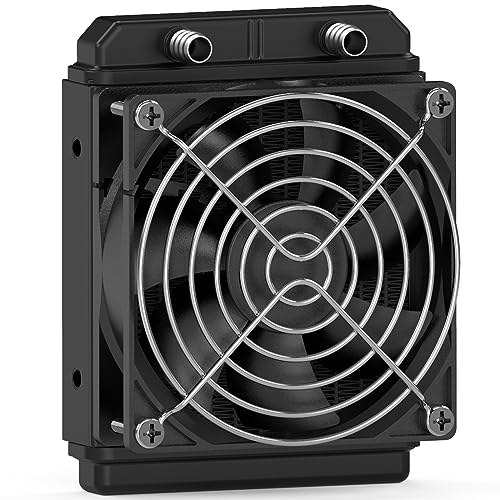
The Clyxgs Water Cooling Radiator is a niche product designed for custom water loops, laser cooling, and industrial applications. It combines a 12-pipe aluminum heat exchanger with a high-speed 120mm fan capable of 5000 RPM. The black oxidation paint increases thermal efficiency, making it suitable for situations requiring aggressive heat dissipation.
At max speed, the fan is very loud, but the system is designed for effectiveness over silence. The 58mm thickness of the radiator core provides substantial surface area for heat exchange. The 4-pin connector allows basic speed control.
This is not a product for standard desktop cooling. It lacks mounting brackets for standard PC cases and is best suited for open-loop water cooling or specialized setups like laser engraver cooling. If you need a compact, high-performance radiator for a non-standard build, this fits the bill.
Why it’s great
- Complete radiator and fan assembly
- High 5000 RPM fan for aggressive cooling
- Compact 12-pipe aluminum core design
Good to know
- No mounting brackets for standard cases
- Very loud at maximum RPM
- Intended for industrial/non-PC applications
FAQ
Can I use any 120mm case fan on my CPU cooler heatsink?
What is the difference between PWM and DC fan control for 120mm CPU fans?
Final Thoughts: The Verdict
For most users, the best 120mm cpu fan is the Noctua NF-A12x25 G2 because it stands alone at the intersection of silence and cooling capacity, supported by an unmatched accessory kit and legendary longevity. If you want high static pressure for a dense radiator setup, grab the ARCTIC P12 Pro PST 5-Pack. And for a budget-friendly build that doesn’t sacrifice quality, nothing beats the value of the Thermalright TL-C12C X5.