
Bringing a 3D printer into your home opens up a world where you can turn digital ideas into physical objects—from replacement parts and custom tools to toys and artistic models. The decision hinges on finding a machine that offers reliable print adhesion, sufficient build volume for your projects, and a filament system that doesn’t turn every attempt into a troubleshooting session.
I’m Min — the co-founder and writer behind Gadgets Feed. I’ve spent hundreds of hours analyzing print speeds, auto-leveling accuracy, and extruder designs across the latest FDM and resin models to separate the gimmicks from the genuinely capable home machines.
Whether you’re a beginner seeking a kid-friendly starter or a maker chasing multi-color capability, this guide evaluates the top contenders to help you confidently choose the best 3d home printer for your workspace and skill level.
How To Choose The Best 3D Home Printer
The home 3D printer market has matured rapidly, with sub- machines now offering features like multi-color printing, CoreXY kinematics, and AI-assisted monitoring that were once reserved for industrial units. Your choice should balance speed, print volume, material compatibility, and ease of use against the types of projects you actually plan to make.
Print Technology: FDM vs. Resin
Fused Deposition Modeling (FDM) printers melt filament and lay it down layer by layer, making them ideal for functional parts, large models, and beginner-friendly operation. Resin printers use a UV light to cure liquid resin into solid layers, delivering far higher detail (down to 18–50 micron resolution) but requiring post-processing, ventilation, and more careful handling of messy chemicals. For general home use and STEM learning, FDM is the safer and more versatile choice.
Build Volume and Speed
Build volume determines the maximum size of a single print. A machine with a 220x220x220mm volume handles most common objects—phone stands, toys, brackets—while compact printers around 100x100x100mm are better suited for small trinkets and educational projects. Speed is measured in mm/s and acceleration in mm/s²; modern high-speed printers can reach 500–600mm/s, but true print time depends on model complexity and layer height. A printer with a 14-minute Benchy is genuinely fast, but always check real-world reviews for sustained reliability at those speeds.
Auto Leveling and First Layer Reliability
The first layer determines whether a print succeeds or becomes a tangled mess. Mechanical auto-leveling systems use a sensor to map the bed and adjust the nozzle height dynamically, while manual systems require you to turn knobs and slide paper. For any home printer, especially one used by kids or beginners, full auto leveling with a flexible magnetic build plate is a must-have—it eliminates the most common frustration point in the entire hobby.
Filament Compatibility and Multi-Color
Most FDM printers handle PLA without issue, but if you want to print with TPU (flexible), PETG (stronger), or carbon-fiber composites, you need an all-metal hotend capable of 280–300°C and an enclosed chamber for temperature stability. Multi-color systems—like those using an AMS Lite or ACE Pro—use a filament buffer and splitter to automate color changes, adding incredible visual impact at the cost of some waste filament purged between swaps. Native multi-color support is a premium feature that dramatically expands creative possibilities.
Quick Comparison
On smaller screens, swipe sideways to see the full table.
| Model | Category | Best For | Key Spec | Amazon |
|---|---|---|---|---|
| Anycubic Kobra X | FDM | Multi-Color Home Use | 260mm build volume | Amazon |
| ELEGOO Centauri Carbon | FDM | High-Speed CoreXY | 500mm/s + 32-bit board | Amazon |
| Bambu Lab A1 Mini Combo | FDM | Compact Multi-Color | 10,000mm/s² acceleration | Amazon |
| Creality K1C | FDM | Carbon Fiber Ready | 300°C nozzle temp | Amazon |
| ELEGOO Mars 5 Ultra | Resin | Ultra-High Detail | 9K 18μm XY resolution | Amazon |
| AOSEED X-Maker Joy AI+ | FDM | All-in-One Kids Kit | 0.05mm precision | Amazon |
| FLASHFORGE Adventurer 5M | FDM | Entry-Level Workhorse | 600mm/s + 32mm³/s flow | Amazon |
| Entina Tina2 Plus | FDM | Kid-Friendly Starter | 250mm/s + 40s hotend | Amazon |
| Geeetech M1 | FDM | Budget STEM Learning | 100x110x100mm volume | Amazon |
In‑Depth Reviews
1. Anycubic Kobra X

The Anycubic Kobra X is the first printer in this price tier to ship with native four-color printing straight out of the box, and it handles the task with surprising maturity. The integrated ACE 2 Pro system manages filament changes seamlessly through a four-buffer setup, and the machine can be expanded to 19 colors with additional ACE units. Print quality is excellent—reviewers consistently report crisp detail and smooth layers even at 600mm/s, and the LeviQ 3.0 auto-leveling system uses 49 calibration points to ensure first-layer success every time.
The 260mm³ build volume is generous for a home machine, accommodating large functional parts like lamp bases or storage bins without splitting models. The hardened steel nozzle handles abrasive filaments, and the top-mount spool holder frees up desk space. The AI camera includes spaghetti detection and foreign object monitoring, adding a layer of safety for unattended prints.
At just 45dB during operation, this printer won’t disrupt a home office or bedroom. The Anycubic app and slicer integration allow full remote control, and the vibrant multi-color output makes it a standout choice for families who want to create detailed, colorful models without manual filament swaps.
Why it’s great
- Native 4-color printing with expandable ACE system
- 600mm/s speed with vibration compensation
- Large 260mm³ build volume
Good to know
- ACE 2 Pro not backward-compatible with original ACE Pro
- Phone app could use more polish
2. ELEGOO Centauri Carbon

The ELEGOO Centauri Carbon is a CoreXY machine that prioritizes rigidity and speed, arriving fully assembled and pre-calibrated so you can print within minutes of unboxing. The die-cast aluminum frame minimizes vibration at high speeds, and the auto bed leveling combined with vibration compensation ensures first layers are flawless even on large prints. The 256x256x256mm build volume hits the sweet spot for home use—big enough for practical parts but still compact enough to fit on a standard desk.
The 320°C brass-hardened steel nozzle unlocks advanced filaments like carbon-fiber reinforced PLA and PETG-CF, and the enclosed chamber with enhanced cooling keeps temperatures stable. The built-in camera with dual LED lighting lets you monitor prints remotely and capture time-lapse videos. Users report print speeds up to 500mm/s with excellent detail, and the dual-sided build plate includes a PLA-specific surface that reduces warping significantly.
At 38.5 pounds, this is a heavy, solid machine that stays planted during fast moves. The only recurring feedback is that the slicer software can be resource-intensive on older laptops, and the initial tech support experience can be slow for US customers. Once dialed in, however, it delivers consistent quality that rivals machines costing twice as much.
Why it’s great
- Pre-calibrated out of the box
- 320°C nozzle for high-temp filaments
- Rigid die-cast aluminum frame
Good to know
- Heavy (38.5 lbs) with smaller footprint
- Slicer may struggle on low-spec laptops
3. Bambu Lab A1 Mini Combo

The Bambu Lab A1 Mini Combo redefines what a compact printer can do, pairing a tiny footprint with the AMS Lite multi-color system for up to four filaments. The 10,000mm/s² acceleration makes it one of the fastest printers in its size class, and the full-auto calibration system handles Z-offset, bed leveling, and input shaping without any manual tweaking. The 1-Clip quick-swap nozzle makes maintenance effortless, and active motor noise cancellation keeps operation at or below 48dB.
The build volume is limited—180x180x180mm—so you won’t be printing large helmets or storage bins. But for miniatures, toys, fidgets, and small functional parts, it produces exceptional surface quality with zero fuss. The Bambu Studio slicer and cloud integration are polished, and the Bambu Handy app offers a library of pre-sliced models for one-tap printing.
Users note that the multi-color system wastes some filament during color changes, and the machine needs a solid, non-carpeted surface to avoid shaking at ludicrous speed. For families with limited desk space or kids who want to print small colorful objects right away, this is the most beginner-friendly option available.
Why it’s great
- Compact with AMS Lite multi-color
- 10,000mm/s² acceleration
- Ultra-quiet 48dB operation
Good to know
- 180mm³ volume limits large prints
- Multi-color filament waste
4. Creality K1C

The Creality K1C is built to handle demanding filaments without clogging. The direct-drive extruder uses a bolster spring and ball plunger to grip filament securely, and the titanium alloy heatbreak prevents heat creep that causes jams in cheaper designs. The 300°C nozzle supports carbon-fiber reinforced materials, and the enclosed chamber with three separate fans—hotend, part cooling, and auxiliary—manages thermal gradients across long prints.
At 600mm/s and 20,000mm/s² acceleration, this is one of the fastest consumer printers available. The AI camera monitors for spaghetti failures and foreign debris, and the built-in time-lapse feature captures the entire print process. The 8.66×8.66×9.84 inch build volume is adequate for most home projects, and the auto-leveling system with input shaping delivers clean layers out of the box.
Assembly is minimal—Creality says three minutes from unboxing to powering on—but the instructions can be sparse, and some users report needing to tighten Y-axis belts or adjust wheel bearings. Once tuned, the K1C produces consistent prints with excellent bridge performance thanks to the auxiliary fan. It’s best suited for makers who want to print functional parts in advanced materials without spending premium-tier money.
Why it’s great
- 300°C nozzle for carbon-fiber filaments
- Triple-fan cooling system
- AI failure detection and time-lapse
Good to know
- Instructions could be clearer
- Some assemblies need minor tuning
5. ELEGOO Mars 5 Ultra
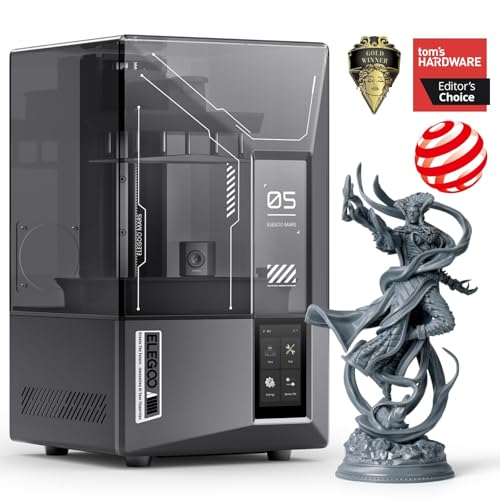
If your home projects demand extreme detail—miniatures, jewelry patterns, or intricate cosplay props—the ELEGOO Mars 5 Ultra is the resin printer to beat. The 7-inch mono LCD delivers a true 9K resolution with 18μm XY pixel size, capturing fine textures and sharp edges that FDM printers simply cannot reproduce. The tilt release mechanism speeds up layer separation, achieving a print speed of 150mm/h without sacrificing accuracy.
The AI camera monitors the build plate and alerts you to failures like model separation or resin shortages. Self-leveling and automatic calibration eliminate the messy setup typical of resin printers, and WiFi cluster printing allows control of multiple units from a single device. The smart mechanical sensor detects residue on the LCD to prevent damage.
Resin printing requires dedicated workspace with ventilation, gloves, and isopropyl alcohol for post-processing. The build volume of 6.04 x 3.06 x 6.49 inches is small, and the lid lacks hinges, which some users find inconvenient. For those willing to manage the extra workflow, the print quality from the Mars 5 Ultra is unmatched at this price point.
Why it’s great
- 9K resolution with 18μm detail
- Tilt release for faster prints
- AI camera and auto-leveling
Good to know
- Requires ventilation and resin handling
- Small build volume
6. AOSEED X-Maker Joy AI+

The AOSEED X-Maker Joy AI+ is designed specifically for families and kids, bundling an AI-powered printer with eight rolls of PLA filament, tools, and a magnetic build plate right in the box. The AI Doodle feature lets children create 3D models using voice, text, or image prompts—no 3D modeling experience required—and the app provides a library of over 8,000 models organized into 17 themed modules.
Print precision reaches 0.05mm, and speeds of 220–250mm/s (peaking at 400mm/s) mean small toys can be finished in as little as 20 minutes. The enclosed, pinch-resistant design and TÜV Rheinland-tested PLA make it safer for supervised use. A built-in camera supports real-time monitoring and automatic time-lapse recording.
The leveling-free platform eliminates the biggest point of frustration for newcomers, and one-tap printing via the app works reliably on iOS, Android, and Windows. Some users report adhesion issues with certain models, but the included glue stick resolves most cases. For a complete, kid-friendly setup that encourages creativity without requiring prior knowledge, this kit offers outstanding value.
Why it’s great
- AI Doodle for kid-friendly design
- 8 PLA filaments included
- Enclosed pinch-resistant design
Good to know
- Some adhesion issue reports
- Build volume limited to small toys
7. FLASHFORGE Adventurer 5M

The FLASHFORGE Adventurer 5M is a refined entry-level machine that has earned its reputation as a workhorse. With a maximum speed of 600mm/s and acceleration of 20,000mm/s², it competes with faster printers while maintaining consistent quality. The 50W heating rod brings the nozzle to 200°C in 35 seconds, and the 32mm³/s flow rate means less stringing and better bridging.
The one-click auto-leveling and vibration compensation produce a smooth first layer reliably. The filament run-out sensor pauses prints when the spool empties, and the power loss recovery feature resumes jobs after a power cut. The open-frame design works best in ventilated spaces, and the PEI steel plate handles PLA, PETG, and TPU with ease.
Reviewers consistently praise the build quality and tech support. The 220x220x220mm build volume is standard but sufficient. Some users note that the touchscreen can be sensitive and that WiFi performance is better on 2.4GHz networks. For a straightforward, reliable printer that gets out of your way, the Adventurer 5M is a top-tier entry-level pick.
Why it’s great
- 35-second nozzle heat-up
- Filament run-out and power-loss recovery
- Excellent tech support
Good to know
- Open frame needs ventilation
- WiFi prefers 2.4GHz band
8. Entina Tina2 Plus

The Entina Tina2 Plus is a no-nonsense kids’ printer that focuses on getting the first print done quickly. It arrives fully assembled—no screws, no leveling—and the included TF card contains pre-loaded models so a child can start printing within minutes. The ceramic hotend reaches printing temperature in just 40 seconds, reducing the wait before each job.
WiFi connectivity and the Poloprint Cloud app provide access to 1,500+ models and enable remote printing. The dual Z-axis structure and PEI spring steel build plate improve print stability, and auto-leveling ensures good first layers. The partially enclosed frame protects hands from hot components while still allowing visibility.
At 250mm/s print speed, it’s slower than the premium options, but adequate for learning and small projects. Some users report that the app can be slow and offers limited free models. The included spool holder doesn’t fit 1kg filament reels without a printed adaptor. For a simple, safe introduction to 3D printing for a child, this is a solid starting point.
Why it’s great
- Fully assembled out of the box
- 40-second ceramic hotend
- WiFi cloud printing
Good to know
- App can be slow
- Needs printed adaptor for 1kg spools
9. Geeetech M1

The Geeetech M1 is the most affordable option here, but it doesn’t cut corners on the fundamentals. The 50W heating rod and advanced nozzle deliver speeds up to 250mm/s, and the direct-drive extruder with a 1:5 gear ratio provides enough torque to handle TPU alongside standard PLA. The 16-point full auto-leveling system and magnetic flexible build plate combine to make first-layer success routine.
The fully assembled design with knob operation and one-click filament loading makes it accessible for kids and beginners. The 2.4-inch LCD screen and bright internal lighting help users monitor prints clearly. The print volume is small at 100x110x100mm—roughly the size of a fist—so large objects are not feasible. It supports both 500g and 1kg spools, though a printed filament holder is recommended for stability with larger spools.
Users report good out-of-box print quality, with some minor stringing that can be tuned out with profile adjustments. The 30-day return policy and lifetime technical support add peace of mind. For the price, this is a capable learning tool that introduces the basics of FDM printing without a big investment.
Why it’s great
- Very affordable entry point
- Auto-leveling and flexible build plate
- Lifetime tech support
Good to know
- Small 100x110x100mm build volume
- May need slicer profile tuning
FAQ
What is the typical noise level of an FDM home printer?
How often do I need to replace the build plate surface?
Can I use a 3D home printer in a bedroom or small apartment?
Final Thoughts: The Verdict
For most users, the 3d home printer winner is the Anycubic Kobra X because it delivers native multi-color printing, a generous 260mm³ build volume, and reliable auto-leveling at a price that makes it accessible to families and hobbyists alike. If you want ultra-compact multi-color capability with the best beginner experience, grab the Bambu Lab A1 Mini Combo. And for printing functional parts in advanced materials like carbon-fiber PLA, nothing in this tier beats the Creality K1C.