
The most critical decision in buying a Budget Gaming PC isn’t just the processor or the RAM — it’s whether the included graphics card can actually play the games you own without choking. Many prebuilt towers look fast on paper but ship with integrated video that can’t handle modern shooters or battle royales, leaving you with a desktop that can check email but can’t run 1080p esports titles smoothly.
I’m Min — the co-founder and writer behind Gadgets Feed. I’ve spent hundreds of hours combing through Amazon listings, decoding generational CPU suffixes, matching GPU benchmarks to real-world frame rates, and filtering out the towers with hidden pitfalls like unsupported Windows 11 workarounds or proprietary power supplies that block upgrades.
After analyzing over 60 prebuilt configurations across all price tiers, these are the only desktops that earned a spot on this list of the best budget gaming pc options worth your time in 2025.
How To Choose The Best Budget Gaming PC
Every budget tower forces trade-offs. Knowing which trade-offs hurt your gaming experience and which ones are manageable is what separates a smart purchase from a frustrating one. Below are the three specs that matter most when the price is tight.
The Graphics Card Decides Everything
On a budget build, allocate every dollar toward the GPU first. A quad-core processor paired with an RX 580 8GB will deliver playable frame rates in Fortnite, Overwatch 2, and Apex Legends at 1080p medium settings. The reverse — a six-core CPU with no dedicated graphics — often results in stutter and sub-30 FPS. Look for at least a GTX 1050 Ti 4GB or RX 560 4GB as the entry floor for any gaming-focused rig.
CPU Generation Matters More Than Core Count
An i7-4770 from 2013 lacks the security and TPM 2.0 features required for a clean Windows 11 installation, forcing sellers to use unsupported bypasses that may break during updates. Stick with 6th-gen Intel or newer, or AMD Ryzen 5 3000-series and later. The CPU socket age also determines whether you can drop in a faster processor later without replacing the motherboard.
Upgrade Path Is a Hidden Value Multiplier
Proprietary Dell OptiPlex motherboards often use custom power connectors and front-panel pinouts, turning a simple GPU swap into a wiring nightmare. Standard ATX or Micro-ATX motherboards with a standard 24-pin power header let you upgrade the PSU, add a larger graphics card, and double the RAM without hitting a dead end. The best budget towers are starter platforms, not disposable boxes.
Quick Comparison
On smaller screens, swipe sideways to see the full table.
| Model | Category | Best For | Key Spec | Amazon |
|---|---|---|---|---|
| CyberPowerPC Gamer Master | Premium | Future-proof 1080p ultra | RTX 5060 Ti 8GB + DDR5 | Amazon |
| Skytech Gaming Crystal | Premium | High FPS esports | RTX 5060 + 32GB DDR4 | Amazon |
| BEASTCOM Q3 | Mid-Range | 1080p casual gaming | Vega 11 Integrated | Amazon |
| NINGMEI Gaming PC | Mid-Range | GPU upgrade platform | 6 RGB fans + ATX 3.0 | Amazon |
| YAWYORE Gaming PC | Mid-Range | Integrated Vega gaming | R5 5600GT + 1TB NVMe | Amazon |
| suevery Prebuilt Gaming PC | Mid-Range | Starter gaming & media | RX 560 4GB + DDR4 3200 | Amazon |
| WIWB Gaming PC | Mid-Range | Casual & esports gaming | Ryzen 5 3500X + RX 560 | Amazon |
| abytespark Gaming PC | Budget | VR-ready budget gaming | RX 590 8GB + i7-4770 | Amazon |
| STGAubron i7 / RX 580 | Budget | 1080p medium settings | RX 580 8GB + i7 4th Gen | Amazon |
| STGAubron i5 / RX 550 | Budget | Light esports & schoolwork | RX 550 4GB + Wi-Fi 6 | Amazon |
| Dell OptiPlex RGB Tower | Budget | Entry-level 1080p gaming | GTX 1050 Ti 4GB | Amazon |
In‑Depth Reviews
1. CyberPowerPC Gamer Master (GMA2900A3)

The CyberPowerPC Gamer Master sits at the premium edge of the budget spectrum and justifies every dollar. Its AMD Ryzen 7 8700F 8-core processor paired with the RTX 5060 Ti 8GB GDDR7 graphics card delivers 60+ FPS on ultra settings at 1080p in titles like Call of Duty: Modern Warfare III and Black Myth: Wukong. The GDDR7 memory bandwidth on the 5060 Ti is a generational leap — it handles texture-heavy scenes without the stutter common in older budget GPUs.
The inclusion of 16GB of DDR5 RAM and a 1TB PCIe 4.0 NVMe SSD means load times are near-instantaneous, and the AM5 socket on the B850 chipset provides a clear upgrade path to future Ryzen processors without swapping the motherboard. Connectivity is equally forward-looking with Wi-Fi 6, Bluetooth 5.3, and two USB-C 3.2 ports. The tempered glass side panel and custom RGB lighting give it an aesthetic that matches its performance.
Buyers should note the 650W power supply is adequate for the 5060 Ti but leaves modest headroom for a major GPU upgrade later — you may need a PSU swap for an RTX 5070-class card. The 1-year parts and labor warranty with free lifetime tech support is a strong safety net for a first-time PC buyer who wants a platform that will stay relevant for years.
Why it’s great
- RTX 5060 Ti delivers 60+ FPS at 1080p ultra in demanding titles
- DDR5 RAM and PCIe 4.0 SSD provide lightning-fast load and multitasking speeds
- AM5 socket allows CPU upgrades without replacing the motherboard
Good to know
- 650W PSU has limited headroom for future high-wattage GPU upgrades
- Only 16GB of DDR5 — some heavy modders may want 32GB within a year
2. Skytech Gaming Crystal

The Skytech Gaming Crystal is built around the AMD Ryzen 7 5700 processor and the new NVIDIA GeForce RTX 5060 8GB GDDR7 graphics card, an excellent combination for esports gamers who want frame rates above 200 FPS in titles like Valorant, Overwatch 2, and Counter-Strike 2. The 32GB of DDR4 3200MHz RAM is an unusual find at this price point — it eliminates the need for an immediate memory upgrade for heavy multitaskers who stream or run Discord alongside their game.
The 1TB NVMe M.2 SSD is standard for this tier, but the 650W Gold PSU and high-performance air cooler with ARGB fans ensure stable temperatures during marathon sessions. The Crystal case features triple tempered glass panels and is assembled in the USA. The system ships with a free gaming keyboard and mouse, and the lack of bloatware means you spend your first hour gaming instead of uninstalling trial software.
Some users noted the actual RTX 5060 brand may vary from the product images, but the performance specs remain identical. The 802.11ac Wi-Fi is a notch below Wi-Fi 6 — if your router supports the newer standard, consider a USB adapter upgrade. The 1-year warranty on parts and labor is standard, and gamers who want 4K resolution should note this rig is optimized for 1080p ultra, not high-refresh 4K.
Why it’s great
- 32GB DDR4 RAM handles streaming and heavy multitasking without compromise
- RTX 5060 reaches over 200 FPS in competitive esports titles
- No bloatware — Windows 11 Home ready to use immediately
Good to know
- Wi-Fi 5 limits high-speed wireless potential; upgrade to a Wi-Fi 6 adapter advisable
- GPU brand may differ from photos, though performance specifications are identical
3. BEASTCOM Q3 Gaming PC

The BEASTCOM Q3 proves that integrated graphics can be genuinely playable for casual gamers. Powered by the AMD Ryzen 5 3400G with Radeon Vega 11 graphics, this tower runs games like League of Legends, Minecraft, and CS:GO at 1080p with respectable frame rates. The 16GB of DDR4 RAM and 512GB M.2 NVMe SSD provide responsive boot times and smooth background multitasking, even with browser tabs and chat apps open mid-game.
The 500W 80PLUS PSU offers enough wattage to add a low-to-mid-range dedicated GPU later, transforming this into a significantly more capable machine. The RGB lighting includes a remote control for color customization, and the case is compact enough to fit on a desk without dominating the workspace. BEASTCOM backs the Q3 with a 30-day free replacement policy and a 1-year all-in warranty.
The Vega 11 integrated graphics will struggle with AAA titles at medium settings — you cannot expect 60 FPS in Cyberpunk 2077 or Starfield without a GPU addition. The single HDMI port can be a limitation for dual-monitor setups; a DVI-to-HDMI adapter or a USB display adapter solves this. This is an ideal starter PC for younger gamers or those whose library consists primarily of indie and esports titles.
Why it’s great
- Vega 11 graphics handle 1080p esports like League and CS:GO with ease
- 500W PSU allows adding a dedicated GPU later for a major performance jump
- 30-day free replacement policy provides buyer confidence
Good to know
- Integrated GPU cannot run modern AAA titles at smooth frame rates
- Only one HDMI port — dual monitors require a DVI or USB adapter
4. NINGMEI Gaming PC (Ryzen 5 5600GT)

The NINGMEI Gaming PC is built around the AMD Ryzen 5 5600GT, a 6-core processor with integrated Radeon graphics that clocks up to 4.6GHz. What makes this tower special is its upgrade-friendly foundation: the ATX 3.0 power delivery system supports future PCIe 5.0 graphics cards, and the case accommodates full-size dual-slot GPUs easily. The 16GB of DDR4 RAM and 1TB NVMe SSD offer ample speed and capacity out of the box.
Cooling is handled by six addressable RGB fans, making this one of the best-ventilated chassis at this price. The included AX210 Wi-Fi and Bluetooth module provides Wi-Fi 6 connectivity, and the sliding magnetic dust filter simplifies maintenance. Buyers who already own a GPU from a previous build will find this the most cost-effective way to get a modern CPU platform without paying for a graphics card they don’t need.
The integrated Radeon graphics are sufficient for light gaming at 1080p low settings — Fortnite runs around 30-40 FPS. This PC is not designed for AAA gaming without a discrete GPU addition. The Mini-ATX motherboard has only two RAM slots, both occupied, so upgrading beyond 16GB means discarding the existing sticks. The 1-year warranty and lifetime tech support are reassuring for first-time builders.
Why it’s great
- ATX 3.0 PSU ready for future PCIe 5.0 graphics cards
- Six RGB fans deliver exceptional airflow for sustained gaming sessions
- Modern Ryzen 5 5600GT with Wi-Fi 6 and BT 5.0 built in
Good to know
- Integrated graphics only handle 1080p low settings in demanding games
- Both RAM slots filled — upgrading to 32GB requires replacing the existing sticks
5. YAWYORE Gaming PC (R5 5600GT)

The YAWYORE Gaming PC is another excellent entry in the Ryzen 5 5600GT integrated-graphics category, but it distinguishes itself with a larger 1TB NVMe SSD and a 550W 80PLUS Gold PSU. The base frequency of 3.6GHz with a 4.6GHz boost means the CPU handles productivity tasks and web browsing without hesitation. Five 120mm RGB fans keep temperatures low even when the CPU is under sustained load.
The MSI A520M-A PRO motherboard is a reliable, non-proprietary platform with standard connectors, making it easy to add a used graphics card — the GPU power cables are tucked near the PSU and easily accessible. This system includes a remote control for the RGB fan lighting and comes with genuine Windows 11 Home preinstalled. Buyers have successfully added GTX 1070 Ti and RX 580 cards with zero compatibility issues.
The integrated Radeon Vega graphics are the limiting factor here — 1080p Fortnite runs around 30 FPS without a dedicated GPU. The 550W PSU is sufficient for most mid-range graphics card upgrades up to an RTX 3060, but users dropping in a 300W+ card will need a power supply upgrade. The case is compact but supports full-height GPUs, and the blue/black color scheme is subtle enough for an office environment.
Why it’s great
- 1TB NVMe SSD provides double the storage of most budget competitors
- MSI A520M-A PRO motherboard uses standard connectors for easy upgrades
- 550W Gold PSU offers headroom for mid-range dedicated GPUs
Good to know
- No dedicated GPU included — integrated Vega limits gaming to esports titles
- PSU may need an upgrade for higher-wattage graphics cards
6. suevery Prebuilt Gaming PC

The suevery Prebuilt Gaming PC finds the sweet spot between integrated and dedicated graphics. Its AMD Radeon RX 560 4GB discrete GPU is a genuine step above Vega integrated solutions, delivering 50-60 FPS in Fortnite and Overwatch 2 at 1080p medium settings. The AMD Ryzen 5 6-core processor clocks between 3.6GHz and 4.1GHz, providing enough CPU horsepower for both gaming and productivity tasks like photo editing or coding.
The 16GB of DDR4 3200MHz memory and 512GB M.2 NVMe SSD storage provide responsive boot and load times. Wi-Fi 6 connectivity is a welcome inclusion at this tier, ensuring low-latency online gameplay. The customizable RGB lighting system adds personalization, and the air cooling design with RGB fans maintains stable temperatures without excessive noise.
Some units have shipped with the RX 560 graphics card not properly detected by the system — this is typically resolved by reseating the GPU or updating drivers. The case prioritizes aesthetics over cable management space, so adding storage drives requires some patience. The RX 560 4GB is not suitable for ray tracing or high-fidelity AAA titles, but for the price, it represents the cheapest path to a dedicated GPU experience.
Why it’s great
- RX 560 dedicated GPU outperforms all integrated solutions at 1080p
- Wi-Fi 6 provides fast, low-latency wireless connectivity for online gaming
- DDR4 3200MHz RAM ensures snappy multitasking performance
Good to know
- RX 560 may require reseating or driver update upon first setup
- Not capable of ray tracing or high settings in modern AAA games
7. WIWB Gaming PC (Ryzen 5 / RX 560)
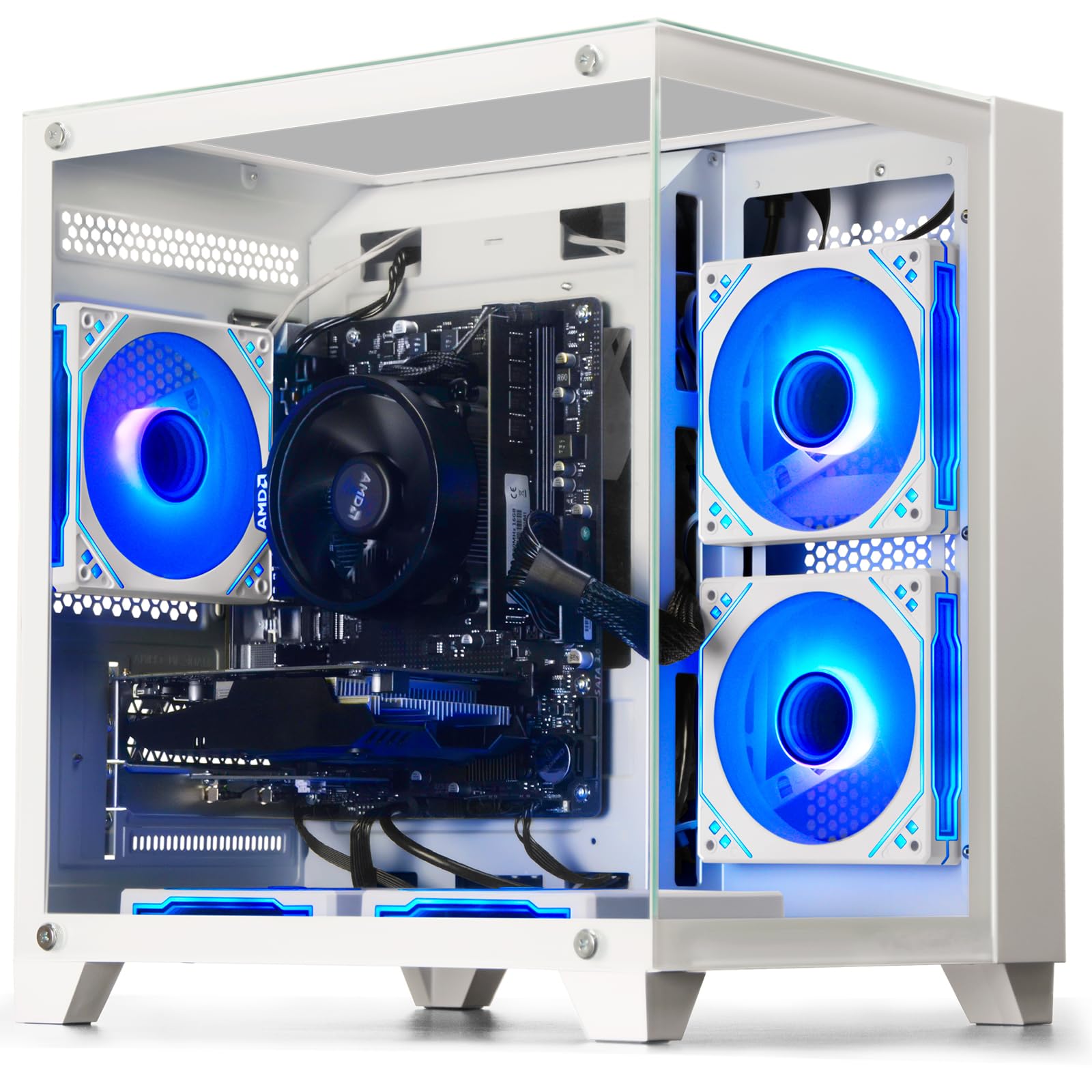
The WIWB Gaming PC is a white-themed build that stands out visually while delivering solid entry-level performance. Powered by the AMD Ryzen 5 3500X — a 6-core, 6-thread processor with a 4.1GHz boost — it pairs with an AMD Radeon RX 560 4GB graphics card to handle League of Legends, CS:GO, and Overwatch at smooth frame rates. The 16GB of DDR4 RAM and 512GB NVMe SSD provide fast load times for games and applications.
The case design prioritizes expandability — the motherboard includes multiple reserved slots, an M.2 SSD interface, and DDR4 memory slots for future upgrades. The custom air-cooling system with optimized airflow keeps temperatures under control during extended sessions. WIWB provides detailed manuals and online technical support, plus a 1-year manufacturer warranty.
The RX 560 4GB is best suited for 1080p low-to-medium settings in modern esports titles; AAA games like Elden Ring or Cyberpunk 2077 will require significant graphical compromises. Some units have been reported with the actual RAM configuration differing from the listing — verify the single vs. dual-channel setup upon arrival. The Ryzen 5 3500X lacks SMT, so it behaves more like a 6-core/6-thread chip than a 12-thread CPU.
Why it’s great
- Unique white chassis design that stands out from typical black towers
- Ryzen 5 3500X offers strong single-core performance for gaming workloads
- Expandable motherboard with M.2 and DDR4 slots for future upgrades
Good to know
- RX 560 is limited to 1080p low/medium in demanding games
- Ryzen 5 3500X lacks multithreading — productivity tasks may lag behind Ryzen 5 3600
8. abytespark Gaming PC (i7 / RX 590)

The abytespark Gaming PC packs the most powerful GPU you’ll find at this price level — the RX 590 8GB is significantly faster than the RX 560 or GTX 1050 Ti, capable of running BONEWORKS in VR and handling modern titles at 1080p high settings. The Intel Core i7-4770 processor operates between 3.4GHz and 3.9GHz, and while the CPU architecture is older, the RX 590 carries the graphical weight. The 16GB of RAM and 512GB SSD complete a well-balanced configuration.
The sea-view tower case with RGB lighting makes for an attractive desktop centerpiece, and the four included RGB fans provide adequate airflow for the RX 590’s heat output. The system includes a gaming keyboard, mouse, and mouse pad, plus lifetime free technical support. Buyers have reported easy setup within one hour and smooth performance in VR applications.
The i7-4770 is a 2013-era Haswell processor that does not support TPM 2.0 or Secure Boot natively — Windows 11 Home is installed via a bypass that Microsoft may eventually block. The motherboard lacks NVMe boot support, so the SSD operates at SATA speeds. This is a budget gaming PC with an expiration date; plan to replace the platform within 2-3 years rather than upgrade.
Why it’s great
- RX 590 8GB delivers VR-capable performance and 1080p high settings
- Best GPU-to-price ratio in the entire budget tier
- Attractive sea-view case with RGB fans included
Good to know
- i7-4770 CPU does not natively support Windows 11 — bypass may be blocked in future updates
- Motherboard lacks NVMe boot support, limiting SSD performance to SATA speeds
9. STGAubron i7 / RX 580 Gaming PC
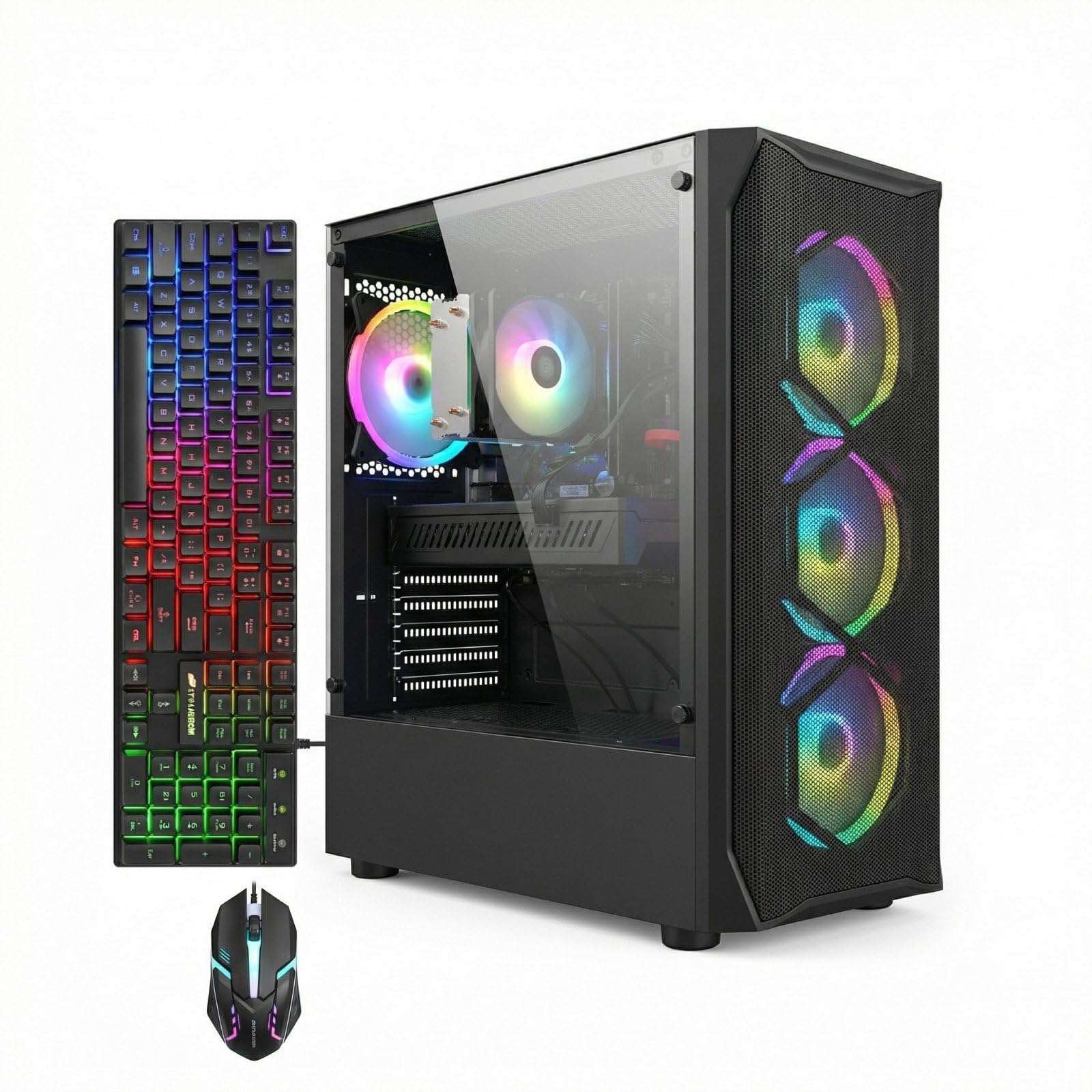
The STGAubron i7 / RX 580 configuration is a serious contender for the best value gaming PC under this tier. The AMD Radeon RX 580 8GB is a legendary budget GPU — it delivers 60+ FPS in Fortnite, Call of Duty: Warzone, and GTA V at 1080p high settings. The Intel Core i7 4th-gen processor clocks up to 3.9GHz, and while the architecture is older, the 8GB of VRAM on the RX 580 ensures texture-heavy games don’t stutter. The 16GB RAM and 512GB SSD provide responsive boot times and smooth in-game loading.
Connectivity is surprisingly modern with Wi-Fi 6 and Bluetooth 5.0, plus a full complement of USB 3.0 and USB 2.0 ports. The RGB case lighting and four RGB fans create an immersive gaming atmosphere, and the included gaming keyboard and mouse are functional for entry-level use. STGAubron offers a 1-year warranty and free lifetime tech support.
The i7-4770/4790-era CPU is the weak link — it cannot support Windows 11 without a bypass, and the 4-core/8-thread design can bottleneck the RX 580 in CPU-intensive titles like Battlefield 2042. Some units have shipped with non-functional LED lighting or loose fan connections. The generic power supply may lack 80PLUS certification, so reliability concerns exist under sustained load. This PC is a stopgap, not a long-term investment.
Why it’s great
- RX 580 8GB is a proven 1080p high-settings performer with excellent driver support
- Wi-Fi 6 and Bluetooth 5.0 bring modern wireless connectivity
- RGB fans and case lighting create an immersive gaming setup
Good to know
- CPU bottleneck in modern multi-threaded games limits frame rate ceiling
- Generic PSU may lack 80PLUS certification — upgrade recommended for reliability
10. STGAubron i5 / RX 550 Gaming PC

The STGAubron i5 / RX 550 is the most affordable entry point that still includes a dedicated graphics card. The AMD Radeon RX 550 4GB can handle lighter esports titles like Valorant, CS:GO, and Roblox at 1080p medium settings, and the Intel Core i5 processor (up to 3.6GHz) provides enough speed for everyday computing. The 16GB DDR4 RAM ensures smooth multitasking, while the 512GB SSD keeps load times reasonable for a budget build.
Wi-Fi 6 and Bluetooth 5.0 are standout features at this price — you won’t need to run an Ethernet cable for stable online matches. The included RGB gaming keyboard and mouse, along with two RGB case fans, give the system a gaming aesthetic despite its entry-level status. STGAubron provides a 1-year parts and labor warranty with free lifetime tech support.
The long-term reliability of this system is questionable — several users have reported PSU, cooler, and GPU failures after six to twelve months. The RX 550 4GB has only 512 stream processors, making it significantly weaker than the RX 560 or GTX 1050 Ti. This PC is suitable only as a first gaming PC for very light users or as a dedicated school computer with light gaming on the side.
Why it’s great
- Lowest price entry point with a dedicated GPU for esports gaming
- Wi-Fi 6 and Bluetooth 5.0 provide modern wireless connectivity
- Includes RGB peripherals and two RGB fans out of the box
Good to know
- RX 550 4GB is significantly weaker than RX 560 or GTX 1050 Ti
- Long-term reliability concerns — generic PSU and cooler may fail within a year
11. Dell OptiPlex RGB Gaming Tower (Renewed)

The Dell OptiPlex RGB Gaming Tower takes a business-class OptiPlex chassis and retrofits it with a GTX 1050 Ti 4GB, 16GB DDR4 RAM, and a 512GB SSD — delivering a cheap path to 1080p gaming. The i7-6700 6th-gen processor is one of the few older CPUs that supports Windows 11 natively without a bypass, avoiding the security issues plaguing 4th-gen systems. The GTX 1050 Ti handles Overwatch 2, Valorant, and Fortnite at 60+ FPS on low settings, and can push The Witcher 3 to 60 FPS on high settings.
The system ships with a complete RGB setup including a keyboard, mouse, speakers, and case lighting — everything you need to start gaming immediately. The i7-6700 is fast enough for light video editing in DaVinci Resolve and 4K rendering in Krita, though complex effects will show the CPU’s age. The single-fan cooler keeps temperatures manageable for the non-overclockable i7.
Dell’s proprietary motherboards use non-standard power supply and front-panel connectors, making future upgrades difficult. The GPU may arrive loose and require reseating. Some units have beep codes at first boot due to the graphics card not being detected — a known issue fixed by adjusting the BIOS primary display setting. The renewed nature means cosmetic imperfections are possible, and the warranty period is shorter than a new unit.
Why it’s great
- GTX 1050 Ti supports 60 FPS in esports titles at 1080p
- i7-6700 supports Windows 11 natively without bypass workarounds
- Complete RGB peripherals included — keyboard, mouse, and speakers
Good to know
- Proprietary Dell motherboard limits future PSU and case upgrades
- GPU may arrive loose — reseating and BIOS adjustment sometimes required
FAQ
Can I upgrade the RAM and GPU later on these budget gaming PCs?
Is an Intel Core i7 4th-gen processor still good enough for gaming in 2025?
How much SSD storage do I need for a budget gaming PC?
Does RGB lighting affect gaming performance?
What FPS can I expect from an RX 580 8GB in 2025?
Final Thoughts: The Verdict
For most users, the budget gaming pc winner is the CyberPowerPC Gamer Master because it delivers the best combination of modern components, upgrade potential, and out-of-box performance without cutting corners on the power supply or using a Windows 11 bypass. If you want dedicated graphics at the lowest possible price, grab the abytespark Gaming PC for its powerful RX 590 and VR-ready capability. And for those who plan to install their own GPU and want a clean upgrade platform, nothing beats the NINGMEI Gaming PC with its ATX 3.0 power delivery and six-fan cooling system.