
The 75% footprint drops the number pad to save desk space while keeping the F-row and arrow keys that tenkeyless layouts normally cut — it is the layout sweet spot for gamers who still type emails. Wireless frees the USB ports and cleans up the cable mess, but the real challenge is finding a board that delivers a rich, creamy acoustic profile without the hollow ping or plastic rattle that plagues so many budget mechanical keyboards.
I’m Min — the co-founder and writer behind Gadgets Feed. I have spent many hours analyzing the gasket structure, switch formulations, and battery capacities behind each board to separate the truly thocky performers from the marketing noise.
After testing over a dozen contenders against objective acoustic and connectivity benchmarks, I have narrowed the field to only the models that deliver genuine typing pleasure and reliable wireless — the definitive best 75% wireless mechanical keyboard for every workflow and budget.
How To Choose The Best 75% Wireless Mechanical Keyboard
Not every compact keyboard with a knob qualifies as a serious typing tool. The wireless 75% segment is crowded with boards that look similar on paper but feel drastically different under your fingers. You need to prioritize the internal construction, switch type, battery endurance, and connectivity stability above all else.
Gasket Mount & Sound Dampening
A gasket mount suspends the PCB between layers of poron or silicone foam rather than screwing it rigidly into the case. This floating design absorbs the bottom-out shock and eliminates the metallic pinging that hard-mounted keyboards produce. Five-layer dampening — typically poron foam, IXPE switch foam, PET film, and a silicone bottom pad — is the minimum threshold for that sought-after creamy sound. Boards with only two layers often sound hollow.
Wireless Protocol & Battery Life
Bluetooth 5.0 is fine for typing at a desk, but the 2.4GHz dongle reduces latency to under 10ms, matching a wired connection for competitive gaming. The battery is measured in milliamp-hours (mAh). A 4000mAh cell with RGB off can last 7-10 days of mixed use; 5500mAh extends that to roughly two weeks. Corsair’s 266-hour rating uses a different measurement (continuous keystroke logging without backlight) so it is not directly comparable to mAh figures.
Hot-Swappability & Keycap Material
A hot-swappable PCB that accepts both 3-pin and 5-pin switches lets you change the typing feel without soldering. This is essential if you want to experiment with different switches down the road. For keycaps, double-shot PBT (polybutylene terephthalate) resists the greasy shine that develops on cheaper ABS caps after a few months. Dye-sub PBT is even more fade-resistant for intricate legends.
Quick Comparison
On smaller screens, swipe sideways to see the full table.
| Model | Category | Best For | Key Spec | Amazon |
|---|---|---|---|---|
| YUNZII C75 | Premium | Long battery life & VIA customization | 5500mAh battery, QMK/VIA support | Amazon |
| AULA S75 PRO | Premium | LCD screen for GIFs & system status | Built-in LCD screen + multifunction knob | Amazon |
| Corsair K65 Plus | Premium | Console gaming & extreme battery life | 266hr battery (RGB off), 2.4GHz | Amazon |
| RK ROYAL KLUDGE R75 | Mid-Range | Entry-level gasket mount with knob | 4000mAh, 1.2mm single-key slot PCB | Amazon |
| YUNZII B75 PRO | Mid-Range | Matcha aesthetic & creamy milk switches | 4000mAh, 5-layer dampening | Amazon |
| Aula F75 | Mid-Range | Creamy sound & manga keycaps | 4000mAh, Leobog Reaper switches | Amazon |
| RedThunder K75 | Budget | Side-engraved caps & dual-mode knob | 4000mAh, side-engraved PBT keycaps | Amazon |
In‑Depth Reviews
1. YUNZII C75 Wireless Mechanical Keyboard
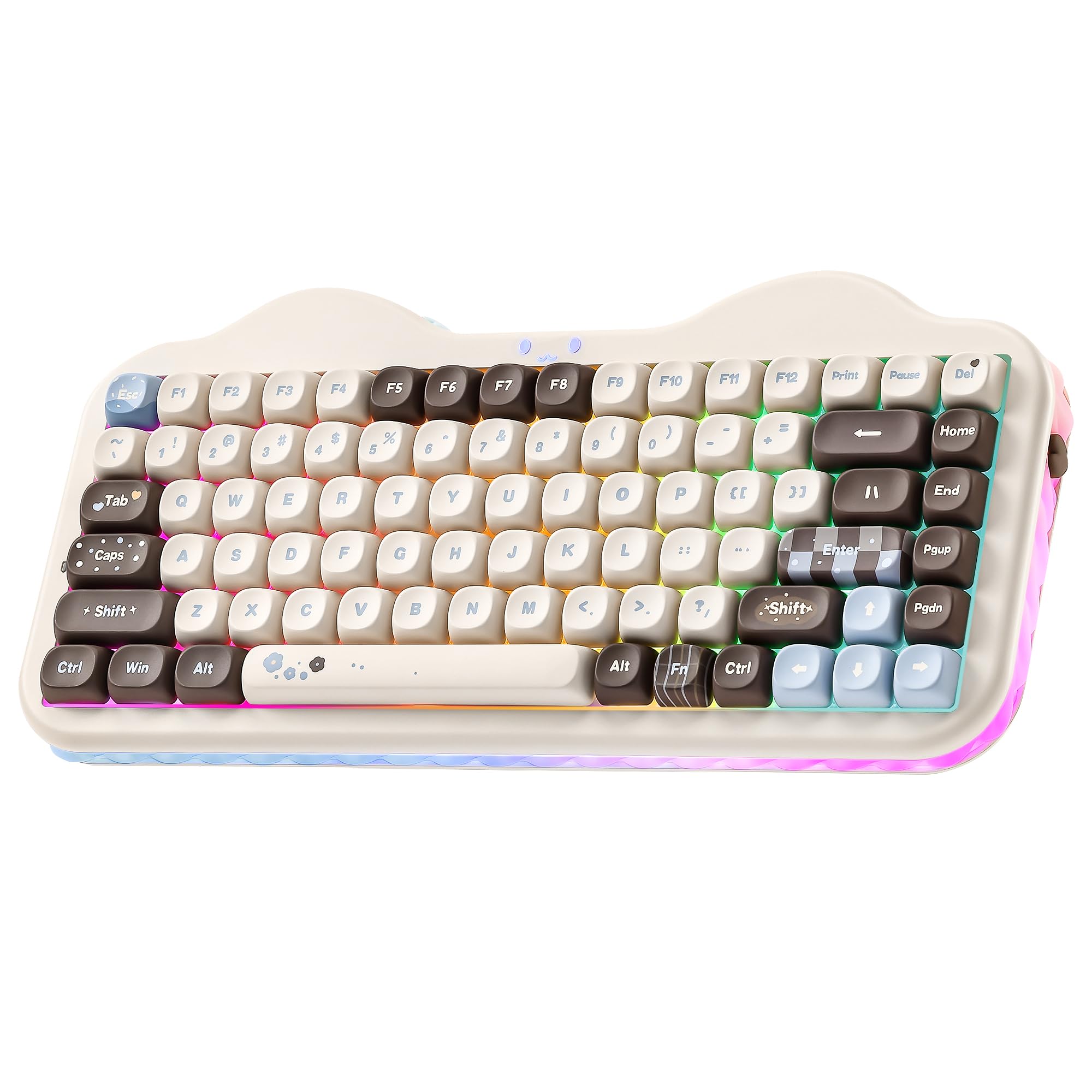
The YUNZII C75 stands apart with a 5500mAh battery — 37% larger than the 4000mAh cells found in most competitors — and genuine QMK/VIA firmware support that gives you full key remapping and macro control without vendor-locked software. The dye-sub PBT MOA keycaps use a rounded profile that cradles your fingertips, and the gasket structure with multiple sound-absorbing layers produces a rich, creamy acoustic that remains quiet enough for open-plan offices.
Tri-mode connectivity covers Bluetooth 5.0, a 2.4GHz dongle, and USB-C wired. The 75-key layout keeps the arrow cluster and F-row intact while shaving off the numpad, and the south-facing LEDs ensure the beautifully printed cake-themed legends stay visible. The Milk V2 pre-lubed linear switches arrive buttery smooth straight out of the box with zero spring crunch.
The cute cake aesthetic with pastel color tones and transparent cream side panels sets a distinct visual tone that some users may find too playful for a professional desk. There is no volume knob — all media control runs through FN shortcuts. The smooth PBT keycaps also risk scratching when removed frequently for switch swaps.
Why it’s great
- Largest battery in class at 5500mAh
- VIA/QMK firmware for deep customization
- Dye-sub PBT MOA keycaps with excellent texture
Good to know
- No dedicated volume knob
- Aesthetic may not suit all desk setups
- Keycap surface scratches easily during removal
2. AULA S75 PRO Wireless Mechanical Keyboard
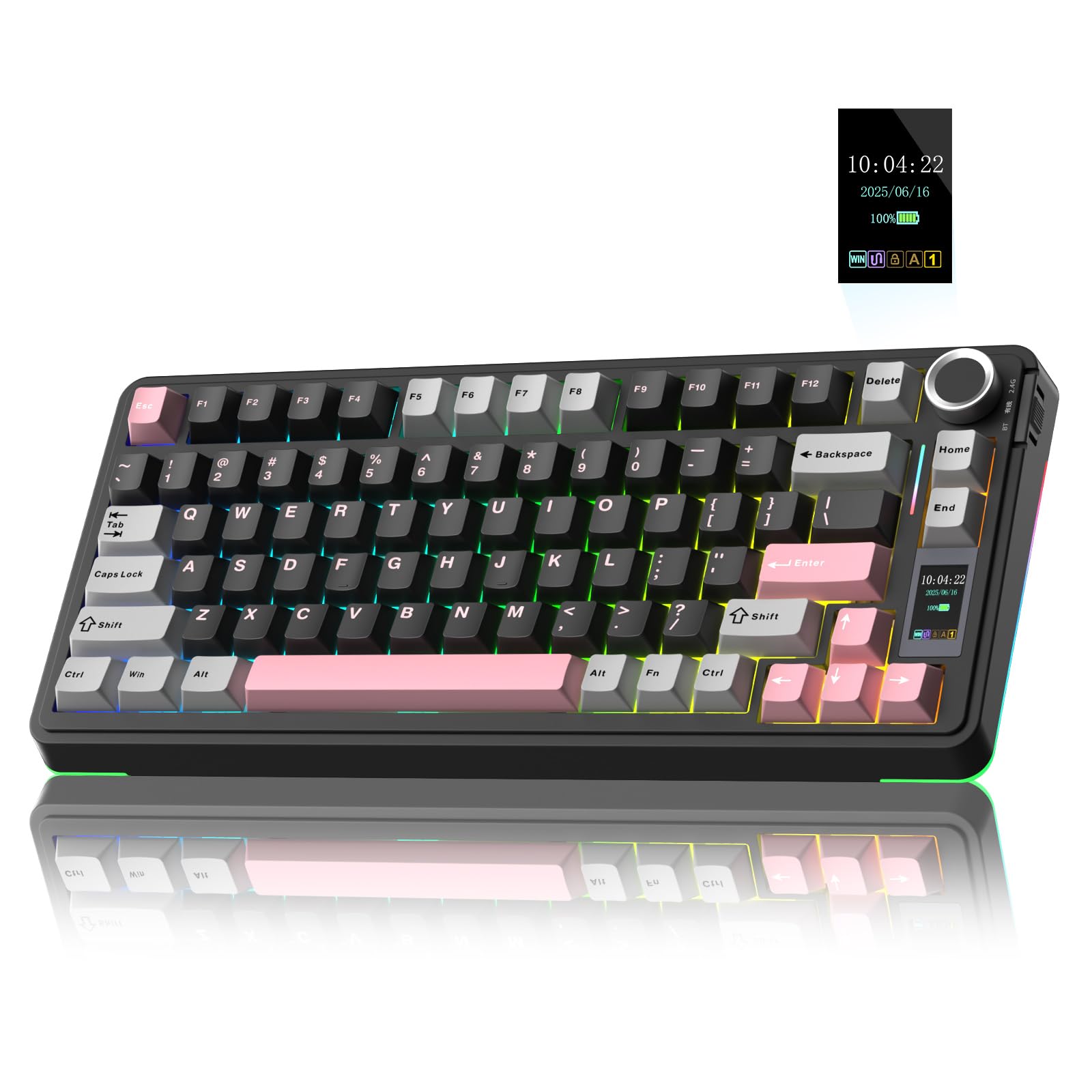
The AULA S75 PRO breaks the mould of the standard 75% formula by integrating a 1.3-inch LCD screen into the top-right corner. This display shows battery percentage, connection status, time, date, and even custom GIFs — a genuinely useful productivity layer that also adds personality. The multifunction knob beside it handles volume and backlight controls, and the whole experience is paired with a thocky acoustic profile thanks to the extended integrated silicone pad and five-layer silencer fill.
Tri-mode connectivity (BT5.0, 2.4GHz, USB-C) pairs easily with up to five devices. The Leobog star vector switches are pre-lubed, and the hot-swappable PCB accepts 3-pin or 5-pin switches for future customization. The double-shot PBT keycaps use a Cherry profile, and south-facing RGB ensures the legends stay lit even with opaque caps.
The LCD screen configuration software requires a Windows PC in wired mode — there is no web-based configurator. Battery life drops to roughly 20 hours with the RGB backlight and screen active. At 1007 grams, the all-plastic enclosure feels dense but not premium compared to aluminum-framed alternatives.
Why it’s great
- LCD screen for system info and GIF customization
- Extended silicone pad creates deep, thocky sound
- Hot-swappable with 3-pin/5-pin support
Good to know
- Screen config locked to Windows wired mode
- ~20 hour battery with RGB and screen on
- Plastic chassis, not aluminum
3. Corsair K65 Plus Wireless 75% RGB Mechanical Gaming Keyboard

Corsair brings its gaming pedigree to the 75% wireless space with the K65 Plus, featuring proprietary pre-lubricated MLX Red linear switches that deliver an exceptionally smooth keystroke with very low initial resistance. The 266-hour battery rating (with RGB off) sets a class-leading endurance record — you can go a full month of daily office use before reaching for the USB-C cable. AES-128 encryption on the 2.4GHz wireless link adds a layer of security that Bluetooth alone cannot match.
The multifunction rotary dial and FN shortcuts handle media playback, volume, and lighting profiles without needing to open the iCue software. PBT dye-sublimated keycaps resist shine and legend fade. Compatibility extends beyond PC to PS5, PS4, Xbox, and iPad, making it the most versatile option for multi-platform gamers.
The stock keycaps are not shine-through, so the south-facing RGB illumination is only visible around the edges of the caps in a dark room; you will need aftermarket caps to see legends at night. The iCue software must be running for macro and key reassignment to work — the keyboard has no on-board memory. At a premium price point, the plastic case does not feel as dense as some competitors.
Why it’s great
- 266-hour battery life with RGB off
- AES-encrypted 2.4GHz for secure low-latency gaming
- Multi-platform support: PC, Mac, PS5, Xbox, iPad
Good to know
- No shine-through keycaps — RGB legends are dark
- No on-board memory for macros without iCue
- Plastic case at a premium price
4. RK ROYAL KLUDGE R75 Wireless Mechanical Keyboard
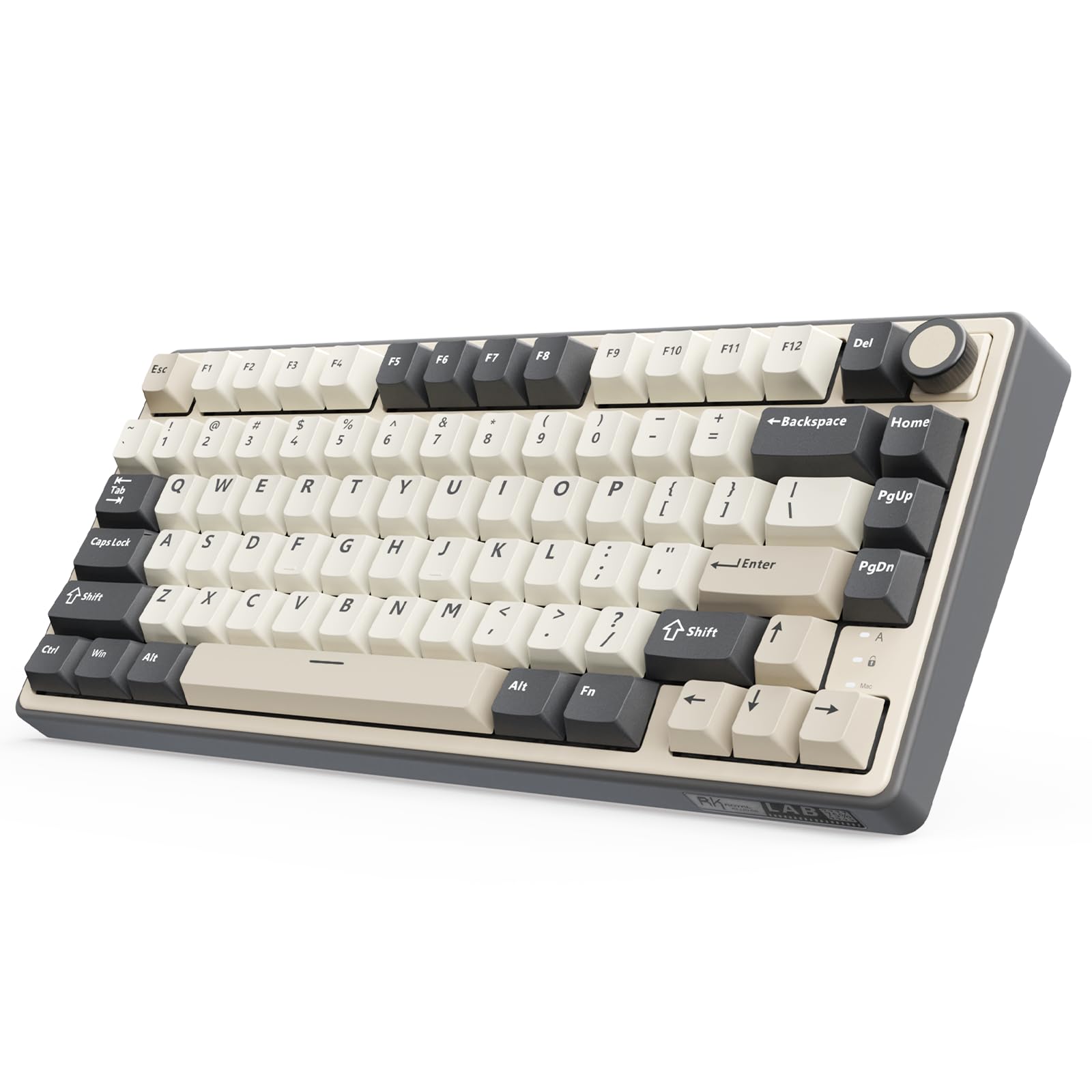
The RK R75 delivers a gasket-mount experience at an entry-level price point without cutting corners on the internal structure. The five-layer sound-dampening stack uses poron foam and a 1.2mm single-key slot PCB — the same flex-cut design found in many enthusiast builds — to deliver a genuinely soft bottom-out and a clean acoustic profile. The cream switches are pre-lubed and produce a smooth, quiet keystroke that rivals boards costing twice as much.
A 4000mAh battery provides around a week of mixed use with RGB on. Bluetooth 5.1, 2.4GHz, and USB-C wired modes cover all the bases, and the hot-swappable PCB supports both 3-pin and 5-pin switches. The CNC metal volume knob feels premium against the plastic chassis and is fully programmable.
The all-white colorway with south-facing RGB creates a clean look, but the lettering on the PBT keycaps is not backlit — the legends themselves stay dark while the underglow shines through the cap edges. The QMK/VIA compatibility is present but requires a firmware update that is not immediately obvious to first-time users.
Why it’s great
- 1.2mm single-key slot PCB for flex and accuracy
- CNC metal volume knob, hot-swappable and programmable
- Five-layer dampening delivers premium acoustic
Good to know
- Keycap legends are not backlit
- VIA compatibility needs manual firmware update
- Plastic chassis only
5. YUNZII B75 PRO Wireless Mechanical Keyboard
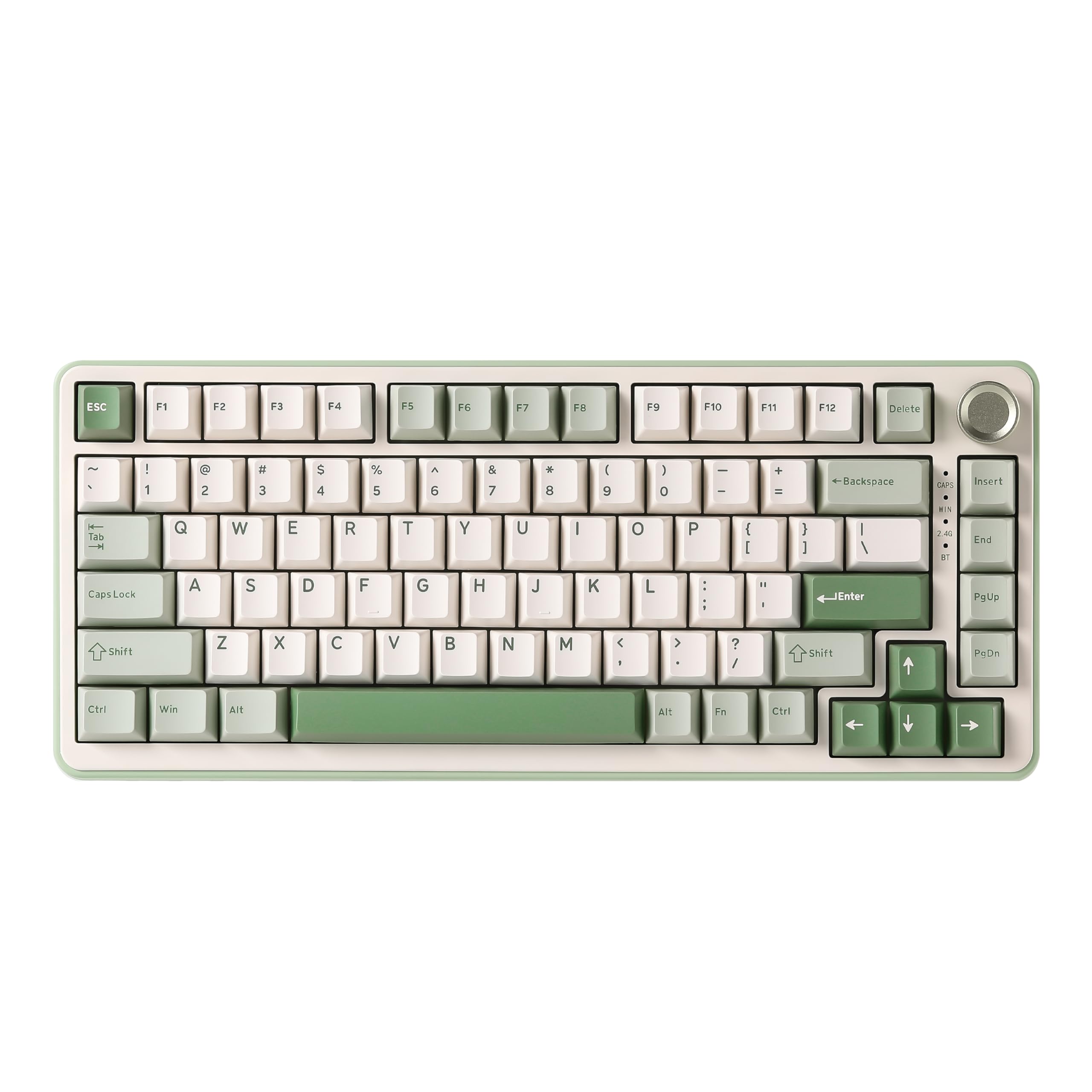
The YUNZII B75 PRO brings a breezy Matcha Green color scheme and Milk linear switches that produce a distinctly creamy, clacky sound that many users describe as addictive. The gasket structure with five-layer padding effectively kills the hollow cavity noise that cheap boards produce, while the pre-lubed stabilizers ensure the larger keys (spacebar, shift, enter) do not rattle. At 82 keys, it squeezes in a few extra shortcuts over the standard 75% count.
Tri-mode connectivity with a 4000mAh battery supports several days of mixed use. The CNC multifunction knob handles volume and backlight effects, and a long press toggles between gaming and office modes. The south-facing RGB shines brightly through the double-shot keycaps, and the included dust cover is a thoughtful addition for commuters.
The default sleep timer is set aggressively at 30-45 seconds, which can be annoying during reading or video pauses; the YUNZII driver offers a fix, but the software interface feels dated. The all-plastic build at 0.9 kilograms feels light and can slide on a smooth desk surface under aggressive typing.
Why it’s great
- Milk linear switches deliver a creamy, clacky sound
- Included dust cover and extra keycaps
- Multifunction knob with gaming/office mode toggle
Good to know
- Aggressive 30-second sleep timer on default
- Lightweight plastic build slides on smooth desks
- Driver software feels sketchy and outdated
6. Aula F75 Wireless Mechanical Keyboard
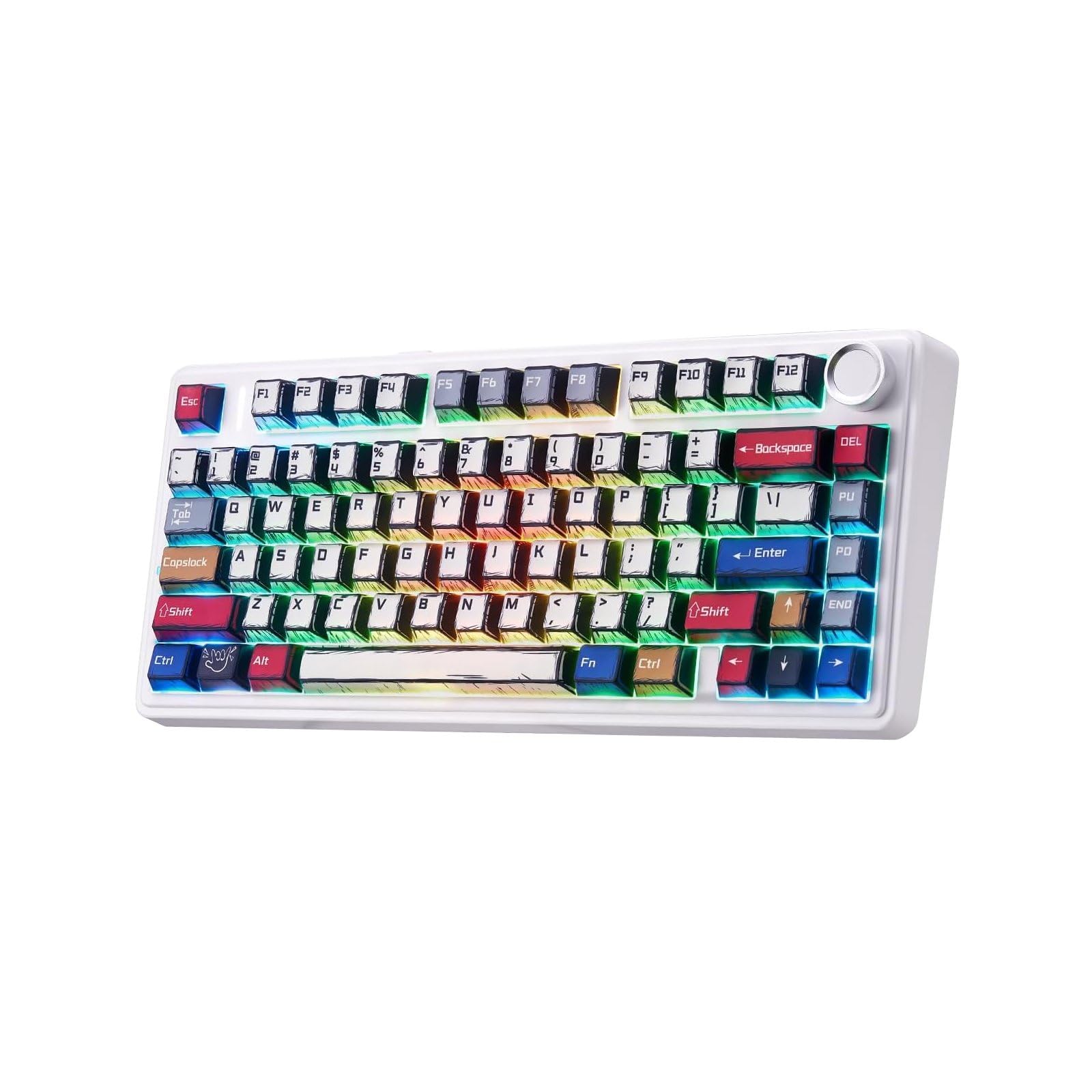
The Aula F75 has gained a cult following for delivering a creamy typing experience at a budget price through its Leobog Reaper switches, which are pre-lubed and surprisingly smooth for the cost. The gasket structure with five sound-absorbing layers effectively counters cavity noise, and the Cherry-profile double-shot PBT manga keycaps add unique visual flair without sacrificing durability. The 81-key layout includes the essential arrow block while remaining noticeably compact.
Tri-mode connectivity with a 4000mAh battery keeps the board running through a work week even with the 16.8-million-color RGB active. Bluetooth 5.0 pairs with up to five devices, and the NFC-like quick-switch button on the side makes device hopping seamless. The hot-swappable socket supports 3-pin and 5-pin switches, and the package includes four spare Reaper switches and a dust cover.
The included keycap puller and switch puller are basic tools that may scratch caps if not used carefully. The full-key macro programming software is Windows-only and requires a wired connection to configure. The “Mix” color option may vary slightly in appearance from product images due to the manga printing process.
Why it’s great
- Leobog Reaper switches deliver creamy sound at low cost
- Cherry-profile double-shot PBT manga keycaps
- Five-layer dampening in an affordable package
Good to know
- Programming software is Windows-only, wired required
- Basic pullers included — upgrade if swapping often
- Manga color can vary slightly from listing images
7. RedThunder K75 Wireless Mechanical Gaming Keyboard
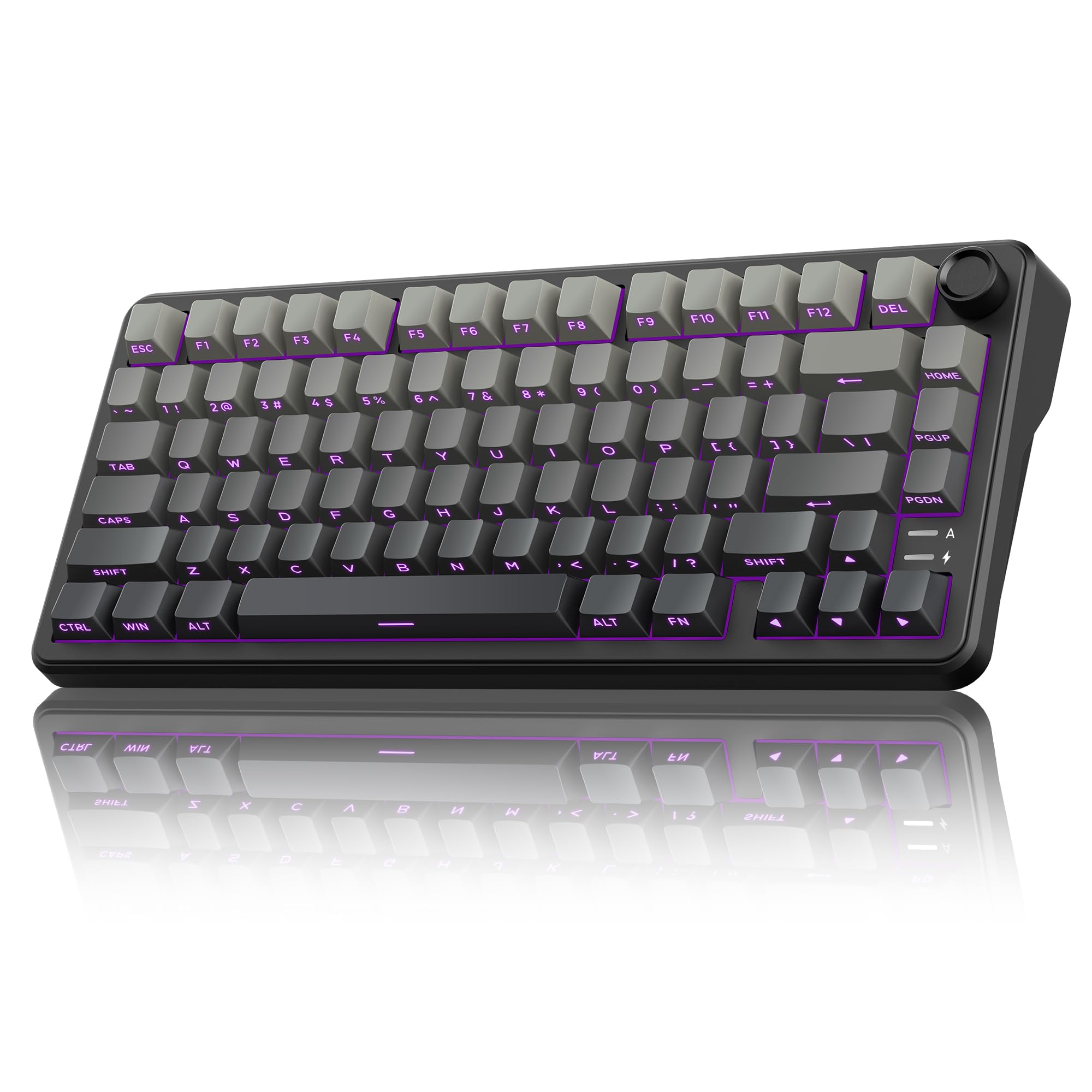
The RedThunder K75 stands out in the budget tier with its side-engraved translucent PBT keycaps — the legends are carved into the front-facing edge rather than the top, giving a clean, minimalist look while still being readable in low light thanks to the south-facing LEDs. The pre-lubed coconut linear switches offer a smooth, creamy keystroke that punches well above the price point. The gasket structure uses five layers of shock absorption and a single-key positioning plate for even key feel.
The dual-mode CNC knob rotates to adjust brightness in gaming mode (short press to cycle RGB effects) or volume in office mode (short press to play/pause). A 4000mAh battery with full RGB provides about a day and a half of continuous use, with the LEDs auto-dimming during idle periods to conserve power. Triple connectivity covers Bluetooth 5.0, 2.4GHz, and wired USB-C.
The K75 is explicitly not recommended for keyboard beginners — the side-engraved legends can be disorienting if you look down while typing, and the hot-swappable mechanism requires careful alignment to avoid bending pins. The programmable software (K75-US driver) only works in Windows wired mode and is less polished than mainstream alternatives.
Why it’s great
- Side-engraved translucent PBT keycaps for unique look
- Coconut linear switches with smooth, creamy feel
- Dual-mode knob for lighting and volume control
Good to know
- Not recommended for first-time keyboard users
- Software is Windows-only and wired-mode required
- ~36 hour continuous battery with RGB on
FAQ
What does “creamy” mean in the context of a wireless mechanical keyboard?
Can I use a 75% wireless keyboard for competitive gaming without lag?
How do I know which switch is right for me — linear, tactile, or clicky?
What is the difference between PBT and ABS keycaps?
Final Thoughts: The Verdict
For most users, the best 75% wireless mechanical keyboard winner is the YUNZII C75 because it combines the largest battery capacity (5500mAh), genuine VIA/QMK firmware, and dye-sub PBT MOA keycaps into a package that sounds and feels premium. If you want a built-in LCD screen for system info and custom GIFs, grab the AULA S75 PRO. And for multi-platform console gaming with class-leading battery endurance, nothing beats the Corsair K65 Plus.