
The leap from caliper measurements to a fully captured 3D mesh is a single purchase away, but the chasm between a usable scan and a frustrating mess of corrupted point clouds is defined by one thing: resolution. Whether you are reverse-engineering an automotive bracket, preserving a historical artifact, or feeding a desktop 3D printer with organic forms, the 3D model scanner you choose dictates whether your workflow ends in triumph or a string of failed alignment errors.
I’m Min — the co-founder and writer behind Gadgets Feed. My analysis of this market has involved cross-referencing over 200 hours of user experience data, parsing technical datasheets for fusion point distance, volumetric accuracy, and laser wavelength performance across eleven distinct models that span from entry-level structured light to professional-grade blue laser arrays.
This guide distills that research into a clear, actionable comparison of the best options available, helping you match the right hardware to your specific scanning needs. My goal is to help you identify the best 3d model scanner for your projects without wasting time on specs that don’t matter.
How To Choose The Best 3D Model Scanner
Every 3D scanner is a compromise between speed, accuracy, and ease of use. Before you evaluate price tiers, you need to know which scanning technology matches your typical objects, what kind of computer can run the software, and whether you care about full-color texture capture or just raw geometry.
Single-Frame Precision vs. Volumetric Accuracy
Single-frame precision (often quoted as 0.01mm, 0.02mm, or 0.05mm) tells you the theoretical resolution of one static capture. Volumetric accuracy (expressed as mm + mm/m) reveals how much error accumulates as you scan larger objects. For jewelry or small engine parts, single-frame precision matters most. For car bumpers or furniture, volumetric accuracy is your real concern. Ignore the headline number — look for the volumetric formula.
Laser Wavelength and Surface Reflectivity
Blue lasers (450nm) handle shiny and dark surfaces better than infrared structured light, but they require more processing power. Infrared systems (850-940nm) are gentler on eyes and work outdoors, but they struggle with reflective metallic surfaces and often require anti-glare spray. If you scan engine blocks or chrome trim, a blue laser scanner like the Revopoint MetroY Ultra or Creality Sermoon S1 is non-negotiable. For organic forms and people, infrared structured light is safer and more forgiving.
PC Requirements: The Hidden Gatekeeper
A 3D scanner is only as good as the computer it connects to. Budget and mid-range scanners offload processing to your PC, meaning you need at least an Intel i7-12th Gen or AMD Ryzen 7, 32GB of RAM, and an NVIDIA RTX 3060 (8GB) GPU to avoid constant crashes and laggy previews. The premium all-in-one scanners like the Shining 3D Einstar Vega have built-in computing, bypassing this bottleneck entirely. Check the minimum RAM and GPU requirements before buying any tethered scanner.
Quick Comparison
On smaller screens, swipe sideways to see the full table.
| Model | Category | Best For | Key Spec | Amazon |
|---|---|---|---|---|
| Revopoint MetroY Ultra | Blue Laser | Industrial precision | 0.01mm single-frame precision | Amazon |
| Revopoint MetroY Pro | Blue Laser | High-detail metrology | 62-line full-field structure | Amazon |
| Shining 3D Einstar Vega | All-in-One | Standalone wireless scanning | Built-in 8-core CPU | Amazon |
| Creality Sermoon S1 | Blue Laser | Large-object scanning | 5mm–4m scanning range | Amazon |
| Shining 3D Einstar | IR Structured Light | Hobbyist body scanning | 14 FPS scanning speed | Amazon |
| EINSTAR Pro | IR VCSEL | Sub- value | 0.1mm point distance | Amazon |
| Matterport Pro3 | LiDAR | Architectural scanning | 100m scanning range | Amazon |
| Matterport Pro2 | 360 Camera | Virtual tour creation | 134 MP resolution | Amazon |
| Revopoint INSPIRE 2 Premium | Hybrid | Versatile wireless scanning | Dual scan modules | Amazon |
| Revopoint INSPIRE 2 Standard | Hybrid | Outdoor scanning on budget | WiFi 6 mobile scanning | Amazon |
| 3DMakerpro Seal Lite | Blue LED | Entry-level small objects | 0.02mm accuracy | Amazon |
In‑Depth Reviews
1. Revopoint MetroY Ultra Laser 3D Scanner
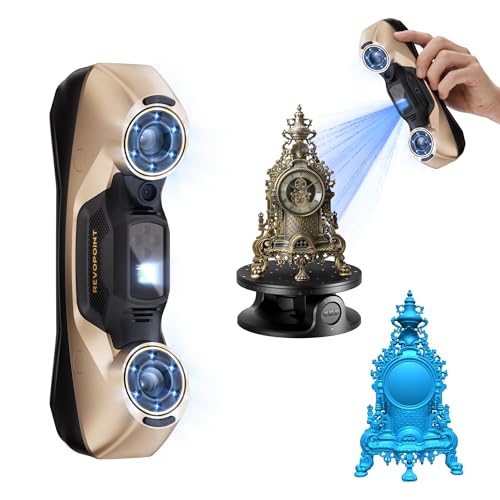
The Revopoint MetroY Ultra sets the benchmark for industrial-grade desktop scanning with a genuine 0.01mm single-frame precision and a 0.015 + 0.04 mm/m volumetric accuracy that satisfies metrology-level inspection. Its five scanning modes — including 34 laser cross-lines for rapid capture and a single-line mode for deep holes — make it adaptable to everything from gear teeth to turbine blades.
The 5500mAh battery grip delivers about 2.5 hours of untethered operation, and the Wi-Fi 6 connection allows you to monitor scans on a tablet while keeping the PC safely away from the scanning environment. Real user feedback confirms that the no-spray capability works on black, high-gloss, and metallic surfaces, eliminating a major friction point in industrial workflows.
On the downside, the learning curve is steep — the software requires a robust PC (i7-13th Gen or Ryzen 7 5800, 32GB RAM, RTX 3060) and the sheer number of modes can overwhelm new users. One review noted misleading advertising regarding mobile connectivity, stating the scanner still requires a PC for processing. For professionals who need sub-0.02mm precision without spray, however, the MetroY Ultra is the current gold standard.
Why it’s great
- True 0.01mm single-frame precision verified by carbon fiber ball plate tests
- Five scanning modes including 34-line cross and deep-hole single-line
- Built-in Wi-Fi 6 for wireless streaming and control
Good to know
- Requires a powerful gaming-class PC — not for casual laptops
- User reviews indicate mobile connectivity is limited; tethered PC still needed
- Software learning curve is significant for non-professionals
2. Revopoint MetroY Pro 3D Scanner
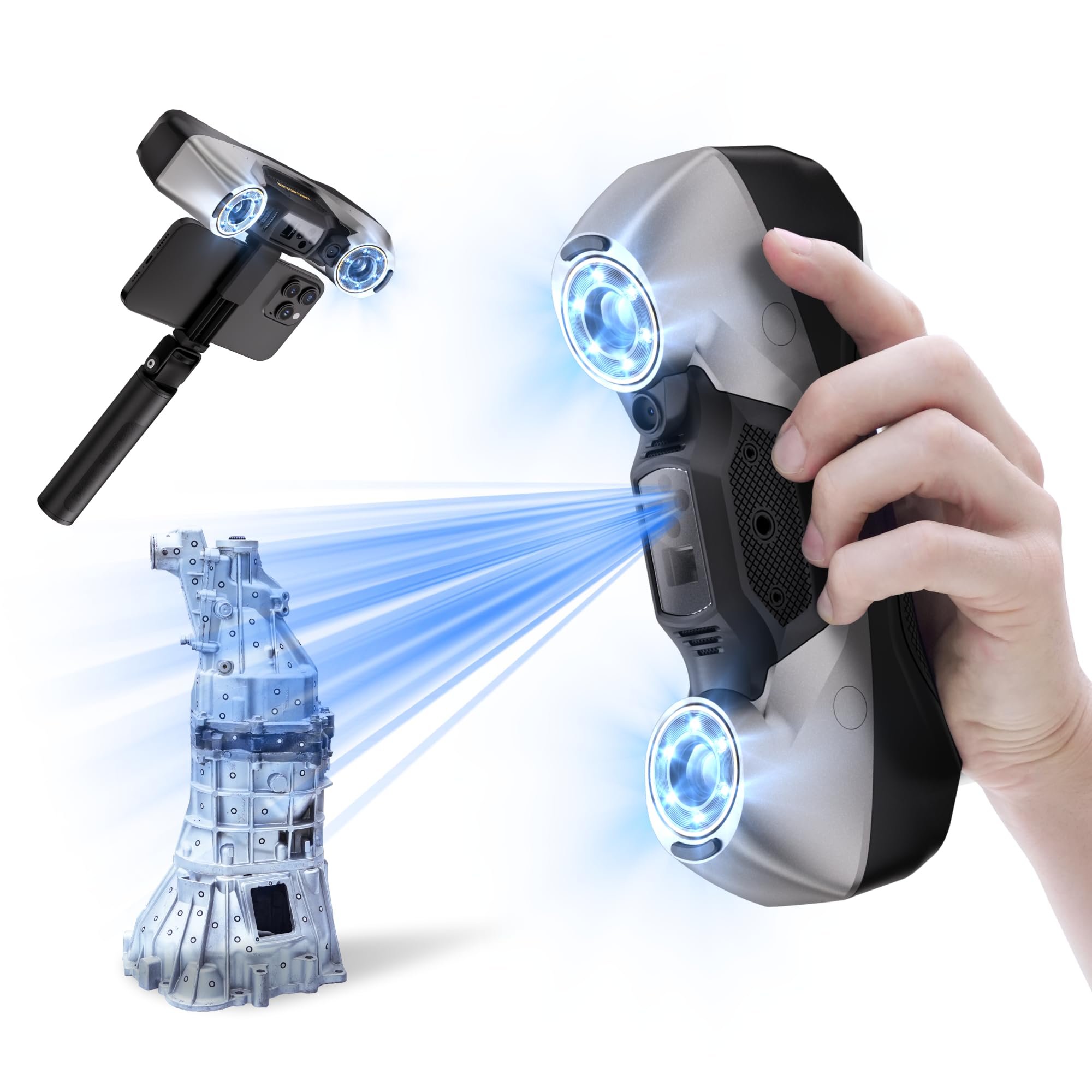
The MetroY Pro is the sibling that trades the Ultra’s wireless battery grip for a 62-line full-field blue structured light mode that shoots 7 million points per second without any markers. This makes it the fastest scanner in this roundup for marker-free capture of feature-rich objects, ideal for reverse engineering complex molds or automotive trim pieces that already have surface texture.
Both the MetroY Pro and Ultra share the same 0.01mm precision and 0.02mm accuracy, but the Pro adds real-time temperature monitoring sensors that automatically adjust fan speed to prevent accuracy drift during long scanning sessions. Build quality is exceptional — the all-metal chassis and secure cable connections feel like lab equipment. The included dual-axis turntable syncs automatically for hands-free operation.
Where it falls short is software maturity. Multiple verified reviews report bugs in both the firmware and the Revo Metro software, especially on macOS — the software crashes on M-series Macs and wireless streaming is unsupported. The scan speed is also slower than some competitors at roughly 60 FPS. This scanner is best suited for Windows users who prioritize absolute precision over speed.
Why it’s great
- Marker-free 62-line full-field mode at 7 million points per second
- Real-time temperature monitoring prevents accuracy drift
- Included dual-axis turntable with auto-sync for hands-free scanning
Good to know
- Software has notable bugs — crashes on macOS M-series chips
- Slower scanning speed (~60 FPS) compared to the 90 FPS competition
- Requires a high-end Windows PC — Mac users should avoid
3. Shining 3D Einstar Vega Wireless 3D Scanner

The Einstar Vega is the first truly standalone handheld 3D scanner that doesn’t require a PC for operation. With a built-in 8-core 2.4GHz CPU, 32GB RAM, and 512GB SSD, it processes scans on-device and displays them on a 6.4-inch 2K AMOLED touchscreen. This eliminates the single biggest frustration of tethered scanners — the requirement for a powerful external computer.
It features two scanning technologies: VCSEL structured light for large objects with a 270–1500mm working distance and up to 20 FPS in Fast Mode, and MEMS projectors for small objects at 100–350mm with up to 15 FPS in HD Mode. The infrared light source works outdoors in direct sunlight without losing tracking, and it can scan dark hair and people without any safety concerns. The one-click scanning mode makes it genuinely beginner-ready.
The trade-off is that the Vega struggles with dark, shiny, or transparent surfaces — one user reported it “fails on sunlight, dark, shiny, small, transparent, flat, and curved objects” even with spray and markers. The battery life is also just over one hour, requiring a power bank for extended sessions. For professionals who need a truly portable, tether-free solution for medium-to-large objects, the Vega is unmatched, but it is not a universal tool.
Why it’s great
- Fully standalone — no PC required for scanning or processing
- Two scanning modes for objects from small to car-sized
- Works outdoors in sunlight and scans dark surfaces like hair
Good to know
- Struggles with black, shiny, transparent, and small objects
- Battery life is approximately 60–70 minutes
- Some users report batch defects — inconsistent performance
4. Creality 3D Scanner Sermoon S1
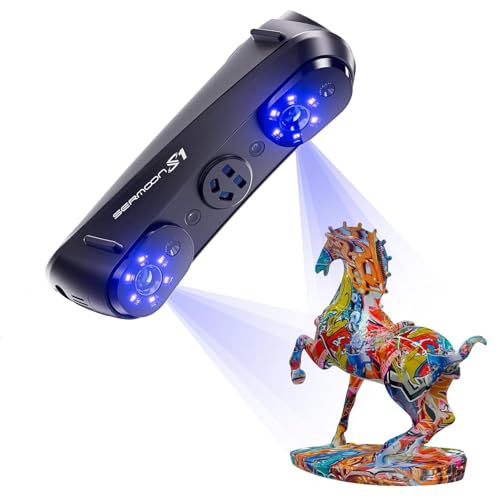
Creality’s Sermoon S1 is designed to scan everything from a 5mm dental model to a 4-meter automotive body panel with a single device. The triple-mode blue laser system switches between 34 crossed lines for speed, 7 parallel lines for detail, and single-line mode for deep holes and grooves. The scanning speed hits 90 FPS, making it one of the fastest blue laser scanners available.
Accuracy is rated at 0.02mm with 0.08 mm/m volumetric precision, and the 4-lens stereo vision supports marker-free scanning on feature-rich surfaces. The AI-assisted software in Creality’s ecosystem simplifies mesh generation and data cleanup, which is a welcome feature for users coming from the 3D printer world. The carrying case and all accessories are included, making it a turnkey professional solution.
However, the user reviews for the Sermoon S1 are sparse and mostly focus on the quality of the included marker dots rather than the scanner itself. This suggests the product is very new, and long-term reliability data is not yet available. The system requirements are steep — 32GB RAM and an i7-10th Gen minimum — and the software ecosystem is less mature than Revopoint’s Revo Metro or Shining 3D’s EXstar.
Why it’s great
- Ultra-wide scanning range from 5mm to 4m — covers micro to macro
- 90 FPS scanning speed with triple-mode blue laser flexibility
- Marker-free scanning support with 4-lens stereo vision
Good to know
- Very new product with limited long-term user reviews
- Software ecosystem is less developed than competitors
- Requires a powerful Windows PC; macOS support is basic
5. Shining 3D Einstar Handheld 3D Scanner

The original Einstar remains a powerful entry point into professional-grade 3D scanning. It uses three infrared VCSEL projectors and two stereo depth cameras to achieve a 0.1mm point distance at 14 FPS, which is competitive for hobbyist and light professional use. The built-in RGB camera captures full-color texture, and the “Hair Mode” feature allows for detailed human head scans including hair — a rare capability at this price point.
User reviews consistently praise its ease of use and tracking reliability compared to the similarly priced Revopoint Range, with one verified reviewer stating it outperforms that competitor in dim light and on dark gray surfaces. The EXstar software provides automatic alignment and real-time data quality indicators, reducing the learning curve significantly.
Downsides include a need for tracking dots and spray on dark or reflective surfaces, a somewhat awkward ergonomic design with no tripod mount, and a 3.08-pound weight that gets heavy after extended use. Some users also report that the software lacks a tutorial and can be frustrating for complete beginners. For the price, however, the original Einstar delivers the best balance of capability and cost.
Why it’s great
- Excellent value for professional-grade resolution at 0.1mm point distance
- Dual infrared projectors enable reliable tracking in dim indoor environments
- Hair Mode works for scanning human heads and detailed organic forms
Good to know
- Requires spray and tracking dots for dark or reflective surfaces
- Heavy at 3.08 pounds with no tripod mount — fatiguing to hold
- Software lacks a tutorial; some learning curve required
6. EINSTAR Pro Handheld 3D Scanner

The EINSTAR Pro (also from Shining 3D) strips away the original Einstar’s triple projector setup while keeping the same 0.1mm resolution and RGB texture capture, making it a leaner, lighter option at a friendlier price point. It weighs just 1.1 pounds, which is a dramatic improvement for handheld scanning sessions that last longer than ten minutes.
Users call it a “sub- beast” that rivals scanners costing twice as much, particularly praising the polished software experience. The VCSEL structured light handles dark and textured objects reasonably well without spray, though reflective surfaces still require preparation. The ergonomic design is better than the original Einstar, and the carrying case is included for portability.
Where it loses points is consistency — one verified reviewer reported that theirs “never produced a usable scan” despite troubleshooting on a 64GB RAM / RTX 4090 system, eventually destroying it in frustration. Another noted it struggles with small objects below 5cm and simple geometric shapes. The PRO is a fantastic tool for medium-to-large objects in the right hands, but it is not a guaranteed out-of-box success for every user.
Why it’s great
- Lightweight 1.1-pound design for comfortable extended use
- 0.1mm resolution with full-color RGB texture capture
- Software is polished and user-friendly compared to competitors
Good to know
- Some units have severe tracking issues even on high-end PCs
- Struggles with small objects under 5cm and simple shapes
- Customer support is inconsistent based on user reports
7. Matterport Pro3 3D Lidar Scanner
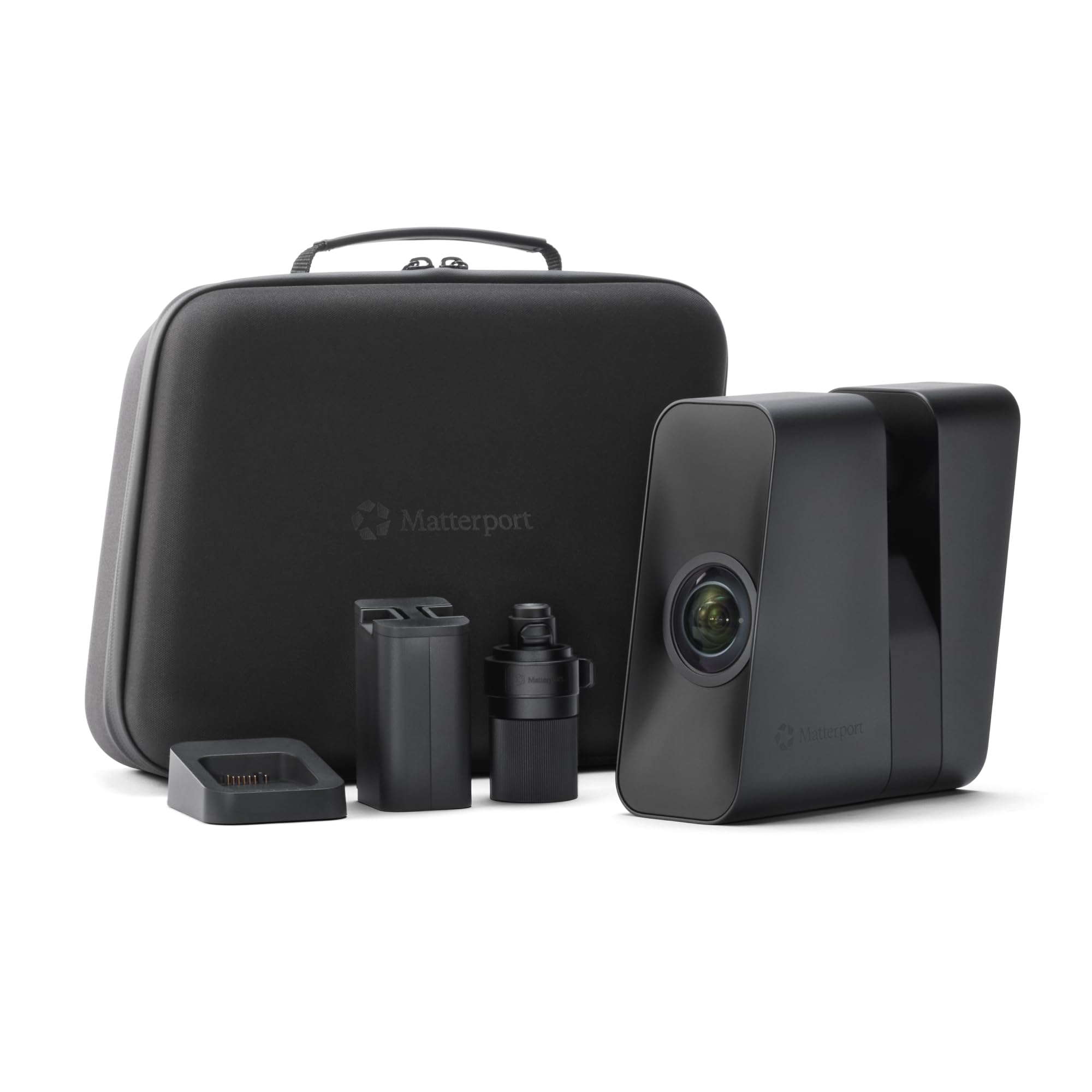
The Matterport Pro3 is the gold standard for architectural-scale 3D scanning. Its LiDAR sensor captures 100,000 points per second with a +/-20mm accuracy at 10 meters, and the extended range reaches 100 meters — enough to scan an entire warehouse or outdoor landmark in a single sweep. Each scan completes in under 20 seconds, making it dramatically faster than any structured light or blue laser scanner for large spaces.
The removable battery allows for continuous scanning with hot-swappable packs, and the camera output is 4K photo-realistic with 360-degree views. The included tripod mount and hard carrying case make it field-ready for real estate, construction, and heritage documentation professionals. Users consistently praise its ease of use and robust build quality.
The major catch is the subscription model — the Pro3 requires an active Matterport professional or business subscription to process and view scans, and it is not compatible with the free plan. One reviewer called this a “scam” given the hardware cost. Additionally, the Pro3 is not designed for small object scanning — its minimum range and accuracy make it unsuitable for parts under 20cm. It is a specialized tool for space-scale digital twins only.
Why it’s great
- 100m LiDAR range captures entire buildings in under 20 seconds per scan
- 4K photo-realistic 360° digital twins with high precision
- Removable battery supports continuous field operation
Good to know
- Requires ongoing Matterport subscription — not a one-time purchase
- Not suitable for small objects under 20cm
- Very expensive compared to structured light alternatives
8. Matterport Pro2 3D Camera Professional Kit

The Matterport Pro2 is the predecessor to the Pro3, still widely used for indoor virtual tours and real estate marketing. It captures 1.5 million depth points per scan with 4K (134 MP) photo resolution, producing highly immersive digital twins in under 30 seconds per scan. The accuracy is rated at +/-50mm, which is sufficient for room-scale models but not for engineering-grade measurements.
The Professional Kit includes a 31-inch hard rolling case, tripod, and quick-release clamp, making it a complete travel-ready solution. Users report an 8-hour battery life, which easily covers a full day of property scans. The learning curve is much shallower than any handheld 3D scanner — the Capture app guides you through placement, and the processing happens in Matterport’s cloud.
The same subscription requirement applies as the Pro3, and one user noted that “processed images will disappear forever if I stop paying the monthly fee.” There have also been reports of batteries that won’t charge to 100% and customer service only offering refunds instead of replacements. For real estate professionals who need turnkey virtual tours, the Pro2 is still a viable workhorse, but the subscription model is a permanent cost anchor.
Why it’s great
- Fast 30-second per scan capture with 134 MP photo-realistic output
- 8-hour battery life covers a full workday
- Complete kit with rolling hard case, tripod, and clamp
Good to know
- Requires paid Matterport subscription — cloud processing is mandatory
- 50mm accuracy is not suitable for engineering or reverse engineering
- Some units have battery charging issues; customer service limited to refunds
9. Revopoint INSPIRE 2 Premium 3D Scanner
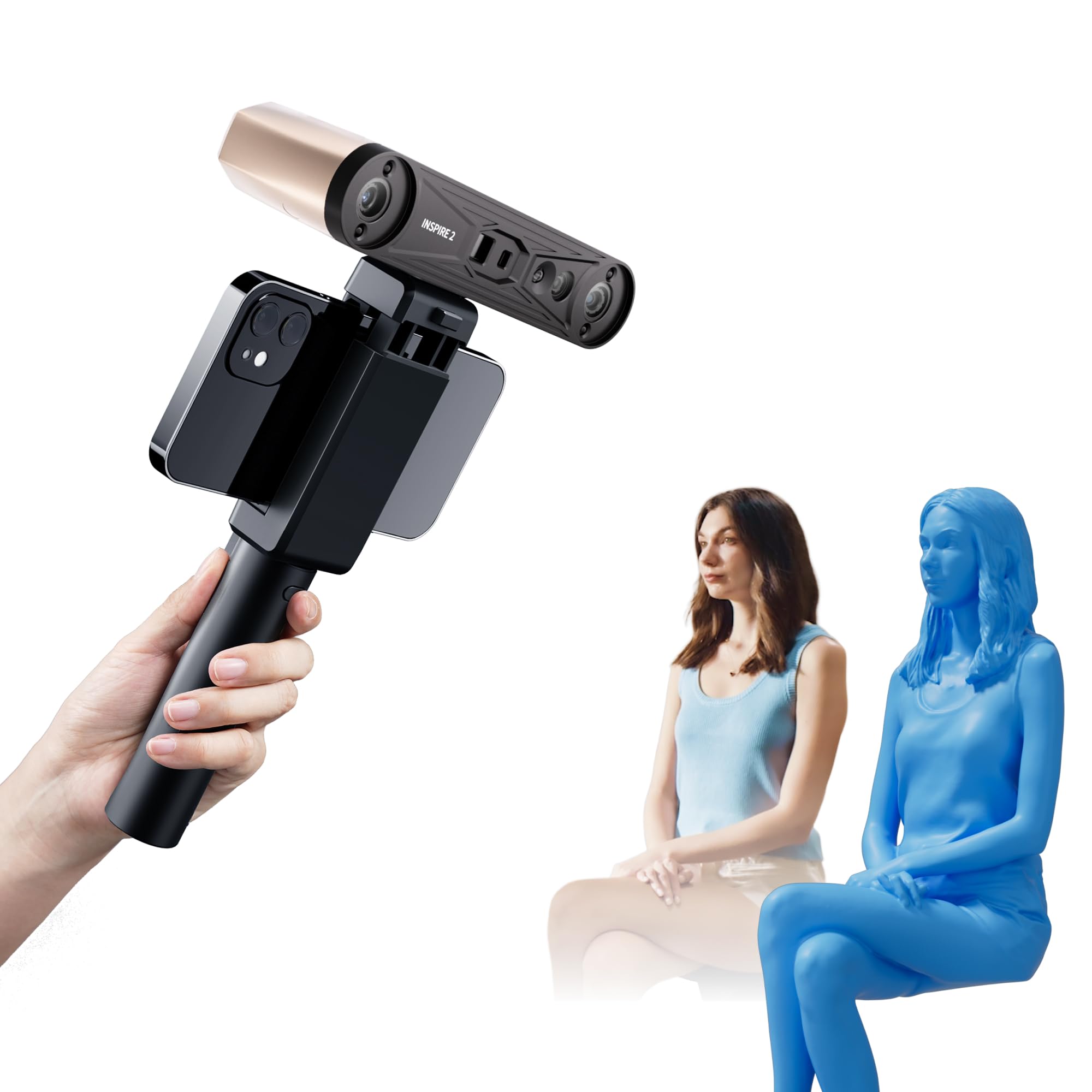
The INSPIRE 2 Premium package from Revopoint combines infrared structured light with an 11-line laser module, giving you the flexibility to scan both organic forms and reflective mechanical parts without switching devices. The structured light mode handles people and dark hair indoors, while the multi-line laser mode captures shiny metal and outdoor objects at up to 20,000 lux without spray.
Precision is rated at 0.03mm with an accuracy of 0.05mm, which is impressive for a sub- hybrid system. The built-in Wi-Fi 6 enables wireless scanning to your phone or tablet, and the 190-gram weight makes it the lightest dual-mode scanner we tested. The Revo Metro software provides professional-grade post-processing tools, and the calibration board boosts point cloud accuracy by 75%.
User feedback is largely positive, but the sticky calibration dots are a recurring complaint — they fail to adhere properly and can ruin a calibration session. One verified user also reported incompatibility with a custom PC (32GB RAM, AMD 5800x3D, RTX 4700 TI Super) requiring customer service intervention. The Premium package includes extra accessories, but the value over the Standard edition depends on whether you need the turntable and calibration board.
Why it’s great
- Dual scanning modules for both organic and mechanical objects
- Ultra-lightweight 190g with Wi-Fi 6 wireless connectivity
- 0.03mm precision with calibration board that boosts point cloud accuracy by 75%
Good to know
- Calibration dots are low quality and fail to stick properly
- Some PCs with high-end GPUs have compatibility issues
- Premium package accessories may not justify the price increase for all users
10. Revopoint INSPIRE 2 Standard 3D Scanner

The INSPIRE 2 Standard edition delivers the same core hardware as the Premium — dual scanning modules, 0.03mm precision, Wi-Fi 6, and the 190g lightweight body — but without the turntable and calibration board accessories, making it the most accessible entry point into hybrid 3D scanning. This is the sweet spot for hobbyists who want professional-grade results without paying for accessories they may never use.
One verified user reported producing a “high-quality color scan on the first try” using default settings, which is rare for a 3D scanner at this price. The software guides you through each step, and the calibration tray (included in both editions) ensures accurate sizing. The ability to switch between structured light for people and laser for objects makes it a versatile first scanner.
On the downside, the Standard edition still has the poor-quality calibration dots, and the scanning speed can be slow — one user found it “really slow to map things out” even with spray. The 0.03mm precision is theoretical under ideal conditions; in practice, user-reported tolerance is closer to 0.5mm. For a first scanner that lets you learn without a huge investment, it is a solid choice, but temper your expectations on real-world accuracy.
Why it’s great
- Same core hardware as Premium edition at a lower price point
- Dual scanning modules for people and objects
- Easy out-of-box experience — first scan success reported by many users
Good to know
- Calibration dots are poor quality and may ruin calibration
- Scanning speed is slow compared to blue laser alternatives
- Real-world accuracy closer to 0.5mm than the advertised 0.03mm
11. 3DMakerpro 3D Scanner Seal Lite
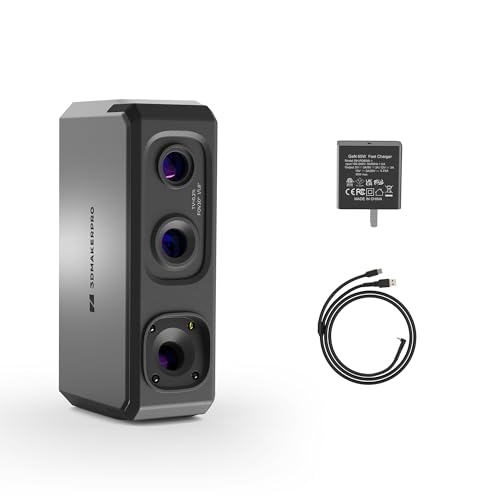
The 3DMakerpro Seal Lite is the most affordable true 3D scanner in this guide, designed specifically for small-format objects between 10mm and 300mm. It uses a blue LED light source with a 400–500nm wavelength to achieve 0.02mm accuracy on static captures, which is technically higher resolution than many scanners costing twice as much. The recommended working distance is 180–280mm for best results.
The free JMStudio software supports visual tracking, error correction, and auto-alignment, and it exports in OBJ, STL, PLY, and ASC formats compatible with any 3D printer. Users report that after overcoming the learning curve, the Seal Lite produces “great quality” scans with “solid accuracy” that rival much more expensive units. The anti-shake and scan-back features help reduce failed capture attempts.
The caveats are numerous: it requires a powerful PC (65W power draw), struggles with shiny and dark surfaces, and one verified user returned it because it “basically doesn’t work unless the object meets ALL the requirements” — failing on black, tiny, and hair objects. The documentation is also criticized as poorly organized, leading to wasted scans. For patient beginners who scan small, matte, well-lit objects, the Seal Lite is a capable budget entry point, but it demands more skill than any other scanner on this list.
Why it’s great
- 0.02mm accuracy at a budget-friendly price point
- Blue LED light source captures fine details on small objects
- Free JMStudio software with lifetime updates and multi-format export
Good to know
- Very picky about object surface — fails on black, shiny, and tiny objects
- Documentation is poor, leading to steep learning curve and wasted scans
- Requires a tethered high-power PC — not portable at all
FAQ
Can a 3D model scanner scan black shiny objects without spray?
What computer specs do I need for a tethered 3D scanner?
What is the difference between structured light and blue laser scanning?
How much does the Matterport processing subscription cost?
Can I use a 3D model scanner outdoors in sunlight?
Final Thoughts: The Verdict
For most users, the best 3d model scanner winner is the Revopoint MetroY Ultra because its 0.01mm precision, five scanning modes, and no-spray blue laser cover the widest range of industrial and hobbyist applications without requiring a separate spray or specialized lighting setup. If you want standalone wireless operation without a PC, grab the Shining 3D Einstar Vega. And for large-scale architectural scanning, nothing beats the Matterport Pro3.