
For students and professionals working through calculus, differential equations, or linear algebra, a standard graphing calculator hits a wall fast. The real pain isn’t plotting points — it’s spending hours on symbolic manipulation that a dedicated Computer Algebra System can handle in seconds. The difference between punching in numbers and having the machine factor polynomials, solve indefinite integrals, and handle complex variables defines the entire value proposition of this category.
I’m Min — the co-founder and writer behind Gadgets Feed. After spending weeks cross-referencing processor speeds, CAS engine capabilities, display resolutions, battery chemistries, and exam-compliance policies across the major players, I’ve isolated the models that actually deliver reliable symbolic algebra without forcing you to fight the interface.
Whether you need to simplify rational expressions or solve systems of equations with multiple variables, choosing the right cas calculator is the single most important hardware decision you will make for your math and science coursework.
How To Choose The Best CAS Calculator
Not every calculator labeled “CAS” handles symbolic math the same way. The processor driving the engine, the screen resolution for rendering expressions, and the battery system for day-long exam sessions separate capable tools from frustrating ones. These are the criteria that actually matter when you are comparing models side by side.
CAS Engine Depth and Processor Speed
The CAS engine determines whether the calculator can perform indefinite integration, solve polynomial equations symbolically, and handle Laplace transforms or complex number algebra. The HP Prime G2 uses an ARM Cortex-A9 clocked at over 400 MHz, which translates to near-instant response on symbolic operations that bog down older TI architectures. The TI-Nspire CX II CAS relies on a custom TI processor that balances power efficiency with a robust CAS library, but the boot time and large-derivative rendering can feel slower than the HP counterpart. For heavy differential equation work, processor speed directly correlates to how long you wait between inputting a problem and seeing the answer.
Display Quality: Resolution, Color, and Size
A 3.5-inch color screen at 320×240 pixels is the baseline for modern CAS calculators, but the Casio fx-CG500 and ClassPad II push that to 4.8-inch touchscreens with 320×528 pixels, giving you enough room to view split-screen graphs and equation editors without constant zooming. The TI-Nspire CX II CAS offers 16-bit color and 6 graph styles, which helps differentiate functions in multivariable calculus. The HP Prime G2 uses a multi-touch capacitive display that responds more like a smartphone than a resistive screen, reducing the frustration of tapping small icons during a timed exam.
Exam Compliance and Mode Switching
Many high-stakes exams — AP, SAT, PSAT, and some state assessments — allow CAS calculators, but the ACT and IB exams restrict them. A reliable CAS calculator must include a one-button or menu-driven “Press-to-Test” mode that disables CAS functionality, clears user memory, and cannot be overridden without a full reset. The TI-Nspire CX II CAS and Casio fx-CG100 both implement this cleanly, while the HP Prime G2 allows CAS to be toggled on and off through the settings menu. If you are taking multiple exam types, verify that your model is accepted by each testing body before purchase.
Battery Life and Charging Convenience
The rechargeable Li-ion battery in the TI-Nspire CX II CAS lasts up to two weeks on a single charge under normal usage, which covers a full exam cycle without anxiety. The HP Prime G2 also uses a rechargeable battery but some users report 1-2 days of heavy use before needing a charge. AAA-powered models like the Casio fx-CG100 and Casio fx-CG500 offer the advantage of instant replacement — no charging downtime — but add recurring cost and environmental waste. For long-term reliability, rechargeable Li-ion models with USB charging are the better investment.
Quick Comparison
On smaller screens, swipe sideways to see the full table.
| Model | Category | Best For | Key Spec | Amazon |
|---|---|---|---|---|
| TI-Nspire CX II CAS | Premium | Engineering students & Differential Equations | 320x240px Color, 2-Week Battery, Python | Amazon |
| TI-Nspire CAS Touchpad | Mid-Range | Budget CAS with 3D capabilities | 3D Graphing, Touchpad, AAA Battery | Amazon |
| Casio fx-CG100 ClassWiz | Mid-Range | High school / College STEM & Python | 65K Color, 3D Graphing, MicroPython | Amazon |
| TI-Nspire CX II CAS (Blue) | Premium | Symbolic algebra & exam reliability | CAS Engine, Rechargeable, Python | Amazon |
| Casio fx-CG500 | Premium | Touchscreen CAS & Drag-and-Drop | 4.8″ Touch, Stylus, Split-Screen | Amazon |
| HP Prime G2 (WYNGS Bundle) | Premium | Fastest CAS processor & RPN users | ARM Cortex-A9, Multi-Touch, RPN | Amazon |
| HP Prime G2 (Standard) | Premium | Touchscreen CAS & Advanced graphing | 3.5″ Color Touch, CAS Toggle, RPN | Amazon |
| TI-Nspire CX II CAS Power Bundle | Premium | Students needing accessories & Python | Power Bundle, 8 Built-in Apps, Python | Amazon |
| Casio FX-CP400 ClassPad II | Premium | Largest screen & stylus interaction | 4.8″ Rotating Display, 320x528px, CAS | Amazon |
In‑Depth Reviews
1. Texas Instruments TI-Nspire CX II CAS

The TI-Nspire CX II CAS strikes the best balance between CAS power and daily usability. Its 320×240 pixel color screen renders 3D graphs, split views, and complex fractions cleanly, and the rechargeable battery delivers up to two weeks of active use — a tangible advantage over AAA-powered competitors during exam blocks. Engineering students consistently report that it factors polynomials, solves indefinite integrals, and handles transfer functions for electrical engineering coursework without the lag found in older CAS models.
Six graph styles and 15 color choices let you differentiate multiple functions on the same plot, which matters when you are visualizing parametric, polar, and Cartesian equations simultaneously. The bundled TI-Nspire CX Student Software extends the environment to your PC or Mac, allowing you to transfer work, create documents, and run the same CAS engine on a larger screen for homework. The touchpad navigation works well once you memorize the gestures, though the learning curve is steeper than a traditional D-pad.
One significant limitation: the Chromebook software compatibility is broken, so if your school exclusively uses ChromeOS, the PC/Mac software bundle becomes a dead feature. The calculator is also useless for high school math if your school bans CAS devices — verify your exam board’s policy before buying. For college-level calculus, differential equations, and linear algebra, this is the most versatile and future-proof CAS calculator on the market.
Why it’s great
- Longest battery life in class — two weeks per charge
- CAS engine handles symbolic integration and polynomial factoring reliably
- Bundled PC/Mac software adds desktop workflow capabilities
Good to know
- No Chromebook support for the software suite
- Touchpad has a moderate learning curve versus traditional key navigation
2. TI-Nspire CAS with Touchpad

The first-generation TI-Nspire CAS with the touchpad remains a powerful option if you need CAS capability on a tighter budget. It supports 3D graphing, unit conversions, and symbolic equation solving that outpaces the TI-89 and TI-84 families, and the Scratchpad feature lets you perform quick calculations or graph a function without saving a document — a fast workflow for exam conditions. Older models can often be found in refurbished condition at a significant discount, which makes this the most affordable entry point to the TI-Nspire CAS ecosystem.
The touchpad navigation mimics a laptop trackpad, but the keys are small and require deliberate finger placement. The screen is large and clear but not backlit, so you need good ambient lighting to read it easily. Battery life runs about two months on AAA cells depending on usage, which is shorter than the rechargeable CX II but acceptable for a device you can swap batteries on instantly. The CAS engine is identical in core functionality to the newer CX II — symbolic differentiation, integration, and solving systems all work the same.
The biggest downside is the “Press-to-Test” mode that can permanently lock the calculator if you activate it without the desktop software to unlock it. Also, the calculator is not allowed on the ACT or IB exams, so verify your testing requirements. For college students who need CAS for calculus, physics, or chemistry homework and want to spend less, this is the value king.
Why it’s great
- Same core CAS engine as the newer CX II at a lower price
- 3D graphing and unit conversions included
- Scratchpad enables quick calculations without file management
Good to know
- Screen is not backlit — hard to see in dim light
- Press-to-Test mode can permanently lock the device without software intervention
3. Casio fx-CG100 ClassWiz

Casio’s fx-CG100 ClassWiz brings a 65,536-color backlit LCD and native MicroPython support to the CAS market, making it a strong contender for students who want to learn coding alongside advanced math. The 3.7-inch display renders 3D graphs of spheres, cylinders, and planes with smooth rotation, and the Natural Textbook Display shows fractions, integrals, and matrices exactly as they appear in your textbook. The tab-based menu layout reduces the number of keystrokes required to reach complex functions compared to older Casio models.
The Exam Mode is accessible directly from the home screen and disables CAS functionality for AP, SAT, PSAT, and ACT compliance — a cleaner implementation than some competitors that bury the mode in a submenu. The MicroPython integration allows you to write, store, and execute Python scripts directly on the calculator, which is rare in this price tier and opens up algorithmic thinking exercises without needing a computer. The 4 AAA battery power source means you can swap cells mid-day instead of hunting for a USB outlet.
The CAS engine on the fx-CG100 is well-suited for high school and early college math — algebra, trigonometry, and pre-calculus — but may feel slower on heavy symbolic operations like large indefinite integrals or differential equation solving compared to the TI-Nspire CX II or HP Prime G2. The glyph-based key labeling is intuitive for first-time users but can slow down experienced users who rely on muscle memory from older Casio models.
Why it’s great
- Vibrant 65K-color backlit display improves readability
- Integrated MicroPython for on-device programming education
- Clean Exam Mode for standardized test compliance
Good to know
- CAS engine slower on heavy symbolic differential equation work
- 4 AAA batteries add recurring cost and waste
4. Texas Instruments TI-Nspire CX II CAS (Blue)

This variant of the TI-Nspire CX II CAS includes the deSolve wizard, which reduces syntax errors when working with differential equations — a specific feature that engineering students tackling second-order ODEs will appreciate. The animated path tracing visualizes parametric and polar graphs as they are drawn, giving you a real-time sense of how the equation behaves, which is more intuitive than static plots. The keyboard and screen have been redesigned for easier readability compared to the original Nspire, with larger font options and higher contrast against the backlit LCD.
The included PC software license mirrors the calculator’s functionality on your desktop, allowing you to prepare documents, run CAS operations, and print graphs without squinting at the handheld screen. The Li-ion battery charges via USB and holds for several days of heavy use, making it practical for back-to-back lecture and lab sessions. Python programming support is built in, though the execution speed is noticeably slower than writing the same code on a PC — acceptable for small algorithmic demonstrations.
The boot time on this unit is slower than the HP Prime G2, taking roughly 8 seconds from cold start to the home screen. If you are accustomed to instant-on calculators, this can be frustrating during a timed exam. The document-centric interface (each problem lives inside a .tns file) is powerful but over-engineered for quick calculations — the Scratchpad helps, but it is still extra friction compared to the Casio’s worksheet-style approach.
Why it’s great
- deSolve wizard reduces syntax errors in differential equations
- Animated path tracing for parametric and polar graphs
- Bundled PC software mirrors handheld functionality
Good to know
- Slow boot time — up to 8 seconds from cold start
- Document-centric interface adds friction for quick math
5. Casio fx-CG500

The Casio fx-CG500 is the largest-screened CAS calculator you can buy, with a 4.8-inch color touchscreen that supports stylus input and drag-and-drop interactions. This form factor transforms the device into something closer to a mini tablet, allowing you to move data between graphs, spreadsheets, and equation editors without navigating a series of menus. The Natural Textbook Display shows integrals, summations, and matrices exactly as typeset in your textbook, reducing the cognitive load of translating between the screen and the page.
The built-in CAS engine performs symbolic algebra, calculus, and matrix operations with solid speed, and the ability to copy-paste results between applications streamlines multi-step problem solving. The stylus is stored in the unit and provides precise control for selecting small graph points or menu items, though it can be easy to misplace. The battery runs on 4 AAA cells, which means you never have to wait for a recharge, but the calculator ships with a protective hard case and USB cable for data transfer.
The main trade-off is interface speed — the fx-CG500 takes longer to power on and off and can lag when executing large CAS transformations compared to the HP Prime G2. The cursor buttons are small and the lack of a mixed number template is a surprising omission for a device at this tier. If your priority is screen real estate for split-view work — graphing a function on one half while computing derivatives on the other — this is the best option available.
Why it’s great
- Largest display in class at 4.8 inches with touch/stylus
- Drag-and-drop workflow makes multi-step problems easier
- Protective hard case and USB cable included
Good to know
- Power-on and calculation speeds are slower than competitors
- No mixed number template and cursor buttons feel cheap
6. HP Prime G2 (WYNGS Bundle)
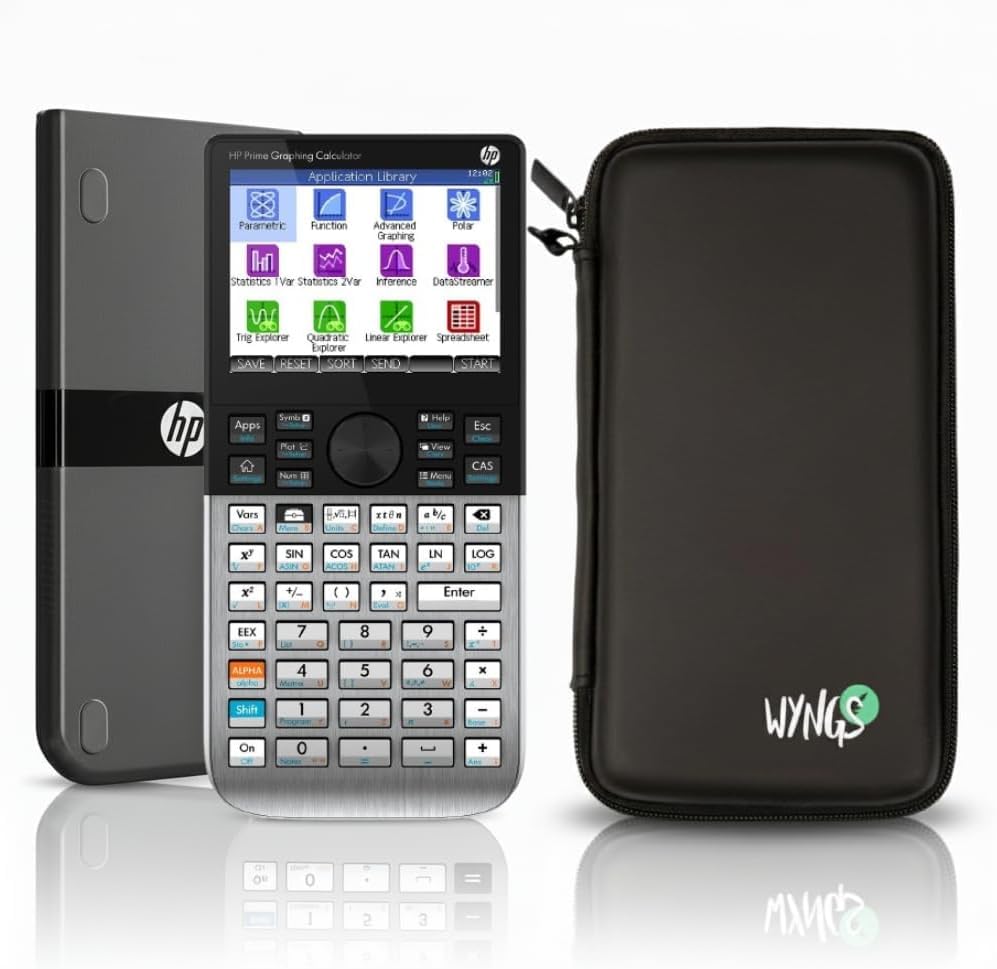
The HP Prime G2 is the fastest handheld CAS calculator available, driven by an ARM Cortex-A9 processor that makes symbolic operations feel instant. On large indefinite integrals, systems of equations, and matrix decompositions, the G2 finishes calculations in a fraction of the time the TI-Nspire CX II takes. The high-resolution multi-touch capacitive display responds like a modern smartphone — you can pinch-zoom graphs, tap to select variables, and swipe through menus without the hesitance that resistive screens introduce.
This particular bundle includes a WYNGS custom-fit protective case, which adds grip and protects the metal chassis from drops. The CAS can be toggled on and off via the settings menu, making it adaptable for exams that restrict symbolic algebra. The RPN (Reverse Polish Notation) mode is a major draw for engineers and finance professionals who prefer stack-based entry, and the HP Prime’s implementation is widely considered the best RPN experience outside of vintage HP hardware. The bundled manuals — a 500-page PDF and a searchable 1200-page PDF — are dense but comprehensive.
The main drawback is battery life: heavy use drains the Li-ion battery in 1-2 days, so you need to charge it nightly. The USB port is micro-USB, not USB-C, which is an outdated connector in 2025. The WYNGS case adds bulk, and the calculator itself has a metal chassis that feels premium but is heavier than all-plastic competitors.
Why it’s great
- Fastest CAS processor on the market — near-instant symbolic results
- Multi-touch capacitive display with intuitive smartphone-like navigation
- RPN mode included for power users and finance professionals
Good to know
- Battery life is short — 1-2 days of heavy use
- Uses micro-USB instead of USB-C
7. HP Prime Graphing Calculator (Standard)

The standard HP Prime G2 offers the same ARM Cortex-A9 processor and multi-touch color display as the bundled version, minus the case. This is the cleanest way to access HP’s CAS platform, which is widely considered the most sophisticated symbolic engine in a handheld form factor. The calculator switches between symbolic, graphical, and numerical views with dedicated keys, and the CAS toggling capability allows you to disable symbolic algebra for exam settings without a full reset.
The 3.5-inch color display renders graphs and equations with excellent clarity, and the touchscreen supports gestures that make navigating complex functions faster than any D-pad or touchpad competitor. Engineering students report that the HP Prime handles transfer functions, Bode plots, and complex number arithmetic more naturally than the TI-Nspire, and the built-in spreadsheet application is surprisingly functional for data analysis. The programming environment supports variables, functions, and app creation, making it a versatile tool for computational thinking beyond just math class.
The learning curve from TI-based calculators is real — the menu structure and function inputs are different enough that you will need a few days of practice before you are fluent. Some units ship with packaging that appears to have been opened, and customer reviews note that using third-party sellers carries risk of receiving a returned unit. The battery life on this version is also limited to about a day of heavy use, and the lack of USB-C charging is frustrating for a device at this level.
Why it’s great
- Industry-leading CAS engine with toggle-on/off capability
- Multi-touch touchscreen with gesture navigation
- Built-in spreadsheet and programming environment
Good to know
- Steep learning curve for users coming from TI calculators
- Battery life under heavy use is roughly one day
8. Texas Instruments TI-Nspire CX II CAS Power Bundle

This Power Bundle of the TI-Nspire CX II CAS packages the calculator with the Signature Series accessories, giving you extra value if you need a slip case, screen protector, or additional charging cables. The core device is identical to the standard CX II CAS — same 320×240 pixel color screen, same rechargeable Li-ion battery, same Python and TI-Basic coding support — but the bundled extras make this a convenient grab-and-go option for students who want everything in one box. The 8 built-in apps cover Calculator, Graphs, Lists & Spreadsheets, Data & Statistics, Geometry, Notes, Vernier DataQuest, and Programming, which provides a comprehensive toolkit for STEM coursework.
The CAS engine handles symbolic differentiation, integration, and equation solving with the same reliability as the standard model, and the color-coded screen tabs improve navigation speed once you are familiar with the interface. The USB port allows data transfer to a computer, and the bundled software multiplies the functionality by letting you work on documents in a desktop environment. The slim design — 7.59 inches long and 9.12 ounces — makes it easy to carry in a backpack pocket alongside textbooks.
The boot time is still slow at roughly 8 seconds, and the Python environment is limited compared to a full computer — acceptable for script execution but not for heavy coding projects. The bundled accessories are not high-end; the case is basic and the screen protector may not offer anti-glare properties. If you already have a case and cable at home, buying the calculator alone is more economical.
Why it’s great
- Comprehensive bundle with accessories saves separate purchases
- 8 built-in apps cover the full STEM curriculum range
- Same reliable CAS engine as the standard CX II model
Good to know
- Slow boot time and limited on-device Python environment
- Bundled accessories are basic quality
9. Casio FX-CP400 ClassPad II

The Casio FX-CP400 ClassPad II features the largest display in the CAS calculator category — a 4.8-inch rotating color screen with 320×528 pixel resolution. The rotating mechanism lets you switch between portrait and landscape orientation, which is genuinely useful when you are working on wide graph plots versus tall spreadsheet columns. The resistive touchscreen works with both finger and stylus, and the stylus is accurate enough for selecting individual data points on a crowded scatter plot. The CAS engine handles symbolic algebra, calculus, and matrix operations, and the spreadsheet application is surprisingly capable for data analysis and statistical calculations.
The ClassPad II runs on standard batteries, and the large screen with its resistive layer drains them faster than smaller displays. German-language customer reviews confirm the calculator is excellent for solving nonlinear equation systems and large symbolic transformations, though it is measurably slower than the HP Prime G2 on the same workload. The variable manager is a standout feature — it organizes all defined variables in a single window, making it easy to track assignments across multiple documents.
The biggest issue is software compatibility: the ClassPad II is not compatible with Windows 11, so if you need to connect it to a modern PC for data transfer or document management, you will be stuck. There is no Python support, and the keyboard lacks printed key labels, which can cause confusion in a dim classroom. The resistive screen is prone to scratches, and the touch response feels dated compared to the HP Prime’s capacitive panel. For users who prioritize raw screen size and orientation flexibility above speed and modern connectivity, this is a niche but effective choice.
Why it’s great
- Largest rotating display at 4.8 inches with high resolution
- Resistive touch with stylus for precise data selection
- Variable manager streamlines multi-variable problem tracking
Good to know
- Incompatible with Windows 11 for software connectivity
- Slower CAS processing than HP Prime G2; no Python support
FAQ
Can I use a CAS calculator on the AP Calculus exam?
Why is the TI-Nspire CX II CAS slower to boot than the HP Prime G2?
Is the Casio fx-CG500’s touchscreen better than the HP Prime G2’s?
Final Thoughts: The Verdict
For most users, the cas calculator winner is the Texas Instruments TI-Nspire CX II CAS because it delivers the best balance of battery life, CAS engine reliability, educational software, and exam-day practicality. If you want the fastest symbolic processing and a modern touch interface, grab the HP Prime G2 (WYNGS Bundle). And for the largest display and stylus-driven workflow, nothing beats the Casio fx-CG500.