
The best mini PC isn’t about cramming desktop specs into a smaller box—it’s about rethinking what a desktop should be. When you strip away the tower, the noise, and the power draw, what’s left is a machine that lives behind your monitor or under your desk, sipping power while handling demanding business workflows, multi-monitor setups, and light creative tasks. The real challenge isn’t finding a small computer; it’s finding one that doesn’t compromise on connectivity, thermals, or real-world speed.
I’m Min — the co-founder and writer behind Gadgets Feed. I spend hundreds of hours each quarter analyzing CPU benchmarks, memory bandwidth, wireless standards, I/O arrays, and thermal designs across the mini PC market to separate actually capable hardware from marketing fiction.
Whether you’re upgrading a cramped home office, setting up a quiet media server, or deploying fleet workstations, finding the right mini pc means balancing raw CPU performance against expansion flexibility, port selection, and sustained thermal behavior under load.
How To Choose The Best Mini PC
Choosing a mini PC is different from buying a standard tower because you’re trading expansion slots for space efficiency. The key is to prioritize the specs that directly affect your daily workload—CPU architecture, RAM type, storage expandability, and port versatility—while accepting the inherent limitations of an integrated graphics solution.
CPU Architecture and Thermal Limits
The processor is the heart of any mini PC, but its performance is throttled by the cooling solution. A chip with a higher TDP, like the AMD Ryzen 7 7735HS (35W) or Intel Core i7-1185G7 (28W), can maintain boost clocks longer under sustained load if paired with a robust fan and heat pipe assembly. Look for models with dual heat pipes and a centrifugal fan design rather than a single small fan. Benchmarks such as PassMark or Cinebench R23 multi-core scores give a better real-world comparison than base clock speeds alone.
RAM Type and Upgrade Path
Mini PCs typically use either soldered LPDDR5 or socketed SO-DIMM DDR4/DDR5. Soldered RAM offers higher bandwidth and lower power consumption but locks you into the factory configuration—24GB or 32GB is a sweet spot for future-proofing. Socketed DDR4 allows you to upgrade to 64GB later, which is critical if you plan to run virtual machines or containers. Always check if the RAM is dual-channel; single-channel memory halves integrated graphics performance.
Storage Flexibility
Look for at least one M.2 NVMe slot (PCIe 3.0 or 4.0) and, ideally, a second M.2 or 2.5-inch SATA bay. Models with a second expansion slot let you add a dedicated SSD for caching, a second OS, or extra storage without replacing the primary drive. The best mini PCs in this guide offer up to 4TB total expandability, which is essential for media server or content creation use cases.
Connectivity and Display Outputs
Count the number of USB-A ports, the presence of USB-C with DisplayPort Alt Mode, and the generation of HDMI/DP outputs. For multi-monitor productivity, a mini PC should support at least two independent 4K displays at 60Hz via dedicated video ports—not daisy-chained USB-C. Dual 2.5GbE LAN ports are a distinguishing feature for home lab enthusiasts, while WiFi 6E and Bluetooth 5.2/5.3 ensure future-proof wireless performance.
Quick Comparison
On smaller screens, swipe sideways to see the full table.
| Model | Category | Best For | Key Spec | Amazon |
|---|---|---|---|---|
| BOSGAME P4 Ultra | Mid-Range | Home server / NAS | Dual 2.5G LAN + WiFi 6E | Amazon |
| ACEMAGICIAN M1 | Premium | High-performance multitasking | 24GB LPDDR5 + Radeon 680M | Amazon |
| Lenovo ThinkCentre neo 50q | Premium | Business / enterprise | DDR5 + WiFi 6E + BT 5.3 | Amazon |
| KAMRUI P2 | Mid-Range | Compact office workstation | i5-12600H (12C/16T) | Amazon |
| GEEKOM A5 | Mid-Range | Multi-monitor productivity | Vega 7 / 8K via Type-C | Amazon |
| ACEMAGIC K1 | Mid-Range | Light office / secondary PC | Built-in power supply | Amazon |
| GMKtec M2 Pro S | Premium | Compact creative workstation | i7-1185G7 + Iris Xe 96EU | Amazon |
| Dell OptiPlex 7020 MFF | Premium | Enterprise / fleet deployment | DDR5 + WiFi 6E + TPM 2.0 | Amazon |
| HP EliteDesk 800 G2 | Budget | Basic tasks / Linux server | i5-6500T + 16GB DDR4 | Amazon |
In‑Depth Reviews
1. BOSGAME P4 Ultra Mini PC Gaming
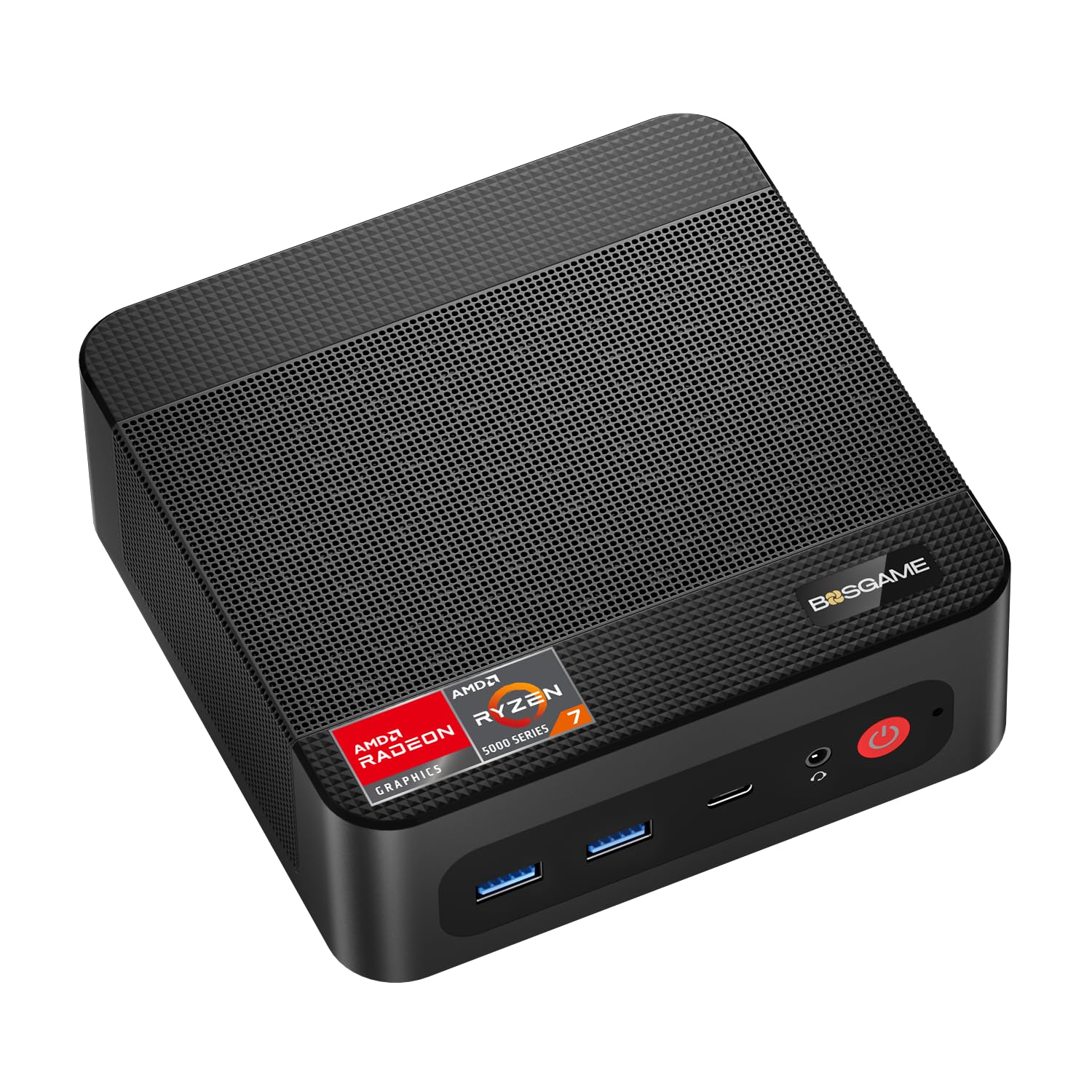
The BOSGAME P4 Ultra strikes the hardest-to-beat balance between raw CPU grunt, storage capacity, and pro-grade networking. Its AMD Ryzen 7 7730U (8 cores, 16 threads, up to 4.5GHz) delivers roughly 30% faster multi-core performance than older 5825U models, and the inclusion of a full 1TB PCIe 3.0 NVMe SSD out of the box means you won’t hit a storage wall within the first year. The dual 2.5GbE Realtek RTL8125 LAN ports are the standout feature here—they unlock link aggregation for up to 5Gbps throughput, making this an ideal candidate for pfSense, TrueNAS, or a Plex media server chassis.
Triple 4K display support via HDMI 2.0, DisplayPort 1.4, and a full-function USB-C with DP Alt Mode covers demanding multi-monitor workflows for traders, developers, or designers. The Intel AX210 card provides WiFi 6E on the 6GHz band and Bluetooth 5.2. Thermal management is handled by a low-noise fan that remains genuinely quiet under moderate loads, though sustained CPU pegging does produce audible spin-up. The compact 3.2L chassis comes with a VESA mount for behind-monitor installation.
Memory is expandable to 64GB via dual SO-DIMM slots, and the secondary M.2 slot allows up to 16TB total storage. This is the most versatile mini PC in this lineup for users who need both a daily driver and a platform for homelab experiments. The only compromise is integrated Radeon Graphics, which handles League of Legends and Minecraft at 60+ FPS but won’t run AAA titles at playable settings.
Why it’s great
- Dual 2.5GbE LAN enables link aggregation for home servers
- 1TB NVMe SSD included—double the storage of most competitors
- WiFi 6E (6GHz band) for lag-free streaming and large file transfers
Good to know
- Not suitable for AAA gaming without a discrete GPU
- Runs warm under sustained multi-core load; supplementary USB fan recommended by some users
2. ACEMAGICIAN M1 Mini PC

The ACEMAGICIAN M1 delivers a generational leap in integrated graphics performance thanks to the AMD Ryzen 7 7735HS paired with Radeon 680M (12 compute units at 2200 MHz). This combination pushes GPU performance roughly 50% higher than older 5800H-based mini PCs, making it the best option in this guide for light gaming, casual video editing in DaVinci Resolve, and running design software like Figma or Affinity Photo without a discrete GPU. The 24GB of LPDDR5 memory operates at 5500 MT/s, ensuring the integrated graphics aren’t starved for bandwidth.
Connectivity is robust with five USB 3.2 Gen 2 Type-A ports, a single Type-C port that supports DP1.4 (4K@60Hz) and 5V power delivery, and a 2.5G RJ45 Ethernet port. WiFi 6 and Bluetooth 5.2 round out the wireless stack. The triple display output via HDMI, DP, and Type-C allows for a productive three-monitor setup without daisy-chaining. Users consistently report that the M1 runs cool and exceptionally quiet, even under sustained loads, thanks to an active air cooling solution with a sizeable heatsink.
The LPDDR5 is soldered and non-upgradeable, which is the main trade-off—you’re locked into 24GB for the life of the system. However, for most business, creative, and light gaming workloads, 24GB is sufficient. The 512GB PCIe SSD is fast and can be expanded via the second M.2 NVMe slot up to 4TB. This is the strongest choice for users who need high integrated GPU performance in a silent, portable chassis.
Why it’s great
- Radeon 680M graphics deliver ~50% better GPU performance than 5800H-based systems
- 24GB LPDDR5 at 5500 MT/s ensures smooth multitasking and graphics throughput
- Whisper-quiet cooling even under load—ideal for noise-sensitive environments
Good to know
- RAM is soldered and cannot be upgraded beyond 24GB
- No USB4 or Thunderbolt support; Type-C limited to DP Alt Mode and 5V output
3. Lenovo ThinkCentre neo 50q Gen 5

The Lenovo ThinkCentre neo 50q Gen 5 is the clear choice for enterprise and professional environments where reliability, security, and manageability take precedence over peak benchmark scores. Its 13th Gen Intel Core i5-13420H (8 cores, 12 threads, up to 4.6GHz) combined with 16GB of DDR5 RAM (50% faster memory bandwidth than DDR4) ensures smooth operation across Office 365, Zoom calls, Chrome tabs, and business software without stuttering. The 512GB PCIe NVMe SSD boots Windows 11 Pro in under 10 seconds and provides ample space for documents and presentations.
The dual monitor support via HDMI 2.1 and DisplayPort 1.4 allows side-by-side 4K displays at 60Hz, which is transformative for accountants, developers, and analysts who work across multiple documents simultaneously. The inclusion of WiFi 6E (6GHz band) and Bluetooth 5.3 future-proofs wireless connectivity, while Gigabit Ethernet ensures a stable fallback for critical tasks. The chassis measures just 7.05 x 7.20 x 1.42 inches and comes with a VESA mount for behind-monitor installation. Lenovo backs this with a 3-year limited warranty, which is a significant advantage over most mini PC brands.
The ThinkCentre neo 50q includes BitLocker encryption, Remote Desktop, and Hyper-V support through Windows 11 Pro, making it suitable for domain-joined corporate networks. The 8 USB ports (including USB-C), HDMI 2.1, and DisplayPort provide comprehensive connectivity. The only downside is a slightly higher price point and the fact that the RAM and SSD are more difficult to access for user upgrades compared to some competitors. For businesses seeking a long-term, supportable platform, this is the safest recommendation.
Why it’s great
- DDR5 RAM provides 50% faster memory bandwidth than DDR4 for snappier multitasking
- Bluetooth 5.3 and WiFi 6E deliver next-gen wireless connectivity
- 3-year limited warranty and enterprise-grade Windows 11 Pro features
Good to know
- User upgrade path is more restricted than socketed SO-DIMM competitors
- Premium pricing compared to equivalent-spec mini PCs from lesser-known brands
4. KAMRUI P2 Mini PC
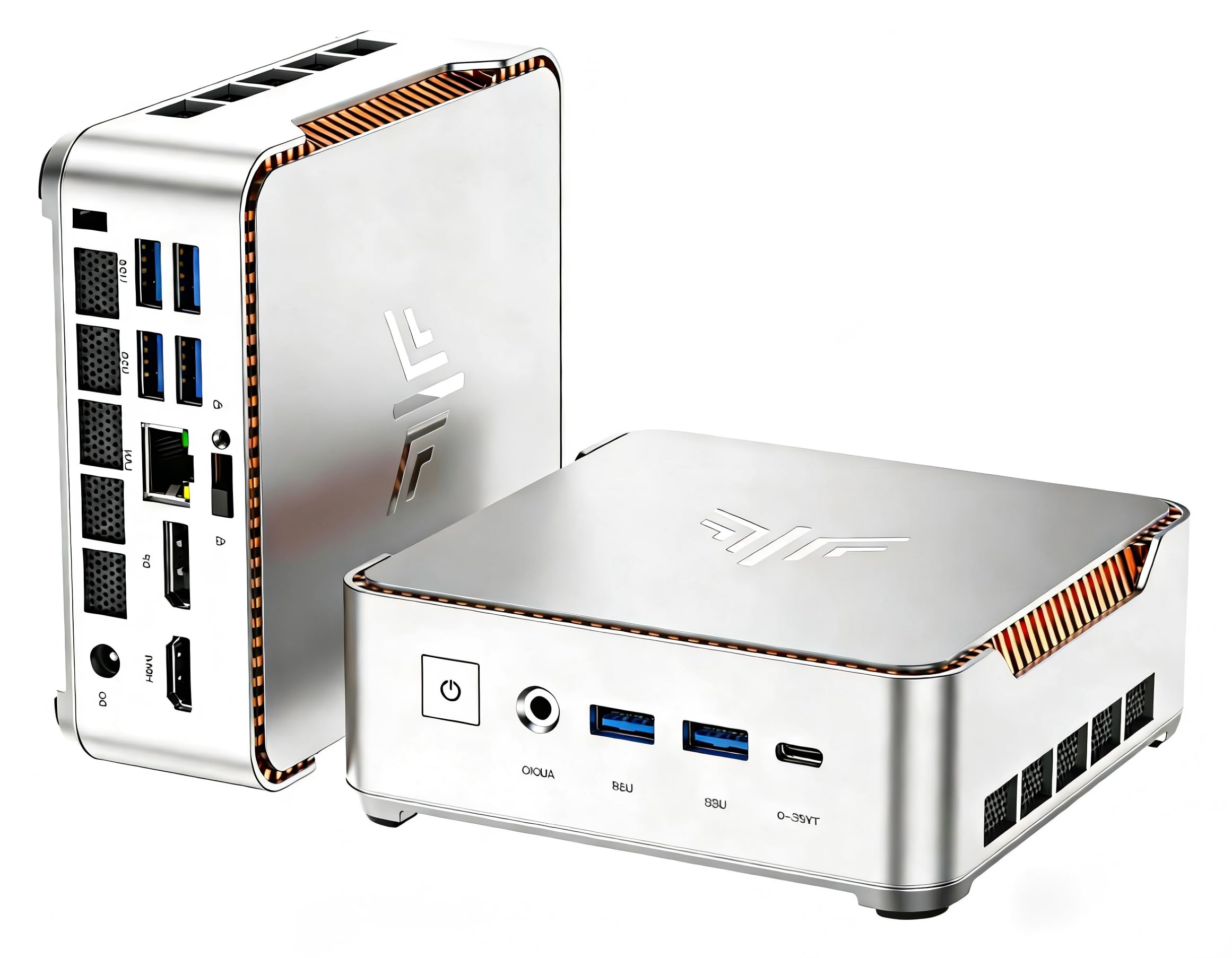
The KAMRUI P2 offers an impressive core count for its price bracket, featuring the 12th Gen Intel Core i5-12600H with 12 cores (4 Performance + 8 Efficient) and 16 threads. This hybrid architecture delivers a Cinebench multi-core score that rivals some desktop i7 processors from previous generations, making the P2 a legitimate choice for users who run multiple virtual machines, compile code, or process large spreadsheets. The 16GB of DDR4 RAM and 512GB SSD are adequate for immediate use, though some units ship with a slower SATA-based M.2 drive rather than a full NVMe—worth checking upon arrival.
The cooling system is a highlight for this chassis: a dual-outlet centrifugal fan paired with two heat pipes and copper plates in contact with power components. This design allows the i5-12600H to maintain higher boost clocks under sustained loads compared to single-fan competitors. The silver metal body with orange accent lines is a unique aesthetic choice, and the unit measures only 5.04 x 5.04 x 1.63 inches. A VESA mount is included for behind-monitor mounting. The port selection is generous with 6 USB 3.2 Type-A ports, 1 Type-C, 1 HDMI, 1 DP, and Gigabit Ethernet.
Triple display support via HDMI, DP, and Type-C enables a productive multi-monitor setup at 4K@60Hz. WiFi 6 and Bluetooth 5.2 provide solid wireless connectivity. The primary trade-off is the occasional quality control variance—some units arrive with a slow SSD, and the power supply is basic. However, given the 12-core processor performance, the P2 represents strong value for compute-intensive workloads in a compact form factor. Users comfortable with swapping an SSD will unlock its full potential.
Why it’s great
- 12-core / 16-thread i5-12600H rivals desktop i7 performance from prior generations
- Advanced dual-fan, dual-heat-pipe cooling sustains boost clocks under load
- Six USB 3.2 Type-A ports eliminate the need for a separate hub
Good to know
- Some units ship with a SATA-based M.2 SSD; swap for an NVMe drive for full performance
- Power supply is basic; no USB-C PD or Thunderbolt support
5. GEEKOM A5 2026 Edition

The GEEKOM A5 distinguishes itself through build quality and warranty coverage, offering a 3-year limited warranty that is rare among mini PC manufacturers. Powered by the AMD Ryzen 5 7430U (6 cores, 12 threads, up to 4.3GHz) with Vega 7 graphics, this unit handles business productivity, 4K streaming, and light creative work with ease. The 16GB of DDR4 RAM is socketed and expandable to 64GB via dual SO-DIMM slots, and the 512GB M.2 NVMe SSD can be upgraded to 4TB. An additional M.2 2242 slot and a 2.5-inch SATA bay allow for total storage expansion up to 10TB.
The display output capability is a standout: the A5 supports up to four 4K displays simultaneously via two HDMI 2.0 ports and two USB 3.2 Gen 2 Type-C ports, with one Type-C capable of 8K output. This makes it the best option in this guide for complex multi-monitor setups required by financial traders, video editors, or data analysts. WiFi 6 and Bluetooth 5.2 ensure fast wireless connectivity. GEEKOM’s IceBlast 2.0 cooling system keeps the unit quiet under normal office loads, with users reporting it’s easy to forget the fan is running.
The chassis uses a 3x-reinforced ABS+PC shell with a metal mid-frame for structural rigidity and heat dissipation. Vibration-damping feet and a high-gain 3D antenna add to the professional-grade feel. The main trade-off is that the Ryzen 5 7430U, while efficient, doesn’t match the raw multi-core performance of the Ryzen 7 models in this list. However, for users who prioritize build quality, warranty length, and extreme multi-monitor flexibility, the GEEKOM A5 is an excellent choice.
Why it’s great
- Supports up to four 4K displays or one 8K display via USB-C
- 3-year limited warranty—strongest coverage in this price tier
- 10TB total storage capacity via M.2 and 2.5-inch SATA expansion
Good to know
- Ryzen 5 7430U is outmatched by Ryzen 7 options for multi-core workloads
- DDR4 RAM, not DDR5—slightly lower memory bandwidth than newer competitors
6. ACEMAGIC Mini PC (K1)

The ACEMAGIC K1 is a solid mid-range option that differentiates itself with a built-in power supply—a design choice that eliminates the external power brick and keeps your desk clean with a single cable connection. Powered by the AMD Ryzen R2544 (4 cores, 8 threads, up to 3.7GHz), it offers roughly 28% higher CPU performance than N150-based systems and 23% better GPU performance than N100/N95 chips. While not a performance leader, it is perfectly adequate for business documents, web browsing, video conferencing, and 4K media playback.
The memory configuration is 16GB of DDR4 RAM and a 256GB M.2 NVMe SSD. The storage is expandable via a second M.2 slot up to 2TB. Triple display support via HDMI 2.0, DP 1.4, and Type-C (with DP Alt Mode) allows 4K output across three monitors, which is useful for productivity workflows. Connectivity includes six USB 3.2 Type-A ports, one 10Gbps Type-C port, and Gigabit Ethernet. The 28W max TDP of the processor ensures low power consumption and minimal heat output.
The silver metal body measures 5 x 5 x 1.6 inches and includes a VESA mount for behind-monitor installation. The built-in power supply is a genuine convenience, though it limits the unit’s ability to be powered via USB-C PD. Users consistently praise the near-silent operation—the fan is virtually inaudible under light office loads. The ACEMAGIC K1 is the best choice for users who want a clean, cable-free desk setup and only need moderate computing power for daily office tasks.
Why it’s great
- Built-in power supply eliminates external brick for a clean desk
- Very quiet fan operation—ideal for open-plan offices or home workspaces
- Triple 4K display support via HDMI, DP, and Type-C
Good to know
- 256GB SSD is small for primary storage; expect to expand or use external drives
- Ryzen R2544 is an entry-level CPU—not suitable for heavy multitasking or gaming
7. GMKtec M2 Pro S

The GMKtec M2 Pro S packs an 11th Gen Intel Core i7-1185G7 (4 cores, 8 threads, up to 4.8GHz) with Iris Xe Graphics featuring 96 execution units—the highest-end integrated GPU Intel offered before the Arc series. This combination provides snappy performance for business applications and capable 4K video playback across three displays via dual HDMI and a USB-C port. The 16GB of dual-channel DDR4 RAM is socketed and expandable to 64GB, and the 1TB NVMe SSD can be expanded to a total of 2TB across two M.2 slots.
The M2 Pro S supports Auto Power On, Wake-on-LAN, and has a 2.5Gbps Ethernet port (Intel I226V), making it suitable for always-on server or digital signage use. WiFi 6 and Bluetooth 5.2 provide modern wireless connectivity. The chassis is compact and comes with a VESA mount. The i7-1185G7 at 28W TDP runs cool and quiet under normal loads, with the cooling fan remaining unobtrusive.
However, reliability concerns appear in the customer review data, with multiple reports of units failing to boot after a few months or experiencing Ethernet port failure. Support responsiveness is also cited as a weak point. For users comfortable with potential warranty claims, the M2 Pro S offers strong specs for the price. But for those who need guaranteed long-term reliability, brands with better support track records—like Lenovo or Dell—are safer bets. This unit is best reserved for technically adept buyers who can self-troubleshoot.
Why it’s great
- Intel Iris Xe 96EU graphics provide strong 4K playback and light creative performance
- Socketed DDR4 RAM expandable to 64GB for virtualization workloads
- 2.5Gbps Intel I226V Ethernet port for pro networking setups
Good to know
- Multiple user reports of failures within the first year and poor customer support
- 11th Gen CPU is two generations behind current Intel offerings
8. Dell OptiPlex 7020 MFF

The Dell OptiPlex 7020 MFF (Micro Form Factor) is the gold standard for corporate IT deployments that require standardized hardware, remote manageability, and long-term support. Powered by a 12th Gen Intel Core i5-12500T (6 cores, 12 threads, up to 4.4GHz) with Intel UHD Graphics 770, it handles business applications, spreadsheets, and multi-monitor setups with ease. The 16GB of DDR5 RAM provides a 50% bandwidth uplift over DDR4, and the 512GB PCIe NVMe SSD boots Windows 11 Pro in seconds.
The display output configuration is enterprise-standard: two DisplayPort 1.4a ports and one HDMI 1.4b port support up to three 4K monitors simultaneously. Intel Wi-Fi 6E AX211 with Bluetooth 5.2 provides future-proof wireless connectivity. The port selection includes front USB 3.2 Gen 2×2 Type-C (10Gbps) and USB 3.2 Gen 1 with PowerShare, plus rear USB 2.0 with SmartPower On for wake-from-keyboard functionality. Dell’s proprietary manageability tools and TPM 2.0 support make this the most IT-friendly mini PC in the guide.
The OptiPlex is built for 24/7 operation with a robust ventilation design and a form factor that fits standard VESA mounts. The unit includes a keyboard and mouse. The primary concern from user reviews is warranty transferability—some units sold on Amazon may have non-transferable OEM warranties, so buyers should verify warranty status with Dell before purchase. For volume deployments in regulated or managed environments, the OptiPlex 7020 MFF is the most reliable and serviceable option, though its premium price reflects the enterprise-grade support infrastructure.
Why it’s great
- DDR5 RAM provides 50% more memory bandwidth than DDR4 for snappy multitasking
- Intel Wi-Fi 6E AX211 supports 6GHz wireless for low-latency connectivity
- Enterprise-grade build with TPM 2.0, SmartPower On, and remote manageability
Good to know
- Some units ship with non-transferable OEM warranties—verify with Dell before purchasing
- Premium pricing reflects enterprise support; individual buyers may find better value elsewhere
9. HP EliteDesk 800 G2 (Renewed)

The HP EliteDesk 800 G2 is a certified refurbished business mini PC that delivers surprising value for basic computing tasks, Linux servers, or dedicated home automation hubs. Its Intel Quad-Core i5-6500T (up to 3.1GHz) is an older Skylake architecture chip, but paired with 16GB of DDR4 RAM and a 240GB SSD, it handles web browsing, document editing, email, and media playback without noticeable lag. The CPU scored 8.7 out of 10 in the Windows 11 performance test, confirming it’s still capable for light productivity workflows.
The I/O array is generous for its age: 6 USB 3.0 ports (2 front, 4 rear), a front USB Type-C port, VGA, DisplayPort, and RJ-45 Ethernet. The inclusion of VGA is useful for connecting older projectors or secondary displays in institutional settings. The unit supports 4K output via DisplayPort and can drive two monitors simultaneously. An included USB keyboard and mouse make this a ready-to-use system out of the box. The fan is remarkably quiet—users consistently note the near-silent operation.
The main limitation is the 6th-gen CPU, which is not officially supported for Windows 11 upgrades via Windows Update, though a registry workaround exists and has been confirmed to work. The 240GB SSD is adequate for an OS and a few applications but will fill quickly for media storage. The refurbished condition is generally good, but storage health (SSD lifespan) varies by unit. For users on a strict budget who need a functional desktop for web-based tasks or a dedicated Linux server, the EliteDesk 800 G2 offers incredible per-dollar value.
Why it’s great
- Extremely affordable for a complete desktop with 16GB RAM and SSD
- Quiet fan operation—barely audible even under load
- Includes USB keyboard and mouse; ready to use out of the box
Good to know
- 6th-gen i5 is not officially supported for Windows 11 upgrades
- 240GB SSD is small; expect to upgrade storage for anything beyond basic use
FAQ
What is the difference between a Mini PC and a NUC?
Can a Mini PC replace a traditional desktop tower for gaming?
How important is the cooling system in a Mini PC?
What is a VESA mount and why does it matter?
Final Thoughts: The Verdict
For most users, the mini pc winner is the BOSGAME P4 Ultra because its combination of an 8-core Ryzen 7 processor, dual 2.5GbE LAN, WiFi 6E, and a 1TB SSD covers the widest range of use cases—from office productivity to home server operation. If you need the best integrated graphics performance for light creative work or casual gaming, grab the ACEMAGICIAN M1 with its Radeon 680M GPU and 24GB of LPDDR5. And for enterprise reliability, multi-monitor flexibility, and a 3-year warranty, nothing beats the GEEKOM A5.