
Printing homework, tax forms, or shipping labels at home shouldn’t drain your wallet or your patience. A black and white laser printer replaces the constant anxiety of dried-out ink cartridges with instant, smudge-free text that stays readable for decades inside a binder. The real shift comes when you stop calibrating colors you never needed and start counting cents per page instead of dollars per cartridge.
I’m Min — the co-founder and writer behind Gadgets Feed. I spent hundreds of hours dissecting monochrome laser printer specs, sorting through real user reports on wireless stability and duplex reliability, and mapping the ongoing battle between OEM toner lock-ins and third-party compatibility to build this guide.
The right machine for your desk moves paper fast, connects without drama, and doesn’t force you to subscribe to a toner club you never signed up for — that’s the true measure of a black and white laser printer for home use.
How To Choose The Best Black And White Laser Printer For Home Use
A monochrome laser printer is a durable-good purchase that should last through thousands of pages without drama. The wrong choice leads to jammed paper, failed wireless connections at critical moments, or toner costs that quietly exceed the price of the printer within a year. Focus on the factors that control your long-term ownership experience.
Print Speed and First Page Out Time
Pages per minute (ppm) ratings matter most when printing multi-page documents like school packets or work reports. Entry-level models hover around 28-30 ppm, while mid-range units push 35-36 ppm, and premium options reach 50 ppm. First page out time, measured in seconds, determines how long you wait for single-page jobs — look for numbers under 8 seconds for snappy single-page printing.
Toner Yield and Cost Per Page
Starter toner cartridges included in the box typically yield only 700-1,000 pages. The replacement cartridge’s page yield directly controls your ongoing expense. High-yield or ultra-high-yield options (3,000 to 18,000 pages) drastically lower cost per page. Factor in whether the manufacturer uses firmware to block third-party toner — HP’s Dynamic Security feature is a prime example of this restriction.
Connectivity: Wired vs Wireless vs Ethernet
USB-only printers are the cheapest and most reliable for single-computer setups, but they lack flexibility. Dual-band Wi-Fi (2.4GHz and 5GHz) lets you print from any device in the house, while Gigabit Ethernet provides the most stable connection for shared home offices. Smart self-healing Wi-Fi, found in newer HP models, automatically reconnects after network disruptions.
Paper Handling and Duplex Capability
Automatic duplex printing is a non-negotiable feature for reducing paper waste and speeding up two-sided document creation. Input tray capacity matters more than you think — a 150-sheet tray runs out quickly when printing study guides or project reports. A 250-sheet tray gives you breathing room. If scanning is important, look for a flatbed scanner with an automatic document feeder (ADF) rated for at least 35 sheets.
Quick Comparison
On smaller screens, swipe sideways to see the full table.
| Model | Category | Best For | Key Spec | Amazon |
|---|---|---|---|---|
| Brother HL-L2480DW | All-in-One | Best overall home office | 36 ppm, 2.7″ touchscreen | Amazon |
| Canon MF284dw | All-in-One | Fast scanning with ADF | 35 ppm, 35-sheet ADF | Amazon |
| Canon MF287dw | All-in-One | Fax and scan combo | 35 ppm, fax + ADF | Amazon |
| HP MFP 3101sdw | All-in-One | Small team productivity | 40 ppm, self-healing Wi-Fi | Amazon |
| Brother MFC-L2820DW | All-in-One | Cloud scanning support | 36 ppm, 2.7″ touchscreen | Amazon |
| Canon MF275dw | All-in-One | Reliable 4-in-1 value | 30 ppm, 35-sheet ADF | Amazon |
| HP M207dw | Print-only | Fast duplex wireless | 28 ppm, dual-band Wi-Fi | Amazon |
| HP M209d | Print-only | Budget wired duplex | 30 ppm, USB-only | Amazon |
| Brother HL-L6210DW | Print-only | High-volume home use | 50 ppm, 1660-sheet max | Amazon |
In‑Depth Reviews
1. Brother HL-L2480DW
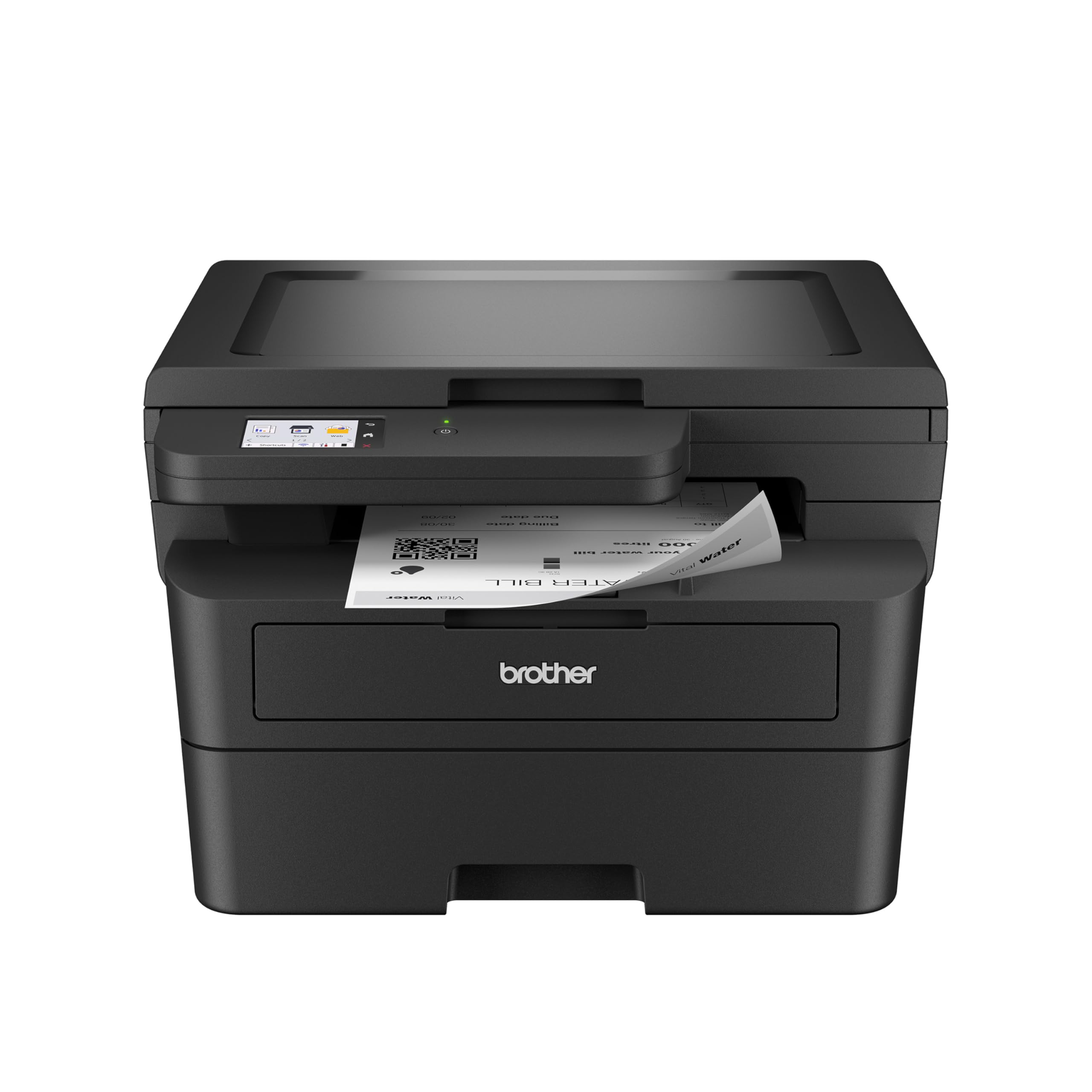
The Brother HL-L2480DW delivers the strongest feature-per-dollar ratio in this roundup with a 36 ppm print speed, automatic duplex, and a bright 2.7-inch touchscreen that makes navigating Cloud apps like Google Drive and Dropbox genuinely painless. The included flatbed scanner with copy functionality transforms this compact unit into a true 3-in-1 workhorse without bloating its footprint. Dual-band wireless and Ethernet mean you can park it anywhere without worrying about weak signal spots.
Real-world user reports consistently highlight how fast and quiet this machine operates — a 30-page document finishes before you’re done standing up. The starter toner lasts longer than most inkjet cartridges do in a year, and replacement yields from Brother’s TN830 or TN830XL keep the cost per page comfortably low. The renewed premium version adds even more value without sacrificing reliability, as verified by multiple reviewers who received units indistinguishable from new.
Setup proved straightforward across iOS, Windows, and Chromebook devices, with the touchscreen providing clear walkthrough prompts. A few early users noted a mild noise level typical for home laser units, but the consensus over a year of ownership is overwhelmingly positive — no jams, no connectivity dropouts, and no firmware tricks that force you into proprietary toner.
Why it’s great
- Fast 36 ppm with automatic duplex saves time and paper
- Intuitive 2.7-inch touchscreen with Cloud app integration
- Dual-band wireless plus Ethernet for flexible placement
Good to know
- Slightly noisier operation than Canon equivalents at full speed
- Starter toner is standard yield; budget for an XL cartridge early
2. Canon imageCLASS MF284dw

Canon’s MF284dw stands out with a first print out time under 5 seconds and a blistering 35 ppm speed that feels instantaneous for single-page jobs. The 35-sheet automatic document feeder makes multi-page scanning and copying genuinely productive — you can feed a full contract stack and walk away. Include AirPrint and Mopria support, and mobile users get a seamless experience that doesn’t require installing bloated companion apps.
User feedback emphasizes how much quieter this Canon runs compared to Brother models in the same speed class. The high-capacity toner option (072H) dramatically extends intervals between replacements, pushing the cost per page into the fractions of a cent territory. The paper cassette design, while a bit plasticky, handles 250 sheets reliably, and the duplex printing reverses pages cleanly without jams over extended use.
Initial wireless setup required a firmware update for some users before the 5GHz band worked correctly, a common pain point that Canon has addressed. A few units shipped as gray-market imports that lack US warranty support, so verify the seller’s authorization before clicking buy. Once operational, the MF284dw is a dependable workhorse that balances speed, quiet operation, and low running costs in a compact white chassis.
Why it’s great
- Extremely quiet operation compared to peer printers
- Fast first page out under 5 seconds for snappy single prints
- AirPrint and Mopria support for app-free mobile printing
Good to know
- Wireless setup may need a firmware update out of the box
- Some sellers ship non-US units without warranty coverage
3. Canon imageCLASS MF287dw

The MF287dw inherits the same 35 ppm engine and sub-5-second first print speed as the MF284dw but adds a fax modem and the ability to forward received faxes directly to email or a file server — a rare convenience in the home printer segment. The 35-sheet ADF and 250-sheet cassette mirror the MF284dw’s paper handling, while the fax-to-email feature effectively turns this into a paperless receptionist for home-based businesses that still deal with legacy document workflows.
Users consistently praise the plug-and-play wireless setup, with most reporting successful connections in under ten minutes without pulling out a USB cable. The print quality is characteristically sharp for a Canon laser, producing dense black text that doesn’t feather on standard copy paper. The high-yield toner option keeps the machine running for thousands of pages before requiring attention, and two-sided printing works reliably on letter-size documents.
Legal-size printing is not supported, and there is no USB port for direct scanning to a flash drive — two omissions that frustrated a minority of buyers who expected wider media compatibility. A small subset of users experienced non-descript error messages that required printer restarts, though this appears tied to specific Windows network configurations rather than a systemic defect. For a pure wireless all-in-one with fax capability, the MF287dw delivers exceptional value.
Why it’s great
- Fax-to-email and file server forwarding for paperless workflows
- Fast 5-second first page out with crisp monochrome text
- Reliable wireless setup reported by most users
Good to know
- No USB port for direct scan-to-flash
- Does not support legal-size paper
4. HP LaserJet Pro MFP 3101sdw

The HP LaserJet Pro MFP 3101sdw raises the performance ceiling with a 40 ppm print speed, a 50-sheet auto document feeder, and HP’s self-healing Wi-Fi that automatically detects and resolves connectivity drops without user intervention. The 250-sheet input tray and automatic duplex printing handle high-volume document runs comfortably, and the introductory toner cartridge yields roughly 1,000 pages, giving you time to assess whether the standard or high-yield replacements fit your volume.
User reviews spanning several months of heavy use report effortless setup, particularly for wireless environments where other printers struggle. The self-healing Wi-Fi property proved its worth when a power outage knocked the network offline — the printer reconnected on its own once service returned. The print quality is sharp and consistent, with dense black text that looks professional enough for client-facing documents.
HP’s Dynamic Security firmware actively blocks third-party toner cartridges, which forces you into HP-branded supplies or declining firmware updates to gain compatibility with generics. The auto document feeder works best with stacks under 25 sheets to avoid occasional jams. Despite these caveats, the 3101sdw is a capable machine for small teams or demanding home offices that need speed, reliability, and a clean user experience.
Why it’s great
- 40 ppm speed with 50-sheet ADF for high productivity
- Self-healing Wi-Fi reconnects automatically after network drops
- Compact white chassis fits small desk spaces
Good to know
- Dynamic Security blocks non-HP toner cartridges
- ADF jams more frequently with stacks over 25 sheets
5. Brother MFC-L2820DW

The Brother MFC-L2820DW packs a 36 ppm engine, automatic duplex, a 50-page auto document feeder, and a 2.7-inch touchscreen into a chassis that’s barely larger than a print-only model. The all-in-one functionality covers print, copy, scan, and fax, with the ADF enabling hands-free multi-page copying and scanning. Brother’s Mobile Connect app extends printing and scanning to your phone with a clean interface that actually works on the first try.
Real-world owners highlight the machine’s reliability after months of daily use — it powers through homeschooling worksheets, business forms, and reference documents without jamming or losing network connectivity. The TN830XL high-yield toner cartridge significantly reduces the cost per page, and Brother’s Refresh subscription service offers automatic toner delivery for those who prefer set-and-forget consumables. Setup has improved with recent firmware, though the sparse printed instructions still confuse first-time users who skip the online video guides.
The touchscreen provides smooth navigation through Cloud printing from Google Drive and Dropbox, and the dual-band wireless handles iPad and Android devices equally well. A minority of users report frustration with third-party ink detection in firmware updates, but Brother’s stance is less aggressive than HP’s — you can generally use compatible cartridges without forced updates. The MFC-L2820DW earns its place as a do-it-all machine that doesn’t inflate the budget.
Why it’s great
- Compact all-in-one with 50-sheet ADF for batch scanning
- 2.7-inch touchscreen with Cloud app support
- High-yield toner option for low cost per page
Good to know
- Setup instructions are sparse; online guides are essential
- Firmware updates sometimes flag third-party toner
6. Canon imageCLASS MF275dw

The Canon MF275dw serves as the entry point into Canon’s monochrome all-in-one lineup with a 30 ppm print speed, 5.3-second first print time, and a 6-line adjustable touchscreen that tilts for comfortable viewing whether sitting or standing. The 35-sheet ADF handles multi-page copy and scan jobs, while the 150-sheet cassette covers moderate home printing volumes. The four-in-one functionality includes fax, making this a complete communications hub for home offices that still receive faxed documents.
User feedback consistently praises the reliable wireless connection and the ease of printing from iPhones via AirPrint — no app installation required. The 071 starter toner yields about 700 pages, and the standard replacement maintains a low cost per page that beats budget inkjet alternatives by a wide margin. Several reviewers noted the machine’s durability and trouble-free operation after months of daily use, with aftermarket cartridges working without triggering error messages.
The color depth is limited to 1 bit, meaning scanned images look acceptable for archiving but not for reproducing photographs. Duplex scanning is absent — you can print two-sided automatically, but scanning multi-page documents two-sided requires manual flipping. For a budget-conscious home buyer who needs color scanning capability and reliable wireless printing without the premium price tag, the MF275dw delivers consistent performance in a compact black chassis.
Why it’s great
- Reliable wireless printing with AirPrint and Mopria support
- Adjustable 6-line touchscreen for flexible desk use
- Affordable entry to reliable monochrome all-in-one printing
Good to know
- 1-bit color depth limits scan quality for photos
- No duplex scanning; manual flipping required for two-sided documents
7. HP LaserJet M207dw

The HP LaserJet M207dw is a print-only monochrome laser that brings dual-band Wi-Fi with self-reset connectivity to the budget-friendly tier. It prints up to 28 ppm with automatic duplex standard, and the first page emerges in about 7 seconds. The compact footprint and black chassis fit neatly on a bookshelf or corner desk without dominating the room. Ethernet is included for those who prefer a wired backhaul, and the printer works with Windows, Mac, AirPrint, Android, and Chromebook devices.
Real-world reviews celebrate the plug-and-play simplicity — multiple users reported it was the easiest printer setup they had ever experienced, with drivers automatically installing on Windows 11 without a CD or manual download. The print quality delivers crisp, dark text that suits business documents and school worksheets equally well. Several owners replaced aging Brother or Canon units with this HP specifically because of its reliable wireless and low initial cost.
The lack of a scanner or copier limits this unit to pure printing, which may frustrate buyers who occasionally need to digitize documents. HP’s firmware enforces the Dynamic Security policy, meaning third-party toner cartridges are blocked unless you proactively decline firmware updates. The email-to-print and mobile app features are solid, but HP pushes a paid subscription for advanced scanning features that feels unnecessary for a print-only device.
Why it’s great
- Reliable dual-band Wi-Fi with automatic connection recovery
- Plug-and-play setup across Windows, Mac, and mobile devices
- Automatic duplex printing at 28 ppm for fast two-sided documents
Good to know
- Print-only unit with no scan or copy capability
- HP Dynamic Security blocks non-HP toner cartridges
8. HP LaserJet M209d

The HP LaserJet M209d strips away wireless complexity and delivers a pure wired printing experience at 30 ppm with automatic duplex — making it the most affordable option for single-computer home setups. It comes with a USB cable included, a 150-sheet input tray, and smart-guided buttons that light up to walk you through common tasks. The compact white design measures just 8.07 inches wide, fitting into tight spaces where even a small all-in-one would be cramped.
Users praise the reliability that comes from eliminating WiFi from the equation altogether — no dropped connections, no password re-entry, no firmware conflicts. The print quality produces sharp, professional black-and-white text that rivals more expensive models, and the toner lasts significantly longer than the ink cartridges it replaced for most buyers. Setup is genuinely simple: plug the USB cable into a Windows PC, and the printer is recognized within minutes.
The USB-only design is a dealbreaker for households with multiple devices or users who want to print from phones or tablets. Mac compatibility is a known issue — the M209d does not support macOS 12.x or later, and HP’s Smart app won’t function without a network connection. HP’s Dynamic Security also applies here, locking out third-party toner unless you keep firmware static. For a dedicated Windows user printing from a single desk, this is a fast, fuss-free machine at a low entry cost.
Why it’s great
- No wireless to configure or troubleshoot; true plug-and-print
- Fast 30 ppm with automatic duplex for efficient two-sided printing
- Extremely compact footprint for tight desk spaces
Good to know
- USB-only connection; no WiFi or Ethernet
- Not compatible with macOS 12.x and later versions
9. Brother Professional HL-L6210DW

The Brother HL-L6210DW is a print-only monochrome laser that operates at a dominant 50 ppm, making it the fastest machine in this lineup by a wide margin. It ships with a 520-sheet main tray and a 100-sheet multipurpose tray, expandable to 1,660 sheets with optional add-on trays — true office-grade capacity for a home environment that processes high volumes of documents. Gigabit Ethernet and dual-band wireless provide rock-solid network integration, while Triple Layer Security protects your documents and network from unauthorized access.
Users who push this machine to its limits report flawless operation with zero jams even on long print runs. The print quality is professional-grade, producing dense black text and sharp mathematical symbols that don’t feather or fade. The ultra-high-yield TN920UXXL toner cartridge delivers up to 18,000 pages, drastically reducing the cost per page and the frequency of consumable replacements. The metal-reinforced internal frame gives it a tank-like build quality that surpasses the plastic chassis of most home-tier printers.
The noise level is quieter than expected for a 50 ppm machine, though it’s not silent — you’ll hear the paper feed mechanism during heavy runs. A firmware update issue that locks out users who lose their admin credentials is a genuine pain point — keep your password documented. For a home user who prints thousands of pages per month, the HL-L6210DW is a long-term investment in speed and durability.
Why it’s great
- 50 ppm speed with expandable 1,660-sheet capacity
- Ultra-high-yield toner prints up to 18,000 pages per cartridge
- Metal-reinforced frame for long-term durability
Good to know
- Starter toner only yields 3,000 pages; upgrade immediately
- Lost admin password can lock out printer after firmware update
FAQ
Does a black and white laser printer use more electricity than an inkjet?
Can I use my black and white laser printer for occasional printing without the toner drying out?
Is it worth paying more for an all-in-one model over a print-only laser printer?
Final Thoughts: The Verdict
For most users, the black and white laser printer for home use winner is the Brother HL-L2480DW because it combines a fast 36 ppm engine, automatic duplex, a 2.7-inch touchscreen, and a flatbed scanner in a compact footprint without aggressive toner locks. If you want faster scanning with an ADF for batch processing, grab the Canon imageCLASS MF284dw. And for high-volume home use where speed and capacity rule, nothing beats the Brother HL-L6210DW with its 50 ppm output and expandable 1,660-sheet paper system.