
The clatter of plastic tracks on hardwood, the whir of a motor spinning up a weapon spinner, and the satisfying *thwack* of a well-aimed ram — that’s the sound of a battle robot kit in action. Unlike a static model or a simple RC car, these kits demand assembly, strategy, and a willingness to see your creation shatter and rebuild. The best kits don’t just move; they fight, they learn, and they push young engineers to think about torque, center of gravity, and material science before the first match begins.
I’m Min — the co-founder and writer behind Gadgets Feed. For this guide, I’ve spent dozens of hours dissecting technical specifications, analyzing motor types, battery chemistries, and structural design across the current market of battle robot kits to find the builds that truly survive the arena.
Whether you’re looking for a first kit to introduce the basics of gearing or a full programmable chassis ready for competitive action, this guide details the very best battle robot kits available today based on real component quality and user feedback.
How To Choose The Best Battle Robot Kits
A battle robot kit is a system, not a toy. You are buying a drivetrain, a power system, and a chassis that must survive impact. Choosing the right one means balancing build complexity, power delivery, and long-term expandability.
Motor Type & Gearbox Material
The motor determines whether your robot can push a 3-pound opponent across the arena or just spin its wheels. Look for high-torque DC motors or hobby-grade servos. The gearbox material is equally critical — metal gears handle shock loads from collisions far better than plastic ones. A kit with metal-drive gears costs more upfront but avoids stripping a gear mid-match.
Chassis Design & Modularity
A rigid frame made from anodized aluminum or thick ABS offers better impact resistance than thin polycarbonate. Modularity matters too: the best kits let you swap weapons (spinner vs. lifter vs. wedge) and armor plates without rebuilding the entire drivetrain. This flexibility keeps the robot relevant as you develop new strategies.
Control System & Coding Path
Entry-level kits use 2.4GHz remote controls, which are simple and responsive. Advanced kits include Bluetooth or Wi-Fi modules for app-based control and programmable logic. For kids who want to code, a kit that supports both Scratch (block-based) and Python (text-based) offers a clear upgrade path. Check that the software is still actively supported — some older models lose app compatibility.
Quick Comparison
On smaller screens, swipe sideways to see the full table.
| Model | Category | Best For | Key Spec | Amazon |
|---|---|---|---|---|
| Makeblock mBot2 | Coding Robot | Learning Python & Robotics | Aluminum chassis; 10+ sensors | Amazon |
| HEXBUG BattleBots Arena MAX | Arena Battle Set | Immediate RC Battle Action | Pulverizer & weaponized bot | Amazon |
| JIMU ROBOT FireBot | Programmable Dragon | Blockly Coding & Servo Motion | 606 pieces; touch sensor | Amazon |
| okk Robot Building Toys | 635-Piece STEM Bot | Versatile APP Control & Value | 635 pcs; USB rechargeable | Amazon |
| Suplanet 12-in-1 Robot | Multi-Form Block Kit | Creative Model Swapping | 557 pcs; 12 build variations | Amazon |
| Butterfly EduFields 10-in-1 | Electronics Starter | First STEM Circuit Projects | 100+ components; wood chassis | Amazon |
| INSOON 5-in-1 Robot | Budget Block Build | Entry-Level RC & Build | 520 pcs; 2.4GHz remote | Amazon |
In‑Depth Reviews
1. Makeblock mBot2 Coding Robot

The mBot2 is built on a rigid blue anodized aluminum frame that shrugs off impacts that would crack a plastic chassis. Its 10+ advanced sensors — including a line-follower, ultrasonic obstacle avoider, and color identifier — turn it from a simple battle bot into a programmable data-gathering platform. Assembly takes roughly 30 minutes with a screwdriver, and the included 2,400mAh battery delivers up to 5 hours of continuous runtime on a single charge.
What separates the mBot2 from cheaper kits is its dual coding path. Beginners start with Scratch-style block programming inside the Makeblock app, then graduate to Python for more complex behaviors like autonomous navigation and voice control via the on-board Wi-Fi module. The robot can even be used for IoT experiments, linking its sensors to cloud dashboards.
The mBot2 also includes 4 standard coding project cards and access to 8+ courses covering robotics and data science. Its construction is sturdy enough for classroom use — the aluminum mainboard plate and rubber-tired wheels handle the bumps and nudges of social battles without losing alignment.
Why it’s great
- Metal chassis offers real durability for casual collisions
- Dual coding support (Scratch and Python) with free curriculum
- 5-hour rechargeable battery — no constant battery swaps
Good to know
- No included battle arena or opponent bot
- Python syntax can be tricky for absolute beginners without help
2. HEXBUG BattleBots Arena MAX

This is the closest you can get to a sanctioned BattleBots event in your living room. The Arena MAX includes a licensed replica of Tombstone — the legendary horizontal spinner — plus a customizable tank-style bot with over 30 swappable armor and weapon pieces. The arena measures 20.5 x 4.5 x 14.13 inches, and its containment walls are high enough to prevent airborne bots from escaping during a fight.
The pulverizers — dual overhead hammers — are powered by their own motors and add a stage hazard element that forces you to think about positioning. Both robots run on included batteries (AA for remote, 3x AAA for Tombstone, and 4x AA for the buildable bot), so it’s ready to fight straight out of the box. The 2.4GHz controllers operate on different frequencies to avoid interference during head-to-head matches.
Customer feedback consistently highlights the sheer fun factor. The weapons deliver real impact — the screws on Tombstone’s spinner will gouge the arena walls, and the buildable bot’s interchangeable parts allow for quick repairs between rounds. It’s less about coding and more about mechanical customization and driving skill.
Why it’s great
- Official BattleBots licensing with Tombstone replica
- 30+ modular parts for weapon and armor swapping
- Motorized pulverizer adds real arena hazard drama
Good to know
- Hammers are fragile and can break if struck too hard
- Recommended to use rechargeable AAs for sustained play
3. JIMU ROBOT Mythical Series: FireBot Kit

The FireBot is a dragon-shaped coding robot from UBTECH Robotics. Its 606 pieces build into a fully articulated creature with servo-driven wings, a touch sensor on the chest, and an LED-equipped snout that glows red or blue. The app-driven building instructions offer 360-degree rotatable views, making it easier to locate pin insertion points during the multi-hour assembly process.
After construction, FireBot is programmable via Blockly — a visual drag-and-drop language from Google. Kids can program the touch sensor to trigger wing flaps, animatronic mouth movements, and color changes. The included DC motors and servos provide smooth, multi-axis motion that feels more like a robotic sculpture than a wheeled battle bot.
One major caveat: as of December 2023, UBTECH ceased supporting the app for this model, meaning new buyers may struggle to access instructions and coding features. Existing devices with the app pre-installed still function, but this limits its viability as a long-term purchase. The build quality remains high — lithium rechargeable battery, numbered servo ports, and frustration-free connector pins — but software support is the deciding weakness.
Why it’s great
- Expressive animatronic dragon design with full articulation
- Blockly coding teaches sequencing and event-driven logic
- Rechargeable lithium battery included
Good to know
- App no longer supported for new downloads as of late 2023
- 5+ hour build time; requires patience and an adult helper
4. okk Robot Building Toys for Boys
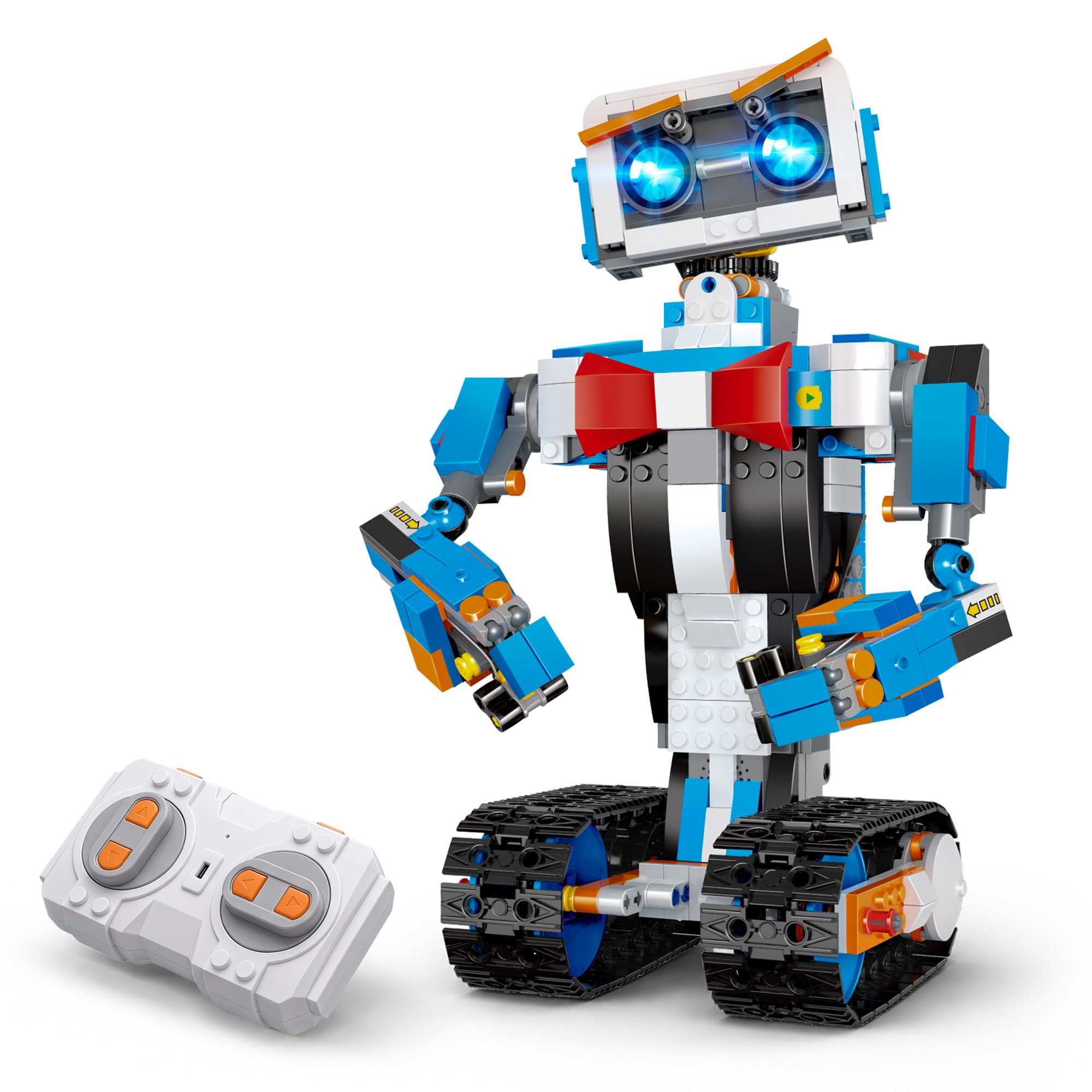
The okk robot packs 635 pieces into a 2.2-pound kit that assembles into a white-and-blue wheeled battle robot. Its key advantage is the built-in rechargeable battery pack — charge via USB-C for two hours and get about 60 minutes of fighting runtime. The 2.4GHz remote offers a 65-foot range, and the APP adds five control modes: path mode, voice control, gravity sensor, remote, and STEM programming.
The build is segmented into numbered bags, which makes the assembly process manageable for kids 8+. The motorized tracks are driven by a metal-gear motor system that handles transitions from carpet onto hardwood without bogging down. The head, arms, and shoulders rotate independently, allowing expressive movement. The inclusion of a programming mode introduces the logic of sequencing commands in a visual interface.
User reviews consistently note the build quality — the ABS plastic is dense and holds up to the bumps of casual indoor combat. The remote requires two AAA batteries (not included), and the hands do not articulate independently via the remote — they move as a set during specific programmed actions. For the price, the okk delivers one of the best piece-to-function ratios in the category.
Why it’s great
- USB rechargeable battery eliminates constant AA purchases
- 5 APP control modes including voice and gravity sensor
- Numbered bag system simplifies the building process
Good to know
- Remote requires 2 AAA batteries (not included)
- Hand articulation is limited to pre-programmed sequences
5. Suplanet 12-in-1 Remote Control Robotics Kit

This kit from Suplanet emphasizes variety over specialization. With 557 pieces, you can build 12 different configurations — from a wheeled dune buggy to a tracked tank — all powered by a single rechargeable battery pack. The remote control allows basic movement (forward, backward, left, right), while the APP version adds path programming and voice control.
The ABS plastic pieces are compatible with standard building block systems, so you can supplement with extra bricks for reinforcement. The battery pack charges via a provided USB cable, and the motor is geared for moderate speed indoors. The instructions are picture-based and break each model into sections, making it accessible for kids aged 8 to 14.
Where this kit excels is in replay value. Once one model is mastered, disassembling and rebuilding a different configuration teaches structural trade-offs — a tracked chassis offers better traction but slower turning versus a wheeled design. The simple two-channel remote keeps the focus on mechanical design, not complex control schemes.
Why it’s great
- 12 different build models from a single piece set
- Rechargeable battery included — no constant cell swaps
- Compatible with standard building block bricks for expansion
Good to know
- Simple two-channel control limits advanced combat tactics
- Instructions are picture-based; no written troubleshooting
6. Butterfly EduFields 10-in-1 STEM Robotics Kit
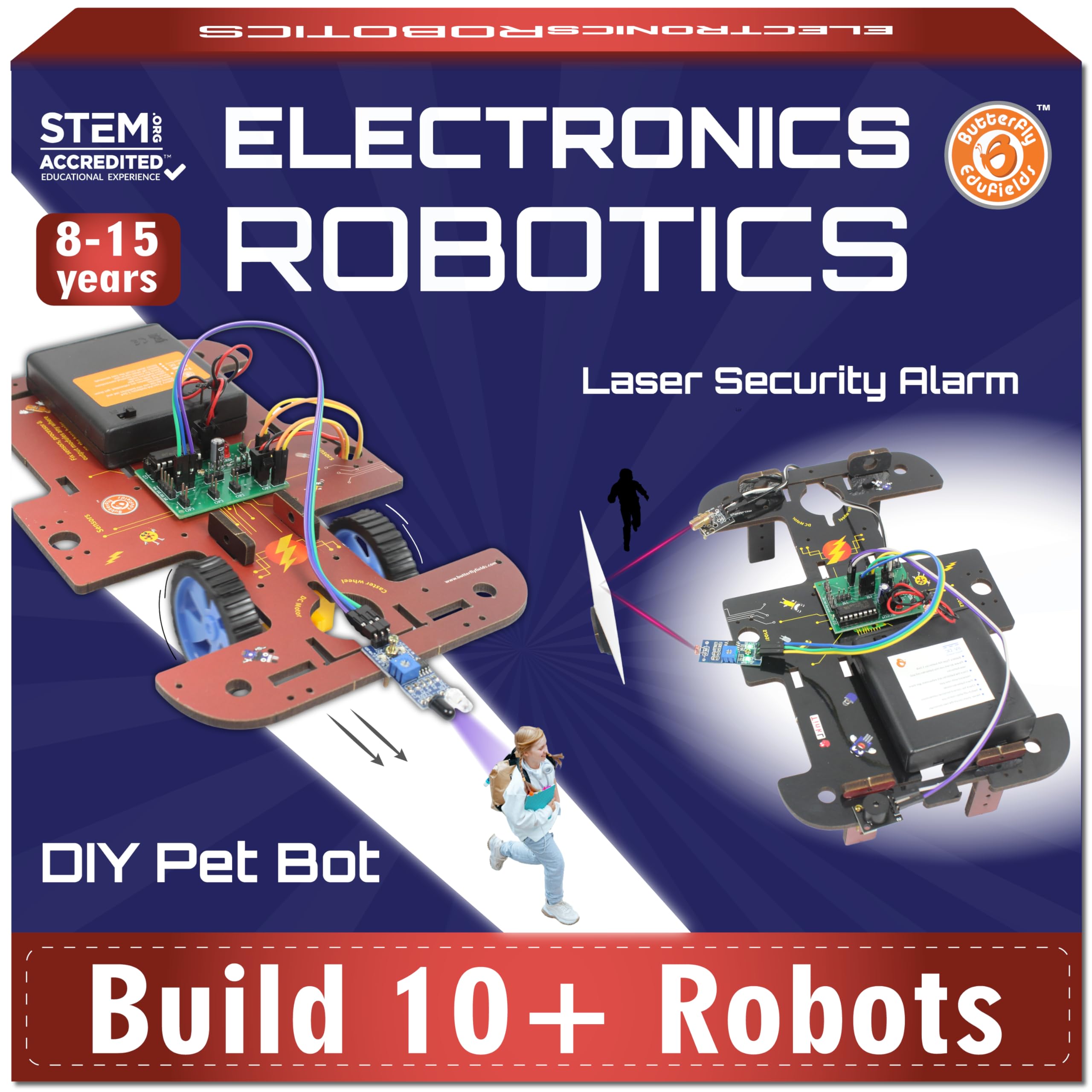
The Butterfly EduFields kit takes a fundamentally different approach — instead of a single motorized robot, it uses a wood-based platform with over 100 electronic components (wires, switches, connectors, LEDs) to build 10 different projects. These range from a line-following rover to an obstacle-avoidance vehicle, each designed to teach a specific electronic principle.
The instructions are step-by-step and well-illustrated, with each project taking about 15 minutes to complete. This makes it ideal for kids 8-14 who are new to circuits and want to understand why a motor spins or an LED lights up. The wood chassis is lightweight and easy to modify with a little sandpaper or hot glue, encouraging experimentation beyond the included projects.
One practical limitation: the wood frame is less durable than ABS or aluminum in a direct collision. It’s better suited for sensor-based challenges (following a black line, avoiding a wall) than for head-to-head smashing. The included battery pack requires AA batteries, and the kit does not include a remote — projects are either autonomous via sensors or manually triggered.
Why it’s great
- Teaches real circuitry and sensor logic, not just block assembly
- 10 different projects with quick 15-minute builds
- Wood chassis can be modified and customized easily
Good to know
- Wood frame is not impact-resistant for direct combat
- No remote control — projects operate via onboard sensors
7. INSOON 5-in-1 Robot Building Set

The INSOON 5-in-1 kit offers 520 pieces that build into five distinct models: a Wall Robot, Engineering Robot, Mech Dinosaur, Tank, and Stunt Car. It uses a 2.4GHz remote control with a claimed 20-meter range and four driving modes — path mode, gyro mode, one-handed, and two-handed driving. The included motor is a high-speed DC unit that pushes the plastic chassis across hard floors at a decent clip.
The build quality is better than expected for the price tier. The ABS plastic pieces clip together securely, and the designers added intentional stress-separation points — pieces that would snap under heavy impact are designed to separate cleanly instead. This means a 5-year-old can crash the robot into a wall without fracturing a critical gear. The yellow color scheme and angular design give it a visual identity distinct from the typical gray/black robot aesthetic.
A few customers reported that the robot runs for short bursts (about 30 seconds) before needing a power-cycle reset, though the seller appears responsive with replacements. The remote requires 2 AAA batteries (not included), and only one model can be built at a time. For an entry-level price, it offers a safe introduction to RC robot building mechanics.
Why it’s great
- 5 build options from a single piece set; good variety
- Stress-separation points prevent gear damage on impact
- Responsive seller support for any defects
Good to know
- Only one model can be built at a time
- Some units exhibit brief runtime issues needing power reset
FAQ
What is the difference between a building block robot and a programmable robot kit?
Can I use these kits in an actual robot combat competition?
How do I know if a robot kit supports Scratch or Python programming?
What battery type gives the longest fight runtime in a battle robot kit?
Final Thoughts: The Verdict
For most users, the best battle robot kits winner is the Makeblock mBot2 because its anodized aluminum chassis and dual coding support (Scratch to Python) provide a pathway from basic building to advanced robotics. If you want immediate head-to-head combat with licensed weapons and a full arena, grab the HEXBUG BattleBots Arena MAX. And for a creative, animatronic building experience that doubles as a coding project, nothing beats the JIMU ROBOT FireBot — provided you can still access the app.