
Every home printer buyer knows the sinking feeling when a critical document stalls mid-print because the ink ran dry. The search for a replacement cartridge, the high cost per page, the clunky wireless setup—these pain points define the search for a true all-in-one solution that actually delivers on its promises.
I’m Min — the co-founder and writer behind Gadgets Feed. I’ve spent countless hours dissecting print engine specs, comparing ink yield numbers, and cross-referencing real-world customer experiences to separate marketing claims from actual performance for home all-in-one printers.
Whether you need crisp black-and-white text for homework or vibrant color for family photos, this guide helps you find the right aio printer for home based on real-world performance and long-term value, not just spec sheets.
How To Choose The Best AIO Printer For Home
Choosing the right all-in-one printer for your home means looking beyond the upfront cost. The real expense lives in the ink or toner you’ll buy over the next few years, so understanding page yield and print engine type is crucial.
Ink Tank vs. Cartridge-Based Printers
Ink tank (supertank) printers come with refillable reservoirs that hold enough ink for thousands of pages. Cartridge-based printers use replaceable cartridges that are easier to swap but often cost more per page. For high-volume home use, a tank printer usually wins on long-term value.
Laser vs. Inkjet for Home Use
Laser printers excel at sharp, fast black-and-white text that resists smudging. Inkjet printers handle color photos and graphics with better gradation. If your home printing is mostly documents, a monochrome laser saves time and money. If you print photos often, a color inkjet is your best bet.
Connectivity and Mobile Printing
Look for dual-band Wi-Fi (2.4GHz and 5GHz) for reliable wireless connections. Support for Apple AirPrint, Mopria, or a dedicated mobile app lets you print directly from your phone or tablet without a computer. An automatic document feeder (ADF) is a time-saver for scanning or copying multi-page documents.
Quick Comparison
On smaller screens, swipe sideways to see the full table.
| Model | Category | Best For | Key Spec | Amazon |
|---|---|---|---|---|
| Epson EcoTank ET-3950 | Supertank Inkjet | High-volume color with ADF | 8500-page B&W / 6500-page color yield | Amazon |
| Canon MegaTank MAXIFY GX2020 | Supertank Inkjet | Small office color with fax | 3000-page B&W / 3000-page color yield | Amazon |
| HP Smart Tank 7001 | Supertank Inkjet | Low-cost high-volume printing | 8000-page color / 6000-page B&W yield | Amazon |
| Epson EcoTank ET-2980 | Supertank Inkjet | Entry-level supertank value | 6600-page B&W / 5500-page color yield | Amazon |
| HP LaserJet Pro MFP 3101fdw | Monochrome Laser | Fast B&W with fax and security | 35 ppm print speed | Amazon |
| Brother HL-L2480DW | Monochrome Laser | Compact B&W with touchscreen | 36 ppm print speed | Amazon |
| Brother MFC-L2820DW | Monochrome Laser | Small office B&W with ADF and fax | 36 ppm, 50-page ADF | Amazon |
| Xerox C235dni | Color Laser | Color laser for home office | 24 ppm color / 24 ppm B&W | Amazon |
| Canon PIXMA TS7720 | Cartridge Inkjet | Budget color with photo focus | 15 ppm B&W / 10 ppm color | Amazon |
In‑Depth Reviews
1. Epson EcoTank ET-3950
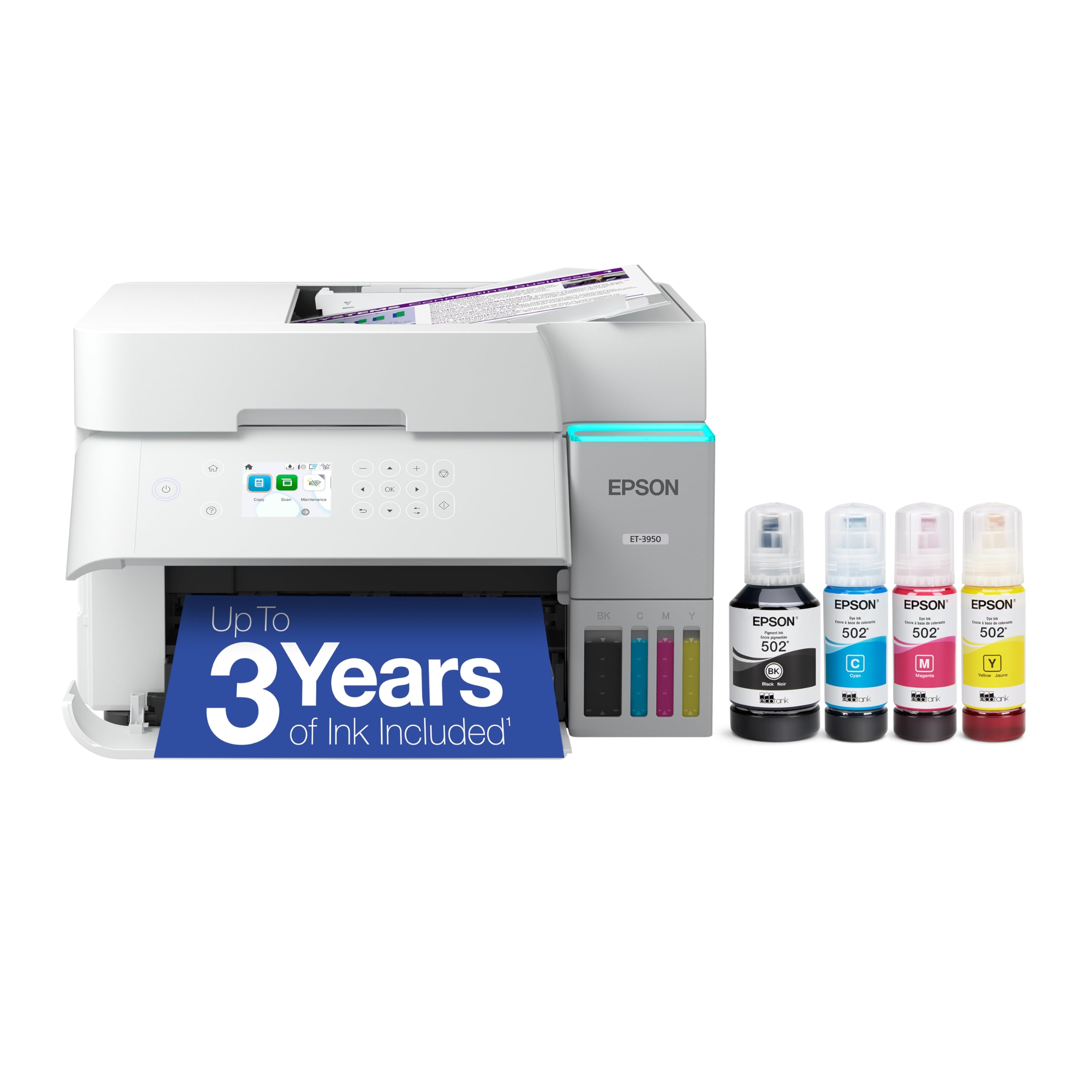
The Epson EcoTank ET-3950 is the high-volume champion for home offices that print frequently. It delivers 18 pages per minute in black and 9 in color, with a maximum resolution of 4800 x 1200 dpi for crisp documents and vibrant photos. The included ink bottles yield up to 8,500 black pages and 6,500 color pages, which translates to years of printing between refills for most households.
The 2.4-inch color touchscreen is intuitive for navigation, and the automatic document feeder handles multi-page scan and copy jobs efficiently. Wi-Fi 5 (802.11ac) and Wi-Fi Direct provide reliable wireless connections, while Ethernet delivers a stable wired option. The flatbed scanner supports 48-bit color input, preserving detail in photos and documents.
At this premium tier, the ET-3950 justifies its position with low ongoing costs and strong print quality. The automatic duplex printing saves paper, and the four individual ink bottles make refilling mess-free. For a home that needs high-yield color printing with minimal ongoing hassle, this is the most complete package.
Why it’s great
- Massive page yield (8500 B&W / 6500 color) keeps costs low for years
- ADF and duplex scanning streamline multi-page workflows
- High 4800×1200 dpi resolution delivers sharp text and photos
Good to know
- Setup can be involved with serial number placement and ink tank orientation
- Some early units reported document feeder jams and wireless reliability issues
- Plastic chassis feels less robust than premium laser alternatives
2. Canon MegaTank MAXIFY GX2020

The Canon MegaTank MAXIFY GX2020 bridges the gap between home and small office with its pigment-based ink system. Pigment inks resist smudging and water better than dye-based alternatives, making this printer suitable for important documents. It prints 15 pages per minute in black and 10 in color, with a single set of GI-25 bottles yielding 3,000 pages in both black and color.
The 2.7-inch color touchscreen is responsive, and the 35-sheet automatic document feeder simplifies scanning, copying, and faxing multi-page sets. Auto duplex printing is included, and the compact desktop design fits neatly on a shelf or desk. Wireless connectivity worked reliably in tests, with both Mac and iPhone setups completing without roadblocks.
Pigment-based ink gives printed text a laser-like crispness that many inkjets lack. The GX2020 also runs quieter than many tank printers, and the ink level indicators on the front panel let you see remaining volume at a glance. For a household that prints both documents and photos and wants professional-grade output, this Canon is a smart mid-range investment.
Why it’s great
- Pigment-based ink produces sharp, water-resistant prints
- 35-sheet ADF and fax support for small office workflows
- Low ink costs with 3000-page yield per color set
Good to know
- Some users report color accuracy issues with photos showing grayish tones
- Cardstock printing may produce curling and streaks at high-quality settings
- No Ethernet port — wireless or USB only
3. HP Smart Tank 7001

The HP Smart Tank 7001 delivers one of the most approachable supertank experiences for home users. It prints 15 pages per minute in black and 9 in color, with included ink bottles good for 6,000 black pages or 8,000 color pages. The mess-free refill system uses keyed bottles that only fit their matching tank, eliminating the risk of cross-contamination.
Setup is guided by the HP Smart app, which walks you through ink filling and Wi-Fi configuration in minutes. The printer supports Apple AirPrint, Android printing, and Amazon Alexa integration for voice-commanded print jobs. The AI-powered print feature automatically removes unwanted content from web pages before printing, saving paper and ink.
The 2-line monochrome LCD is basic but functional, and the automatic duplex printing works reliably. HP claims the print head can be replaced separately, extending the printer’s lifespan. For a household that wants a supertank with straightforward setup and strong app support, the Smart Tank 7001 is an excellent mid-range pick.
Why it’s great
- Mess-free, spill-proof ink bottle refill system
- HP Smart app guides setup and manages print jobs seamlessly
- AI-powered web page printing removes clutter automatically
Good to know
- Basic monochrome LCD feels dated at this price point
- Paper tray lacks a rear guide for envelope feeding
- Scanner LED blinks constantly, which can be distracting in a quiet room
4. Epson EcoTank ET-2980

The Epson EcoTank ET-2980 brings supertank economics to an entry-level price point. It prints 15 pages per minute in black and 8 in color, with each included ink bottle set replacing roughly 90 individual cartridges. The 6,600-page black yield and 5,500-page color yield are generous for a printer at this level, making it ideal for families with moderate print volumes.
The 2.7-inch color touchscreen provides clear navigation, and automatic duplex printing is included despite the budget-friendly positioning. The Epson Smart Panel app handles mobile printing and scanning, and the compact footprint fits easily on a desk. The EcoFit ink bottles have a unique nozzle that only fits the correct tank, preventing spills.
The ET-2980 lacks an automatic document feeder, so multi-page scanning requires manual page-by-page work. Print quality is good for office documents and acceptable for casual photos, but it does not match the higher resolution of the ET-3950. For a home that wants supertank savings without the premium price, this Epson is a solid entry point.
Why it’s great
- Generous ink yield (6600 B&W / 5500 color) at entry-level cost
- Auto duplex printing saves paper without manual intervention
- EcoFit bottles with spill-proof nozzle make refilling easy
Good to know
- No automatic document feeder — manual scanning only
- Wi-Fi setup can be temperamental with Windows 11
- Print quality at 600 DPI is acceptable but not exceptional
5. HP LaserJet Pro MFP 3101fdw

The HP LaserJet Pro MFP 3101fdw is built for homes that print a high volume of black-and-white documents. It delivers 35 pages per minute, with the first page out in under 8 seconds. The automatic document feeder handles multi-page scanning and copying, while the fax function remains useful for those who need it. HP Wolf Pro Security provides customizable protection for your data.
Intelligent Wi-Fi automatically selects the best connection band to maintain uptime, and the printer supports Apple AirPrint, Android, Chromebook, and Microsoft devices out of the box. Ethernet and Bluetooth are also included for flexible connectivity. The Economode setting can double cartridge life, with some users reporting over 10,000 pages from a single 5,000-page cartridge.
The 3101fdw is designed for up to 7 users, making it suitable for a busy home office or family with heavy printing needs. Print quality is crisp and professional, with no smudging. For a household that prints mostly text and wants laser speed and reliability, this HP is a premium choice worth considering.
Why it’s great
- 35 ppm print speed keeps document-heavy tasks moving quickly
- HP Wolf Pro Security protects sensitive documents and network data
- Economode can extend toner yield by up to 2x for lower running costs
Good to know
- Firmware updates may block third-party toner cartridges
- Some units have reported wireless connectivity and panel failures
- Color depth is limited to 1 bpp — monochrome only
6. Brother HL-L2480DW

The Brother HL-L2480DW is a compact monochrome laser that punches above its size. It prints 36 pages per minute with an initial page out in 8.5 seconds, making it one of the fastest printers for black-and-white documents in its class. The 2.7-inch touchscreen provides access to cloud apps like Google Drive, Dropbox, and OneNote for direct printing and scanning.
Built-in dual-band wireless (2.4GHz/5GHz) and Ethernet offer flexible connectivity, and the Brother Mobile Connect app lets you manage print jobs from your phone. The 250-sheet paper tray handles moderate volumes, and the manual feed slot supports envelopes and specialty media. Auto duplex printing is standard, cutting paper waste in half.
The TN830 or TN830XL toner cartridges offer low per-page costs, and the Refresh subscription service provides automatic toner delivery. For a home that needs fast, dependable black-and-white printing in a small footprint, this Brother is a no-brainer.
Why it’s great
- Fast 36 ppm print speed with 8.5-second first-page-out
- Intuitive 2.7-inch touchscreen with cloud app support
- Reliable wireless connectivity praised in long-term user reviews
Good to know
- Monochrome only — no color printing
- No automatic document feeder for multi-page scanning
- Laser engine is slightly louder than inkjet alternatives
7. Brother MFC-L2820DW

The Brother MFC-L2820DW takes the core laser engine of the HL-L2480DW and adds scan, copy, fax, and a 50-page automatic document feeder. It prints 36 pages per minute with the same 8.5-second first-page-out, and the ADF lets you quickly scan or copy multi-page documents without standing at the scanner. The 2.7-inch touchscreen is identical to the HL model, with cloud app access for Google Drive and Dropbox.
Wireless connectivity uses dual-band Wi-Fi, and Ethernet is available for wired networks. The Brother Mobile Connect app offers remote printing and toner monitoring. The MFC-L2820DW is designed for up to 7 users, making it a strong candidate for a home with multiple family members printing and scanning regularly.
Long-term reliability is a hallmark of Brother laser printers, with one reviewer reporting that their previous Brother unit lasted 11 years before a scanner defect forced a replacement. The TN830XL high-yield toner can last months for moderate home use. For a household that needs a true all-in-one monochrome laser with fax and document feeder, this is the premium choice.
Why it’s great
- 50-page ADF enables efficient multi-page scanning and copying
- 36 ppm laser print speed with dual-band wireless and Ethernet
- Brother’s legendary long-term reliability — many units last 10+ years
Good to know
- Setup instructions are sparse and may require manual Wi-Fi configuration
- Monochrome only — no color printing capability
- Mobile printing app can feel clunky compared to AirPrint
8. Xerox C235dni

The Xerox C235dni brings full-color laser printing to the home office with 24 pages per minute in both black and color. Color laser printing produces sharp text and vibrant graphics that resist fading and smudging better than inkjet. The printer supports Apple AirPrint and Mopria for effortless mobile printing, and the Xerox Easy Assist App guides you through setup in minutes.
The printer handles scanning, copying, and faxing in addition to printing, making it a true all-in-one. The starter toner yields 500 pages, and high-yield cartridges are available to reduce ongoing costs. The C235dni is rated for up to 1,500 pages per month, suitable for a busy home office with moderate color printing needs.
Print quality from the laser engine is crisp and professional, with no risk of drying out between uses like inkjet printers. The color depth of 24 bits per pixel ensures smooth gradients in presentations and reports. For a home that needs consistent, vivid color output without the hassle of liquid ink, the Xerox C235dni is a reliable premium pick.
Why it’s great
- Color laser output is sharp, smudge-proof, and fade-resistant
- 24 ppm color speed matches monochrome lasers in its class
- AirPrint and Mopria support for seamless mobile printing
Good to know
- Starter toner only yields 500 pages — factor in immediate replacement costs
- Scanner software on Windows 11 may be unreliable for some users
- Requires premium paper for best print quality — generic paper may produce light output
9. Canon PIXMA TS7720

The Canon PIXMA TS7720 is a budget-friendly inkjet that covers the basics: print, copy, and scan in a compact white chassis. It prints 15 pages per minute in black and 10 in color, with a 2.7-inch LCD touchscreen for operation. The auto duplex feature saves paper, and the streamlined setup process gets you printing in minutes.
The TS7720 uses just two ink cartridges (one black pigment and one tri-color), which simplifies replacement but means when any single color runs low, you must replace the entire color cartridge. The printer handles a variety of media types, including photo paper and envelopes, making it versatile for creative projects. Borderless photo printing is supported up to 8.5 x 11 inches.
Print quality is adequate for everyday documents and passable for casual photos, though colors from the two-cartridge system are less vivid than Canon’s five-ink models. The scanner lacks an automatic document feeder, so multi-page jobs require manual effort. For a household with low print volumes and a tight budget, the TS7720 is a functional entry-level option.
Why it’s great
- Low upfront cost with auto duplex printing included
- Compact design fits easily on small desks or shelves
- 2.7-inch touchscreen provides clear, intuitive navigation
Good to know
- Two-cartridge system leads to wasted color ink when one color runs low
- Trial cartridges run out quickly — factor in immediate replacements
- No automatic document feeder for multi-page scanning or copying
FAQ
What is the difference between a supertank and a cartridge printer for home use?
Should I get a monochrome laser or a color inkjet for home use?
How do I calculate the real cost of a home printer?
Final Thoughts: The Verdict
For most users, the aio printer for home winner is the Epson EcoTank ET-3950 because it combines the highest page yield with strong print quality, an automatic document feeder, and a reasonable long-term cost per page. If you want monochrome laser speed for a document-heavy household, grab the Brother HL-L2480DW. And for a home office that needs color laser output with fax and ADF, nothing beats the Brother MFC-L2820DW.