
Printing a full-size helmet, a functional drone frame, or a batch of production parts in one go demands a build volume that standard desktop machines simply cannot provide. A 400mm-class printer is the threshold where prototyping turns into real manufacturing—but choosing the wrong one means wrestling with warping, failed adhesion, and unreliable firmware. The market is flooded with machines claiming massive volume, yet only a handful deliver the rigidity, thermal stability, and motion accuracy required to actually fill that cube with usable parts.
I’m Min — the co-founder and writer behind Gadgets Feed. I have spent thousands of hours analyzing the thermal dynamics, extrusion consistency, and frame rigidity of large-format FDM printers to separate serious production tools from unreliable prototypes. This guide focuses on the specific engineering challenges that emerge when you push past 350mm in every axis.
After poring over user reports and technical specifications, I have distilled the field down to the machines that actually earn their place on your workbench. This is the definitive resource for anyone searching for the best 400mm 3d printer.
How To Choose The Best 400mm 3D Printer
Stepping up to a 400mm build cube introduces thermal and mechanical demands that smaller printers never face. The bed surface area is roughly four times that of a standard 220mm printer, which means more heat loss, more warping force on the model corners, and more weight for the motion system to sling around. You must consider active chamber heating, the kinematics architecture, and the leveling system’s ability to map a flat plane across a large aluminum tooling plate.
Active Chamber Heating vs. Passive Enclosure
A passive enclosure traps residual heat from the bed, but on a 400mm printer, that is rarely enough to prevent corner lifting on ABS, ASA, or polycarbonate. Machines like the QIDI PLUS4 and QIDI Max4 include dedicated 400W active heating that brings the internal air to 65°C before printing starts. This pre-heat cycle is non-negotiable for engineering-grade filaments because the ambient air temperature inside the chamber must be high enough to slow the cooling rate of the part’s outer layers relative to the shrinking internal core.
CoreXY vs. Bed-Slinger Kinematics
On a 400mm printer, moving the bed forward and backward (a traditional bed-slinger) introduces massive inertia that limits acceleration and causes ringing. CoreXY architecture keeps the bed stationary on the Z-axis, moving only the toolhead on the X and Y axes via crossed belts. This design permits higher accelerations—typically 10,000 to 30,000 mm/s²—without introducing momentum artifacts in the part surface. Every printer in this guide uses CoreXY, which is the minimum viable architecture for a 400mm build volume at modern speeds.
Leveling Fidelity Across a Large Surface
A 400mm x 400mm tooling plate can have subtle convex or concave deviations even when machined flat. Look for printers that perform at least 16-point bed mesh compensation and preferably 64-point. The Creality Ender 5 Max uses 64-point auto leveling, while the QIDI Max4 relies on a closed-loop motor system combined with mesh compensation. Without sufficient probing resolution, the first layer will be inconsistent across the bed, causing adhesion failure on a part that may have taken 12 hours to print.
Quick Comparison
On smaller screens, swipe sideways to see the full table.
| Model | Category | Best For | Key Spec | Amazon |
|---|---|---|---|---|
| Anycubic Kobra 3 MAX | Mid-Range | Ultra-large single parts | 420 x 420 x 500 mm | Amazon |
| QIDI Max4 Combo | Premium | Engineering-grade materials | 390 x 390 x 340 mm / 65°C chamber | Amazon |
| Creality K2 Plus Combo | Premium | Multi-color / multi-material | 350 x 350 x 350 mm / 16 colors | Amazon |
| Creality Ender 5 Max | Mid-Range | Print farm / batch production | 400 x 400 x 400 mm / 700 mm/s | Amazon |
| QIDI PLUS4 | Mid-Range | PPS-CF / high-temp polymers | 305 x 305 x 280 mm / 370°C nozzle | Amazon |
| Snapmaker Artisan | Premium | Multi-function (laser/CNC) | 400 x 400 x 400 mm / dual extruder | Amazon |
| Bambu Lab P1S | Mid-Range | Plug-and-play reliability | 256 x 256 x 256 mm / 500 mm/s | Amazon |
| ELEGOO Centauri Carbon | Mid-Range | Entry-level large format | 256 x 256 x 256 mm / 500 mm/s | Amazon |
| Anycubic Kobra 3 Max Combo | Mid-Range | Multi-color on a large bed | 420 x 420 x 500 mm + ACE Pro | Amazon |
| Prusa XL 5-Tool | Premium | Industrial multi-material workflow | 360 x 360 x 360 mm / 5 toolheads | Amazon |
| Prusa XL 1-Tool | Premium | High-precision single-material | 360 x 360 x 360 mm / segmented bed | Amazon |
In‑Depth Reviews
1. Anycubic Kobra 3 MAX

The Kobra 3 MAX delivers a staggering 420 x 420 x 500 mm build volume at a price point that undercuts most machines with half its capacity. The CoreXY motion system paired with SG15 linear bearings pushes print speeds to 600 mm/s and acceleration to 10,000 mm/s², which is genuinely impressive for a printer this size. The AI print-monitoring camera detects spaghetti failures and automatically pauses the job, saving both material and time on long overnight prints.
Pairing the Kobra 3 MAX with one or two Anycubic ACE Pro units unlocks 4- to 8-color multi-material printing, a feature rarely seen in this volume class. The dual Z-axis ensures the massive bed moves without wobble, and the auto-leveling system handles the 420mm x 420mm tooling plate without requiring manual intervention. Users consistently report that the printer prints large single-piece items—like full pet playgrounds or prototype sand tables—without splitting the STL.
Initial quality control has been mixed; some units exhibit layer shifting or adhesion issues right out of the box, but Anycubic’s customer support has a strong track record of sending replacement parts like print heads and plates. The printer is heavy at 48 pounds and demands a stable table due to the mechanical energy transferred during high-speed movement. Overall, the Kobra 3 MAX offers the most cubic volume for your money and handles it with a surprisingly refined feature set.
Why it’s great
- Largest build volume in its price tier: 420 x 420 x 500 mm.
- AI failure detection and auto-pause save long prints from disaster.
- ACE Pro compatibility brings multi-color to a jumbo frame.
Good to know
- No active chamber heating; enclosed DIY needed for high-temp materials.
- Initial QC variance reported—some units need immediate support contact.
- Vibrations can be significant; requires a heavy, stable work surface.
2. QIDI Max4 Combo

The QIDI Max4 Combo redefines what a large-format enthusiast printer can do by combining a 390 x 390 x 340 mm build volume with a 65°C actively heated chamber. This is not a passive box—the 400W heater brings the internal air temperature to a stable 65°C before the first layer goes down, which eliminates warping on ABS, polycarbonate, and carbon-fiber-reinforced nylons. The closed-loop stepper motors on the X/Y axes deliver 30,000 mm/s² acceleration and an 800 mm/s top speed, making it one of the fastest large-coreXY printers available.
QIDI includes a 40 mm³/s high-flow hotend with a hardened steel nozzle rated to handle abrasive filaments like PPS-CF and PPA-CF without rapid wear. The Polar Cooler system, which can be added separately, provides directed cooling for bridging and overhangs. The fully-assembled nature of the printer means you unbox, attach the gantry, and start printing within 30 minutes—no firmware flashing or belt tension guesswork required.
User reports highlight the open-source Klipper firmware as a major advantage, allowing custom macros and remote monitoring through the QIDI Studio slicer and mobile app. The machine is heavy at 120 pounds and draws significant power during the chamber pre-heat cycle, so factor in both a sturdy workbench and an available 15-amp circuit. Multi-color printing via the QIDI BOX (sold separately) enables up to 16 colors, though some users note the purge waste is higher than with Bambu’s AMS system.
Why it’s great
- Active 65°C heated chamber makes high-temp printing effortless.
- Closed-loop X/Y motors deliver 30,000 mm/s² acceleration.
- Open-source Klipper firmware with active community support.
Good to know
- Heavy 120-pound frame requires two people to move and position.
- Polar Cooler for bridging is not included; must be purchased separately.
- Long pre-print heat cycle and higher idle power draw than passive enclosures.
3. Creality K2 Plus Combo
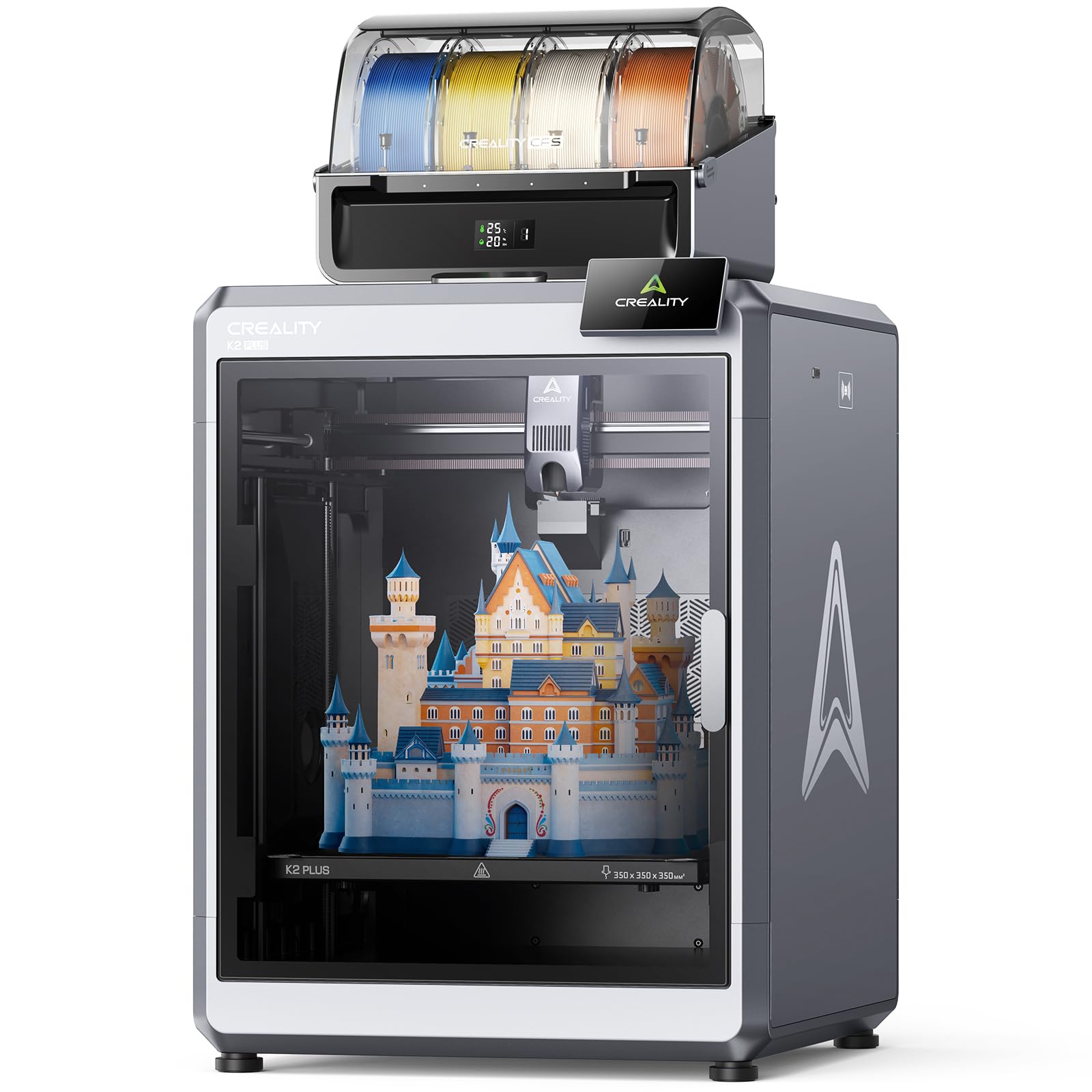
The Creality K2 Plus Combo combines a 350 mm³ build volume with an all-new CFS (Creality Filament System) that supports up to 16 colors by daisy-chaining four CFS units. The printer uses FOC step-servo motors that deliver 30,000 mm/s² acceleration and a top speed of 600 mm/s, ensuring that multi-color prints do not take exponentially longer than single-color jobs. The active chamber heating maintains 60°C, which is sufficient for ASA, ABS, and PPA without the enclosure modifications required by passive printers.
Two AI cameras monitor the print: one in the chamber catches spaghetti failures and idle nozzle movements, while a toolhead-mounted camera performs flow rate optimization in real time. The RFID filament system automatically detects the color and material type when you load a CFS-compatible spool, eliminating the need to manually configure material profiles. The dual Z-axis with independent motors auto-tilts the bed before leveling, which compensates for any mechanical play introduced during shipping.
User feedback after 1,400+ hours of operation shows zero failures on the motion system and consistent first-layer adhesion across the full 350mm bed. The major caveat is that switching between PLA and high-temp materials like ABS can cause clogging if the hotend is not purged at the correct temperature—some users dedicate a separate toolhead for ABS to avoid the issue. The machine is 70 pounds and demands a dedicated sturdy table, but the overall package is the most integrated multi-color solution in the premium large-format segment.
Why it’s great
- Daunting 16-color multi-material capability with RFID filament detection.
- Dual AI cameras monitor for spaghetti failures and flow optimization.
- Active 60°C chamber eliminates warping on engineering filaments.
Good to know
- Nozzle clogs can occur when switching between PLA and high-temp materials.
- CFS dislikes cardboard spools; spool adapters may be required.
- Heavy and large footprint; requires at least two people for initial setup.
4. Creality Ender 5 Max

The Creality Ender 5 Max is purpose-built for print farms and batch production, with an exact 400 mm³ build volume and WLAN multi-printer control that lets you manage a dozen units from a single interface. The CoreXY system hits 700 mm/s, and the 64-point auto-leveling system ensures first-layer consistency across the entire 400mm x 400mm surface without manual shimming. The rigid all-metal frame with a die-cast aluminum base and X-axis linear rail is designed to damp out vibration over long production runs.
The 1000W rapid-heating bed reaches operating temperature within minutes, supporting materials from PLA and PETG up to ABS and nylon. The direct-drive dual-gear extruder provides the consistent feed force needed for a 400mm-wide gantry, and the tri-color status indicator on the front makes it easy to spot idle, printing, or error states from across the room. This is the only sub-premium printer in this guide that ships with networking as a first-class feature, not an afterthought.
Reliability reports are polarized. Some users report flawless operation over weeks of continuous printing, while others experienced severe bed adhesion issues, extruder casing fractures from vibration, and replacement parts that were unavailable for months. The enclosure panel is too short to fully seal the top, so users are adding custom risers to prevent heat loss. The Ender 5 Max is a capable farm printer if you are willing to debug initial teething issues, but it is not a truly turnkey solution out of the box.
Why it’s great
- Exact 400 mm³ build volume for jumbo prototypes and batch runs.
- WLAN-based multi-printer control ideal for scaling a print farm.
- 64-point auto leveling and 1000W fast-heat bed reduce downtime.
Good to know
- Inconsistent quality control; some units fail within hours of first use.
- Stock enclosure is too short; a riser is almost mandatory for ABS/ASA.
- Replacement parts and Creality support response can be slow.
5. QIDI PLUS4

The QIDI PLUS4 is not a true 400mm machine—its build volume is 305 x 305 x 280 mm—but it belongs in this guide because it fills the role of a dedicated high-temperature workhorse for users who need to print PPS-CF, PPA-CF, and other industrial polymers regularly. The 80W hotend reaches 370°C, and the active chamber heater maintains a steady 65°C, which is critical for preventing delamination on semi-crystalline materials. The integrated multi-metal nozzle reduces clogging risks compared to PTFE-lined hotends.
The CoreXY structure at 600 mm/s and the dual-motor independent Z-axis with 10mm-diameter lead screws provide the rigidity needed for abrasive carbon-fiber filaments. QIDI Studio and the mobile app enable remote monitoring via the HD camera, and the filament wrap and break detection sensors conserve material during unattended operation. The printer has accumulated over 4,000 hours of use in some owner reports with no maintenance beyond occasional hotend swaps.
Setup can be frustrating: the factory firmware may ship with bugs that require manual OTA workarounds, and the WiFi module has been unreliable for some users. The leveling system also requires a manual mesh adjust after the first few prints to achieve consistent adhesion. Once dialed in, however, the print quality rivals printers costing twice as much, particularly with engineering-grade filaments that warp on passive-enclosure machines. The QIDI PLUS4 is the right purchase if your material list is dominated by high-temp composites rather than PLA.
Why it’s great
- 370°C nozzle and active 65°C chamber for industrial-grade polymers.
- Proven reliability; multiple users report thousands of hours of uptime.
- Open-source Klipper firmware allows custom tuning and macros.
Good to know
- Build volume is 305mm, not a full 400mm cube.
- Initial firmware and WiFi issues require manual intervention to resolve.
- Leveling can drift and needs occasional manual recalibration.
6. Snapmaker Artisan

The Snapmaker Artisan is a modular platform that combines 3D printing, laser engraving (up to 40W), and CNC carving (200W spindle) in a single 400mm x 400mm x 400mm frame. The dual-extrusion 3D printing module uses a 7.5:1 planetary gear ratio plus dual gears to push filament smoothly at moderate speeds—this is not a speed-focused CoreXY but rather a precision system built for surface quality. The anodized aluminum frame and CNC-ground steel guiderails give the Artisan a sense of rigidity uncommon in modular machines.
The quick-swap toolhead and baseplate system allows switching between 3D printing, laser, and CNC modes in under five minutes, making the Artisan a viable option for small workshops that lack the floor space for three separate machines. The 7-inch touchscreen runs Snapmaker’s own software, which integrates the slicing, laser, and CNC workflows into a single interface. The printer supports over 600 materials across its three functions—including PLA, ABS, PETG, wood, metal, and acrylic.
The 3D print quality is good but not great at high speeds; the Artisan’s acceleration is limited compared to dedicated CoreXY printers, so large parts take longer than they would on an Ender 5 Max or Kobra 3. The lack of a heated chamber limits material selection to PLA and PETG unless you build a custom enclosure. The inclusion of laser and CNC functions makes the Artisan uniquely valuable for makers who need flexibility over raw printing speed, but the multi-function compromise shows in each individual mode’s throughput.
Why it’s great
- Genuine 3-in-1 capability: 3D print, laser engrave, and CNC carve.
- Industrial-grade steel guiderails ensure high positional accuracy.
- Toolhead and bed swap in under 5 minutes without tools.
Good to know
- 3D print speed is modest compared to pure CoreXY machines.
- No active chamber heating limits engineering-material use.
- Software can be glitchy; some users report crashes and wrong-language errors.
7. Bambu Lab P1S

The Bambu Lab P1S is not a 400mm printer—its 256mm³ build volume is at the small end of this guide—but it earns a spot because it represents the gold standard for setup and reliability in a fully enclosed CoreXY machine. The printer comes out of the box, takes 15 to 30 minutes to set up, and produces consistent, high-quality prints on the first attempt without any calibration tweaks. Auto bed leveling occurs before every print, and filament runout pause-and-resume works flawlessly.
The P1S hits 500 mm/s with 20,000 mm/s² acceleration, and the enclosed design supports ABS, ASA, and PETG without additional modifications. The Bambu Studio slicer and mobile app provide remote monitoring, and the camera allows time-lapse capture. The AMS (Automatic Material System) enables up to 16 colors when multiple units are daisy-chained, though only a single AMS unit is included in the base package.
The biggest drawback for this guide’s audience is the limited build volume. Users who need a 400mm z-height will outgrow the P1S within weeks. The closed ecosystem—proprietary firmware, cloud-dependent features, and a locked-down slicer—bothers some advanced users, but for pure productivity and first-layer reliability, the P1S is unmatched in this price band. It is the printer to recommend to someone who just wants to make parts, not fix printers.
Why it’s great
- Unmatched out-of-box experience: 15-minute setup, first print flawless.
- Consistent high-quality output with minimal layer lines and strong adhesion.
- AMS adds multi-color capability that integrates seamlessly.
Good to know
- Build volume (256mm³) is far too small for true 400mm applications.
- Proprietary, cloud-dependent ecosystem limits advanced customization.
- TPU print quality is mediocre; soft filaments struggle in the extruder path.
8. ELEGOO Centauri Carbon

The ELEGOO Centauri Carbon is the lowest-cost fully enclosed CoreXY printer in this guide, featuring a die-cast aluminum frame, 320°C nozzle, and 500 mm/s top speed. The printer arrives fully assembled and pre-calibrated, requiring only filament loading and a first-layer check before the first print. The auto bed leveling and vibration compensation algorithms work well enough that even beginners can produce usable parts within 30 minutes of unboxing.
The 256mm³ build volume is small relative to the rest of the list, but the Centauri Carbon’s real strength is material compatibility: the 320°C brass-hardened-steel nozzle supports carbon-fiber-reinforced PLA and PETG, and the enclosed chamber with enhanced cooling allows reliable ABS and polycarbonate prints. The built-in camera and dual LED lighting enable remote monitoring and time-lapse capture, and the dual-sided PEI plate provides strong adhesion for PLA at reduced bed temperatures.
Long-term reliability has been a point of contention. Some units experience hotend communication errors within the first week, attributed to tight cable routing around the gantry. ELEGOO’s support team is responsive but can be slow for US-based customers, and the replacement process may require self-diagnosis over email. The Centauri Carbon is a compelling entry point into CoreXY printing, but buyers should budget time for potential early teething issues that are common at this price point.
Why it’s great
- Lowest-cost fully enclosed CoreXY printer with die-cast frame.
- 320°C nozzle and enclosed chamber handle carbon-fiber composites.
- Pre-assembled and pre-calibrated; setup is truly out-of-box.
Good to know
- Build volume is limited to 256mm³, not suitable for true 400mm parts.
- Cable routing near the hotend can cause early communication failures.
- Customer support turnaround for replacements can be slow.
9. Anycubic Kobra 3 Max Combo

The Kobra 3 Max Combo bundles the same jumbo 420 x 420 x 500 mm frame with the Anycubic ACE Pro multi-color unit, offering a complete multi-material system out of the box. The printer itself is identical to the standalone Kobra 3 MAX reviewed above, sharing the 600 mm/s CoreXY motion, G-sensor vibration compensation, and dual-sided PEI spring steel plate. The combo saves you the trouble of sourcing the ACE Pro separately and ensures firmware compatibility from day one.
Multicolor and multimaterial support on a build volume this large is rare; you can print a 16-inch-tall model with four colors without splitting the part or gluing segments together. The 300°C all-metal hotend handles PLA, PETG, and TPU reliably, and the filament runout sensor with power-loss resume makes 24-hour prints feasible. The offline printing mode means you do not need to rely on a cloud service for basic operation.
Owners report that the ACE Pro’s filament change mechanism can cause jams when using brittle or recycled filaments, and the lack of an enclosure means large ABS and ASA prints will warp unless you build a DIY enclosure. The printer’s price with the combo is significantly higher than the standalone version, so the value proposition depends on whether you genuinely need multi-color capability on this scale. If you do, this combo is the most affordable route to that specific use case.
Why it’s great
- Jumbo 420 x 420 x 500 mm build volume with integrated multi-color support.
- G-sensor vibration compensation maintains quality at 600 mm/s.
- Power-loss resume and offline mode simplify long-duration prints.
Good to know
- No heated chamber; large ABS/ASA prints warp without a DIY enclosure.
- ACE Pro can jam with brittle or recycled filament spools.
- Combo pricing is significantly higher than the standalone printer.
10. Prusa XL 5-Tool

The Prusa XL 5-Tool is the only printer in this guide with five independent toolheads, enabling true multi-material printing without the purge waste of a filament-switching system. Each toolhead carries its own extruder, hotend, and nozzle, so you can print with five different materials—for example, PLA for the main body, PETG for supports, TPU for grips, and a dissolvable PVA for complex overhangs—all in a single job. The 360 mm³ build volume uses a segmented heated bed that heats only the zones under the active toolhead, reducing power consumption and thermal stress on large parts.
The CoreXY motion system maintains speed and precision even during frequent tool changes. Prusa’s open-source philosophy means you own the printer fully; there are no forced updates, no cloud login requirements, and no proprietary slicer lock-in. The lifespan support from Prusa Research is industry-leading, with firmware updates and replacement parts available years after purchase.
The tradeoffs are significant. The printer costs substantially more than any other machine on this list, and the initial assembly requires a half-day of work because the toolhead assembly and several fragile components are packed separately to survive shipping. Some users report software bugs that cause crashes and blue screens, and the UI feels dated compared to the touchscreens on competing machines. The Prusa XL 5-Tool is the right choice for professional prototyping environments where material flexibility and long-term reliability justify the investment.
Why it’s great
- Five independent toolheads allow true multi-material printing with zero purge waste.
- Segmented heated bed zones reduce power consumption and warping.
- Fully open ecosystem with no cloud requirements or forced updates.
Good to know
- Highest price on this list; a serious investment for most users.
- Assembly requires half a day, and shipping-damaged parts have been reported.
- Software and UI feel less polished than the competition.
11. Prusa XL 1-Tool
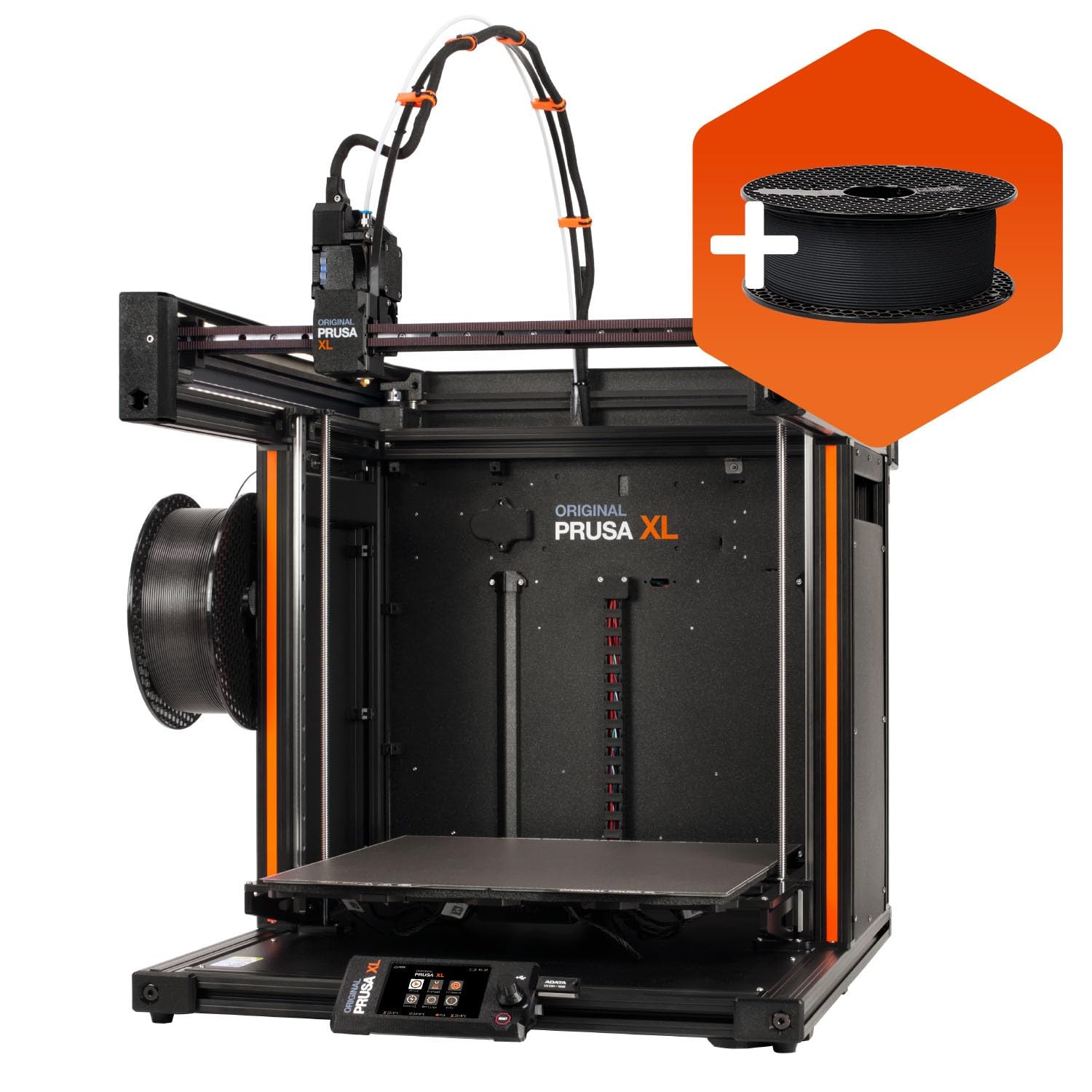
The Prusa XL 1-Tool strips the multi-head complexity to deliver the same 360 mm³ build volume and segmented heated bed at a substantially lower price than the 5-tool version. This is the printer for production engineers who need consistent single-material output at scale, without the overhead of tool-changing mechanisms. The CoreXY architecture and Prusa’s calibration routines deliver dimensional accuracy that rivals industrial machines costing three times as much.
The segmented bed is a genuine innovation: nine independently controlled heating zones ensure that only the area under the printed part consumes power, reducing thermal soaking and warping on large flat surfaces. The Satin PEI sheet provides excellent adhesion across a wide range of materials, from PLA to polycarbonate. The printer integrates seamlessly with Prusa Connect for remote monitoring, and the 1kg spool of Prusament PLA included in the box gets you started immediately.
As with the 5-tool version, the final assembly is not truly complete out of the box. The extruder assembly, LCD, and Wi-Fi antenna ship separately to protect them during transport, and putting everything together takes an afternoon. Some users report broken plastic parts and scattered packing materials upon delivery, which soured their initial experience. The print quality and long-term support are top-tier, but the Prusa XL 1-Tool demands a buyer who values reliability over turnkey simplicity.
Why it’s great
- Segmented nine-zone heated bed reduces warping and power use.
- Industrial-grade dimensional accuracy and repeatability.
- Fully open, repairable, and backed by lifetime technical support.
Good to know
- Requires half a day of final assembly; not truly ready out of the box.
- Some units arrive with broken plastic parts due to packaging issues.
- Premium pricing means less value per cubic mm than Asian competitors.
FAQ
Is a 400mm 3D printer worth it for a beginner?
Do I need an active heated chamber for 400mm PLA prints?
How many points of bed leveling are enough for a 400mm bed?
Final Thoughts: The Verdict
For most users, the best 400mm 3d printer winner is the Anycubic Kobra 3 MAX because it delivers the largest usable build volume (420 x 420 x 500 mm) with reliable CoreXY motion, AI failure detection, and ACE Pro multi-color support at a price that undercuts everything else in its class. If you need an active heated chamber for engineering-grade filaments like PPS-CF, grab the QIDI Max4 Combo. And for a turnkey multi-color experience on a 350mm cube, nothing beats the Creality K2 Plus Combo.