
A wall-mounted TV is only as clean as the mess it hides behind it. That dangling bundle of HDMI, power, and Ethernet cables transforms a sleek living room into a tangled eyesore the moment you glance sideways. The solution sits inside the wall itself: a recessed box that swallows the clutter and returns your space to the crisp, minimalist look you paid for. Choosing the right enclosure means understanding depth, fire rating, device compatibility, and the real installation work involved.
I’m Min — the co-founder and writer behind Gadgets Feed. My research for this guide involved cross-referencing technical specs, reading hundreds of verified owner experiences, and comparing the actual interior dimensions of seven different in-wall boxes to determine which models genuinely conceal Samsung One Connect boxes, streaming sticks, and power bricks without forcing compromises.
Whether you are mounting a Samsung Frame or a standard LED TV, a recessed enclosure transforms cable spaghetti into a professional finish. This guide ranks the best back box for tv options by capacity, safety certification, and real-world ease of installation for every skill level.
How To Choose The Best Back Box For TV
Not all recessed boxes are created equal. A 9-inch enclosure that barely fits a single streaming stick is useless if you need to hide a Samsung One Connect plus a router and an Apple TV. The first decision is capacity — measure all your devices, stack them in your mind, and add an inch of breathing room on every side for heat dissipation. The second decision is safety: an in-wall power cord must carry a UL or ETL listing, meaning it is rated for concealed use behind drywall. The third decision is installation complexity — some kits include a hole saw, a dust bag, and a cutting template, while others assume you have these tools already.
Measure Your Wall Cavity First
Standard residential studs are spaced 16 inches on center, which gives you about 14.5 inches of usable width between studs. A 17-inch box like the Perlegear or the ynVISION.DESIGN actually sits in a larger stud bay or spans two bays, so verify your wall is compatible. Depth is equally critical: most interior walls have a 3.5-inch cavity, but some older homes or thin walls provide only 2.5 inches. Every kit in this guide lists a minimum cavity depth — ignore it at your own risk.
Match the Box to Your Devices
A 9-inch enclosure is perfect for a single streaming device like a Roku or Fire TV Stick. If you need to hide a One Connect box, a network switch, and a power strip, move to a 17-inch box with an adjustable shelf. The ventilation also matters: streaming devices generate heat, and a sealed box can cause throttling or shutdowns. Look for vented covers, which the ynVISION.DESIGN and Perlegear 17-inch models provide.
Certification Is Not Optional
Running power cords inside a wall voids the UL listing of most extension cords and creates a fire hazard. A proper in-wall box uses a pre-wired, ETL or UL certified power cord that is rated for concealed installation. The ECHOGEAR 9-inch and the Mount-It! kit both carry these certifications, while some budget options skip them entirely. Never trust an unlisted power module inside your wall.
Quick Comparison
On smaller screens, swipe sideways to see the full table.
| Model | Category | Best For | Key Spec | Amazon |
|---|---|---|---|---|
| Perlegear 17″ | Media Box | Samsung One Connect & large devices | 17″ x 14.5″ x 3.9″ interior capacity | Amazon |
| ECHOGEAR 9″ | Media Box | Samsung Frame One Connect Mini | 9″ H x 14.3″ W x 3.9″ D enclosure | Amazon |
| ECHOGEAR Cable Kit | Cable Kit | Simple power + HDMI pass-through | 3.75″ W x 3.25″ D modules | Amazon |
| Perlegear USB-C Kit | Cable Kit | Built-in USB-A and USB-C charging | Dual AC outlets + USB-C port | Amazon |
| Mount-It! | Cable Kit | Triple outlets in one recessed plate | Triple outlet + 9ft pre-wired cord | Amazon |
| ynVISION.DESIGN 17″ | Media Box | Vented storage for streaming boxes | 17″ W x 10″ H vented cover | Amazon |
| VIVO MOUNT-REC01 | Recessed Mount | Full-motion mount with recessed look | Fits 50-75″ TVs, 110 lb capacity | Amazon |
In‑Depth Reviews
1. Perlegear 17″ in-Wall Media Box

This 17-inch enclosure offers nearly twice the interior volume of standard 9-inch boxes, which makes it the only mid-range option here that comfortably houses a Samsung One Connect box, a network switch, and an Apple TV simultaneously. The ABS plastic body carries an SGS fire-resistance certification, and the kit includes a cutting template, a dust bag, and a drywall saw — three tools that reduce installation mess considerably. Removable knockouts let you route power and low-voltage cables through your chosen position.
Multiple verified owners confirm the box fits Samsung Frame TV One Connect units, though a few note the knockouts for standard electrical boxes required light modification with a heat gun. The box ships with hook-and-loop straps for bundling cables inside, which prevents tangling when you pull the TV out for access. At roughly 2.8 kilograms, the unit feels solid without being difficult to maneuver during drywall installation.
Where this Perlegear model falls short is the knockout sizing — several reviews mention that the pre-cut openings do not align perfectly with a standard 1-gang electrical box, forcing some DIY adjustments. The labeling on the packaging could be clearer about which knockouts match which conduit sizes. Still, for the price and the generous interior volume, this box delivers the cleanest outcome for anyone hiding multiple devices in a single stud bay.
Why it’s great
- Giant 17-inch interior fits One Connect, router, and streaming box
- SGS-certified fire-resistant ABS materials for in-wall safety
- Includes dust bag, cutting template, and drywall saw for clean install
Good to know
- Knockout openings may need heat-gun modding for standard outlet boxes
- Some users found the brackets too small for larger Samsung One Connect units
2. ECHOGEAR 9″ in-Wall Media Box

The ECHOGEAR 9-inch box is tailored for the Samsung Frame TV owner who only needs to hide the One Connect Mini and maybe one streaming stick. Its 9 x 14.3-inch footprint fits snugly between standard 16-inch on-center studs, and the UL certification means the power rating is documented for in-wall use — a critical detail for homeowners insurance. The plastic enclosure uses WiFi-transparent materials so your signal is not degraded by a metal box inside the wall.
Owners consistently praise the trim ring, which creates a finished, painted appearance around the opening. The included drywall clips and step-by-step instructions reduce installation to roughly 15 minutes, making it the fastest retrofit option in this comparison. One reviewer noted that the One Connect Mini fits “but just barely,” confirming the 3.9-inch depth is the tightest acceptable clearance for that specific device.
The main limitation is capacity: this is not the box for a full-size One Connect or for anyone who wants to stash a router and a switch alongside their streaming hardware. A single owner reported that a Fire TV Stick inside the enclosure experienced temperature errors, potentially due to limited airflow. For minimalists with a single device, however, the ECHOGEAR 9-inch delivers a clean, certified installation in under an hour.
Why it’s great
- UL-certified for safe in-wall power routing
- WiFi-transparent materials prevent signal degradation
- Trim ring creates a paintable, finished wall appearance
Good to know
- 9-inch height barely fits the One Connect Mini — no room for extra devices
- Limited ventilation may cause streaming sticks to run warm
3. ECHOGEAR in-Wall Cable Management Kit

This kit is not a media box — it is a two-module pass-through system designed for those who only need to route power and low-voltage cables behind the wall. The upper module contains the pre-wired power cord and the lower module serves as a brush-through opening for HDMI, Ethernet, and audio cables. The kit includes a 6-foot extension cord rated for in-wall use with an ETL listing, plus a drywall hole saw attachment for a perfectly round cutout.
Installation is genuinely DIY-friendly: you cut one hole for power, another for cables (up to 5 feet apart in the same stud bay), snap the modules in, and lock them with gripping wings. The power module accepts a 90-degree plug, which saves depth behind a flush-mounted TV. Owners consistently mention the professional look and the fact that no electrician is required, as long as your wall cavity is at least 2.5 inches deep.
The included hole saw has drawn complaints about durability — several reviewers found it flimsy and ended up using their own drill bits. The brush grommets are paintable, which helps them blend, but the lower module offers no cord clamping, so cables can slide back into the wall over time. For a straightforward power-and-cables-only solution, this kit is hard to beat on price, but it is not a substitute for a full media enclosure.
Why it’s great
- Pre-wired, ETL-certified power cord rated for in-wall installation
- Includes drywall hole saw for precise, round cutouts
- Takes under 30 minutes with no electrical experience needed
Good to know
- Hole saw quality is poor — plan to use your own 3.75-inch bit
- Requires at least 2.5 inches of drywall cavity depth
4. Perlegear in-Wall Cable Kit with USB-C
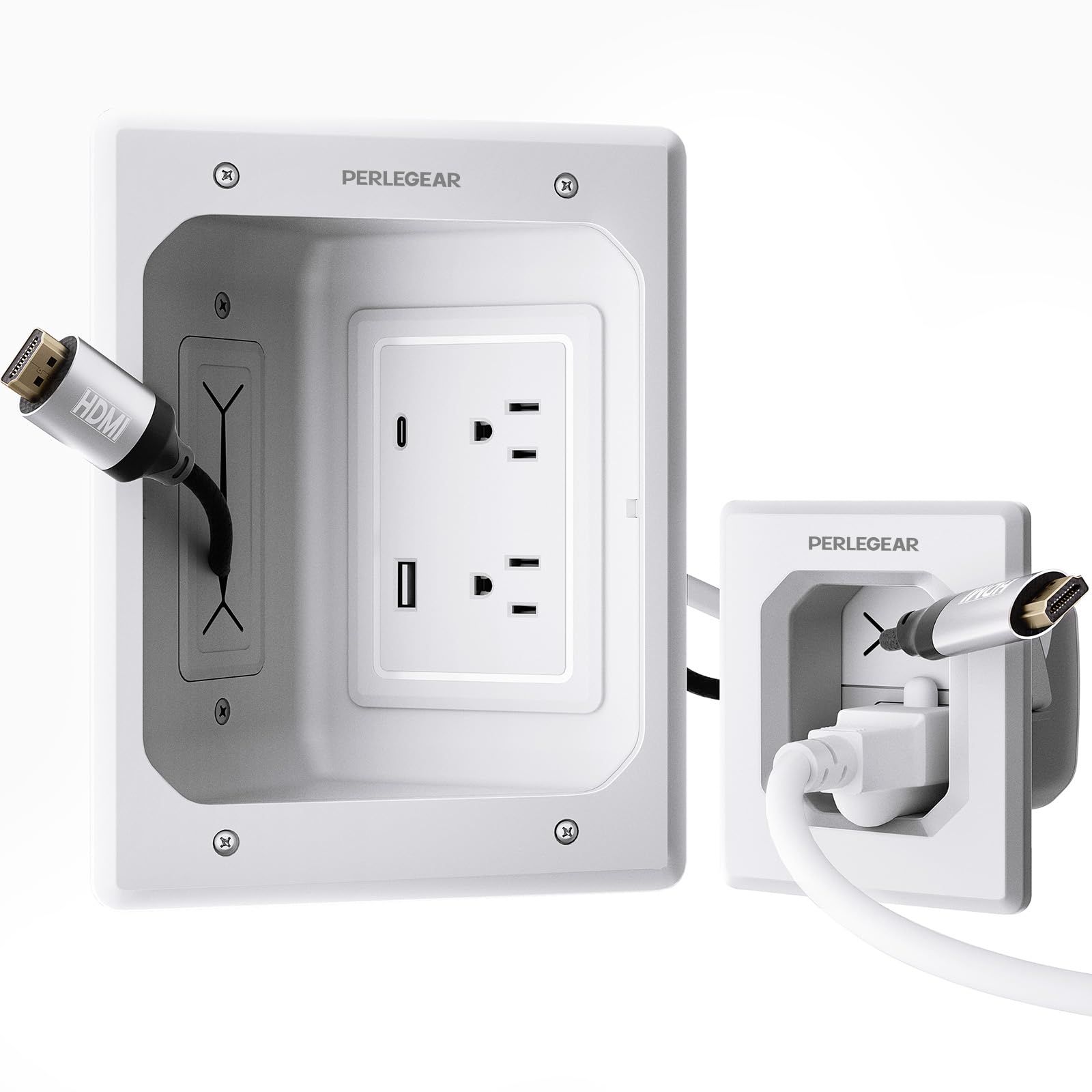
Perlegear’s cable management kit stands out by integrating two AC outlets with a USB-A and a USB-C charging port directly into the wall plate. This eliminates the need for an external power strip, freeing up limited space behind a flush-mounted TV. The ABS plastic modules carry both UL and SGS fire-resistance certifications, and the kit includes a hole saw drill attachment, a drywall saw, two cutting templates, and two dust bags — a comprehensive accessory set that justifies the price.
The USB-C port delivers enough power for a streaming stick or a phone, which makes this kit useful for wall-mounted setups above a desk or a media console as well as behind a TV. The locking wings grip the drywall securely, and the modules install in under 30 minutes per several verified owner accounts. The white industrial-style plate is paintable, so you can match it to any wall color.
On the downside, the instructions are clear but the templates require careful alignment to avoid crooked cutouts. The kit is not designed for large media boxes — it is strictly a power-and-USB solution for those who already have a low-voltage cable pass-through elsewhere. Owners also note that the included drywall saw is functional but not premium. If you want integrated USB charging without adding a separate block, this kit is the only option in this range.
Why it’s great
- Integrated USB-A and USB-C charging ports eliminate external power bricks
- UL and SGS certified for safe in-wall power routing
- Includes hole saw, drywall saw, templates, and dust bags
Good to know
- Power-only kit — not designed to house media devices or One Connect boxes
- Requires exactly 3 inches of wall cavity depth
5. Mount-It! in-Wall TV Cable Concealer Kit
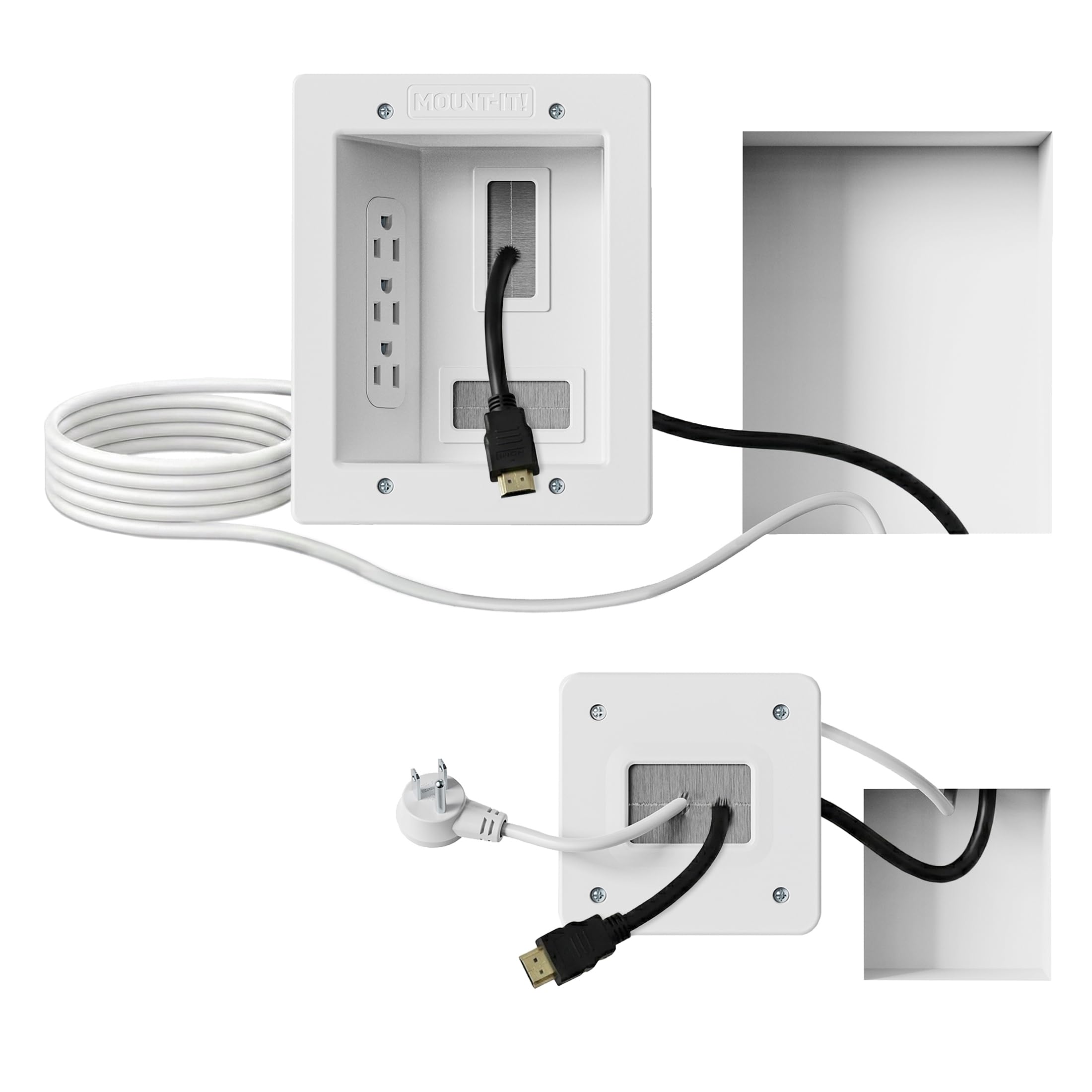
Mount-It! takes the cable-management concept and scales it up: the large recessed plate measures 6.3 x 7.9 inches and houses three AC outlets, giving you enough ports for a TV, a soundbar, and an extra device without needing a power strip. The pre-wired ETL-certified 9-foot extension cord provides generous reach to any existing wall outlet, and the system is plug-in only — no hardwiring required. The kit includes a folding drywall saw and a cutting template that owners describe as exceptionally accurate.
The spacious opening accommodates multiple HDMI and Ethernet cables alongside the power cord, all routed through a single, clean wall plate. Verified buyers consistently highlight the professional-grade feel of the plastic and rubber materials, plus the fact that the saw and template made the cutout foolproof. The product is backed by a lifetime warranty, which adds confidence for a permanent in-wall installation.
The trade-off is size: the large plate requires a drywall cutout between studs, and the minimum cavity depth is 2.4 inches — slightly less than average, but still tight. The kit does not include any USB ports, which means you still need separate chargers for streaming devices. The triple-outlet design is ideal for those who have already hidden their media boxes elsewhere and just need clean power deliver behind the TV.
Why it’s great
- Three recessed AC outlets in a single plate for TV plus soundbar
- ETL-certified 9-foot pre-wired cord for flexible placement
- Lifetime warranty and includes accurate cutting template
Good to know
- No USB ports — separate charging bricks still needed
- Large plate requires clearance between studs and a 2.4-inch minimum cavity
6. ynVISION.DESIGN 17″ Recessed Media Box
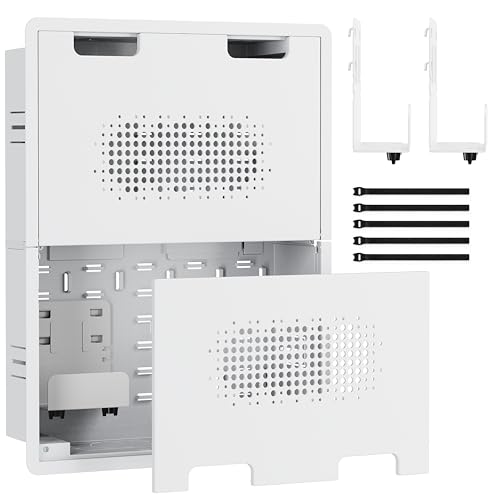
The ynVISION.DESIGN 17-inch box is the premium storage solution for anyone who wants to stash multiple devices — a full-size One Connect, an Apple TV, a router, and a power strip — behind a single flush cover. The plastic body includes an adjustable metal shelf, built-in hooks, and Velcro straps that keep every component in place. The front cover is vented, which actively mitigates the heat buildup that plagues sealed enclosures when streaming hardware runs for hours.
Knockouts on all sides allow flexible cable routing, and the flush-mount design sits perfectly between 16-inch stud bays. Owners with Nvidia Shield Pros, Ethernet-to-HDMI converters, and laptop power supplies all report that the 17-inch width provides the headroom to arrange components without cramming. The vented cover is paintable, so the box vanishes into the wall after the final coat.
Installation feedback is split: some owners love the swing-out wings, while others found they could not engage properly between 16-inch studs and had to screw directly into the wood through internal tabs. The box ships without a power cord or any electrical modules, so it is strictly a low-voltage enclosure — you must run a separate cable management kit for power. At the premium end of the price range, it offers the best device storage but demands a more involved planning process.
Why it’s great
- Vented cover promotes airflow to prevent device overheating
- Adjustable metal shelf and integrated cable straps organize multiple components
- Massive 17-inch interior fits One Connect, router, and streaming boxes
Good to know
- No power cord included — requires separate in-wall power module
- Swing-out mounting wings may not fit all 16-inch stud bay layouts
7. VIVO Recessed 50-75 inch TV Wall Mount

VIVO’s MOUNT-REC01 redefines the category by merging a full-motion articulating mount with a recessed steel box. Instead of hiding cables behind a separate enclosure, this mount sinks the entire television into a cutout in the wall, reducing the gap to just 1.1 inches when folded flat. The three-section arm extends 30 inches, tilts +15 to -15 degrees, and swivels 180 degrees, giving you full viewing flexibility without sacrificing the flush, built-in look.
The steel enclosure supports 50- to 75-inch TVs up to 110 pounds, and it accepts standard electrical boxes at the top and bottom for integrated power routing. Rubber grommets are included for cable management, and knockouts let you wire power directly from inside the wall. Owners with 75-inch Samsung panels consistently describe the mount as “rock solid” and value the 0-inch look when the TV is pressed flat against the wall cutout.
Installation is significantly more involved than a simple media box: you need to cut a large opening in the drywall, reinforce the studs if the gap is wider than 16 inches, and handle the heavy TV hoisting alone or with help. The mount does not include a level or any cable routing accessories beyond the grommets. For serious home-theater builders who want the TV to appear built into the wall, this is the ultimate solution, but it is overkill for anyone just wanting to hide a few cables.
Why it’s great
- Flush-to-wall design leaves only 1.1 inches of gap when folded
- Full-motion arm with 30-inch extension and 180-degree swivel
- Integrated knockouts for standard electrical boxes inside the wall
Good to know
- Installation is complex — requires large drywall cutout and stud reinforcement
- No level or cable management tools included beyond basic grommets
FAQ
Can I install a back box for TV in a rental apartment without damaging the wall?
What is the minimum wall cavity depth needed for a standard back box for TV?
Will a back box for TV interfere with my WiFi or streaming device signal?
Final Thoughts: The Verdict
For most users, the back box for tv winner is the Perlegear 17-inch Media Box because its generous interior, fire-rated ABS build, and included installation accessories provide the best balance of device capacity and ease-of-install at the mid-range price point. If you need a precise fit for a Samsung Frame One Connect Mini with minimum wall intrusion, grab the ECHOGEAR 9-inch Media Box for its UL-certified power and paintable trim ring. And for a fully integrated cable-and-power kit without media storage, nothing beats the ECHOGEAR in-Wall Cable Management Kit.