
The line between a cheap paper notebook and a digital note-taking device used to be painfully clear. Budget tablets suffered from laggy pens, dim screens, and stuttered handwriting that made you want to tear the page out. That gap has closed, and today’s affordable Android slates pair sharp 90Hz or 120Hz displays with pressure-sensitive styluses that actually keep up with a fast scribble or a precise sketch.
I’m Min — the co-founder and writer behind Gadgets Feed. I’ve spent countless hours cross-referencing processor clock speeds, pressure sensitivity levels, screen resolutions, battery capacities, and real-world user feedback to separate the genuine note-taking tools from the multimedia tablets that just happen to work with a stylus.
Whether you’re a student filling digital notebooks or a professional marking up PDFs, finding the right budget tablet for note taking means prioritizing pen accuracy, display quality, and battery endurance over flashy extras.
How To Choose The Best Budget Tablet For Note Taking
A note-taking tablet lives or dies by its stylus and screen ecosystem. High-end iPad Pros cost over ten times the price floor of this list, so you need to know exactly which corners to cut and which specs are non-negotiable for a responsive writing experience.
Stylus Technology: Active vs. Battery-Free EMR
Active styluses require charging and Bluetooth pairing but often deliver lower latency and higher pressure sensitivity. Battery-free EMR pens, common in Wacom and Boox devices, never need charging and offer excellent tip precision. For a budget tablet, a rechargeable active pen with 4096 levels is the minimum; 8192 or 16384 levels provide finer control for shading and varied stroke thickness.
Display Refresh Rate and Resolution
A 60Hz screen works for reading but introduces noticeable pen lag during fast writing. A 90Hz or 120Hz refresh rate reduces ghosting and makes handwriting feel fluid. Resolution matters too — a 2K (2000×1200) or 2.5K (2560×1600) panel renders crisp text and fine pen strokes, while a 1280×800 screen will look fuzzy when you zoom in on small handwriting.
Battery Capacity and Charge Speed
A note-taking tablet with a 7,000mAh to 8,000mAh battery can last a full school day or a long meeting. Anything below 6,000mAh means you’ll need to top up mid-afternoon. Fast charging (18W or 20W PD) matters because these devices are often used heavily between classes or meetings with limited downtime.
Storage and RAM
Handwritten notes and PDFs consume less storage than videos, but 64GB or 128GB is comfortable for years of documents. A microSD slot lets you expand flexibly. RAM of at least 4GB is essential for multitasking with note-taking apps and a browser open simultaneously — 8GB or higher makes split-screen note-taking and web research lag-free.
Quick Comparison
On smaller screens, swipe sideways to see the full table.
| Model | Category | Best For | Key Spec | Amazon |
|---|---|---|---|---|
| Wacom MovinkPad 11 | Premium | Serious artists & note-takers | 8,192 pressure levels, matte etched glass | Amazon |
| XPPen Magic Note Pad (16K) | Premium | Paper-like writing & sketching | 16,384 pressure levels, 90Hz, AG etched glass | Amazon |
| XPPen Magic Note Pad 3-in-1 | Premium | Versatile color modes & notes | 16,384 pressure levels, 90Hz, 3 color modes | Amazon |
| Penstar eNote 2 | Premium | Distraction-free E Ink writing | 300 PPI, pen-only, 8,192 levels | Amazon |
| TABWEE 13.4″ | Mid-Range | Large screen & keyboard bundle | 120Hz, 10,000mAh, 24GB RAM | Amazon |
| Lenovo Idea Tab | Mid-Range | College note-taking & media | 2.5K 90Hz display, 12h battery | Amazon |
| TCL NXTPAPER 11 Gen 2 | Mid-Range | Eye-friendly reading & notes | NXTPAPER 4.0, 4096 pen, 8,000mAh | Amazon |
| Callsky-Tab 12″ | Budget | Students on a tight budget | 16GB RAM, 256GB storage, 4096 pen | Amazon |
| BOOX Go Color 7 Gen II | Specialty | E Ink color reading & annotation | 7″ Kaleido 3, 300 PPI B/W | Amazon |
In‑Depth Reviews
1. Wacom MovinkPad 11

The Wacom MovinkPad 11 is the gold standard for a dedicated drawing and note-taking Android tablet. Its 11.45-inch display features a matte etched glass surface that delivers a genuine paper-like friction, and the battery-free Pro Pen 3 with 8,192 pressure levels and three programmable buttons rivals professional pen displays. The Quick Draw feature lets you tap and hold the pen on the screen to instantly open a sketch or note, mimicking the reflex of pulling out a physical notebook.
Under the hood, it runs Android 14 with 8GB of RAM and 128GB of storage, plus it comes bundled with a 2-year CLIP STUDIO PAINT DEBUT license and trials of Ibis Paint. The anti-glare coating reduces fingerprints and reflections, making it usable in brightly lit classrooms or coffee shops. At just 588 grams and 1.3 pounds, it’s lighter than most laptops and slips into any bag — it truly goes wherever a sketchbook can go.
On the downside, the processor can struggle with heavy-layer effects in painting apps, and the touchscreen can be finicky at times. There is no headphone jack, and charging is relatively slow, though battery life holds up well for a full day of note-taking. For students and artists who want a dedicated, standalone creative tool without the distraction of a full desktop OS, this is the top pick.
Why it’s great
- Best-in-class paper-like matte screen with minimal pen latency
- Battery-free EMR pen requires no charging and has 8,192 pressure levels
- Quick Draw feature launches notes instantly from lock screen
Good to know
- Processor is moderate — struggles with heavy effects in painting apps
- No 3.5mm headphone jack, and charging is not ultra-fast
- 3rd-party case options are limited at launch
2. XPPen Magic Note Pad 3-in-1 Color Digital Notebook

The XPPen Magic Note Pad 3-in-1 redefines versatility for a note-taking tablet. It features a 10.95-inch AG nano-etched LCD with TCL NXTPAPER 3.0 technology, offering three distinct color modes — Monochrome LCD for an e-reader-like experience, Light Color for sketching, and Nature Color for full 16.7 million color work. The screen reduces up to 95% of ambient light interference, making it far more readable outdoors than a glossy iPad screen.
Its X3 Pro Pencil 2 is a battery-free stylus with a staggering 16,384 levels of pressure sensitivity — even finer than the 8,192-level Wacom Pro Pen. The included XPPen Notes app offers handwriting-to-text conversion, audio recording with time-stamped notes, AI summarization, and seamless sync with Google Drive and OneDrive. The 90Hz refresh rate eliminates ghosting during fast writing, and the magnetic pen attachment keeps the stylus secure.
The trade-off is that the narrow viewing angle of the etched glass means you must view it straight-on for the best experience. The battery averages a reasonable 4 hours of heavy use, and the Android 14 OS can feel slightly sluggish if you push multitasking too far. That said, for a dedicated note-taker and sketchpad that weighs only 495g, it offers premium features at a mid-range price.
Why it’s great
- Industry-leading 16,384 pressure levels for extremely fine pen strokes
- Three color modes adapt to reading, sketching, and color work
- Matte etched display eliminates glare and feels like real paper
Good to know
- Narrow viewing angle due to etched glass — best viewed straight-on
- Battery life averages 4 hours under heavy use, needs daily charge
- Android performance is not flagship — moderate for heavy multitasking
3. XPPen 10.95″ Standalone Drawing Tablet (16K)
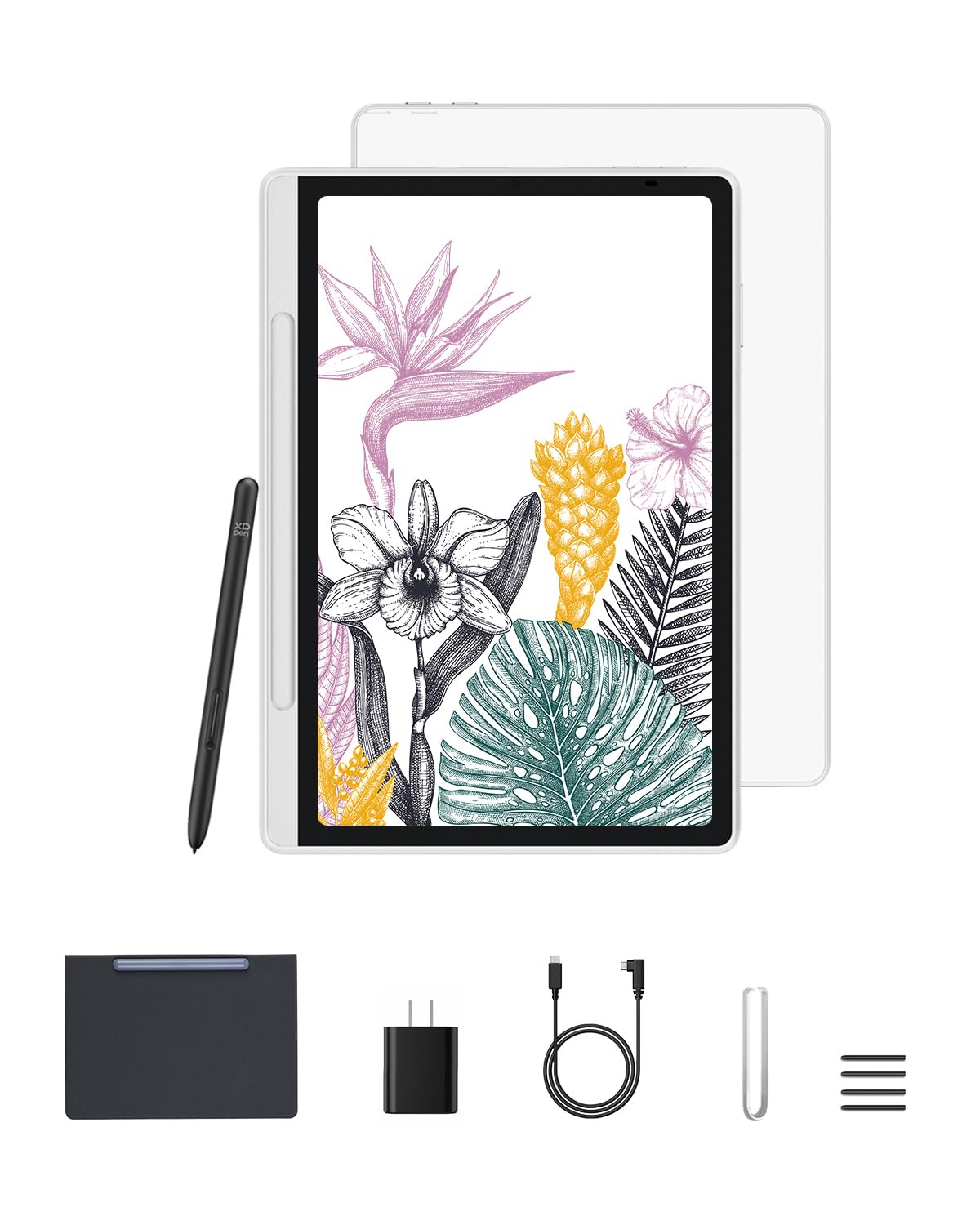
This 16K variant of the XPPen Magic Note Pad is nearly identical to the 3-in-1 version but focuses purely on the standalone drawing and note-taking experience with the same X-Paper AG nano-etched display and X3 Pro battery-free Pencil 2. It offers 16,384 pressure levels and a 90Hz refresh rate that completely eliminates pen lag during fast jotting or shading. The anti-glare surface and TÜV-certified low blue light make it comfortable for all-day note-taking sessions.
The pre-installed XPPen Notes app (lifetime license) includes handwriting-to-text, voice-to-text, PDF annotation, and AI tools for summarizing notes. The 7mm thin, 495g chassis is exceptionally portable, and the battery-free stylus means you never need to hunt for a charger before a meeting. Users consistently praise the premium feel — the magnetic flip case and build quality rival tablets costing twice as much.
The main compromise is the same narrow viewing angle due to the etched glass, which limits off-angle clarity. Battery life under heavy note-taking and occasional streaming lasts a full school day but not much beyond. For students and professionals who want a premium writing experience without the premium price tag, this is the sweet spot.
Why it’s great
- Outstanding 16,384 pressure sensitivity rivals professional drawing tablets
- Lifetime license for XPPen Notes with AI-powered transcription
- Premium build and magnetic case included at a budget-friendly price
Good to know
- Narrow viewing angle due to etched glass limits off-axis clarity
- Battery drains faster when using full color mode continuously
- Not ideal for heavy video streaming or gaming
4. Penstar eNote 2 – The Whitest Paper Tablet

The Penstar eNote 2 is engineered for one thing: the purest possible handwriting experience. Its 10.3-inch E Ink display offers a 300 PPI resolution with a pen-only interface — no touch inputs, no distractions, just a bright white screen that looks and feels like premium paper. The PureView screen technology eliminates backlight flicker, making it the most eye-friendly option for extended reading and writing sessions.
The bundle is generous: two B5 digital styluses with 8,192 pressure levels each, plus 18 spare nibs and a leather folio cover. Powered by MyScript technology, your handwriting is converted to editable text in real time with support for 66 languages. The AI voice-to-text feature transcribes speech from meetings in 52 languages and can generate structured summaries. The 9 physical shortcut keys can be programmed for instant access to tools like undo, eraser, or new page.
The non-touch screen can feel limiting if you’re used to poking at icons, and the closed Android environment lacks Google Play — you get a focused app store with reading and note apps. Two-week battery life means you can leave the charger at home during a business trip. For lawyers, academics, or anyone who wants a focused, paper-replacing e-notebook, this is unmatched.
Why it’s great
- Pure E Ink with 300 PPI — the sharpest text and clearest writing surface
- Two-week battery life and no touch distractions
- AI voice-to-text and handwriting recognition in 66 languages
Good to know
- Pen-only screen means no touch gestures for navigation
- No Google Play Store — limited app selection
- Fragile design, requires the included folio for protection
5. TABWEE 13.4″ Android 16 Tablet & Keyboard Bundle

The TABWEE 13.4-inch tablet is built for those who want a massive canvas for note-taking and document work. Its 1920×1200 IPS display runs at a fluid 120Hz refresh rate with a 180Hz touch sampling rate, making pen strokes feel instant and stutter-free. The 10,000mAh battery is the largest in this lineup, easily powering through two full days of lecture notes, PDF markup, and occasional video streaming.
The bundle is all-inclusive: a keyboard case, mouse, stylus, tempered glass screen protector, and a stand. The 24GB RAM (8GB physical + 16GB virtual boost) and 256GB of onboard storage are overkill for note-taking but ensure zero lag when multitasking with split-screen notes, web research, and voice recording. Android 16 with Gemini AI integrates document summarization, voice-to-text, and organizational tools right into the OS.
The sheer size makes handheld note-taking awkward — at 13.4 inches, it’s best used on a desk with the keyboard case. The included stylus is adequate but not in the same class as the XPPen or Wacom pens in terms of pressure sensitivity. For students who need a laptop replacement for typing, note-taking, and media, this bundle delivers exceptional value.
Why it’s great
- Massive 13.4-inch 120Hz display with TUV eye-care certification
- All-inclusive bundle: keyboard, mouse, stylus, case, and stand
- 10,000mAh battery offers exceptional endurance
Good to know
- Too large for comfortable one-handed note-taking
- Included stylus lacks advanced pressure sensitivity of premium pens
- Heavy — not ideal for slipping into a small bag
6. Lenovo Idea Tab (11″ 2.5K, 90Hz)

The Lenovo Idea Tab strikes an almost perfect balance for college students who need a capable note-taking device without breaking the bank. Its 11-inch 2.5K IPS touchscreen with a 90Hz refresh rate delivers sharp text and fluid pen response. The included Tab Pen supports Circle to Search with Google, letting you circle handwritten notes or diagrams to instantly search for information — a clever productivity boost for research-heavy classes.
Powered by the MediaTek Dimensity 6300 processor with 4GB of RAM and 128GB of storage, it’s responsive for note-taking apps like Squid, Nebo, and MyScript, all of which come pre-installed. The 7,216mAh battery lasts up to 12 hours of mixed use, meaning it can survive a full day of classes without needing a charger. The quad Dolby Atmos-tuned speakers provide clear audio for recorded lectures or streaming study breaks.
The 4GB RAM is the limiting factor for heavy multitasking — running a browser with multiple tabs alongside a note-taking app can cause slowdowns. Some users also report that it refuses to install the Amazon shopping app via Google Play. But as a dedicated note-taking and study tablet with a premium 2.5K display and included pen and case, it’s the smartest all-rounder in the mid-range.
Why it’s great
- Sharp 2.5K resolution at 90Hz makes handwriting and text look crisp
- 12-hour battery life comfortably outlasts a full day of classes
- Includes Lenovo Tab Pen, folio case, and pre-installed note-taking apps
Good to know
- 4GB RAM can struggle with heavy multitasking or many browser tabs
- Some apps (Amazon Shopping) have compatibility issues
- Plastic build feels less premium than metal competitors
7. TCL NXTPAPER 11 Gen 2

The TCL NXTPAPER 11 Gen 2 is purpose-built for extended reading and note-taking without eye strain. Its 11-inch 2K display uses NXTPAPER 4.0 technology with TÜV-certified low blue light, anti-glare coating, and DC dimming for a completely flicker-free experience. The screen even offers three display modes — Regular, Ink Paper Mode (e-reader-like), and Color Paper Mode (soft, low-saturation colors) — so you can tailor the visual experience to your task.
The included T-PEN stylus delivers 4,096 pressure levels, which is adequate for handwriting and basic sketching. The MediaTek Helio G80 processor and 8GB + 8GB virtual RAM (16GB effective) ensure smooth operation of note-taking apps and split-screen multitasking. The 8,000mAh battery provides a full day of use, and reverse charging lets you top up your phone or earbuds from the tablet.
The matte finish display makes text look printed, but it can look slightly grainy in direct sunlight. The 60Hz refresh rate is the main compromise — fast handwriting shows subtle ghosting, and scrolling isn’t as smooth as 90Hz competitors. For students who spend hours reading PDFs and want the gentlest screen on their eyes, this is the best choice in its class.
Why it’s great
- Industry-leading NXTPAPER 4.0 anti-glare, flicker-free display
- Three display modes adapt perfectly for reading, notes, or color work
- Long battery life with reverse charging for accessories
Good to know
- 60Hz refresh rate introduces subtle ghosting with fast handwriting
- Matte finish can appear slightly grainy under bright sunlight
- No guaranteed Android update path from TCL
8. Callsky-Tab 12″ Drawing Tablet
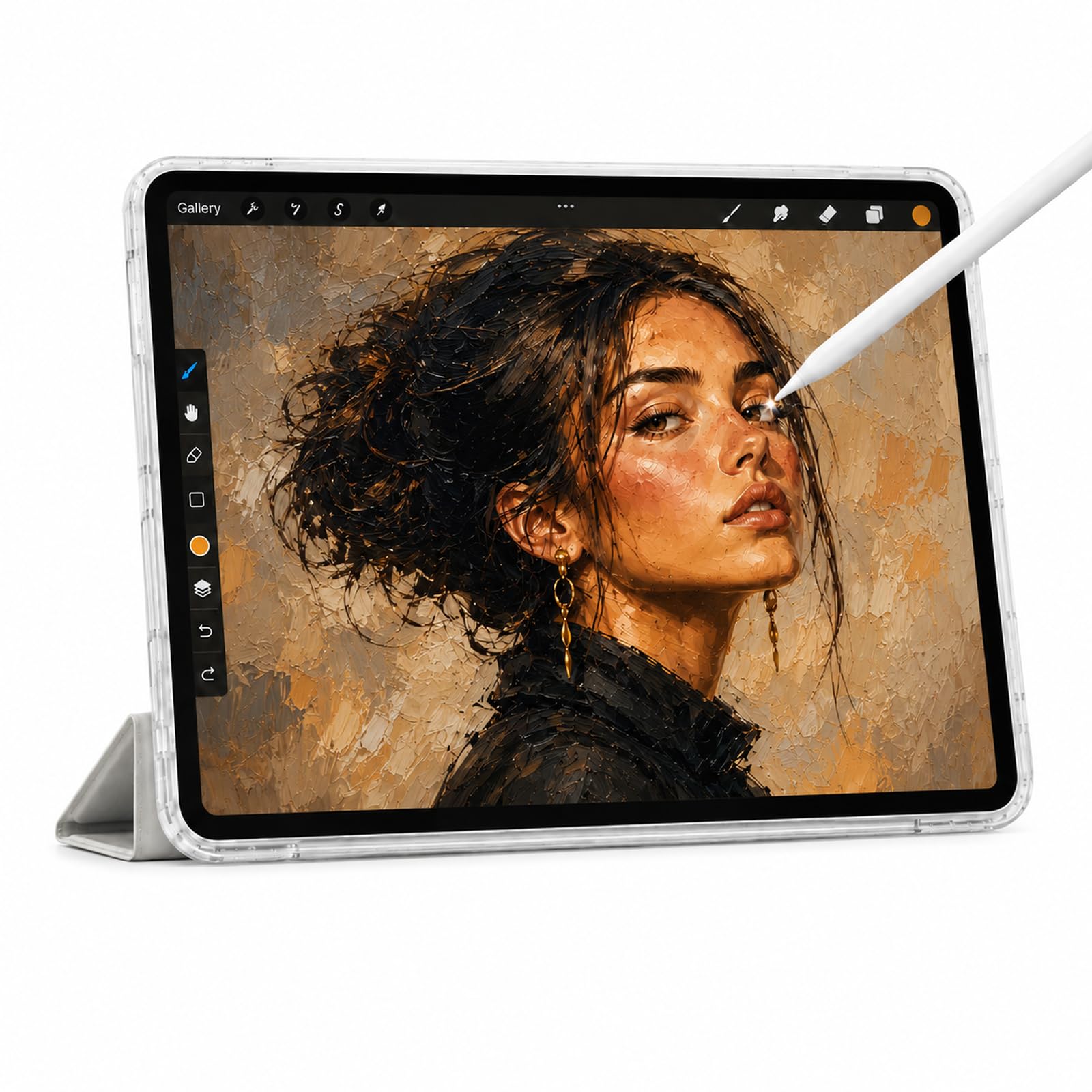
The Callsky-Tab 12 puts an emphasis on raw specs for the money, offering a 12-inch 2000×1200 FHD IPS display, a T616 octa-core processor, and an eye-popping 16GB of RAM with 256GB of onboard storage. The included rechargeable stylus features 4,096 pressure levels and tilt support, with a magnetic attachment to keep it from rolling off your desk. The 8,000mAh battery is rated for up to 6 hours of video playback or creative work.
At this price point, the sheer amount of RAM and storage means you can keep dozens of note-taking apps, drawing programs, and textbooks installed without ever worrying about running out of space. The 12-inch screen provides a generous canvas for note-taking, though the 60Hz refresh rate means you won’t get the ultra-smooth pen response of a 90Hz panel. The included flip case and drawing glove show the manufacturer considered the note-taking use case from the start.
The battery life is the main compromise here — 6 hours is below the class average, and heavy note-taking with the screen on constantly will drain it faster. The Android 15 OS runs well with 16GB of RAM, but the lower-resolution display (2000×1200 is fine, not 2.5K) and unverified long-term software support mean it’s best for students on a tight budget who need raw power over polished finish.
Why it’s great
- Exceptional 16GB RAM and 256GB storage for heavy app usage
- Large 12-inch canvas with included stylus and protective case
- 4,096 pressure levels and tilt support for basic sketching
Good to know
- Battery lasts only about 6 hours, below the mid-range average
- 60Hz refresh rate shows more pen lag than 90Hz or 120Hz panels
- Uncertain long-term software support and app compatibility
9. BOOX Go Color 7 Gen II

The BOOX Go Color 7 Gen II is the only color E Ink tablet in this guide, offering a 7-inch Kaleido 3 display that renders 4,096 colors alongside a 300 PPI black-and-white resolution. The display is naturally darker and more muted than LCD screens — this is an inherent characteristic of color E Ink — but it also means zero backlight strain on your eyes during hours of reading and note-taking. It runs Android 13 with full access to the Google Play Store, so you can install Kindle, Libby, or any note-taking app.
The compact 7-inch form factor (156 x 137 x 6.4mm, 195g) is the most portable option here. The page-turn buttons on the side make it easy to navigate long PDFs one-handed. The 2,300mAh battery delivers weeks of battery life if used primarily for reading, though heavy note-taking with the front light on will cut that to several days. The device supports InkSense active stylus, but the stylus is sold separately.
This is not a general-purpose tablet — the color E Ink screen is too slow for video, web browsing, or fast-paced apps. 4GB of RAM and a 64GB storage are adequate for notes and ebooks, but you can’t run multiple heavy apps simultaneously. For students who primarily read textbooks, annotate PDFs, and take occasional notes in color, this is a unique and highly specialized tool.
Why it’s great
- Unique color E Ink display with zero blue light and weeks of battery
- Ultra-compact 7-inch design with page-turn buttons
- Full Android 13 with Google Play for any reading or note app
Good to know
- Color is muted and darker than LCD — not for fast-paced use
- Stylus (InkSense) is sold separately, not included
- 4GB RAM limits multitasking; apps may close when switching
FAQ
Is a 60Hz refresh rate enough for note-taking on a budget tablet?
What is the difference between an E Ink tablet and an LCD tablet for note-taking?
Do budget note-taking tablets support handwriting-to-text conversion?
How much RAM do I really need for note-taking?
Final Thoughts: The Verdict
For most users, the budget tablet for note taking winner is the Lenovo Idea Tab because it combines a sharp 2.5K 90Hz display, included pen and case, and reliable 12-hour battery at a price that doesn’t hurt. If you want the most paper-like writing feel with a battery-free stylus, grab the XPPen 10.95″ Standalone Drawing Tablet with its 16,384 pressure levels. And for students who need a massive screen and keyboard bundle for note-taking and typing, nothing beats the TABWEE 13.4″ Android Tablet.